Posts in news

PlaceTagger 2 Releases Universal Build, iCloud Support, Mac App Store Version

PlaceTagger is a veteran iPhone app that has been around for years – originally an app that allows photographers to use their iPhone to geotag the photos taken with a traditional digital camera. Return7, the company behind PlaceTagger and other great apps like Billminder and Debtminder, has a reputation for innovating in every App Store category they take on. This release of PlaceTagger 2.0 including a universal build for iOS devices, a new Mac App Store version, and even iCloud support binding them together, has certainly lived up to their outstanding reputation.

There is no shortage of iOS apps tailored to photographers but PlaceTagger has really excelled in the niche area of providing a quality geotagging product to users of all experience levels. Version 2.0 does a remarkable job at implementing a simplistic user experience for what could have been an extremely complicated outcome. The iOS app is designed to run on iPhones as well as 3G enabled iPads. Although it is possible to run this app on a wifi-only iPad or an iPod touch connected to a wifi network, the results may vary and it is not officially supported. Overall, I found the user interface to be pleasantly minimal while still providing the necessities required to effortlessly start capturing GPS data.

When I first launched the iOS app, my eyes were drawn to a large clock and message reminding me to ensure the time on my camera matched the time on my phone. This was easy to check and was honestly the only thing I had to configure during my entire time using the suite of PlaceTagger apps. Once I had my camera’s clock synced to my iPhone I simply tapped the “Begin” button and stuffed my phone back in to my pocket so I could snap some pictures with my digital camera. I am not a professional photographer or even a decently skilled photographer so I usually rely on my iPhone to take outstanding photos. While I was testing PlaceTagger, I used my point-and-shoot Canon IS770, an iPhone 4S to log GPS data, and PlaceTagger on my MacBook Air to tag the photos. Apart of the new features in version 2 is the ability to tag photos on the iPad with the camera connection kit, however I had neither of these available so I opted for the Mac app. When I was finished taking pictures of my two Jack Russell Terriers, Bob and Daisy, I pulled out my phone and tapped the “Finished” button. That was the only interaction with the iOS app that I had – two taps on one button.

I jumped over to my MacBook Air, popped in my camera’s SD card and pointed the Mac App Store version of PlaceTagger to the pictures on the memory card. Below each picture was a bit of text saying “Location Matched” and all I had to do was select the “Tag Photos” button to complete the process. Right then it clicked, PlaceTagger had magically synced all of the GPS data between my devices with no settings, options, or configuration – it just worked.

PlaceTagger 2 has the most invisible implementation of iCloud I have ever seen.

When the tagging process was complete, I simply imported my photos in to iPhoto just as I normally would and experienced no issues. In iPhoto’s “Info” section for each of these photos is now a little Google Map containing the exact location the photo was taken.

If you are a user of a standard digital camera and have an iOS device then I highly recommend PlaceTagger 2 to add GPS data to all of your future photos. This suite of geotagging apps does not just add functionality to your Apple devices, but it also breathes new life in to older technology like my Canon SD770. You do not have to be a prosumer to enjoy the benefits of PlaceTagger because its polished user interface and refined feature set makes it the ideal companion app to photographers of any skill level.

PlaceTagger 2 is currently available on the iTunes App Store for $4.99 and there is also a version on the Mac App Store priced at $4.99


iTunes Match Launches In Italy [Update: Coming To Greece, Portugal, Austria and Slovenia Too]

Earlier today, Apple updated its Terms and Conditions for the Italian iTunes Store to include information about iTunes Match, the company’s music service powered by iCloud. Launched in November 2011 in the United States (here’s our original hands-on), the service was later brought to more countries on December 15 and January 17, including South America, the UK, and other European countries.

Lei può abbonarsi a iTunes Match pagando un canone annuale. Per abbonarsi Lei deve aver registrato una carta di credito valida nell’archivio di iTunes. L’abbonamento non è rimborsabile (salvo richiesto dalla legge applicabile), e si rinnoverà automaticamente per periodi di un anno finché Lei non lo cancellerà. Il Suo account sarà addebitato non più di 24 ore prima della scadenza del periodo di abbonamento corrente. Lei può annullare il rinnovo automatico modificando le impostazioni dell’account iTunes Store sul Suo computer. Lei non sarà più in grado di accedere ai Suoi Contenuti iTunes Match su iTunes Match dopo la scadenza del Suo periodo di abbonamento.

Back in March, it was reported that Apple was holding a series of meetings with SIAE – the Italian association that represents “artists and editors” – to get the green light on launching iTunes Match in Italy.

According to Apple’s official support document about iTunes Match and iTunes in the Cloud availability, Italy still isn’t listed among the countries with support for Match and iTunes in the Cloud; as of today, iTunes Match is available in 37 countries worldwide.

Whilst the update of iTunes’ terms and conditions to include additional iTunes Match certainly confirms the company has made progress on obtaining rights to launch the service, it should also be noted that, back in February, Japan was rumored to be getting support for iTunes Match soon. In the case of Japan, however, only support for iTunes in the Cloud was spotted (and was eventually launched), whilst today’s updated agreement specifically mentions iTunes Match in Italy. Read more


Tweetbot 2.3 Adds New Gestures, Integrations, UI Refinements

Less than a month after a major 2.2 update that added iCloud sync for timelines, DMs, and mute filters, Tweetbot is back today with a significant update on the iPhone and iPad that redefines some of the gestures and interactions introduced with the original version 1.0 (2.0 on the iPhone). Overhauling the standalone tweet detail and conversation views that, based on intuitive gestures, were two of Tweetbot’s hallmark features, Tweetbot 2.3 unifies single tweets, actions, replies, and conversations within redesigned screens that, with a bit of practice, I believe will ultimately help saving time and precious taps around the app.

New Tweet Detail View

Quick access: swipe right to left on a tweet.

The single tweet view – the screen that displays a user’s single tweet alongside the action bar, geo-location and client info, and other data – has been redesigned to accomodate inline conversations and replies. Providing the usual context for author, buttons to reply, retweet, fave, share, and view, the new tweet detail view elegantly puts a banner-like notification up top to indicate how many replies a specific tweet received; if the tweet belongs to a conversation, Tweetbot 2.3 displays a “In reply to…” section at the bottom (down to the original tweet that started the conversation), with additional replies above.

The developers have managed to cram a lot of information and elements into a single screen without sacrificing usability and clarity – unlike other apps, it’s always clear which tweets belong to a conversation and which ones generated other replies.

To go back to the timeline from the tweet detail view, you can now quickly swipe with one finger from left to right. Here’s a recap of all the gestures and tap actions supported in Tweetbot from our review of the iPad version (interactions are mostly the same on iPhone).

New Conversation View & Sharing

Quick access: swipe left to right on a tweet.

Similarly, the new conversation view of Tweetbot 2.3 displays both conversations and replies inline. Accessible with the usual swipe-to-reveal action, the conversation view loads replies in a neatly separated section just like the aforementioned tweet detail view.

New in 2.3, conversations can now be uploaded directly to social curation platform Storify for further sharing with the world; the uploading process is automatic and doesn’t require a dedicated login, meaning that Tweetbot will simply publish a conversation, such as this one, to Storify using your Twitter account. Whilst I hope for a future version of Tweetbot to let me save “all replies” to a specific tweet from the detail view (right now, it’s only enabled in the Conversation window), I think Tapbots did the right thing in simplifying the curation aspect of Storify and make it available as a direct option without additional configuration required.

Also new in the 2.3 conversation view (but enabled for single tweets and DMs as well): the app now has an improved email format when sending tweets to someone else via email.

More Features in 2.3

Several additional refinements and improvements went into the development of Tweetbot 2.3. First off, Droplr support: for URLs, images, and videos, users have now the option to choose Droplr as a sharing service in the Settings. When shared, videos now have a dedicated “play” thumbnail to differentiate them from images, and thumbnail support has been added for Vimeo links, too.

The app now correctly recognizes $stock links, allowing you to easily fire up a search for $AAPL or your favorite stock, and save it for future usage.

The tweet drawer has been reorganized, with the last two buttons gaining more order in the process.

Last, some minor touches in version 2.3 will contribute to improving usability and to allowing users customize their timelines to their needs and tastes: retweets from specific users can now be disabled at any time, and it’s possible to quickly open the last saved draft by holding down the tweet compose button. The timeline sync bookmark icon is now an optional setting, and Tweetbot is capable of uploading high-res images when on WiFi.

With important improvements and UI refinements aimed at increasing the app’s ease of use and display of information, Tweetbot 2.3 is another solid and rich update that adds powerful functionality without compromising the app’s interaction and workflow. You can get Tweetbot 2.3 on the App Store today.


DevRocket Is A Photoshop Plugin To Boost Your iOS Design Workflow

Just a few hours ago I wrote a bit about Screeshot Journal, an app to easily manage and investigate your iPhone and iPad screenshots in order to ease your design workflow. But to take pictures of an app which deserves to be viewed in such large resolutions, such app must have a solid UI design. To speed up and simplify the process of creating iOS UIs, developers at UI Parade — one of the greatest resources for UI inspiration by the way — just released their own Photoshop plugin called DevRocket.

DevRocket is a sweeping blow of all design presets and saving possibilities iOS UI designers could need for their process of designing new apps. It supports designing for all devices (iPhone and iPad) and Retina resolution presets as well. With DevRocket, you can:

  • generate portrait, landscape and splash display canvases, which include the native iOS status and navigation bars
  • design the same interface for Retina and non-Retina devices at the same time
  • save those designs with one click cut down the complete UI to individual “UI snips” for Xcode
  • create icons out of preset canvases (with adjustable corner radius and correct naming for Xcode)

Besides all these features, DevRocket looks nice and easy to use. It is definitely worth a try for all iOS designers who use Photoshop to design their app UIs, and who are constantly after a nitro boost for their productivity and workflow. There’s also a little demo video on Vimeo (and embedded after the break) showing the plugin in action. You can get DevRocket for $10 (payment via PayPal).
Read more


Rovio: Angry Birds Space “Fastest Growing Mobile Game” with 50 Million Downloads in 35 Days

Angry Birds maker Rovio has today announced the impressive milestone that the latest entry in the Angry Birds franchise, Angry Birds Space, has become the “fastest growing mobile game yet” with 50 million downloads in 35 days.

Angry Birds Space hit 50 million downloads within 35 days, making it the fastest growing mobile game yet and breaking all our previous records. This has been simply amazing, and the whole Rovio team is thrilled to see such a fantastic reception for the game.

It’s unclear whether Rovio is counting desktop versions in the total number of downloads for the mobile game, but the figure is still impressive and substantial nevertheless of how iOS, Android, PC, and Mac downloads have been split so far. Considering Rovio’s previous numbers, it is safe to assume the majority of downloads are really coming from mobile platforms like iOS and Android.

Angry Birds Space was released on March 22. In the three days following the launch, the company announced users had already downloaded the game over 10 million times.


Kickstarter: Do More with the iPad + Brydge

Wow, Kickstarter has been on fire lately. People have some really great ideas that everyone wants to be a part of. Remember the Pebble from two weeks ago? It was looking for $100,000 in funding and now is at almost $7 million with 22 days left. Amazing!

Another product that’s getting a lot of attention is the Brydge, an accessory that turns your iPad into an Apple worthy laptop. “Brydge is an elegant solution to the lack of quality iPad keyboards and accessories currently on the market.” It’s made from aerospace-grade aluminum and optional stereo speakers. Load your iPad into the patent-pending extra-strong hinge and connect via a Bluetooth connection. The optional built-in stereo speakers are an excellent addition to the Brydge since the iPad lacks stereo sound.

Video after the break. Read more


Apple Offers 150 Student Scholarships For WWDC 2012

Full-time or part-time students over the age of 13 have the chance of winning one of 150 scholarships to attend this year’s WWDC. Apple says that it wants to  ”reward outstanding student developers with the opportunity to attend this year’s conference on a WWDC 2012 Student Scholarship”. It means that for those lucky (and talented) students selected, they can attend the WWDC conference free of charge (tickets are on sale today for $1599). Apple will be judging the applicants on a few key criteria:

  • Technical ability
  • Creativity of ideas expressed in products/projects
  • Prior WWDC attendance
  • Technical and work experience

Due to the low age-limit, some events such as the WWDC Bash may restrict some students if they are under 18. Apple has posted a full list of eligibility requirements and more details on the application process and it should be noted that applicants also be a member of the iOS Developer Program, iOS Developer Enterprise Program, or Mac Developer Program, or an iOS Developer University Program Student and they must have been a member prior to August 1st, 2011.

You can lodge your own application for the 2012 WWDC Student Scholarship here, or view all the details on the 2012 WWDC page. The deadline for sending in your application is Wednesday, May 2, 2012 at 5:00 PM PDT.


Apple Opens Nominations For 2012 Apple Design Awards

Along with announcing the dates for WWDC 2012, Apple has today also opened nominations for this year’s Apple Design Awards. The award, which aims to “recognize state of the art iOS and OS X apps that reflect the very best in design, innovation, and technology adoption”  has become a staple of every WWDC and  is perhaps the most prestigious recognition an Apple developer can receive. The award criteria is founded in the following characteristics:

  • Well-Designed: Apps that are inviting, engaging, easy to use, intuitive, and compelling.
  • State of the Art: Apps that take advantage of the latest hardware, OS releases, and technologies to offer rich functionality, high performance, and extensive system integration.
  • Innovative: Apps that are revolutionary, inspiring, and do things in new and creative ways.

To be considered for the award, the app must be on the App Store or Mac App Store by May 1st in order to be eligible, but a nomination is not necessary (Apple can choose the award winner regardless of whether it was nominated or not). Developers can nominate an app via Apple’s developer portal.

You can also review the winners of the 2011 Apple Design Awards.


Apple Announces WWDC 2012: Kicks Off June 11

UPDATE: Apple has confirmed that tickets for WWDC 2012 are already sold out.

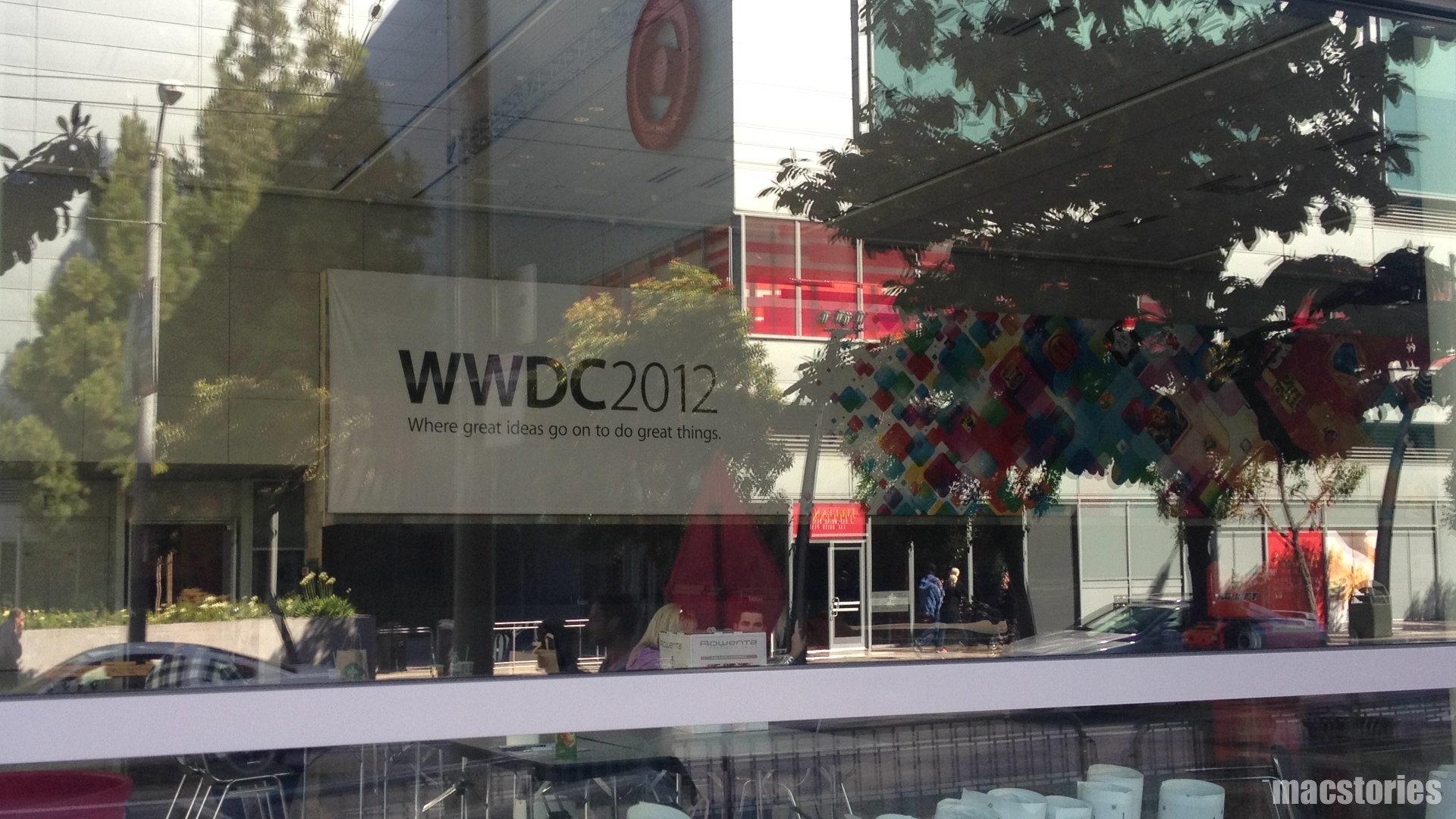
Apple has announced the official dates for WWDC 2012. The developer event kicks off in San Francisco on June 11 and runs through June 15. Tickets are on sale for $1599, and are limited to one ticket per person or five tickets per organization. This year, app developers under 18 years old (13 - 17) can have their legal guardian purchase a WWDC ticket and approve their attendance at the conference — budding developers do not have to miss out on this year’s events.  Despite being an ever popular event that sells out quickly, WWDC 2012 still takes place at Moscone West.

We have a great WWDC planned this year and can’t wait to share the latest news about iOS and OS X Mountain Lion with developers,” said Philip Schiller, Apple’s senior vice president of Worldwide Marketing. “The iOS platform has created an entirely new industry with fantastic opportunities for developers across the country and around the world.

Registration for the event will take place on June 10th starting at 9:00am. If the event cannot be attended, videos from this year’s sessions will be made available for download. It’s best to go in person so experts can answer your development related questions. This year’s topics will include information about OS X Mountain Lion, which will be made available later this summer, alongside iOS app development sessions.

WWDC 2012 will cover six technical tracks with over 100 sessions and labs. Tracks include:

  • Essentials
  • App Services
  • Developer Tools
  • Graphics, Media, and Games
  • Safari and Web
  • Core OS

Alongside ticket sales, Apple has opened nominations for the 2012 Apple Design Awards. Nominated apps will be considered for an ADA and must be made available on the App Store or Mac App Store by May 1st. Students can also look forward to a great time at WWDC, and earn the chance to attend the conference free of charge on a scholarship.

Activities at Apple’s WWDC 2012 include:
more than 100 technical sessions presented by Apple engineers on a wide range of technology-specific topics for developing, deploying and integrating the latest iOS and OS X technologies;100 hands-on labs staffed by more than 1,000 Apple engineers providing developers with code-level assistance, insight into optimal development techniques and guidance on how they can make the most of iOS and OS X technologies in their apps;the opportunity to connect with thousands of fellow iOS and OS X developers from around the world—last year more than 60 countries were represented;engaging and inspirational lunchtime sessions with leading minds and influencers from the worlds of technology, science and entertainment; andApple Design Awards which recognize iPhone®, iPad® and Mac® apps that demonstrate technical excellence, innovation and outstanding design.

PR after the break!

Read more