Posts in news

Shazam 5.5 With Better Offline Support

Shazam is, for me, one of those solutions made possible by our mobile era that, alongside Twitter and Rdio, I’d miss the most if I had to switch to a “dumbphone”. Shazam released today version 5.5 of their iPhone app, which I own in the Encore variation, and it’s got a few changes I really like.

The new icon was a bit of Home screen shock at first, but it plays nicely with the updated “listening dial” that animates and responds in real-time to audio captured by a device’s mic. It’s a nice touch. There are also other improvements such as better VoiceOver support, Google+ sharing (for Robert Scoble), and search for tagged songs. I don’t know exactly when this happened, but Shazam now properly opens tagged songs in the Rdio app, ready for listening.

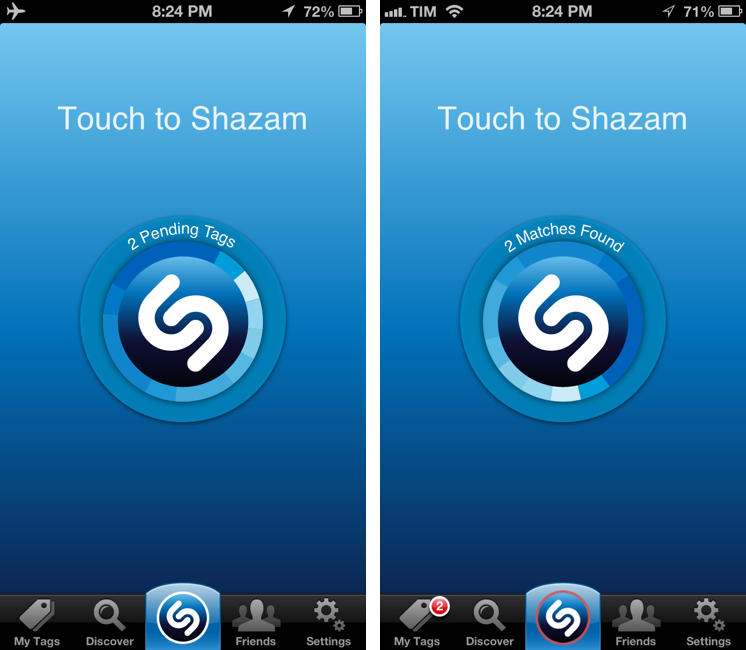
The best feature of Shazam 5.5 is how the app handles offline devices or songs tagged in areas with poor reception. If unable to contact the Shazam servers, the app will queue tags, showing a count in the animated dial. When the Internet comes back, the app will automatically start tagging all previously queued item, display whether or not it has found matches, and highlight results in the My Tags screen and with a badge on the tab bar.

I’ve tagged songs using Shazam in the past, only to find out I didn’t have a 3G connection to get results immediately. This is a better solution, and judging from some first tests, it works as advertised. Shazam 5.5 is available on the App Store.


Angry Birds Turns 3.0

Angry Birds Turns 3.0

To celebrate the third anniversary of Angry Birds 1.0, which was released on December 10, 2009, Rovio has today released Angry Birds 3.0, a major update to the original game that, after three years, is still sold at $0.99 on the App Store.

Angry Birds 3.0 comes with a new “pink bird”, 15 new “Birdday levels” and other 15 Bad Piggies-themed levels. On top of that, Rovio has updated the game for the iPhone 5’s Retina display as well; the update is also available in the HD version for the iPad. Rovio isn’t new to releasing free updates to an existing game that users only purchased years ago; in fact, many have argued that one of the points of Rovio’s main strategy is creating “brand loyalty” through free updates that add new levels, features, and, for those interested, in-app purchases.

Just over a year ago we charted Angry Birds’ road to half a billion downloads; since then, Rovio has released a different game, Amazing Alex, and more entries in the Angry Birds franchise, including the popular Star Wars tie-in and a different take on the typical Angry Birds gameplay, Bad Piggies.

Angry Birds 3.0 is now available on the App Store.

Permalink

Instagram 3.2 Brings Better Camera

Instagram 3.2 Brings Better Camera

Following the recent launch of web profiles, Instagram has today updated its iPhone app to version 3.2, bringing a new camera experience, a new filter, better tilt-shift, and various UI improvements for filter selection and photo browsing. The Verge has a nice overview of the changes; the Instagram blog has detailed release notes, which include an explanation of tilt-shift:

In the past, there had been vast differences in the effective strength of the blur between the preview screen and the output in your feed and camera roll. With this update the blur you see is now the blur you’ll get! We’ve also completely overhauled the blur algorithm to increase quality and accuracy. Tilt-shift now gives a vastly more realistic rendering of depth of field because of these improvements and subtle tweaks to how we render the image.

I’m particularly fond of the UI changes brought by Tim Van Damme: aside from cleaner photo grids and infinite scrolling on pages, Instagram 3.2 comes with a gorgeous Welcome screen and a refreshed camera view that puts the focus on a large shutter button, while also giving access – to iPhone 5 owners – to a “last photo taken” button. I wouldn’t underestimate how Instagram is taking advantage of the taller screen: on the iPhone 4S, tapping the last-image selector opens a standard iOS photo picker; on the iPhone 5, the app gently slides over to an embedded Camera Roll view reminiscent of Facebook’s Camera app. On the iPhone 5, you can swipe up to reveal more Camera Roll photos without leaving the Scale & Crop view – essential to make sure your existing photos will look good on Instagram.

Mostly though, I believe Instagram 3.2 feels more polished thanks to various details implemented by Van Damme, Ryan Gomba, and team: the aforementioned animation to switch from Camera to Scale & Crop; the opening/closing animation of the custom shutter; the blue highlight on selected photos; the custom, animated tap to focus that is incredibly fun to look at and try out. I also like the shortcut to quickly access the Camera Roll: anywhere in the app, tap & hold the camera button in the tab bar to open the Camera Roll.

Instagram 3.2 is now available on the App Store.

Permalink

Sponsor: Orbicule

My thanks to Orbicule for sponsoring MacStories this week.

Undercover is Find My Mac done right. After a very simple installation, Undercover will run in the background, constantly monitoring the location of your Mac. If your Mac gets stolen, in addition to tracking location Undercover will also snap mugshots through the computer’s built-in camera and capture keystrokes.

I personally use Undercover 5 because I like its web-based interface better than Apple’s Find My Mac. If you’re looking for a more powerful Find My Mac, I highly recommend Undercover 5.

Find out more about Undercover here.


Pinbook 1.2 Gets iPad Support, Editing, Title Auto-Complete

Pinbook by Collin Donnell is my favorite iOS app for Pinboard. From my previous review of version 1.0:

I think there are several additions the developer could make to Pinbook to make it a more complete app with a faster workflow. Firstly, I’d like to have a bookmarklet that sends a page’s URL and title to Pinbook; for as much as Launch Center support is handy, it doesn’t allow me to copy two arguments simultaneously to the iOS clipboard. The great thing about the Pinboard bookmarklet is that it grabs a link’s URL and title automatically, and then offers suggested tags with auto-completion: Pinbook should do the same.

An iPad version and more navigation options would also be welcome. Like I said, I don’t just use Pinboard to add new bookmarks, but also to discover new ones added by someone else. Access to Popular page and user profiles would be a start.

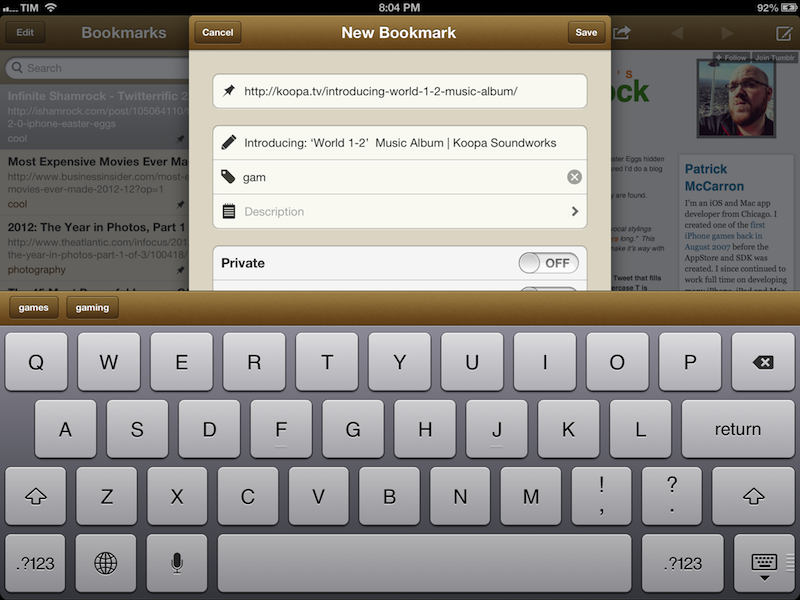
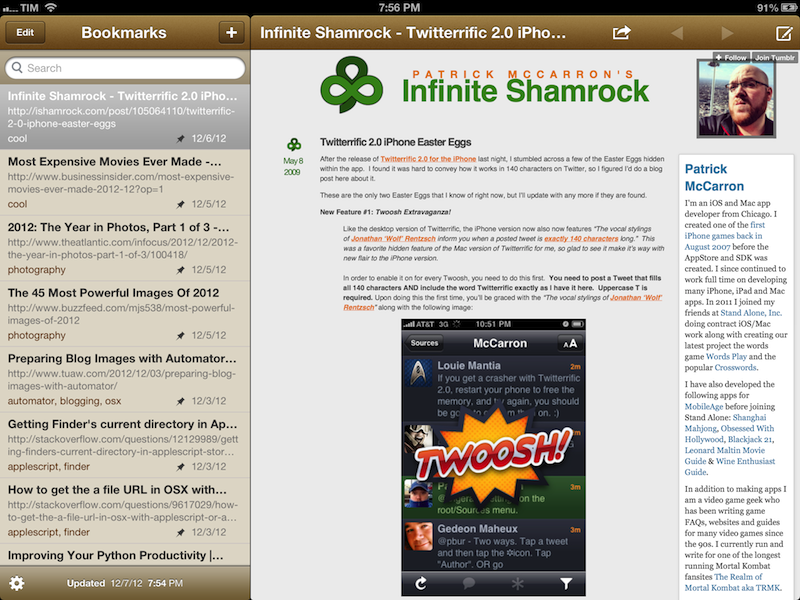
Today, Pinbook has been updated to version 1.2, which introduces a native iPad app and some new features that I really like. The iPad version features a standard Mail-like layout with a sidebar for bookmarks on the left, and website previews on the right. I find Pinbook for iPad to be a much more pleasant experience to sit back and check on saved bookmarks without switching back and forth between lists and multiple views. On the iPad, Pinbook retains the speed and interface polish that led me to write a positive review of version 1.0: the app takes less than 3 seconds to fetch over 500 bookmarks from my account.

The experience of adding new bookmarks has been improved as well. Aside from the tag suggestions of version 1.1, Pinbook can now also auto-complete titles: independently from the way you send a bookmark (from Launch Center Pro, bookmarklet, or by simply pasting a URL), Pinbook will now automatically fetch the title of the webpage and insert it in the Title field of the Add Bookmark screen.

Personally, I either save bookmarks by pasting a URL saved from somewhere else (usually Tweetbot) or by sending directly to Pinbook. I used to rely on a Pythonista script to save items to Pinboard, but now that Pinbook runs on the iPad and has a more reliable URL scheme I prefer to use this rather than Python. Here’s a bookmarklet to send the current page from Safari to Pinbook:

javascript:window.location='pinbook:///add?url='+encodeURIComponent(location.href)

Last, while Pinbook still doesn’t have any social/discovery features for Pinboard – I am not sure whether the API allows this – it does come with bookmark editing now. Simply open a bookmark and tap on the compose button in the toolbar to start editing.

Pinbook 1.2 is available on the App Store, and I recommend it to every Pinboard user looking for a native and great-looking iOS app.


Kotaku’s “Everything You Should Know” Primer on Baldur’s Gate: Enhanced Edition

Kotaku’s “Everything You Should Know” Primer on Baldur’s Gate: Enhanced Edition

Released through Beamdog on the PC last week and developed by their gaming division Overhaul Games, BioWare’s 1998 classic RPG Baldur’s Gate makes its return as an Enhanced Edition that includes the Tales of the Sword Coast expansion pack, a new adventure, and a few new characters. Now available on the App Store for iPads running iOS 6, I’d recommend reading through Kotaku’s explainer of the isometric remake, as well as Mike Fahey’s 13-year-old review of the original game.

If you ask me, Baldur’s Gate: Enhanced Edition should be played traditionally with a keyboard and mouse. I’d recommend waiting for Baldur’s Gate: Enhanced Edition to arrive on the Mac — expected later this month. But if you’re so inclined to play on a touchscreen, I’d wait for a proper review (say, from the folks at Touch Arcade) before embarking on your next adventure in the Forgotten Realms.

Permalink

Tim Cook Speaks With Businessweek In A Wide-Ranging Interview

Tim Cook Speaks With Businessweek In A Wide-Ranging Interview

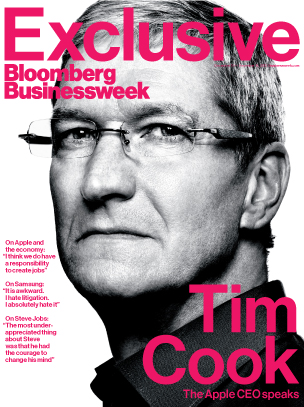
Josh Tyrangiel of Bloomberg’s Businessweek has a terrific and in-depth interview with Apple CEO Tim Cook. In it, Cook is asked a whole swathe of questions from transparency, to the recent executive changes, Apple’s competition, US manufacturing and a lot more. The whole article is available online and in the latest edition of Businessweek. NBC will also air an interview with Tim Cook today on it’s Rock Center program at 10pm/9c in the US.

Talking of Apple Maps, Cook is asked whether Apple took on an approach of doing something for strategic company purposes, rather than something that would make the product better. Cook rebuffs this suggestion and suggests that they wanted to enable certain features such as directions and voice integration and set upon accomplishing them.

 We set on a course some years ago and began to do that. So it wasn’t a matter of saying, “Strategically it’s important that we not work with company X.” We set out to give the customer something to provide a better experience. And the truth is it didn’t live up to our expectations. We screwed up.

Asked about manufacturing and whether Apple might bring back some manufacturing efforts back to the US, Cook responds that they will begin to do so in 2013 for certain Mac products. It lines up with recent reports of the new iMacs arriving with “Assembled in USA” engravings. You can also see an excerpt of the Rock Center interview here in which he discusses this transition back to the US.

And next year we are going to bring some production to the U.S. on the Mac. We’ve been working on this for a long time, and we were getting closer to it. It will happen in 2013. We’re really proud of it. We could have quickly maybe done just assembly, but it’s broader because we wanted to do something more substantial. So we’ll literally invest over $100 million. This doesn’t mean that Apple will do it ourselves, but we’ll be working with people, and we’ll be investing our money

These are just a few snippets of the interview, be sure to read the entire interview over at Bloomberg Businessweek, it’s a must read.

Permalink

Mapping The Entertainment Ecosystems: A Brief Revisit

In mid-October, we published a story on the entertainment ecosystems of Apple, Microsoft, Google and Amazon - looking at to what degree their music, movie, TV, eBook and app stores were available in international markets. Apple on the whole seemed to have the best average availability - slightly losing to Microsoft for the app stores and Amazon dominating everyone in the eBook store.

I’ve decided to briefly revisit the topic today because the original post garnered quite a lot of discussion and feedback and because of two “events” that have since happened. Firstly, Apple yesterday announced an expansion of the iTunes Music Store into dozens of new countries (and Movie store in a few additional countries). Secondly, I have since found two pieces of data on which countries Xbox Music is available in (for some odd reason I cannot find any official Microsoft document detailing the countries it is available in). So below is an update to the Music and Movie diagrams and graphs.


Note: Read the original ‘Mapping the Entertainment Ecosystems’ post which includes diagrams for eBooks, TV and App Stores.
Read more


YouTube for iOS Gets iPhone 5 and AirPlay Support, iPad Version

Following a major update to Gmail for iOS, Google has today also released a new version of its YouTube app, which includes AirPlay and iPhone 5 support, as well as an iPad version that makes the app Universal.

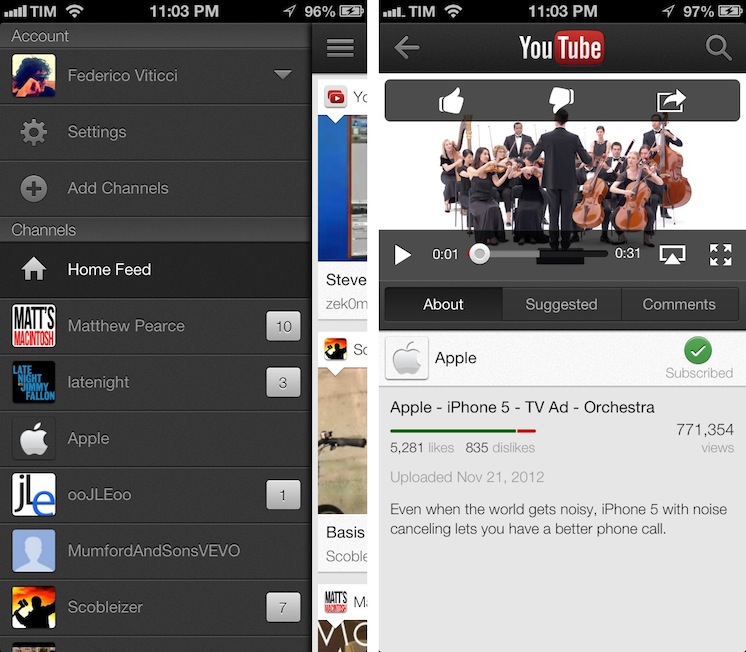
One of the new features is the Guide of channels that you can access by tapping on the YouTube logo in the title bar; tap it, and you’ll go back to the app’s main sidebar, listing your account’s options and Channels. On the iPhone 5, YouTube is now optimized for the taller screen – a glaring omission that has annoyed several iPhone 5 users since the device’s release. Among other improvements – including clickable links in video descriptions and ability to add or remove a video from your playlists – a notable addition is AirPlay support: you can now natively stream videos to any AirPlay-compatible device such as the Apple TV or a Mac running Reflection (which is what I tested).

The iPad version of the app is rather obvious, but still welcome: it packs a sidebar on the left side, and main content on the right side of the screen. When you tap on a video, the right portion becomes the main view hiding the sidebar and displaying suggested videos on the right. Interestingly, you can’t browse and watch videos at the same time, as the sidebar will always be hidden after you click a video’s thumbnail.

For everything else, both the updated iPhone app and iPad version share the same features that I covered in my original review of the app, and today’s changes are definitely improvements worth checking out – it’s especially good to see Google supporting AirPlay right after the 1.0 release. Both on the iPhone and iPad, Google offers a feature in the Settings to open links in Chrome, also available for both platforms on the App Store.

The updated YouTube app is available on the App Store. More screenshots of the iPad app are available below. Read more