Posts in news

Twitter Launches Dashboard App for Small Businesses

Last week saw Twitter introduce Engage, a business-oriented analytics app for iOS. Twitter continued the roll-out of new features and products today with Twitter Dashboard, a free iOS account management app (US only) aimed at businesses that can also be accessed on the web. Dashboard, is designed to address the needs of small business in particular. According to The Twitter Small Business Blog,

Dashboard offers a single destination to get things done. It gives business owners a clear picture of what’s being said about their businesses, lets them schedule Tweets, and offers insights about their Tweet performance.

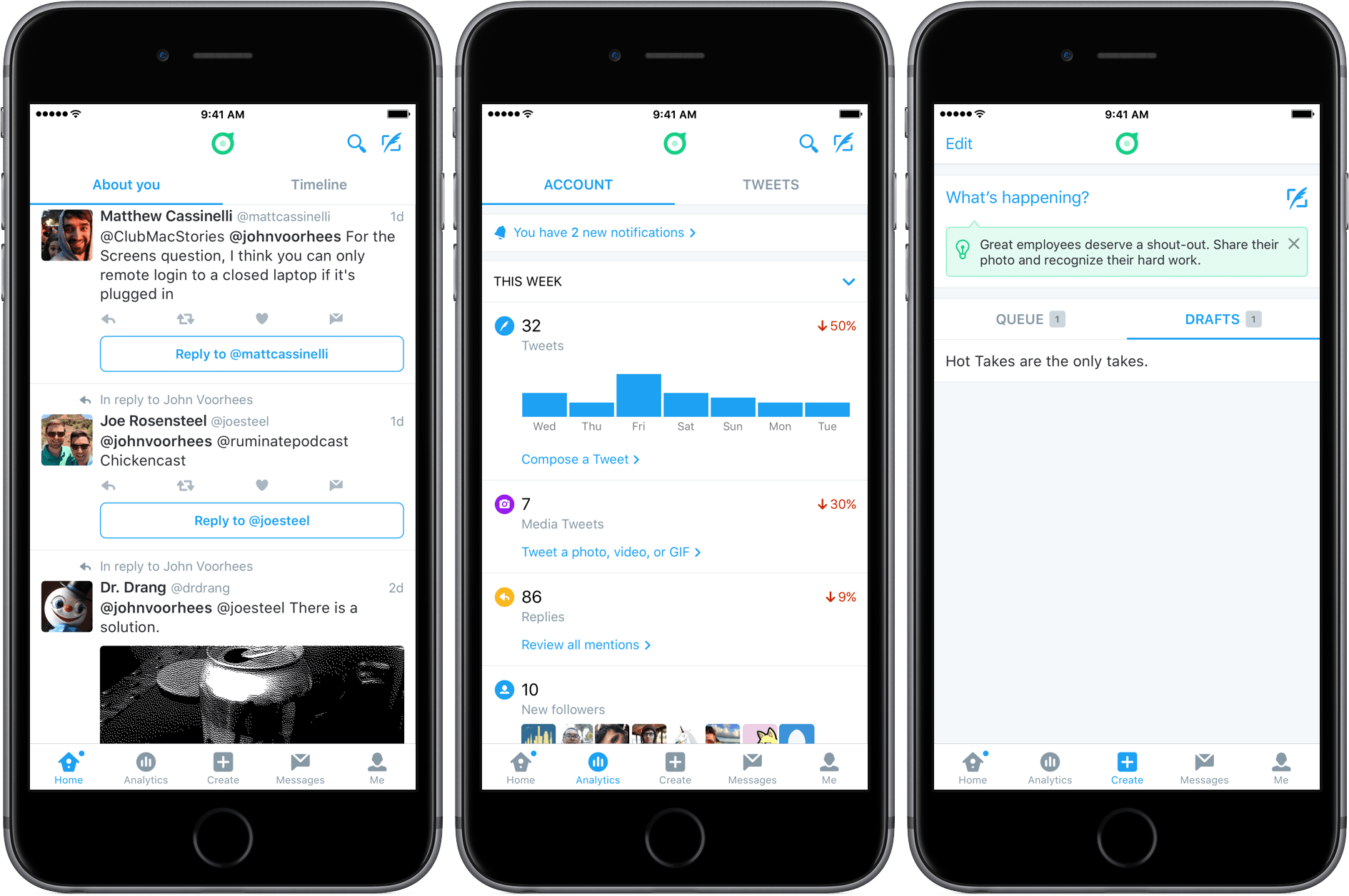
Dashboard will be familiar to anyone who has used the official Twitter client, with some interesting differences. The ‘Home’ tab defaults to a view called ‘About You’ instead of your timeline. ‘About You’ includes things like mentions, replies, tweets that use of your account name, and tweets with any other keywords that you add because you want to surface them in Dashboard. A second tab within the ‘Home’ view takes you to your timeline.

Dashboard also includes two unique tabs called ’Analytics’ and ‘Create.’ ‘Analytics’ includes some of the same information provided by Engage, but presented in a more summary fashion than in Engage. ‘Create’ serves the same purpose as a service like Buffer, allowing you to schedule tweets and save multiple drafts.

If you have used Twitter account management tools in the past, you’ll find that there is nothing revolutionary about the tools included in Dashboard. The benefit, however, is having these tools all in one place with a design that focuses on what people are saying about your business, which should make it easier for business owners to monitor what people are saying about their businesses on Twitter and also promote their businesses with Twitter.


Apple’s iOS Icon Templates Are a Little Off

Update 2016-06-28: The iOS icon templates provided by Apple as part of the iOS Human Interface Guidelines section of its developer website have been updated to the correct shape.


Last week Apple posted templates for iOS icons on its developer website. Designer Michael Flarup noticed something was a little off about the templates. It turns out that the templates aren’t the ‘squircle’ icon shape that is created when developers submit an app to the App Store. Instead, the templates are rounded rectangles. The difference is small, but as Flarup explains with a neat GIF that highlights the difference between the two shapes:

using the wrong canvas can have consequences for your design. Apple will crop your icon in the squircle shape, so you’d better not try to do anything precise in the templates they provide.

Fortunately, Flarup and others have created their own squircle templates that are linked in his article.

Permalink

Twitter Adds Stickers

Virtual stickers are all the rage on social networks and in messaging apps. Just two weeks ago, Apple jumped on the sticker bandwagon at WWDC with the upcoming version of the Messages app that will ship with iOS 10. This is not something particularly new (remember Gowalla?), but the pace of adoption seems to have accelerated in the past year with the growing popularity of apps like Snapchat and Facebook Messenger.

Adding stickers to photos in Twitter.

Adding stickers to photos in Twitter.

Now Twitter is going all-in with hundreds of custom stickers and rotating seasonal sticker packs you can use to decorate photos. As reported by the The Verge this morning, Twitter will be rolling out stickers to all users in its official app over the next few weeks.

Twitter has its own special take on stickers. From within the official Twitter client, you will be able to

search them like hashtags. Tap on a sticker inside a tweet and you’ll be taken to a new timeline that shows you how it’s being used around the world.

It appears that stickers will be available through Twitter’s official client only, which undoubtedly will be viewed by some people as yet another advantage of third-party Twitter clients, but I can’t help but wonder if sticker-mania will have a net negative impact on third-party clients like Tweetbot and Twitterrific.

Permalink

Game Day: SEQ

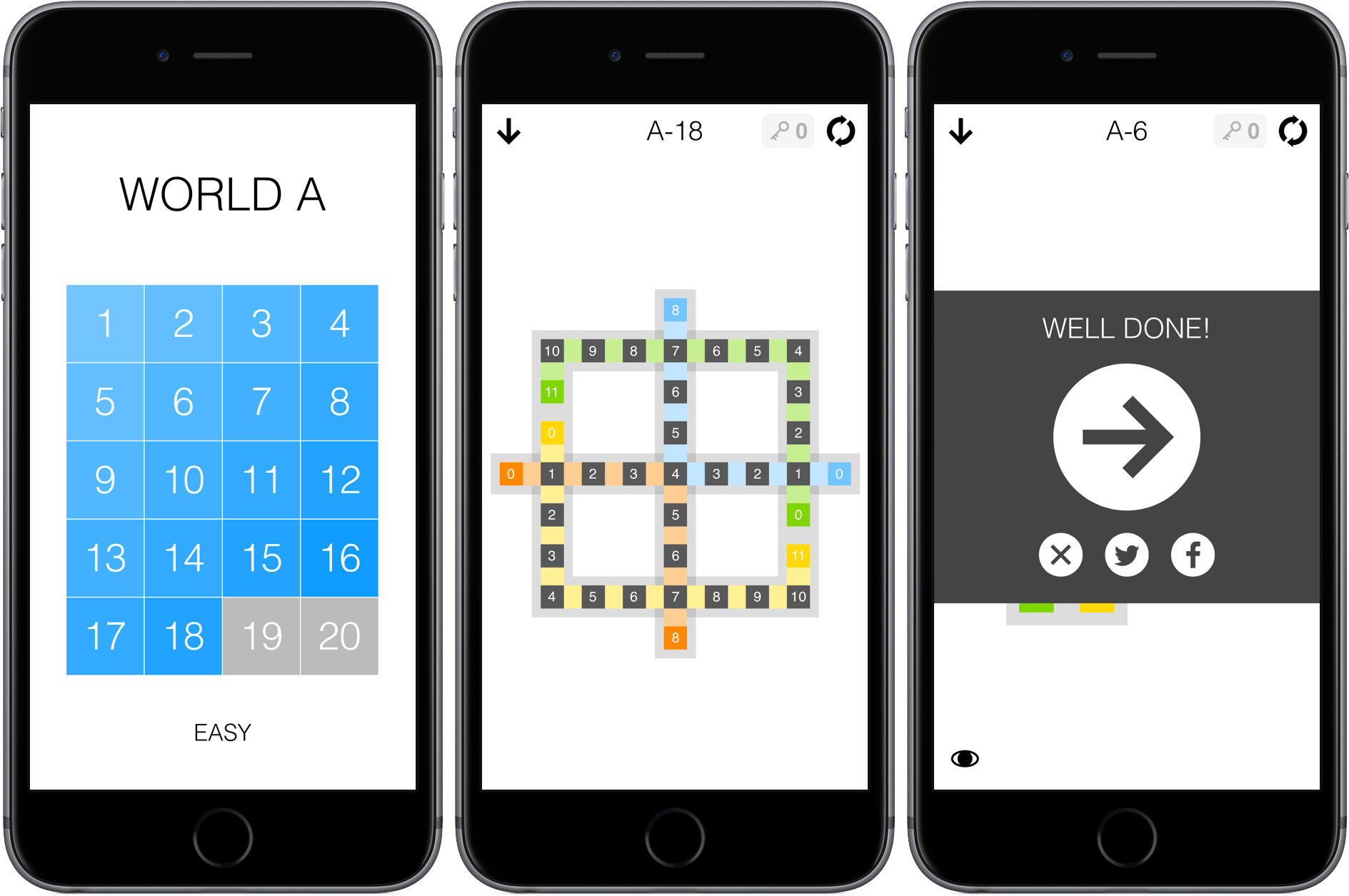
SEQ is a number sequencing puzzle game from 1Button with 280 levels. The premise is simple – each level is a series of squares laid out in a pattern. There are colored squares with numbers in them and grey squares with zeros in them. Your job is to trace a path from the colored squares to the grey squares. Each square along your path is given a number that is one less than the square before it. For example, if you start with a colored square with a ‘5’ in it, you need to fill squares with 4 - 3 - 2 - 1 before landing on a grey zero square. If you have multiple number sequences to complete in a single puzzle, things get trickier. One sequence cannot cross the path of another unless the number in the earlier sequence where the two cross matches what you need to advance the current sequence. It’s easiest to understand by watching 1Button’s video:

SEQ starts with very simple puzzles that gradually get more complex. You cannot skip around, except among the puzzles you have completed or ahead if you have purchased keys to bypass puzzles you cannot solve. SEQ works well on iOS with its simple path tracing and the ability to play for short periods of time. SEQ is also the sort of game that I like to play while I’m listening to a podcast or music, and fortunately the sound effects, which can be disruptive when you are simultaneously listening to something else, can be turned off by swiping to the view to the left of the puzzles.

SEQ is $1.99 on the App Store with a $0.99 in-app purchase to buy five keys that allow you to bypass puzzles you cannot complete.


Marble: A Portable 2-in-1 USB-C Dock & Charger [Sponsor]

Marble by Mofily is a portable 2-in-1 USB-C docking & charging station that can expand USB-C to HDMI, DisplayPort, 4x USB, MicroSD, and charge 4x devices simultaneously with a built-in 60w AC adapter.

Marble offers a single compact way to connect multiple devices to your USB-C ported laptop, including the new MacBook and many more. Marble gives you all the functionality of having your devices nearby. It’s as though they are still plugged right into your computer. When it’s not connected to an AC outlet, you can still use Marble as an on-the-go multifunctional hub for your laptop. The power supply of the USB ports will automatically switch from AC to laptop.

Safety has always been Mofily’s priority, which is why they built Marble with advanced protection technology. Marble protects all your plugged-in devices from overcurrent, overvoltage, overtemperature and short-circuiting, giving you a stable power supply and peace of mind.

For details on how to get a Marble – plus photos, videos, and more technical information – you can check out their campaign on Indiegogo.

Our thanks to Mofily for sponsoring MacStories this week with Marble.


Microsoft Flow Adds iOS App

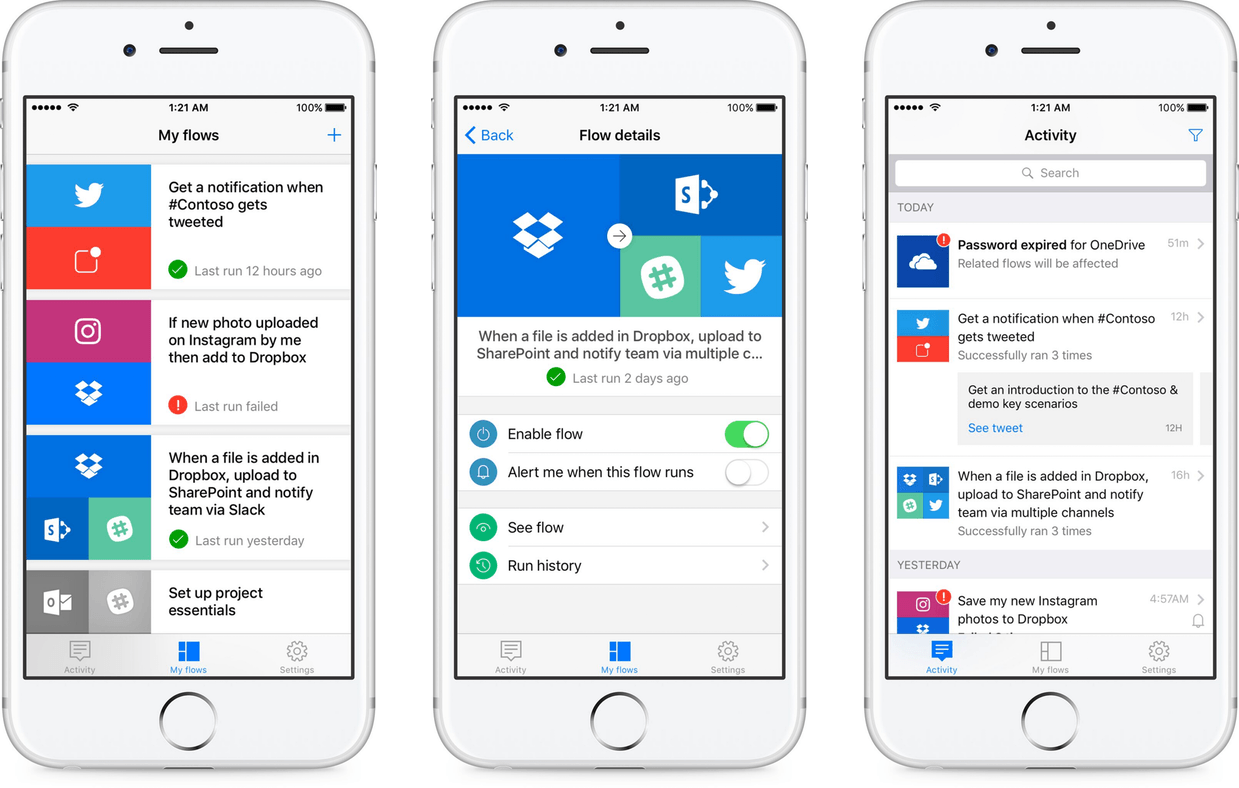
Back in April, Microsoft jumped into web service automation with the introduction of Flow, a business-oriented, Zapier and IFTTT-like service for creating workflows that connects disparate web services like Dropbox, Google Drive, Slack, Mailchimp, GitHub, Twitter, SharePoint, and Salesforce. Yesterday, Microsoft released an iOS app called Microsoft Flow that, according to the Microsoft blog, allows users to ‘manage, track, and explore your automated workflows anytime and anywhere.’

I have spent a little time with the Microsoft Flow app and it works as advertised, but is limited. Unlike IFTTT’s iOS app, Flow does not let you create workflows, though Microsoft says that feature is will be added in the coming months. In addition, the complex workflows that are possible in Zapier are not possible with Flow. For now, Flow is limited to doing things like turning workflows on and off, reviewing history reports of workflows that have run, receiving workflow push notifications, and evaluating error messages for workflows that fail.

Flow has a long way to go before it approaches the power of Zapier or its app has the depth of IFTTT’s, but it’s good to see Microsoft bring Flow to mobile devices and remains a service worth watching.

Microsoft Flow is available on the App Store as a free download.


The Iconfactory Celebrates Its Twentieth Anniversary

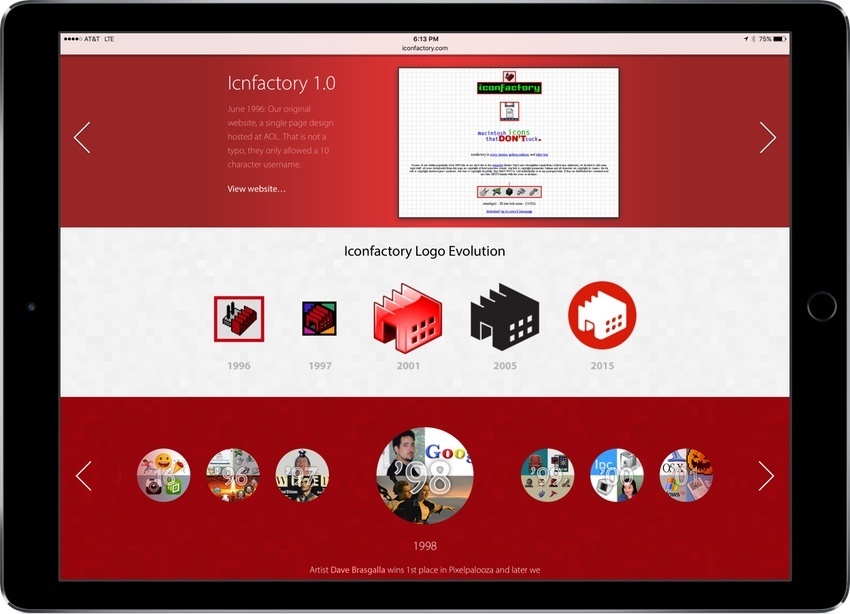
The Iconfactory is celebrating its 20th anniversary this week with a special website that shows off the evolution of its website, icon, and animations through the years, chronicles major events in the company’s history, and much more. I got a sneak peak at the site after my WWDC interview with Craig Hockenberry and this isn’t something you want to miss. It’s a fascinating exploration of the evolution of web and icon design over the past two decades.

Exify provides photographers with pages of metadata.

Exify provides photographers with pages of metadata.

In addition to the 20th anniversary site, the Iconfactory released a new photography app for iOS called Exify, that provides photographers with several pages of metadata for any photo on your iOS device. Whether it’s a histogram, location data, or data about where the camera was focused, Exify can display it. Exify also includes extensions that let you add watermarks and copyright data to images nondestructively, get data about an image from within Photos or another app, and magnify images.


App Launching on Apple Watch

Conrad Stoll:

The significance of complications being the best way to launch apps is why swiping between watch faces is so valuable. It allows users to literally switch their context on the Apple Watch. One day this could presumably happen automatically, but at least it only takes one swipe to switch from your primary daily watch face to one with the type of information you want to have at a glance in another context.

[…]

I love using the Stopwatch and Timer apps while I’m cooking or brewing coffee, but I don’t want their complications visible during the rest of the day. The ability to swipe left and bring up an entire watch face devoted to them and any other complications relevant to cooking is a game changer for me.

Prescient realization by Stoll about the implications of the new Apple Watch swipe-to-change-face feature. While Apple emphasized the Dock during the keynote as the new best way to switch between apps, maybe that crown will really go to Complications on various watch faces.

Permalink

iOS 10: Our Complete Overview

At yesterday morning’s keynote event in the Bill Graham Civic Auditorium, Apple took the wraps off of the latest revision of their mobile operating system. The tenth version of iOS opens up the system to a bold new world of integrations, APIs, and surprising customizability. It modernizes core apps that were growing long in the tooth, takes ambitious leaps forward with computer vision and contextual predictions, and enriches the user experience of such system tentpoles as notifications and the lock screen.

iOS 10 marks the beginning of a new era of iOS in many different ways. With a solid, mature core to build on, Apple is now feeling free to reach out into new areas that it has never before explored with its most popular operating system. We’ll have to wait for real world testing and future betas to see if they’ve truly delivered, but the promises of iOS 10 are some of the most ambitious Apple has ever pursued with “the world’s most advanced mobile operating system.”

So let’s take a look at the features Apple has planned for hundreds of millions of users next Fall.

Read more