This Week's Sponsor:

Dropzone 5

Improve your Drag-and-Drop Workflow


Posts in mac

Happy Birthday, OS X!

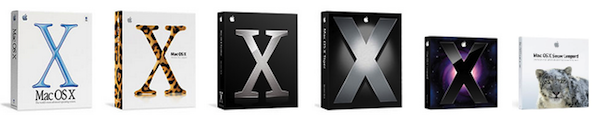
Ten years ago today, on March 24th 2001, Apple released Mac OS X 10.0 Cheetah. Now ten years on, OS X has evolved into what we know and love as being Snow Leopard, that latest major update to OS X.

Between the original, and rather buggy version of OS X, Cheetah and Snow Leopard now, we had 10.1 Puma (September 2001), 10.2 Jaguar (August 2002), 10.3 Panther (October 2003), 10.4 Tiger (April 2005) and 10.5 Leopard (October 2007). With just a few short months before the summer, we don’t have much longer to wait until OS X 10.7 Lion arrives and brings a convergence of traditional desktop OS design and iOS design together into one great operating system.

So Happy Birthday OS X! If you’re feeling nostalgic you might want to have a read of the Wikipedia page on OS X which gives a nice synopsis of the major feature additions each release brought and jump the break to watch Steve Jobs introduce OS X at the 2000 MacWorld.

Read more


#MacStoriesDeals - Wednesday

If you didn’t already know, we’ve set up a new twitter account for Deals, it’s @MacStoriesDeals - please follow for Deals-only posts. We’ll tweet the daily deals there as well as exclusive weekend deals too. Help spread the word! Here are today’s deals on iOS, Mac, and Mac App Store apps that are on sale for a limited time, so get ‘em while they’re hot!

Read more


#MacStoriesDeals - Tuesday

If you didn’t already know, we’ve set up a new twitter account for Deals, it’s @MacStoriesDeals - please follow for Deals-only posts. We’ll tweet the daily deals there as well as exclusive weekend deals too. Help spread the word! Here are today’s deals on iOS, Mac, and Mac App Store apps that are on sale for a limited time, so get ‘em while they’re hot!

Read more


Sparrow 1.1 Is Out: IMAP Support, Priority Inbox and More

Since its release date weeks ago, Sparrow for Mac has quickly become many people’s favorite way to access Gmail from the desktop. With an intuitive user interface resembling the original Tweetie for Mac and support for several Gmail functions like labels and archive, Sparrow has sold thousands of copies in the Mac App Store enabling the developers to focus on bringing additional features to the app.

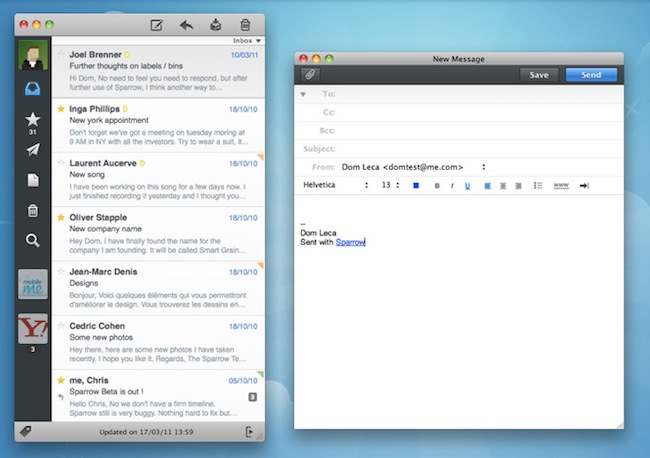
With the release of version 1.1 today, Sparrow is once again redefining the rules of Mail clients for OS X: Sparrow 1.1 contains several bug fixes and stability improvements, but most of all it adds general IMAP compatibility, MobileMe support and lots more features like Gmail’s Priority Inbox.

If you’re a Gmail user, Sparrow now lets you switch between the regular inbox, the Priority one and unread items from a dropdown menu under the top toolbar. The feature is very convenient as it further integrates Gmail with the desktop in a way no other apps did before. Switching between different types of inboxes is effortless and takes seconds. Another Gmail improvement is a fix for archive’s synchronization, which was pretty slow on version 1.0.

Gmail aside, Sparrow 1.1 is a complete revamp of the application. In the redesigned preferences panel, you can now set a signature for each of your aliases, and a signature can be made default with the click of a button; a format bar in the compose windows lets you choose fonts, sizes and styles without opening an external window or the system’s default font picker. The “minimal mode” – available in the Preferences – is another new option that lets users hide the message preview in the main window – quite handy if you don’t want to see a preview of the message while scrolling the list. On a related note, scrolling performances have been improved as well and now Sparrow feels much more responsive.

Sparrow 1.1 is a huge update that contains many other improvements like better HTML and CSS rendering, contact grouping options and Gravatar support, multitouch gestures (I love the three-finger swipe to open a message in its dedicated panel) and a “mark as spam” shortcut. The app is available in the App Store at $9.99, and it’s a powerful alternative to Mail.app – now with IMAP support and deeper Gmail compatibility. More screenshots below. Read more


#MacStoriesDeals - Monday

If you didn’t already know, we’ve set up a new twitter account for Deals, it’s @MacStoriesDeals - please follow for Deals-only posts. We’ll tweet the daily deals there as well as exclusive weekend deals too. Help spread the word! Here are today’s deals on iOS, Mac, and Mac App Store apps that are on sale for a limited time, so get ‘em while they’re hot!

Read more


Numerous Owners Reporting 2011 MacBook Pro Crashes Whilst Under Load

A considerable number of owners of the new 15” and 17” 2011 MacBook Pro’s have reported both on the Apple Discussion board and also on the MacRumors forum that their new machines are locking up and freezing when under an extensive load. For example this post by ‘brandonlive02’ is representative of what many are complaining about;

I have a 15” 2011 MacBook Pro with a 128 SSD. It has repeatedly frozen in the week I’ve had it - often at random points while using StarCraft II and also while trying to access Time Machine. When it freezes, sound continues and I can still move the cursor (which is sometimes the spinning ball and sometimes the regular cursor) but the computer is completely unresponsive – force quit does not work nor does anything else - have to do a hard reboot.

The issue is believed to be fairly widespread with one user reproducing it on three separate machines and another who reportedly managed to reproduce it on every new MacBook Pro at their local Apple store. This wiki outlines the various methods one can use to re-create the crash if they wish to check if their MacBook has this issue.

No complete fix has been found and the cause is still unknown but the wiki page suggests one fix of using some software to only use the integrated graphics chip of the MacBook Pro. A post in the MacRumors thread suggests that Apple is aware of the issue and that they believe it to be a firmware or driver related problem rather than a hardware issue, but this has yet to be confirmed and Apple have not issued any public statement.

[Via MacRumors]


Clocky - A Beautiful World Clock App for Mac: Review & Giveaway

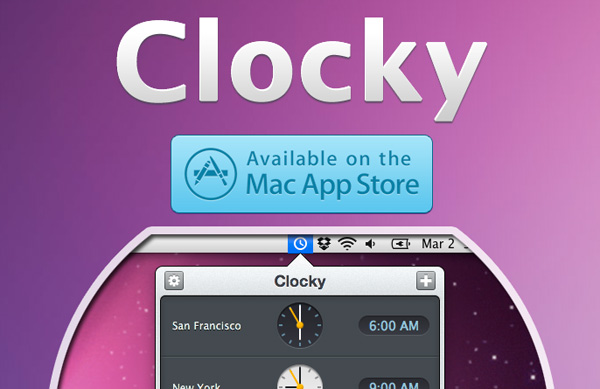
Yesterday I was browsing the new apps in the Mac App Store and came across Clocky, a world clock app that sits in your menu bar. Clocky was developed by Studio Dalton, who also did Lighty for iPhone, a very nice flashlight app. Clocky is already in the Top 100 apps in the Mac App Store and number 12 in Utilities.

Clocky shows the current time in the cities you’ve added, there are 479 to choose from. To add a city, click the ‘+’ sign and use the drop down menu or start typing. Even with almost 500 cities, I found some cities, such as Federico’s town of Viterbo, not on the list. If you want to delete a city, simply select and delete, or drag the clock out of the app. You can also click and drag the clocks to rearrange them. Read more


#MacStoriesDeals - Friday

If you didn’t catch all the deals we had yesterday, here’s a link back to the page. Here are today’s deals on iOS, Mac, and Mac App Store apps that are on sale for a limited time, so get ‘em while they’re hot!

Read more


Market Share Research Reveals That The Swiss Love Their Macs

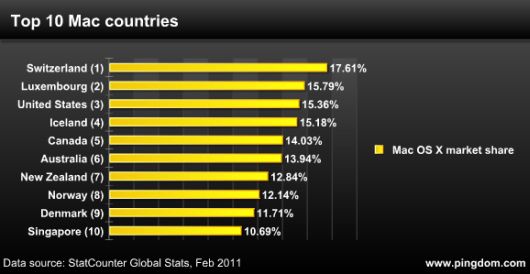
The Pingdom blog did a little statistical research using Statcounter to figure out which countries had the highest percentage of Macs and found that Switzerland topped that list with 17.61% market share. Meanwhile Luxembourg, USA, and Iceland were also countries with high Mac market share, all above 15%.

The UK was notably missing from the top 10 whilst as a region, Asia only had an average of 1.61% of market share – a very low figure, but one Apple is likely trying to increase with a recent push into that market with its retail stores. As for the region with the lowest Mac market share, Asia comes close but it is in fact South America, which has only 1.08% market share of Macs.

[Via TUAW]