This Week's Sponsor:

Dropzone 5

Improve your Drag-and-Drop Workflow


Posts in iPhone

These Are Real-Life Fruit Ninjas

Fruit Ninja is an insanely successful game for iPhone, iPad and Android I think you might have heard of. In the game, you have to slice fruit to get the highest score or simply slice more fruit as possible in a certain amount of time. It’s got several multiplayer options and it’s also quite addictive.

Now, the problem is Fruit Ninja is a game. A game that, if you think about it, doesn’t really make any sense at all: why would you be a ninja to slice fruit with a knife? I don’t know. Still, some shirtless dudes tried to replicate Fruit Ninja in real life, and there is video proof of the hilarious experiments. The videos embedded below might be slightly NSFW – but if your boss is a Fruit Ninja fan you might just go ahead and let him watch them.

Also: please don’t try this at home. Just keep playing the iPhone game. [via Kotaku] Read more
Access Extra Content and Perks

Founded in 2015, Club MacStories has delivered exclusive content every week for nearly a decade.

What started with weekly and monthly email newsletters has blossomed into a family of memberships designed for every MacStories fan.

Learn more here and from our Club FAQs.

Club MacStories: Weekly and monthly newsletters via email and the web that are brimming with apps, tips, automation workflows, longform writing, early access to the MacStories Unwind podcast, periodic giveaways, and more;

Club MacStories+: Everything that Club MacStories offers, plus an active Discord community, advanced search and custom RSS features for exploring the Club’s entire back catalog, bonus columns, and dozens of app discounts;

Club Premier: All of the above and AppStories+, an extended version of our flagship podcast that’s delivered early, ad-free, and in high-bitrate audio.

Learn more here and from our Club FAQs.


Apple Adds iPhone 5 Suppliers, Launch “During Summer At The Earliest”

We’ve heard rumors about the next-generation iPhone that suggest the device might get NFC capabilities, a dual-core processor and a brand new redesign, but we didn’t know much about the actual release date. Apple usually unveils new iPhone models at the WWDC in June, with US launch to follow after a few weeks; according to a report from Digitimes this morning, launch of the iPhone 5 will happen “during summer at the earliest”.

Apple has also added new suppliers to the iPhone 5 production chain:

Foxconn will become the iPhone 5’s new earphone supplier. Japan’s Foster was the previous supplier, but a strengthening yen has spurred Apple to look for more cost-effective sources, the report said, noting that related orders are estimated at NT$5 billion (US$171.7 million). Foxlink will produce earphone jack sockets for the iPhone 5.

With a shortage of HDI boards, Apple has also newly added GCE as a supplier, but will continue to source from Compeq Manufacturing and Unimicron Technology as well.

In October, rumors suggested the iPhone 5 had hit “EVT” testing stage.

Access Extra Content and Perks

Founded in 2015, Club MacStories has delivered exclusive content every week for nearly a decade.

What started with weekly and monthly email newsletters has blossomed into a family of memberships designed for every MacStories fan.

Learn more here and from our Club FAQs.

Club MacStories: Weekly and monthly newsletters via email and the web that are brimming with apps, tips, automation workflows, longform writing, early access to the MacStories Unwind podcast, periodic giveaways, and more;

Club MacStories+: Everything that Club MacStories offers, plus an active Discord community, advanced search and custom RSS features for exploring the Club’s entire back catalog, bonus columns, and dozens of app discounts;

Club Premier: All of the above and AppStories+, an extended version of our flagship podcast that’s delivered early, ad-free, and in high-bitrate audio.

Learn more here and from our Club FAQs.


XBMC Comes to the iPhone, iPad, Apple TV 2

XBMC, a popular media center originally made for the first Xbox has become fairly widespread has been available for a variety of platforms, today that platform base extended to include the new Apple TV, iPhone and iPad.

The client on these new platforms is not stripped down to simply just view streams but is fully fledged with all the features you would come to expect it to have on a Windows PC. Because of this it is being distributed for the iOS devices through a Cydia repository and for the Apple TV through an apt-get install.

Scott Davilla one of the XBMC developers talked to TUAW and he revealed that development for the Apple TV 2 started only on November 1st last year and the iOS versions a few weeks later. He notes that the built in web server is currently disabled and the skin isn’t optimized but says improvements will be made including the possibility of implementing AirPlay into all the Apple related releases.

Perhaps one of the most interesting developments that occurred whilst XBMC was ported was the discovery of an API called VideoToolBox that allows hardware video decoding, encoding and scaling of the video size to match the final display size. So powerful is this API that Davilla and others that developed XBMC for iPad are able to stream full 1080p video with no transcoding to the iPad and it plays nearly perfectly, only dropping a few frames. Davilla’s confident however that the A4 processor can handle 1080p and will be working to ensure fully smooth playback.

TUAW put together some video’s demonstrating it running on all three of the new platforms, check it out here.

[Via XBMC, TUAW]

Access Extra Content and Perks

Founded in 2015, Club MacStories has delivered exclusive content every week for nearly a decade.

What started with weekly and monthly email newsletters has blossomed into a family of memberships designed for every MacStories fan.

Learn more here and from our Club FAQs.

Club MacStories: Weekly and monthly newsletters via email and the web that are brimming with apps, tips, automation workflows, longform writing, early access to the MacStories Unwind podcast, periodic giveaways, and more;

Club MacStories+: Everything that Club MacStories offers, plus an active Discord community, advanced search and custom RSS features for exploring the Club’s entire back catalog, bonus columns, and dozens of app discounts;

Club Premier: All of the above and AppStories+, an extended version of our flagship podcast that’s delivered early, ad-free, and in high-bitrate audio.

Learn more here and from our Club FAQs.


TestFlight Goes Live For Everyone - Distribute & Receive Beta Apps Effortlessly

TestFlight has been in lockdown mode for a while, and I’ve had plenty of opportunities to put the service through its paces before they opened their doors to everybody this evening. I’ll just say that TestFlight is incredibly convenient for installing beta applications on the fly - there’s nothing more annoying than unzipping iPad or iPhone files, dragging them to iTunes, syncing, and it doing all over again when updates are distributed. TestFlight simply has you log into their site via your iPad or iPhone, tap a button, and you can browse through the beta apps developers have subscribed you to for immediate downloads. It’s so much easier for developers to submit one beta to TestFlight than to package their app and distribute it to dozens of emails, and it’s much easier on the tester to be updated and install updates. It’s completely Apple worthy, and if you’re a developer we encourage you to sign up for the service so you can focus on creating content instead of worrying about beta distribution.

TechCrunch notes that the service is free to developers, while a paid Enterprise version is in the works that will allow for licensed versions of apps to be passed through the airwaves (presumably for corporate/in-house application use).

[via TestFlight, TechCrunch]

Access Extra Content and Perks

Founded in 2015, Club MacStories has delivered exclusive content every week for nearly a decade.

What started with weekly and monthly email newsletters has blossomed into a family of memberships designed for every MacStories fan.

Learn more here and from our Club FAQs.

Club MacStories: Weekly and monthly newsletters via email and the web that are brimming with apps, tips, automation workflows, longform writing, early access to the MacStories Unwind podcast, periodic giveaways, and more;

Club MacStories+: Everything that Club MacStories offers, plus an active Discord community, advanced search and custom RSS features for exploring the Club’s entire back catalog, bonus columns, and dozens of app discounts;

Club Premier: All of the above and AppStories+, an extended version of our flagship podcast that’s delivered early, ad-free, and in high-bitrate audio.

Learn more here and from our Club FAQs.


Transparent iPhone 4 Exposes Ive’s Best Kept Secrets

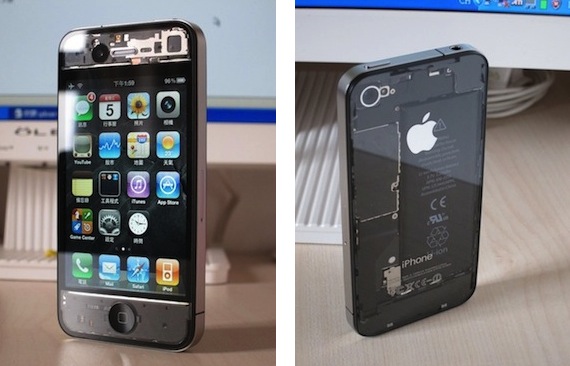
This iPhone 4 mod is the best I’ve seen so far. There, I said it. No other mod can compete with this one, from my personal point of view. I don’t know about build quality and difficulty of installation (I guess it’s not a 5-step How To), I just know I like it.

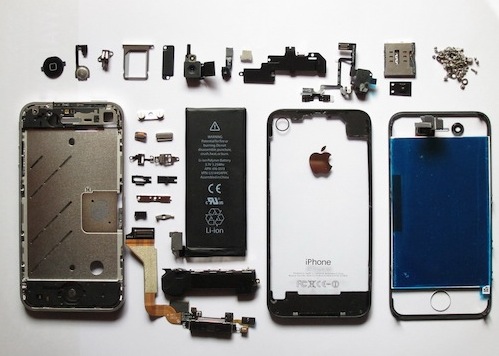
It’s a fully transparent mod for the iPhone 4, where you get to see the battery and innards through the back of the device, front-facing camera, sensors and screen at the front. It reminds me of those semi-transparent Game Boy Colors Nintendo released in the mid-90s, only for something made in Cupertino.

Full gallery available here. If you know where to buy it, please let us know in the comments. [via TUAW]

Update: Looks like it’s a DIY mod with paint thinner used on standard black OEM components. [Thanks, Markus]

Access Extra Content and Perks

Founded in 2015, Club MacStories has delivered exclusive content every week for nearly a decade.

What started with weekly and monthly email newsletters has blossomed into a family of memberships designed for every MacStories fan.

Learn more here and from our Club FAQs.

Club MacStories: Weekly and monthly newsletters via email and the web that are brimming with apps, tips, automation workflows, longform writing, early access to the MacStories Unwind podcast, periodic giveaways, and more;

Club MacStories+: Everything that Club MacStories offers, plus an active Discord community, advanced search and custom RSS features for exploring the Club’s entire back catalog, bonus columns, and dozens of app discounts;

Club Premier: All of the above and AppStories+, an extended version of our flagship podcast that’s delivered early, ad-free, and in high-bitrate audio.

Learn more here and from our Club FAQs.


Physical Mailbox Sends Push Notifications to iPhone

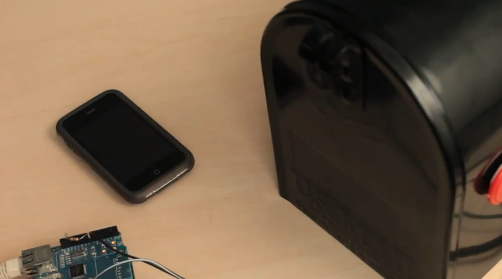
Matt Richardson over at Make: Online might have just come up with the ultimate way to get push notifications on the iPhone from physical objects in the real world. Like your garage door, your secret stash drawer – or your mailbox. Thanks to the power of open-source hardware Arduino, a PHP web server and the Prowl iPhone app, he managed to create a system that sends a notification to his iPhone every time mail is delivered to his mailbox. The notification arrives in seconds, as the mailbox is wired to an internet connection (no wireless for now) and the Arduino board tells the web server to forward a notification to the Prowl app via API. Of course, there is a sensor below the mailbox that knows when the lid is opened and closed.

The concept is great, useful and requires minimal PHP and hardware knowledge to be up and running. Sure, you still need to get an Arduino and follow the instructions, but it’s price worth to be paid only to be able to connect the real world with iOS. Let me say it again: real word sends push notifications to iOS. [via Boing Boing] Read more

Access Extra Content and Perks

Founded in 2015, Club MacStories has delivered exclusive content every week for nearly a decade.

What started with weekly and monthly email newsletters has blossomed into a family of memberships designed for every MacStories fan.

Learn more here and from our Club FAQs.

Club MacStories: Weekly and monthly newsletters via email and the web that are brimming with apps, tips, automation workflows, longform writing, early access to the MacStories Unwind podcast, periodic giveaways, and more;

Club MacStories+: Everything that Club MacStories offers, plus an active Discord community, advanced search and custom RSS features for exploring the Club’s entire back catalog, bonus columns, and dozens of app discounts;

Club Premier: All of the above and AppStories+, an extended version of our flagship podcast that’s delivered early, ad-free, and in high-bitrate audio.

Learn more here and from our Club FAQs.


#MacStoriesDeals - Thursday

There are some great freebies today. Here’s today’s deals on iOS, Mac, and Mac App Store apps that are on sale for a limited time, so get ‘em while they’re hot! Read more

Access Extra Content and Perks

Founded in 2015, Club MacStories has delivered exclusive content every week for nearly a decade.

What started with weekly and monthly email newsletters has blossomed into a family of memberships designed for every MacStories fan.

Learn more here and from our Club FAQs.

Club MacStories: Weekly and monthly newsletters via email and the web that are brimming with apps, tips, automation workflows, longform writing, early access to the MacStories Unwind podcast, periodic giveaways, and more;

Club MacStories+: Everything that Club MacStories offers, plus an active Discord community, advanced search and custom RSS features for exploring the Club’s entire back catalog, bonus columns, and dozens of app discounts;

Club Premier: All of the above and AppStories+, an extended version of our flagship podcast that’s delivered early, ad-free, and in high-bitrate audio.

Learn more here and from our Club FAQs.


Here’s Why Gestures On The iPhone Are A Bad Idea

Rumor has it Apple may be willing to implement the multitasking gestures already seen in the iOS 4.3 beta for iPad on the iPhone as well. Those willing to believe that gestures will take over buttons on our mobile devices someday even claim that Apple may get rid of the Home button altogether on the next iPhone and iPad.

Four and five-finger gestures on the iPhone’s screen, however,  have always sounded like a terrible idea to us. And now there’s video proof that, indeed, the iPhone isn’t meant for all those fingers.

It goes like this: a Youtube user enables multitasking gestures on the iPhone (weren’t they supposed to only being tested internally?) and records a video of the multi-touch galore in action. The result is embedded below. And, quite frankly, we do believe the Home button is here to stay.

[Youtube via Engadget] Read more

Access Extra Content and Perks

Founded in 2015, Club MacStories has delivered exclusive content every week for nearly a decade.

What started with weekly and monthly email newsletters has blossomed into a family of memberships designed for every MacStories fan.

Learn more here and from our Club FAQs.

Club MacStories: Weekly and monthly newsletters via email and the web that are brimming with apps, tips, automation workflows, longform writing, early access to the MacStories Unwind podcast, periodic giveaways, and more;

Club MacStories+: Everything that Club MacStories offers, plus an active Discord community, advanced search and custom RSS features for exploring the Club’s entire back catalog, bonus columns, and dozens of app discounts;

Club Premier: All of the above and AppStories+, an extended version of our flagship podcast that’s delivered early, ad-free, and in high-bitrate audio.

Learn more here and from our Club FAQs.


Leaked Screenshot of Internal iPhone with Gestures?

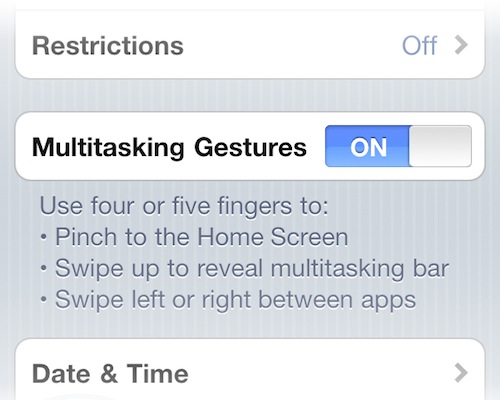
Well after the 4.3 Beta that previewed multitasking gestures on the iPad, there is now some supposed evidence that suggests that the iPhone is also being considered by Apple to have gestures thanks to an internal build that BGR claims to have gotten some screenshots of.

Obviously there is an issue with the supposedly leaked pictures, gestures on the iPhone would likely have to be different to those previewed on the iPad that used four or five finger swipes because they would be pretty unreasonable to use on the iPhone’s smaller screen. That said it remains possible that the text is left over from the iPad and whilst being tested internally has not been edited to reflect the iPhone’s gestures.

Engadget notes that information from it sources says that since the lost iPhone 4 debacle Apple made significant changes to how it keeps track of it’s devices and that it added clauses to screens saying “Confidential and Proprietary, if found, please contact…” listing a Cupertino 408 number. The photo’s BGR have gotten a hold have this message, adding credence to this leak. All three pictures posted after the break.

Read more

Access Extra Content and Perks

Founded in 2015, Club MacStories has delivered exclusive content every week for nearly a decade.

What started with weekly and monthly email newsletters has blossomed into a family of memberships designed for every MacStories fan.

Learn more here and from our Club FAQs.

Club MacStories: Weekly and monthly newsletters via email and the web that are brimming with apps, tips, automation workflows, longform writing, early access to the MacStories Unwind podcast, periodic giveaways, and more;

Club MacStories+: Everything that Club MacStories offers, plus an active Discord community, advanced search and custom RSS features for exploring the Club’s entire back catalog, bonus columns, and dozens of app discounts;

Club Premier: All of the above and AppStories+, an extended version of our flagship podcast that’s delivered early, ad-free, and in high-bitrate audio.

Learn more here and from our Club FAQs.