This Week's Sponsor:

Dropzone 5

Improve your Drag-and-Drop Workflow


Posts in iPad

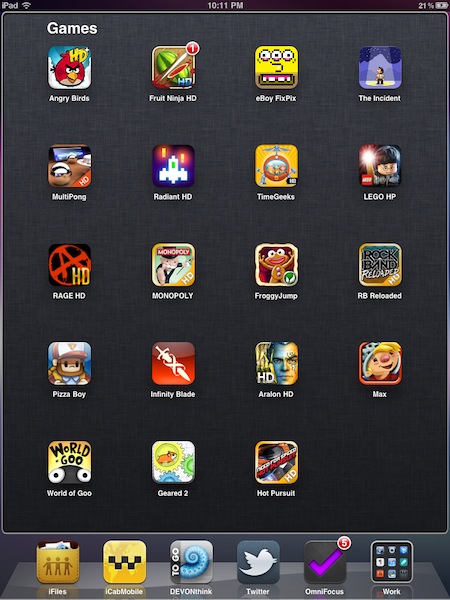
FolderEnhancer for iPad Makes Folders Faster, Bigger

FolderEnhancer is one of my favorite Cydia tweaks for the iPhone which brings several additional functionalities to Apple’s implementation of folders in iOS 4.x. It makes opening folders faster, full-screen (above the dock) and allows for infinite apps inside each folders. You can also enable scrolling and pagination.

FolderEnhancer was updated to support the iPad a few days ago, but it’s not quite ready yet. Most of all, the tweak won’t let you put more than 22 apps in a folder (otherwise, the iPad will crash) and the landscape view isn’t ready. Pagination and scrolling haven’t been updated for the tablet, either. Still, the tweak in portrait mode makes opening folders a breeze, and I like the larger view that it offers. I usually put a lot of apps in a folder, so having a bigger view for “just a few icons” is not a problem to me.

FolderEnhancer for iPhone and iPad is available at $2.49 in the Cydia Store.

Access Extra Content and Perks

Founded in 2015, Club MacStories has delivered exclusive content every week for nearly a decade.

What started with weekly and monthly email newsletters has blossomed into a family of memberships designed for every MacStories fan.

Learn more here and from our Club FAQs.

Club MacStories: Weekly and monthly newsletters via email and the web that are brimming with apps, tips, automation workflows, longform writing, early access to the MacStories Unwind podcast, periodic giveaways, and more;

Club MacStories+: Everything that Club MacStories offers, plus an active Discord community, advanced search and custom RSS features for exploring the Club’s entire back catalog, bonus columns, and dozens of app discounts;

Club Premier: All of the above and AppStories+, an extended version of our flagship podcast that’s delivered early, ad-free, and in high-bitrate audio.

Learn more here and from our Club FAQs.


Meet Hikari, The iPad Controlled Robot [Video]

Some say the iPad is a device for content consumption, many iPad owners are firmly convinced it can be used for content creation, too. After watching the following video, you’ll be wondering if, actually, the tablet was meant for content disruption.

Without getting too technical, there’s a robot controlled from an iPad which uses an app (TouchOSC) to send commands to a PC. The robot is connected to the Windows machine and can be controlled through the Open Sound Control (OSC) supported by the aforementioned app. It’s quite complex, but it works. Hikari – the robot – can walk and stand up, move and even attack. On the author’s Youtube channel, there are other videos when Hikari even learns to dance.

Check out the video below. [via TUAW]

Access Extra Content and Perks

Founded in 2015, Club MacStories has delivered exclusive content every week for nearly a decade.

What started with weekly and monthly email newsletters has blossomed into a family of memberships designed for every MacStories fan.

Learn more here and from our Club FAQs.

Club MacStories: Weekly and monthly newsletters via email and the web that are brimming with apps, tips, automation workflows, longform writing, early access to the MacStories Unwind podcast, periodic giveaways, and more;

Club MacStories+: Everything that Club MacStories offers, plus an active Discord community, advanced search and custom RSS features for exploring the Club’s entire back catalog, bonus columns, and dozens of app discounts;

Club Premier: All of the above and AppStories+, an extended version of our flagship podcast that’s delivered early, ad-free, and in high-bitrate audio.

Learn more here and from our Club FAQs.


#MacStoriesDeals - Friday

Here’s some great deals for today on iOS & Mac apps that are on sale for a limited time, so get ‘em while they’re hot!

Read more

Access Extra Content and Perks

Founded in 2015, Club MacStories has delivered exclusive content every week for nearly a decade.

What started with weekly and monthly email newsletters has blossomed into a family of memberships designed for every MacStories fan.

Learn more here and from our Club FAQs.

Club MacStories: Weekly and monthly newsletters via email and the web that are brimming with apps, tips, automation workflows, longform writing, early access to the MacStories Unwind podcast, periodic giveaways, and more;

Club MacStories+: Everything that Club MacStories offers, plus an active Discord community, advanced search and custom RSS features for exploring the Club’s entire back catalog, bonus columns, and dozens of app discounts;

Club Premier: All of the above and AppStories+, an extended version of our flagship podcast that’s delivered early, ad-free, and in high-bitrate audio.

Learn more here and from our Club FAQs.


iPad Landscape Connector [Concept]

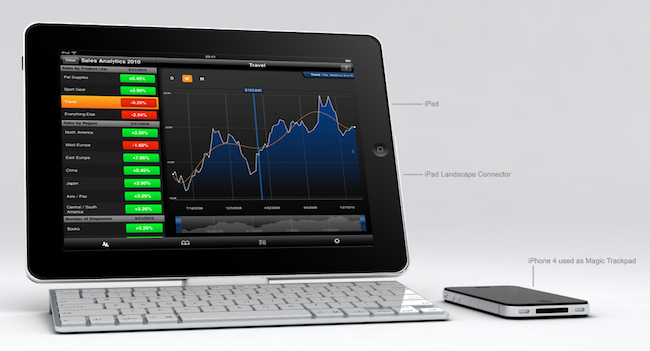
That keyboard dock Apple sells for the iPad? It’s meant for portrait mode. There’s no way to put the tablet in there and expect the dock to hold it in landscape (which offers a broader and better view in most apps), which is kind of a bummer considering that the iPad is not the iPhone and it’s not specifically meant for portrait. Still, this is what Apple is selling.

Italian designer Federico Ciccarese came up with a neat concept of an accessory that, placed between the dock and the iPad, would allows users to use the keyboard and dock functionalities while holding the iPad in landscape mode. It looks fairly simple and clever enough to provide an alternative solution for all those who wished Apple thought of a way to hold the iPad in both orientations in the first place.

But as usual, this is just a concept and Ciccarese is looking for a producer. [via iPadevice]

Access Extra Content and Perks

Founded in 2015, Club MacStories has delivered exclusive content every week for nearly a decade.

What started with weekly and monthly email newsletters has blossomed into a family of memberships designed for every MacStories fan.

Learn more here and from our Club FAQs.

Club MacStories: Weekly and monthly newsletters via email and the web that are brimming with apps, tips, automation workflows, longform writing, early access to the MacStories Unwind podcast, periodic giveaways, and more;

Club MacStories+: Everything that Club MacStories offers, plus an active Discord community, advanced search and custom RSS features for exploring the Club’s entire back catalog, bonus columns, and dozens of app discounts;

Club Premier: All of the above and AppStories+, an extended version of our flagship podcast that’s delivered early, ad-free, and in high-bitrate audio.

Learn more here and from our Club FAQs.


The Daily Coming In January with iTunes App Subscriptions?

Peter Kafka at All Things Digital reports that Rupert Murdoch’s The Daily, the highly anticipated newspaper exclusively built for the iPad, is coming in January. The app will be based on the rumored new iTunes subscription system that will push content to users on a daily basis, with iTunes billing users automatically monthly or weekly.

Kafka also confirms that The Daily’s launch plans “have moved around a couple times in the past few months”, with many people expecting the digital publication to be unveiled by Jobs and Murdoch in December. In November, we reported that The Daily and a new build of iOS containing the new app subscription features were set to be announced in mid-December. That didn’t happen, and we speculate that Apple might have re-scheduled the launch to focus on the Mac App Store – opening on January 6.

The Daily will feature fresh new content every day, and “it will use lots of video, it will have cool multimedia bells and whistles, including some of kind 3-D effect”. Kafka also confirms that the new subscription method won’t allow publishers to access users’ data, but it will surely change the way content is pushed and billed using iTunes.

Previous rumors indicated The Daily as a collaboration between Apple’s Steve Jobs and News Corp’s Murdoch that’s been in development for several months.

Access Extra Content and Perks

Founded in 2015, Club MacStories has delivered exclusive content every week for nearly a decade.

What started with weekly and monthly email newsletters has blossomed into a family of memberships designed for every MacStories fan.

Learn more here and from our Club FAQs.

Club MacStories: Weekly and monthly newsletters via email and the web that are brimming with apps, tips, automation workflows, longform writing, early access to the MacStories Unwind podcast, periodic giveaways, and more;

Club MacStories+: Everything that Club MacStories offers, plus an active Discord community, advanced search and custom RSS features for exploring the Club’s entire back catalog, bonus columns, and dozens of app discounts;

Club Premier: All of the above and AppStories+, an extended version of our flagship podcast that’s delivered early, ad-free, and in high-bitrate audio.

Learn more here and from our Club FAQs.


Skyfire Coming To The iPad, Integrates Facebook & Twitter In The Browser

Remember Skyfire? The Flash browser for iPhone? Yes, the one that lets you watch Flash videos on the iPhone by quickly converting them to HTML5. In our review, we wrote that the app, besides Flash converting capabilities, also had a lot of neat features to bring an innovative browsing experience to the iPhone. Even if I’m sure many users bought it and quickly came back to Safari, Skyfire managed to gain quite a few followers. Skyfire is now coming to the iPad.

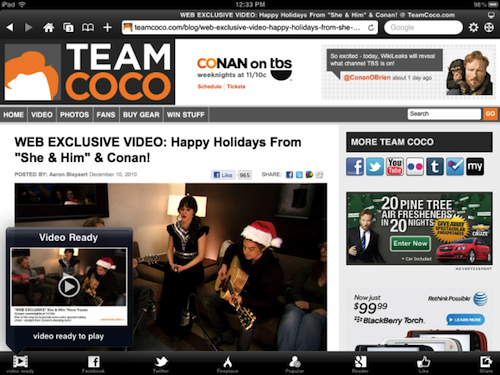
The iPad app, which according to Wired should be released “before Christmas” at $4.99, will come with even more functionalities than its mobile counterpart. Skyfire for iPad, thanks to the tablet’s larger screen, will integrate lots of social features such as the possibility to access your Facebook wall at any time, Twitter, Google Reader and a bunch of other websites all within popovers on screen. Skyfire for iPad will allow yo to quickly access your social profiles and check on links shared by your friends and people you follow, tap on them and open everything inside the browser, in additional tabs. The tab interface looks cool and well-animated, but I wonder why the developers went for an iPhone-like approach instead of mimicking the tabs seen in Mobile Safari for iPad.

Also, I don’t know why would I want to see my Facebook wall at any time in the browser. I can understand the Google Reader integration, but all these other social features sound like a useless overlay to me. Oh, and Skyfire for iPad will also have a universal Facebook Like button that will let you like any page without opening Facebook. This, admittedly, sounds pretty cool.

I’m not sure about all this social stuff in browsers (remember RockMelt?), but I’ll be keeping an eye on this new version of Skyfire. With Apple’s devices dominating encoded web video, clearly there’s not this huge need of a browser capable of converting Flash anymore. Perhaps all we need is a social browser for the tablet. [via MobileCrunch] Read more

Access Extra Content and Perks

Founded in 2015, Club MacStories has delivered exclusive content every week for nearly a decade.

What started with weekly and monthly email newsletters has blossomed into a family of memberships designed for every MacStories fan.

Learn more here and from our Club FAQs.

Club MacStories: Weekly and monthly newsletters via email and the web that are brimming with apps, tips, automation workflows, longform writing, early access to the MacStories Unwind podcast, periodic giveaways, and more;

Club MacStories+: Everything that Club MacStories offers, plus an active Discord community, advanced search and custom RSS features for exploring the Club’s entire back catalog, bonus columns, and dozens of app discounts;

Club Premier: All of the above and AppStories+, an extended version of our flagship podcast that’s delivered early, ad-free, and in high-bitrate audio.

Learn more here and from our Club FAQs.


Kids at Palo Alto Apple Store Get Free Musical iPad Lesson

Kids filled up the Palo Alto Apple retail store the other night to get some music lessons from Ge Wang, the Smule Co-Founder and Stanford Music Professor. Smule makes Magic Fiddle, among other musical iOS apps for the iPad, and it was used to teach the kids. Read more

Access Extra Content and Perks

Founded in 2015, Club MacStories has delivered exclusive content every week for nearly a decade.

What started with weekly and monthly email newsletters has blossomed into a family of memberships designed for every MacStories fan.

Learn more here and from our Club FAQs.

Club MacStories: Weekly and monthly newsletters via email and the web that are brimming with apps, tips, automation workflows, longform writing, early access to the MacStories Unwind podcast, periodic giveaways, and more;

Club MacStories+: Everything that Club MacStories offers, plus an active Discord community, advanced search and custom RSS features for exploring the Club’s entire back catalog, bonus columns, and dozens of app discounts;

Club Premier: All of the above and AppStories+, an extended version of our flagship podcast that’s delivered early, ad-free, and in high-bitrate audio.

Learn more here and from our Club FAQs.


The iPad: 50,000 Apps In 8 Months

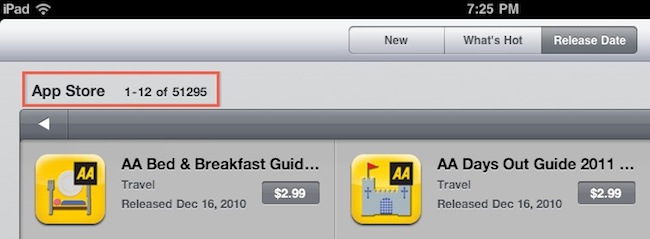
The iPad was released on April 3rd in the United States. That was 257 days ago. The iPad App Store, launched on the same day, now has over 50,000 apps. It’s got 51,295 apps to be exact, at the moment of writing this. It only took 8 months for Apple to reach this milestone, but it’s been kind of an unstoppable growth.

In the past months, in fact, we have seen how the iPad App Store was growing to accommodate more apps every month. 10,000 apps in June. 20,000 apps in August. Then, more than 40,000 apps only 24 days ago, when iOS 4.2 was released to the public. We can argue that the App Store (for iPad and iPhone) is increasingly becoming a place for games, rather than standard “apps”, but still – these are the numbers. And even if using and getting a device to fit in our daily lives has really nothing to do with numbers, this is an achievement Apple is going to rely on for months to come.

50,000 apps available for the iPad isn’t cool. You know what’s cool? Thinking about the Mac apps ready to go on sale in another App Store.

Access Extra Content and Perks

Founded in 2015, Club MacStories has delivered exclusive content every week for nearly a decade.

What started with weekly and monthly email newsletters has blossomed into a family of memberships designed for every MacStories fan.

Learn more here and from our Club FAQs.

Club MacStories: Weekly and monthly newsletters via email and the web that are brimming with apps, tips, automation workflows, longform writing, early access to the MacStories Unwind podcast, periodic giveaways, and more;

Club MacStories+: Everything that Club MacStories offers, plus an active Discord community, advanced search and custom RSS features for exploring the Club’s entire back catalog, bonus columns, and dozens of app discounts;

Club Premier: All of the above and AppStories+, an extended version of our flagship podcast that’s delivered early, ad-free, and in high-bitrate audio.

Learn more here and from our Club FAQs.


Acapella Group Rocks Out Madonna With iPads [Video]

Finnish acapella group Viisi got their hands (literally) on some iPads and thought it’d be nice to rock out some tunes with the tablets. After all, it’s not that the Internet hasn’t seen examples of Apple’s iDevices music before. The result, as you can guess, it’s pretty sweet.

The group made a cover of Madonna’s Material Girl using their voices to create harmonies (the main concept behind acapella performances) and ran a bunch of iPads as background instruments. I can spot a few pianos apps in there.

Check out the video below. [via TUAW]

Access Extra Content and Perks

Founded in 2015, Club MacStories has delivered exclusive content every week for nearly a decade.

What started with weekly and monthly email newsletters has blossomed into a family of memberships designed for every MacStories fan.

Learn more here and from our Club FAQs.

Club MacStories: Weekly and monthly newsletters via email and the web that are brimming with apps, tips, automation workflows, longform writing, early access to the MacStories Unwind podcast, periodic giveaways, and more;

Club MacStories+: Everything that Club MacStories offers, plus an active Discord community, advanced search and custom RSS features for exploring the Club’s entire back catalog, bonus columns, and dozens of app discounts;

Club Premier: All of the above and AppStories+, an extended version of our flagship podcast that’s delivered early, ad-free, and in high-bitrate audio.

Learn more here and from our Club FAQs.