Posts in Featured

New iPad 2 Ad: We Believe

But when technology gets out of the way, everything becomes more delightful.

What separates Apple from other companies can be summed up in a single quote. Apple isn’t a company that’s competing on specs, nor do they wish to win the gigahertz war. Quite simply, the answer to the tablet computer isn’t the ability to play Flash media or score the highest on a GPU benchmark. Apple understands that it’s how you use a tablet, and not what it is, that makes the iPad a very real Post-PC device. At the iPad 2 announcement, Steve Jobs said:

Technology married with liberal arts, humanities, yields the result that makes our hearts sing.

This video is a representation of just that. You can catch the video after the break.

[via YouTube]

Read more

Access Extra Content and Perks

Founded in 2015, Club MacStories has delivered exclusive content every week for nearly a decade.

What started with weekly and monthly email newsletters has blossomed into a family of memberships designed for every MacStories fan.

Learn more here and from our Club FAQs.

Club MacStories: Weekly and monthly newsletters via email and the web that are brimming with apps, tips, automation workflows, longform writing, early access to the MacStories Unwind podcast, periodic giveaways, and more;

Club MacStories+: Everything that Club MacStories offers, plus an active Discord community, advanced search and custom RSS features for exploring the Club’s entire back catalog, bonus columns, and dozens of app discounts;

Club Premier: All of the above and AppStories+, an extended version of our flagship podcast that’s delivered early, ad-free, and in high-bitrate audio.

Learn more here and from our Club FAQs.


Instadesk: The First Instagram Client for Mac

Thanks to Instagram’s huge success and the release of an API that allows third-party developers to plug into the service to fetch images, user information and much more, in the past weeks we’ve seen the quick rise of dedicated Instagram clients for iOS that don’t focus on shooting and uploading new images (the API doesn’t allow that, yet) but instead turn Instagram’s social aspect into a central part of the experience. Apps like Instagallery for iPad or the popular Flipboard make great use of Instagram’s API and third-party tools by letting you browse popular photos and read comments directly from the tablet’s larger screen; they also let you like and comment on pictures, see your own photos and profile or follow other people. Photo taking capabilities aside, these apps are proving that there’s a whole world of social interactions and media behind “a simple iPhone app” that deserves to be studied and implemented through native software for iPhones and iPad. Not to mention other clever experiments with the Instagram API we have covered on MacStories, such as printed photos and web apps.

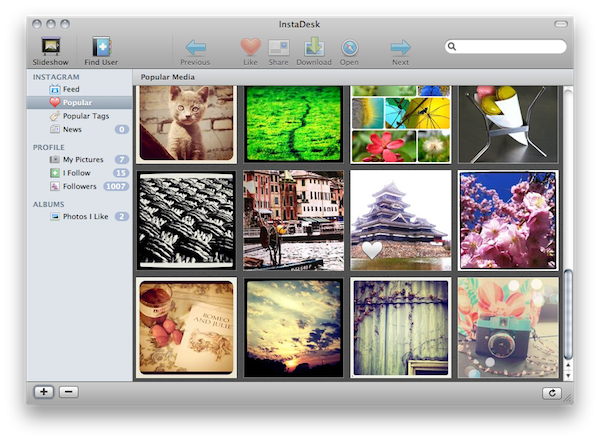
But what about the Mac? When you follow a link to an Instagram picture from, say, your Twitter client of choice, the photo will open into the web browser. Instagram’s website lets you see the photo at higher resolution and check out the author’s details, but there’s no “social backend” to browse photos and people just yet. Instadesk, a new app available in the Mac App Store, wants to bring Instagram’s full experience to the desktop. The app has a clean and nice design with thumbnail previews and beautiful icons in the top toolbar; it enables you to create local “albums” to save photos for later; it lets you share photos from you or others through a variety of social networks supported by Instagram.

Instadesk is a full-featured Instagram client built specifically for the Mac. Once you’ve authorized the app with your credentials and granted permission to access your account through the API, Instadesk will place a link to your profile in the sidebar, right below links to the feed, most popular photos and tags, and status updates. In the profile tab you can check out all your photos, people you follow and your followers. As you click on a thumbnail in Instadesk, the photo is automatically brought in the foreground with a slick animation and a new screen that shows the author on the right (with buttons to follow / unfollow) as well as comments and likes,  and a box to leave a new comment yourself. You can like a photo or open it in the web browser, download it locally on your computer or hit the Share button to share the instagr.am link with your Facebook friends, Twitter followers and email contacts.

The popular section offers a selection of the most viewed photos and tags, whilst the Feed displays items posted by you and the people you follow. Instadesk also comes with a slideshow functionality and a “find user” option to manually search for a person on Instagram.

Instadesk provides a nice way to browse Instagram from your Mac. At $1.99 in the Mac App Store, it’s not a bad deal if you’re a loyal (and addicted) Instagram user. More screenshots below. Read more

Access Extra Content and Perks

Founded in 2015, Club MacStories has delivered exclusive content every week for nearly a decade.

What started with weekly and monthly email newsletters has blossomed into a family of memberships designed for every MacStories fan.

Learn more here and from our Club FAQs.

Club MacStories: Weekly and monthly newsletters via email and the web that are brimming with apps, tips, automation workflows, longform writing, early access to the MacStories Unwind podcast, periodic giveaways, and more;

Club MacStories+: Everything that Club MacStories offers, plus an active Discord community, advanced search and custom RSS features for exploring the Club’s entire back catalog, bonus columns, and dozens of app discounts;

Club Premier: All of the above and AppStories+, an extended version of our flagship podcast that’s delivered early, ad-free, and in high-bitrate audio.

Learn more here and from our Club FAQs.


iPhone 5 To Feature 8-Megapixel Camera from Sony?

9to5mac reports Sony CEO Howard Stringer, in an interview with Walt Mossberg at Carnegie Hall in New York City, said shipments of camera sensors to Apple will be delayed due to Sony’s facility in Sendai that was affected by last month’s earthquake and tsunami. Stringer’s statements come as a surprise considering Sony has never been a supplier for Apple’s camera-enabled mobile devices (iPhone, iPad 2, iPod touch 4th gen) as the company chose to implement Omnivision’s image sensors in the past years. Omnivision’s lens modules are used in the iPhone 4 (5 megapixel sensor), iPod touch and iPad 2.

Stringer just said that their camera image sensor facility in Sendai was affected by the tsunami. Getting image sensors to Apple will be delayed.

MacRumors also points to a transcript of the interview by the Wall Street Journal itself, which seems to confirm Stringer’s hints at image sensors set to be shipped to Apple in the near future:

Early on, he raised the irony of Sony supplying camera components for Apple devices. It “always puzzles me,” he said. “Why would I make Apple the best camera?”

It is unclear what devices he was talking about as Sony isn’t known to supply key camera components, known as image sensors, to Apple; A Sony spokeswoman declined to comment and an Apple spokesperson couldn’t be reached for comment.

Following Stringer’s interview, speculation is running wild on the Internet about whether he was referring to a brand new Apple product still in early production stages, or a new version of the iPhone or iPad. A report from April of last year, however, provides more insight into Stringer’s mention of image sensor for Apple: analyst Ashok Kumar claimed that Apple had signed on with Sony for an 8-megapixel camera lens to be used in the “2011 iPhone” – which would be the iPhone 5 set to be announced sometime between summer and fall. The report from Kumar also correctly indicated that Omnivision would be the supplier of a 5-megapixel sensor for the iPhone that Jobs would announce at WWDC 2010 – indeed, the iPhone 4 with a 5 MP camera module from Omnivision. In the past months, several bloggers also speculated Apple could implement Omnivision’s new 16:9 CMOS image sensor in the iPhone 5, although the reports didn’t provide any additional details. The iPhone 5 is also rumored to feature a bigger screen, the same Apple A5 processor seen in the iPad 2, NFC capabilities and a new aluminum design with internal antenna.

Access Extra Content and Perks

Founded in 2015, Club MacStories has delivered exclusive content every week for nearly a decade.

What started with weekly and monthly email newsletters has blossomed into a family of memberships designed for every MacStories fan.

Learn more here and from our Club FAQs.

Club MacStories: Weekly and monthly newsletters via email and the web that are brimming with apps, tips, automation workflows, longform writing, early access to the MacStories Unwind podcast, periodic giveaways, and more;

Club MacStories+: Everything that Club MacStories offers, plus an active Discord community, advanced search and custom RSS features for exploring the Club’s entire back catalog, bonus columns, and dozens of app discounts;

Club Premier: All of the above and AppStories+, an extended version of our flagship podcast that’s delivered early, ad-free, and in high-bitrate audio.

Learn more here and from our Club FAQs.


dPad Is A Lightweight iPad HTML Editor for Bloggers

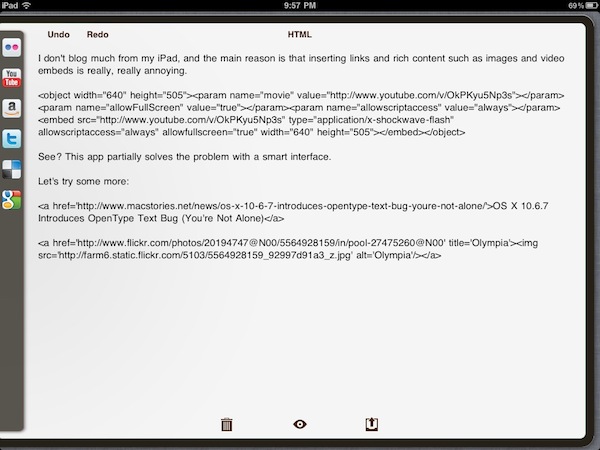
I haven’t written many blog entries from my iPad, and the main reason is that inserting links and rich content like images and video embeds can be really, really annoying on the tablet. No HTML editor for the iPad nailed it when it comes to offering an interface and a set of tools that allow bloggers to rely on the device as their main blogging machine; and especially if you write for blogs with several articles every day and you need to keep up at a fast pace, wasting time trying iPad apps is impossible. But I believe also those folks that post status updates and journal entries on their personal blogs must have noticed the iPad is far from being an ideal mobile blogging device, and the lack of dedicated apps is worrying. Sure, there are plenty of iOS text editors out there, even with advanced HTML and Markdown formatting capabilities; for bloggers like me, though, that is not enough. Either with WordPress, Movable Type, Drupal or a custom CMS you might be using on your blog, there are usually a lot of writing and management options to consider that most apps don’t support. The official WordPress app doesn’t even accept custom fields and many, many other things that millions of bloggers rely on every day. The situation is almost unacceptable, and I really don’t understand why – with more than 15 million iPads out there – someone hasn’t set out to create the ultimate iOS blogging app. I really don’t. Yet we keep hoping. Read more

Access Extra Content and Perks

Founded in 2015, Club MacStories has delivered exclusive content every week for nearly a decade.

What started with weekly and monthly email newsletters has blossomed into a family of memberships designed for every MacStories fan.

Learn more here and from our Club FAQs.

Club MacStories: Weekly and monthly newsletters via email and the web that are brimming with apps, tips, automation workflows, longform writing, early access to the MacStories Unwind podcast, periodic giveaways, and more;

Club MacStories+: Everything that Club MacStories offers, plus an active Discord community, advanced search and custom RSS features for exploring the Club’s entire back catalog, bonus columns, and dozens of app discounts;

Club Premier: All of the above and AppStories+, an extended version of our flagship podcast that’s delivered early, ad-free, and in high-bitrate audio.

Learn more here and from our Club FAQs.


GarageBand ‘11 For Mac Updated to 6.0.2

GarageBand ‘11 is getting an update this evening to 6.0.2, which now supports imported projects from GarageBand for the iPad alongside bug fixes and improved stability. The update is around 47 MB in size, and you can check Software Update or directly download the update from the support page listed below.

GarageBand 6.0.2: DL1345

Access Extra Content and Perks

Founded in 2015, Club MacStories has delivered exclusive content every week for nearly a decade.

What started with weekly and monthly email newsletters has blossomed into a family of memberships designed for every MacStories fan.

Learn more here and from our Club FAQs.

Club MacStories: Weekly and monthly newsletters via email and the web that are brimming with apps, tips, automation workflows, longform writing, early access to the MacStories Unwind podcast, periodic giveaways, and more;

Club MacStories+: Everything that Club MacStories offers, plus an active Discord community, advanced search and custom RSS features for exploring the Club’s entire back catalog, bonus columns, and dozens of app discounts;

Club Premier: All of the above and AppStories+, an extended version of our flagship podcast that’s delivered early, ad-free, and in high-bitrate audio.

Learn more here and from our Club FAQs.


Boxcar Beta for Mac Now Available

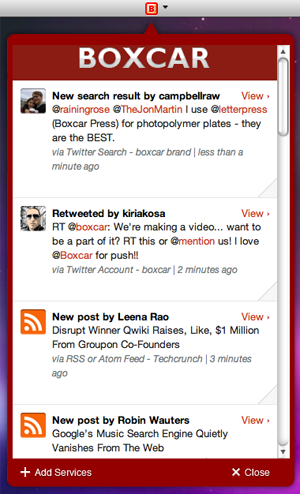
Popular notification service Boxcar is taking a huge step forward in delivering a continuous stream of updates and notifications to millions of users with the release of a desktop client, specifically built for the Mac. As reported by MG Siegler at TechCrunch, the Mac version of Boxcar follows the steps of the iOS and web apps: once logged in with your Boxcar account and configured the online services you’d like to keep an eye on, the app will sit in the background and “listen” for changes that interest you happening across Twitter, Facebook, RSS feeds, your Gmail account and more. As new things happen while you’re busy working or browsing the web on your computer, Boxcar will “push” a notification to your desktop alerting you of what’s new.

The Mac app sits in the menubar and has support for Growl, a customizable notification service Mac users know and love. One of the biggest advantages of Boxcar over its iOS competitors is the unified dashboard that gives you instant access to your favorite services with just a few taps; the iOS interface got lost in the transition to the Mac, with the developers adopting a cleaner and simpler list of notifications you can scroll with your trackpad. Of course, there are buttons to open notifications in the browser, but it’d be nice to have deeper integration with other native Mac apps such as the official Twitter one. This is a first beta anyway, so I guess more updates will come soon with features and enhancements. The Mac app has also an option to “mute” notifications.

The Boxcar beta for Mac is available as a free download here. More screenshots below. Read more

Access Extra Content and Perks

Founded in 2015, Club MacStories has delivered exclusive content every week for nearly a decade.

What started with weekly and monthly email newsletters has blossomed into a family of memberships designed for every MacStories fan.

Learn more here and from our Club FAQs.

Club MacStories: Weekly and monthly newsletters via email and the web that are brimming with apps, tips, automation workflows, longform writing, early access to the MacStories Unwind podcast, periodic giveaways, and more;

Club MacStories+: Everything that Club MacStories offers, plus an active Discord community, advanced search and custom RSS features for exploring the Club’s entire back catalog, bonus columns, and dozens of app discounts;

Club Premier: All of the above and AppStories+, an extended version of our flagship podcast that’s delivered early, ad-free, and in high-bitrate audio.

Learn more here and from our Club FAQs.


Apple Patent of the Day: Spaces for the iPad

PASpaces

PASpaces

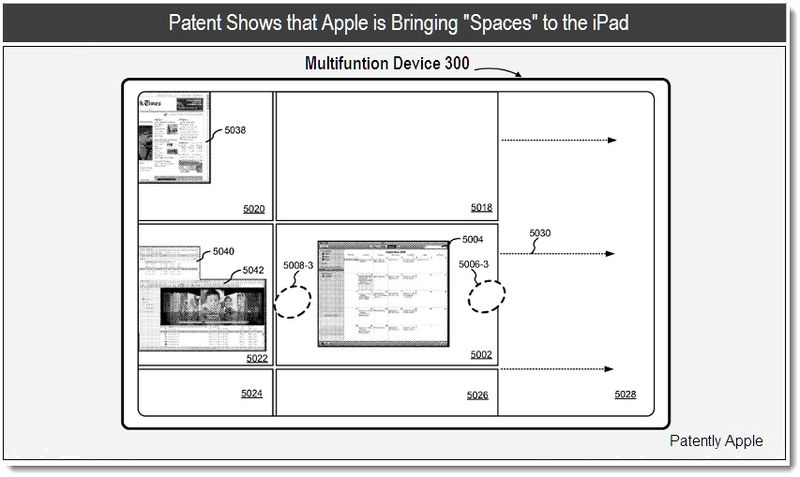
Spaces are crucial to my daily workflow on my MacBook (I never was a ⌘⇥ guy), and the prospect of using Spaces on my iPad as a virtual workspace is amusing. While Spaces will still exist in Lion alongside Mission Control, Spaces itself is sort of taking a backseat in terms of what we traditionally think of in Leopard and Snow Leopard.  The patent suggests that Apple has been toying with the idea of Spaces on the iPad – shown running a version of OS X in the patent files – and suggests that multitouch gestures could manipulate items on screen and bring Spaces into view. Just like the desktop, gestures have been submitted which give users the ability to push a window to an adjacent space by dragging applications to the edge of the screen, and to drag windows between virtual the virtual desktops. The gesture to open Spaces is noted as a pinching gesture at the corner of the display, a perfect choice in that it also mimics the hot corner features in OS X. The patent was filed in Q3 of 2009, and give us a little insight into how Apple may incorporate a new multitasking system in iOS. I don’t think the multitasking bar is as nimble as HP’s Card view when it comes to multitasking on webOS devices, and mulling over a patent like this reminds us that Apple may make some big changes in the next iteration of iOS.

[via Patently Apple]

Access Extra Content and Perks

Founded in 2015, Club MacStories has delivered exclusive content every week for nearly a decade.

What started with weekly and monthly email newsletters has blossomed into a family of memberships designed for every MacStories fan.

Learn more here and from our Club FAQs.

Club MacStories: Weekly and monthly newsletters via email and the web that are brimming with apps, tips, automation workflows, longform writing, early access to the MacStories Unwind podcast, periodic giveaways, and more;

Club MacStories+: Everything that Club MacStories offers, plus an active Discord community, advanced search and custom RSS features for exploring the Club’s entire back catalog, bonus columns, and dozens of app discounts;

Club Premier: All of the above and AppStories+, an extended version of our flagship podcast that’s delivered early, ad-free, and in high-bitrate audio.

Learn more here and from our Club FAQs.


Review: Take Five…For Mac!


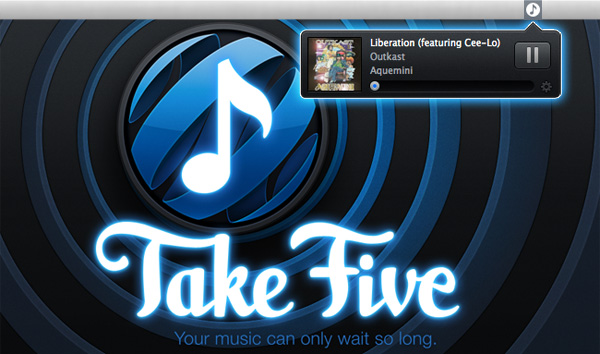
Now I will admit, I never bought Iconfactory’s Take Five for iOS. Don’t get me wrong it’s a beautiful app but I didn’t see myself using it that much on my iPhone. I’m so use to just using the volume controls or multitasking tray. The point of the app makes a lot of sense though: it’s aimed at letting you restart music that you paused and forgot to turn back on. I received an email a few weeks ago with the subject “Take Five for the Mac Beta,” I knew right away that this would fit into my workflow on my iMac because I get more sidetracked at home with my wife, kids and the television. So now when I want to pause music, I use Take Five for the Mac. Read more

Access Extra Content and Perks

Founded in 2015, Club MacStories has delivered exclusive content every week for nearly a decade.

What started with weekly and monthly email newsletters has blossomed into a family of memberships designed for every MacStories fan.

Learn more here and from our Club FAQs.

Club MacStories: Weekly and monthly newsletters via email and the web that are brimming with apps, tips, automation workflows, longform writing, early access to the MacStories Unwind podcast, periodic giveaways, and more;

Club MacStories+: Everything that Club MacStories offers, plus an active Discord community, advanced search and custom RSS features for exploring the Club’s entire back catalog, bonus columns, and dozens of app discounts;

Club Premier: All of the above and AppStories+, an extended version of our flagship podcast that’s delivered early, ad-free, and in high-bitrate audio.

Learn more here and from our Club FAQs.


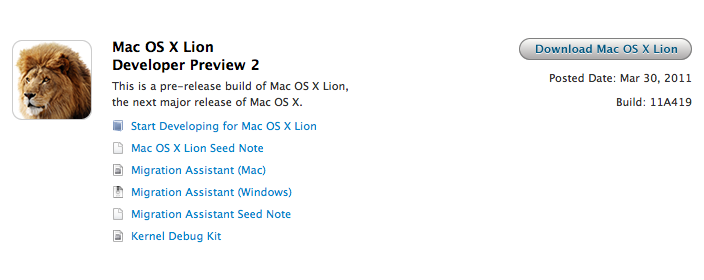
Apple Posts Mac OS X Lion Developer Preview 2

Following a brief fix in Software Update, here comes a new build of OS X Lion. It’s available now in the Mac Dev Center. Build number is 11A419. Once again, the new Developer Preview must be downloaded through the Mac App Store via a redeem code. It’s worth noting that OS X Lion Server has been posted as a separate build this time:

To install the Lion Developer Preview, you’ll need 10.6.7 or the previous developer preview which, again, needs to be updated in Software Update. For those who will need to pause their download from the Mac App Store and resume it, Apple says in the FAQ section:

If you need to interrupt your download for any reason, including changing the network you are connected to or traveling to a new location, ensure that you first Pause your download under the Purchases tab in Mac App Store. After you re-establish your connection, you may Resume your download under the Purchases tab.

While TechCrunch reported a few days ago that Apple would soon release a “GM” version of Lion to developers, it clearly appears that Lion still needs a few more updates before being ready for the golden master status. Several bloggers are speculating that a GM version will actually be released at the WWDC, which will kick off in San Francisco on June 6th.

Changes in the Lion Developer Preview 2 are still unknown. We’ll update this post as we gather more details.

TechCrunch now follows up to their previous report with details on today’s build:

More importantly, this is the build that Apple is considering to be a “GM1″ revision internally, we hear. And yes, it’s said to be much more stable and complete than the previous build.

Having said that, it’s unlikely that this will be the actual “Golden Master” copy. We’re still a solid two months away from Apple’s WWDC event where Lion will be a key area of focus. Apple may attempt to launch Lion there, but more likely is that the release candidates is handed out to developers there.


Access Extra Content and Perks

Founded in 2015, Club MacStories has delivered exclusive content every week for nearly a decade.

What started with weekly and monthly email newsletters has blossomed into a family of memberships designed for every MacStories fan.

Learn more here and from our Club FAQs.

Club MacStories: Weekly and monthly newsletters via email and the web that are brimming with apps, tips, automation workflows, longform writing, early access to the MacStories Unwind podcast, periodic giveaways, and more;

Club MacStories+: Everything that Club MacStories offers, plus an active Discord community, advanced search and custom RSS features for exploring the Club’s entire back catalog, bonus columns, and dozens of app discounts;

Club Premier: All of the above and AppStories+, an extended version of our flagship podcast that’s delivered early, ad-free, and in high-bitrate audio.

Learn more here and from our Club FAQs.