Posts in Featured

iOS 4.3.2 Coming In Two Weeks?

BGR reports this morning that Apple is looking to launch another version of iOS 4.3 within two weeks. The update, labelled iOS 4.3.2, should contain various fixes and enhancements, address security issues (quite possibly a jailbreak fix) and it “will also fix several bugs that have affected users.”

On March 21st, BGR reported iOS 4.3.1 would be released within “one or two weeks”, and the OS was released on Friday, March 25th. If BGR’s track record is of any indication, there is the small chance to see iOS 4.3.2 becoming available next week if Apple really wants to close security holes and fix bugs quickly. In the past weeks, several users running iOS 4.3.1 reported bugs in the FaceTime application for iPad and iPhone, WiFi connectivity issues after the 4.3.1 upgrade and other minor glitches in the Camera app.

Access Extra Content and Perks

Founded in 2015, Club MacStories has delivered exclusive content every week for nearly a decade.

What started with weekly and monthly email newsletters has blossomed into a family of memberships designed for every MacStories fan.

Learn more here and from our Club FAQs.

Club MacStories: Weekly and monthly newsletters via email and the web that are brimming with apps, tips, automation workflows, longform writing, early access to the MacStories Unwind podcast, periodic giveaways, and more;

Club MacStories+: Everything that Club MacStories offers, plus an active Discord community, advanced search and custom RSS features for exploring the Club’s entire back catalog, bonus columns, and dozens of app discounts;

Club Premier: All of the above and AppStories+, an extended version of our flagship podcast that’s delivered early, ad-free, and in high-bitrate audio.

Learn more here and from our Club FAQs.


With The Latest Update, Cloud Connect Becomes A Finder for iPhone

Back in January when I reviewed Antacea’s Cloud Connect Pro, I called the app “a Finder for the iPad” thanks to its large set of functionalities that allowed users to easily connect to computers, AirPort stations, shared drives and a variety of services / machines with a few taps. The app didn’t exactly sport a beautiful user interface (the developers are still working on improving this aspect), but it was already a full-fledged solution to put most of the features of the Mac’s Finder into the tablet’s screen: copy and paste actions, sorting options, media streaming, column-based folder navigation were there in the first release. Of all the apps to locally or remotely connect to a computer (SMB, FTP, SFTP protocols are supported, as well as VNC and RDP for screensharing) I’ve tried over the past years, Cloud Connect Pro was, in spite of graphic elements that could have been better, the most powerful way to put a computer or online services like Dropbox in your hands. And with the latest 2.0 update, this is now possible on the iPhone too.

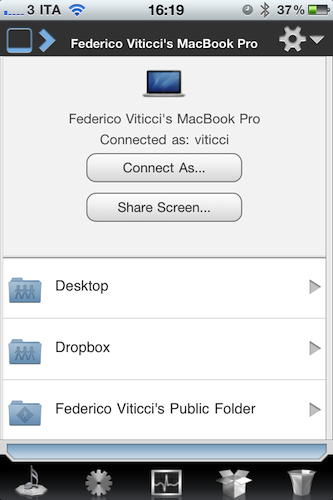
Cloud Connect Pro has gone universal with the update released on April 1st, and the iPhone version is nothing but the iPad app on a smaller screen with tweaked navigation to please your thumbs. It’s got the same features of the iPad client: iDisk and Dropbox remote access, Google Docs / Box.net support, FTP / SFTP / WebDAV / Apple File Sharing and SMB authentication. Plus screensharing functionalities that turn the app into a simple VNC client. Not to mention automatic discovery of computers on your local network, different login options as Guest or Administrator, copy & paste support, local downloads and much more. All the features I mentioned here have been implemented on the iPhone, basically. Of course you can’t see multiple columns at once when browsing a computer, but you can move back and forward between folders with a single swipe. A button in the upper left corner takes you back to the main screen that lists all your servers and desktop machines. Feature-wise, Cloud Connect Pro blows most of its competitors out of the water.

The 2.0 update also brings support for multitasking (finally), which now allows you to stream music in the background even when not using the app. At $24.99 in the App Store Cloud Connect Pro doesn’t come cheap, but it’s packed with features that will enable you to connect to your computers, services and shared drives directly from an iOS device. More screenshots below. Read more

Access Extra Content and Perks

Founded in 2015, Club MacStories has delivered exclusive content every week for nearly a decade.

What started with weekly and monthly email newsletters has blossomed into a family of memberships designed for every MacStories fan.

Learn more here and from our Club FAQs.

Club MacStories: Weekly and monthly newsletters via email and the web that are brimming with apps, tips, automation workflows, longform writing, early access to the MacStories Unwind podcast, periodic giveaways, and more;

Club MacStories+: Everything that Club MacStories offers, plus an active Discord community, advanced search and custom RSS features for exploring the Club’s entire back catalog, bonus columns, and dozens of app discounts;

Club Premier: All of the above and AppStories+, an extended version of our flagship podcast that’s delivered early, ad-free, and in high-bitrate audio.

Learn more here and from our Club FAQs.


Giveaway: Be Distraction Free With Byword for Mac

You wouldn’t want your fingers to glide across the keyboard to type in just any regular text-editor. Ladies and gentlemen, you deserve nothing but class and a distraction free environment that helps you focus on the text and nothing more, or nothing less. Byword for the Mac from the folks @metaclassy is a bite-sized text editor that packs a big punch in the downright-beautiful department. In your choice of a shell white for an afternoon scrawl or an alternate dark theme for evening pondering, Byword contains five typography presets for plain or rich text editing that when combined with contextual formatting presets create a pleasurable typing experience for your sensitive neural inputs. Out of love for writing, Byword helps improve text legibility by implementing text substitutions for Smart Quotes, Smart Dashes, and a user friendly interface that simply disappears as your fingers strike the keys. Reviewed at the onset of March and now at version 1.1 in the App Store, Byword is available for a small expense of $4.99.

We’re giving away five copies of Byword to our MacStorian authors who frequent our site for the latest in Mac apps, and we’d be remiss if we didn’t offer you the opportunity to put away your thoughts in this beautiful text writer. The giveaway rules can be had after the break.

Read more

Access Extra Content and Perks

Founded in 2015, Club MacStories has delivered exclusive content every week for nearly a decade.

What started with weekly and monthly email newsletters has blossomed into a family of memberships designed for every MacStories fan.

Learn more here and from our Club FAQs.

Club MacStories: Weekly and monthly newsletters via email and the web that are brimming with apps, tips, automation workflows, longform writing, early access to the MacStories Unwind podcast, periodic giveaways, and more;

Club MacStories+: Everything that Club MacStories offers, plus an active Discord community, advanced search and custom RSS features for exploring the Club’s entire back catalog, bonus columns, and dozens of app discounts;

Club Premier: All of the above and AppStories+, an extended version of our flagship podcast that’s delivered early, ad-free, and in high-bitrate audio.

Learn more here and from our Club FAQs.


Apple Launches Free App To Browse iAds

Released a few minutes ago in the App Store, iAd Gallery is a new iPhone app developed by Apple and aimed at showcasing the best iAd campaigns that landed on iOS in the past weeks. The app collects several iAds for iPhone, you can browse by advertiser, category or ad feature thanks to a spinning wheel that lets you easily jumo through ads and select the ones you want to “watch”. You can also learn more about the advertising agencies behind a campaign, and check out the latest ads from the iAd network. You can also “love” specific iAd campaigns and access them at any time from the Loved tab in the bottom toolbar.

The iAd Gallery is a celebration of advertising, featuring iAd campaigns from some of the world’s best brands and their advertising agencies. The iAd Gallery gives you easy access to a selection of the fun and informative ads that have run in some of your favorite apps. Use the Browse feature to discover ads you haven’t seen, or to find those you want to see again. Even lets you tag your favorites to a Loved section that’s all your own.

From a first quick test, it appears that the app takes a few seconds to load the initial gallery (even on a fast WiFi network), but once loaded everything is quite responsive. Browsing through ads in the wheel feels smooth and fast; in the More section, you can contact the iAd team to ask for more info about joining the network. Clearly this is an app meant for media and business to showcase the capabilities of iAds, and perhaps also educate App Store users about the interactivity of Apple’s ad platform. We’re not sure what kind of message Apple is sending to advertisers here, and if the impressions generated in this app account for the iAd campaign itself. It is worth nothing, though, that Apple recently cut the minimum iAd buy in half to $500,000 from the previous $1 million, and a released a desktop tool called iAd Producer to simplify the creation of iAds for designers and developers. Advertisers claimed that iAd wasn’t off to a happy start at all after the initial hype, although we’re hearing iAd revenue for iOS devs has seen a huge rise in the past three weeks. Apple also rolled out fullscreen iAds for the iPad.

You can find iAd Gallery here. More screenshots below. Read more
Access Extra Content and Perks

Founded in 2015, Club MacStories has delivered exclusive content every week for nearly a decade.

What started with weekly and monthly email newsletters has blossomed into a family of memberships designed for every MacStories fan.

Learn more here and from our Club FAQs.

Club MacStories: Weekly and monthly newsletters via email and the web that are brimming with apps, tips, automation workflows, longform writing, early access to the MacStories Unwind podcast, periodic giveaways, and more;

Club MacStories+: Everything that Club MacStories offers, plus an active Discord community, advanced search and custom RSS features for exploring the Club’s entire back catalog, bonus columns, and dozens of app discounts;

Club Premier: All of the above and AppStories+, an extended version of our flagship podcast that’s delivered early, ad-free, and in high-bitrate audio.

Learn more here and from our Club FAQs.


nvALT 2.0 Launches with (Multi)Markdown, HTML/CSS Template Support

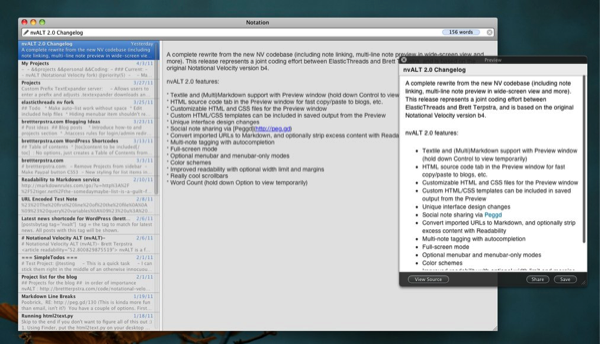
Notational Velocity is a huge productivity tool for keep tracking of internal notes with tags and content linking, and followers of Brett Terpstra are probably already big fans of the nvALT project that’s designed to add power-user friendly features to a favorite text client. With help from ElasticThreads, nvALT 2.0 has been released which highlights lots of killer features that can be added to Notational Velocity. I’ve listed just a few below (I encourage you to check out Brett’s site and the project page) for a quick taste of what nvALT 2.0 has to offer.

  • Textile and (Multi)Markdown support with Preview window (hold down Control to view temporarily)
  • Custom HTML/CSS templates can be included in saved output from the Preview
  • Convert imported URLs to Markdown, and optionally strip excess content with Readability
  • Word Count (hold down Option to view temporarily)
  • Full-screen mode

As a fork of Notional Velocity, nvALT is a keyboard-focused text editor that’s being improved to deliver rich features that writers such as myself rely on to get things done, take notes, and quickly exit ideas from my brain box. If you’re already familiar with Notational Velocity, it works with Simplenote on your favorite iOS device, and it can be extended thanks to the great nvALT project Brett and other volunteers are working on. It doesn’t replace Notational Velocity, but runs alongside it with it’s own set of preferences and additional features.

[via Brett Terpstra]

Access Extra Content and Perks

Founded in 2015, Club MacStories has delivered exclusive content every week for nearly a decade.

What started with weekly and monthly email newsletters has blossomed into a family of memberships designed for every MacStories fan.

Learn more here and from our Club FAQs.

Club MacStories: Weekly and monthly newsletters via email and the web that are brimming with apps, tips, automation workflows, longform writing, early access to the MacStories Unwind podcast, periodic giveaways, and more;

Club MacStories+: Everything that Club MacStories offers, plus an active Discord community, advanced search and custom RSS features for exploring the Club’s entire back catalog, bonus columns, and dozens of app discounts;

Club Premier: All of the above and AppStories+, an extended version of our flagship podcast that’s delivered early, ad-free, and in high-bitrate audio.

Learn more here and from our Club FAQs.


Review: Mr. Reader Takes On Reeder For King of iPad RSS Apps

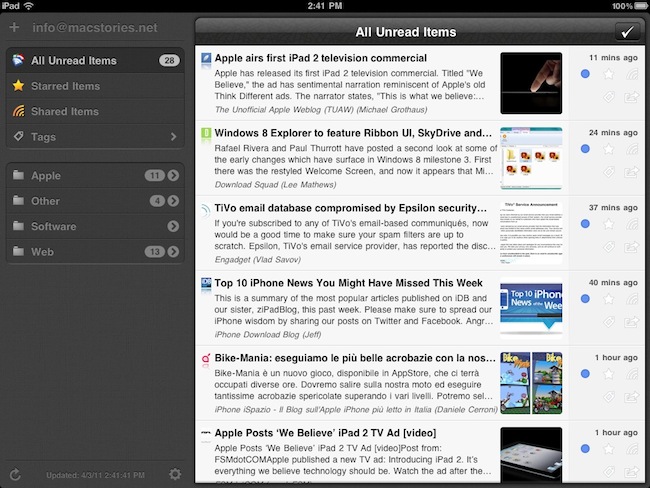
I read a lot on my iPad. Either with Instapaper, Read It Later, Flipboard or iBooks, there’s lots of content to consume and these apps made specifically for the tablet are a real pleasure to use. I don’t reckon I read as many articles saved from the web or discovered through social media on the iPhone as much as I do on the iPad. But of course, Instapaper and Twitter aside, there’s another category of apps I’m constantly going back to: RSS readers. Both for work and personal purposes, RSS plays a huge role in my workflow that requires me to stay on top of news, save items for later, and forward them to my colleagues. Google Reader is my RSS service of choice.

On the iPad, there’s no doubt Silvio Rizzi’s Reeder has become the most popular RSS app currently available on the App Store. I love Reeder, and I use it on the Mac and iPhone as well. Reeder is beautiful, fast, stable, has lots of options and syncs with Google Reader. Ever since it came out on the iPad last year, I haven’t looked back. But you know I’m always curious to try out new things and alternatives, because you never know what might be coming out from the minds (and Xcodes) of thousands of iOS developers out there. Mr. Reader, an iPad app released last week in the App Store, is a new Google Reader client that I’ve been testing for the past 3 weeks. I was impressed by the quality of the app, so I took it for a spin on my homescreen. Read more

Access Extra Content and Perks

Founded in 2015, Club MacStories has delivered exclusive content every week for nearly a decade.

What started with weekly and monthly email newsletters has blossomed into a family of memberships designed for every MacStories fan.

Learn more here and from our Club FAQs.

Club MacStories: Weekly and monthly newsletters via email and the web that are brimming with apps, tips, automation workflows, longform writing, early access to the MacStories Unwind podcast, periodic giveaways, and more;

Club MacStories+: Everything that Club MacStories offers, plus an active Discord community, advanced search and custom RSS features for exploring the Club’s entire back catalog, bonus columns, and dozens of app discounts;

Club Premier: All of the above and AppStories+, an extended version of our flagship podcast that’s delivered early, ad-free, and in high-bitrate audio.

Learn more here and from our Club FAQs.


Enable Display Mirroring On The iPad 1

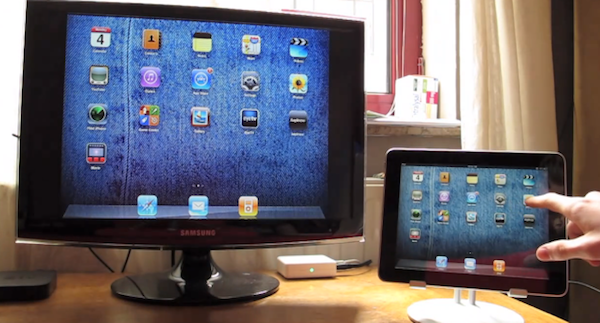
One of the most interesting features of the iPad 2 (cameras and thinner design aside) is the possibility to activate video mirroring: thanks to Apple’s Digital AV Adapter or VGA Adapter, any app on your iPad 2 can be mirrored on the television’s bigger screen with just an additional cable and no setup required. It works out of the box – meaning all your apps, presentations and websites can be sent off to a monitor that supports HDMI or VGA. This has been touted as one great functionality of the iPad 2 especially among teachers and people who always wished to mirror the iPad’s display to an external monitor during business meetings.

Unfortunately, the feature is “officially” iPad 2-only – but thanks to a jailbreak hack it is now possible to enable system-wide display mirroring on the original iPad with a few easy steps. As detailed by Nature’s Eye Studios, you’ll need a jailbroken iPad 1 running iOS 4.3 to modify some system files and activate video mirroring. This can be easily achieved with the latest redsn0w that brought untethered 4.3.1 jailbreak last night. Read more

Access Extra Content and Perks

Founded in 2015, Club MacStories has delivered exclusive content every week for nearly a decade.

What started with weekly and monthly email newsletters has blossomed into a family of memberships designed for every MacStories fan.

Learn more here and from our Club FAQs.

Club MacStories: Weekly and monthly newsletters via email and the web that are brimming with apps, tips, automation workflows, longform writing, early access to the MacStories Unwind podcast, periodic giveaways, and more;

Club MacStories+: Everything that Club MacStories offers, plus an active Discord community, advanced search and custom RSS features for exploring the Club’s entire back catalog, bonus columns, and dozens of app discounts;

Club Premier: All of the above and AppStories+, an extended version of our flagship podcast that’s delivered early, ad-free, and in high-bitrate audio.

Learn more here and from our Club FAQs.


redsn0w Untethered Jailbreak Now Available For iOS 4.3.1

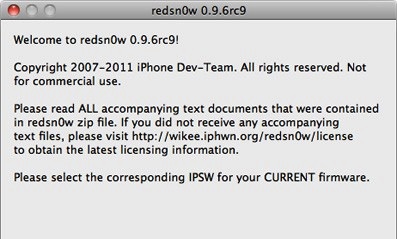
The Dev-Team today released version 0.9.6rc9 of their jailbreaking tool redsn0w, which jailbreaks all iOS devices running 4.3.1 - except for the iPad 2. So effectively that includes the iPhone 4 (GSM), iPhone 3GS, iPod Touch 4G, iPod Touch 3G, iPad 1 and the Apple TV 2G (PwnageTool only). However if you depend on ultrasn0w you must wait until there’s a compatibility fix, which is currently in the works.

The key (untethered) exploit is all thanks to Stefan Esser (@i0n1c) who is a security researcher in Germany that is experienced in vulnerability research. He was previously known in the iPhone jailbreak community for his “antid0te” framework which actually improved security by adding ASLR support for jailbroken iPhones, and before Apple had even implemented it. Needless to say the Dev-Team is pleased to see Stefan help them with jailbreak exploits.

As for the iPad 2, Apple unfortunately patched the two bootrom exploits that the Dev-Team had ready (SHAtter and limera1n) and so until a new one is found, no untethered jailbreak can be developed.

You can download this latest edition of redsn0w for either Windows or Mac. You can also get the latest PwnageTool (Mac only) here, and the latest edition of sn0wbreeze (Windows only) here.


Access Extra Content and Perks

Founded in 2015, Club MacStories has delivered exclusive content every week for nearly a decade.

What started with weekly and monthly email newsletters has blossomed into a family of memberships designed for every MacStories fan.

Learn more here and from our Club FAQs.

Club MacStories: Weekly and monthly newsletters via email and the web that are brimming with apps, tips, automation workflows, longform writing, early access to the MacStories Unwind podcast, periodic giveaways, and more;

Club MacStories+: Everything that Club MacStories offers, plus an active Discord community, advanced search and custom RSS features for exploring the Club’s entire back catalog, bonus columns, and dozens of app discounts;

Club Premier: All of the above and AppStories+, an extended version of our flagship podcast that’s delivered early, ad-free, and in high-bitrate audio.

Learn more here and from our Club FAQs.


Happy Birthday, iPad!

One year ago today, the original iPad went on sale in the United States. It was 365 days ago, and we really didn’t know what to expect from the “magical device” Steve Jobs unveiled on stage roughly two months before, at a special event on January 27th. We just knew that Apple was up to something, and we needed to check out this “new thing”. Then many of us realized an Apple tablet was exactly what they had been looking for: smaller than a laptop but bigger than a smartphone, the iPad was meant to create a new market for all those who didn’t need a physical keyboard anymore, for all those who wanted the simplicity of iOS on a large multitouch screen, for all those who believed technology wasn’t just about the RAM and Gigahertz. That was April 3, 2010.

One year later, the iPad has been a terrific commercial success for Apple. More than 15 million copies sold, over 75,000 native apps available in the App Store, long lines around the globe to get the chance of buying an iPad 2. The iPad has become an iconic device in 12 months; and for those who believe, it’s become more than a simple piece of glass and aluminum. One year of iPad has changed everything for Apple, and the millions of consumers who get things done with it every day. The doctors, the journalists, the school teachers, the students, the writers and the sports fans. A single device with simple hardware features (touch, large screen, thin design) has proved that apps and a well-designed operating system can make a huge difference. And one year later, I still have the feeling we’re just getting started.

So happy birthday, iPad. It’s been a year already, but we know the best has yet to come.
Read more

Access Extra Content and Perks

Founded in 2015, Club MacStories has delivered exclusive content every week for nearly a decade.

What started with weekly and monthly email newsletters has blossomed into a family of memberships designed for every MacStories fan.

Learn more here and from our Club FAQs.

Club MacStories: Weekly and monthly newsletters via email and the web that are brimming with apps, tips, automation workflows, longform writing, early access to the MacStories Unwind podcast, periodic giveaways, and more;

Club MacStories+: Everything that Club MacStories offers, plus an active Discord community, advanced search and custom RSS features for exploring the Club’s entire back catalog, bonus columns, and dozens of app discounts;

Club Premier: All of the above and AppStories+, an extended version of our flagship podcast that’s delivered early, ad-free, and in high-bitrate audio.

Learn more here and from our Club FAQs.