Posts in Featured

Apple Stops Serving iAds In Apps Targeted To Kids

Since its introduction last year, Apple’s iAd advertising network has been off to a somehow rough start: touted as the best way for advertisers to build interactive campaigns to deliver effortlessly to iOS users, the service was repeatedly criticized by advertisers and ad agencies due to Apple’s strict design requirements and control, expensive minimum buy and low fill rates compared to Google’s AdMob network. In the past months, Apple tried to address several issues reported by iAd’s initial partners: they released a desktop tool to design iAds visually on a Mac, they cut the minimum buy in half from $1 million to $500,000, and rolled out fullscreen ads with even more interactivity on the iPad. They updated the official iAd website to display more information and details, and released an iPhone app entirely focused on showcasing experiences built for the iAd network.

A change in the way Apple chooses the apps that can display iAds, however, might cause a little bit of confusion among developers that, until now, have relied on iAds as the sole source of income for their free apps. Mike Zornek, developer of the free Dex app for iPhone and iPod touch (a Pokèmon browser application), relays an email from the iAd Network Support team in which an Apple employee explains how iAds may not be displayed anymore in apps targeted to “young children” because of the advertisers’ preference to not show ads to this particular audience. Read more

Access Extra Content and Perks

Founded in 2015, Club MacStories has delivered exclusive content every week for nearly a decade.

What started with weekly and monthly email newsletters has blossomed into a family of memberships designed for every MacStories fan.

Learn more here and from our Club FAQs.

Club MacStories: Weekly and monthly newsletters via email and the web that are brimming with apps, tips, automation workflows, longform writing, early access to the MacStories Unwind podcast, periodic giveaways, and more;

Club MacStories+: Everything that Club MacStories offers, plus an active Discord community, advanced search and custom RSS features for exploring the Club’s entire back catalog, bonus columns, and dozens of app discounts;

Club Premier: All of the above and AppStories+, an extended version of our flagship podcast that’s delivered early, ad-free, and in high-bitrate audio.

Learn more here and from our Club FAQs.


IM+ 5 Updates to 5.0 With Neighbors Location Service

ShapeService’s popular instant messaging app for iOS, IM+, has updated to version 5.0 today bringing a neighbors location service for chatting with friends and persons in your vicinity. IM+’s new Neighbor enables persons to find friends and chat with people whom have similar interests nearby. It isn’t too dissimilar from something like Google Buzz, with the exception that your location can be tightly controlled by exact, approximate, or city based positioning accuracy. While I see a service such as this being useful for natural disasters or emergencies, Neighbors is advertised as a way to initiate conversations, make new friends, and find people of interest using the IM+ service in your local city. Merchants looking for an alternative to Craigslist may find great use in Neighbors, updating their status to include products being sold while giving them the opportunity to talk with customers in real time. Friends and neighbors are displayed on a map with their respective avatar, giving users an overview of those that are nearby.

Version 5.0 also includes the ability to delete your account history, fixes numerous bugs, and includes some visual tweaks to the service icons. IM+ has long been known as the instant messaging client that does it all on the iPad and iPhone, and is available for free on the App Store or you can pick up the Pro version for $9.99 as a universal app.

Access Extra Content and Perks

Founded in 2015, Club MacStories has delivered exclusive content every week for nearly a decade.

What started with weekly and monthly email newsletters has blossomed into a family of memberships designed for every MacStories fan.

Learn more here and from our Club FAQs.

Club MacStories: Weekly and monthly newsletters via email and the web that are brimming with apps, tips, automation workflows, longform writing, early access to the MacStories Unwind podcast, periodic giveaways, and more;

Club MacStories+: Everything that Club MacStories offers, plus an active Discord community, advanced search and custom RSS features for exploring the Club’s entire back catalog, bonus columns, and dozens of app discounts;

Club Premier: All of the above and AppStories+, an extended version of our flagship podcast that’s delivered early, ad-free, and in high-bitrate audio.

Learn more here and from our Club FAQs.


Carousel Is A Beautiful Instagram Client for Mac

Back in April we covered Instadesk, the first Instagram client for Mac that, through an interface design similar to iTunes and iPhoto, allowed you to browse Instagram photos, users, likes and comments directly from your desktop. The app was one of the thousands of results coming from the launch of the Instagram API, a set of tools that enable third-party developers to plug into your Instagram feed to retrieve photos uploaded by you or relevant to you. Of all the Instagram-connected apps we’ve covered, Instadesk saw a huge success as it was the first one to land on the Mac App Store.

Carousel, however, wants to step the game up by offering a beautiful and slick way to access Instagram from your Mac with a design that’s heavily inspired by iOS, yet runs natively on OS X. I don’t know if the developers are using the Iconfactory’s Chameleon framework for this, but it certainly looks like Carousel has some similarities with Twitterrific – the Twitter client from the Iconfactory that shares it codebase across the Mac, iPhone and iPad. So what’s this all about? First off, Carousel presents a minimal, vertical-oriented interface as if you were looking at your iPhone’s screen in portrait mode while browsing Instagram. The photo stream is embedded directly into the app’s window, with beautiful Instagram photos to flick through as they load. At the bottom, three tabs allow you to switch between your feed, popular photos and your profile. Every photo can be enlarged via Quick Look, saved locally on your Mac, or commented / liked thanks to a wide selection of keyboard shortcuts to choose from.

In Carousel, you can open every user’s profile to check out their photos. You can comment and like pictures, too, with interaction happening inside an iOS-like popover that resembles Twitterrific’s implementation of conversation views and profiles. You can even view if a user’s following you, or if you’re following him. Last, the app can be themed. Carousel’s default theme is already gorgeous in my opinion, but you can switch to a classic Mac or red one from the Settings.

Carousel can be downloaded for free, or you can purchase a license at $4.99 (introductory price) from the developer’s website. More screenshots below. Read more

Access Extra Content and Perks

Founded in 2015, Club MacStories has delivered exclusive content every week for nearly a decade.

What started with weekly and monthly email newsletters has blossomed into a family of memberships designed for every MacStories fan.

Learn more here and from our Club FAQs.

Club MacStories: Weekly and monthly newsletters via email and the web that are brimming with apps, tips, automation workflows, longform writing, early access to the MacStories Unwind podcast, periodic giveaways, and more;

Club MacStories+: Everything that Club MacStories offers, plus an active Discord community, advanced search and custom RSS features for exploring the Club’s entire back catalog, bonus columns, and dozens of app discounts;

Club Premier: All of the above and AppStories+, an extended version of our flagship podcast that’s delivered early, ad-free, and in high-bitrate audio.

Learn more here and from our Club FAQs.


Adobe Finally Releases Its Photoshop Touch SDK iPad Apps

It was supposed to happen last week, but today Adobe finally released its three iPad apps that use the Photoshop Touch SDK. The three apps, including Adobe Eazel, Adobe Nav, Adobe Color Lava, were built be Adobe to demonstrate the potential of the Photoshop SDK for creating powerful companion apps for mobile devices from the iPad and iPhone to Android and BlackBerry. See below for brief descriptions of each of the three apps and if you want more information be sure to check out our original coverage of the apps and the Photoshop Touch SDK. Screenshots are included after the break.

Adobe Color Lava ($2.99) is a simple utility that allows you to mix colors, organize and save palettes and color groups to send to Photoshop wirelessly. Upon sending a palette to Photoshop, you’ll be able to see details on the colors you mixed, and send via email to someone else if you don’t want to share colors with your local Photoshop installation. The colors will appear in the Swatches panel of desktop Photoshop.

Adobe Eazel ($4.99) is perhaps the most innovative app of the initial rollout, as it features some interesting multitouch controls and menu choices I haven’t seen in any other iPad app before. Eazel is a drawing app, but instead of placing controls for brush sizes, colors, or opacity in dedicated toolbars, Adobe decided to develop a “five-finger touch UI” that takes a bit of learning, but it’s actually pretty clever once you get used to it. Basically, controls are placed above each finger, through a series of overlays that you can interact with using your fingertips after selecting an item. Sounds more complex than it really is, at least after some practice. When you’re done painting, you can send your creation to Photoshop and keep editing or refining there.

Last, Adobe Nav ($1.99) is the app we believe will be most successful among Photoshop users, as it drives the application’s UI remotely and allows you to see open documents on the iPad’s screen. Most of Photoshop’s tools and palettes are displayed on the iPad’s screen as bigger buttons meant for touch interactions, enabling you to select and modify the controls that you see on the desktop. There’s no doubt Nav will be tested by many as a complete replacement for Photoshop’s on-screen controls, which may get a little obtrusive on smaller portable computers. Alternatively, you can also browse open documents in Nav and instantly change the file you’re working with in Photoshop for Mac or Windows.

Adobe’s new iPad apps are available for download on the company’s App Store developer page. Check out the official promo videos and screenshots after the break.
Read more

Access Extra Content and Perks

Founded in 2015, Club MacStories has delivered exclusive content every week for nearly a decade.

What started with weekly and monthly email newsletters has blossomed into a family of memberships designed for every MacStories fan.

Learn more here and from our Club FAQs.

Club MacStories: Weekly and monthly newsletters via email and the web that are brimming with apps, tips, automation workflows, longform writing, early access to the MacStories Unwind podcast, periodic giveaways, and more;

Club MacStories+: Everything that Club MacStories offers, plus an active Discord community, advanced search and custom RSS features for exploring the Club’s entire back catalog, bonus columns, and dozens of app discounts;

Club Premier: All of the above and AppStories+, an extended version of our flagship podcast that’s delivered early, ad-free, and in high-bitrate audio.

Learn more here and from our Club FAQs.


Duke Nukem Forever Also Coming To iOS?

As noted by TouchArcade, popular yet never released console and PC game Duke Nukem Forever might be coming to iOS devices, too. Duke Nukem Forever is particularly interesting as a title as it’s become synonym of vaporware online: development started in 1997, but the game never actually came out (in spite of promotional material and screenshots being handed out to the press and fans) due to multiple delays from the original developers, 3D Realms. If you’ve been following Duke Nukem Forever’s history throughout the years, you know that the brand’s userbase came to the point where many lost any kind of hope in seeing the game officially out: that was until 2010, when game studio Gearbox revealed they had picked DNF off 3D Realms’ hands and were busy working on a full adaption and rewrite for current-gen consoles. They announced a release date for May 2010, but the game was delayed again. It should be finally coming out after 14 years on June 9, 2011, and it’s already available for pre-purchase on Steam.

Digging into the game’s manual, a TouchArcade reader found out the developers included “Apple App Store Additional License Terms” – a bunch of legalese that most gamers usually skip, but it’s intended to inform users about licensing terms, agreements, and so forth. This could mean a mobile version of Duke Nukem Forever is also in the works, which wouldn’t be surprise considering the App Store userbase nowadays and the fact that the Unreal Engine runs on iPhones and iPads. Gearbox hasn’t confirmed they’ll use the Unreal Engine in the game, but that’s a possibility if DNF is really being ported to iOS devices. As TouchArcade notes, the license terms might also refer to the Mac App Store, although Gearbox specifically stated there weren’t any announcements related to the Mac or Linux platforms – and the terms clearly mention the iPhone and iPod touch in regards to the software license.

After all these years, it’d be nice to see the Duke on the iPad.

Access Extra Content and Perks

Founded in 2015, Club MacStories has delivered exclusive content every week for nearly a decade.

What started with weekly and monthly email newsletters has blossomed into a family of memberships designed for every MacStories fan.

Learn more here and from our Club FAQs.

Club MacStories: Weekly and monthly newsletters via email and the web that are brimming with apps, tips, automation workflows, longform writing, early access to the MacStories Unwind podcast, periodic giveaways, and more;

Club MacStories+: Everything that Club MacStories offers, plus an active Discord community, advanced search and custom RSS features for exploring the Club’s entire back catalog, bonus columns, and dozens of app discounts;

Club Premier: All of the above and AppStories+, an extended version of our flagship podcast that’s delivered early, ad-free, and in high-bitrate audio.

Learn more here and from our Club FAQs.


TouchUp for iPad Gracefully Adds Effects to your Photos: Review & Giveaway

The photographs you’ve dumped onto your iPad via the Camera Connection Kit are already pretty swell, but what if you had an app that took an ordinary shot and turned it into something seriously beautiful? With TouchUp by RogueSheep, you can quickly swipe over your photographs in an elegant and friendly interface that encourages creativity. Example photos are included to get you familiar with what’s possible with TouchUp, and we’ll be taking a look at one of these pre-included items to help you get started.

Read more

Access Extra Content and Perks

Founded in 2015, Club MacStories has delivered exclusive content every week for nearly a decade.

What started with weekly and monthly email newsletters has blossomed into a family of memberships designed for every MacStories fan.

Learn more here and from our Club FAQs.

Club MacStories: Weekly and monthly newsletters via email and the web that are brimming with apps, tips, automation workflows, longform writing, early access to the MacStories Unwind podcast, periodic giveaways, and more;

Club MacStories+: Everything that Club MacStories offers, plus an active Discord community, advanced search and custom RSS features for exploring the Club’s entire back catalog, bonus columns, and dozens of app discounts;

Club Premier: All of the above and AppStories+, an extended version of our flagship podcast that’s delivered early, ad-free, and in high-bitrate audio.

Learn more here and from our Club FAQs.


Reeder for Mac Beta Update: New Features, Tweetie-like UI

I had some pretty good words about the first beta of Reeder for Mac that came out last December, but since then it seemed like Silvio Rizzi – the main developer of Reeder – disappeared from our radars releasing minor updates to the iPhone and iPad versions (focused on Readability integration) and extending the expiration date of Reeder for Mac (public beta) by one month at a time. After a few updates following the feedback Rizzi got after the (insanely popular) launch of the beta, the app was left available for download with a few fixes coming out every once in a while. Six months later, it looks like we’re back to the start: a new beta of Reeder for Mac with lots of new features is available (and like the last time, I’ve been testing it for a while), but the app is still nowhere to be seen in the Mac App Store. This time, however, with Reeder for Mac Public Beta 14, we might have an almost-complete and full-featured RSS reader for our desktops that not only looks better than ever, but it’s also packed with features, new gestures, and interface schemes.

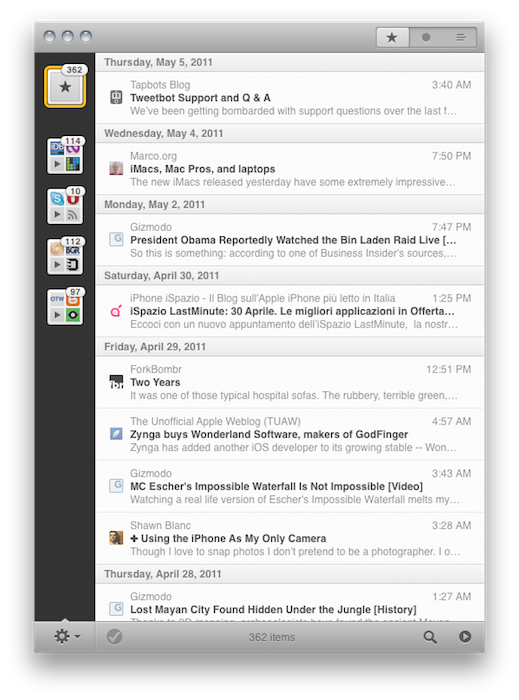
The new beta is available for download here. Without re-reviewing the app all over again (in spite of the additions it still retains 80% of the features seen in the first beta, reviewed here), I’d like to focus on the key areas that Rizzi improved, redesigned and, overall, simply evolved into something new. First off, the app comes with a new optional “minimized layout” that, following a trend started by the original Tweetie for Mac and later re-ignited by other apps like the popular Sparrow email client, places your Google Reader’s source favicons in a narrow sidebar on the left, with unread items in the main panel. The minimized layout, unlike the standard one, doesn’t come with a right panel to read articles: everything happens in a single window, much like Twitter for Mac doesn’t display additional sidebars and popovers when you’re interacting with your timeline. In the new Reeder beta, clicking on a title will open the article (with a neat animation) in the same panel; tap the close button, and the article will bounce back to reveal the main list of feeds again. In this new single-window approach, all the interactions with Google Reader or external services either happen though gestures or keyboard shortcuts – support for both of them has been improved in the new version.

Reeder for Mac retains an iOS-like feel that’s even more visible in today’s beta. The app was accused of being the first iOS app coming to the Mac without considering the nature of the desktop platform; however, as Apple is proving with the Lion developer builds and the latest updates to its flagship applications, it really looks like the future of the Mac will be heavily inspired by iOS. Back to the Mac, as Steve Jobs said, and Rizzi knows this. Reeder for Mac feels like a desktop iOS app more than ever, with support for swipes and pinches to navigate and open / close articles, monochrome icons in the top toolbar to share an article or open it in the browser, and a general feel attached to it that makes Reeder perfect for OS X Lion already, in spite of the OS not being available yet. Whilst the classic reading mode reminds us this is a desktop application meant for RSS power users with lots of features and deep Google Reader integration, the minimized mode and enhanced gesture-based navigation proves, once again, that Reeder is an app with an iOS background that’s coming to a new Mac ecosystem, the one that will start populating our MacBooks and iMacs this summer.

The app is far from finished, though. Whilst Rizzi tells me he’s still planning on making the app available through the Mac App Store, there are some aspects of the app that are not yet completed, such as full subscription management and downloads. However, this new beta confirms that the developer has been busy addressing the issues reported in the first versions: search finally works, and he even implemented a new “appearance” settings panel that will allow you to change Reeder’s color scheme from the much criticized sepia background to something more Mac-like. I love this preference panel: I’m a “standard” user as you can tell from the screenshots in this post, and I appreciate the little touches like the Preferences window fading to let you see the modifications you’re making to the app. Furthermore, the “article list row height” slider enables me to make the app even more minimal with narrower headlines. I quickly skim through hundreds of headlines in my daily news workflow, and I don’t really need to see a three-line preview before deciding to open an entire article. That’s why minimized mode works for me (by the way, you can switch between the two modes at any time by hitting a button in the bottom toolbar).

One thing I’ve always wanted from Reeder for Mac but Rizzi never implemented is the ability to click on a website’s favicon in the upper toolbar to reveal options like “unsubscribe from this source” or “refresh this source only.” Perhaps they’ll come in the final release – which should happen relatively soon at this point, considering the entire app has been rewritten since the original beta and most of the functionalities are working.

Overall, this new beta of Reeder is a terrific improvement over the past version, which was aimed at porting the Reeder experience to OS X, but perhaps lacked the right amount of features that could make it absolutely stand out. With minimized mode, more gestures and an iOS-like approach to news reading, Reeder for Mac leads the way for great things to come. Download the beta here, and check out more screenshots below. Read more

Access Extra Content and Perks

Founded in 2015, Club MacStories has delivered exclusive content every week for nearly a decade.

What started with weekly and monthly email newsletters has blossomed into a family of memberships designed for every MacStories fan.

Learn more here and from our Club FAQs.

Club MacStories: Weekly and monthly newsletters via email and the web that are brimming with apps, tips, automation workflows, longform writing, early access to the MacStories Unwind podcast, periodic giveaways, and more;

Club MacStories+: Everything that Club MacStories offers, plus an active Discord community, advanced search and custom RSS features for exploring the Club’s entire back catalog, bonus columns, and dozens of app discounts;

Club Premier: All of the above and AppStories+, an extended version of our flagship podcast that’s delivered early, ad-free, and in high-bitrate audio.

Learn more here and from our Club FAQs.


Apple Negotiating With Nuance Over Voice Recognition Technology?

A TechCrunch post from late yesterday suggests that Apple and voice recognition company Nuance have been negotiating a deal for months following Apple’s acquisition of Siri. Siri, which Apple acquired last April, developed an iPhone app that was marketed as a “virtual personal assistant” and would listen to audible questions from a user (such as “where can I find parking around here”), and would respond with an answer.

In a previous report, TechCrunch said that they believed the acquisition of Siri would lead to iOS 5 having “assistance technology [that] is said to be deeply integrated into the OS for all the different services offered.” However, Apple has had to renegotiate deals with all the partners of Siri since it acquired them and apparently the one hold out is Nuance. According to TechCrunch’s sources, the negotiations between Apple could be as big as an acquisition or just a partnership.

Apparently an acquisition is unlikely at this stage, likely for a number of reasons mainly surrounding the cost; Nuance is a public company valued at over $6 billion, furthermore much of that value is because of various licensing deals that would likely be stopped if Apple bought Nuance. The other alternative is that Apple partners Nuance and licenses the voice recognition technology; and at this stage it is the more likely option according to TechCrunch’s sources. The hold up is apparently because of Nuance CEO Paul Ricci being a “really hard bargainer”, going as hard as Steve Jobs would in the negotiations and resulting in a standoff between the two companies.

Apple does have alternatives to dealing with Nuance, it could build its own service but this would be fraught with legal issues (Nuance holds many patents) and would take time (that Apple may not want to spend) or it could go with Google, but given the current smartphone battle this seems unlikely. Consequently it seems unlikely that Apple has any good alternative here, particularly given how well the Nuance voice recognition technology works.

With with WWDC rapidly approaching, and iOS 5 fairly likely to make some kind of appearance, one would presume that Apple would be at this stage rushing to finalise a deal with Nuance, particularly if it is a major cornerstone of the iOS 5 experience. One final point made by MG Siegler in the article is that;

And the truth is that Nuance needs Apple too. Not only are they also threatened by Google, but Nuance technology is simply not very meaningful without apps that utilize it like Siri. And many of those apps are appearing guess where: iOS.

[Via TechCrunch]

Access Extra Content and Perks

Founded in 2015, Club MacStories has delivered exclusive content every week for nearly a decade.

What started with weekly and monthly email newsletters has blossomed into a family of memberships designed for every MacStories fan.

Learn more here and from our Club FAQs.

Club MacStories: Weekly and monthly newsletters via email and the web that are brimming with apps, tips, automation workflows, longform writing, early access to the MacStories Unwind podcast, periodic giveaways, and more;

Club MacStories+: Everything that Club MacStories offers, plus an active Discord community, advanced search and custom RSS features for exploring the Club’s entire back catalog, bonus columns, and dozens of app discounts;

Club Premier: All of the above and AppStories+, an extended version of our flagship podcast that’s delivered early, ad-free, and in high-bitrate audio.

Learn more here and from our Club FAQs.


redsn0w Untethered Jailbreak Now Available For iOS 4.3.3

This week’s release of iOS 4.3.3 may have patched some of the location log concerns people had, but it did nothing in the way of patching the exploit used by the Dev-Team that allowed them to release PwnageTool and redsn0w, both of which can jailbreak nearly all iOS devices on 4.3.3. The key exploit, discovered by relative newcomer to the jailbreak scene, Stefan Esser (@ionic) was originally used to deliver an untethered jailbreak, but surprisingly still works despite two iOS updates.

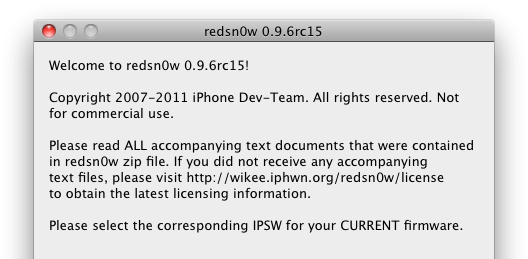
The small work that is required to get the exploit to work on the new iOS version has been done and as a result there is a new PwnageTool and redsn0w available for download. Like the versions made available for the 4.3.1 jailbreak, it uses geohot’s limera1n bootrom in conjunction with Esser’s exploit. Unfortunately the iPad 2 has yet to be jailbroken by the team, but they do note on their blog that development is currently going ahead. However apart from that, every other device capable of running iOS 4.3.3 can use the 4.3.3 untethered jailbreak – this includes the iPhone 3GS and 4, iPod Touch 3G and 4G, iPad 1 and the Apple TV (2G).

For those curious, it is presumed that the first iOS update after the jailbreak was made available, 4.3.2, didn’t fix the exploit because it was compiled the day before the release of the jailbreak. Finally, a note of warning to those ultrasn0w unlockers to stay away from redsn0w and use a custom IPSW to update to 4.3.3.

redsn0w [OS X] [Windows]

PwnageTool (OS X Only) [Torrent] [Direct Download]

[Via Dev-Team Blog]


Access Extra Content and Perks

Founded in 2015, Club MacStories has delivered exclusive content every week for nearly a decade.

What started with weekly and monthly email newsletters has blossomed into a family of memberships designed for every MacStories fan.

Learn more here and from our Club FAQs.

Club MacStories: Weekly and monthly newsletters via email and the web that are brimming with apps, tips, automation workflows, longform writing, early access to the MacStories Unwind podcast, periodic giveaways, and more;

Club MacStories+: Everything that Club MacStories offers, plus an active Discord community, advanced search and custom RSS features for exploring the Club’s entire back catalog, bonus columns, and dozens of app discounts;

Club Premier: All of the above and AppStories+, an extended version of our flagship podcast that’s delivered early, ad-free, and in high-bitrate audio.

Learn more here and from our Club FAQs.