Posts in Featured

Pure Reader: Amazing Google Reader Mod

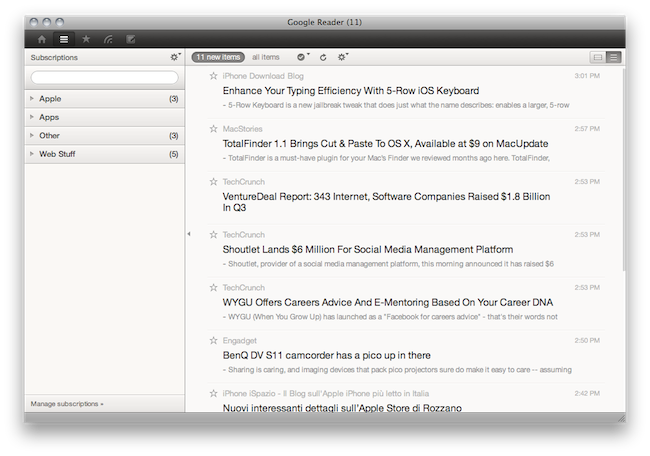
A lot of people started using RSS once again when Reeder for Mac (public beta) came out last week. It is a beautiful app that brings the power of Google Reader to the desktop with a lot of additional functionalities such as support for sharing on multiple social networks and background loading of webpages. But many users are still tied to Google Reader in the browser, that pinned tab that they just can’t close.

If so, take a look at Pure Reader, a browser extension by designer Na Wong. Read more

Access Extra Content and Perks

Founded in 2015, Club MacStories has delivered exclusive content every week for nearly a decade.

What started with weekly and monthly email newsletters has blossomed into a family of memberships designed for every MacStories fan.

Learn more here and from our Club FAQs.

Club MacStories: Weekly and monthly newsletters via email and the web that are brimming with apps, tips, automation workflows, longform writing, early access to the MacStories Unwind podcast, periodic giveaways, and more;

Club MacStories+: Everything that Club MacStories offers, plus an active Discord community, advanced search and custom RSS features for exploring the Club’s entire back catalog, bonus columns, and dozens of app discounts;

Club Premier: All of the above and AppStories+, an extended version of our flagship podcast that’s delivered early, ad-free, and in high-bitrate audio.

Learn more here and from our Club FAQs.


This 5-Row iOS Keyboard Makes My Typing Faster | Cydia Store

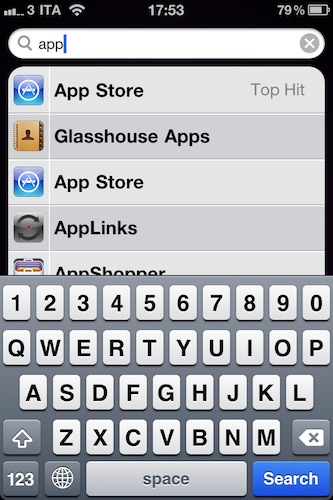
5-Row Keyboard iOS 4 is a $0.99 tweak available in the Cydia Store which, you guessed it, adds a fifth row to the standard iOS keyboard. Most specifically, it adds a numeric row so that you won’t have to constantly change the keyboard layout when having to type numbers. That happens every day to me, especially when typing password, and it’s incredibly annoying.

This hack makes the keyboard bigger, but I haven’t really noticed any difference. Actually, my mobile typing has improved as I can get sentences and passwords done faster. To configure the tweak, install it from Cydia and activate it as a theme in Winterboard. Then open your keyboard settings in General -> Keyboard, select your default keyboard and apply the new 5-Row layout.

Useful.

Access Extra Content and Perks

Founded in 2015, Club MacStories has delivered exclusive content every week for nearly a decade.

What started with weekly and monthly email newsletters has blossomed into a family of memberships designed for every MacStories fan.

Learn more here and from our Club FAQs.

Club MacStories: Weekly and monthly newsletters via email and the web that are brimming with apps, tips, automation workflows, longform writing, early access to the MacStories Unwind podcast, periodic giveaways, and more;

Club MacStories+: Everything that Club MacStories offers, plus an active Discord community, advanced search and custom RSS features for exploring the Club’s entire back catalog, bonus columns, and dozens of app discounts;

Club Premier: All of the above and AppStories+, an extended version of our flagship podcast that’s delivered early, ad-free, and in high-bitrate audio.

Learn more here and from our Club FAQs.


I Just Met The Real AirPlay

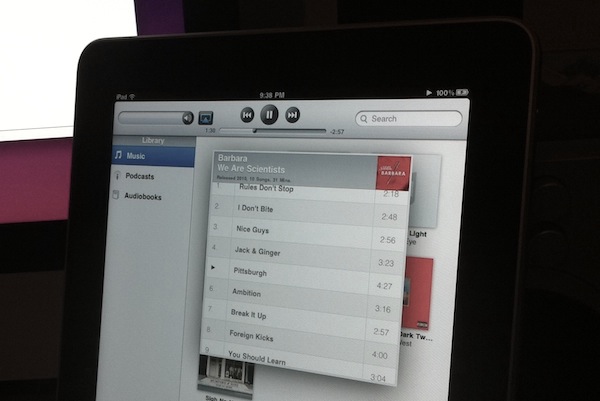
Until today, I never really experienced a real-life AirPlay situation. Sure, I configured a couple of devices to work with it, I even hacked my iPhone and iPad to become AirPlay speakers and played around with some tweaks from Cydia, but all this was mainly done in order to guarantee coverage for MacStories. A few minutes ago I finally met the real AirPlay. It wasn’t planned. It just sort of happened, and it was great. Read more

Access Extra Content and Perks

Founded in 2015, Club MacStories has delivered exclusive content every week for nearly a decade.

What started with weekly and monthly email newsletters has blossomed into a family of memberships designed for every MacStories fan.

Learn more here and from our Club FAQs.

Club MacStories: Weekly and monthly newsletters via email and the web that are brimming with apps, tips, automation workflows, longform writing, early access to the MacStories Unwind podcast, periodic giveaways, and more;

Club MacStories+: Everything that Club MacStories offers, plus an active Discord community, advanced search and custom RSS features for exploring the Club’s entire back catalog, bonus columns, and dozens of app discounts;

Club Premier: All of the above and AppStories+, an extended version of our flagship podcast that’s delivered early, ad-free, and in high-bitrate audio.

Learn more here and from our Club FAQs.


Modded SNES Controller and Nintendo 64 Become iPhone and iPad Docks

In what could be described as a pretty surprising turn of events, Nintendo now considers Apple the biggest threat to its mobile gaming dominance. Etsy user Geekunique, however, wants to bring some love back between Cupertino and Kyoto and find a way to let old Nintendo consoles and modern iOS devices play nice together. Geekunique, in fact, modded an old SNES controller and a Nintendo 64 to become iPhone and iPad docks, respectively.

It seems pretty easy to cut a hole in the controller and place an iPhone dock connector in there but hey – you can avoid the trouble and buy these things now at Etsy. If you think you really need them, be quick: I guess they’ll be sold out pretty soon.

[via TUAW]

Access Extra Content and Perks

Founded in 2015, Club MacStories has delivered exclusive content every week for nearly a decade.

What started with weekly and monthly email newsletters has blossomed into a family of memberships designed for every MacStories fan.

Learn more here and from our Club FAQs.

Club MacStories: Weekly and monthly newsletters via email and the web that are brimming with apps, tips, automation workflows, longform writing, early access to the MacStories Unwind podcast, periodic giveaways, and more;

Club MacStories+: Everything that Club MacStories offers, plus an active Discord community, advanced search and custom RSS features for exploring the Club’s entire back catalog, bonus columns, and dozens of app discounts;

Club Premier: All of the above and AppStories+, an extended version of our flagship podcast that’s delivered early, ad-free, and in high-bitrate audio.

Learn more here and from our Club FAQs.


MultiIconMover Now iOS 4.2.1 Compatible | Cydia

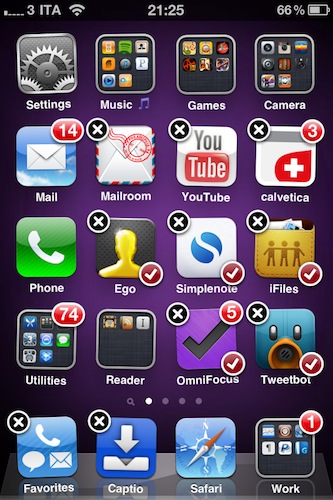
MultiIconMover is one of the reasons why many people jailbreak their iPhones: it allows users to move multiple icons at once without having to constantly move back and forth between pages. It’s really simple: you enter wiggle mode, you start selecting icons you want to move, a red badge will appear on them, choose the destination and press the Home button. All the icons will be moved to the new location.

Many say Apple should implement this by default. It surely looks “native” enough to be part of Apple’s iOS, but in the meantime you can just go ahead and install it from Cydia. The tweak is now iOS 4.2.1 compatible, and it works great on the iPhone. I haven’t tested it yet on the iPad.

MultiIconMover is available for free in Big Boss’ repository.

Access Extra Content and Perks

Founded in 2015, Club MacStories has delivered exclusive content every week for nearly a decade.

What started with weekly and monthly email newsletters has blossomed into a family of memberships designed for every MacStories fan.

Learn more here and from our Club FAQs.

Club MacStories: Weekly and monthly newsletters via email and the web that are brimming with apps, tips, automation workflows, longform writing, early access to the MacStories Unwind podcast, periodic giveaways, and more;

Club MacStories+: Everything that Club MacStories offers, plus an active Discord community, advanced search and custom RSS features for exploring the Club’s entire back catalog, bonus columns, and dozens of app discounts;

Club Premier: All of the above and AppStories+, an extended version of our flagship podcast that’s delivered early, ad-free, and in high-bitrate audio.

Learn more here and from our Club FAQs.


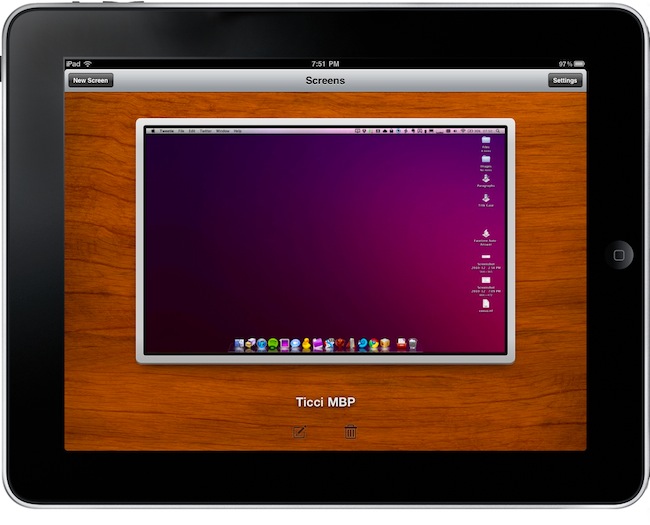
MacStories Preview: Screens, New VNC Client for iPhone and iPad

When the iPad came out in April, there was a category of apps I was looking forward to trying on the tablet: VNC clients. Those apps that allow you to connect to your Mac using OS X default sharing capabilities, enabling you to mirror your computer’s screen on an external device – such as the iPad, indeed. I got my iPad, and soon after that I installed iTeleport on it.

I’ve been using iTeleport on a daily basis since then to check on my computer when using the iPad in another room – usually the living room –  to change songs in iTunes, quickly move files to Dropbox and stuff like that. iTeleport is a fast and stable application, and it also comes with a feature that lets you connect over 3G routing the computer through a Google Account. Using a computer remotely over 3G isn’t the best experience you can get, but it works fairly well to start downloads and trigger actions on the go.

A few weeks ago Luc Vandal from Edovia contacted me and asked me if I’d be interested in trying a new VNC client they had been working on for months. I said yes, and now the app is basically ready for App Store submission. I’m running a final version of the app, the same that Edovia will submit to the App Store.

Screens by Edovia has become the best VNC app I’ve ever run on my iPhone and iPad. Read more

Access Extra Content and Perks

Founded in 2015, Club MacStories has delivered exclusive content every week for nearly a decade.

What started with weekly and monthly email newsletters has blossomed into a family of memberships designed for every MacStories fan.

Learn more here and from our Club FAQs.

Club MacStories: Weekly and monthly newsletters via email and the web that are brimming with apps, tips, automation workflows, longform writing, early access to the MacStories Unwind podcast, periodic giveaways, and more;

Club MacStories+: Everything that Club MacStories offers, plus an active Discord community, advanced search and custom RSS features for exploring the Club’s entire back catalog, bonus columns, and dozens of app discounts;

Club Premier: All of the above and AppStories+, an extended version of our flagship podcast that’s delivered early, ad-free, and in high-bitrate audio.

Learn more here and from our Club FAQs.


Will Mac App Store Users Really Miss Demos? Probably Not.

The big news this morning is that Apple clarified its position on demos and trials in the upcoming Mac App Store and confirmed what we thought would happen all along: developers can’t have demo versions of their apps in the Mac App Store. Only full-featured retail versions will be accepted. Clearly, Apple doesn’t want to offer limited-time or “half baked” apps in its new Store, and it’s forcing Mac developers to go the iOS way with either free or paid apps.

That is going to cause a few problems and headaches for many, many OS X developers. For years, they have been trained to release demo / trail versions of applications, with a paid version to purchase immediately or after the trial runs out. And indeed Apple suggests just that: keep hosting trial versions on your website, because you’ll be able to insert a link to it in the App Store description page of the app. Just as it’s possible now in the iPhone and iPad App Store. Read more

Access Extra Content and Perks

Founded in 2015, Club MacStories has delivered exclusive content every week for nearly a decade.

What started with weekly and monthly email newsletters has blossomed into a family of memberships designed for every MacStories fan.

Learn more here and from our Club FAQs.

Club MacStories: Weekly and monthly newsletters via email and the web that are brimming with apps, tips, automation workflows, longform writing, early access to the MacStories Unwind podcast, periodic giveaways, and more;

Club MacStories+: Everything that Club MacStories offers, plus an active Discord community, advanced search and custom RSS features for exploring the Club’s entire back catalog, bonus columns, and dozens of app discounts;

Club Premier: All of the above and AppStories+, an extended version of our flagship podcast that’s delivered early, ad-free, and in high-bitrate audio.

Learn more here and from our Club FAQs.


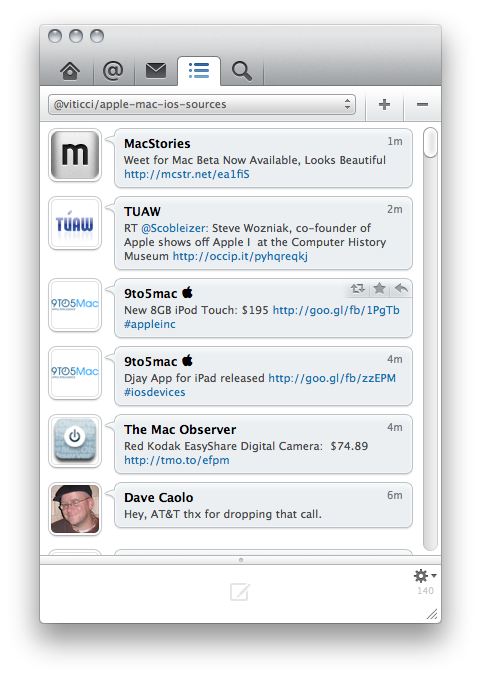
Weet for Mac: The New Tweetie? More Like A Promising Beta App.

Weet for Mac was released yesterday as a first beta, and it quickly made the rounds of the internet as dozens of blogs covered the app, and thousands of users went ahead and downloaded the beta hosted on Droplr. It seems like until Loren Brichter comes out with his long-awaited Tweetie 2, there’s a real, tangible need of Twitter clients for OS X.

My guess is that, plain and simply, Tweetie still manages to be the best desktop Twitter client for many users. Sure it doesn’t support native retweets, it hasn’t got support for Lists yet and it hasn’t been updated in months – but the interaction and navigation methods developed by Brichter are still far superior than most clients available on the Mac.

That said – we don’t want to write another Tweetie-related post here – let’s take a look at Weet. It’s a first, rough and not-so-stable beta, but I think that it gives us an idea of things to come in this app, the path the developers have chosen with the app’s interface and the overall feeling. Read more

Access Extra Content and Perks

Founded in 2015, Club MacStories has delivered exclusive content every week for nearly a decade.

What started with weekly and monthly email newsletters has blossomed into a family of memberships designed for every MacStories fan.

Learn more here and from our Club FAQs.

Club MacStories: Weekly and monthly newsletters via email and the web that are brimming with apps, tips, automation workflows, longform writing, early access to the MacStories Unwind podcast, periodic giveaways, and more;

Club MacStories+: Everything that Club MacStories offers, plus an active Discord community, advanced search and custom RSS features for exploring the Club’s entire back catalog, bonus columns, and dozens of app discounts;

Club Premier: All of the above and AppStories+, an extended version of our flagship podcast that’s delivered early, ad-free, and in high-bitrate audio.

Learn more here and from our Club FAQs.


White iPhone Spotted In A Bar

Following in the footsteps of Gizmodo, we have our own bar stories to share with the general public. Or at least some spy shots of Apple’s unicorn-status white iPhone 4. While there aren’t any scandalous stories about sex and espionage (I wish there was), we do have some sexy finger photos after the break.

Read more

Access Extra Content and Perks

Founded in 2015, Club MacStories has delivered exclusive content every week for nearly a decade.

What started with weekly and monthly email newsletters has blossomed into a family of memberships designed for every MacStories fan.

Learn more here and from our Club FAQs.

Club MacStories: Weekly and monthly newsletters via email and the web that are brimming with apps, tips, automation workflows, longform writing, early access to the MacStories Unwind podcast, periodic giveaways, and more;

Club MacStories+: Everything that Club MacStories offers, plus an active Discord community, advanced search and custom RSS features for exploring the Club’s entire back catalog, bonus columns, and dozens of app discounts;

Club Premier: All of the above and AppStories+, an extended version of our flagship podcast that’s delivered early, ad-free, and in high-bitrate audio.

Learn more here and from our Club FAQs.