Posts in Featured

This iPhone App Snaps Pictures With The Volume Buttons

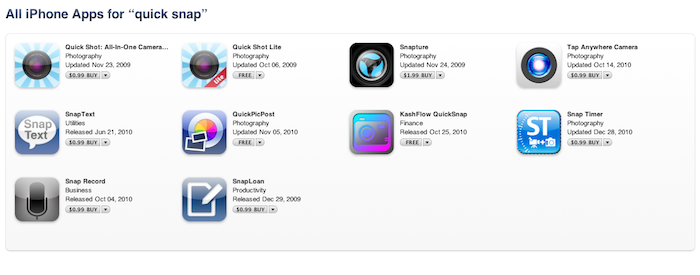
Remember when Camera+ was removed from the App Store because the developers hid a feature in it that allowed you to snap pictures using the iPhone’s volume buttons? Apple didn’t want that and as far as I know they’re still going against apps that modify iOS’ standard functionalities such as volume adjustment. But then why is there an app in the App Store that lets you do just that? Quick Snap, available at $1.99 and released two weeks ago, enables you to take pictures using the physical volume buttons. I just bought the app and it works.

Not only does Quick Snap take pictures with the “+” volume button, it also triggers a timed shot with the other button. I don’t know how this app made its way into the App Store, also considering how much the developers promote the feature on the app’s description page. But other than that, the app isn’t really great. It’s got a less than decent UI and its animations when changing from portrait to landscape mode are slow. It saves pics to the camera roll, but it hasn’t got basic camera features such as zoom or tap to focus.

But hey, it’s got the volume buttons thing. If $1.99 is a good price for such functionality, then go ahead and buy it before Apple pulls it. I’m just surprised the App Review Team missed this one.

Update: And just as we expected, the app is gone. It wasn’t that great anyway.
Access Extra Content and Perks

Founded in 2015, Club MacStories has delivered exclusive content every week for nearly a decade.

What started with weekly and monthly email newsletters has blossomed into a family of memberships designed for every MacStories fan.

Learn more here and from our Club FAQs.

Club MacStories: Weekly and monthly newsletters via email and the web that are brimming with apps, tips, automation workflows, longform writing, early access to the MacStories Unwind podcast, periodic giveaways, and more;

Club MacStories+: Everything that Club MacStories offers, plus an active Discord community, advanced search and custom RSS features for exploring the Club’s entire back catalog, bonus columns, and dozens of app discounts;

Club Premier: All of the above and AppStories+, an extended version of our flagship podcast that’s delivered early, ad-free, and in high-bitrate audio.

Learn more here and from our Club FAQs.


App Store’s Christmas Brings Millions of Downloads to Developers

All those new iPhone and iPod touch users tracked by the official Facebook app? Yeah, the spike in traffic and new users isn’t limited just to the Facebook app. According to numbers reported by The Next Web and Business Insider, Rovio’s blockbuster iOS game Angry Birds and Tapulous’ Tap Tap Revenge 4 generated over 1 million downloads and twice the level of traffic of last year, respectively. Put simply: this year’s App Store and iOS growth showed its results on December 25th by bringing tons of new customers and downloads to apps that already managed to gain a prominent position in the Store. Or was it because of all those people that got an iPhone, iPod touch or iPad under their Christmas trees?

A little bit of both, in my opinion. Surely lots of people got an iDevice for Christmas and rushed to the App Store to buy apps; we shouldn’t ignore the fact, though, that several developers discounted their apps before the iTunes Connect shutdown (which ends tomorrow, by the way) forcing many users like me to save money for Christmas (or iTunes gift cards) and buy apps altogether right before the family dinner. Either way, those are impressive numbers. Read more

Access Extra Content and Perks

Founded in 2015, Club MacStories has delivered exclusive content every week for nearly a decade.

What started with weekly and monthly email newsletters has blossomed into a family of memberships designed for every MacStories fan.

Learn more here and from our Club FAQs.

Club MacStories: Weekly and monthly newsletters via email and the web that are brimming with apps, tips, automation workflows, longform writing, early access to the MacStories Unwind podcast, periodic giveaways, and more;

Club MacStories+: Everything that Club MacStories offers, plus an active Discord community, advanced search and custom RSS features for exploring the Club’s entire back catalog, bonus columns, and dozens of app discounts;

Club Premier: All of the above and AppStories+, an extended version of our flagship podcast that’s delivered early, ad-free, and in high-bitrate audio.

Learn more here and from our Club FAQs.


Sleipnir: Free, Innovative Browser for iPhone

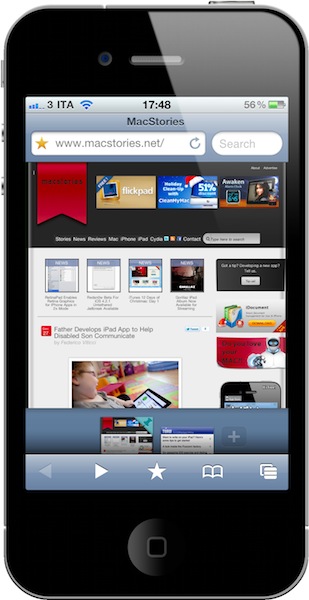
From the same developers of Inkiness for iPad comes Sleipnir, a new app for the iPhone that’s without a doubt one of the most innovative, stable and fast alternative browsers released in the recent months. My problem with alternatives to Mobile Safari is that they don’t provide anything better than Apple’s implementation, aside from a different visualization of tabs. Many apps sold through the App Store simply gained popularity because they brought “desktop-class tabs” to the iPhone or iPad, with the trade-off of adding ugly UIs and navigation controls to an already-powerful WebKit engine. I’m all for alternatives and different solutions to built-in software (especially when the third-party version is available for free, like Sleipnir), but I’m looking for something that really takes advantage of iOS. Not just a port of desktop functionalities.

Sleipnir offers just that. From the first first launch, you’ll immediately notice it’s an app developed with the iPhone (and iPhone users) in mind. It doesn’t come with “desktop tabs” yet it allows you to organize open pages in an innovative and useful “tabbed view” I haven’t seen in any other app. Sleipnir might just be the most innovative iPhone browser to date, powered by a nice interface design and a seriously great engine. Read more

Access Extra Content and Perks

Founded in 2015, Club MacStories has delivered exclusive content every week for nearly a decade.

What started with weekly and monthly email newsletters has blossomed into a family of memberships designed for every MacStories fan.

Learn more here and from our Club FAQs.

Club MacStories: Weekly and monthly newsletters via email and the web that are brimming with apps, tips, automation workflows, longform writing, early access to the MacStories Unwind podcast, periodic giveaways, and more;

Club MacStories+: Everything that Club MacStories offers, plus an active Discord community, advanced search and custom RSS features for exploring the Club’s entire back catalog, bonus columns, and dozens of app discounts;

Club Premier: All of the above and AppStories+, an extended version of our flagship podcast that’s delivered early, ad-free, and in high-bitrate audio.

Learn more here and from our Club FAQs.


You Too Can Have A Macintosh Portable Prototype on eBay

Long before iBooks and MacBooks, there was the Macintosh Portable. Released in 1989, the press loved it but consumer sales weren’t that great. The device was Apple’s first attempt to produce a portable, battery-based Macintosh computer that featured an LCD screen and a rechargeable battery. The machine also had a physical keyboard and a trackball to use as a mouse.

Looking back, the Macintosh Portable looks like the perfect piece of old Apple hardware to buy and keep jealously in your room. Now you can, as a prototype has been posted for sale on eBay. The unit is described as “absolutely mint, flawless, clean prototype Macintosh Portable” which was meant for sale – a label on the bottom of the computer confirms that “it is intended for demonstration purposes only”. The only caveat is that this prototype isn’t actually working as there seems to be a problem with the internal battery. It looks perfect on the outside, but it won’t turn on.

Bids start at $1,750.00. More photos are available on eBay, and if you plan on purchasing the item – be quick. After all, it’s an Apple prototype.

Access Extra Content and Perks

Founded in 2015, Club MacStories has delivered exclusive content every week for nearly a decade.

What started with weekly and monthly email newsletters has blossomed into a family of memberships designed for every MacStories fan.

Learn more here and from our Club FAQs.

Club MacStories: Weekly and monthly newsletters via email and the web that are brimming with apps, tips, automation workflows, longform writing, early access to the MacStories Unwind podcast, periodic giveaways, and more;

Club MacStories+: Everything that Club MacStories offers, plus an active Discord community, advanced search and custom RSS features for exploring the Club’s entire back catalog, bonus columns, and dozens of app discounts;

Club Premier: All of the above and AppStories+, an extended version of our flagship podcast that’s delivered early, ad-free, and in high-bitrate audio.

Learn more here and from our Club FAQs.


RetinaPad Enables Retina Graphics for iPhone Apps in 2x Mode

The iPad can run iPhone apps in compatibility mode, and we all know Apple implemented this feature to allow iPad owners to access a huge catalogue of apps on day one. The fact that the iPad App Store got to more than 40,000 apps in a few months is a different story. What is not great about iPhone compatibility mode is that, when an iPhone app is blown up to 2x mode, the graphics become fuzzy. Even if you’ve installed on your iPad an app that’s got Retina Display-ready graphics on the iPhone, you’ll get the pixelated graphics.

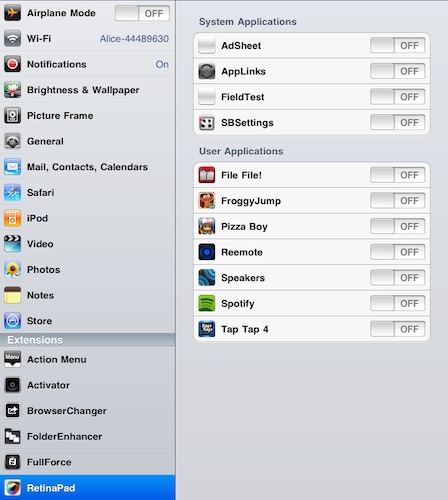
RetinaPad, a new Cydia tweak by Ryan Petrich, fixes this problem, and it works great with basically any app or game that’s got Retina graphics. Once installed, you’ll have to choose the iPhone apps that you’d like to run with the new 2x mode. Fire up the app, tap on 2x and you’ll notice that the iPad will display clean graphics without pixelation. If the iPhone app has been updated for the Retina Display, it most likely works with RetinaPad out of the box. It’s really neat.

I’ve been able to successfully run in the 2x mode Spotify, Voices 2, Calvetica – they all look great on the iPad now. RetinaPad is available at $2.99 in the Cydia Store. More screenshots below. Read more

Access Extra Content and Perks

Founded in 2015, Club MacStories has delivered exclusive content every week for nearly a decade.

What started with weekly and monthly email newsletters has blossomed into a family of memberships designed for every MacStories fan.

Learn more here and from our Club FAQs.

Club MacStories: Weekly and monthly newsletters via email and the web that are brimming with apps, tips, automation workflows, longform writing, early access to the MacStories Unwind podcast, periodic giveaways, and more;

Club MacStories+: Everything that Club MacStories offers, plus an active Discord community, advanced search and custom RSS features for exploring the Club’s entire back catalog, bonus columns, and dozens of app discounts;

Club Premier: All of the above and AppStories+, an extended version of our flagship podcast that’s delivered early, ad-free, and in high-bitrate audio.

Learn more here and from our Club FAQs.


Redsn0w Beta For iOS 4.2.1 Untethered Jailbreak Available

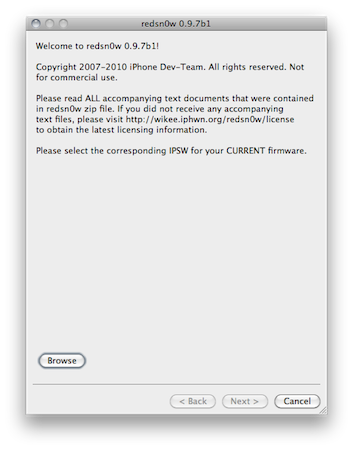
As promised on Twitter a few days ago, the Dev Team released a beta of Redsn0w for Mac to provide an untethered jailbreak solution for iOS 4.2.1. Redsn0w 0.9.7b1 should allow you to jailbreak your iPhone 4, iPad and iPod touch 4th gen without having to plug your device in your computer on each reboot or shutdown. iPhone 3G, old-bootrom iPod touch 2nd gen and iPhone 3GS owners don’t need this new Redsn0w as they already have an untethered jailbreak.

This beta version of Redsn0w (or as the Dev Team calls it, the “backup plan”) is meant for testers willing to provide useful feedback on this new jailbreak. To use it, you’ll need iOS 4.2 beta 3 hashes saved on Cydia and the iOS 4.2 beta 2 IPSW file saved on your computer. In this beta the bluetooth functionality is disabled, the task switcher will make the Springboard crash and the iPod player is only enabled on the iPod touch 4th gen.

Redsn0w 0.9.7b1 is available here.

Access Extra Content and Perks

Founded in 2015, Club MacStories has delivered exclusive content every week for nearly a decade.

What started with weekly and monthly email newsletters has blossomed into a family of memberships designed for every MacStories fan.

Learn more here and from our Club FAQs.

Club MacStories: Weekly and monthly newsletters via email and the web that are brimming with apps, tips, automation workflows, longform writing, early access to the MacStories Unwind podcast, periodic giveaways, and more;

Club MacStories+: Everything that Club MacStories offers, plus an active Discord community, advanced search and custom RSS features for exploring the Club’s entire back catalog, bonus columns, and dozens of app discounts;

Club Premier: All of the above and AppStories+, an extended version of our flagship podcast that’s delivered early, ad-free, and in high-bitrate audio.

Learn more here and from our Club FAQs.


iTunes 12 Days of Christmas: Day 1

As announced two weeks ago, today Apple launched the “iTunes 12 Days of Christmas” promotion across European iTunes and App Stores. Every day from December 26th to January 6th, users will be able to download a “fantastic selection of songs, music videos, apps, books, TV episodes and a film” completely for free on iTunes.

The free app for iPhone and iPad that lets you receive push notifications for daily offers is available here.

While a first free download showed up on December 17, the promotion officially starts today with “Day 1”. Today, you can download “Promise This - Christmas Bundle” by Cheryl Cole entirely for free. At least in the UK Store, as it appears a Vasco Rossi is given away in the Italian iTunes Store. The Cheryl Cole bundle includes a song and a video to download from the iTunes app.

Stay tuned for promotions coming every day until January 6.

Access Extra Content and Perks

Founded in 2015, Club MacStories has delivered exclusive content every week for nearly a decade.

What started with weekly and monthly email newsletters has blossomed into a family of memberships designed for every MacStories fan.

Learn more here and from our Club FAQs.

Club MacStories: Weekly and monthly newsletters via email and the web that are brimming with apps, tips, automation workflows, longform writing, early access to the MacStories Unwind podcast, periodic giveaways, and more;

Club MacStories+: Everything that Club MacStories offers, plus an active Discord community, advanced search and custom RSS features for exploring the Club’s entire back catalog, bonus columns, and dozens of app discounts;

Club Premier: All of the above and AppStories+, an extended version of our flagship podcast that’s delivered early, ad-free, and in high-bitrate audio.

Learn more here and from our Club FAQs.


Gorillaz iPad Album Now Available for Streaming

As announced by Damon Albarn in November, the new Gorillaz album “The Fall” is now available online for streaming and will be released as digital download tomorrow, December 25th. What’s so special about The Fall that we’re covering it on MacStories? It was entirely recorded on an iPad.

Albarn first told the NME:

I’ve made it on an iPad – I hope I’ll be making the first record on an iPad. I fell in love with my iPad as soon as I got it, so I’ve made a completely different kind of record.

The Fall contains 14 new songs and it was recorded using apps such as SoundyThingie, AmpliTube, iOrgel HD and iElectribe. Full list of songs and apps used in the album is embedded below. You can stream the record for free now by hitting this link, which requires you to subscribe to the band’s mailing list. From a first listen, it all sounds pretty…digital and electronic. Perhaps different from previous Gorillaz records, but interesting nonetheless considering the setup being used to produce it. Check out the video of “Phoner to Arizona” below.


Read more

Access Extra Content and Perks

Founded in 2015, Club MacStories has delivered exclusive content every week for nearly a decade.

What started with weekly and monthly email newsletters has blossomed into a family of memberships designed for every MacStories fan.

Learn more here and from our Club FAQs.

Club MacStories: Weekly and monthly newsletters via email and the web that are brimming with apps, tips, automation workflows, longform writing, early access to the MacStories Unwind podcast, periodic giveaways, and more;

Club MacStories+: Everything that Club MacStories offers, plus an active Discord community, advanced search and custom RSS features for exploring the Club’s entire back catalog, bonus columns, and dozens of app discounts;

Club Premier: All of the above and AppStories+, an extended version of our flagship podcast that’s delivered early, ad-free, and in high-bitrate audio.

Learn more here and from our Club FAQs.


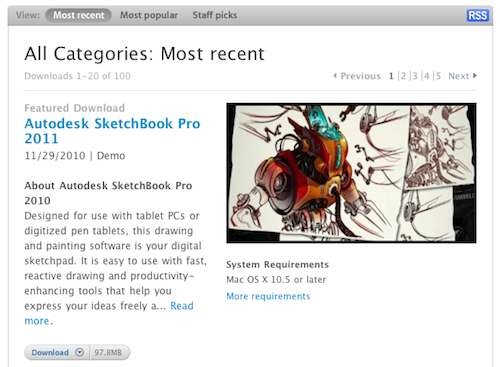
Apple Shuts Down Mac OS X Downloads Page

Well, we all knew this was going to happen sooner or later. Apple is shutting down the OS X Downloads page, in lieu of the Mac App Store which is launching on January 6th. Here’s the email Apple just sent out to Mac developers:

Thank you for making the Mac OS X Download site a great destination with apps that offer users new ways to work, play, learn, and create on their Mac.

We recently announced that on January 6, 2011, the Mac App Store will open to users around the world, presenting you with an exciting, new opportunity to reach millions of customers. Since the introduction of the App Store in 2008, we’ve been thrilled with the incredible support from developers and the enthusiastic response from users. Now we’re bringing the revolutionary experience of the App Store to Mac OS X.

Because we believe the Mac App Store will be the best destination for users to discover, purchase, and download your apps, we will no longer offer apps on the Mac OS X Downloads site. Instead, beginning January 6, we will be directing users to explore the range of apps available on the Mac App Store.

We appreciate your support of the Mac platform and hope you’ll take advantage of this new opportunity to showcase your apps to even more users. To learn how you can offer your apps on the Mac App Store, visit the Apple Developer website at http://developer.apple.com/programs/mac.

The Mac OS X Downloads website provided for years a way for developers to showcase their Mac apps for free to the large audience of Apple’s website. It also served as a great way to get new Mac users started on third-part software for OS X. Clearly Apple thinks this is all going to change with the Mac App Store, which will be included in a Software Update for all Snow Leopard users.

No details have been provided about other categories of software currently promoted on the Downloads site, such as Automator workflows and Dashboard widgets.

Access Extra Content and Perks

Founded in 2015, Club MacStories has delivered exclusive content every week for nearly a decade.

What started with weekly and monthly email newsletters has blossomed into a family of memberships designed for every MacStories fan.

Learn more here and from our Club FAQs.

Club MacStories: Weekly and monthly newsletters via email and the web that are brimming with apps, tips, automation workflows, longform writing, early access to the MacStories Unwind podcast, periodic giveaways, and more;

Club MacStories+: Everything that Club MacStories offers, plus an active Discord community, advanced search and custom RSS features for exploring the Club’s entire back catalog, bonus columns, and dozens of app discounts;

Club Premier: All of the above and AppStories+, an extended version of our flagship podcast that’s delivered early, ad-free, and in high-bitrate audio.

Learn more here and from our Club FAQs.