Posts in Featured

MobileMe Music Streaming: Keep It Simple

According to recent speculation, Apple is launching a complete overhaul of MobileMe this summer that will include a streaming option for media like music, movies, photos and videos recorded through an iPhone. Steve Jobs himself said in an email from last year that MobileMe would get “a lot better” in 2011. The fact that Apple is working on making MobileMe free in more sections, and more powerful and feature-rich when it comes to cloud-based access to files and media, seems pretty much obvious at this point.

The problem is “how”. With the rumors floating around, all kinds of speculation have arisen lately: cloud storage for your entire iTunes library, through a subscription à la Dropbox; cloud storage through the existing MobileMe plans; cloud storage for free. The list of possible implementations goes on and on. Yesterday, The Loop’s Jim Dalrymple weighed in with an interesting theory about a user’s Mac as a the actual cloud behind MobileMe’s streaming:

Instead of trying to provide everyone with cloud storage, I believe Apple will use MobileMe as the brain of the cloud service. The actual storage will be on our individual machines. In effect, in the cloud.

MobileMe would handle the settings and streaming settings, the files would reside on our Macs. Jim further explains:

Here’s the thing — those songs won’t actually be on my iPhone until I tap to play them. As soon as I tap to play, it will download to my phone. You can scroll through your music library and choose something else and it will download and play.

In effect, what Apple’s doing is setting up a streaming service that you host. By using advanced caching and MobileMe as the brain behind the operation, you will always have access to your media.

Read more

Access Extra Content and Perks

Founded in 2015, Club MacStories has delivered exclusive content every week for nearly a decade.

What started with weekly and monthly email newsletters has blossomed into a family of memberships designed for every MacStories fan.

Learn more here and from our Club FAQs.

Club MacStories: Weekly and monthly newsletters via email and the web that are brimming with apps, tips, automation workflows, longform writing, early access to the MacStories Unwind podcast, periodic giveaways, and more;

Club MacStories+: Everything that Club MacStories offers, plus an active Discord community, advanced search and custom RSS features for exploring the Club’s entire back catalog, bonus columns, and dozens of app discounts;

Club Premier: All of the above and AppStories+, an extended version of our flagship podcast that’s delivered early, ad-free, and in high-bitrate audio.

Learn more here and from our Club FAQs.


Apple Launches Subscriptions for Apps

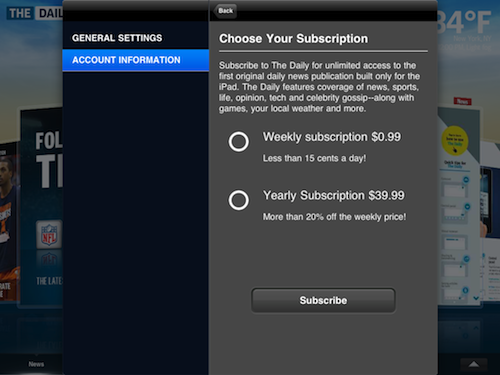
It’s official: Apple has announced subscription for App Store apps. Billing happens automatically through your iTunes account, and Apple keeps 30% of revenue if they bring a new subscriber to the app. If the publisher brings a new or existing subscriber to the app, the publisher keeps 100%. Publishers can provide alternative payment methods (outside of the app) and login systems for existing subscribers, but iTunes subscriptions must be offered as an option into the app at the same price or less. Plus, publishers can no longer insert links to external payment methods inside their apps. Here’s the gist:

Publishers who use Apple’s subscription service in their app can also leverage other methods for acquiring digital subscribers outside of the app. For example, publishers can sell digital subscriptions on their web sites, or can choose to provide free access to existing subscribers. Since Apple is not involved in these transactions, there is no revenue sharing or exchange of customer information with Apple. Publishers must provide their own authentication process inside the app for subscribers that have signed up outside of the app. However, Apple does require that if a publisher chooses to sell a digital subscription separately outside of the app, that same subscription offer must be made available, at the same price or less, to customers who wish to subscribe from within the app. In addition, publishers may no longer provide links in their apps (to a web site, for example) which allow the customer to purchase content or subscriptions outside of the app.

As for privacy policy, customers “will be given the option” to provide publishers with information, although the use of information will be under the publisher’s privacy policy. Here’s everything you need to know about subscriptions. Press release embedded below.

Read more

Access Extra Content and Perks

Founded in 2015, Club MacStories has delivered exclusive content every week for nearly a decade.

What started with weekly and monthly email newsletters has blossomed into a family of memberships designed for every MacStories fan.

Learn more here and from our Club FAQs.

Club MacStories: Weekly and monthly newsletters via email and the web that are brimming with apps, tips, automation workflows, longform writing, early access to the MacStories Unwind podcast, periodic giveaways, and more;

Club MacStories+: Everything that Club MacStories offers, plus an active Discord community, advanced search and custom RSS features for exploring the Club’s entire back catalog, bonus columns, and dozens of app discounts;

Club Premier: All of the above and AppStories+, an extended version of our flagship podcast that’s delivered early, ad-free, and in high-bitrate audio.

Learn more here and from our Club FAQs.


Portal 2 Available For Pre-Order Now

Well after some delays, Portal 2 is now finally available for pre-order for an expected release of April 18th.  Mac users can pre-order the game for US$44.99 on Steam or at selected retail shops, some of which have special pre-order offers;

Special pre-order offers vary at participating outlets around the world and include a variety of dollars off and/or exclusive in-game content for those who reserve the game for purchase before it is released the week of April 18. These include $5 off the full price, exclusive in-game skins for the coop bots (Atlas and P-body), and more.

Read more

Access Extra Content and Perks

Founded in 2015, Club MacStories has delivered exclusive content every week for nearly a decade.

What started with weekly and monthly email newsletters has blossomed into a family of memberships designed for every MacStories fan.

Learn more here and from our Club FAQs.

Club MacStories: Weekly and monthly newsletters via email and the web that are brimming with apps, tips, automation workflows, longform writing, early access to the MacStories Unwind podcast, periodic giveaways, and more;

Club MacStories+: Everything that Club MacStories offers, plus an active Discord community, advanced search and custom RSS features for exploring the Club’s entire back catalog, bonus columns, and dozens of app discounts;

Club Premier: All of the above and AppStories+, an extended version of our flagship podcast that’s delivered early, ad-free, and in high-bitrate audio.

Learn more here and from our Club FAQs.


Apple’s Market Cap Rises $100 Billion Above Microsoft’s

At the close of trading today Apple managed to reach a market cap of $330.90 billion, a full $100 billion more than the nearest technology company, Microsoft, which is at $228.8 billion. This is despite Apple only passing Microsoft in market cap less then nine months ago, since then Microsoft has only gained $1 billion.

Read more

Access Extra Content and Perks

Founded in 2015, Club MacStories has delivered exclusive content every week for nearly a decade.

What started with weekly and monthly email newsletters has blossomed into a family of memberships designed for every MacStories fan.

Learn more here and from our Club FAQs.

Club MacStories: Weekly and monthly newsletters via email and the web that are brimming with apps, tips, automation workflows, longform writing, early access to the MacStories Unwind podcast, periodic giveaways, and more;

Club MacStories+: Everything that Club MacStories offers, plus an active Discord community, advanced search and custom RSS features for exploring the Club’s entire back catalog, bonus columns, and dozens of app discounts;

Club Premier: All of the above and AppStories+, an extended version of our flagship podcast that’s delivered early, ad-free, and in high-bitrate audio.

Learn more here and from our Club FAQs.


iPhone 5 To Feature 4-inch Screen?

With rumors about a smaller iPhone floating around since last week, the latest report from Digitimes surely is interesting. According to the publication, Apple might expand the next generation iPhone’s screen to 4 inches, mainly to compete with various Android handsets that come with displays larger than the iPhone 4.

Apple reportedly will change the screen size of iPhone to 4-inch for its fifth generation iPhone to compete with the Google Android platform in the 4- to 7-inch smartphone market, according to upstream component suppliers.

The component suppliers noted that the production lines for Apple’s next generation iPhone have begun testing, and Apple is interesting in expanding the screen size to 4-inches to support the tablet PC market as the vendor only has a 9.7-inch iPad in the market.

A bigger iPhone screen would raise questions on the resolution of the device, which is currently dubbed as “Retina” thanks to its DPI on the current 3.5-inch display. Another report from last week suggested Apple might adopt Samsung’s Super LPS screen technology, which offers greater viewing angles and brightness. Engadget reported in January that the iPhone would come with a radical new design which, if the rumors are to believed, would play well with this 4-inch screen theory. Digitimes has a good track record on Apple’s production chain reports, and admittedly a slightly bigger display would be pretty cool in our opinion.

In the past months, other rumors pointed to Apple building an iPhone with NFC capabilities for easy mobile payments (although iOS-to-iOS communication would be interesting, too), dual-core processor and LTE for a summer launch “at the earliest”. Earlier today, a new report suggested Apple has been considering three different iPhone 5 models with one of them featuring a slide-out physical keyboard – again, to possibly compete with Android devices. Last, the iPhone 5 is rumored to be a worldphone with integrated GSM / CDMA antennas.

Access Extra Content and Perks

Founded in 2015, Club MacStories has delivered exclusive content every week for nearly a decade.

What started with weekly and monthly email newsletters has blossomed into a family of memberships designed for every MacStories fan.

Learn more here and from our Club FAQs.

Club MacStories: Weekly and monthly newsletters via email and the web that are brimming with apps, tips, automation workflows, longform writing, early access to the MacStories Unwind podcast, periodic giveaways, and more;

Club MacStories+: Everything that Club MacStories offers, plus an active Discord community, advanced search and custom RSS features for exploring the Club’s entire back catalog, bonus columns, and dozens of app discounts;

Club Premier: All of the above and AppStories+, an extended version of our flagship podcast that’s delivered early, ad-free, and in high-bitrate audio.

Learn more here and from our Club FAQs.


Apple Testing An iPhone With A Slide Out Keyboard, But Will They Sell It?

Apple.pro reports this afternoon that Apple may be testing three different iPhone protoypes (including the mini iPhone we’ve been hearing about), one of which is a model with a slide out keyboard. The translation to English is very rough:

There are three iPhone5 prototype
one is a sliding cover which
Is the introduction of the keyboard after the side cover

Being a fan of physical keyboards (especially those on the Palm Pre), an iPhone five with a portrait slider might be enough for me to switch to the next-gen iPhone. Rumors aside, would it be wise for Apple to differentiate with an entire iPhone family to compete against Android, HP, and other competitors? We’re skeptical that Apple would actually launch an iPhone with a physical keyboard, but we’ll have to wait and see.

Also in the mix is a rumored upgrade to the camera, getting a bump to 8 megapixels from the iPhone 4’s current 5 megapixel camera. The report also notes that the transition to the next iPhone will be similar to the transition from the 3G to the 3GS: different guts with the same basic hardware design.

[Apple.pro via MacRumors]

Editors note: Image via TechShout

Access Extra Content and Perks

Founded in 2015, Club MacStories has delivered exclusive content every week for nearly a decade.

What started with weekly and monthly email newsletters has blossomed into a family of memberships designed for every MacStories fan.

Learn more here and from our Club FAQs.

Club MacStories: Weekly and monthly newsletters via email and the web that are brimming with apps, tips, automation workflows, longform writing, early access to the MacStories Unwind podcast, periodic giveaways, and more;

Club MacStories+: Everything that Club MacStories offers, plus an active Discord community, advanced search and custom RSS features for exploring the Club’s entire back catalog, bonus columns, and dozens of app discounts;

Club Premier: All of the above and AppStories+, an extended version of our flagship podcast that’s delivered early, ad-free, and in high-bitrate audio.

Learn more here and from our Club FAQs.


How To: Send Any Webpage From iOS To Your Mac Browser

Yesterday, I asked on Twitter if there was an easy way to send a webpage from the iPhone to the Mac. Currently, there are several iPhone apps that allow you to get links from your Mac browser onto the iPhone or iPad: most of them either work with a bookmarklet or browser extensions that, with just one click, let you “push”  webpages to iOS. Apps like Handoff (review) and Push The Page even work remotely with the iPhone on a 3G connection. But the other way around, iOS to Mac, is not just as easy to achieve.

In my Twitter poll, many followers recommended AirLink, a web service that, once installed on the Mac and iOS, allows you to send an receive webpages remotely. AirLink, however, requires you to visit a special webpage on your browser to retrieve the link you have shared. What I’m looking for, and what I’m sure others like me have dreaming of for a while, it’s a simple system that allows me to send with a few taps any webpage from the iPhone (on WiFi and 3G) to the Mac, and have a new browser tab open on the desktop. So when I get home, I’ll find the link I shared on iOS ready in my browser. It turns out though, this “simple system” wasn’t so simple to achieve but now, thanks to the help of my friend @MisterJack, I think I’ve got something here that just works and does exactly what I need. Most of all, it requires three taps to be activated. Read more

Access Extra Content and Perks

Founded in 2015, Club MacStories has delivered exclusive content every week for nearly a decade.

What started with weekly and monthly email newsletters has blossomed into a family of memberships designed for every MacStories fan.

Learn more here and from our Club FAQs.

Club MacStories: Weekly and monthly newsletters via email and the web that are brimming with apps, tips, automation workflows, longform writing, early access to the MacStories Unwind podcast, periodic giveaways, and more;

Club MacStories+: Everything that Club MacStories offers, plus an active Discord community, advanced search and custom RSS features for exploring the Club’s entire back catalog, bonus columns, and dozens of app discounts;

Club Premier: All of the above and AppStories+, an extended version of our flagship podcast that’s delivered early, ad-free, and in high-bitrate audio.

Learn more here and from our Club FAQs.


Tap-Translate Does Inline Mobile Safari Translations

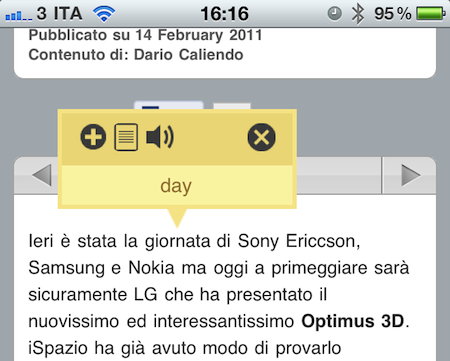
Tap-Translate, a $1.99 universal app by developer Ronen Drihem, brings an interesting approach to translations on iOS, and more specifically in Mobile Safari. Tap-Translate, in fact, isn’t exactly an “app”: it’s an app whose only function is to let you install a bookmarklet in Safari that will let you tap on a word on any webpage to get an instant translation inside a cute yellow popup menu.

It works like this: once you’ve followed the steps provided by the app to install the bookmarklet (which allows you to choose from a variety of languages), you’ll find the bookmarklet in Mobile Safari (works on any iOS device, but I’ve also tested it in Chrome and Safari on the desktop) ready to give you inline translations on tap. The translation’s popup allows you to “speak” a selected word, or jump directly to the Google Translation page. Tap-Translate can also do entire paragraphs, and be dismissed at any time. It’s fast, easy to use and convenient.

At $1.99 you could argue you’re spending money to install a bookmarklet. The thing is, Tap-Translate works really well and, most of all, it’s integrated with Safari and it’s unobtrusive. Recommended.

Access Extra Content and Perks

Founded in 2015, Club MacStories has delivered exclusive content every week for nearly a decade.

What started with weekly and monthly email newsletters has blossomed into a family of memberships designed for every MacStories fan.

Learn more here and from our Club FAQs.

Club MacStories: Weekly and monthly newsletters via email and the web that are brimming with apps, tips, automation workflows, longform writing, early access to the MacStories Unwind podcast, periodic giveaways, and more;

Club MacStories+: Everything that Club MacStories offers, plus an active Discord community, advanced search and custom RSS features for exploring the Club’s entire back catalog, bonus columns, and dozens of app discounts;

Club Premier: All of the above and AppStories+, an extended version of our flagship podcast that’s delivered early, ad-free, and in high-bitrate audio.

Learn more here and from our Club FAQs.


iPhone Dominates in Small and Medium Sized Businesses

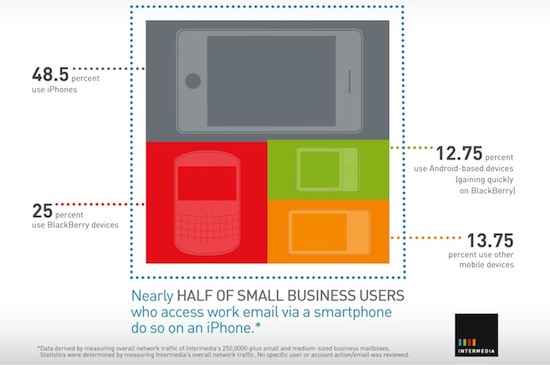
The iPhone is the most popular smartphone for small and medium sized business employees according to Intermedia, the world’s largest provider of hosted Microsoft Exchange email services. With a user base size of more than 250,000 email users, Intermedia says that 48.5% of email accounts were accessed through an iPhone compared to 25% accessed by a BlackBerry and 12.75% accessed through Android.

BlackBerry’s usage is also dropping and Android is gaining quickly whilst other smartphone’s such as Windows Phone 7 and other non smartphone operating systems represent 13.75%. Intermedia’s chief executive Jonathon McCormick said “staying in sync with the office regardless of time or day has become imperative in most industries.” Also interesting was that iPhone users sent the most emails whilst Android users received the most emails.

[Via AppleInsider]

Access Extra Content and Perks

Founded in 2015, Club MacStories has delivered exclusive content every week for nearly a decade.

What started with weekly and monthly email newsletters has blossomed into a family of memberships designed for every MacStories fan.

Learn more here and from our Club FAQs.

Club MacStories: Weekly and monthly newsletters via email and the web that are brimming with apps, tips, automation workflows, longform writing, early access to the MacStories Unwind podcast, periodic giveaways, and more;

Club MacStories+: Everything that Club MacStories offers, plus an active Discord community, advanced search and custom RSS features for exploring the Club’s entire back catalog, bonus columns, and dozens of app discounts;

Club Premier: All of the above and AppStories+, an extended version of our flagship podcast that’s delivered early, ad-free, and in high-bitrate audio.

Learn more here and from our Club FAQs.