Posts in Featured

New York Times: There’s No iPhone Nano, New MobileMe Will Be Free

According to a report published tonight by The New York Times, Apple is not developing a smaller version of the iPhone. Rather, the report indicates Apple is looking for ways to make the iPhone cheaper by cutting the costs of internal iPhone components, like Flash storage. Like previous speculation, the NYTimes report, which cites people familiar with Apple’s plans, mentions that by reducing the capacity of the iPhone storage (one of the most expensive components in iPhone production) Apple is aiming at letting users store their information and media online, on Apple’s servers, through MobileMe.

The new MobileMe, according to the Times, will be free and will let users “synch their files without using a cable”. Apparently, the goal is to make MobileMe’s infrastructure fast and reliable enough to allow for photo, video and media storage so that users won’t have to do anything to find content synced across all their devices. The move to MobileMe as the primary way to store content online instead of Flash memory would let Apple launch a cheaper iPhone, but not a smaller one. An iPhone with a different screen resolution would force developers to “rewrite their apps” and “would be more difficult to operate”.

But contrary to published reports, Apple is not currently developing a smaller iPhone, according to people briefed on Apple’s plans who requested anonymity because the plans are confidential.

Apple’s engineers are currently focused on finishing the next version of the iPhone, which is likely to be similar in size to the current iPhone 4, said one of the people. The person said Apple was not planning to introduce a smaller iPhone any time soon. Analysts expect the new iPhone to be ready this summer.

The New York Times also mentions a senior Apple executive said during a meeting “that it did not make sense for the company to make multiple iPhone models”. Apple is very concerned about the fragmentation issue of multiple devices with different specs running the same operating system. The NYTimes report thus contradicts what has been said so far by Bloomberg and the WSJ, which confirmed through anonymous sources that Apple was planning on releasing a smaller version of the iPhone with a 2.3-inch screen.

Access Extra Content and Perks

Founded in 2015, Club MacStories has delivered exclusive content every week for nearly a decade.

What started with weekly and monthly email newsletters has blossomed into a family of memberships designed for every MacStories fan.

Learn more here and from our Club FAQs.

Club MacStories: Weekly and monthly newsletters via email and the web that are brimming with apps, tips, automation workflows, longform writing, early access to the MacStories Unwind podcast, periodic giveaways, and more;

Club MacStories+: Everything that Club MacStories offers, plus an active Discord community, advanced search and custom RSS features for exploring the Club’s entire back catalog, bonus columns, and dozens of app discounts;

Club Premier: All of the above and AppStories+, an extended version of our flagship podcast that’s delivered early, ad-free, and in high-bitrate audio.

Learn more here and from our Club FAQs.


MANsaver: The iPhone App That Will Save Your Relationship

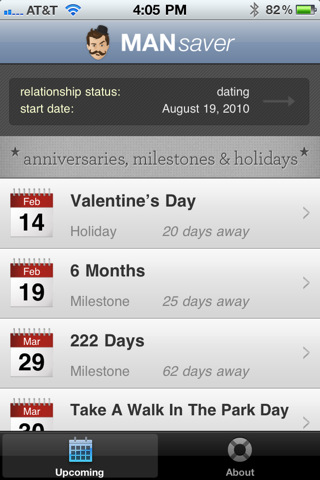
It is no secret that men usually forget about things. Especially if you’re married and you have to think about paying the bills, your job, kids and that car insurance that just won’t go away, it might happen to forget about your 4th anniversay, the perfect gift for Valentine’s Day, or the anniversary of the day your first met with your wife. While girls seem to remember any kind of holiday, anniversary and important milestone with ease, guys…well, usually just forget. And if your relationship is anything like mine, you know this could become a problem. Like, a huge problem.

Now, for as silly as it sounds, we there’s an app for that. MANsaver, a free iPhone app by Oven Bits and Creation Code, is aimed at collecting all these kinds of holidays and anniversaries you should remember into a single list view that – and here comes the real trick – will also send you notifications five days ahead of a scheduled event, and on the same day as well. This app, also nicely designed, is literally a man saver: it allows you to build custom lists of dates based on your relationship, set up reminders and even send text messages based on “romantic templates”. This is an iPhone geek’s relationship-oriented OmniFocus, basically. Read more

Access Extra Content and Perks

Founded in 2015, Club MacStories has delivered exclusive content every week for nearly a decade.

What started with weekly and monthly email newsletters has blossomed into a family of memberships designed for every MacStories fan.

Learn more here and from our Club FAQs.

Club MacStories: Weekly and monthly newsletters via email and the web that are brimming with apps, tips, automation workflows, longform writing, early access to the MacStories Unwind podcast, periodic giveaways, and more;

Club MacStories+: Everything that Club MacStories offers, plus an active Discord community, advanced search and custom RSS features for exploring the Club’s entire back catalog, bonus columns, and dozens of app discounts;

Club Premier: All of the above and AppStories+, an extended version of our flagship podcast that’s delivered early, ad-free, and in high-bitrate audio.

Learn more here and from our Club FAQs.


Today In Apple Patents: Dense Lithium Cells, iOS Controls via Smart Bezels

Two patents uncovered today by AppleInsider and Patently Apple give us some insight on technologies and features Apple might implement in future MacBooks and iOS devices. Smart bezels (a subject we’ve covered before) make a comeback today in a patent that describes how tablets could benefit from losing physical buttons and delegating functions like volume and brightness adjustment to touch-sensitive hardware parts running around the screen of a device. Read more

Access Extra Content and Perks

Founded in 2015, Club MacStories has delivered exclusive content every week for nearly a decade.

What started with weekly and monthly email newsletters has blossomed into a family of memberships designed for every MacStories fan.

Learn more here and from our Club FAQs.

Club MacStories: Weekly and monthly newsletters via email and the web that are brimming with apps, tips, automation workflows, longform writing, early access to the MacStories Unwind podcast, periodic giveaways, and more;

Club MacStories+: Everything that Club MacStories offers, plus an active Discord community, advanced search and custom RSS features for exploring the Club’s entire back catalog, bonus columns, and dozens of app discounts;

Club Premier: All of the above and AppStories+, an extended version of our flagship podcast that’s delivered early, ad-free, and in high-bitrate audio.

Learn more here and from our Club FAQs.


Duplifinder Eradicates iPhoto Doubles, Saves HDD Space

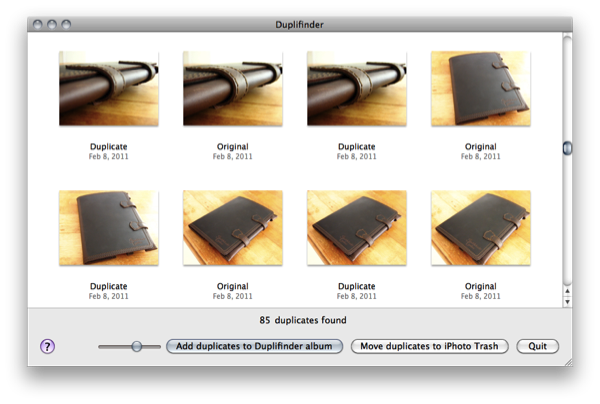
If you’re as fumbly with the camera as I am, you might download several of the same images to iPhoto over and over again before finally deleting them off your camera. Thankfully you don’t have to delete whole albums to remove those well hidden duplicates: you can simply run Duplifinder from Haystack Software. Duplifinder runs as its own app, closing and launching iPhoto when it’s necessary to accomplish one of its two tasks. Firstly, Duplifinder will scan your iPhoto library before presenting you with the option to dump duplicates into their own folder, or deleting them via iPhoto’s trash. You’re shown both the original and duplicate images before you commit to any rash decisions (extras of those ex-girlfriend photos are handy to have on hand), and you can bet you’ll use the software often if you’re taking photos all day long.

The app is only $7, and works with iPhoto ‘08, ‘09, and ‘11.

Access Extra Content and Perks

Founded in 2015, Club MacStories has delivered exclusive content every week for nearly a decade.

What started with weekly and monthly email newsletters has blossomed into a family of memberships designed for every MacStories fan.

Learn more here and from our Club FAQs.

Club MacStories: Weekly and monthly newsletters via email and the web that are brimming with apps, tips, automation workflows, longform writing, early access to the MacStories Unwind podcast, periodic giveaways, and more;

Club MacStories+: Everything that Club MacStories offers, plus an active Discord community, advanced search and custom RSS features for exploring the Club’s entire back catalog, bonus columns, and dozens of app discounts;

Club Premier: All of the above and AppStories+, an extended version of our flagship podcast that’s delivered early, ad-free, and in high-bitrate audio.

Learn more here and from our Club FAQs.


Pixelfari: It’s Safari, In 8-bit. And It’s Totally Awesome.

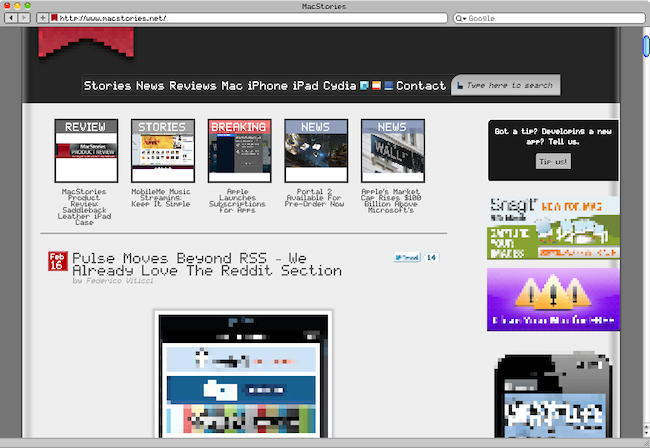
Pixelfari by Neven Mrgan is the coolest Safari mod I’ve ever seen. The app, very buggy and released as an experiment by Mrgan, is basically a skin for Apple’s browser completely realized in 8-bit style. Like those old Nintendo games, or The Incident from Mrgan himself. It’s pixel art applied to a browser: toolbars, fonts, menus, preferences – everything. It’s unreadable as hell. But at the same time, my beloved geeks, it’s kind of a dream come true: Nintendo from the 80s meets Apple. Mrgan writes:

Ladies and gents, fellow humans — presenting Pixelfari, a pixely, 8-bitty version of everyone’s favorite browser. Enjoy chunky fonts, blocky graphics, and a general sense of giddy inefficiency. Spearheaded by yours truly and developed by a very clever friend.

Maybe we’re all getting excited about this because it’s a neat hack no one ever did before. Still, you can’t take the 8-bit love away from me. So go download the app here , right now. Enjoy. Read more

Access Extra Content and Perks

Founded in 2015, Club MacStories has delivered exclusive content every week for nearly a decade.

What started with weekly and monthly email newsletters has blossomed into a family of memberships designed for every MacStories fan.

Learn more here and from our Club FAQs.

Club MacStories: Weekly and monthly newsletters via email and the web that are brimming with apps, tips, automation workflows, longform writing, early access to the MacStories Unwind podcast, periodic giveaways, and more;

Club MacStories+: Everything that Club MacStories offers, plus an active Discord community, advanced search and custom RSS features for exploring the Club’s entire back catalog, bonus columns, and dozens of app discounts;

Club Premier: All of the above and AppStories+, an extended version of our flagship podcast that’s delivered early, ad-free, and in high-bitrate audio.

Learn more here and from our Club FAQs.


Quick Weather with QuickWeather

I love watching the weather and enjoy checking extended forecasts via my iPhone. The weather category in the App Store is flooded with sub-par apps with horrible UIs. Even some of the more popular ones look like they are being neglected in the pixel department. There are some great weather apps there but this review is only about one, a newcomer to the App Store, QuickWeather.

Although I like weather data, sometimes I want a simple weather reading that gives me some visual stimulation, not just numbers. If my hometown weather isn’t the best, I usually check Destin, Florida, where it’s always sunny and where my family goes once a year. QuickWeather, by App Jon, simply does this; it’s a beautiful app that makes it easy to quickly access weather anywhere in the world. Read more

Access Extra Content and Perks

Founded in 2015, Club MacStories has delivered exclusive content every week for nearly a decade.

What started with weekly and monthly email newsletters has blossomed into a family of memberships designed for every MacStories fan.

Learn more here and from our Club FAQs.

Club MacStories: Weekly and monthly newsletters via email and the web that are brimming with apps, tips, automation workflows, longform writing, early access to the MacStories Unwind podcast, periodic giveaways, and more;

Club MacStories+: Everything that Club MacStories offers, plus an active Discord community, advanced search and custom RSS features for exploring the Club’s entire back catalog, bonus columns, and dozens of app discounts;

Club Premier: All of the above and AppStories+, an extended version of our flagship podcast that’s delivered early, ad-free, and in high-bitrate audio.

Learn more here and from our Club FAQs.


First Screenshots Of Opera for iPad [Update: Video]

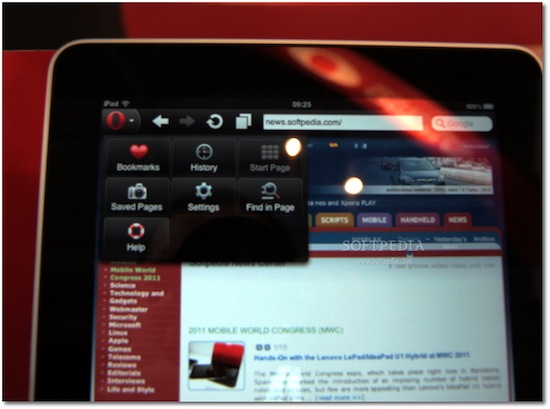
At Mobile World Congress 2011 the folks over at Softpedia managed to get their hands on preliminary version of Opera for iPad, and apparently they were impressed by the speed of the browser. Released on the iPhone last year, Opera for iOS raised some doubts over the quality of the app, mainly due to scrolling smoothness and font rendering on pinching and zooming – clearly inferior to Apple’s Mobile Safari. Opera for iPad is set to provide a much better experience on the tablet screen, with an interface that reminds of the desktop version (visual tabs on top) and menus accessible from a huge Opera button in the upper left corner. The developers also confirm the iPad app has been built on the same engine the powers Opera desktop.

The app runs very smooth, and allows for some rapid movement between visual tabs (open pages). Visual tabs allow users to have several web pages open concurrently and quickly switch between them using tabs. Each tab allows users to preview a thumbnail, as well as the page title and icon for each web page they have open.

Where the default touchscreen keyboard provides a less-than-optimal user experience, users can take advantage of Opera’s virtual keyboard to type and edit information without having to leave the page they are viewing.

I’m curious to see this Opera virtual keyboard and see how it compares to the iPad’s default one. No release date was provided by Opera at MWC, but Softpedia speculates we might see the app in the Store as early as next week. It will likely be free, and quickly jump the charts of free software like the iPhone counterpart did.

Check out more screenshots of Opera for iPad below. Read more

Access Extra Content and Perks

Founded in 2015, Club MacStories has delivered exclusive content every week for nearly a decade.

What started with weekly and monthly email newsletters has blossomed into a family of memberships designed for every MacStories fan.

Learn more here and from our Club FAQs.

Club MacStories: Weekly and monthly newsletters via email and the web that are brimming with apps, tips, automation workflows, longform writing, early access to the MacStories Unwind podcast, periodic giveaways, and more;

Club MacStories+: Everything that Club MacStories offers, plus an active Discord community, advanced search and custom RSS features for exploring the Club’s entire back catalog, bonus columns, and dozens of app discounts;

Club Premier: All of the above and AppStories+, an extended version of our flagship podcast that’s delivered early, ad-free, and in high-bitrate audio.

Learn more here and from our Club FAQs.


Dayboard: Animated Clock, Weather and Twitter Widget for iPad

Dayboard by Blend is a beautiful and, at the same time, interesting application for all those who prefer to keep their iPads on the desk as a clock widget / second monitor while they’re working. The app, sold at $0.99 in the App Store, combines a minimal, elegant and sexy design with clock, weather, calendar and Twitter widgets displayed on screen at the same time.

Dayboard provides all kinds of information without being just a flip clock – like many other apps in the App Store. Upon launch you’ll be asked to grant location access to the app, and I’ve noticed Dayboard reliably and correctly fetches my current location – which, for some reason, has been kind of a problem with several apps lately. Together with location and weather info, Dayboard displays time and date. On top of the animated flip clock, there’s a button to switch from dark theme to light theme. Last, a widget at the bottom rotates Twitter trends – and you can even pick local trends for your country or stick with the worldwide ones. You can’t tap on them to load Twitter in Safari, but the animation is pretty cool.

Dayboard is available at $0.99 in the App Store. Give it a try if you’re looking for a great addition to your desk.

Access Extra Content and Perks

Founded in 2015, Club MacStories has delivered exclusive content every week for nearly a decade.

What started with weekly and monthly email newsletters has blossomed into a family of memberships designed for every MacStories fan.

Learn more here and from our Club FAQs.

Club MacStories: Weekly and monthly newsletters via email and the web that are brimming with apps, tips, automation workflows, longform writing, early access to the MacStories Unwind podcast, periodic giveaways, and more;

Club MacStories+: Everything that Club MacStories offers, plus an active Discord community, advanced search and custom RSS features for exploring the Club’s entire back catalog, bonus columns, and dozens of app discounts;

Club Premier: All of the above and AppStories+, an extended version of our flagship podcast that’s delivered early, ad-free, and in high-bitrate audio.

Learn more here and from our Club FAQs.


MacStories Product Review: Saddleback Leather iPad Case

The iPad case market is full of cheap faux leather folio stands, plastic shells, and silicone grips that don’t quite do the beauty of the iPad justice. Face it: you want to spend your money on a case that’s going to last you a lifetime whether or not your iPad itself is going to last that long. You want a case that’s strong, hardy, and reflects the personality of its proud owner. If you’ve never heard of American bred Saddleback Leather, then you wouldn’t know about their range of real leather laptop bags, backpacks, and iPad cases. It’s probably the finest case I’ve handled to date, and I think you’ll fall in love with it too after reading this review.

Read more

Access Extra Content and Perks

Founded in 2015, Club MacStories has delivered exclusive content every week for nearly a decade.

What started with weekly and monthly email newsletters has blossomed into a family of memberships designed for every MacStories fan.

Learn more here and from our Club FAQs.

Club MacStories: Weekly and monthly newsletters via email and the web that are brimming with apps, tips, automation workflows, longform writing, early access to the MacStories Unwind podcast, periodic giveaways, and more;

Club MacStories+: Everything that Club MacStories offers, plus an active Discord community, advanced search and custom RSS features for exploring the Club’s entire back catalog, bonus columns, and dozens of app discounts;

Club Premier: All of the above and AppStories+, an extended version of our flagship podcast that’s delivered early, ad-free, and in high-bitrate audio.

Learn more here and from our Club FAQs.