

What a day! Apple has not only exceeded our expectations for an iPad 2, but has introduced a whole slew of new apps that bring iLife to the touchscreen. Are we completely blown away? Shocked? I think all of us are going to have a hard time coming off of this one, at least until we get the iPad 2 (in black or white) in our own hands. If you’re looking for the summary of all things iPad 2, you’ll find it right here.
Posts in Featured
iPad 2 Roundup

Access Extra Content and Perks
Founded in 2015, Club MacStories has delivered exclusive content every week for nearly a decade.
What started with weekly and monthly email newsletters has blossomed into a family of memberships designed for every MacStories fan.
Club MacStories: Weekly and monthly newsletters via email and the web that are brimming with apps, tips, automation workflows, longform writing, early access to the MacStories Unwind podcast, periodic giveaways, and more;
Club MacStories+: Everything that Club MacStories offers, plus an active Discord community, advanced search and custom RSS features for exploring the Club’s entire back catalog, bonus columns, and dozens of app discounts;
Club Premier: All of the above and AppStories+, an extended version of our flagship podcast that’s delivered early, ad-free, and in high-bitrate audio.
iPad 2 Gets GarageBand
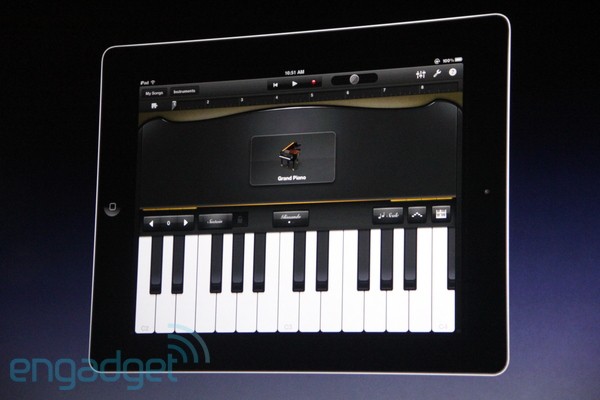
The second app Apple announced for the iPad 2 is GarageBand. It’s got touch instruments (but apparently you can plug in a guitar if you really want to), more than 250 loops and multitrack recording and mixing. Finally Apple has deployed its own app to turn the iPad into a music instrument, following the runaway success of music app developers in 2010.
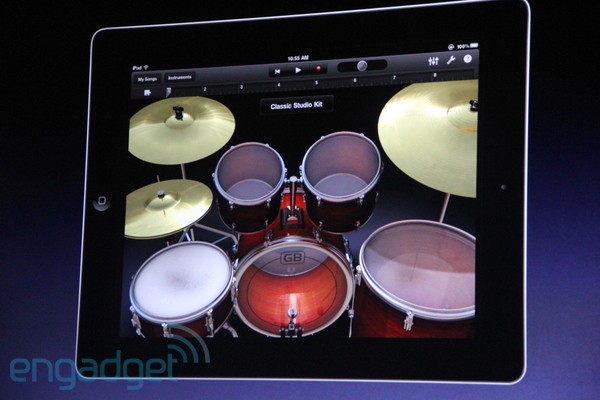
An interesting detail: the piano demoed on stage recognize pressure on keys thanks to the iPad’s accelerometer. That’s very neat. The graphics looks really beautiful and you can switch between lots of instruments including organs and synths. You can toggle octaves and the sustain pedal on the piano. Engadget also reports you can tweak the vibrato with your finger as you slide on screen. Plus, drums!
Access Extra Content and Perks
Founded in 2015, Club MacStories has delivered exclusive content every week for nearly a decade.
What started with weekly and monthly email newsletters has blossomed into a family of memberships designed for every MacStories fan.
Club MacStories: Weekly and monthly newsletters via email and the web that are brimming with apps, tips, automation workflows, longform writing, early access to the MacStories Unwind podcast, periodic giveaways, and more;
Club MacStories+: Everything that Club MacStories offers, plus an active Discord community, advanced search and custom RSS features for exploring the Club’s entire back catalog, bonus columns, and dozens of app discounts;
Club Premier: All of the above and AppStories+, an extended version of our flagship podcast that’s delivered early, ad-free, and in high-bitrate audio.
iOS 4.3 To Be Released on March 11

At Apple’s iPad 2 event, Scott Forstall just confirmed that together with the iPad 2, customers will also get iOS 4.3 on March 11. This doesn’t come as a surprise, as the new iPad runs iOS 4.3 by default with FaceTime and Photo Booth capabilities. We assume a GM build will be released shortly.
Access Extra Content and Perks
Founded in 2015, Club MacStories has delivered exclusive content every week for nearly a decade.
What started with weekly and monthly email newsletters has blossomed into a family of memberships designed for every MacStories fan.
Club MacStories: Weekly and monthly newsletters via email and the web that are brimming with apps, tips, automation workflows, longform writing, early access to the MacStories Unwind podcast, periodic giveaways, and more;
Club MacStories+: Everything that Club MacStories offers, plus an active Discord community, advanced search and custom RSS features for exploring the Club’s entire back catalog, bonus columns, and dozens of app discounts;
Club Premier: All of the above and AppStories+, an extended version of our flagship podcast that’s delivered early, ad-free, and in high-bitrate audio.
iPad 2: Available on March 11, March 25 in More Countries
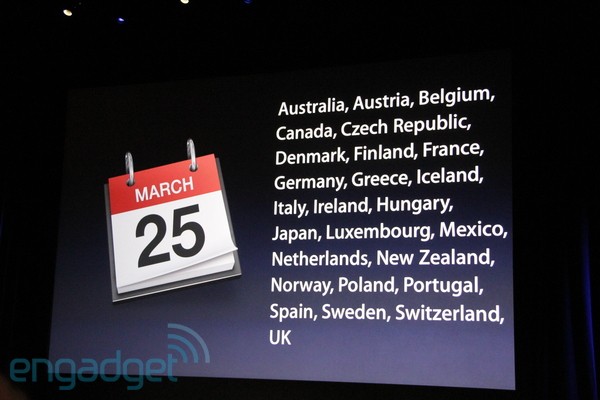
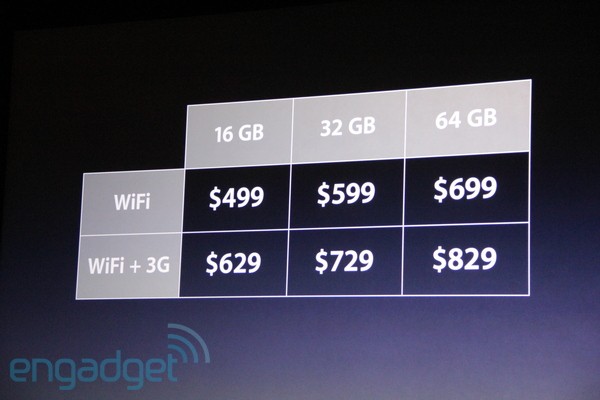
The iPad 2 will be released on March 11 in the United States. Other countries will follow on March 25. Prices start at $499 for the base model, same of iPad 1. Table below.
Access Extra Content and Perks
Founded in 2015, Club MacStories has delivered exclusive content every week for nearly a decade.
What started with weekly and monthly email newsletters has blossomed into a family of memberships designed for every MacStories fan.
Club MacStories: Weekly and monthly newsletters via email and the web that are brimming with apps, tips, automation workflows, longform writing, early access to the MacStories Unwind podcast, periodic giveaways, and more;
Club MacStories+: Everything that Club MacStories offers, plus an active Discord community, advanced search and custom RSS features for exploring the Club’s entire back catalog, bonus columns, and dozens of app discounts;
Club Premier: All of the above and AppStories+, an extended version of our flagship podcast that’s delivered early, ad-free, and in high-bitrate audio.
This Is The iPad 2: White Version Available, Same Price of iPad 1 [Update: Photos, Videos]
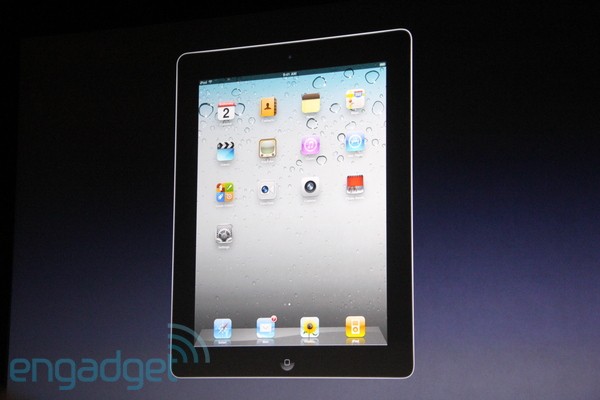
Finally, it’s here. At Apple’s media event at the Yerba Buena Center, Steve Jobs just unveiled the second generation iPad. It’s called iPad 2. It features an all-new design, it’s faster, it’s got an Apple A5 processor with dual core CPU, faster graphics. Two cameras, rear and front facing ones. A gyroscope, perfect for gaming. It looks very similar to the leaked mockups we’ve seen in the past weeks.
iPad 2 is 33% thinner than the original one, 3.4mm to 8.8mm. It’s got tapered edges and it’s even thinner than the iPhone 4. It comes in a new white design, it’s got the same 10 hours of battery life. Same prices of iPad 1. Available both in WiFi and 3G versions for AT&T and Verizon.
Other iPad 2 coverage today:
Pictures courtesy of Engadget. More details below, and look for a detailed roundup of iPad 2 in a few minutes on MacStories.
Update: First hands-on pictures below as well. Read more
Access Extra Content and Perks
Founded in 2015, Club MacStories has delivered exclusive content every week for nearly a decade.
What started with weekly and monthly email newsletters has blossomed into a family of memberships designed for every MacStories fan.
Club MacStories: Weekly and monthly newsletters via email and the web that are brimming with apps, tips, automation workflows, longform writing, early access to the MacStories Unwind podcast, periodic giveaways, and more;
Club MacStories+: Everything that Club MacStories offers, plus an active Discord community, advanced search and custom RSS features for exploring the Club’s entire back catalog, bonus columns, and dozens of app discounts;
Club Premier: All of the above and AppStories+, an extended version of our flagship podcast that’s delivered early, ad-free, and in high-bitrate audio.
March 2nd Liveblog: The iPad’s Second Coming

There couldn’t be a more hyped announcement than this week’s Apple Keynote at the Yerba Buena Center for the Arts on March 2nd, and we’ll be hanging out with all of you guys at a safe distance for when the fireworks misfire. Rumors will be settled, white iPads will be tossed into (non)-existence, and awkward picture moments with new cameras will be had. Plus, you can expect those heart tingling show-stoppers with a Jony Ives speech, and maybe (just maybe) a new look at the next generation of iOS. Excited yet?
Join us at 12:00 pm, Eastern Standard Time (that’s the New York gamut) for an hour long pre-show where we’ll kick around iPad predictions, overdose on coffee, and potentially ruin a perfectly good stress ball before the event. As always we’ll be consolidating all of the major announcements into a streamlined feed from everyone’s favorite websites.
Bookmark this page and come back before the event starts on March 2nd for lots of fun, question answering from the audience, and maybe a guest or two.
Time Zones:
13:00 – New York, New York
10:00 – San Francisco, California
08:00 – Honolulu, Hawaii
05:00 – Sydney, Australia
03:00 – Tokyo, Japan
02:00 – Shanghai, China
23:30 – New Delhi, India
21:00 – Moscow, Russia
19:00 – Rome, Italy
18:00 – London, England
Don’t see your city? You can use this link to get your exact time. Read more
Access Extra Content and Perks
Founded in 2015, Club MacStories has delivered exclusive content every week for nearly a decade.
What started with weekly and monthly email newsletters has blossomed into a family of memberships designed for every MacStories fan.
Club MacStories: Weekly and monthly newsletters via email and the web that are brimming with apps, tips, automation workflows, longform writing, early access to the MacStories Unwind podcast, periodic giveaways, and more;
Club MacStories+: Everything that Club MacStories offers, plus an active Discord community, advanced search and custom RSS features for exploring the Club’s entire back catalog, bonus columns, and dozens of app discounts;
Club Premier: All of the above and AppStories+, an extended version of our flagship podcast that’s delivered early, ad-free, and in high-bitrate audio.
OS X Lion and the Mac App Store Distribution Dilemma
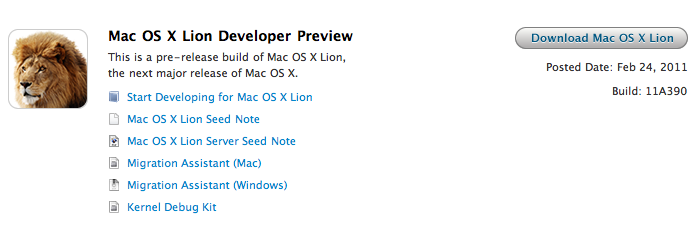
Last week, Apple released the first developer preview of Mac OS X Lion. New and improved OS aside, something set apart Lion from the previous beta releases Apple seeded in the past years: Lion needs to be downloaded through the Mac App Store. That’s right: a 3.6 GB download, available for developers in the App Store infrastructure. How did this happen? Well, the how is easily explainable: developers can log in the Dev Center, request a Lion build and a unique promo code is generated. With the promo code, developers can fire up the Mac App Store and start the OS X Lion installer download. The promo code, as an additional security measure to prevent people from sharing it, can only be used once, on a single machine.
While the method is really clever and brings a bit of fresh air to the developer community (no need to have a download in your browser, you can just leave the Mac App Store do its job), this has raised some questions on the future of Apple’s OS downloads for consumers. Namely, some people are speculating the Lion developer preview is clearly pointing to a summer 2011 featuring Mac OS X 10.7 Lion available only in digital format. Apple is killing the CD, and physical Mac OS purchases. Read more
Access Extra Content and Perks
Founded in 2015, Club MacStories has delivered exclusive content every week for nearly a decade.
What started with weekly and monthly email newsletters has blossomed into a family of memberships designed for every MacStories fan.
Club MacStories: Weekly and monthly newsletters via email and the web that are brimming with apps, tips, automation workflows, longform writing, early access to the MacStories Unwind podcast, periodic giveaways, and more;
Club MacStories+: Everything that Club MacStories offers, plus an active Discord community, advanced search and custom RSS features for exploring the Club’s entire back catalog, bonus columns, and dozens of app discounts;
Club Premier: All of the above and AppStories+, an extended version of our flagship podcast that’s delivered early, ad-free, and in high-bitrate audio.
Place Clock Combines iPhone Alarms and Location
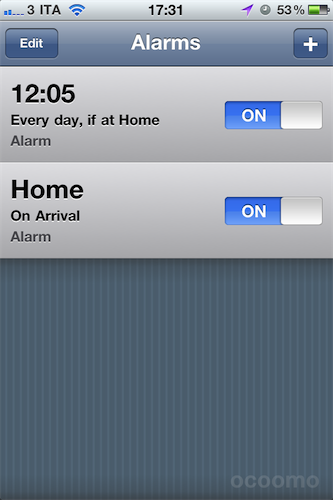
Sometimes, you don’t want to be reminded of something you have to do at a certain time during the day – rather, you’d like to be notified of events and tasks you need to take care of in a specific location, say pick up the laundry at home or meet Mike at the office. But as the default iPhone clock application doesn’t allow you to attach location info to alarms, you’re forced to assign a “time” to everything.
Place Clock, a new app by Ocoomo, aims at fixing these issues by providing a solution that combines both time and location to create the ultimate alarm clock application that’s aware of where you are in the world, yet can rely on time-based alarms as the native Apple software can. What’s cool about Place Clock (I have been testing the app for 2 days now), is that it completely works in the background without draining too much battery (at least on the iPhone 4, might be different on the 3GS) and it continuously keeps track of your location as a possible way to initiate alarms. The app doesn’t need to be open all the time, but it can fire off an alarm when you arrive to, depart from a location or get in a specific range. This, combined with classic time-based features, makes for a very solid app that’s, at least for me, something new on the iPhone. Read more
Access Extra Content and Perks
Founded in 2015, Club MacStories has delivered exclusive content every week for nearly a decade.
What started with weekly and monthly email newsletters has blossomed into a family of memberships designed for every MacStories fan.
Club MacStories: Weekly and monthly newsletters via email and the web that are brimming with apps, tips, automation workflows, longform writing, early access to the MacStories Unwind podcast, periodic giveaways, and more;
Club MacStories+: Everything that Club MacStories offers, plus an active Discord community, advanced search and custom RSS features for exploring the Club’s entire back catalog, bonus columns, and dozens of app discounts;
Club Premier: All of the above and AppStories+, an extended version of our flagship podcast that’s delivered early, ad-free, and in high-bitrate audio.
2x Graphic Files Found in Lion May Hint at “Retina Display” for Macs
A report surfaced earlier this week suggested Apple may soon start building support for “HiDPI display modes” in Mac OS X to allow developers to take advantage of high-resolution displays and provide graphic files for apps at much greater detail. The HiDPI mode, from what MacRumors managed to gather taking a look at Lion’s Quartz Debug, would let developers save different sets of graphic elements into an application bundle, standard ones and 2x-enlarged ones that will have the same physical size on a display, but more detail thanks to the high-resolution mode. A 15” MacBook Pro with a standard 1440x900 display, for example, could go to 2880x1800 and have the same 15-inch size, but more detail because of its pixel density. Just like on the iPhone 4’s Retina Display, 2x files would be automatically used for the hi-res display.
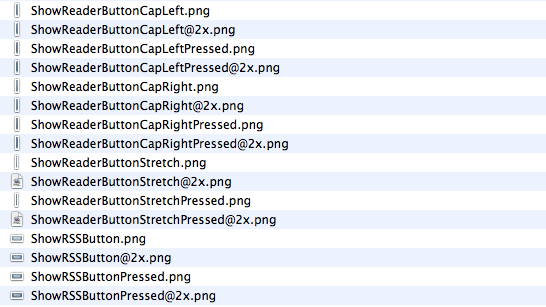
While the HiDPI mode needs to be manually enabled for now, we have found a series of 2x-enlarged files in the current version of Safari for OS X Lion, version 5.1. The files carry the same “@2x” suffix of those seen on iPhone 4 apps, and are twice the size of those saved without 2x mode. The “HideReaderButtonCapLeft” file, for instance, is 6x30 in 2x mode and 3x15 in standard mode. Same applies for all the other files in Safari 5.1.
This isn’t the first time we discover 2x files hidden in Apple’s applications, and while they don’t really confirm high-res displays are coming in the near future (remember the @2x files we found in iBooks for iPad last year), they should be a good indication of the method Apple is testing to let Macs run more detailed applications on higher resolution displays. It doesn’t come as a surprise that the method is the same of the iPhone 4, and likely the same that will be adopted on the iPad as well. With next year’s MacBook Pro refresh rumored to be a complete redesign of the line, Apple may implement a “Retina display” to leverage 2x-mode for apps.
Access Extra Content and Perks
Founded in 2015, Club MacStories has delivered exclusive content every week for nearly a decade.
What started with weekly and monthly email newsletters has blossomed into a family of memberships designed for every MacStories fan.
Club MacStories: Weekly and monthly newsletters via email and the web that are brimming with apps, tips, automation workflows, longform writing, early access to the MacStories Unwind podcast, periodic giveaways, and more;
Club MacStories+: Everything that Club MacStories offers, plus an active Discord community, advanced search and custom RSS features for exploring the Club’s entire back catalog, bonus columns, and dozens of app discounts;
Club Premier: All of the above and AppStories+, an extended version of our flagship podcast that’s delivered early, ad-free, and in high-bitrate audio.