Posts in reviews

Pigment Brings Adult Coloring Books to iPad Pro with Apple Pencil Support

I first heard of the adult coloring book trend from my friend Myke, who described on various podcasts and Slack conversations how coloring mandala-like patterns helps him concentrate and relax while doing something else. In a peculiar case of Baader-Meinhof Phenomenon, I then started hearing about the popularity of adult coloring from a lot of people – all of them, apparently, owners of physical books with empty artistic designs which need to be filled with color.

While I don’t own any adult coloring books myself, I’ve been intrigued by the trend enough to do some research. The origin story of the modern adult book coloring trend goes somewhat like this: Scottish artist Johanna Basford convinced British publisher Laurence King to order an initial run of ‘Secret Garden: An Inky Treasure Hunt and Coloring Book’. Since its release in 2013, the book has sold over two million copies worldwide. As noted by The Atlantic, adult coloring also started spreading in France when, in 2012, publisher Hachette released Art-Thérapie: 100 Coloriages Anti-Stress’. It was so successful, Hachette had to launch a full series, which has sold more than three and a half million copies so far. The New Yorker has a great primer on the rise of adult coloring books and the initial work of Johanna Basford and Hachette.

In another piece for The Atlantic, Julie Beck described adult coloring as offering the “relief and mindfulness without the paralysis that a blank page can cause”; the constraints of objects designed by others with the sole purpose being coloring them helps a lot of people relieve stress and engage a part of their brain that can either take their mind off daily concerns or, like Beck noted, use multitasking to relax.

Evidence – both factual and anecdotal – indicates that adult coloring has now turned into a global, lucrative phenomenon: mainstream media are talking about it, 5 out of 10 of the top books on Amazon are adult coloring books, and, if you go into a bookstore today, there’s a good chance you’ll find a section dedicated to books filled with patterns of flowers, natural landscapes, exotic objects, animals, and more.

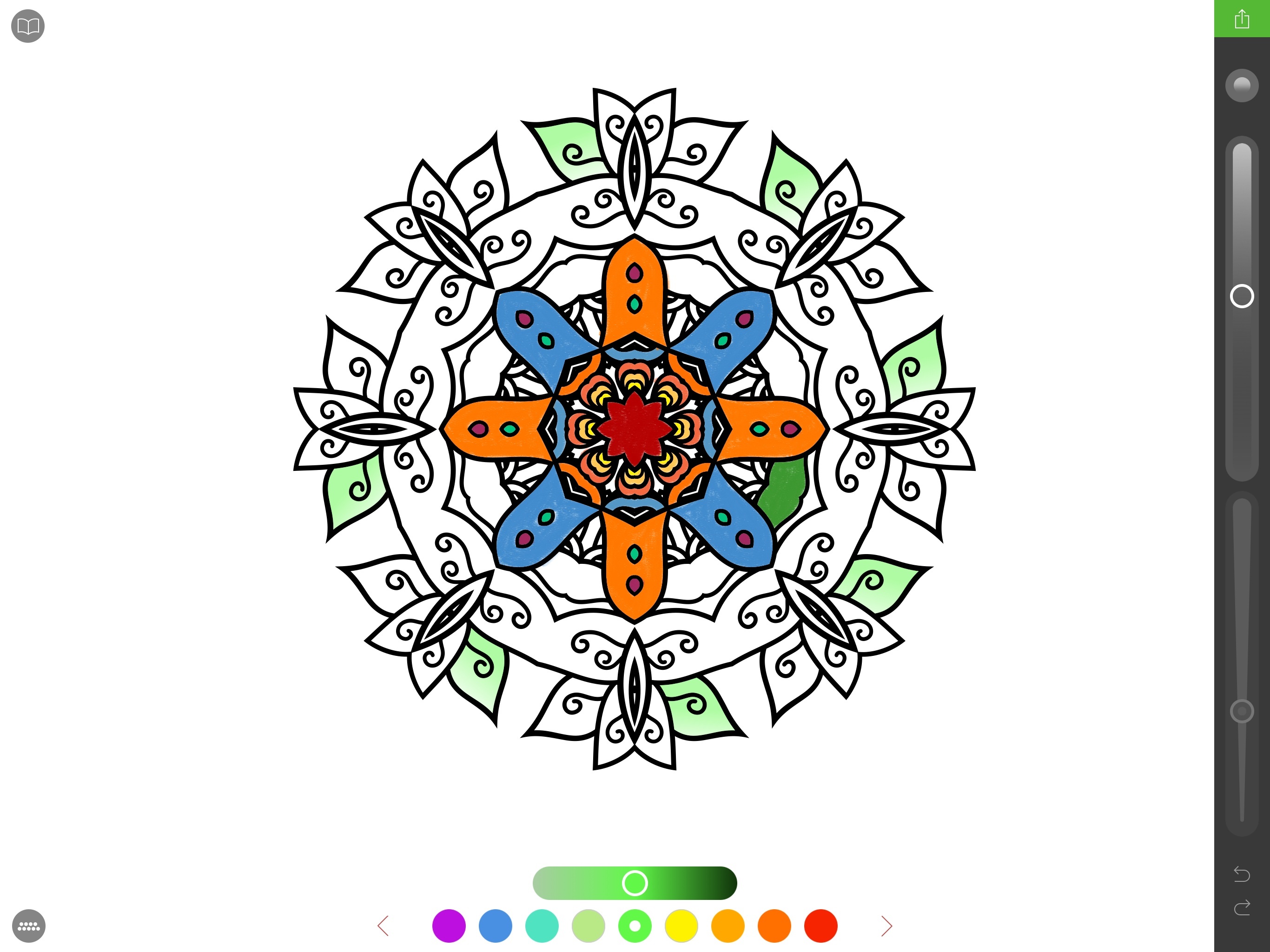
Back in November, I half-jokingly sent a tweet in response to John Gruber saying that the first developer to figure out how to make an adult coloring app with Apple Pencil integration would find success on the App Store. I don’t know if they’re going to make “millions” as I quipped, but California-based studio Pixite – specialized in photo apps for iOS and Android – is following the path I imagined. Today, Pixite is launching Pigment, an adult coloring app for iPhone and iPad that, however, is best enjoyed with the closest digital equivalent of a physical book: an iPad Pro paired with an Apple Pencil.

Read more


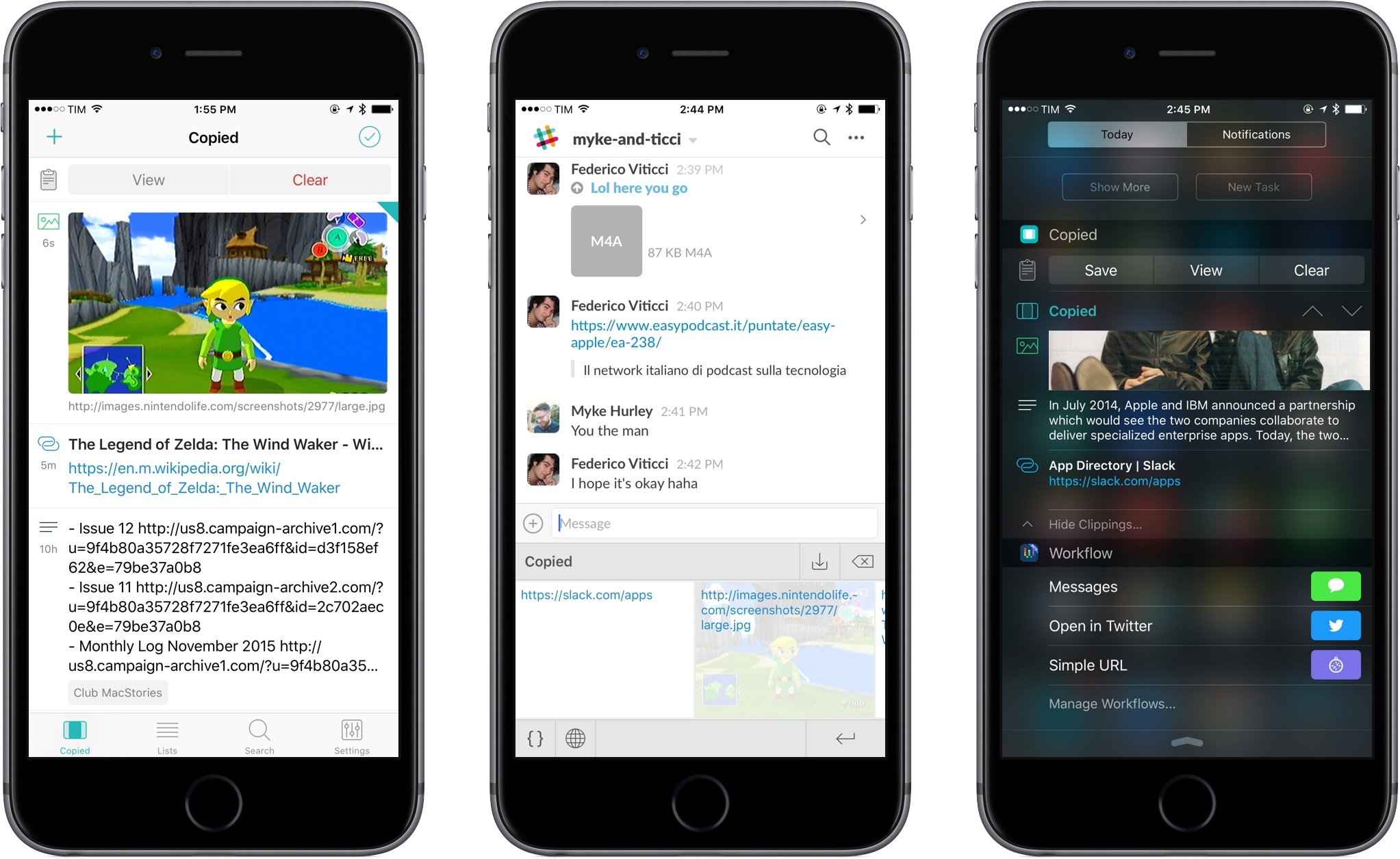
Copied: A Full-Featured Clipboard Manager for iOS 9

I first came across Copied a few days after its release in late October. Developed by Kevin Chang, Copied is a clipboard manager for iOS and OS X with iCloud sync and a polished interface – a fairly standard set of features, I first thought when looking at the app’s product page.

Over the subsequent couple of weeks, Copied played an essential role in helping me assemble my coverage of the iPad Pro, and it has since gained a permanent spot on my Home screen on both the iPhone and iPad. Copied has become my favorite way to quickly exchange bits of text and images between devices with iCloud, transfer URLs and templates I use for in-depth reviews and Club MacStories, and more.

On the surface, Copied may appear like another clipboard manager for iOS; however, several nice touches in the app break new ground in this category, and I consider Copied one of the best app debuts of 2015.

Read more


Daylite 6 for Mac and iOS

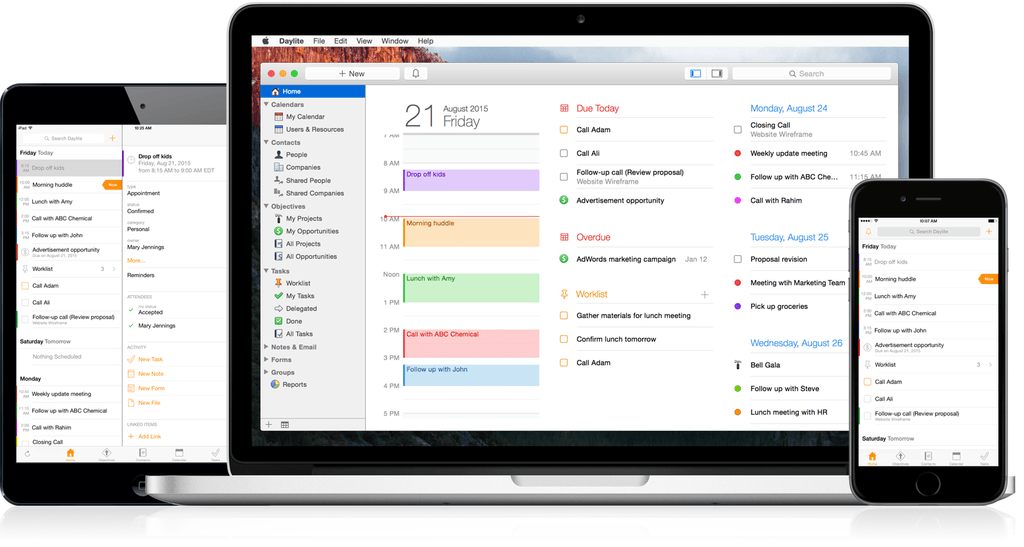
Daylite 6 was released today for both Mac and iOS, and it’s a major upgrade for the business productivity app. Already boasting a complete set of tools for managing projects, clients, and tasks for an individual or workgroup, the new version adds a slew of new features that take the app even further.

One of the major highlights of this release is the announcement of “Daylite Cloud.” Previously, centralizing a group’s Daylite data required running a copy of Daylite Server. With Daylite Cloud, it’s all handled seamlessly, allows offline access, is cheaper, and has no barrier to incorporating it into your company workflow.

The task management features of Daylite have also expanded. The constraints of the previous Pipeline/Activity Set features have been augmented by a “Task Lists” feature, allowing free-form creation of task lists that might not be assigned to a linear timeline, with complete control over ordering, a new entry interface, and additional fields for time, location, estimated time, and other details. There’s also a new “Smart Filtering Bar” for viewing tasks by details such as assigned team member, category, or keyword.

The iOS version has new goodies as well, with features including Today Widgets, full filtering capabilities, and improved editing of Daylite entries. It also adds file linking tools which allow you to snap a photo and link it to one or more items in Daylite.

If you’re a Mail.app user, also check out the Daylite Mail Assistant. It’s not a new feature, but it’s impressive. It allows you to link emails to Daylite items, schedule meetings, and share data without a chain of cc’s and forwards, all from within Mail.

For a complete rundown of all the new features, check out the announcement post on the Daylite blog. You can learn more about Daylite on the Marketcircle website.


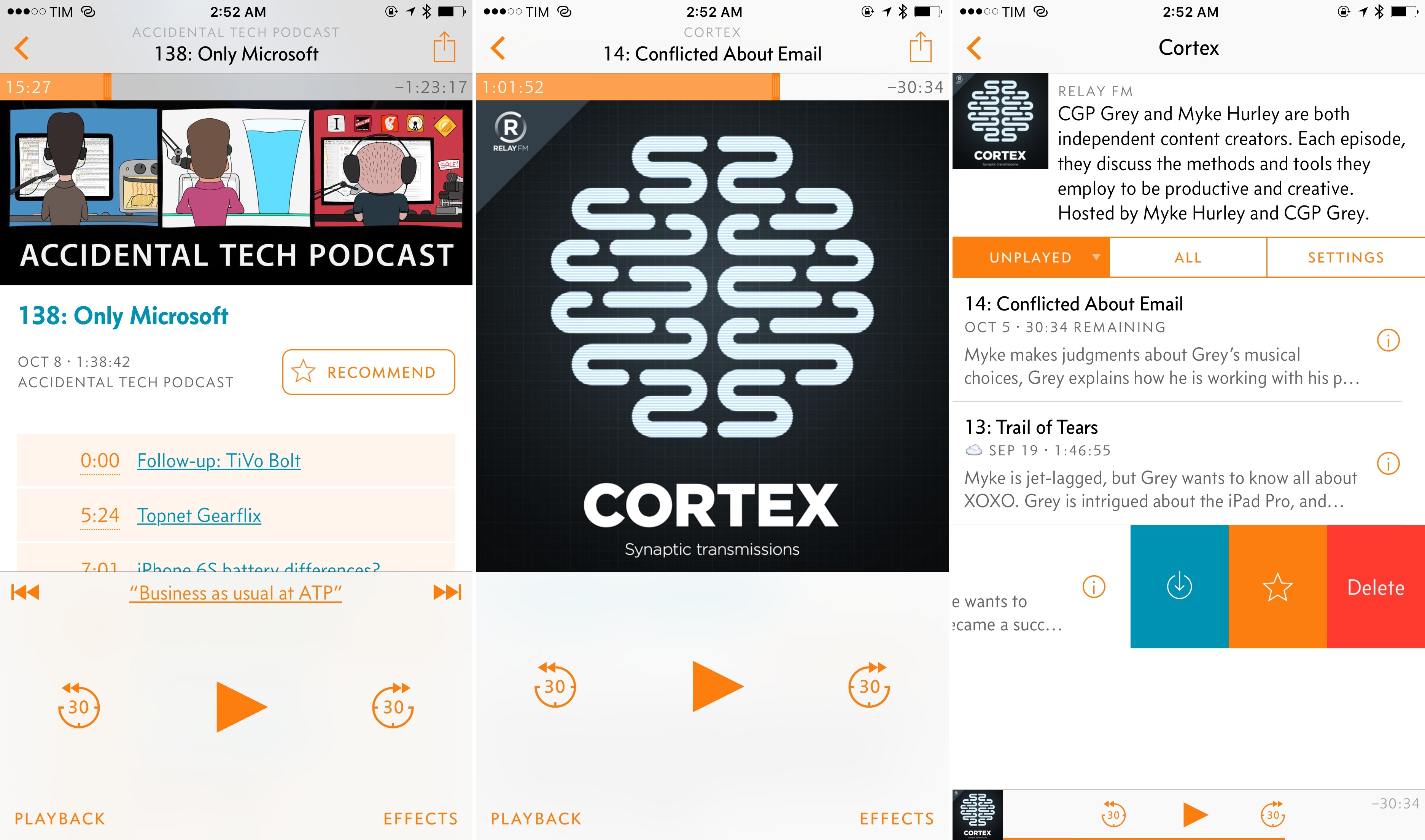
Overcast 2.0 Streaming, Chapters, New Patronage Model, and an Interview With Marco Arment

As I guessed in my iOS 9 review, the temptation to go back to Overcast has been stronger than the allure of Apple’s refreshed Podcasts app.

Released last year for iPhone and later ported to the iPad, Marco Arment’s podcast player launched with an elegant design and the distinctive Smart Speed and Voice Boost, two audio effects that allowed users to save time when listening to podcasts by shortening moments of silence, and enjoy a superior audio quality.

In using Overcast for the past year, Smart Speed has turned from a simple and clever addition to a lock-in factor for daily listening: I know that Overcast will make shows I listen to shorter without making them sound odd or unnatural, and it’s the kind of feature that I can’t enjoy in iOS’ built-in Podcasts app. Apple’s player has gotten considerably better on iOS 9; but, when looking at the total amount of hours saved with Overcast, I realized that those are hours of my life I got back by using Arment’s app instead of an alternative. This, combined with the many thoughtful touches of its interface, makes me happy to stick with Overcast.

Arment faced two problems, though. Overcast always needed to download new episodes before playing them: due to limitations of iOS 7’s web download and audio APIs, Smart Speed and Voice Boost couldn’t work with streaming – a popular feature that many podcast apps implement to avoid taking up storage on users’ devices with downloaded audio files. And, while it was Arment’s goal to gain market share with a freemium model that made Overcast free to use with an In-App Purchase to unlock advanced features (such as unlimited effects), the majority of Overcast users ended up staying on the free tier – a less capable version of the app that Arment himself wasn’t using, and which couldn’t be easily differentiated in a sea of podcast clients for iOS.

Overcast 2.0, launching today on the App Store, fixes both problems. With version 2.0, Overcast users will be able to stream episodes and use audio effects at the same time, getting the same experience of Overcast 1.0 with no upfront download required. But more importantly, Arment is taking a bold step with pricing: Overcast 2.0 is a completely free app, with an optional patronage model to support Arment directly.

Read more


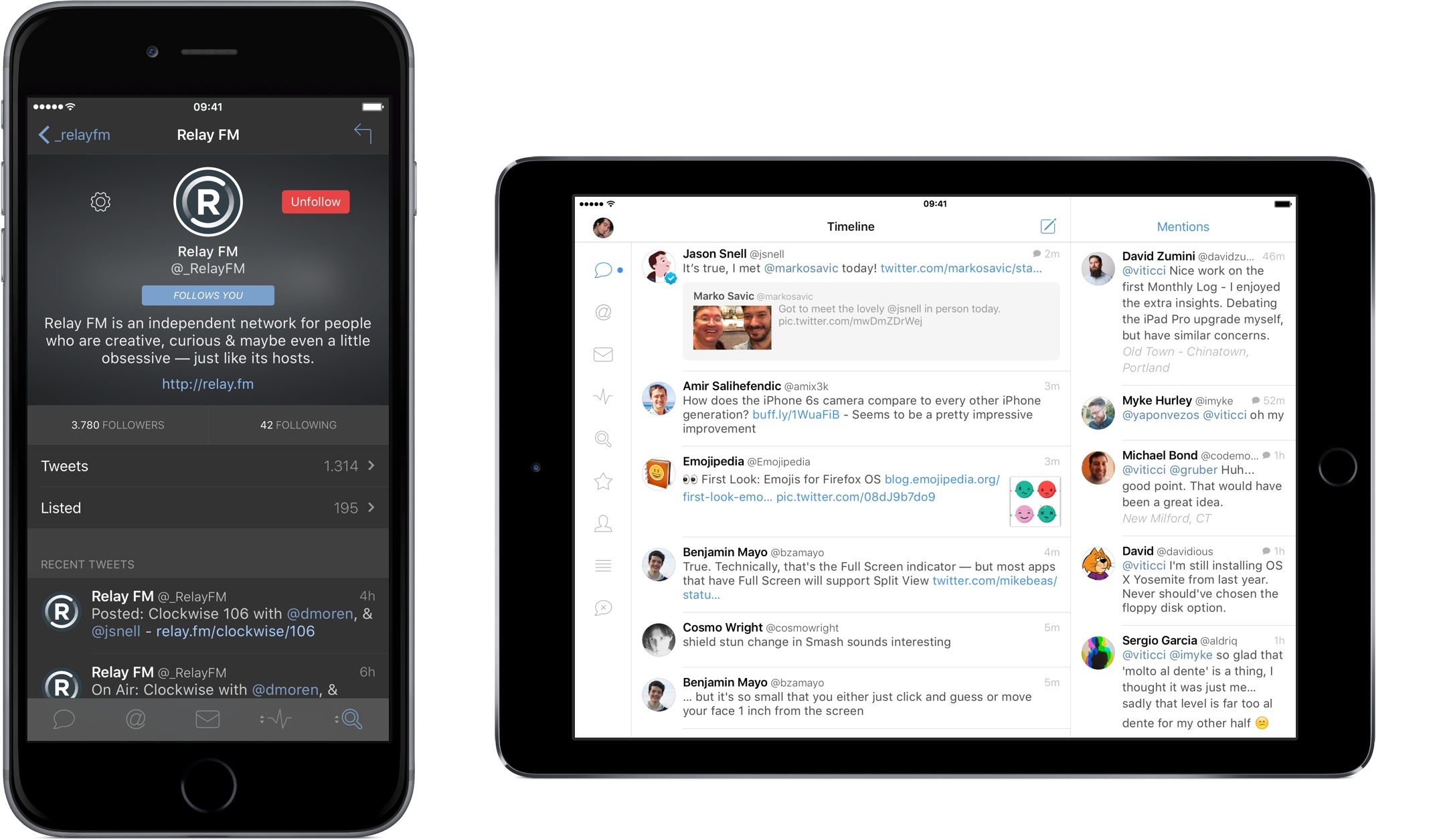
Tweetbot 4 Review: Bigger Bot

There have only been two great Twitter apps for iPad since 2010: Loren Brichter’s Twitter, and the original Tweetbot for iPad.

As I reminisced last year in my look at the state of Twitter clients, iOS apps for Twitter are no longer the welcoming, crowded design playground they once were. Developing a Twitter client used to be an exercise in taste and restraint – a test for designers and developers who sought to combine the complex networking of Twitter with a minimalist, nimble approach best suited for a smartphone. Twitter reclaimed their keys to the playground when they began offering “guidance” on the “best opportunities” available to third-party developers. Four years into that shift, no major change appears to be in sight.

For this reason, I’d argue that while the iPhone witnessed the rise of dozens of great Twitter clients in their heyday, the iPad’s 2010 debut played against its chances to receive an equal number of Twitter apps specifically and tastefully designed for the device. Less than a year after the original iPad’s launch (and the Tweetie acquisition), Twitter advised developers to stop building clients that replicated the core Twitter experience; a year later, they started enforcing the 100,000-token limit that drove some developers out of business. Not exactly the best conditions to create a Twitter client for a brand new platform.

Largely because of the economic realities of Twitter clients, few developers ever invested in a Twitter app for iPad that wasn’t a cost-effective adaptation of its iPhone counterpart. Many took the easy route, scaling up their iPhone interfaces to fit a larger screen with no meaningful alteration to take advantage of new possibilities. Functionally, that was mostly okay, and to this day some very good Twitter apps for iPad still resemble their iPhone versions. And yet, I’ve always felt like most companies had ever nailed Twitter clients for a 10-inch multitouch display.

With two exceptions. The original Twitter for iPad, developed by Tweetie creator and pull-to-refresh inventor Loren Brichter, showed a company at the top of their iOS game, with a unique reinterpretation of Twitter for the iPad’s canvas. The app employed swipes and taps for material interactions that treated the timeline as a stack of cards, with panels you could open and move around to peek at different sets of information. I was in love with the app, and I still think it goes down in software history as one of the finest examples of iPad app design. Until Twitter ruined it and sucked all the genius out of it, the original Twitter for iPad was a true iPad app.

And then came Tweetbot. While Twitter stalled innovation in their iPad app, Tapbots doubled down and brought everything that power users appreciated in Tweetbot for iPhone and reimagined it for the iPad. The result was a powerful Twitter client that wasn’t afraid to experiment with the big screen: Tweetbot for iPad featured a flexible sidebar for different orientations, tabs in profile views, popovers, and other thoughtful touches that showed how an iPhone client could be reshaped in the transition to the tablet. Tapbots could have done more, but Tweetbot for iPad raised the bar for Twitter clients for iPad in early 2012.

Three years later, that bar’s still there, a bit dusty and lonely, pondering a sad state of affairs. Tweetbot is no longer the champion of Twitter clients for iPad, having skipped an entire generation of iOS design and new Twitter features. Tweetbot for iPad is, effectively, two years behind other apps on iOS, which, due to how things turned out at Twitter, haven’t been able to do much anyway. On the other hand, Twitter for iPad – long ignored by the company – has emerged again with a stretched-up iPhone layout presented in the name of “consistency”. It’s a grim landscape, devoid of the excitement and curiosity that surrounded Twitter clients five years ago.

Tweetbot 4 wants to bring that excitement back. Long overdue and launching today on the App Store at $4.99 (regular price will be $9.99), Tweetbot 4 is a Universal app that builds upon the foundation of Tweetbot 3 for iPhone with several refinements and welcome additions.

In the process, Tweetbot 4 offers a dramatic overhaul of the iPad app, bringing a new vision for a Twitter client that’s unlike anything I’ve tried on the iPad before.

Read more



Zen Timer: Elegant Pomodoro on Mac

Zen Timer has improved my daily work life. I have ADHD, and I recently went through a snafu where my disorder was untreated for a couple of months. In order to get any work done, I needed more structured work time, so I gave the Pomodoro technique another go. It turned out to be a huge help for me, and if it can help someone with a level of concentration as hopeless as mine, I have to believe it’s a great tool for more “normal” people, too.

At its core, Pomodoro is a simple method of working and resting in timed intervals. There are a variety of timers available on Mac and iOS for this, and just as I was making the effort to start implementing the technique again, I found Zen Timer. It’s a beautiful and creative app for interval timing that immediately became part of my daily workflow.

Zen Timer generates an animated tree which grows during a work interval, and when the timer is up, the leaves of the tree fall to the ground and rest there while it counts down to your next work period. When the next work interval starts, the tree begins growing anew. Zen Timer generates a unique tree each time, and you can customize the colors, line thicknesses, transparency and more things that people with ADHD (or OCD…) probably shouldn’t be allowed to spend too much time tweaking.

It’s visually customizable, but I’ve found there’s a specific way I like to run it: I set the size of the window as large as it will go, make the window background transparent, and set it at the bottom of the viewport at Desktop level on one of my auxiliary displays. You can hide the timer and controls during work periods, so I’m left with an elegant tree growing on my desktop while I work. I customized my wallpaper and the tree colors, of course. Because I could.

While Zen Timer comes with intervals set to the Pomodoro defaults, its timer settings are easily modified to work with any lengths of time in each interval.

If you’re looking for a new Pomodoro timer on your Mac, or are like me and just need a better way to work, check out Zen Timer ($4.99 US) on the Mac App Store. If you’re curious, check out the developer’s website for an excellent video of Zen Timer in action.


Sofa: Discover New Movies from Curated Collections

Sofa is a new app that launched just last Friday. Sofa does two things: it helps you discover new movies to watch, and it lets you keep a list of movies you want to watch. Despite its rather sparse feature list, Sofa is well worth your time. One of the reasons why is because Sofa’s discover section is populated by hand-curated collections of movies. But Sofa also looks great and, because it isn’t burdened with dozens of features, the app is simple and delightful to use.

Read more