Posts in reviews

Byword 2.0 Gets Publishing Services, Improved Sync, And More

Byword 2.0

Byword 2.0

Metaclassy’s Byword is one of the finest Markdown text editors for iOS and OS X. On the Mac, a great selection of keyboard shortcuts and support for native full-screen mode make Byword an experience that’s both powerful and intuitive; on iPhones and iPads, the app’s excellent MultiMarkdown previews allow the Markdown-savvy writer to always keep an eye on the final outcome of a document. With sync (both through iCloud and Dropbox) and solid exporting options (including PDF), Byword has become many’s preferred solution to write down thoughts and longer essays – with a focus on Markdown, rich text, and cross-device availability of documents.

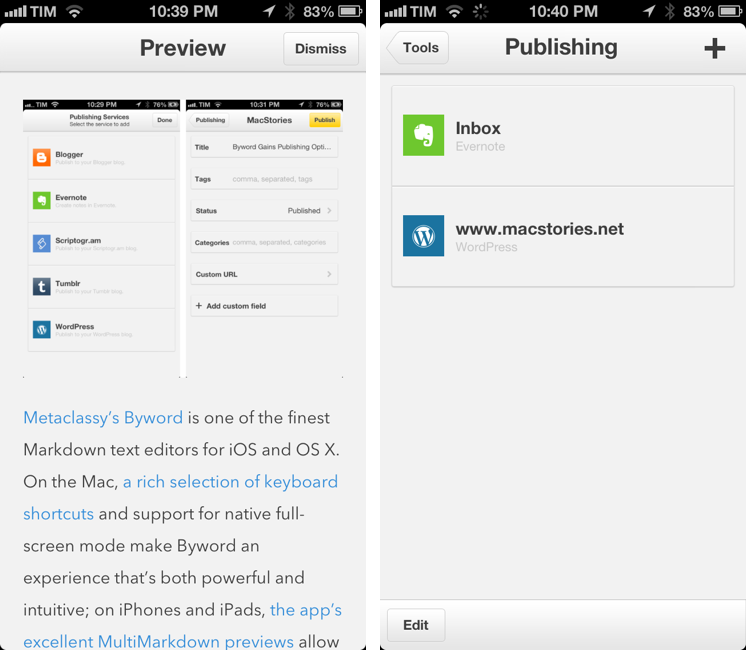
Byword 2.0, released today for iOS and OS X, introduces new publishing options for WordPress, Tumblr, Evernote, Blogger, and Scriptogram, more robust sync with offline support and better conflict resolution, and several other enhancements. I have been testing Byword on all my devices for the past month, pointing the app to my /Apps/ folder in Dropbox where all my text files are stored. Read more


Analog Camera Review

Through a simple card, Analog Camera introduces itself with a short tutorial and animated image, explaining how to set exposure and autofocus. Personally, I wanted to fool around with the app before I read the manual, seeing if I could discover which gestures did what and whether I could navigate the app without having getting frustrated or lost. I took the same approach with Clear, Realmac Software’s earlier collaborative effort on iOS, and ultimately determined that there was enough feedback and freedom to figure it out on your own. So I dismissed the card, and would have to do so a few more times as I got around to viewing different parts of the app.

Read more


Instacast For Mac

Back in early May, Vemedio released a first beta of Instacast for Mac. Instacast is my podcast client of choice on the iPhone and iPad, and I was eager to see whether Instacast could fulfill my long-standing wish of a proper podcast app for OS X. Instacast is officially out of beta today, and it’s my new favorite podcast app for Mac.

There isn’t much to say about Instacast for Mac that hasn’t already been explained in our review of Instacast 3.0 for iOS. The Mac version retains the same interface and episode management principles of its iOS counterpart: you can subscribe to podcasts and organize them in lists, sort them by parameters such as Title or Date, or delve deeper into subscription-specific settings for refresh times and automatic download/deletion options. Literally everything that you know about Instacast 3.0 for iOS – including the app’s design style – has been ported to OS X with this first release.

There’s some stuff that has been built exclusively for the Mac. I am particularly fond of Instacast’s rich selection of keyboard shortcuts, which fit well with the Mac’s nature and will help you save time if you’re looking for a specific command or option (there are many of them, so remembering each one of them may require special mnemonic skills).

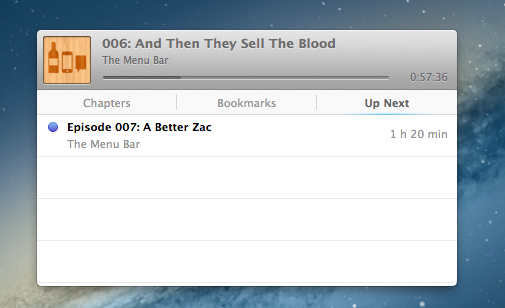
I like when developers porting popular iOS apps to the Mac don’t simply convert their projects for a desktop window: that was the case with Tweetbot (another app that took advantage of OS X features like keyboard shortcuts and larger displays), and, fortunately, it’s happening with Instacast as well through the aforementioned shortcuts and an iTunes-like MiniPlayer. Available through the Window menu (with the keyboard, it’s ⌥⌘2), the MiniPlayer allows you to check on either the episode you’re listening to (with a widget that’s got a minimal footprint on your desktop) or to the ones that you have queued up for later thanks to – another Mac-only feature – Up Next support. Again, similarly to iTunes 11, Instacast lets you send specific episodes to a list that you can consult and modify while you’re already listening to something else.

Another feature that’s currently exclusive to Instacast for Mac is local text search: if you remember an episode that had a particular keyword in its title or description, you can look for it. This is especially useful for names of apps or services that are mentioned in podcasts, but I wish it was possible to save recurring searches.

Instacast for Mac is Instacast 3.0, responsibly and intelligently ported to OS X. It’s not a simple conversion of the iOS app as it takes advantage of the Mac in obvious, but still welcome ways. Sync with Instacast Cloud, initially spotty in the beta, has been reliable and fast for me in the last builds, making the process of switching between devices and continuing to listening to podcasts seamless.

If you’ve been looking for a solid podcast app for Mac that syncs with iOS, Instacast gets my recommendation. Until May 31, Instacast for Mac will be available at $14.99 instead of $19.99.


The Omni Group Launches OmniPresence For Automatic Document Syncing

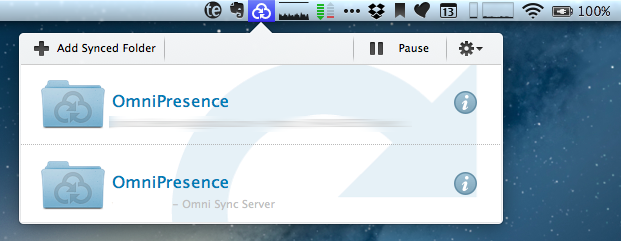
Announced in December 2012, The Omni Group has today started the public rollout of OmniPresence, their new free automatic document syncing solution for OS X and iOS. OmniPresence, based on open web technologies, is available inside OmniGraffle, OmniGraphSketcher, and OmniOutliner for iPad, and it also comes with a companion Mac app that runs in the menubar.

“The way we are doing it is not to hook it up into some backend proprietary service”, The Omni Group CEO Ken Case told us in an interview during Macworld|iWorld earlier this year. As a long-time user of Omni products such as OmniOutliner for the iPad and Mac, I was eager to see whether Case’s promises of a fast, reliable automatic syncing technology would grow into a stable product capable of fitting seamlessly into my daily workflow. After nearly two months of testing, I’m glad to say that, in some ways, The Omni Group has even exceeded my (already high) expectations. Read more


TextExpander Touch 2.0 Brings Fill-In Snippets, Formatted Text To iOS

TextExpander touch 2.0

TextExpander touch 2.0

I rely on Smile’s TextExpander to save keystrokes on my Mac on a daily basis, but the iOS counterpart, TextExpander touch, has always felt vastly underpowered due to limitations imposed by Apple on the iPhone and iPad. Today’s major update, TextExpander touch 2.0, aims at rising the app’s grade of efficiency by introducing several new features that have become must-haves for TextExpander on the Mac. I have been able to test the update for the past month, and it’s already become part of my workflow in interesting (and powerful) new ways. Read more


Limelight: A Beautiful Showcase of Movies for the Discerning Film Lover

I’ve been watching more films this year, although all of them predate 2013 as I play catch up with 2012 box office hits and similarly popular movies from the past few years. But this has made a nice jumping off point for someone who’s now regularly keeping track of movies seen and unseen, helping me avoid articles from some film fanatic’s website titled, “20 best movies of ‘x’ year!” which, I’ll be frank, doesn’t help me that much.

Then there’s Limelight, a social bookcase for displaying film posters and ratings for movies you’ve seen and want to see. It’s an app that’s inherently social, meaning anyone who knows your username can follow you to discover new films and garner recommendations for their To Watch lists. Which is why I say it’s an app for discerning film lovers — for people who genuinely enjoy watching films, who want to proudly share their collections with the world. Limelight is very open – at least, it’s meant to encourage you to discover something new within its small social network. Social is mandatory.

Read more


Why I Use FoxTube

FoxTube

FoxTube

After Cody linked to FoxTube for Mac two days ago, I figured I haven’t mentioned why, after nearly a year and a major update, I’m still using FoxTube for iOS alongside the official YouTube app.

FoxTube isn’t the best looking app ever made for iOS; while the 2.0 version improved the overall design, there’s still a lot going on in terms of interface and everything feels a bit cramped, especially on the iPhone. The icon is a literal representation of the app’s name; sometimes, icons in toolbars overlap with navigation buttons. I wish the FoxTube developer could find a way to slim down the interface and make some parts more cohesive, but I understand how that can be difficult when FoxTube does so many things.

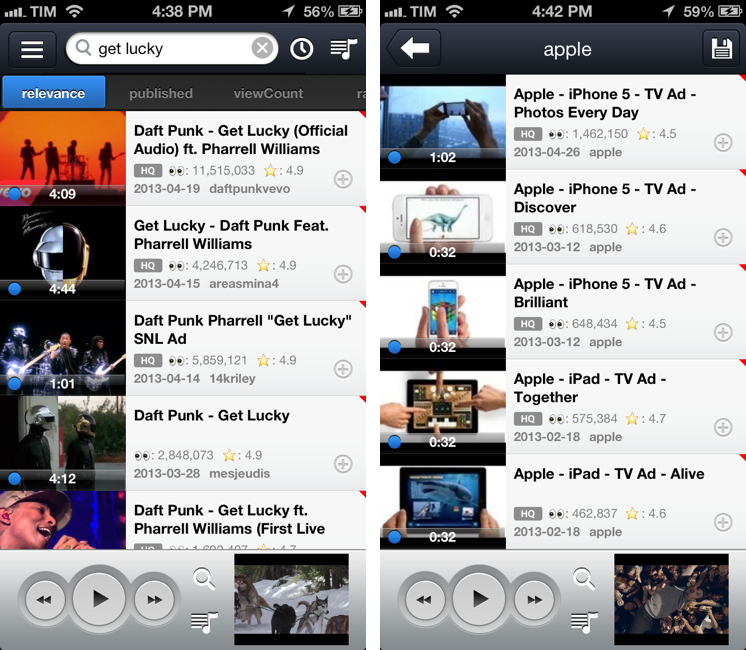
FoxTube is a supercharged YouTube client for iOS. I know what you’re thinking: you don’t need another YouTube app after the release of the (free) official client. And that is probably true – as MacStories readers know, I’m a big fan of the new YouTube app (App Store users seem to agree, too). FoxTube, however, is a great complement to the YouTube app that I recommend if you’re looking for more flexibility and customization in certain aspects of the YouTube experience. Read more


Calzy Calculator

Calzy

Calzy

When it comes to iPhone calculators, I have simple needs: they have to help me when I’m buying groceries.

I have been using Tapbots’ excellent Calcbot app for years: unlike Apple’s built-in calculator, it comes with proper support for undo and history, which allows me to easily keep track of the items I’m buying at the grocery store. You could say that, like image editors, I seek out for non-destructive calculators: I want to have access to a stacked list of the single operations I have entered and to be able to delete items inside the expression list. The problem with Calcbot, as I tweeted in March, is that the app still hasn’t been updated for the iPhone 5’s taller screen, and, as MacStories readers know, I can’t stand looking at a letterboxed app on a daily basis. Calcbot works fine, but I wanted to see whether I was missing out on new calculator apps that were ready for the iPhone 5 and had comparable feature sets. Fortunately, I found Calzy. Read more


Evomail Review: A Gmail Client for iPad With A Clean Design and Push Notifications

Evomail, a new Gmail client for iPad released today at $2.99, wants to fill the void left by the announced-but-never-released Sparrow for iPad, providing an alternative to the largely web-based official Gmail app and the upcoming (?) Mailbox for iPad. To differentiate itself from iOS’ native email client, Apple’s Mail app, Evomail focuses on three main areas: a new, modern design; push notifications; and tight integration with Gmail. The first version of Evomail is good, but rough around (many) edges.

Read more