Federico Viticci

10765 posts on MacStories since April 2009

Federico is the founder and Editor-in-Chief of MacStories, where he writes about Apple with a focus on apps, developers, iPad, and iOS productivity. He founded MacStories in April 2009 and has been writing about Apple since. Federico is also the co-host of AppStories, a weekly podcast exploring the world of apps, Unwind, a fun exploration of media and more, and NPC: Next Portable Console, a show about portable gaming and the handheld revolution.

iPad Lines Around the World

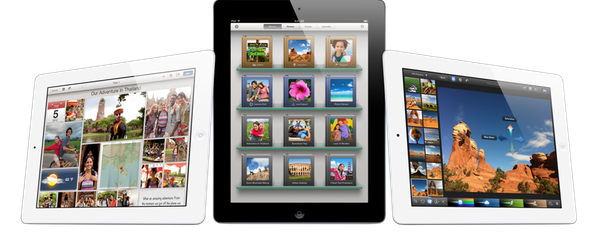
As the new iPad begins its international rollout at 8 A.M. (local time) on Friday, March 16th, it’s no surprise Apple fans have started waiting in line at retail stores to get their hands on the device, which, this year, was also made available through online pre-orders.

On March 16th, the new iPad (our overview) goes on sale in 10 countries.

  • US
  • Canada
  • UK
  • France
  • Germany
  • Switzerland
  • Japan
  • Hong Kong
  • Singapore
  • Australia

In this post, we’ll collect photos and videos about the experience of our readers and other folks around the web while waiting in line for the new iPad. Come back later for updates and new images. Read more


Sparrow for iPhone Review

Back in 2006, when Apple was still rumored to be working on a revolutionary mobile phone, many wondered if such device would be able to do core tasks like email and messaging as well as RIM’s BlackBerry. Months later, when the iPhone was officially announced at Macworld, the introduction of the device alone led some people to write that it was “already impacting its new competitors” – namely RIM, and its BlackBerry line of phones that had captured a great portion of corporate America. Yet, those people were right: the numbers are speaking for themselves now, and the many issues behind RIM’s poor management and marketing choices can be traced back to the iPhone’s introduction.

At Macworld 2007, a healthy-looking Steve Jobs said: “This is a day I’ve been looking forward to for two and half years. Every once in a while, a revolutionary product comes along that changes everything. […] Today we’re introducing three revolutionary products of this class.

Today Apple is going to reinvent the phone”.

Looking back at that day now, it’s a shared sentiment among those who have been following Apple for the past years that Steve touched his highest point in presentation style and product-unveiling skills with that keynote. Because while Steve may no longer be with us today, his words still resonate stronger than ever. On that day, Apple did reinvent the phone. And as it turns out, the revolution wasn’t just about multitouch and elegant hardware design.

It was about the software.

Later on during that keynote, Steve arrived at the third section of the presentation and iPhone feature set, which was also described as an “Internet communications device”. The first item in that slide was Rich HTML email – “for the first time, really rich email on a mobile device”, he said. Sure enough, the iPhone’s Mail app was demoed on stage to show off its rich HTML-parsing capabilities, which included inline images, rich text, support for phone numbers and web links, and more. When the iPhone went on sale six months later, on June 29, and debuted online to rave reviews from the press, many praised its email capabilities, among other things.

But then something happened in the following months. As Apple kept adding features to iPhone and refining its core apps including Mail, users and developers began wondering when Apple would allow for third-party apps to be installed on the device. For as much as Apple was adding new functionalities and fixes, there are always niches and sub-markets that Apple can’t address in new software releases – corporate email was one of them, as, admittedly, that were still several things Apple wasn’t adding to its email client to please business users from corporate environments. When Apple did confirm its plans to open up iPhone OS and offer an App Store, users wondered if it would be possible, like it still is on a Mac, to install replacements for the “core apps”, such as the browser, email client, or calendar application. In a somewhat unexpected and much criticized turn of events, Apple made it clear to developers that it would not accept third-party apps duplicating the functionality of build-in iPhone applications.

John Gruber has a good recollection of the events from 2008 – case in point MailWrangler, an email app that was rejected at the time.

I have a theory. It is more, well, emotional than logical. But it’s the only theory I can think of that makes any sense at all and fits the available evidence. The theory is that there is an unpublished rule that Apple — and in this case, where by “Apple” I really mean “Steven P. Jobs” — will not publish third-party apps that compete with or replace any of the four apps in the iPhone’s default “dock”: Phone, Mail, Safari, and iPod.

In the following years, in spite of App Store-related controversies showing up every once in a while, developers more or less “understood” how Apple’s approval process worked, and kept working on apps that would be “safe” for sale within Apple’s rules. Publishing a set of guidelines certainly helped in making things clear for everyone, but new apps that belonged to categories not mentioned in the guidelines would still appear in the App Store, forcing Apple to revise its guidelines or impose new limits. This often happens after new iOS technologies are made available to developers – a recent example is the banning of Notification Center utilities. However, one thing has been clear since MailWrangler’s rejection in 2008: full replacements for Apple’s system apps can’t be developed for the App Store. Developers can use the frameworks behind system features to develop third-party apps: Address Book companions, Calendar utilities, photo editing apps – these are all built using APIs and frameworks available publicly. The same has been true for browsers, which have to use Safari’s rendering engine, and alternative mail clients, which haven’t been exactly popular on the App Store, with the exception of Google’s Gmail app – an app that, however, is based on web views.

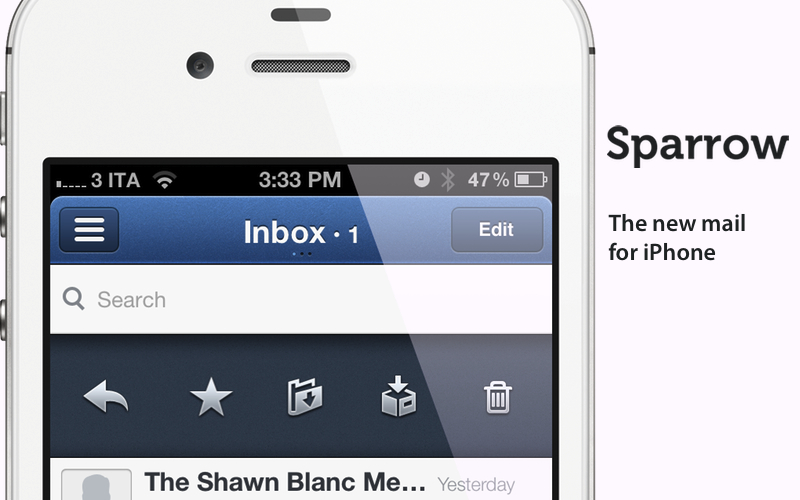
Today marks an important day in the history of the App Store. For the first time, Apple is letting a third-party developer sell a full-featured, custom email client that uses its proprietary email engine to iPhone users. Sparrow, already popular on the Mac and available on the Mac App Store, comes to the iPhone’s App Store today, and it promises to offer a newer, fresh take on email to lure back customers whose only choice since 2007 has been Apple’s Mail.app. Read more


iPad Third-Generation Review Roundup

With lines starting to form around the world for the launch of the new iPad, journalists with access to review units of the device have been given the go-ahead by Apple to publish their impressions of the device. With a Retina display described as “glowing paper”, same 10 hours of battery life and faster 4G connectivity, the new iPad is off to very positive reviews.

Below, we’ve collected some key points from the reviews that have been published today. Make sure to follow the source links, and look for more coverage of the new iPad on MacStories later this week.

On the Retina display

The Retina display is, quite possibly, the biggest reason to consider an upgrade to the new iPad. Reviews focus on the incredible quality of the display, which makes for sharper text, more vibrant colors, and an overall better visual experience when compared to the iPad 2.

Jim Dalrymple

I struggled after the event to put the right words together to describe the display and a week later I’m still lost for the proper analogy. The only thing I can think of that comes close is comparing it to the first time you ever saw an HDTV. Remember how startling it was to go from one of those giant standard definition projector TVs to an HDTV? That’s what this is like.

Jason Snell

The effect is even more dramatic with photos and video. Pictures reveal small details that simply weren’t there before. A photo that looks just fine on an iPad 2 looks almost undefinably better on the new iPad. It’s the same image, but all of a sudden, there’s much more information there—small textures and tiny details that were previously omitted.

Walt Mossberg

My epiphany came when I placed my iPad 2 next to the new model, with the same text on the screen. Letters and words that had seemed sharp on the older model five minutes earlier suddenly looked fuzzier.

MG Siegler

Even if you have perfect vision, indulge me here for a second. You know when you go in for an eye exam and you’re asked to look at a combination of letters and numbers on a chart against a far wall? You read the first few lines, then realize you actually can’t go any further. Then you get prescribed glasses (or contacts) and you can all of a sudden read every letter and number. And even the ones you could read before are now so much clearer.

That’s what it’s like looking at the new iPad versus the older iPads.

On the A5X processor

The new iPad’s dual-core A5X isn’t a revolution coming from the iPad 2’s dual-core A5, at least in terms of initial impressions with apps that haven’t been updated to take advantage of it. With quad-core graphics, however, expect a lot more games and apps to gain powerful new functionalities soon.

Jason Snell

That power comes from the X factor in the A5X processor—a new quad-core graphics engine. And sure enough, the third-generation iPad blows away every other iOS device in terms of graphics performance. In our tests using the GLBench 3D graphics testing app, the third-generation iPad could draw a complex 3D scene at the full frame rate of its display, 60 frames per second, without breaking a sweat. And in GLBench offscreen tests, which aren’t constrained by the display’s frame rate, the third-generation iPad had a frame rate 1.6 times that of the iPad 2 (and 13 times that of the original iPad).

Joshua Topolsky

The fact that the new iPad touts an A5X SoC versus a completely new generation of chip may give some buyers pause, but in my testing I see no evidence that the processor in the iPad isn’t every bit as powerful as it should be. While there’s not some obvious speed boost in comparison to the previous generation iPad, there’s certainly no stutter, stagger, or delay when using the tablet. Apps opened and closed quickly and without issue, app switching was efficient, and graphically-intensive games played smoothly on the device.

On cameras

The new iPad shoots better pictures, but don’t expect 4S-quality photos. The front-facing camera is still VGA.

Vincent Nguyen

Apple says it has borrowed the camera technology and optics from the iPhone 4S for the new iPad, though still the 5-megapixel images the tablet is capable of do lag behind the 8-megapixel examples from the smartphone. There’s more visible noise and chromatic aberrations at full zoom, though the quality is far, far better than any stills the iPad 2 can achieve. You also get face recognition for up to ten people per frame, automatically adjusting focus and exposure, but the camera app UI itself is no more complex than before.

On LTE

From the reviews, LTE seems fast, at least for those who have been able to try it in the US.

MG Siegler

Yesterday, I clocked the new iPad using LTE at over 40 mbps down and 20 up on Verizon’s network. That’s about twice as fast as my current home cable broadband. For good measure, I tethered the new iPad to my iPhone 4S to compare it to Verizon’s 3G speeds. It’s about 40x faster for downloading.

[…]

One other slight downside which I have to assume is related to either the battery or the LTE functionality is that unlike previous iPad models, the new iPad does get noticeably warm in the lower left corner after prolonged use. It’s never hot, just warm. But again, I never noticed this on other models.

Joshua Topolsky

In terms of raw speeds, I saw downloads hit more than 22Mbps, while upstream data topped out around an outrageous 21Mbps — and that was in mid-town Manhattan. Of course, a lot of this depends on your coverage and how many people around you are on the network. One other small thing: I did notice the device getting a bit warm when I was using LTE for extended periods of time, but that’s pretty common for most 4G products I’ve tested.

On iPhone apps in 2x mode

It appears iPhone apps running in “1x mode” on the new iPad can use Retina assets, but they still look pixelated if brought in 2x mode.

Vincent Nguyen

Interestingly, it’s not just native third-party iPad apps that are improved with the Retina Display technology. iPhone titles used in the “2x doubling” mode look considerably better than on either of the previous iPad versions, with the new smoothing technology being brought to bear to make them feel less obviously magnified.

Jason Snell

If you’re running an iPhone app on the new iPad, it will display it in high-resolution Retina detail—but in a small compatibility window in the center of the iPad screen. (You can, as always, tap a 2x button to make iPhone apps bigger but more pixelated.)

The new iPad goes on sale on Friday, March 16th, at 8 A.M. local time in 10 countries.


Byword for iOS Review

Byword, the Mac app that I used last summer to write my MacBook Air review, has been updated today to include iCloud syncing on the Mac, and support for a brand new iOS app that briefly went live on Saturday, was pulled, and now is back on the App Store at $2.99.

Byword is a minimal text editor that works with the Markdown format and allows for easy exporting of plain text to a variety of formats including HTML, PDF, and LaTex. Unlike most minimal text editors these days, Byword for Mac has become popular among writers and bloggers (also) thanks to extensive support for keyboard shortcuts, built-in Markdown preview, and integration with Lion’s full-screen mode, auto save, and Versions. We have covered Byword on MacStories before.

The iOS version of Byword runs as a universal app on the iPhone and iPad, and I have been able to test it since its first release last week. Despite some initial issues with iCloud syncing, I was able to activate the functionality, and sync text documents across devices using Apple’s cloud service and Dropbox, which is also natively supported inside the app. Having tried both solutions, I can say that whilst the developers ensured the two syncing services would appear as “invisible” as possible to the user, iCloud seems a little faster at pushing and picking up changes made on another device. On iOS, upon first launch the app will ask you to choose a syncing service between iCloud and Dropbox – alternatively, you can go with none and save documents locally. If you choose iCloud, which I did, the app will show documents stored in the cloud from a sidebar on the iPad, or a dedicated screen on the iPhone. On both devices, you can switch back and forth between the browsing and editing interface with a single swipe on screen – I found this very intuitive and responsive. Syncing between iOS devices through iCloud has been remarkably stable for me in the past few days, allowing me to effortlessly push changes to this very article around in seconds. I also like how Byword for iOS is capable of updating changes “live” inside your document even if it’s already open but being edited on a second device. Read more


Rdio Launches Complete Redesign

Rdio, a music streaming service that works on the web, Mac, and iOS, is holding a press event today to announce a major redesign that, however, is already available to subscribers in the web browser. Once enabled, “New Rdio”, as the company is calling the new experience, shows a complete rethink of the music browsing and listening workflow behind Rdio.com.

New Rdio is a visually beautiful and dynamic way to play Rdio’s massive catalogue of 15 million songs. New features include the oft requested drag and drop playlist creation, a more personalized Heavy Rotation, and private playlists.

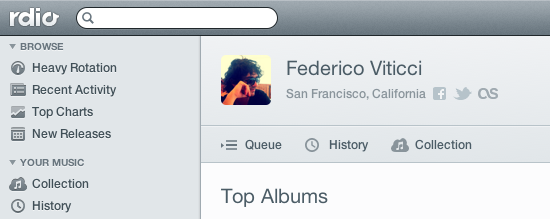
From a first test, it appears the new user interface is heavily based on sidebars and panels to manage your music collection, playlists, queue, and network of friends or people you should follow. Playlists have been updated, and it’s now possible to create them and manage them through drag & drop, as well as make new “private playlists” that you can choose to share with just a few people. A new sidebar on the left organizes people and music influencers by “Your network” and “Who to follow”. The Network tab is similar to Facebook’s own ticker system, in that it shows people you’re currently friends with and the music they’re listening to. Click on an item, and a popover will open allowing you check out a song right away. The suggestions tab is equally interesting, presenting people that Rdio thinks you should invite or follow on the service. The aforementioned drag & drop system has also been enabled for sharing – you can now grab an item from the main panel, head over a friend’s avatar, and share it. Twitter, Facebook, and email sharing are supported.

Search seems a lot faster than before, presenting results for artists, songs, or albums in a few seconds. The overall design feels cleaner, less crowded, and easier to use. As the company stated at its press event “We basically took Rdio apart and put it back together”. The app is more social, puts music and people front and center, and, more importantly, keeps more items and sections within a single page thanks to popups, sidebars, and panels. Furthermore, the new design also allows you to click through items – for instance, an album – and navigate back while maintaining page position, without having to scroll again. What I think is interesting, and will likely take some time getting used to, is that while the Heavy Rotation for your account is harder to access and has been seemingly also incorporated with your network’s rotation, people that are listening to same music as you are now always shown in the UI, your collection included. Top Charts, Recent Activity, Queue, and New Releases keep more or less the same functionalities as before, only with a new design.

The new Rdio experience has also been brought to the official Mac app, which was updated earlier today to version 2.0 and is capable of automatically switching to the new UI once enabled in your account. The app is now smarter at recognizing when music is playing on another location (such as the browser), and offers you a way to quickly switch playback to the desktop.

We will update this story with more screenshots and details from Rdio as the company details the new features at its media event. For now, New Rdio is available only to Web and Unlimited subscribers, with everyone else gaining access sometime in the future. A promo video of the new Rdio is embedded after the break. Read more


Tweetbot Gets Streaming

Tweetbot, Tapbots’ excellent Twitter client for iOS that we recently reviewed for the launch of its long-awaited iPad version and 2.0 update on the iPhone, received today support for one of the most requested functionalities by its users: streaming.

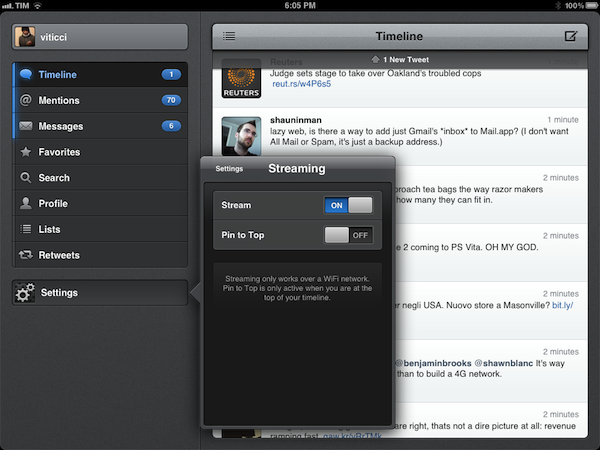
Available today in version 2.1 of the iPad app, live streaming allows users to stay on top of the latest tweets thanks to Twitter’s real-time push technology that can be seen in the new Tweetbot timeline, which, when on WiFi, will constantly check for new tweets and automatically load them above your timeline position. An option is available to disable streaming in the app’s Settings, as well as a switch to enable “Pin to Top”. In my tests, Tweetbot’s new streaming feature has been extremely reliable – that is, unless Twitter itself was experiencing issues – and has enabled me to forego completely the need of manually refreshing or waiting for Tweetbot to update my timeline every few minutes. Like on Twitter for Mac, I think streaming is an invaluable tool if you’re planning on getting the most out of Twitter’s real time nature, and Tweetbot’s implementation doesn’t disappoint.

With streaming come a few other changes to make the experience of fetching and syncing tweets more pleasant. The new tweets sound, for instance, is now limited to mentions, direct messages, and tweets fetched with pull-to-refresh. The Tweet Marker service, which allows you to keep your Tweetbots (and other supporting clients) in sync, has been vastly improved. Generally, this means the process of getting your latest-seen tweet and timeline position should sync faster to the cloud and back to the app – in testing the latest Tweetbot, I can confirm Tweet Marker sync seems a little faster and more “accurate” than before.

Tweetbot is my favorite Twitter client on any platform, and streaming makes it a lot better from a user experience standpoint. You can get iPad update from the App Store now (the app’s graphics are also ready for the new iPad coming out later this week); version 2.1 of the iPhone app, sporting the same new features and Camera+ 3.0 integration, is still waiting for approval in the App Store’s queue.


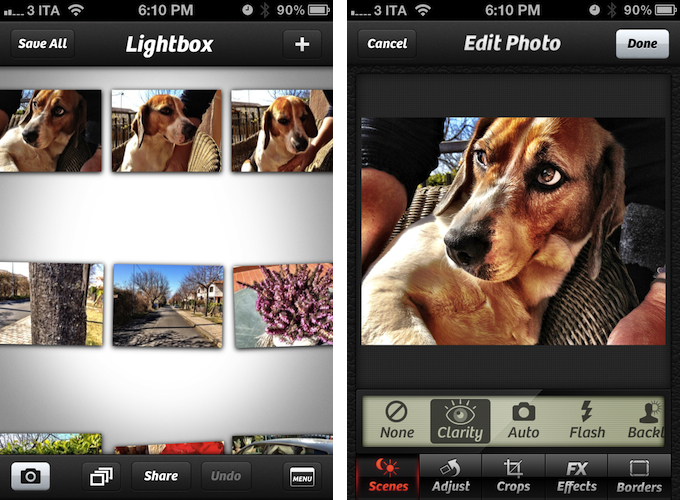
Camera+ 3.0 Review

Few iPhone apps have managed to substantially improve on the functionalities offered by Apple in its core system apps. Tap tap tap’s Camera+, a popular alternative to Apple’s Camera app, is one of them, and the 3.0 version released today takes a major leap in turning Camera+ into a more powerful solution to shoot, edit, and share photos online, as well as providing a solid foundation other developers can integrate their apps with.

The thing about Camera+ is that its lead developer and creator, John Casasanta, knows what people want from an iPhone app, and understands the rules behind viral marketing for software sold on the App Store. In spite of a 4-month ban that forced Camera+ out of the App Store due to a functionality the developers shouldn’t have hidden without telling Apple, the app has been an example of modern success in the App Store, granting its developers a renowned position in the top charts with millions of copies sold worldwide. But it’s not just about clever marketing (Casasanta also runs MacHeist, a website dedicated to promoting deals on Mac software that has amassed an incredible amount of followers in the past years). Camera+ is a very well-done app – from the polished user interface to the features it adds on top of Apple’s standard camera-related functionalities, Camera+ has become many users’ go-to camera app thanks to its enhanced view options, filters and effects, and elegant sharing capabilities.

With Camera+ 3.0, a free update for existing users, tap tap tap wants to refine every aspect of the app, whilst opening the door to third-party devs with APIs to offer Camera+’s features into other apps. Read more


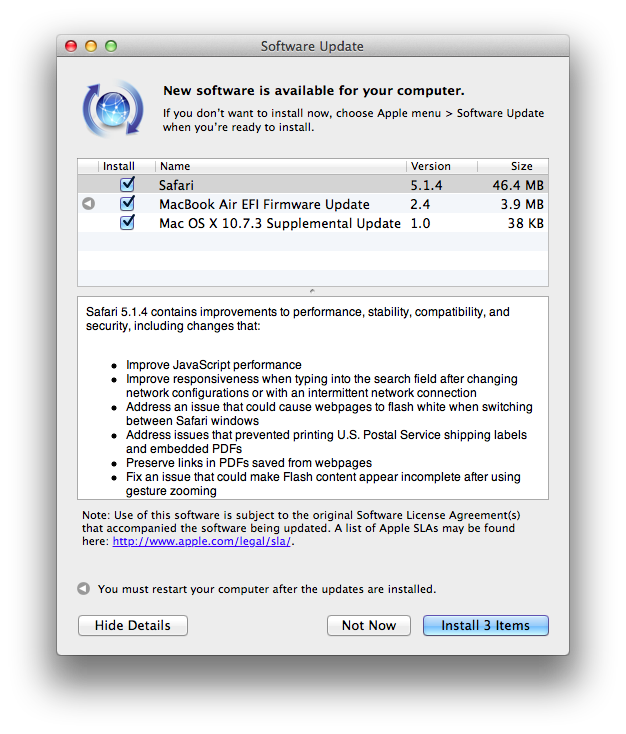
Apple Releases Safari 5.1.4

Apple just released an update to Safari on its Downloads website and Software Update, adding a number of improvements for stability, compatibility, and security.

  • Improve JavaScript performance
  • Improve responsiveness when typing into the search field after changing network configurations or with an intermittent network connection
  • Address an issue that could cause webpages to flash white when switching between Safari windows
  • Address issues that prevented printing U.S. Postal Service shipping labels and embedded PDFs
  • Preserve links in PDFs saved from webpages
  • Fix an issue that could make Flash content appear incomplete after using gesture zooming
  • Fix an issue that could cause the screen to dim while watching HTML5 video
  • Improve stability, compatibility and startup time when using extensions
  • Allow cookies set during regular browsing to be available after using Private Browsing
  • Fix an issue that could cause some data to be left behind after pressing the “Remove All Website Data” button

You can find Safari 5.1.4 here. The previous version of Safari, 5.1.3, was released alongside 10.7.3, adding, again, bug fixes and improvements.


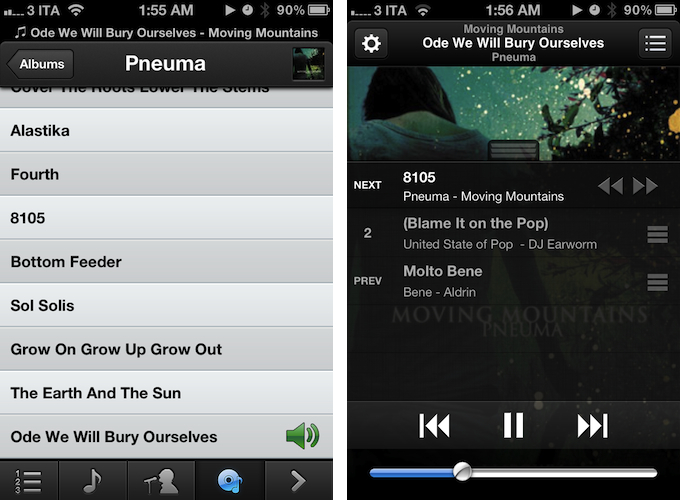
OnCue 5.0 Brings Powerful Music Queue Features To iOS

These days, most of my music consumption happens on Rdio. The term “consumption” isn’t there because that’s how providers like to present content: I consume albums and artists that I discover online. However, for as much as I’m completely hooked to paying a monthly fee to get access to a (virtually) unlimited amount of music, there are albums that I still have to keep synced locally through iTunes. Either because Rdio applies some curious restrictions on several artists from Europe or because these artists choose not to make their music available for streaming (ask Coldplay), I have resorted to keeping a portion of my music synced on the devices I own (32 GB iPhone 4S and iPad 2, soon to be new iPad). And when I want to play songs from this “mini library” I sync, I stumble upon the same problem I initially wrote about last year: Apple’s Music app doesn’t let me create queues, and I loathe creating playlists for all possible scenarios my music listening habits may fall into. Just like last year, Dan Pouradi’s OnCue comes to the rescue, this time with a completely re-engineered version that works with iOS 5, and sports a new UI. Read more