Federico Viticci

10764 posts on MacStories since April 2009

Federico is the founder and Editor-in-Chief of MacStories, where he writes about Apple with a focus on apps, developers, iPad, and iOS productivity. He founded MacStories in April 2009 and has been writing about Apple since. Federico is also the co-host of AppStories, a weekly podcast exploring the world of apps, Unwind, a fun exploration of media and more, and NPC: Next Portable Console, a show about portable gaming and the handheld revolution.

Air Display Gets HiDPI Mode Support on iPad Retina Display

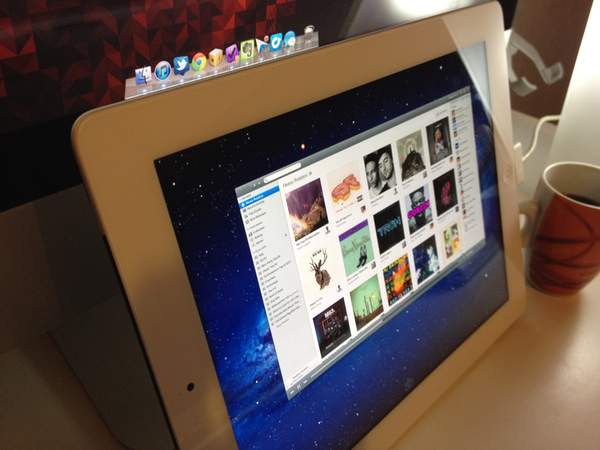
Announced last week, Avatron’s popular utility Air Display, a $9.99 app that can turn any iOS device into an external display for a Mac or PC, has been updated today to include support for two major new features and technical achievements: HiDPI mode and Retina graphics. Meant to be enjoyed on the new iPad’s Retina display, Air Display 1.6 requires the installation of a desktop application that will handle the wireless connection between Lion and the iOS app.

Once installed, Air Display Connect on the Mac will allow you to easily select the device you want to turn into an external monitor. For the new iPad’s display (and Retina iOS devices in general, but of course the app gives its best results on the iPad), Avatron has enabled support for high resolutions, although an option is present to render items at non-Retina resolutions as well. The Retina display’s tightly packed pixels have also allowed Avatron to use HiDPI mode – a hidden feature of Lion which draws element on screen at double the size – in a meaningful and gorgeous-looking way. Read more


Facebook for iPad Gets Retina Graphics

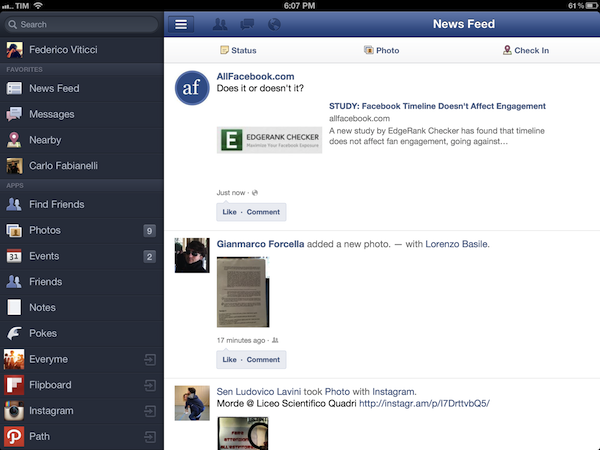
The official Facebook app for iOS, available for free on the App Store, has been updated today to include graphics for the new iPad’s Retina display, and a series of other enhancements. Alongside crisper images for the new display, the 4.1.1 update to the app brings an option to go offline in chat, fixes for the profile picture and names displayed in photo sets, support for more languages, and a number of additional bug fixes to improve the performances of the app. Unfortunately, this version doesn’t sport integration with the Facebook Timeline yet, which, however, was enabled on the iPhone back in December.

You can find Facebook 4.1.1 on the App Store.


Tweet Marker Launches “Plus” Version To Sync Timeline on the Web, Index Tweets

Last year, when Manton Reece of Riverfold Software, maker of Tweet Library, announced he was working on a new service to sync Twitter timelines across apps and platforms called Tweetmarks, Twitter users and iOS nerds alike rejoiced, and began hoping the service would work as well as Manton promised. Not only did it work, Tweet Marker – the final name of Tweetmarks – turned out to become the de facto solution to implement synchronization for timelines across different Twitter applications. In the past nine months, we have seen Tweet Marker find its way into popular apps like The Iconfactory’s Twitterrific and Tweetbot, spanning a variety of mobile devices and platforms like iOS, the web, and even Android. Today, Reece is launching Tweet Marker Plus, an enhanced and paid version of Tweet Marker that adds new features on top of standard timeline sync.

At $2 per month, Tweet Marker Plus offers new functionalities and a web interface for Twitter users, while keeping the basic sync you may already be using in Tweetbot or Twitterrific completely free. On top of that, developers who are already integrating with the “regular” Tweet Marker can now also check out version 2.0 of the API, a minor upgrade to improve reliability.

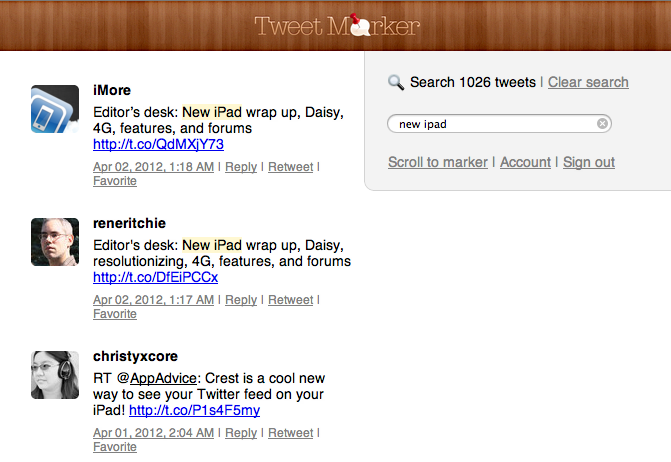
Tweet Marker Plus brings a web-based timeline that remembers the read position from Tweet Marker-enabled apps; a searchable archive of your tweets and tweets from people you follow, and an option to manually select the tweet you want to sync with other apps. I have been able to test Tweet Marker Plus prior to its public launch, and I’ve been consistently impressed with the sync implementation that seamlessly switches from the web, to clients on the Mac and iOS.

The most visible feature of Plus, the web timeline, is very straightforward, but I believe it’ll prove to be a worthy addition for, say, those users who rely on iOS and Mac apps at home, but who are forced to stay on Windows environments at work. Tweet Marker’s web timeline can pick up from where you last left off on another connected client, and it’s got a “scroll to marker” option to manually load your last-seen tweet. On the timeline itself you can reply, retweet, mark as favorite and check out a tweet’s unique URL, but these actions will simply forward you to a dedicated page on Twitter.com. Tweet Marker’s Plus timeline isn’t meant to be a full-featured client: rather, it is a basic way to rely on your existing sync position if nothing else is available.

At the core of Tweet Marker Plus there’s the new search option, which will keep a searchable archive of tweets from you and the people you follow. This is something I’ve been obsessed with lately – to be able to keep a fully indexed archive of tweets I saw appearing on my timeline on any given day. I have been using a combination of Greplin and CloudMagic to search for old tweets from my timeline, and it looks like Tweet Marker Plus will be a fantastic addition to this category of services. Reece told me the goal is to begin by keeping an archive of about a month of tweets, indexing 800 tweets (per Twitter’s limits) when a user signs up to the service. As more tweets are scanned and indexed in the background at regular intervals, Reece plans to increase the amount of tweets searchable by Tweet Marker as the service grows and evolves.

With over 170,000 users to date and 1,000 new ones added each day, Tweet Marker is now a reality that is not going away anytime soon. Twitter hasn’t shown any particular interest in allowing users to sync their timeline position through apps and platforms, and Tweet Marker has turned out to be the proverbial “right idea at the right time” as users were growing tired of having to manually reload and scroll timelines in their clients of choice. Tweet Marker’s servers now process over 40 million hits a week, and the service has been enabled in 15 different apps across 6 platforms. The idea for Tweet Marker Plus, Reece explained, is to lay the foundation for an improved service that will give subscribers more features inside supported apps while continuing to work with the free version, which doesn’t require any registration or subscription.

It may be a version 1.0, but Tweet Marker Plus is already a solid offering. At $2 per month, the service adds search and a web-based interface on top of a platform that has reliably synced Twitter timelines on a variety of apps and hardware. You can subscribe to Tweet Marker Plus here.


Apple Clarifies iPad “4G” Marketing On Australian Website

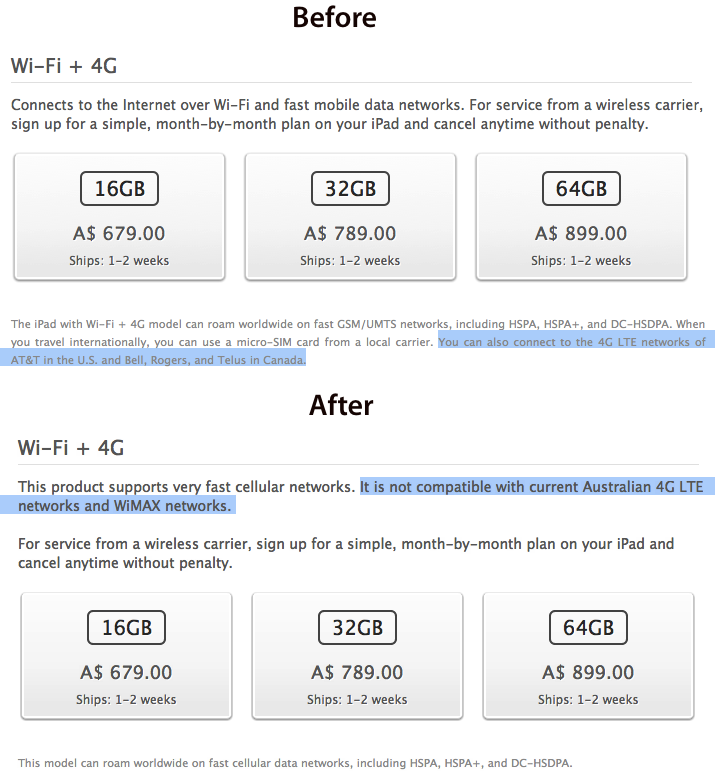
Two days ago we noted Apple had promised the ACCC (Australian Competition and Consumer Commission) to clarify the marketing for the new iPad’s “4G” connectivity options on the company’s Australian website. With the ACCC alleging that Apple was misleading Australian customers in thinking the iPad would be compatible with Telstra’s 4G network, and Apple replying that Australian networks were “misnamed”, Apple agreed to resolve the dispute by clarifying marketing, contacting customers, and sending new signage to resellers by April 5th.

As noted by The Next Web, Apple has begun making these changes by updating the description of 4G compatibility on its Australian online store, clarifying that the new iPad ”supports very fast cellular networks” but that it is not “compatible with current Australian 4G LTE networks and WiMAX networks”. We’ve captured the differences in the screenshot below.

Other international stores, however, including the UK and Italy ones, are still reporting the old description for the iPad WiFi + 4G model, and it’s unclear whether the changes made in Australia will propagate automatically to other countries, or if more lawsuits by local consumer protection organizations will be necessary. Complaints are indeed taking hold in various European countries as well.

As Apple is seemingly making true on its promise to clarify marketing terms and offer a refund to customers, the ACCC is still pushing for a full trial in early May.


iOS 5 Certified For Government Use In Australia

iOS 5 Certified For Government Use In Australia

ZDNet reports the Defence Signals Directorate (DSD) – the organization that reviews and certifies software and devices for use by government agencies in Australia – has certified iOS 5, allowing iPhones and iPads to be used to transmit “certain classified information”.

Today, the DSD cleared iOS for government agencies to use so long as the information that was being communicated and stored had a classification no higher than PROTECTED.

PROTECTED is the lowest level of classification in the Australian Government Security Classification system aside from publicly available information. The other three classifications are CONFIDENTIAL, SECRET and TOP SECRET in order of sensitivity.

As confirmed in the iOS Hardening Configuration Guide, released by the DSD, the certification applies to iPhones, iPads and iPods running iOS 5.1 or higher. The guide includes a series of how-tos and explanations of iOS security, passcode management, iOS device deployment, and “example scenarios” to better understand the iOS file system architecture, data protection, and the way applications can register URL handlers to open documents.

As iPhones and iPads gain traction in the enterprise, government agencies may become another market for Apple to further consider with functionalities specifically aimed at improving the security of iOS.

Permalink

Gravitational Force in Angry Birds Space Analyzed

Gravitational Force in Angry Birds Space Analyzed

Rhett Allain has posted a follow-up to his 2010 article The Physics of Angry Birds, this time studying the gravitational force that influences the trajectories of Rovio’s birds in the franchise’s latest installment, Angry Birds Space. The article goes into great detail analyzing the forces that may affect the gameplay mechanics Rovio built into the game.

If the scale of the sling shot is the same as the scale in the Earth-based Angry Birds, then the birds are launched with a speed of about 25 m/s. This is similar to the launch speed in Earth-based Angry Birds — for which I found a launch speed of about 23 m/s.

Read the full story on Wired if you’re looking for real numbers and a complete dissertation on the “friction” Rovio must be implementing in Angry Birds Space. Make sure to check out Allain’s analysis from November 2011 as well, specifically focused on the yellow Angry Bird.

Permalink

The (Semi)Skeuomorphism

Last night’s release of Paper, a new drawing and sketching app for iPad (The Verge has a good review and interview with its developers), got me thinking about a trend I’m seeing lately in several high-profile iOS apps from third-party developers and, to an extent, Apple itself. That is, drifting away from the forced skeuomorphism of user interfaces to embrace a more balanced approach between imitating real-life objects to achieve familiarity, and investing on all-digital designs and interfaces to benefit from the natural and intuitive interactions that iOS devices have made possible.

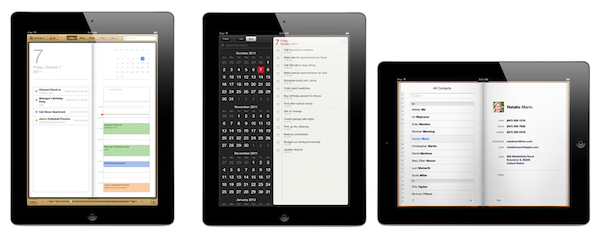
John Gruber says that the tension “between simplicity and obviousness” can be seen in developers getting rid of UI chrome (buttons, toolbars) to make simpler apps, and Apple, which has adopted UI chrome – often, in the form of skeuomorphic elements – to bring obviousness and familiarity to its applications. iCal’s bits of torn paper and Address Book’s pages are obvious, but are they simple?

The subject is complex, and the scope of the discussion is too broad to not consider both ends of the spectrum, and what lies in between. Ultimately, simplicity vs. obviousness brings us to another issue with user interfaces: discovery vs. frustration.

Apple’s (and many others’, with Apple being the prominent example) approach is clearly visible: familiar interfaces are obvious. Everybody knows how a calendar looks. Or how to flip pages in a book. People are accustomed to the physical objects Apple is trying to imitate in the digital world. But are they aware of the limitations these objects carry over when they are translated to pixels? As we’ve seen, this can lead to frustration: why can’t I rip those bits of torn paper apart? Why can’t I grab multiple pages at once, as I would do with a physical book? And so forth. Interfaces that resemble real-life objects should be familiar; it is because of that very familiarity, however, that constraints become utterly visible when pixels can’t uphold the metaphor.

On the other hand, a number of applications are trying to dismantle the paradigm of “skeuomorphism mixed with buttons” by leveraging the inner strength of the iOS platform, and in particular the iPad: the device’s screen. Impending’s Clear, for instance, famously avoided buttons and toolbars to focus its interaction exclusively on gestures. Paper, for as much as its name implies a real-life feeling of actual paper, is the least real-life-looking (and behaving) sketching app of all: sure it’s got paper and a tool palette, but there are no buttons and navigation elements when you are drawing. In Paper, you pinch to go back one level (like Clear); you rotate two fingers on screen to undo and redo your actions. I assume the developers had to use standard sharing and “+” buttons only because they couldn’t come up with a significant breakthrough in associating these commands with equally intuitive gestures.

Which brings me to the downside of simplicity: discovery. Pinch to close and rotate to undo make for a pretty demo and elegant implementations for the iOS nerds like us, but are they discoverable enough by “normal people”? Would my dad know he can pinch open pages and rotate an undo dial? Are these gestures obvious enough to avoid confusion and another form of frustration? Intuitive software shouldn’t need a manual.

There are several ways to look at this debate. For one, we could argue that Apple was “forced” to use skeuomorphic elements to get us “comfortable” with these new devices, easing the transition from computers by imitating other objects and interfaces we already knew how to use. With time, they have realized people are now familiar with the previously unfamiliar, and they are now slowly introducing elements that subtly drift away from real-life interactions. Like the full-screen mode in iBooks, or the sidebar in Mountain Lion’s Contacts app. But there are still some graphical elements decorating Apple’s interfaces that don’t have a clear functional purpose: the leather in Find My Friends, the green table in Game Center, the iPad’s Music app. I think there is also a tension between functionality and appearance, and I believe Apple sees some skeuomorphic UI designs as simply “cool”, rather than necessary means to convey interaction: it’s branding.

The “simple and elegant” interfaces, though, reside in a much wider gray area that’s still largely unexplored. Clear and Instapaper, by foregoing real-life resemblances of any sort, have dodged the bullet of frustration by creating their own standards. You can be mad at Clear’s use of gestures, but you can’t be frustrated because its paper doesn’t act like paper. There is no faux paper in there. The “frustration” this new breed of iOS apps generates can be traced back to the novelty of their interfaces and interactions, not to their legacy. But then there’s a certain selection of apps, like the aforementioned Paper, that are still somewhat bounded to their real-life counterparts and, partly because of technological limitations and established UI patterns, aren’t completely distancing themselves from the familiarity of real objects.

We’re at a point in software history where balance is key. Balance between simplicity and obviousness, discovery and frustration, innovation and familiarity. We’re using software that wants to remember where it came from, but that also strives to touch the emotional cords of a natural extension it didn’t know was reachable: us.

As iOS devices and the ecosystem of apps and developers around them mature and evolve, these dichotomies will increasingly define the interactions of today, and the software of tomorrow.


Tim Cook Visits Foxconn in China

Tim Cook Visits Foxconn in China

Bloomberg reports on a visit by Apple CEO Tim Cook to Foxconn’s plant in Zhengzhou, China, where iPhones and iPads are made, among other devices.

Cook’s trip to Zhengzhou followed a meeting with Beijing Mayor Guo Jinlong on March 26 and with Chinese Vice Premier Li Keqiang on March 27. Apple’s Wu said earlier those meetings were “great,” without providing details on their content.

Vice Premier Li told Cook Chinese authorities will make an effort to strengthen intellectual rights, but also asked for more attention in caring for workers in Chinese factories. Apple recently found itself in the middle of a debate surrounding working conditions in China – a debate spurred by false allegations by performer Mike Daisey, and a series of investigative reports by The New York Times. In February, the Fair Labor Association began an inspection of Apple’s suppliers.

Permalink

Rdio Launching In “All Countries” in Europe “Within The Next Few Months”

According to an interview published  by paidContent, music streaming service Rdio will soon expand in “all countries” in Europe, making its digital music catalog available to more users outside the US, Canada, Germany, Brazil, Portugal, Spain, Australia, New Zealand, and Denmark, where it is currently available.

There are some major competitors in Europe,” Rdio’s partnerships and internationalisation VP Scott Bagby tells paidContent. “We are a couple of years behind others in terms of expansion there.

“But Europe is an immediate focus. We’ll be expanding in all countries in Europe - within the next few months, you’ll see several pop up.

Like competitors Spotify, MOG, and Deezer (the latter very popular in Europe), Rdio allows users to pay a monthly fee to gain unlimited access to a vast library of songs and albums by artists whose labels and publishers have agreed to make music available for streaming. That isn’t always the case, as some notable exceptions have showed in the past, but new data from the US music industry suggests that music subscriptions are growing, proving to be a viable alternative to standard digital downloads. Rdio, however, puts greater focus on the social aspect of music discovery and collection, allowing its users to “follow” other Rdio subscribers and build playlists they can share and collaborate directly on the site, or using the native apps the service has developed for iOS, Android, and OS X. With the recent launch of New Rdio, the company has set out to fundamentally rebuild the way users interact with the service, making it easier to access playlists, recommendations from the network, and people to follow.

Like with most streaming services founded in the US, Rdio hasn’t been able to obtain rights to launch internationally since Day One, preferring to stagger launches in other countries throughout the past year. According to VP Scott Bagby, no timeframe has been set, but Asia will be another focus for the company after a wider European rollout.