Federico Viticci

10758 posts on MacStories since April 2009

Federico is the founder and Editor-in-Chief of MacStories, where he writes about Apple with a focus on apps, developers, iPad, and iOS productivity. He founded MacStories in April 2009 and has been writing about Apple since. Federico is also the co-host of AppStories, a weekly podcast exploring the world of apps, Unwind, a fun exploration of media and more, and NPC: Next Portable Console, a show about portable gaming and the handheld revolution.

“So You Wanna Be A Mac Consultant Now”

Great advice (again) by Patrick Rhone:

If you are not a very, very, very, patient, friendly, likable and kind people-person you probably should not be in this line of work. I’ve seen tons of consultants who quite obviously would have been happier if they had never shaved their neck beard and ventured out of their mother’s basement. If that is you, please take up some line of business that keeps you in the basement. You have to be a person who honestly likes dealing with people that are clueless when it comes to this stuff. Your thrill has to come from giving these people “lightbulb moments”.

I also like the brief follow-up by Stephen Hackett (a former Genius):

We did a fair amount of consulting, and the most important thing I told people was this: “I don’t know, but I know how to find out.”

Permalink


Barry For iOS Takes Full-Size Screenshots of Webpages

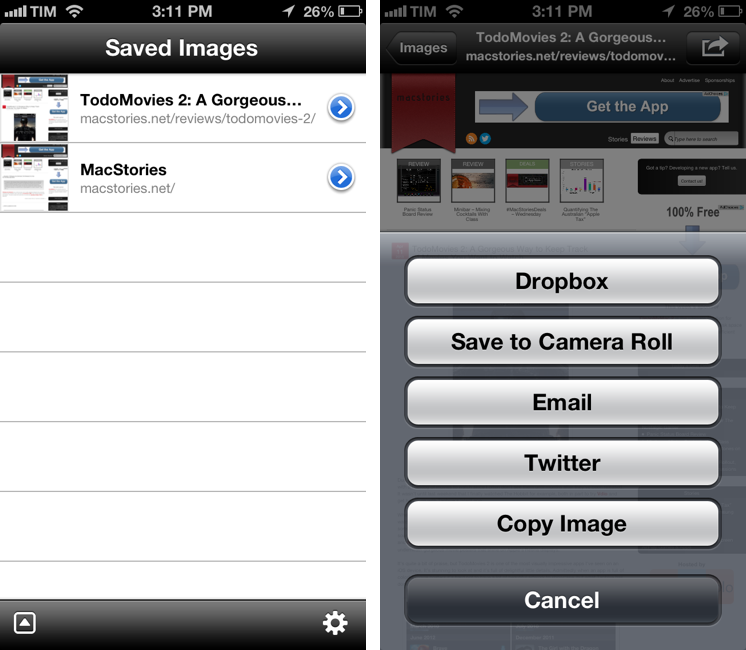
I often find myself having to capture a full screenshot of a webpage (that is, not just the portion that’s shown in the browser, but the full-length site), and while Skitch for iOS is a fine option, I’d like to have an app that’s faster to launch and easier to use. Barry, a $0.99 universal app by North of Three, provides just that kind of functionality. Read more


Bungie’s “Pathways into Darkness” Re-Released For Free On The Mac App Store

In August of 1993, Bungie Software released Pathways into Darkness the most advanced and ground breaking First Person Shooter for the Macintosh.The game broke new ground combining Adventure gameplay with the new First Person Shooter game that was just emerging onto the scene. As time passed, the Macintosh hardware and software changed and the game Pathways into Darkness was no longer playable on a modern computer… Until Now.

Pathways into Darkness was a critical success, and it’s widely regarded as Bungie’s first commercial success as well. As Bungie’s Jason Jones said in an interview in 1995, it was “the game that launched the company”. The same company that would show, four years later, gameplay footage of Halo at Macworld.

Permalink


GIF Finder for iOS

Reports of the GIF’s demise have been greatly exaggerated. Not a day goes by that I don’t see a reaction GIF pop up in a Twitter conversation or text from a friend. Here at MacStories, we “rely” on GIFs as our daily source of visual entertainment and subtle feedback in our iMessage group thread.

GIF Finder is a recent addition to my arsenal of GIF discovery tools that is simple but well executed. The app is free and it can search for GIFs on Tumblr; you can search for GIFs matching queries like “excited” or “sports fail” and tap on a thumbnail to view a GIF in full-screen. Tap the share button, and the app brings up a menu with options to Copy URL (which doesn’t work for me), share on iMessage and Twitter, but also open in Google Chrome and Tweetbot. The app is universal for iPhone and iPad.

I wish GIF Finder could search beyond Tumblr: ReplyGIF, Reactions GIFs, and imgur’s reactiongifsarchive albums are essential resources that I’d love to see supported in GIF Finder.

Permalink

Status Board Links

In my review of Panic’s Status Board, I mentioned that I was looking forward to seeing what the user community would come up with. That didn’t take long.

Hilton Lipschitz came up with a way to integrate Google Analytics with Status Board. He also has a version for Top Pages.

Thomas Bensmann created a script to fetch server statistics and display them in a table widget in Status Board.

Dave Verwer of Shiny Development has already updated the popular Average App Store Review Times site to include two feeds for Status Board, though he says a better version is in the works.

Adriano Manocchia posted a PHP script to parse data from AppFigures API 1.1 into JSON files ready for Status Board.

Bob VanderClay built a Nest panel for Status Board, and posted the code on GitHub.

And last, a Mint pepper for Status Board by Maxime Valette. My friend Preshit has the details:

Today, Maxime Valette, the creator of URI.LV has now released a Pepper for Mint that lets you add graphs for hourly, daily, weekly and monthly stats from your Mint installation to Status Board. He was kind enough to let me test it on my site and was quick to squash a few bugs. The installation of the pepper is simple and it even readily gives you clickable panicboard:// links that’ll automatically install the graph in your Status Board app.

I’m glad to see people are already creating cool hacks and widgets for Status Board, and I can’t wait to see more official Sources.

(Note: the URL of this linked post goes to my public statusboard tag on Pinboard, where you can find all the websites also linked above)

Update: Chris Patterson has put together a webpage collecting all Status Board-related links for hacks and scripts. Go bookmark it right now.

Permalink

Readdle Documents Gets iPhone Support

Nice update to Readdle’s recently rebranded file manager for iOS. The iPhone version has the same features of the iPad app, so make sure to read my original review if you missed it.

Now that it’s universal, Documents comes with proper iCloud sync for documents. iCloud sync requires you to move files to a specific iCloud folder inside the app, and it worked well in my tests. There are two details that I like about Documents for iPhone: the dual icons for the browser/document panel, and the way the tab bar becomes an action bar after you hit Edit. I know Apple probably advises against this kind of UI, but it looks good.

Permalink

PowerUp: 8-bit iPhone Camera For The Nostalgic Gamer

In February 1998, Nintendo released an accessory for the Game Boy line called Game Boy Camera. Compatible with all Game Boy systems (including the Color that would only come out eight months later), the Game Boy Camera could take black & white digital photos using the limited four-color palette of the Game Boy hardware. The Game Boy Camera, which was also compatible with the Super Game Boy SNES/Super Famicom accessory, could print photos on thermal paper through the Game Boy Printer, another piece of hardware that Nintendo introduced in 1998 and discontinued in 2003 (two years after the release of the first Game Boy Advance).

Read more