Federico Viticci

10915 posts on MacStories since April 2009

Federico is the founder and Editor-in-Chief of MacStories, where he writes about Apple with a focus on apps, developers, iPad, and iOS productivity. He founded MacStories in April 2009 and has been writing about Apple since. Federico is also the co-host of AppStories, a weekly podcast exploring the world of apps, Unwind, a fun exploration of media and more, and NPC: Next Portable Console, a show about portable gaming and the handheld revolution.

Finances for iOS Adds Invoice Scanning Powered by iOS 11’s Vision Framework→

Matthias Hochgatterer, in a blog post detailing the invoice scanning feature he brought to Finances for iOS with an update released today:

I’ve just recently worked on invoice scanning for Finances. It lets you scan invoices on iPhone or iPad and add them as a PDF document to transactions. In this post I will show you how I’ve implemented that feature using the frameworks available on iOS.

Let’s start by looking at the final result. You can see the invoice scanning in the Finances trailer. The user interface looks very similar to the document scanning UI in Apple’s Notes app on iOS 11. That’s not a coincident. I’ve reimplemented the exact same user interface, because most iOS users are already familiar with it. Also I found it an interesting challenge to implement it myself.

I’ve been considering Finances (which is available both on Mac and iOS and is on sale for both platforms today) as a replacement for the system I built in Numbers last year, which isn’t scaling anymore (my accountant now wants me to upload PDF receipts to a Trello board, and traditional spreadsheets do not support inline file attachments). I’m intrigued by the cross-platform nature of Finances, its double-entry bookkeeping system, and this new Notes-like scanning mode built using Vision technologies in iOS 11. I haven’t seen other apps publicly advertise scanning functionalities built using Vision and the implementation in Finances looks extremely well done.

I will be playing around with Finances over the weekend (I know; usually, this isn’t what I do with my weekends but I also need to keep my accountant happy). You can take a look at Finances’ new trailer below.

Permalink

Connected, Episode 187: On the Edge→

This week, the trio ponder the future of Apple’s Mac and iOS platforms and explore what merging them may look like before talking about a recent Apple hire.

This week’s episode of Connected is a good one: following rumors of Apple developing their own ARM chips to use in future Macs, we discuss the potential of a single unified Apple platform to supersede both iOS and macOS. You can listen here.

Sponsored by:

  • Squarespace: Make your next move. Enter offer code CONNECTED at checkout to get 10% off your first purchase.
  • Pingdom: Start monitoring your websites and servers today. Use offer code CONNECTED to get 30% off.
  • Freshbooks: Online invoicing made easy.
Permalink

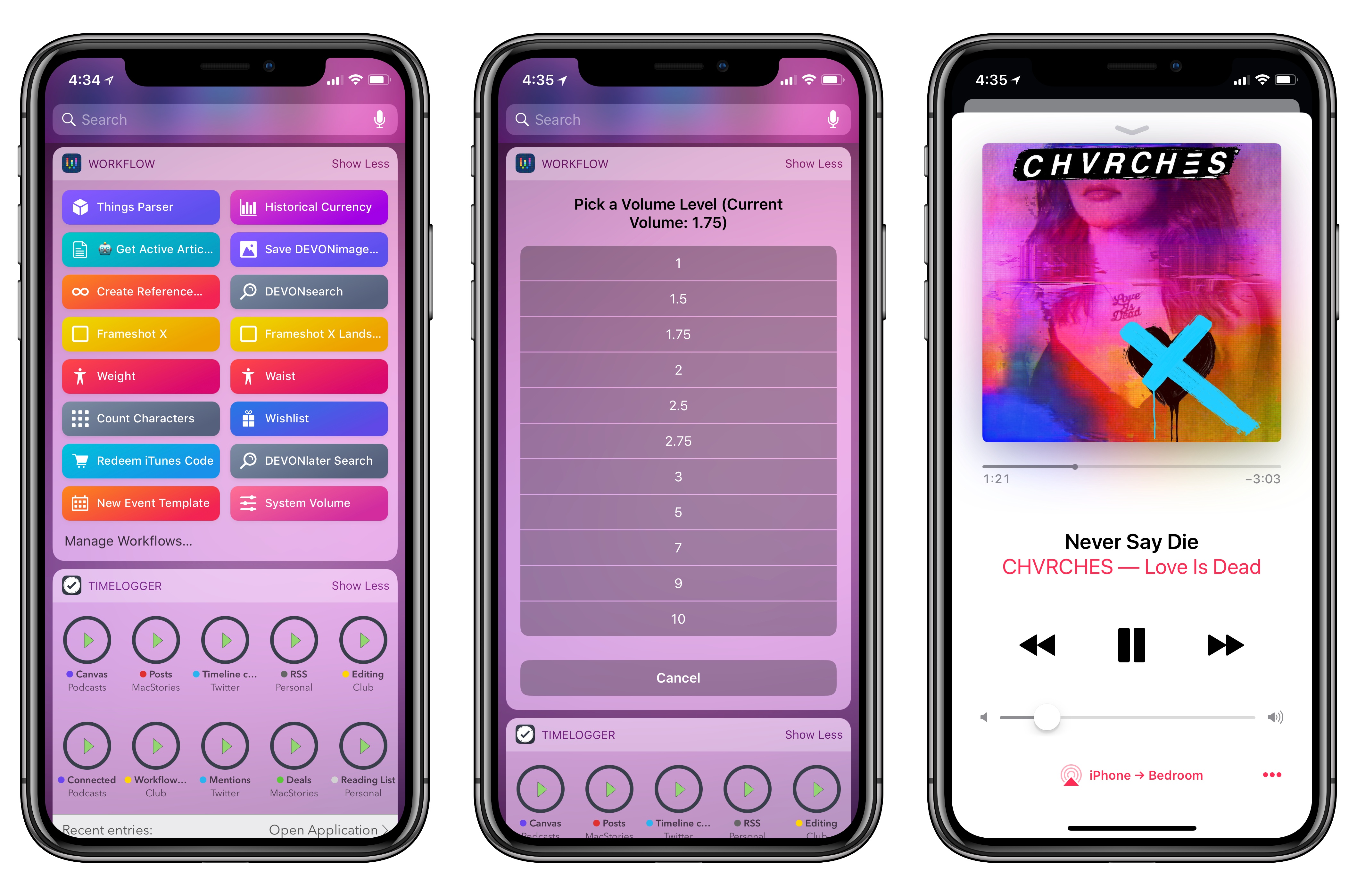
How to Adjust iOS’ Volume via Workflow When Streaming Audio to HomePod

One of Workflow’s least known functionalities is its ability to get details about the hardware it’s running on and control some system features. Among these, Workflow can both retrieve an iOS device’s current volume level and set the volume. A few days ago, I realized I could make a workflow to quickly adjust my iPhone’s volume when streaming music to one of our HomePods. Unlike other automations I’ve crafted over the years, this workflow was quite a success in our household and I felt like it was worth sharing with the wider MacStories audience.

Read more


iOS 11.3 and HomeKit’s Software Authentication→

Mikah Sargent, writing for iMore, on the importance of software-based authentication for HomeKit devices that Apple officially rolled out with iOS 11.3 last week:

Up to this point, commercial accessories were also required to incorporate Apple’s hardware-based Authentication Coprocessor in order to obtain HomeKit certification. The coprocessor handled Apple’s strict rules for encryption and security for HomeKit-enabled accessories. Apple takes HomeKit security seriously — the company says all HomeKit sessions are end-to-end encrypted and mutually authenticated (authenticated by all parties). Each communication session also includes something called “perfect forward secrecy,” meaning that encryption keys aren’t reused — a new key is generated for every session.

These strict rules meant most companies had to build accessories specifically with Apple’s HomeKit requirements in mind. It was a beneficial rule for consumers in terms of privacy and security, but it also meant — at least at the beginning — fewer available HomeKit-enabled accessories. Companies who already had smart home products on the market would need to rethink their products if they wanted to offer HomeKit-enabled accessories. That changes as of iOS 11.3.

I was under the assumption that HomeKit software authentication was already available since Apple announced it at WWDC ‘17 (in fact, I covered it in my iOS 11 review here). As Sargent notes on Twitter, however, accessory makers only received support for software authentication with iOS 11.3, which explains why we haven’t heard of major “HomeKit software updates” yet. Assuming that Apple’s certification process for HomeKit accessories is still going to take weeks, I’m curious to see if software authentication will at least make it easier for third-party manufacturers to consider HomeKit integration.

Permalink

Progressive Web Apps on iOS 11.3→

Great overview by Maximiliano Firtman on progressive web apps, which are now supported on iOS 11.3 thanks to new web technologies Apple adopted in Safari 11.1.

I wouldn’t call progressive web apps a “replacement” for native software from the App Store (just read the list of technical limitations from Firtman’s article), but they are indeed a remarkable improvement over how Safari used to save web apps to the Home screen. I recommend checking out these two lists to try some progressive web apps and see how they work on iOS. I spent way too much time playing around with Web Flap, a Flappy Bird clone that runs as a progressive web app and even supports offline mode on iOS 11.3.

Permalink

The RSS Revival→

The platformization of the web has claimed many victims, RSS readers included. Google Reader’s 2013 demise was a major blow; the company offed it in favor of “products to address each user’s interest with the right information at the right time via the most appropriate means,” as it Google executive Richard Gingras put it at the time. In other words, letting Google Now decide what you want. And the popular Digg Reader, which was born in response to that shuttering, closed its doors this week after a nearly four-year run.

Despite those setbacks, though, RSS has persisted. “I can’t really explain it, I would have thought given all the abuse it’s taken over the years that it would be stumbling a lot worse,” says programmer Dave Winer, who helped create RSS.

I enjoyed this story on the state of RSS by Wired’s Brian Barrett because it resonates with a trend I’ve also noticed in the past couple of years. Many of us have often praised social networks as “winners” in the battle against pure old RSS feeds, but the reality is that RSS is here to say. Perhaps, like rock and roll, RSS can never truly die.

What’s even more interesting is that, beyond RSS as a protocol, RSS services and clients (web backends and apps) are improving and growing more powerful on a weekly basis now. Barrett mentioned Feedly, The Old Reader, and Inoreader (which I’ve been using since 2016 and offers terrific power user features); I would also add NewsBlur and Feedbin – two services that have relentlessly iterated on the RSS experience since Google Reader’s demise. Just in the past few months, for instance, NewsBlur launched infrequent site stories to fix the very problem of subscribing to too many feeds, and Feedbin rolled out support for Twitter subscriptions. Both are genuine innovations that help people who want to get their news directly from the sources they choose. And if we look at the iOS side of this, apps like Fiery Feeds and lire are rethinking what advanced RSS readers for iPhone and iPad should be capable of. We wanted to do an RSS-focused episode of AppStories, and we ended up producing two of them (you can listen here and here) because there was just so much to talk about.

While millions of people may be happy getting their news from Facebook or an aggregator like Apple News (which I also use, occasionally, for more mainstream headlines), the resiliency of RSS makes me happy. There was a time when I thought all my news could come from social feeds and timelines; today, I’m more comfortable knowing that I – not a questionable and morally corrupt algorithm – fully control hundreds of sources I read each day.

Permalink

Pick 2: Bear and DEVONthink

AppStories+ Deeper into the world of apps

AppStories Episode 49 - Pick 2: Bear and DEVONthink

0:00
38:34

↓

AppStories+ Deeper into the world of apps

Federico and John take a deeper look at two favorite apps. In this installment: Bear and DEVONthink.

Read more


The Xcode Cliff→

Paul Miller, writing for The Verge, argues that Swift Playgrounds, while an amazing tool to learn the fundamentals of coding and Swift, ultimately doesn’t let kids build real apps:

The Swift Playgrounds fantasy of what ARKit is like is closer to an ad than a tutorial. I’ve actually worked on an app using Apple’s ARKit and SceneKit APIs directly. I got stuck when my API call to Apple’s sound playback system wouldn’t work, despite all my best efforts at debugging. Writing software with Apple’s APIs is a powerful but difficult practice, and Swift Playgrounds’ penchant for hiding true complexity makes it hard to recommend for someone who doesn’t want to just “learn how to code” but instead wants to build something.

Apple would do its learners a huge service by providing them an Xcode equivalent on the iPad. Not because it would suddenly be easy to make applications and release them on the App Store, but because it would give iPad-bound learners a chance to engage that challenge and grow into true application developers in time.

I agree with Miller. I’ve been crossing my fingers for an iPad version of Xcode ever since the first-generation iPad Pro in late 2015. From aspiring programmers who would have a chance to see their creations on the iPad’s Home screen (without using a Mac) to developers who could create commercial iPad software on their own iPads, the iPad needs Xcode. If coding is as important as learning a language, the lack of Xcode for iPad is like not having a keyboard to express our thoughts.

Permalink
