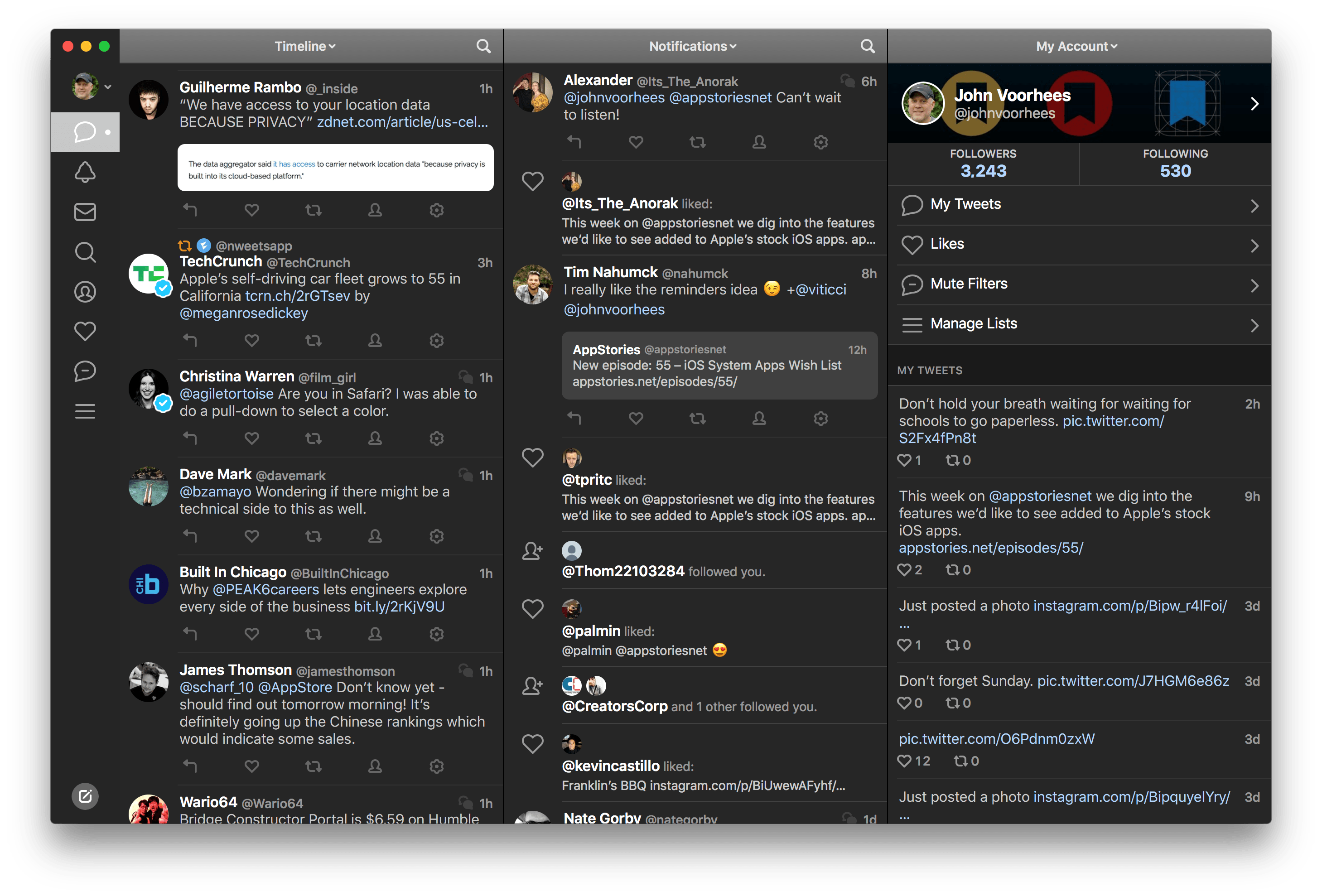
Following the 2.8 update released on iOS in April, Tapbots today updated Tweetbot for Mac to version 1.3, which adds various tweaks to the interface as well as the media timeline that debuted on the iPhone and iPad.

To access the new media timeline, which provides an inline media view of all timelines in Tweetbot, you can hit ⌘F and click on the icon next to the search bar, or, alternatively, choose View > Media Timeline (⌥⌘M with the keyboard). The media timeline retains the same functionality and design that Tapbots first brought to the iPhone; to switch back to the default timeline, you can click another icon next to the search bar or go to View > Default Timeline (⌥⌘T).

Complying with Twitter’s new display guidelines, the tweet detail view now comes with retweet and favorite counters — again, implemented just like in Tweetbot for iOS. And alongside a series of bug fixes and improvements, Tweetbot 1.3 brings a welcome enhancement to profile views: besides Cover Image support, you can now double-click the titlebar on a profile to scroll back to the top. Double-clicking again will scroll a profile’s timeline to the top as well.

Tweetbot for Mac 1.3 is available now on the Mac App Store.

Sean Korzdorfer shares a Tweetbot tip that I didn’t know about: you can construct complex searches with boolean operators and filters and launch them with a URL scheme, both on OS X and iOS. And not just regular searches — you can apply a query to look for specific keywords inside a Tweetbot search.

Basically, Sean is using Tweetbot searches to replace RSS feeds. By saving searches that filter out RTs, mentions, and tweets in foreign languages, he receives a stream of tweets containing links from a specific set of users. Sean has turned his searches into Alfred workflows for Tweetbot on the Mac, and I thought I could do the same on iOS.

Sure enough, here’s a Launch Center Pro action to launch a Tweetbot search for links (no RTs, no mentions) from users I care about:

tweetbot:///search?query=from%3Amacrumors%20OR%20from%3Averge%20OR%20from%3Adaringfireball%20OR%20from%3Apolygonall%20OR%20from%3Akotaku%20OR%20from%3Amacdrifter_feed%20OR%20from%3Areneritchie%20OR%20from%3Amattalexand%20OR%20from%3Anateboateng%20OR%20from%3Adujkan%20OR%20from%3Amarkgurman%20OR%20from%3Apanzer%20filter%3Alinks%20-filter%3Amentions%20-filter%3Aretweets%20lang%3Aen%20[prompt]

And here it is decoded for reading purposes:

tweetbot:///search?query=from:macrumors OR from:verge OR from:daringfireball OR from:polygonall OR from:kotaku OR from:macdrifter_feed OR from:reneritchie OR from:mattalexand OR from:nateboateng OR from:dujkan OR from:markgurman OR from:panzer filter:links -filter:mentions -filter:retweets lang:en [prompt]

The URL action ends with a [prompt] for Launch Center Pro, but that can also be a [[draft]] for Drafts. You’re not forced to launch the search URL with a keyword — if you don’t enter anything in the prompt, Tweetbot will display all links from the search (which is why you probably don’t want to use Drafts for this, as it can’t launch an action from an empty draft). Also, you can see that the first portion of the URL isn’t percent-encoded, but the one after the query parameter is. For this, Launch Center Pro’s encode/decode actions can come in handy.

I am subscribed to a series of Twitter lists to discover interesting links on a daily basis, but these complex searches have the advantage of filtering out RTs and mentions, providing a cleaner, links-only experience.

Apr
23
2013

Tweetbot

Ever since its original release two years ago, I’ve always wished Tweetbot could provide filters to separate the standard timeline from a “media” one containing pictures and videos. After the launch of Twitter’s own photo service and rise in popularity of services like Instagram, usage of pictures – either photos or screenshots – among the people I follow has skyrocketed. Apps like TweetGlass (nèe Quip) succesfully explored the concept of letting users browse “media updates” in a dedicated feed, so why not Tweetbot?

The latest version of Tapbots’ client, available today, does just that: it adds a media timeline to show only supported images and video tweets (the ones that you’d normally see displayed inline as thumbnails). (more…)

DraftsMessages

Last night, Tweetbot for iOS was updated with support for the Twitter 1.1 API, which, among various requirements, includes the need of linking a tweet’s timestamp – the date and time when it was sent – to its unique URL on twitter.com. In Tweetbot, you can now open the tweet detail view and tap on the timestamp to automatically open the Twitter website in your default browser; in terms of interaction, I like this change because it lets me open tweets in Google Chrome with just one tap.

In thinking about the update last night, I realized that:

  • My team and I use iMessage for daily communication;
  • The majority of URLs we share are Twitter URLs;
  • We all use Tweetbot on iOS and OS X;
  • Easier browser access means easier bookmarklet triggering;
  • Drafts can access iMessage.

And I concluded that:

  • I could chain every piece of the puzzle together;
  • Hopefully somebody else will find it useful and adapt the workflow to other similar scenarios.

Therefore, I created a browser bookmarklet, a Python script, and a Drafts action to automate the entire process and demonstrate how you can convert Twitter URLs to tweetbot:// URLs and send text from Pythonista to Drafts.

As usual, I am posting the following workflow as a proof of concept that you can modify and adapt to your needs. For instance, you can change the action that is triggered in Drafts, the x-success parameter that will be triggered, or the way Twitter links are converted to Tweetbot-specific URLs.

(more…)

Tweetbot

Tweetbot for Mac, Tapbots’ Twitter client that I first reviewed in October 2012, has been updated today to version 1.2, which is available on the Mac App Store. Among the notable features of this new version, Tapbots is introducing notifications for specific users, support for inline Flickr and Vine previews, and compliance with the Twitter 1.1 API. (more…)

Tweetbot 2.7, released today for the iPhone and iPad, comes with a new Browser setting to specify an external app for opening links. I have been testing the feature and I’m a big fan of this update.

In the Settings, you can now choose to open links directly in Safari, Google Chrome, or 1Password. There are two ways to do this: you can choose to keep opening links in Tweetbot’s own web view and then forward them to your browser of choice; or you can skip Tweetbot’s web view altogether and go directly to a different browser upon tapping a link.

Opening links in Safari and 1Password doesn’t have anything special to it aside from the fact that you’ll be taken out of Tweetbot and into another browser. The 1Password integration is particularly useful as it is, essentially, the same idea behind my bookmarklet, only available inside Tweetbot: if you see a link for a website that you also want to log into, you can use 1Password’s built-in browser to access it.

Using Chrome alongside Tweetbot is my new favorite option, as it leverages Chrome’s support for x-callback-url to enable a completely automated workflow to open Chrome and go back to Tweetbot. If you open a link in Google Chrome, a new tab will open showing a back button labeled “Tweetbot”; once you’re done reading, you can hit that button to automatically close the tab and be taken back to your position in the Tweetbot timeline. Chrome is smart in hiding the back button if you navigate to other pages from the Tweetbot-created tab; the browser also remembers the “special” tab if you switch to other tabs and then go back to the one created by Tweetbot. There’s a minor bug in this version that will redirect to the Tweetbot’s Timeline when you open a link from Mentions, but Tapbots is aware of it. For me, this is a very welcome addition to Tweetbot as it allows my two most-used iOS apps to better communicate with each other without requiring me to manually move between apps. I can get all the benefits of using an external browser (Facebook sharing, using bookmarklets) while still being able to go back to Tweetbot seamlessly.

For Flickr and Vine users, Tweetbot 2.7 also adds inline previews. Vine’s short videos are shown with a standard iOS video player that has a play/pause button.

Tweetbot 2.7 is a minor, yet useful update for Chrome and 1Password users who have been wishing the app could open links in other browsers. You can find the update on the App Store (iPhone, iPad).

Tweetbot 1.1 For Mac

An update to Tweetbot for Mac — my go-to Twitter client — was released today on the App Store. Tweetbot 1.1 doesn’t bring major new features, but it’s got a fair amount of bug fixes and minor improvements that I like.

For Mountain Lion users, there’s an “All Notifications” option in the Settings to, literally, receive all notifications for your stream. This means you’ll see every tweet from every user you follow show up in Notification Center as soon as they tweet. I can’t use this because I follow too many people (I would get a notification every few seconds), but it can be useful for timelines following less users. What I really like is the option to show a Visual Sync Marker (like on iOS) and to globally invoke the app/new tweet window with a hotkey.

Last, there are many other fixes and improvements such as new keyboard shortcuts, better “pin to top” for non-streaming columns, and better compatibility with Moom. Tweetbot continues to be my favorite Twitter client on the Mac and it’s available at $19.99 on the Mac App Store.

Disable Auto-Correct In Tweetbot for Mac

I write in English, but I live in Italy. Some of my Twitter followers are Italian, too, and I like to talk to them in my native language. In the past weeks, I noticed an annoying bug: Tweetbot for Mac, my Twitter client of choice, couldn’t disable auto-correct (Edit > Spelling and Grammar > Correct Spelling Automatically) permanently. The option is there, but it appears it “doesn’t stick” after you enable it to send a tweet without auto-correct. This led to an increasing number of misspelled Italian tweets with English words mixed in (as per my Mac’s system language).

Fortunately, I’ve found the solution here. With a simple Terminal command, you can override Tweetbot’s default setting and disable auto-correct (but not spell checking) automatically.

This is exactly what I was looking for, so make sure to hit the source link to check out the full command.

Tweetbot 2.6.1 Tweaks UI

A minor update to Tweetbot has been released today by Tapbots: among bug fixes, version 2.6.1 introduces a slightly tweaked user interface with a different design for buttons and icons seen throughout the app. Unchanged since the first version, the new icons are similar to the old ones, yet somewhat more rounded and, in my opinion, peculiar.

Like I said, it is a very minor change. However, if you, like me, stare at Tweetbot for several hours a day, it is something you’ll quickly notice upon updating to 2.6.1. It certainly contributes to subtly differentiating Tweetbot from Netbot, which I appreciate.

Tweetbot 2.6.1 is available on the App Store.