Posts tagged with "podcasts"

Instacast For Mac

Back in early May, Vemedio released a first beta of Instacast for Mac. Instacast is my podcast client of choice on the iPhone and iPad, and I was eager to see whether Instacast could fulfill my long-standing wish of a proper podcast app for OS X. Instacast is officially out of beta today, and it’s my new favorite podcast app for Mac.

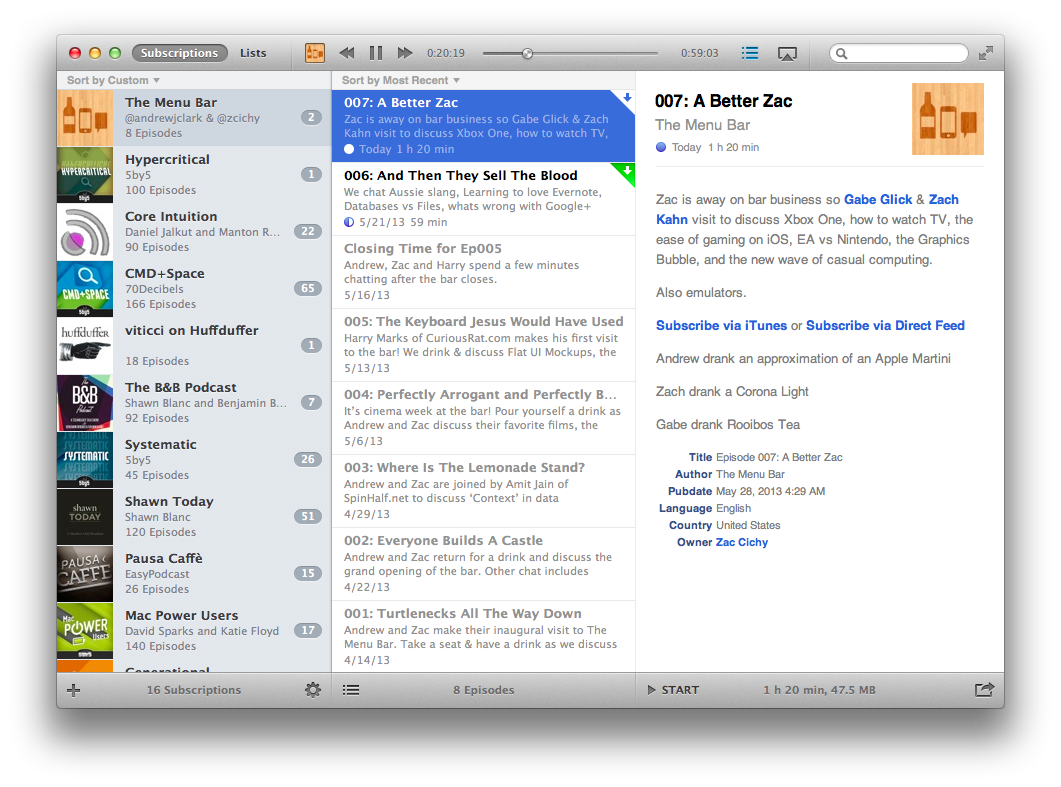
There isn’t much to say about Instacast for Mac that hasn’t already been explained in our review of Instacast 3.0 for iOS. The Mac version retains the same interface and episode management principles of its iOS counterpart: you can subscribe to podcasts and organize them in lists, sort them by parameters such as Title or Date, or delve deeper into subscription-specific settings for refresh times and automatic download/deletion options. Literally everything that you know about Instacast 3.0 for iOS – including the app’s design style – has been ported to OS X with this first release.

There’s some stuff that has been built exclusively for the Mac. I am particularly fond of Instacast’s rich selection of keyboard shortcuts, which fit well with the Mac’s nature and will help you save time if you’re looking for a specific command or option (there are many of them, so remembering each one of them may require special mnemonic skills).

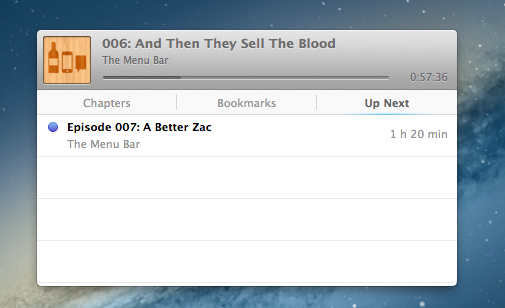
I like when developers porting popular iOS apps to the Mac don’t simply convert their projects for a desktop window: that was the case with Tweetbot (another app that took advantage of OS X features like keyboard shortcuts and larger displays), and, fortunately, it’s happening with Instacast as well through the aforementioned shortcuts and an iTunes-like MiniPlayer. Available through the Window menu (with the keyboard, it’s ⌥⌘2), the MiniPlayer allows you to check on either the episode you’re listening to (with a widget that’s got a minimal footprint on your desktop) or to the ones that you have queued up for later thanks to – another Mac-only feature – Up Next support. Again, similarly to iTunes 11, Instacast lets you send specific episodes to a list that you can consult and modify while you’re already listening to something else.
Another feature that’s currently exclusive to Instacast for Mac is local text search: if you remember an episode that had a particular keyword in its title or description, you can look for it. This is especially useful for names of apps or services that are mentioned in podcasts, but I wish it was possible to save recurring searches.

Instacast for Mac is Instacast 3.0, responsibly and intelligently ported to OS X. It’s not a simple conversion of the iOS app as it takes advantage of the Mac in obvious, but still welcome ways. Sync with Instacast Cloud, initially spotty in the beta, has been reliable and fast for me in the last builds, making the process of switching between devices and continuing to listening to podcasts seamless.

If you’ve been looking for a solid podcast app for Mac that syncs with iOS, Instacast gets my recommendation. Until May 31, Instacast for Mac will be available at $14.99 instead of $19.99.
Access Extra Content and Perks

Founded in 2015, Club MacStories has delivered exclusive content every week for nearly a decade.

What started with weekly and monthly email newsletters has blossomed into a family of memberships designed for every MacStories fan.

Learn more here and from our Club FAQs.

Club MacStories: Weekly and monthly newsletters via email and the web that are brimming with apps, tips, automation workflows, longform writing, early access to the MacStories Unwind podcast, periodic giveaways, and more;

Club MacStories+: Everything that Club MacStories offers, plus an active Discord community, advanced search and custom RSS features for exploring the Club’s entire back catalog, bonus columns, and dozens of app discounts;

Club Premier: All of the above and AppStories+, an extended version of our flagship podcast that’s delivered early, ad-free, and in high-bitrate audio.

Learn more here and from our Club FAQs.


Podcasts 1.2: Thoughts on the New Now Playing View, My Stations, and More

Now Playing View

Now Playing View

Yesterday, Apple updated their podcast player by introducing some great new features as well as some visual changes to the Now Playing view. I’ve talked at length before about Podcasts and where it stands amongst other podcatchers on the App Store, but I’d like to revisit some of those notions as playlists take center stage in the form of stations.

Read more

Access Extra Content and Perks

Founded in 2015, Club MacStories has delivered exclusive content every week for nearly a decade.

What started with weekly and monthly email newsletters has blossomed into a family of memberships designed for every MacStories fan.

Learn more here and from our Club FAQs.

Club MacStories: Weekly and monthly newsletters via email and the web that are brimming with apps, tips, automation workflows, longform writing, early access to the MacStories Unwind podcast, periodic giveaways, and more;

Club MacStories+: Everything that Club MacStories offers, plus an active Discord community, advanced search and custom RSS features for exploring the Club’s entire back catalog, bonus columns, and dozens of app discounts;

Club Premier: All of the above and AppStories+, an extended version of our flagship podcast that’s delivered early, ad-free, and in high-bitrate audio.

Learn more here and from our Club FAQs.


PodGrasp, A Podcast App For OS X

PodGrasp, A Podcast App For OS X

Jonathan Poritsky has posted a review of PodGrasp, a new podcatcher for OS X:

All of that said though, PodGrasp is currently the best option available on the Mac App Store for desktop podcast management. It will only get better and it truly is an incredible start, especially considering there is almost no competition for this right now. Go get it so Gary Hughes, PodGrasp’s developer, can make it even better. His FAQ says an iPhone app is planned as well, so it’s not like he’s gonna take your Washingtons and run.

The lack of good podcast apps for OS X has consistently surprised me. Just a few weeks ago I tweeted about the subject, and proposed a possible API to figure out the (trickier than Twitter timelines) problem of syncing podcasts across platforms and devices.

But things are changing. Aside from PodGrasp, which I’ll make sure to try out, Instacast’s developer Martin Hering announced this morning that he’s working on a Mac version of Instacast. I have been trying the new Instacast for iOS, and it’s a solid update with new functionalities that I like; furthermore, it has a custom sync architecture that – unsurprisingly – works much better than the former iCloud sync. I’m looking forward to his Mac app.

In the meantime, to make sure I can listen to podcasts with my Mac’s speakers while using a podcast app I like, I have been using AirPlay with Reflection to get the job done.

Permalink

Single Podcast Episodes, Huffduffer, and Podcast Apps

Last week I tweeted that developers of podcast apps should figure out a way to let users quickly add podcast episodes from anywhere. I am subscribed to less than 10 podcasts, and I listen to nearly each new episode of them. However, there’s been so much good stuff lately that I’ve found myself wanting to check out another podcast’s episode every once in a while. Maybe it’s an episode of a 5by5 show I’m not subscribed to, or an interview I’m interested in. How can I save these “single episodes” from any device?

Downcast, my podcast client of choice, comes with a “mark for streaming” functionality that lets you add a single episode to a temporary list you can go through later. But I wanted something more like Instapaper: I want to save an episode to a “for later” list I can access and listen to from any device, at any time. I want to be able to save an episode with the click of a button and forget about it – it has to be frictionless.

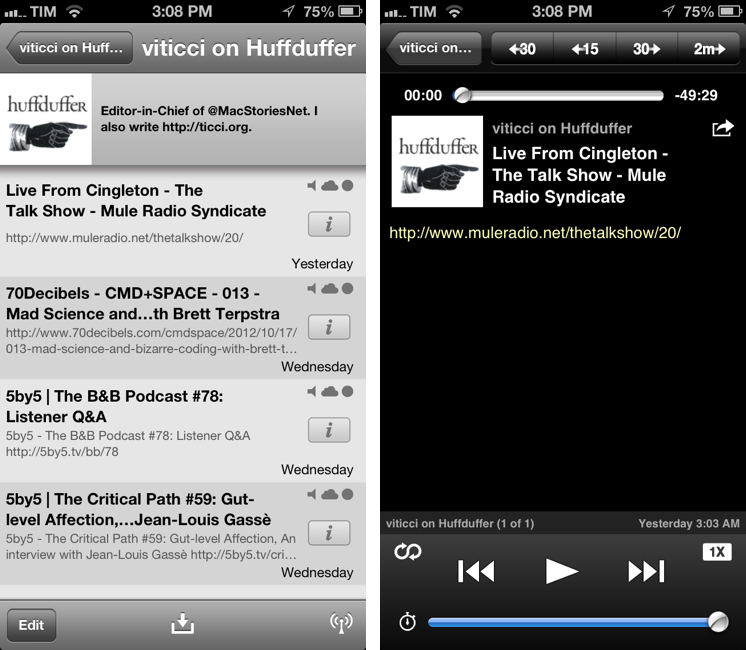
Huffduffer does just that. It is web service that lets you “Instapaper episodes”: it has a bookmarklet which lets you clip podcast pages and save them to a single list on your account, which, unfortunately, can’t be set to private (unless I’m not seeing a setting). It doesn’t bother me to have my profile public, but a private option is always welcome. You can tag episodes, browse other people’s profiles and tags, and check out popular episodes on the homepage.

The cool thing about Huffduffer is that your profile is, essentially, an RSS feed that you can add to any podcast app that supports RSS – which means basically every app nowadays. Adding your Huffduffer profile’s RSS feed as a podcast will enable you to listen to the episodes you’ve saved through the bookmarklet, as Huffduffer directly fetches the audio file of a webpage you save. In my tests, it worked perfectly with podcast pages from 5by5, 70Decibels, and Mule Radio.

To add an RSS feed in Downcast, simply choose Add Podcasts > Add Podcasts Manually; your Huffduffer feed will be added as a podcast with its own episodes. I’ve also found that refresh times are fast – as soon as you add an episode to Huffduffer, your RSS feed will be updated.

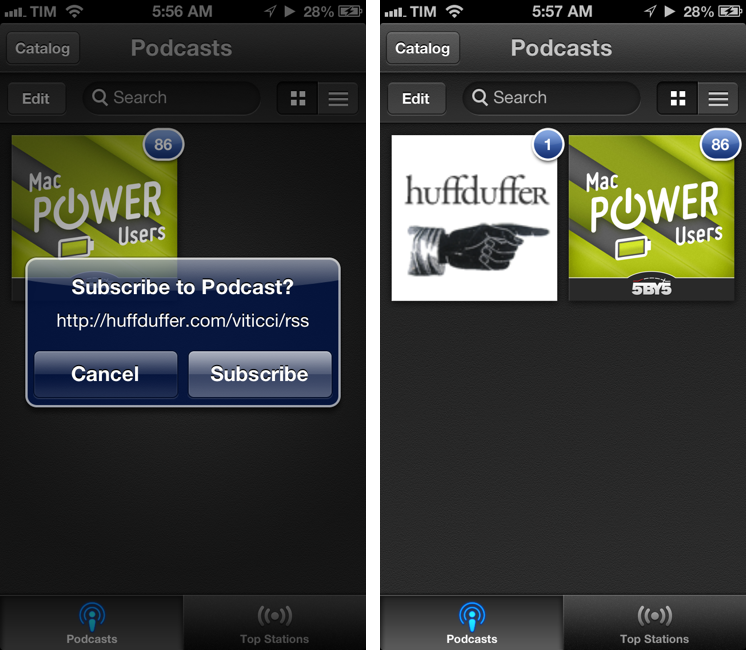
It is slightly more complicated with Apple’s Podcasts app. The app doesn’t have a visible “Add from RSS” button, but you can force it to add one by pasting the URL into the search field. The app will recognize the URL and ask you to subscribe.

Huffduffer is a niche tool that, for me, solves a recurring problem. I can now save episodes from any device without having to subscribe to an entire show if I’m just interested in a a single episode. If I had to nitpick, I’d say I’d like Huffduffer to offer higher-res (Retina-quality) artwork for its default image.

Check out Huffduffer here.

Access Extra Content and Perks

Founded in 2015, Club MacStories has delivered exclusive content every week for nearly a decade.

What started with weekly and monthly email newsletters has blossomed into a family of memberships designed for every MacStories fan.

Learn more here and from our Club FAQs.

Club MacStories: Weekly and monthly newsletters via email and the web that are brimming with apps, tips, automation workflows, longform writing, early access to the MacStories Unwind podcast, periodic giveaways, and more;

Club MacStories+: Everything that Club MacStories offers, plus an active Discord community, advanced search and custom RSS features for exploring the Club’s entire back catalog, bonus columns, and dozens of app discounts;

Club Premier: All of the above and AppStories+, an extended version of our flagship podcast that’s delivered early, ad-free, and in high-bitrate audio.

Learn more here and from our Club FAQs.


Apple’s Podcasts 1.0.1 Update Feels a Lot Faster

While I’ve talked about Apple’s Podcasts app before, I’ve only largely talked about the implications of it being available on the App Store, what it does well, and how it’s not going to totally supplant feature rich podcatchers and their developers who want to continue improving upon the actual medium of podcasting itself. What I didn’t talk about was performance, but at the time it felt no different than my usual experience with the App Store or iTunes apps.

Podcasts 1.0.1 is a significant performance improvement for Apple’s podcatcher. While the Podcast catalogue still feels a little sluggish here or there, overall navigating the catalogue, browsing the library, and starting a podcast stream feels much snappier than before.

Much like a red badge on an app icon, Podcast artwork will display a blue badge indicating the number of unplayed episodes for your subscriptions. Also improved is how Apple handles missing for missing artwork in top stations — they now display the podcast title in its place. Apple has also fixed playback speed, keeping it persistent when a new episode plays.

Apple’s Podcasts 1.0.1 is a solid update, addressing small issues and improving how the app feels when browsing and playing podcasts. You can download Podcasts from the App Store.

Access Extra Content and Perks

Founded in 2015, Club MacStories has delivered exclusive content every week for nearly a decade.

What started with weekly and monthly email newsletters has blossomed into a family of memberships designed for every MacStories fan.

Learn more here and from our Club FAQs.

Club MacStories: Weekly and monthly newsletters via email and the web that are brimming with apps, tips, automation workflows, longform writing, early access to the MacStories Unwind podcast, periodic giveaways, and more;

Club MacStories+: Everything that Club MacStories offers, plus an active Discord community, advanced search and custom RSS features for exploring the Club’s entire back catalog, bonus columns, and dozens of app discounts;

Club Premier: All of the above and AppStories+, an extended version of our flagship podcast that’s delivered early, ad-free, and in high-bitrate audio.

Learn more here and from our Club FAQs.


A Fine Impression of Apple’s Modernized Podcasts App

Apple’s Podcasts app is an acknowledgment that podcasts make up a substantial part of entertainment on iOS devices — more people than ever are subscribing to, learning from, and taking part in conversations around the topics that interest them. Long neglected with basic playback controls and mediocre syncing in the Music app, Podcasts is now its own standalone application. You couldn’t miss the news either — the Music app notifies you of this change on your iPhone or iPad when you open it.

With large and indie media networks recording weekly, if not daily, audio and video content, listeners who want “radio on their own time” can subscribe to and take part in discussions that they otherwise can’t be a part of through traditional radio or broadcast TV (i.e. time slots). Podcasts, while not a new concept, give listeners the opportunity to stream and download often short, consumable chunks of content that that’s more accessible than written text — it’s the way to catch up on news if you’re sitting in rush hour traffic, taking the dog for a walk, or doing the dishes.

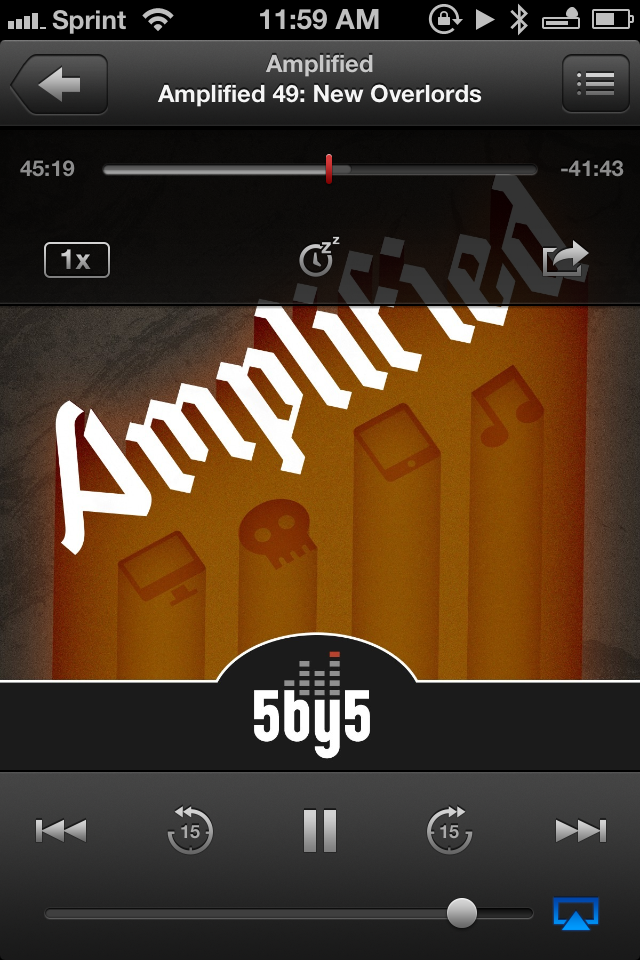
Over the years, consuming podcasts becomes an incredibly intimate experience. Because people choose to listen on their own time, and often when they’re doing specific activities where they otherwise can’t read or listen to an available live stream, people look for specific features tailored to provide a custom listening experience. Being able to increase the playback rate of podcasts, set sleep timers, create playlists, add bookmarks, and stream podcasts over wireless networks has become increasingly important. Features, more-so than fancy user interfaces, are often preferred by users who regularly listen to podcasts.

Apple’s Podcasts application on iOS is their new central hub for finding, subscribing to, and listening to podcasts on your own terms. In consideration of how Apple’s podcast directory (their Catalogue) and podcatcher intermingle, it’s a pretty typical Apple experience. And in places where I thought Apple would fall short, I’m actually impressed at the amount of stuff they’ve added to their once featureless podcatcher. While Apple has certainly gone above and beyond my expectations in what they’ve provided, I think there can be some room for improvement.

Read more

Access Extra Content and Perks

Founded in 2015, Club MacStories has delivered exclusive content every week for nearly a decade.

What started with weekly and monthly email newsletters has blossomed into a family of memberships designed for every MacStories fan.

Learn more here and from our Club FAQs.

Club MacStories: Weekly and monthly newsletters via email and the web that are brimming with apps, tips, automation workflows, longform writing, early access to the MacStories Unwind podcast, periodic giveaways, and more;

Club MacStories+: Everything that Club MacStories offers, plus an active Discord community, advanced search and custom RSS features for exploring the Club’s entire back catalog, bonus columns, and dozens of app discounts;

Club Premier: All of the above and AppStories+, an extended version of our flagship podcast that’s delivered early, ad-free, and in high-bitrate audio.

Learn more here and from our Club FAQs.


Apple Launches Podcasts App for iOS 5.1 and Later

When Peter Kafka at AllThingsD hinted at an upcoming Podcasts app for iOS, we didn’t expect to see it until this Fall. Some early tells clued us in that Apple was working on something, and today our best guesses and inside sources held up: Apple has launched their forecasted Podcasts app, and you can download it right now from the App Store.

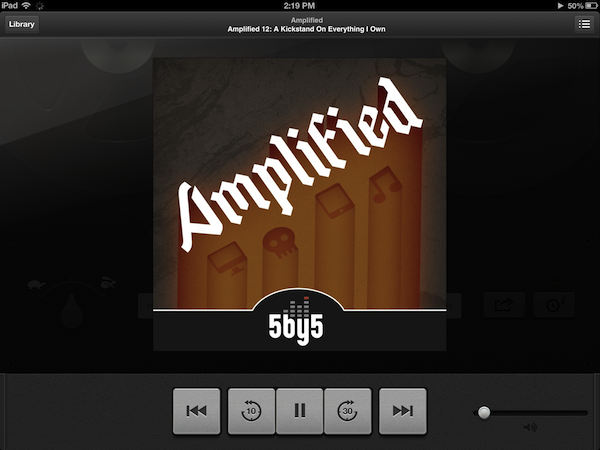
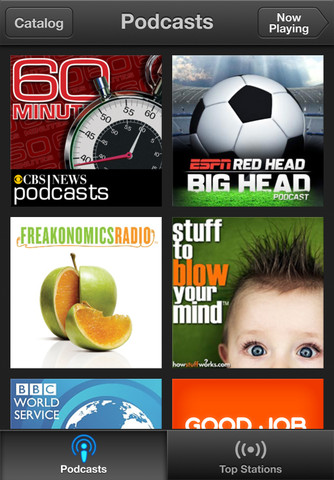
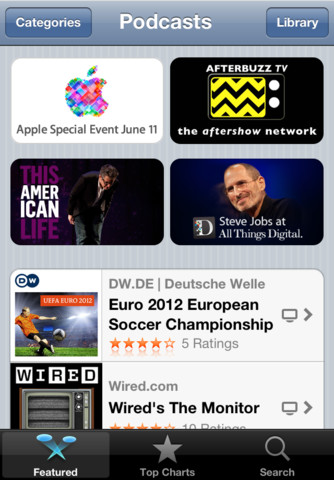
Wearing Apple’s iconic purple colors in its icon, Apple podcasts app centralizes the podcast player and podcast section of the iTunes Store in a standalone application. Able to playback audio and video podcasts, Podcasts continues the retro-styled playback controls first seen in the updated Music app on the iPad, and shares the the catalogue views from the updated App Store and iTunes Store on iOS 6. At first glance, Apple’s Podcasts podcatcher appears to be a rather basic player, leaving room for power-listeners to continue using their favorite apps like Downcast and Instacast.

With Apple’s standalone podcast player breaking away from the Music player, you’ll want to check out all of the new features below:

• Enjoy all of your audio and video podcasts in a single app
• Explore hundreds of thousands of podcasts including shows in over 40 languages
• Try the innovative new Top Stations feature to find new podcast series in a variety of topics, including arts, business, comedy, music, news, sports, and more.
• Browse by Audio or Video podcasts, or see what’s most popular in Top Charts
• Tap subscribe for your favorites and automatically receive new episodes for free as they become available
• Stream episodes or download to listen while offline
• Skip forward and back using simple playback controls
• Turn on Sleep Timer to automatically stop playing a podcast while listening in bed
• Share your favorite episodes with friends using Twitter, Messages and Mail
• Optionally sync your favorite episodes from iTunes on your Mac or PC
• Sync your episode playback for seamless transition between devices

Podcasts required iOS 5.1 and iTunes 10.6.3 for optionally syncing episodes. Download Podcasts (a universal app) from the App Store.

Access Extra Content and Perks

Founded in 2015, Club MacStories has delivered exclusive content every week for nearly a decade.

What started with weekly and monthly email newsletters has blossomed into a family of memberships designed for every MacStories fan.

Learn more here and from our Club FAQs.

Club MacStories: Weekly and monthly newsletters via email and the web that are brimming with apps, tips, automation workflows, longform writing, early access to the MacStories Unwind podcast, periodic giveaways, and more;

Club MacStories+: Everything that Club MacStories offers, plus an active Discord community, advanced search and custom RSS features for exploring the Club’s entire back catalog, bonus columns, and dozens of app discounts;

Club Premier: All of the above and AppStories+, an extended version of our flagship podcast that’s delivered early, ad-free, and in high-bitrate audio.

Learn more here and from our Club FAQs.


A Newsstand-like Platform For iOS 6 Podcasts

A Newsstand-like Platform For iOS 6 Podcasts

Jake Marsh writes about a possible implementation of Apple’s rumored standalone Podcasts app for iOS 6 [via Marco Arment]:

Now the really big one. A universal (iPhone & iPad) iOS application entitled “Podcasts”. This application would provide a way to browse available shows, read about them and subscribe to your favorites. Basicallly extending the existing functionality avaiable in the Podcasts section of the iTunes Store today.Since Apple will now control the experience end-to-end, they can now provided fantastic support for things like new episode push notifications.

As Cody wrote last week when AllThingsD was first to report on speculation about a separate podcast app for iOS 6 devices, podcasts have been neglected for a long time on iOS. Bundled with iTunes within a unified interface for the Store, support for podcasts on iOS has spurred the creation and popularity of third-party solutions like Instacast and Downcast, which make it extremely easy to create playlists, stream episodes without downloading them, and sync settings (including play position) across devices. These are all features Apple’s iOS iTunes app is lacking, but it doesn’t necessarily mean Apple is ignoring the podcast category.

As we suggested, Apple could provide a separate directory for discovering podcasts and a native podcatcher to simplify the process of listening, downloading, and managing podcasts and playlists. What Marsh envisions isn’t too dissimilar from Newsstand – a platform that allows developers to host content on Apple’s servers and manage new releases from iTunes Connect, and that enables iOS users to conveniently browse audio and video content through a dedicated storefront.

It’s important to keep in mind that, if Apple were to provide a new platform for Internet audio and video producers, they’d likely want to see a revenue opportunity to at least break even and cover the costs of offering a better experience. With Newsstand, Apple got several publishers (including Time) on board with the revenue cut business model whilst providing an integrated solution to the end user. With podcasts on iOS, there is certainly room for improvement – but it has to make sense for Apple too, not just the developers and end users.


Permalink

On Breaking Out the Podcast App in iOS 6

Based on Monday’s WWDC 2012 opening Keynote, I can confidently say that Apple is closely listening to their customers, introducing numerous features that the Apple community has been asking for in the previous couple of years. (I really see iOS 6 as a direct response to customer’s wish-lists.) Apple’s goal is to both provide an ecosystem that developers can thrive in, make customers happy, and balance the two by introducing new features in way that makes the most sense. In the course of this discussion, AllThingsD writes that Podcasts will be broken into its own separate app in iOS 6.

People familiar with Apple’s plans tell me that when its new iOS 6 software becomes widely available this fall, podcasts will have their own app, where users will be able to discover, download and play them on mobile devices. Users who access iTunes via laptop and desktop machines will still find them in that version of iTunes, though.

AppAdvice made note that Podcasts, iTunes U, and Audiobooks have been removed from the iTunes app in the iOS 6 beta, sparking thoughts that Audiobooks could find itself reintegrated into the iBooks app, while Podcasts become its own thing.

Myke Hurley of the 70Decibels Podcast Network writes,

However, if Apple are going to make it a separate app it could help highlight the medium even further to people—they’re no longer in the purgatory of the ‘more’ button. What would be even better is if the app comes built in with iOS6 (like the Videos app) or is promoted by a pop-up like iBooks at least.

Podcasts have been neglected for a long time on iOS. While the iTunes Store provides a platform for success, the podcast player itself is currently in a lackluster state, offering only basic functionality for downloaded episodes. As people began listening to more podcasts, alternative 3rd party podcatchers appeared in the form of apps like Downcast and Instacast to fill in gaps for streaming and creating custom playlists. People love talk radio, and podcasts provide a means for both amateurs and professionals to reach large audiences who want to share in the discussion of their favorite topics. In particular, Apple must enjoy the presence of companies like 5by5 and 70Decibels whose success directly corresponds to the Apple community. Apple’s platform lets popular Internet broadcasters like TWiT, CNET, and Revision3 make podcasts available to audiences interested in tech, while companies like CBS and NBC utilize the service to publish the nightly news, political debates, and important broadcasts pertaining to current events.

Podcasts, whether provided as a platform for news or entertainment, aren’t being ignored by Apple. My guess is that it’s in their best interests to expose new customers to the incredible amount of content they host — again I think this is a case where they’re listening to the community and responding accordingly. As with Reading List vs. Instapaper, Apple’s own podcatcher wouldn’t supplant the 3rd party apps in the App Store. Rather, it could do one of two things: 1.) Get more people discovering and subscribing to podcasts through a podcast directory separate from the iTunes Store (currently the conglomerate for all media), and 2.) Provide those customers with a podcatcher that makes downloading, playing, and finding episodes from their subscribed-to podcasts easy. People who want more functionality already have it and will continue to be able to find it from the App Store.

If Podcasts is an app on iOS 6, I’d be really happy to see it happen. There’s a lot of great content available that people are otherwise missing if they only know the iTunes Store for music and video.

Edit 5:42 pm: Updated the article to note that the iTunes app, not the Music app, removed references to Podcasts, iTunes U, and Audiobooks.

[AllThingsD via MacRumors | mentioned: AppAdvice, Myke Hurley]

Access Extra Content and Perks

Founded in 2015, Club MacStories has delivered exclusive content every week for nearly a decade.

What started with weekly and monthly email newsletters has blossomed into a family of memberships designed for every MacStories fan.

Learn more here and from our Club FAQs.

Club MacStories: Weekly and monthly newsletters via email and the web that are brimming with apps, tips, automation workflows, longform writing, early access to the MacStories Unwind podcast, periodic giveaways, and more;

Club MacStories+: Everything that Club MacStories offers, plus an active Discord community, advanced search and custom RSS features for exploring the Club’s entire back catalog, bonus columns, and dozens of app discounts;

Club Premier: All of the above and AppStories+, an extended version of our flagship podcast that’s delivered early, ad-free, and in high-bitrate audio.

Learn more here and from our Club FAQs.