

If you didn’t already know, we’ve set up a new twitter account for Deals, it’s @MacStoriesDeals. We’ll tweet the daily deals there as well as exclusive weekend deals too. Help spread the word! Here are today’s deals on iOS, Mac, and Mac App Store apps that are on sale for a limited time, so get ‘em while they’re hot!
Posts tagged with "mac"
#MacStoriesDeals - Thursday
Flare: Photo Editing with Style

The Iconfactory, makers of apps such as Twitterrific, CandyBar, xScope, IconBuilder, iPulse, and Frenzic, are the “World leaders in icon design, custom design services, software, royalty-free stock icons and much more.”
So what app niche could they fill next? How about photo editing. Unless you’re a pixel pro who uses Photoshop, Lightroom or Aperture, there are few options for the semi-pro and amateur out there to dabble in image effects. That’s where Iconfactory’s new app, Flare, comes into play. The Iconfactory worked together with ARTIS Software to bring Flare to the Mac. Read more
Skype 5.1 for Mac Released, Design Competition Launched
Skype, the popular VoIP and video calling service, released earlier today an update for its official Mac client, adding a number of fixes, new features and design improvements following feedback received by users in the past months since the release of Skype 5 for Mac.
The latest update, version 5.1, includes “improvements to the group video calling interface” as participants in group calls can now easily identify and focus on active speakers. Another addition to the app is the possibility to select recent numbers in the dial pad – which was redesigned in Skype 5. Among other bug fixes, one for iSight FireWire webcam detection. Skype 5.1 for Mac is available for download here.
Together with the new release, Skype is also launching a design competition with many Apple-related prizes (iPads, a MacBook Air, Apple TV) to redesign the look of chat in Skype for Mac:
When we first launched our new Mac app, we were delighted to see so many custom styles emerge from the design community, so we thought we’d make it official.
Between now and the 14th April, we’re inviting you to design your own chat style for Skype for Mac. We’ve assembled a team of experts to choose the very best, and if you’re the winner, we’ll include your design in a future version of Skype for Mac so that it can be enjoyed by millions of people around the world (as well as giving you a brand new MacBook Air, an iPad 2 and a year’s subscription to Unlimited World Extra).
When Skype 5 for Mac came out, many people were indeed disappointed by the new UI and created custom “themes” for the app. Skype noticed, and is now giving designers a chance to be included into the next major release of the app and win gadgets and development books. Not a bad deal, right? Check out the details here, and a demo video of Skype 5 for Mac below.
Read more
Analog for Mac Teases Second Video

Analog for Mac at first glance appears to be a contender for the IconFactory’s run-away success, Flare. With the rise of Instagram, photo editors that allow customers to effortlessly add effects and treatments to their snaps have cropped in numbers on the iPhone, and we’re just starting to see these apps launch on the Mac. I can make a surefire guess that Analog will contend in this arena as well, but to what degree is uncertain. Analog may only focus on aging photos, thus the name. The original teaser video was pretty eye catching, and now Analog is ramping up with a second video and an unspecified April launch. We’ve embedded their latest promotion after the break. There isn’t an email sign-up at getanalogapp.com, but you can follow the secretive team of soon to be photographers at @analogapp on Twitter.
#MacStoriesDeals - Wednesday

If you didn’t already know, we’ve set up a new twitter account for Deals, it’s @MacStoriesDeals - please follow for Deals-only posts. We’ll tweet the daily deals there as well as exclusive weekend deals too. Help spread the word! Here are today’s deals on iOS, Mac, and Mac App Store apps that are on sale for a limited time, so get ‘em while they’re hot!
#MacStoriesDeals - Tuesday

If you didn’t already know, we’ve set up a new twitter account for Deals, it’s @MacStoriesDeals - please follow for Deals-only posts. We’ll tweet the daily deals there as well as exclusive weekend deals too. Help spread the word! Here are today’s deals on iOS, Mac, and Mac App Store apps that are on sale for a limited time, so get ‘em while they’re hot!
Sparrow 1.1 Is Out: IMAP Support, Priority Inbox and More
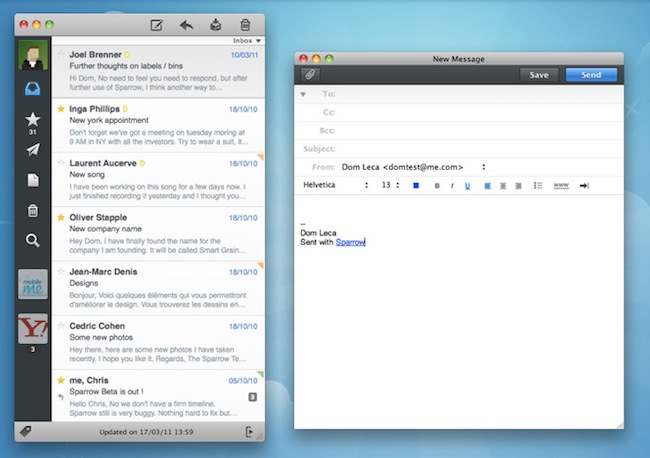
Since its release date weeks ago, Sparrow for Mac has quickly become many people’s favorite way to access Gmail from the desktop. With an intuitive user interface resembling the original Tweetie for Mac and support for several Gmail functions like labels and archive, Sparrow has sold thousands of copies in the Mac App Store enabling the developers to focus on bringing additional features to the app.
With the release of version 1.1 today, Sparrow is once again redefining the rules of Mail clients for OS X: Sparrow 1.1 contains several bug fixes and stability improvements, but most of all it adds general IMAP compatibility, MobileMe support and lots more features like Gmail’s Priority Inbox.
If you’re a Gmail user, Sparrow now lets you switch between the regular inbox, the Priority one and unread items from a dropdown menu under the top toolbar. The feature is very convenient as it further integrates Gmail with the desktop in a way no other apps did before. Switching between different types of inboxes is effortless and takes seconds. Another Gmail improvement is a fix for archive’s synchronization, which was pretty slow on version 1.0.
Gmail aside, Sparrow 1.1 is a complete revamp of the application. In the redesigned preferences panel, you can now set a signature for each of your aliases, and a signature can be made default with the click of a button; a format bar in the compose windows lets you choose fonts, sizes and styles without opening an external window or the system’s default font picker. The “minimal mode” – available in the Preferences – is another new option that lets users hide the message preview in the main window – quite handy if you don’t want to see a preview of the message while scrolling the list. On a related note, scrolling performances have been improved as well and now Sparrow feels much more responsive.
Sparrow 1.1 is a huge update that contains many other improvements like better HTML and CSS rendering, contact grouping options and Gravatar support, multitouch gestures (I love the three-finger swipe to open a message in its dedicated panel) and a “mark as spam” shortcut. The app is available in the App Store at $9.99, and it’s a powerful alternative to Mail.app – now with IMAP support and deeper Gmail compatibility. More screenshots below. Read more
#MacStoriesDeals - Monday

If you didn’t already know, we’ve set up a new twitter account for Deals, it’s @MacStoriesDeals - please follow for Deals-only posts. We’ll tweet the daily deals there as well as exclusive weekend deals too. Help spread the word! Here are today’s deals on iOS, Mac, and Mac App Store apps that are on sale for a limited time, so get ‘em while they’re hot!
iPad 2 + FaceTime for Mac: Enabling Auto-Answer For Remote Monitoring
So I just got my iPad 2, and right after restoring from an iPad 1 backup and syncing all my apps, I wanted to try FaceTime on it. Mainly to test the quality of the cameras (they do decent videos, but they’re not really that great) and the FaceTime application itself, I immediately set up a new email account to use with the iPad 2.
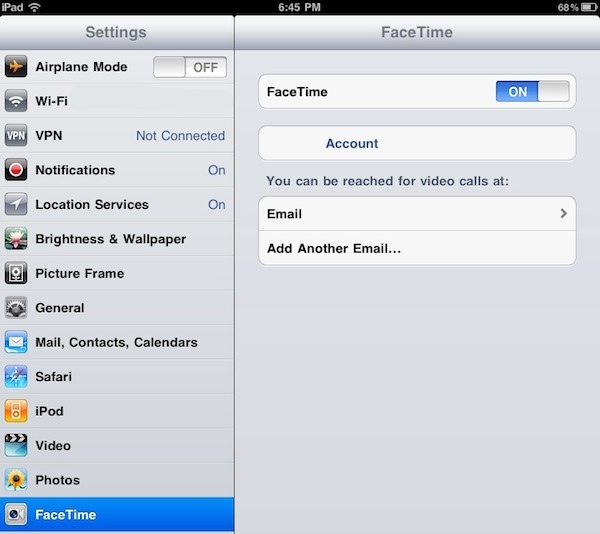
FaceTime on the iPad asks you to create a new email address on first launch; however, you can further tweak your settings, Apple ID and available email addresses in the Settings app under “FaceTime”. In this tab, I logged in with my Apple ID and assigned a new email – different from the ones I use on my MacBook Pro (Apple ID) and iMac (2nd email address). On the iPad, I set up a third email so I can make sure calls are always routed to the right device. I noticed that the verification process failed at first (I didn’t get any email from Apple), so I deleted the email address, entered it again and waited for the confirmation email. After a few minutes, FaceTime was correctly functioning on my iPad 2.
With FaceTime up and running, I wanted to give a shot to an old trick we first covered in October: auto-answering FaceTime calls on a Mac. Why would you want to do that? Simple: to turn your desktop computer into a remote monitoring tool for when you’re not around. Stuff like remotely checking on your room or home office. I leave my computers always on most of the times I have to go out, so it’s not a big deal for me. Plus, I think it’s just neat that you can fire up your iPhone or iPad 2 while on the go to call your Mac and automatically see what’s going in front of the iSight without needing a person to hit the Confirm button. Read more