Posts tagged with "iPad"

Week Calendar Comes To The iPad

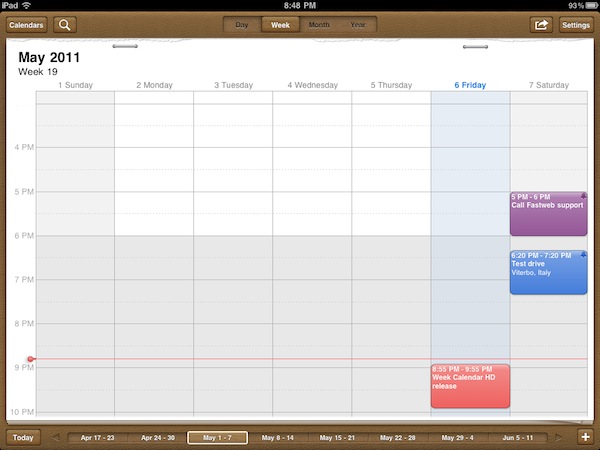
When I first reviewed Week Calendar for iPhone in March, I called it a powerful alternative to Apple’s standard calendar app for iOS devices. It’s not that Apple’s Calendar.app lacks basic functionalities or is utterly broken: in fact, I think Calendar is more than fine for most users. But if you’re willing to get the most out of your MobileMe, Google Calendar, Exchange or CalDAV calendars, UtiliTap’s application is the full-featured alternative to install on an iPhone. And today, you’ll be able to enjoy Week Calendar on the iPad as well, thanks to an “HD” counterpart that’s just been approved and is now available at $2.99 in the App Store.

Week Calendar HD has all the features from the iPhone version, only on a bigger screen and with visual cues from Lion’s calendar app. The difference between the iPad’s native Calendar and Week Calendar HD is very subtle, but Week Calendar implements a leather background and bits of torn paper in a way that’s more reminiscent of Lion than Apple’s own app. Clearly some people are going to hate this choice if they were looking for a cleaner UI as seen on the iPhone, and perhaps the developers will revise their decision. I don’t know, but right now this is what you get. And, more importantly, what matters is that Week Calendar still outpaces Apple’s calendar solution when it comes down to views, gestures, copy & paste support or mere customization of the calendar. Week Calendar’s biggest advantage over Apple’s cal is support for multitouch with copy & paste, possibility to add a new event with tap & hold, easy resizing of events and pinch to personalize the selected view. You can tap and hold an existing event to move it around and change its start and end date; you can “cut” an event and paste it somewhere else; you can access an event’s info panel with a single tap, rather than having to tap the Edit button like in Apple’s calendar. Again, this works like the iPhone version but it’s been ported successfully to the iPad with the use of popovers and bigger real screen estate. From the Event Details panel, like on Week Cal for iPhone, you can set an alert, availability status, custom color, or find your away around four buttons that allow you to share an event, print it, email it or add it to the template list. Week Calendar, in fact, can turn any event into a template to use again in the future. Notes, invitees and local contacts can be attached to an event, too.

The selection of settings is equally impressive. You can turn on time zone support and specify when the week or weekend start,  manage new events’ default preferences and the aforementioned templates (these will save you a lot of time), customize standard colors to assign a color by default to events that meet certain title criteria. There’s more: you can activate TextExpander integration (save even more time), turn off drag & drop entirely, completely overhaul the way the app displays days and weeks. For instance, you can change font sizes, enable out-of-view indicators, tell the app when a day starts and ends. Anything else is just Week Calendar for iPhone, running on the iPad with a new UI: lots of features, yet easy to use.

If you’re a calendar nerd, Week Calendar HD for iPad is a dream come true. It’s got all the customization options you’ve always wanted from the tablet’s calendar app, plus a design consistent with Apple’s recent standards and tons of gestures to simplify navigation. Get it here at $2.99.


Foxconn Now Wants To Start Building iPads In Brazil In July

Last month, we reported Brazilian’s President Dilma Roussef and Hon Hai Precision’s founder Terry Gou discussed during an official meeting in Beijing the possibility for Hon Hai’s subsidiary Foxconn to invest $12 billion to start producing and assembling mobile devices in Brazil throughout the next five years, including Apple’s iPad – currently assembled by Foxconn in its Asian facilities. The investment, result of long-term negotiations between Hon Hai and Brazilian minister of Science and Technology Mercadante, is aimed at targeting Brazil’s growing consumer market, as well as allowing Foxconn and its partner Apple to directly address the distribution issues of devices in Brazil, long affected by import tariffs, inflated prices and poor retail presence.

Whilst the original reports claimed Foxconn was planning to start building iPads in Brazil this November, Reuters reports today the company has moved the estimated date to July, still seeking, however, to obtain tax breaks and other government concessions to ease high labor costs that Hon Hai had to face since they opened three other facilities to build components for Sony, Dell and HP in Brazil years ago. It’s still unknown whether iPad production will be located in an existing facility, or if Foxconn is planning on opening a new one just to build iOS devices. Speculation in the past weeks suggested the second possibility, pointing to the massive investment from Foxconn and the requirements forwarded to the Brazilian government such as training for 200 future employees in China, or the need for 20,000 specialized engineers.

Foxconn has moved up its desired start date for assembling iPads in Brazil to July from November, seeking to tap massive demand for the device in Brazil’s booming consumer market, according to newspapers Estado de S.Paulo and Folha de S.Paulo. Their reports quoted government officials.

“It’s a daring timeline. Whatever is within our reach, we’re going to work on making that viable,” Science and Technology Minister Aloizio Mercadante told Folha.

Reuters also reports Foxconn will initially import components from Asia to assemble devices in Brazil (thus the need for tax incentives on imported materials), shifting the manufacturing chain to local production in the next few years.


iPad Dominates The Competition In US Tablet Market

A Nielsen survey released today reveals the iPad has a commanding lead in the US tablet market, controlling a staggering 82%. This is despite the recent entrance to the market by Android tablets from Motorola, Samsung and others, which have comparatively trivial share of the tablet market.

In fact following Apple is Samsung with just 4% of the market despite its strong push late last year with the Galaxy Tab, and then there is Dell and Motorola with just 3% and 2% of the market. Yet all are overshadowed by the ‘Other’ category, this mishmash of various relatively unknown companies staggeringly has the same share of the market that Samsung, Dell and Motorola have combined.

The survey didn’t differentiate between the iPad 2 and original iPad but it did find that there is a fairly even split between WiFi-only models (43%) and WiFi+3G (39%) models. Also fascinating was that the survey found large proportions of tablet users would change their usage of other devices. In particular 35% of desktop computer and 32% of laptop users would use their computers less often or not at all after purchasing their tablet. E-readers and portable music players would also be used less or not at all following a tablet purchase by 27% of those surveyed.

Furthermore, the most frequently given reasons for using their computer less is mostly because the tablet is “easy to carry/take with you”, “ease of interface/OS” and the “fast start up/off” it provides to users. A final interesting note is that 43% of correspondents said that more than 1 person in their family/household is a user of the tablet device.

[Via Fortune]


The Telegraph Updates iPad App, Enables Subscriptions

The Telegraph has agreed to Apple’s terms and has enabled subscriptions in its updated iPad app, available today on the App Store for free. The app can be downloaded free of charge, but the publication decided to allow users to buy daily issues or monthly access for a fee, which in case of single issues is slightly higher than the print edition, but sports a nice discount if you opt for the monthly subscription. As noted by PaidContent, The Telegraph’s subscriptions come at £1.19 each or £9.99 per month; weekday printed issues of the newspaper are cheaper at £1, but the monthly edition will cost you £26.40. Clearly The Telegraph is aiming at selling monthly digital subscriptions in volume, which are an attractive option due to the price point and access to regular content. In terms of US dollar prices, the in-app subscriptions come at $16.99  for 1 month access, or $1.99 for the daily edition.

The publisher’s upgraded app, out today and built by The Times’ app builder TigerSpike, is free to download but requires “editions” be bought inside at £1.19 each or £9.99 per month, paid and auto-renewing via Apple’s in-app payments.

The app functions much like its free predecessor, so the main new feature is the fee introduction. TMG is rumoured to be considering the introduction of charges to its website, too. If so, this iPad model could give it a springboard to do so.

The app comes with a dedicated settings panel for subscription management, and also allows existing print subscribers to enter their personal code to download iPad issues for free. The Telegraph 2.0 features details instructions to obtain your subscriber code, and places a link back to the iTunes Store to configure your App Store subscriptions. As for other changes in this update, the app includes “video, picture galleries, graphics and cartoon archives”, alongside a night-reading mode and crosswords.

Download The Telegraph 2.0 for iPad here.


“On the way to Woodstock” for iPad Takes You Back To 1969

From the same creators of The History of Jazz, an interactive timeline about jazz music that was featured multiple times by Apple in the past, comes a new “book” for the iPad called On the way to Woodstock that takes where the previous digital experience left off to offer over 100 hours of video, audio, and editorial content related to the 1950’s, 1960’s and each of the artists that performed at the 1969 Woodstock Art & Music Fair. The History of Jazz was incredibly successful in the way it transcended the meaning of “digital book” to offer an experience that was closer to what Push Pop Press is doing now with Our Choice for iPhone and iPad: more than a simple book and closer to an interactive media gallery packed with content of all kinds, On the way to Woodstock is a digital, multitouch-based homage to the culture, politics and style of the 50’s and 60’s, as well as the historic bands and artists that performed at the legendary Woodstock festival.

I have downloaded the app a few minutes ago, and there’s so much stuff to do with its it’s difficult to get the hang of it in a short amount of time. You can look at photos and read descriptions; browse the timeline at the bottom by tapping on the colored bars and check out every single moment of the Woodstock fair with videos, bios, articles and exclusive photographs; you can even enter a special “screensaver mode” to turn your iPad into the perfect Woodstock-themed coffee table book. The app is full of content, information, and media. It’s definitely a rich experience that will engage you in reading and watching for hours, and perhaps even coming back a few times after you’re done consuming everything the app has to offer. Like I said I’ve been playing with On the way to Woodstock for less than an hour, but the attention to detail, the animations, the options and the selection of songs and videos are amazing. The app also packs related content from iTunes, YoutTube and Wikipedia and lets you check out the original Woodstock set lists as well.

On the way to Woodstock is the perfect app to showcase the versatility of the iPad, something Apple would be proud of. You can get the app here at $6.99, and watch the demo video after the break. Read more


Deflect the Damage with the G-Form MacBook Sleeve

Let’s say you’re traveling amongst the lions of Africa, nose-diving off a cliff in Australia, or out-backing in the great wilds of New Zealand. Packing your MacBook, catastrophe strikes and your backpack goes tumbling down a vertical rocky hill even the greatest mountain bikers wouldn’t cross. Not to worry, however, because your Mac is straddled by G-Form’s Extreme Sleeve, offering the same durability that battle-hardened kneepads offer extreme sports enthusiasts. Reactive Protection Technology (a fancy way of saving impact resistance) suppresses hard falls by stiffening upon impact and rippling the shockwaves of the fall evenly through the structure of the case. Crack-ready glass displays and scratch-easy aluminum frames are firmly protected. Thanks to the G-Form’s water resistant, damage deflecting padding, it’s the sleeve that’s ready for everything from the urban jungle to the great outdoors. I can’t vouch for the Superman-like armor, but I’ll be damned if I didn’t believe the home-movie after the break. Available for $69.95 at g-form.com for laptops and $59.95 for iPads, the same people who bring bone protecting gear have taken their technologies to the metal logic-boxes you clank on each day.

Read more