Posts tagged with "iPad Pro"

The 9.7-inch iPad Pro Has 2 GB of RAM

Matthew Panzarino ran some Geekbench tests on a 9.7-inch iPad Pro, which shows 2 GB of RAM as well as a slightly underclocked CPU compared to the bigger iPad Pro, which has 4 GB of RAM.

2 GB of RAM was one of the first things I heard about the new device yesterday, and part of the reason why I’m going to stick with the 12.9-inch Pro. In addition to a more comfortable iOS experience, I like knowing that I’m using the most powerful iPad hardware currently available (I don’t count the camera as essential to what I need to do on an iPad).

Permalink

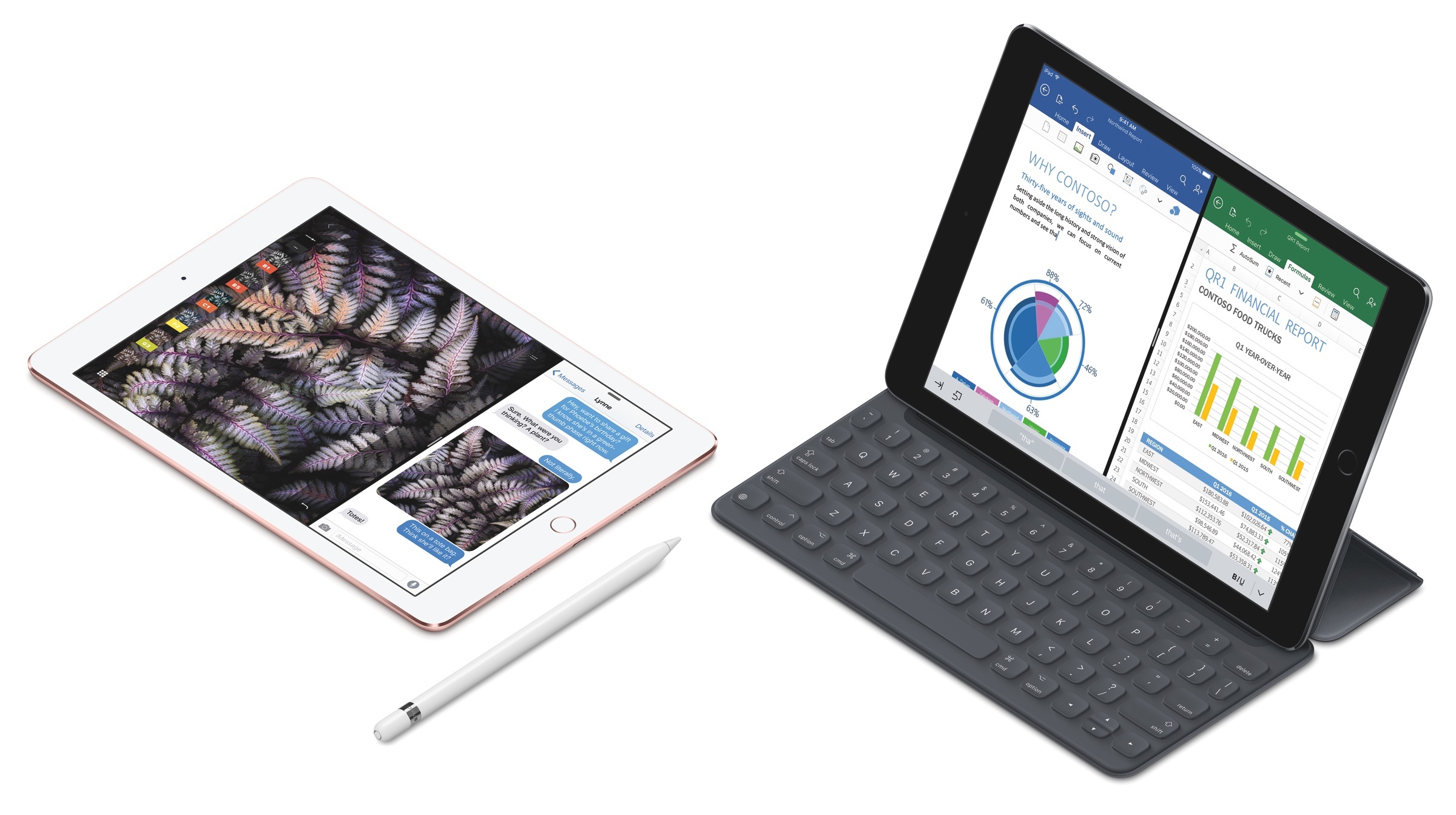
The 9.7-inch iPad Pro: Our Complete Overview

The 9.7-inch iPad Pro.

The 9.7-inch iPad Pro.

At a media event held earlier today at its campus in Cupertino, Apple took the wraps off the highly anticipated smaller iPad Pro. With a 9.7-inch display (same size of the iPad Air 2) and carrying (mostly) the same features of its 12.9-inch counterpart, the smaller iPad Pro brings all the power of the bigger iPad Pro in a more compact package with some new additions as well.

“iPad Pro is a new generation of iPad that is indispensable and immersive, enabling people to be more productive and more creative. It’s incredibly fast, extremely portable, and completely natural to use with your fingers, Apple Pencil and Smart Keyboard. And now it comes in two sizes,” said Philip Schiller, Apple’s senior vice president of Worldwide Marketing.

Read more


How the iPad Pro Made Me Love the iPhone 6s Plus

People talk about how an Apple product such as the iPhone having a halo effect on customers. If you buy an iPhone and like it, the theory goes, you’re more inclined to buy another Apple device, like a MacBook. This theory has certainly proven true in my experience – since buying my first iPhone (my first Apple product) in 2007, I’ve bought numerous other Apple products and subscribed to numerous Apple services in the subsequent years. Put another way, I was entrenched in the Apple ecosystem long before I started covering the company for a living.

Recently, a different kind of halo effect has settled on me. I’ve been using an iPad Pro for the past several weeks, and absolutely love it. Like Federico, the iPad is my computer of choice because of my deep familiarity with iOS and the ways in which working from a touchscreen device makes computing more easily accessible.1 Coming from my old iPad Air 1, iPad Pro has intensified my affinity for the iPad and iOS in general. It has impressed not merely by its technical or software merits, but by one seemingly obvious thing: its screen.

Read more


Apple to Restore Pencil Navigation in Next iOS 9.3 Beta

Following reactions from around the web this week on iOS 9.3 betas losing Pencil navigation features, Apple has now confirmed to The Verge that full Pencil support will return in the next iOS 9.3 beta:

Thankfully, Apple has no plans to cripple its Pencil accessory for the iPad Pro. After the most recent iOS 9.3 beta removed the ability to navigate around iOS with the $99 add-on — marketed as a drawing tool more than a stylus — Apple has confirmed with The Verge that all of those features will soon make a comeback. “We believe a finger will always be the primary way users navigate on an iPad, but we understand that some customers like to use Apple Pencil for this as well and we’ve been working on ways to better implement this while maintaining compatibility during this latest beta cycle,” a spokesperson said. “We will add this functionality back in the next beta of iOS 9.3.”

This has to be my favorite #MykeWasRight so far. I’m glad Apple listened on this one.

Permalink

Apple Pencil and Navigation in iOS 9.3 Beta

Serenity Caldwell, writing for iMore on an Apple Pencil regression in the iOS 9.3 beta:

Unfortunately, whether by bug or intentional design, the Pencil’s navigational prowess appears to have vanished in the iOS 9.3 public betas. With 9.3, you can no longer scroll or manipulate text; the only places the Pencil works are on canvas or when pressing digital buttons.

Normally, I don’t write about beta bugs and features, because it’s a beta: There are always bugs, and features change. But this functionality is important enough that I wanted to talk about it before Apple submits its final 9.3 release. It could be a bug, yes: But several betas in, we’ve seen fixes for Smart Connector keyboards and new features, and the Pencil remains crippled. Which makes me think, more and more, that this is a conscious decision on the part of Apple’s engineering team. (I did reach out to the company about the issue, and will update if and when I receive a response.)

Like Serenity, I refrained from bringing it up due to the beta nature of iOS 9.3, but, as I mentioned earlier today in my iPad story, this is starting to feel like a conscious decision on Apple’s part.

I think it would be a mistake to remove general Pencil navigation features from iOS 9 at this point. While Apple may have not envisioned the Pencil to be used for tasks beyond drawing and sketching, owners of an iPad Pro have gotten used to the functionality four months into owning the device. Using a Pencil to scroll lists and interact with menus has serious benefits for people with RSI problems, and, I have to say, it’s just convenient if you don’t want to switch back and forth between touch and Pencil all the time.

I hope that Apple will listen and restore the full Pencil functionality as seen in iOS 9.2 when the final version of iOS 9.3 ships.

Permalink

Working on the iPad: One Year Later, Still My Favorite Computer

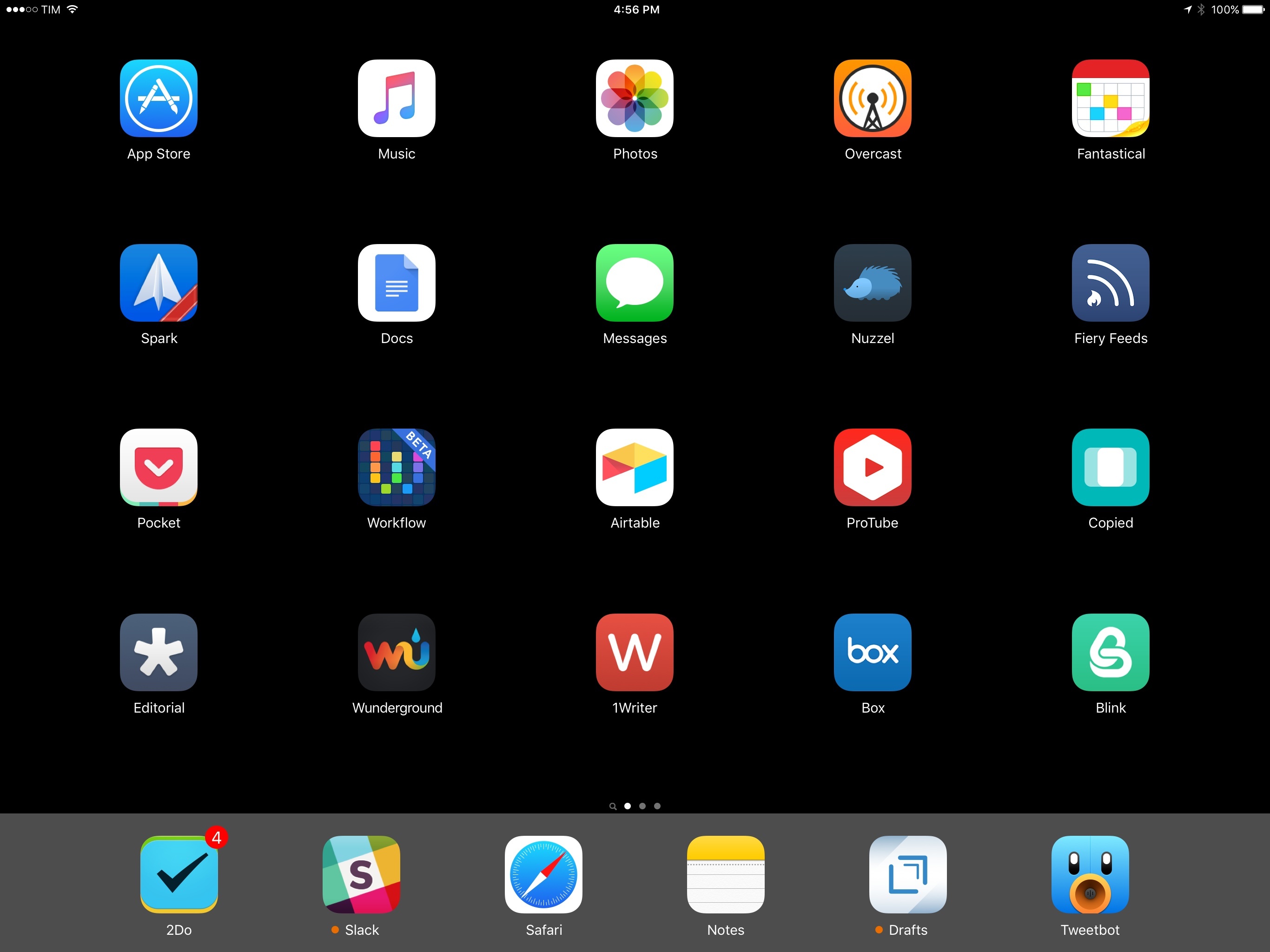
My iPad Pro Home screen.

My iPad Pro Home screen.

Four years ago, I struggled to move from a Mac to an iPad. Today, I only have to open my MacBook once a week. And I wish I didn’t have to.

In February 2015, after years of experiments and workarounds, I shared the story of how the iPad Air 2 became my primary computer. The article, while unsurprising for MacStories readers who had been following my iPad coverage since 2012, marked an important milestone in my journey towards being Mac-free.

As I wrote last year:

Three years ago, as I was undergoing cancer treatments, I found myself in the position of being unable to get work done with a Mac on a daily basis because I wasn’t always home, at my desk. I was hospitalized for several weeks or had to spend entire days waiting to talk to doctors. I couldn’t write or manage MacStories because I couldn’t do those tasks on my iPhone and I couldn’t take my MacBook with me. I’d often go weeks without posting anything to the website – not even a short link – because I couldn’t do it from my bed. I began experimenting with the iPad as a device to work from anywhere and, slowly but steadily, I came up with ways to speed up my workflow and get things done on iOS. I promised myself I’d never let a desk set my work schedule or performance anymore.

Being tied to a desktop computer isn’t an option for me. No matter what life has in store for the future, I have to be ready to work from anywhere. I have to consider the possibility that I won’t always be okay, working from the comfort of my living room. That means having a computer that can follow me anywhere, with a screen big enough to type on, and a higher degree of portability than a MacBook. That means using an iPad. That means iOS.

The past 12 months have cemented this vision and raised new questions. But, more importantly, the iPad and iOS 9 have been essential to launching a project I’ve been working on for years.

At this point, I can’t imagine using a computer that isn’t an iPad anymore.

Read more


Google’s Second-Class iPad Pro Apps

Serenity Caldwell, writing for iMore:

Despite receiving several updates in the last few months, Google’s apps haven’t been updated for Apple’s larger tablet. And there’s no hope, as there is with Facebook, of using Google’s in-theory-HTML5-and-therefore-iPad-compliant website: Google’s standard web view on an iPad flat-out punts you to the apps—if the website even correctly detects you have the app installed. I can’t count the number of times I’ve seen the websites try and send me to the App Store to open a spreadsheet, when I clearly have Sheets already available.

Trying to request the desktop version of the website won’t work, either: You won’t be able to scroll, or tap on anything that requires a double-click, and any link you do manage to make work will send you right back to the mobile environment.

As I’ve tweeted for the past two months, Google’s suite of Drive apps for iOS is an embarrassment.

Compare Google’s subpar iPad Pro “work” to Microsoft, which was quickly ready for the iPad Pro, iOS 9 multitasking, and Apple Pencil. I’ve switched to Office 365 for my personal spreadsheets and Word documents, and, if the situation doesn’t improve, I’ll consider other solutions for collaborative docs as well.

Permalink

iPad Pro and OS X with Screens

Eddie Vassallo, writing on the Entropy blog on using the iPad Pro in combination with a Mac mini via VNC:

The beauty of a single machine fully dedicated to the iPad Pro is that we always have a full OS X instance at the ready for anything that arises - from exporting and compiling app builds to transcoding video, to downloading and uploading large files. Heck, we’ve even found it useful for firing up a desktop instance of Chrome when pesky sites misbehave on mobile Safari. It has truly filled the gap for any desktop-class workflows we require (that have not already been fulfilled with an iOS App or Web-based method).

Before switching to the iPad as my only computer and before iOS 9 multitasking (I would say between 2011 and 2014), this is also what I did. I set up a personal mini at Macminicolo (a fine company which also hosts this very website) and relied on Edovia’s excellent Screens app to access desktop apps like iTunes and Chrome. I also used to keep the mini always running for Hazel rules (here’s an archive of posts about it) and other desktop automation. I do most of this stuff directly on iOS now, but if you need a Mac for some key tasks, Screens with iOS multitasking sounds better than ever.

Permalink

Pigment Brings Adult Coloring Books to iPad Pro with Apple Pencil Support

I first heard of the adult coloring book trend from my friend Myke, who described on various podcasts and Slack conversations how coloring mandala-like patterns helps him concentrate and relax while doing something else. In a peculiar case of Baader-Meinhof Phenomenon, I then started hearing about the popularity of adult coloring from a lot of people – all of them, apparently, owners of physical books with empty artistic designs which need to be filled with color.

While I don’t own any adult coloring books myself, I’ve been intrigued by the trend enough to do some research. The origin story of the modern adult book coloring trend goes somewhat like this: Scottish artist Johanna Basford convinced British publisher Laurence King to order an initial run of ‘Secret Garden: An Inky Treasure Hunt and Coloring Book’. Since its release in 2013, the book has sold over two million copies worldwide. As noted by The Atlantic, adult coloring also started spreading in France when, in 2012, publisher Hachette released Art-Thérapie: 100 Coloriages Anti-Stress’. It was so successful, Hachette had to launch a full series, which has sold more than three and a half million copies so far. The New Yorker has a great primer on the rise of adult coloring books and the initial work of Johanna Basford and Hachette.

In another piece for The Atlantic, Julie Beck described adult coloring as offering the “relief and mindfulness without the paralysis that a blank page can cause”; the constraints of objects designed by others with the sole purpose being coloring them helps a lot of people relieve stress and engage a part of their brain that can either take their mind off daily concerns or, like Beck noted, use multitasking to relax.

Evidence – both factual and anecdotal – indicates that adult coloring has now turned into a global, lucrative phenomenon: mainstream media are talking about it, 5 out of 10 of the top books on Amazon are adult coloring books, and, if you go into a bookstore today, there’s a good chance you’ll find a section dedicated to books filled with patterns of flowers, natural landscapes, exotic objects, animals, and more.

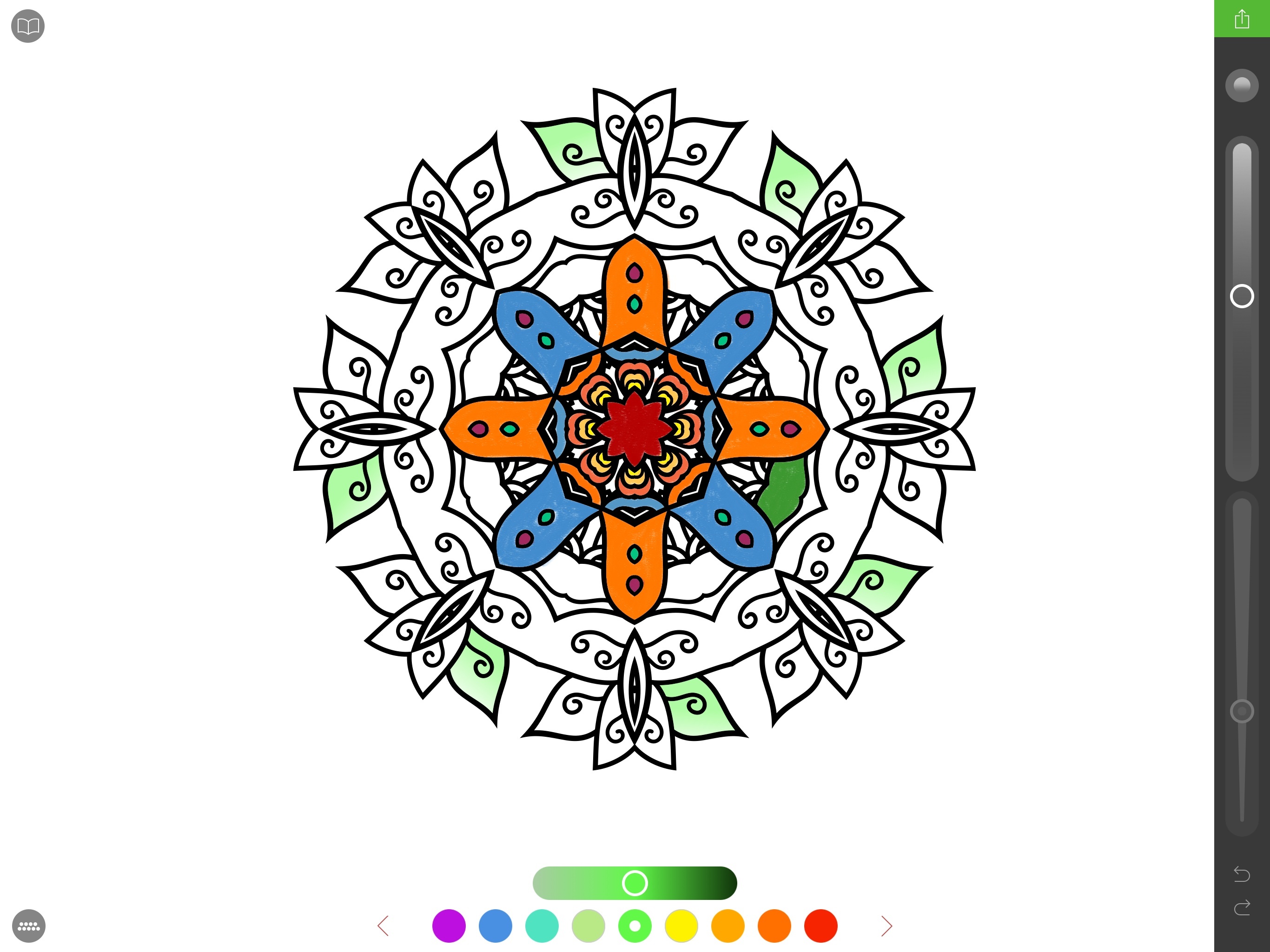
Back in November, I half-jokingly sent a tweet in response to John Gruber saying that the first developer to figure out how to make an adult coloring app with Apple Pencil integration would find success on the App Store. I don’t know if they’re going to make “millions” as I quipped, but California-based studio Pixite – specialized in photo apps for iOS and Android – is following the path I imagined. Today, Pixite is launching Pigment, an adult coloring app for iPhone and iPad that, however, is best enjoyed with the closest digital equivalent of a physical book: an iPad Pro paired with an Apple Pencil.

Read more