
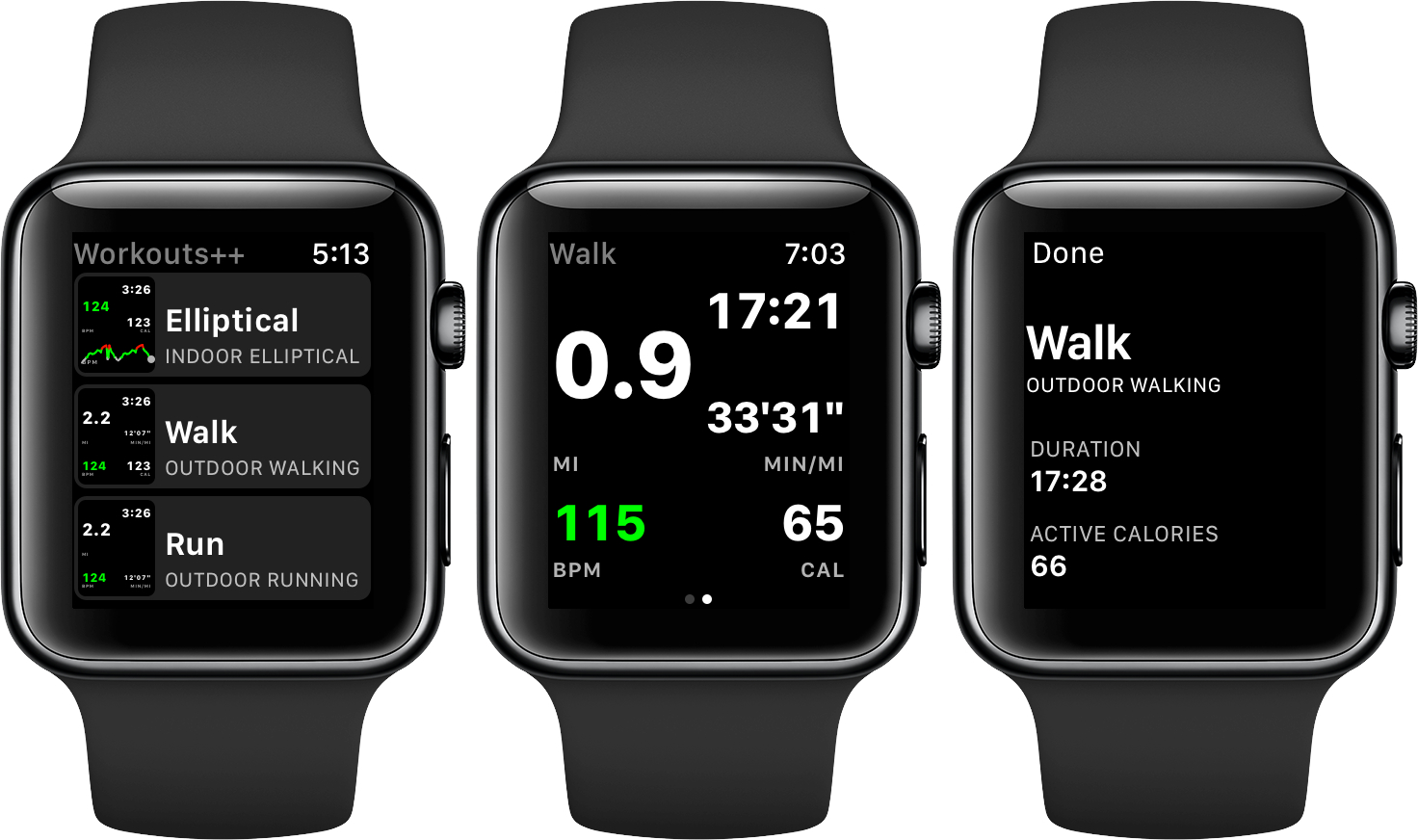
Workouts++ by David Smith takes my favorite aspect of Apple’s stock Workout app for watchOS – the ability to quickly start a workout – and adds layers of customization and workout tracking that takes the app to another level altogether. The key to Smith’s watchOS app is the inclusion of an iOS app that lets you customize the real-time statistics tracked on your Apple Watch during a workout and view the data collected in useful ways.
Posts tagged with "iOS"
Workouts++ Review
A Computer for Everything: One Year of iPad Pro

I wasn’t sure I needed a 12.9-inch iPad when Apple announced the iPad Pro in September 2015. And yet, over a year later, the iPad Pro is, by far, the best computer I’ve ever owned. I’ve never felt so satisfied with any other Apple device before – but the transition wasn’t easy.
After years spent adapting what I learned from the Mac to bring it to iOS, what I found on the other side was a more focused, efficient way of working and communicating with people. The iPad Pro accelerated my move to an iOS-only setup; today, I genuinely don’t know how to perform certain tasks on a Mac anymore.
I use my iPad Pro for everything. It’s my writing machine and favorite research tool, but I also rely on it to organize my finances, play games, read books and watch movies, program in Python and Workflow, and manage two successful businesses. While I’ve been advocating for such multi-purpose use of the iPad platform for a while, the iPad Pro elevated the threshold of possibilities, reaching an inflection point that has pushed others to switch to an iPad as their primary computer as well.
Much of the iPad’s strength lies in iOS and its app ecosystem. If Apple were to stop making iPads, I’d still prefer to work on a device that runs iOS rather than macOS. iOS is where app innovation happens on a regular basis with developers one-upping each other in terms of what software can achieve; I also prefer the structure and interactions of iOS itself. The iPad Pro is the purest representation of iOS: it’s a computer that can transform into anything you need it to be.
Even if this discussion was settled a long time ago, it bears repeating: millions of people today like working on iOS more than they do on macOS, and the iPad Pro is the best machine to run iOS. There is no sarcastic subtext about the Mac here, which is still a fantastic environment that many Apple users love and need for their line of work. The Mac and the iPad can coexist in a market where customers believe one is superior to the other. I prefer working on the iPad; others like their Macs more. And that’s fine because, ultimately, the Apple ecosystem as a whole grows stronger and we all reap the benefits.
Over the past year of daily iPad Pro usage, I’ve made it my personal goal to optimize my iPad workflows as much as possible. This is one of the best aspects of the iOS platform: competition between developers is fierce and you can always choose between different apps to get work done – apps that are improved on a regular basis and are constantly updated for the latest iOS technologies. With enough curiosity and patience, iOS rewards you with the discovery of new ways to work and save time.
Since my last iPad story in February, I’ve taken a hard look at my entire iPad setup and rethought the parts that weren’t working. I tried new apps, created new automations, and optimized every weak spot I could find. I improved how I collaborate with my teammates and produce weekly content for Club MacStories members. Thanks to the time I invested in understanding and fine-tuning my iPad Pro, I was able to embark on more projects, double MacStories’ growth, and manage a larger team.
As a result, my iPad Pro today is noticeably more capable than it was a year ago – all without the need for a hardware refresh.
Here’s what I’ve done.
TV App Review

Today Apple released tvOS 10.1 and iOS 10.2, both of which bring several additions to the operating systems. Chief among all additions, the clear centerpiece of these updates is a brand new app called TV. When Tim Cook announced this app onstage earlier this fall, he plainly stated its purpose: TV exists to create a unified TV experience, one place to access all TV shows and movies.
Does it succeed? Is this the best television experience available today?
Before answering those questions, it’s important to consider the history of underwhelming television endeavors that brought Apple to this point.
Steve Jobs introduced the first Apple TV set-top box over ten years ago, in September 2006. That product unveiling came at the tail end of a keynote focused on the iPod and iTunes, where Jobs announced the additions of Movies and TV Shows to the iTunes Store. At its birth, the Apple TV was not meant to revolutionize television; it was made to support the iTunes ecosystem Apple was building.
Throughout its first three iterations, the Apple TV was never a hallmark product like the iPod, Mac, or iPhone; it was simply a hobby for the company. It was Apple dipping its toes in the TV market. But the fourth generation Apple TV represented a shift. With modern hardware, a new operating system dubbed tvOS, and a vision that the future of TV is apps, Apple dove full force into the television market. It set out to create the best TV experience possible.
The newly released TV app is a significant step forward in realizing that goal.
TV is intended to address a modern issue. While the future of television may be apps, up until now Apple’s implementation of that vision has been lacking; it’s been lacking because the more video apps you have, the more navigating it requires to find the content you love. More time navigating means less time watching. TV was built to solve this problem.
The TV app on tvOS and iOS centralizes content from a wide array of video apps in one place, presenting that content in a simple and familiar interface. No one wants to juggle an assortment of video apps, jumping from one app to another to find the content they’re looking for. We’ve all learned to tolerate it, but none of us wants it. So Apple built TV to be the new hub of our video-watching life.
Workflow Adds Bear Automation→
In the latest update released today, Workflow has received support for six new Bear actions. Bear is the note-taking app with power-user features I reviewed in November, which I’m still using.
With the new Workflow actions, you can further automate Bear without writing a single URL scheme yourself. They are quite powerful: you can create new notes in the app, open a specific note in Bear (something Apple Notes can’t do), and even turn a webpage into Markdown and save it as a note in Bear.
My favorite action, though, is ‘Add to Bear Note’, which can take any file or text and append it to an existing note. I have a Scratchpad note in Bear where I keep a little bit of everything, and with this workflow I can quickly pick a file or a photo and send it to the bottom of the note. Great stuff.
Bear actions are available in the latest version of Workflow.
Workflow 1.6 Brings Revamped Gallery, Better Tools to Share and Import Workflows
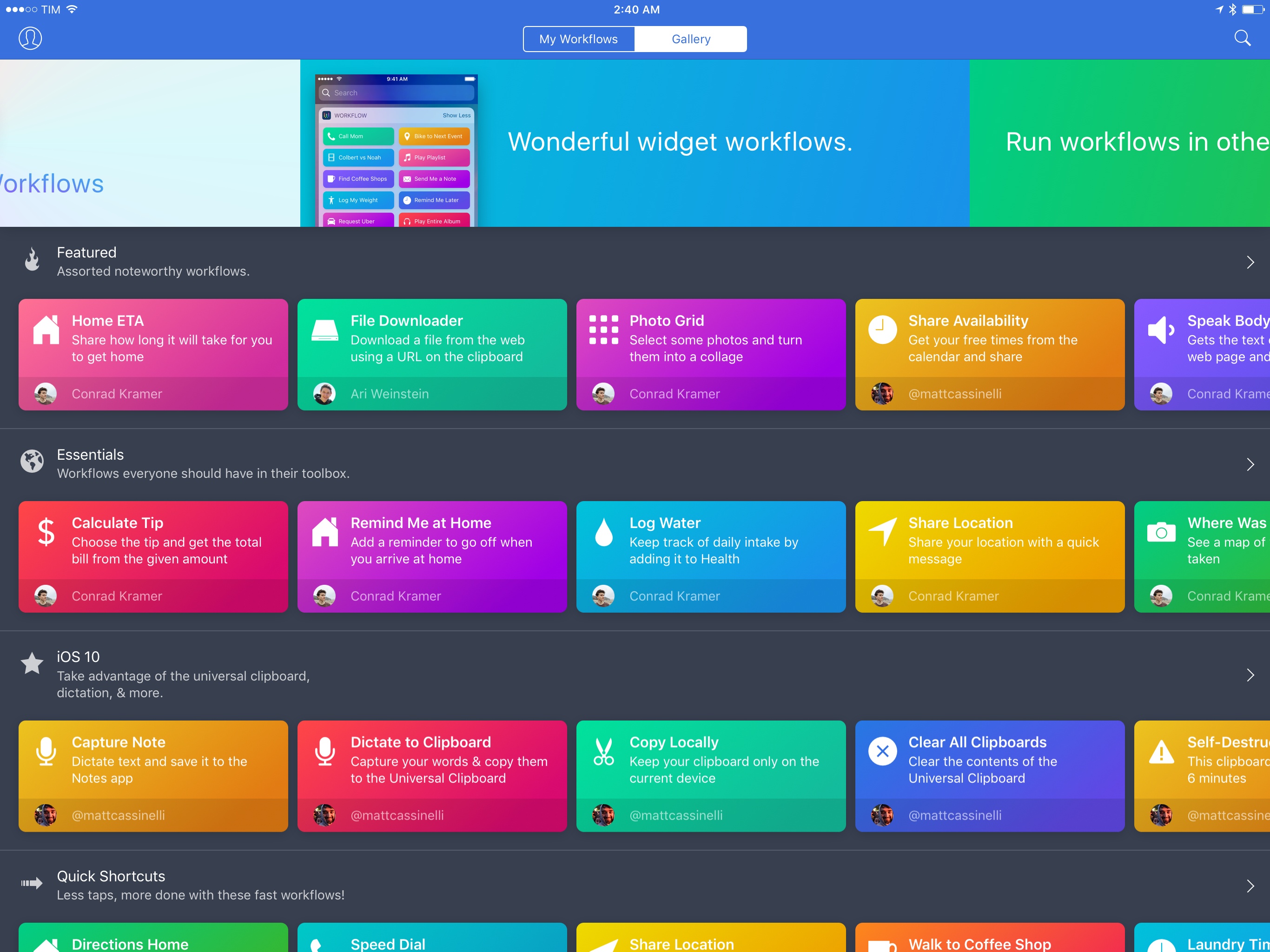
Since version 1.0 launched nearly two years ago, Workflow has always offered the ability to share workflows with others. While somewhat simplistic, Workflow’s ‘Copy Link’ button has allowed the proliferation of sites and communities aimed at sharing workflows with the app’s users – here at MacStories, workflows are one of the key aspects of our MacStories Weekly newsletter, for instance.
With version 1.6, launching today on the App Store, the Workflow team is revising some of the features that have been in the app since the beginning, starting with the Workflow Gallery and major updates to how workflows are shared, installed, and explained to other users.
iOS 10.1 Stands Out Among Updates to All Apple OSes
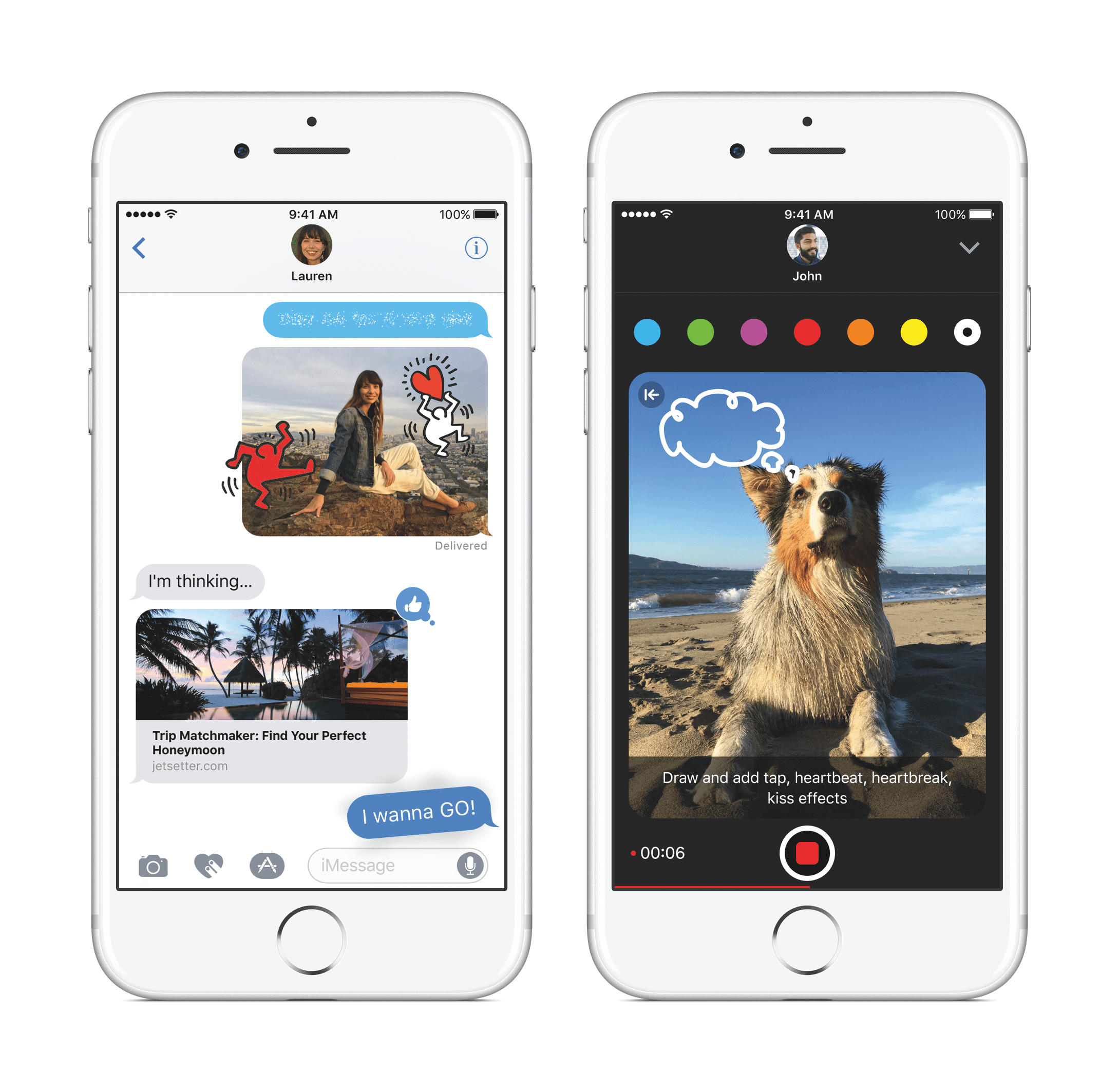
Apple updated iOS, watchOS, macOS, and tvOS all at once today. Most of the changes consist of bug fixes, security enhancements, and similar updates, but there are also a handful of new features concentrated in iOS 10.1.
iOS 10.1 adds Portrait Mode to the Camera app for iPhone 7 Plus users. Portrait Mode simulates shallow depth of field photos taken by DSLR cameras by creating a depth map using the dual cameras of the 7 Plus. The result is a foreground image in sharp focus with a blurred background.
In the Photos app, iOS 10.1 improves the display of wide color gamut photos when viewed in the app’s preview grid. In addition, the names of people associated with photos are now included in iCloud backups.
Maps added transit support for the cities of Tokyo, Osaka, and Nagoya in Japan. Sign-based transit navigation, including the layout of underground structures and walkways in large transit stations, and fare comparisons when viewing alternate transit routes were also added to Maps.
iMessage bubble effects, including ‘slam’ and ‘gentle,’ as well as full-screen effects like ‘balloons,’ ‘confetti,’ and ‘lasers’ can now be replayed in Messages. When you receive a message with effects, iOS 10.1 displays a little replay button below the message. With bubble effects the replay button appears regardless of whether the message you receive is text or a photo. iOS 10.1 also allows users to play effects if Reduce Motion is turned on in the Accessibility settings. In addition, the iMessage app browser has replaced page indicators with a scroll bar so users with lots of sticker packs and iMessage apps no longer have page indicators spilling outside the bounds of the controls below the browser.
In the Activity app, iOS 10.1 adds distance and average pace to workout summaries for outdoor wheelchair run pace and outdoor wheelchair walk pace activities.
Similar to changes to Messages in iOS 10.1, watchOS 3.1 adds the ability to replay messages received with bubble and full screen effects and play effects with Reduce Motion enabled. watchOS 3.1 also includes a handful of bug fixes.
Version 10.12.1 of macOS Sierra primarily improves the ‘stability, compatibility, and and security’ of Macs running Sierra. The update adds a new smart album to the Photos app that collects ‘Depth Effect’ photos taken in Portrait Mode using an iPhone 7 Plus. Sierra also includes improved compatibility with Microsoft’s Office Suite when iCloud Desktop and Documents is turned on.
tvOS received a minor update that fixes unspecified bugs and improves security.
Workflow Update Brings Ability to Interact with Any Web API
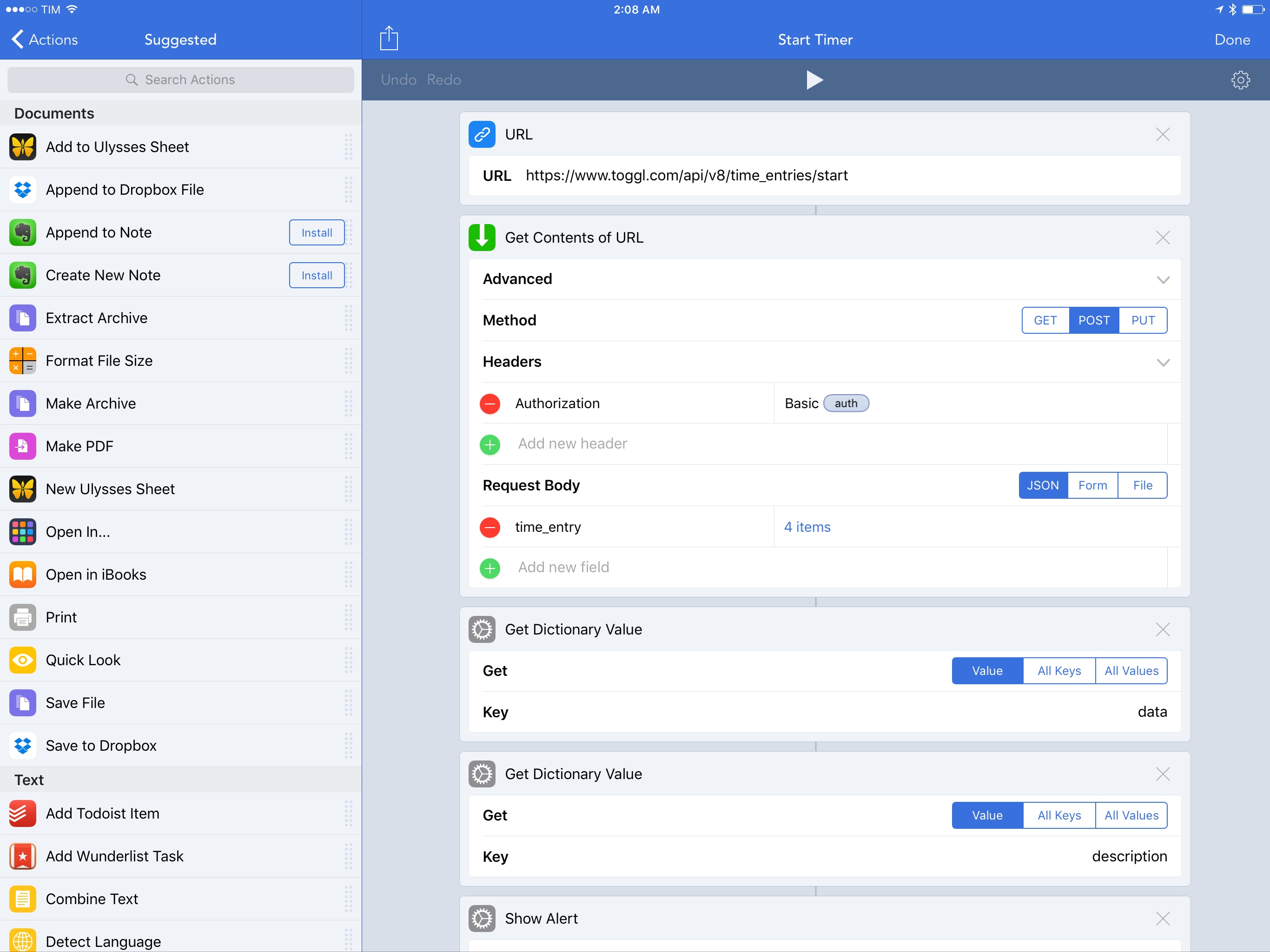
Integration with native iOS features and apps has always been one of Workflow’s strong suits. With an update released today, however, the Workflow team is considerably expanding the scope of the app to work with any web API, giving Workflow a virtually infinite feature set that goes beyond iOS alone.
Apple Starts Selling App Store Search Ads, Launching October 5th
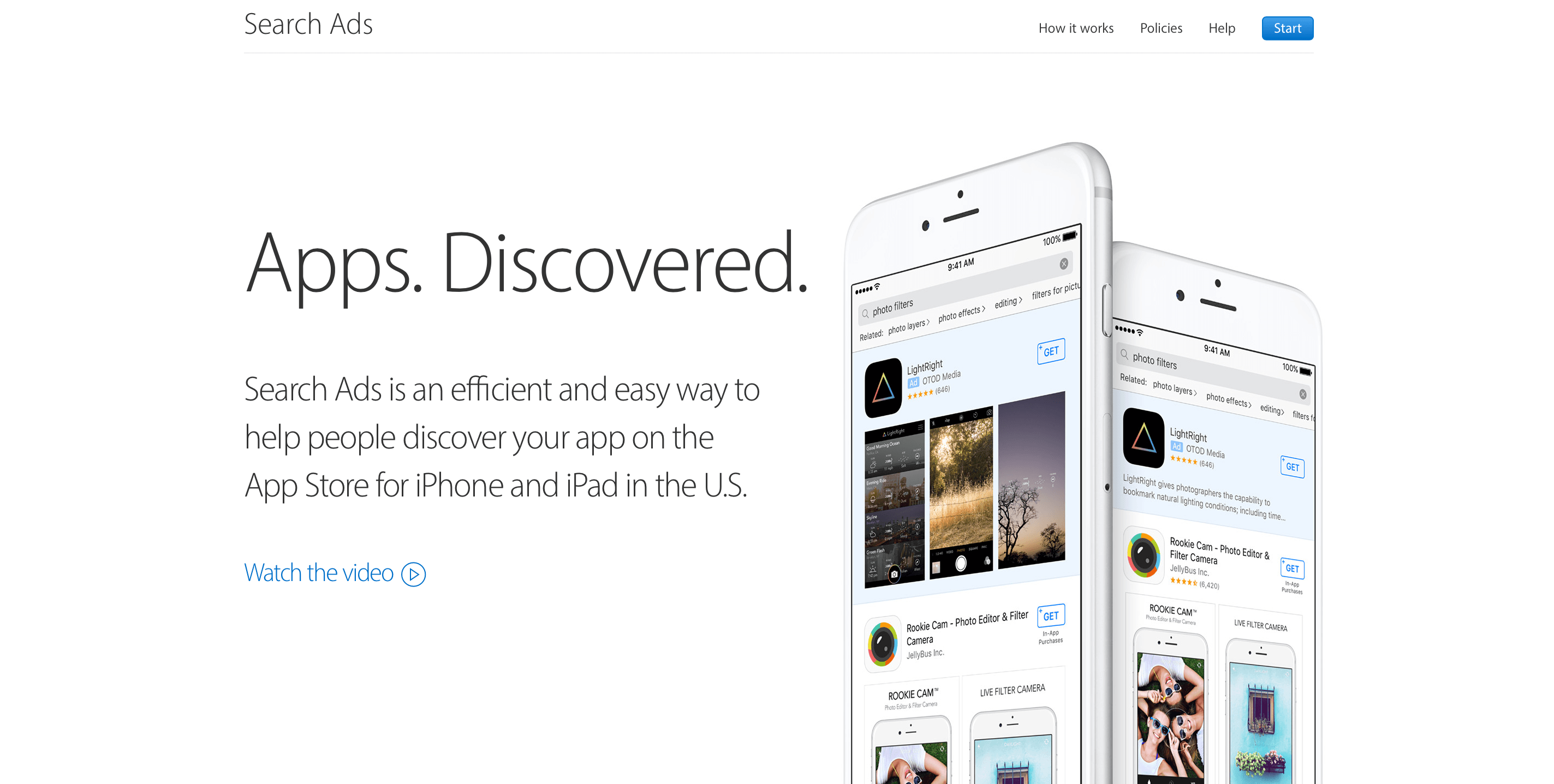
First announced at WWDC in June and beta-tested over the Summer, Apple launched Search Ads for iOS apps today. The ads will appear at the top of App Store customers’ search results based on a combination of search relevancy and bidding. According to Apple, the program is designed to be a simple way for developers to get their apps in front of potential customers. Developers can sign up today and schedule campaigns, but ads won’t go live until October 5, 2016.
In an email to developers Apple says:
Search Ads was designed to be effortless for small and independent developers. Invest as much or as little time as you have and still get results. We create your ads and match them to relevant searches. You can refine who sees your ad with optional keyword, audience and location features, and you only pay when a customer taps on your ad.
Tracking TV Shows with Couchy
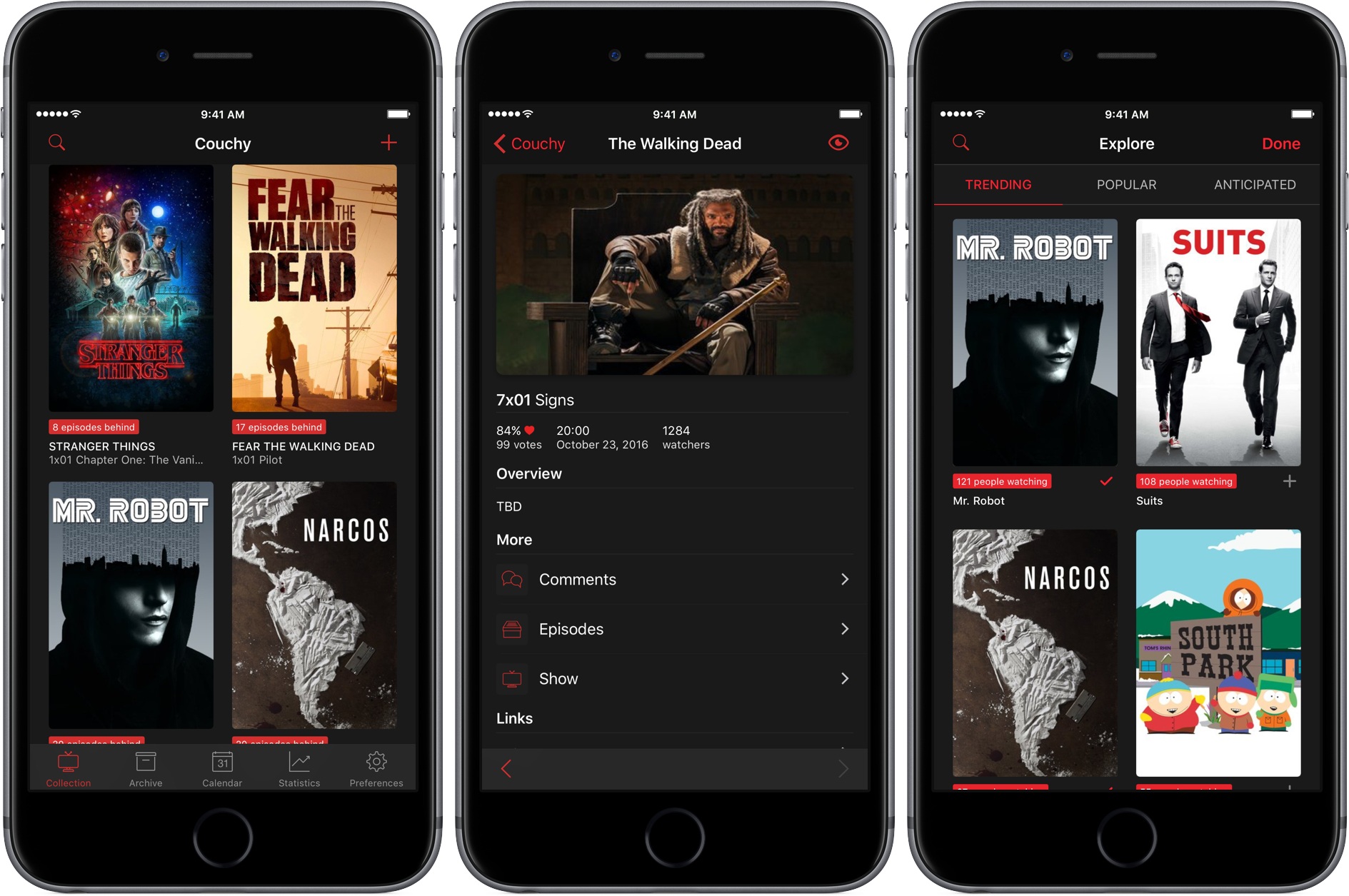
Couchy by Sven Bacia is a brand new iOS and iMessage app for tracking your favorite television shows. Sven’s app first came to my attention when I was researching the iMessage app roundup we published earlier this week. The app wasn’t approved in time to include in the roundup, which has given me time to take an even closer look at the main app, which I like a lot.