Posts tagged with "iOS"

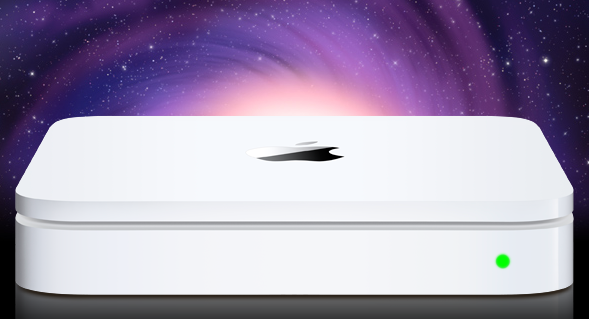
Rumor: New Time Capsule To Run iOS, A4/A5 CPU

A series of reports surfaced earlier this week suggested stock for AirPort Express, AirPort Extreme stations and Time Capsule units was running low at several Apple retail locations in the United States, with a separate source confirming to us that Apple Stores in Canada have seen similar shortages for Express and Extreme devices. Speculation arose quickly claiming that Apple could release new versions next week, during WWDC, with an announcement likely set for Monday’s keynote. Amidst the rumors, many pointed at the Time Capsule receiving an important update to enable advanced caching functionalities for software updates – the Time Capsule would recognize known devices on a network, check for software updates available, download them in the background, and later seed them to all devices in a few seconds without having to wait for a download process. Others also speculated this caching feature would allow users to store portions of iCloud media locally to avoid streaming delays and pauses between songs or movies.

In a separate report, Ars Technica briefly mentions [via MacRumors] the new Time Capsule could run the A4 or A5 chip alongside iOS – perhaps a modified version much like the second-generation Apple TV.

The source didn’t mention any new functionality for Apple’s AirPort Extreme base station, but it is possible to connect an external USB drive to those devices, which then function similarly to a Time Capsule. It seems likely that Apple could enable updated AirPort Extremes to do similar caching when an external drive is connected.

Our own source tells Ars that the revised hardware is believed to be built around Apple’s own A4 or A5 processor, and will run iOS much like the most recent Apple TV model.

A Time Capsule running iOS and capable of caching content for other devices would certainly open to the possibility of iPhones and iPads connected to iCloud but also deeply tied to the local network to increase streaming speed (thanks to cache) and overall quality (higher-quality songs could be cached locally as snippets so iOS devices wouldn’t take long to fetch the remaining portions).

Speculation also suggests an iOS-based Time Capsule could be used for a much broader set of functionalities such as serving content to Apple TVs or enabling additional options in Lion’s AirDrop – though it also needs to be considered that, by making these possible features exclusive to the Time Capsule (and, say, not a server app running on a Mac), users would be forced to purchase a $299 device (current Time Capsule 1 TB) to enjoy all the potential of iCloud and iOS 5.


Android and iOS Continue To Dominate In US Smartphone Market

Apple has continued making gains in the US mobile and smartphone market according to the latest comScore ‘Mobile Subscriber Market Share’. Surpassing RIM, Apple jumped to being the fourth largest OEM with a share of 8.3% of the US market. Samsung remains number one with 24.5% of the market, followed by LG and Motorola.

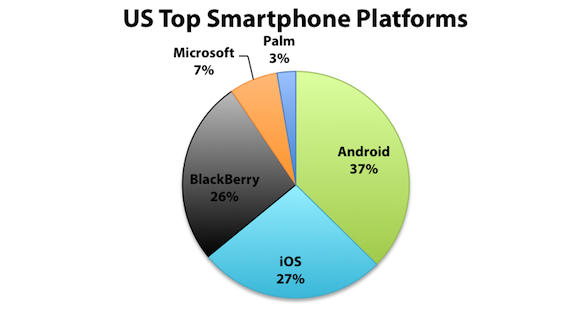
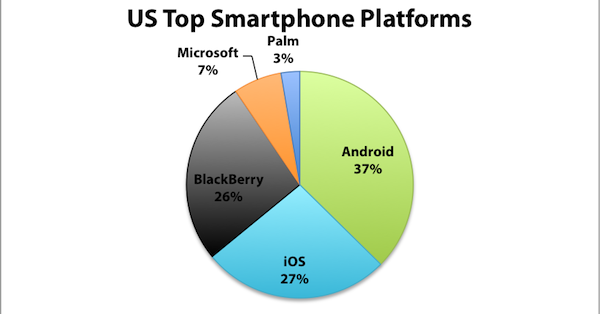
In terms of smartphone operating systems in the US, Google’s Android leads the pack with 36.4% of the market, an increase of 5.2 percentage points over the three month period. Whilst Apple’s iOS, is still in a solid second place, and grew its share by 1.3 percentage points. RIM continues its slide, falling another 4.7 percentage points and Microsoft also managed to see its market share fall by 1.3 percentage points.

Meanwhile in terms of usage, more US consumers ar using web browsers (up 2.1 percentage points), downloading applications (up 2.4 percentage points), playing games (up 2.5 percentage points) and using social networks or accessing blogs (up 2.7 percentage points).

[Via comScore]


Currencies for Mac Makes Conversion Simple, iOS-like

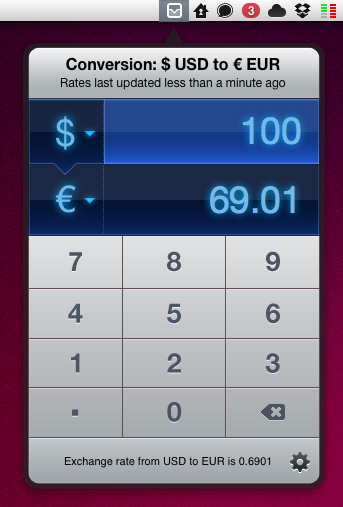
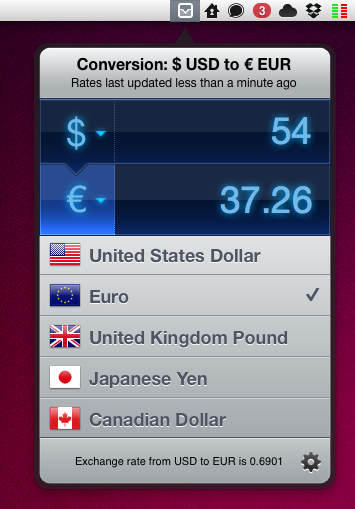
Being based in Italy, I have to deal with currency conversion on a daily basis. Most of my digital purchases are made on US websites, and either for work or personal purposes, more often that not I find myself going through my credit card billing statement to re-convert expenses from Euro to United States Dollars. As you can imagine, being able to easily and accurately convert currencies in seconds in the first place has become an essential part in my workflow. Currencies, a new app by Edovia released today on the Mac App Store, aims at making currency conversion super-simple from the OS X menubar with an interface design heavily inspired by iOS apps and multitouch.

In fact, Currencies for Mac comes from an iOS counterpart already available in the App Store. The app has been “converted” using The Iconfactory’s Chameleon engine, which allows developers to port the UIKit – the framework used to write apps for the iPhone and iPad – to the Mac. We’ve seen another example of Chameleon in action before, Carousel for Instagram. In a similar fashion, Currencies looks like an iPhone app inside an iPad popover menu running in the Mac menubar – a mix of interface schemes and devices that’s actually fun to use and once again hints at where the Mac platform is going. In the next few years, when Macs will be touch-enabled and even more similar to iOS devices, we’ll look back at this transition period, OS X Lion, iOS 5 and Chameleon.

Currencies is very easy to use. One click on the menubar icon, and the app becomes visible to reveal two tabs for the currencies you’d like to convert. To type, you can either use the on-screen keyboard or your Mac’s one. To change currencies, hit the symbol and select a new one from the list – the design is nice and elegant. That’s it. The app has some preferences to choose a keyboard shortcut and a refresh time –  the app relies on Yahoo for its conversion rates, supports 130 currencies and dots / commas for decimal separation.

Should you buy Currencies when your web browser takes seconds to open a currency converter and do the job for free? There’s no doubt you’ll be just fine converting units on a website like Yahoo Currency Converter or Xe.com, but if you care about good design, usability and are intrigued by the whole concept of iOS apps running in the Mac’s menubar, you should give Currencies a try. Go download the app here at $2.99 – you can find the iPhone version at the same price here.


Gameloft’s MMO for iOS Makes $1 Million in 20 Days

Gameloft, the game developer well known among iPhone and iPad users for releasing apps clearly inspired by famous, older PC and console games, has managed to make $1 million in just 20 days with their latest MMO (massively multiplayer online) adventure for iOS called Order and Chaos and available on the App Store at $6.99. The app runs on the iPhone, iPod and iPad, and on top of the price tag to download it from the App Store it also comes with in-app purchases to unlock runes, golds, and other game-related goods. The premium model chosen by Gameloft (ask for a price and keep selling additional items in-app) has turned out to be a successful one with $1M made in the first 3 weeks of availability.

Furthermore, Gameloft is promising more updates coming out in the next months to add more functionalities and server-side features to expand the virtual world of Order & Chaos. If the whole concept sounds a lot like Blizzard’s insanely popular World of Warcraft, it’s because it is similar – Gameloft obviously decided to target iOS users hungry for a WoW clone, a game that years after its original release and in spite of outdated graphics (when compared to more recent PC games) still has a strong and large userbase. TouchArcade reports future updates will bring “new quests, the ability to migrate characters between servers, and separate chat channels for each language”, alongside new dungeons to explore and Player Vs. Player arenas.

Order & Chaos is available at $6.99 in the App Store, so make sure to check it out if you’re a WoW fan looking for an alternative on iOS devices. [via TUAW]


MindManager 9 for Mac Coming June 23, iOS Versions Due Mid-June

What is “Mind Mapping?” Well, if you want to take your analog thoughts and put them into the digital world, Wikipedia tells us that “a mind map is a diagram used to represent words, ideas, tasks, or other items linked to and arranged around a central key word or idea. Mind maps are used to generate, visualize, structure, and classify ideas, and as an aid to studying and organizing information, solving problems, making decisions, and writing.”

MindJet, who makes MindManager, one of the premiere apps in the market selling 1.8 million copies worldwide,  is scheduled to ship MindManager 9 next month. It will cost $249 for new customers and $149 for current users wanting to upgrade. New features will include a presentation mode, “quick entry,” WYSIWYG priting, dynamic content like schedules and web links, offline import/export for iWork and Office, plus project management mode. For more info, read the Mac press release here. Read more


HockeyApp Brings Enhanced Beta Distribution For iOS Apps

Launching today is HockeyApp, a new service for developers of iOS and soon Android and OS X apps. Its main function is to simplify the beta distribution process and collection of crash reports. Like other beta distribution tools and services, such as TestFlight, HockeyKit (for iOS apps) uses Apple’s over-the-air distribution process that was introduced in iOS 4.0.

HockeyApp, however, goes beyond just offering developers an easy way to distribute new beta builds. It also has a feature that lets developers automatically inform testers about a new beta version from within the app itself – even including release notes and potential to instantly update the app right then and there. Critically for developers, HockeyApp gives developers access to key data from crash reports and can optionally also give statistics on exactly what devices, iOS versions and languages were used and for how long.

HockeyApp will offer developers three plans, varying in cost but starting at $20 per month for 5 apps, 1GB storage and 100 users. Team members and testers won’t have to pay anything and there is a one-month trial for developers available. Jump the break for some screenshots of the service.

Read more