Posts tagged with "google"

Gboard Adds Automatic Theme Switching

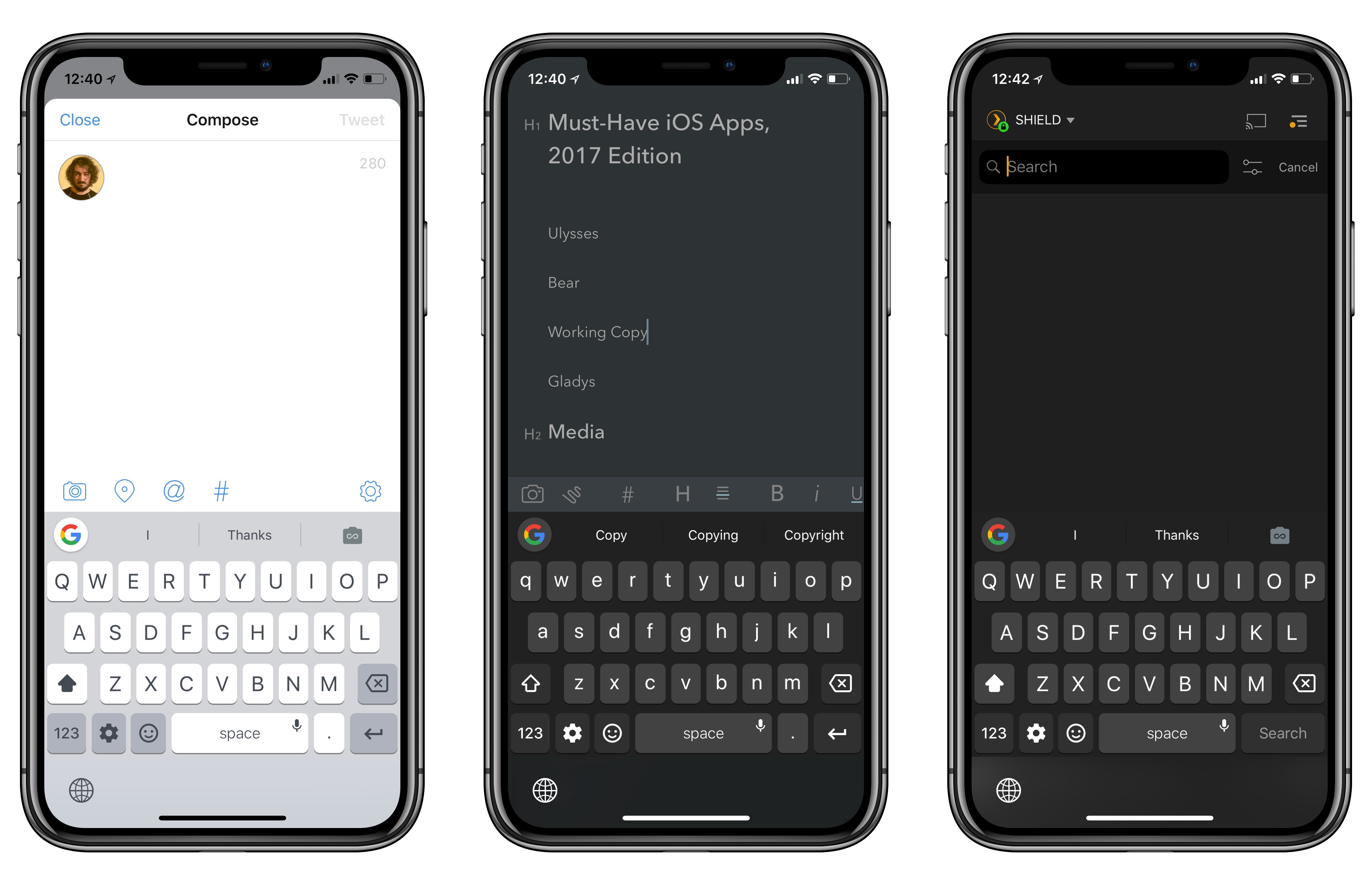
Gboard in Tweetbot, Bear, and Plex.

Gboard in Tweetbot, Bear, and Plex.

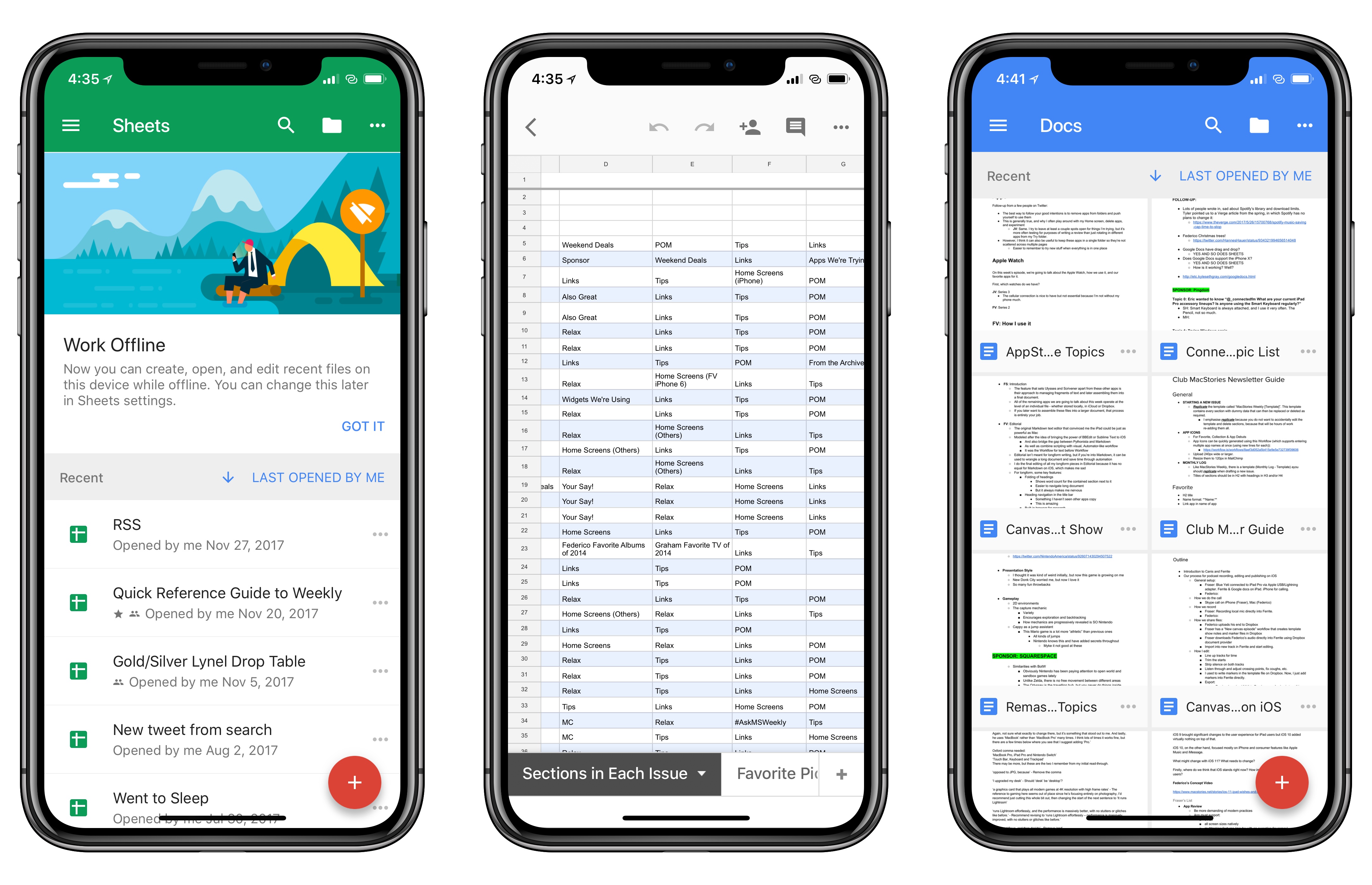
I’ve always liked Gboard, Google’s alternative keyboard for iOS. Gboard combines Google’s intelligence (with accurate and personalized autocorrect, emoji and GIF suggestions) with handy features such as glide typing. However, as I mentioned before, I couldn’t use Gboard as my primary keyboard on the iPhone for a variety of reasons: it lacked iOS’ native dictation mode, couldn’t automatically switch light and dark themes depending on the context of the current app, and, worst of all, it didn’t support multi-language typing without manually picking a different keyboard layout.

Siri dictation and simultaneous multi-language support are still missing (the former will likely never be added), but today’s update is an important step towards making Gboard feel more integrated with iOS. Gboard can now switch its default theme between light and dark based on the app you’re using. I’m not sure how Google pulled this off, but I tested Gboard with the dark modes in Apollo, Tweetbot, Copied, and Bear, and the keyboard always used the dark theme instead of the light version. Conversely, in Safari, App Store, and other light-themed apps, Gboard used the light mode instead.

This was one of my complaints about the old Gboard: its default light theme looked garish in dark apps; on the other hand, if you persistently enabled Gboard’s dark theme, then it would look out of place in apps like Messages or Mail. With automatic theme switch, changing Gboard’s default appearance is no longer a concern because it adapts to the app you’re using.

I’ve found a couple of apps where Gboard doesn’t correctly apply the dark theme (Overcast is one of them), but I’m impressed overall; Gboard even switches to the dark theme when you swipe down on the Home screen to open Spotlight. I’d be curious to know which iOS API Google is using to implement this option, and if third-party developers can optimize for Gboard in any way.

Motion Stills Adds In-App Motion Still and Live Photo Capture, GIF Export, and More

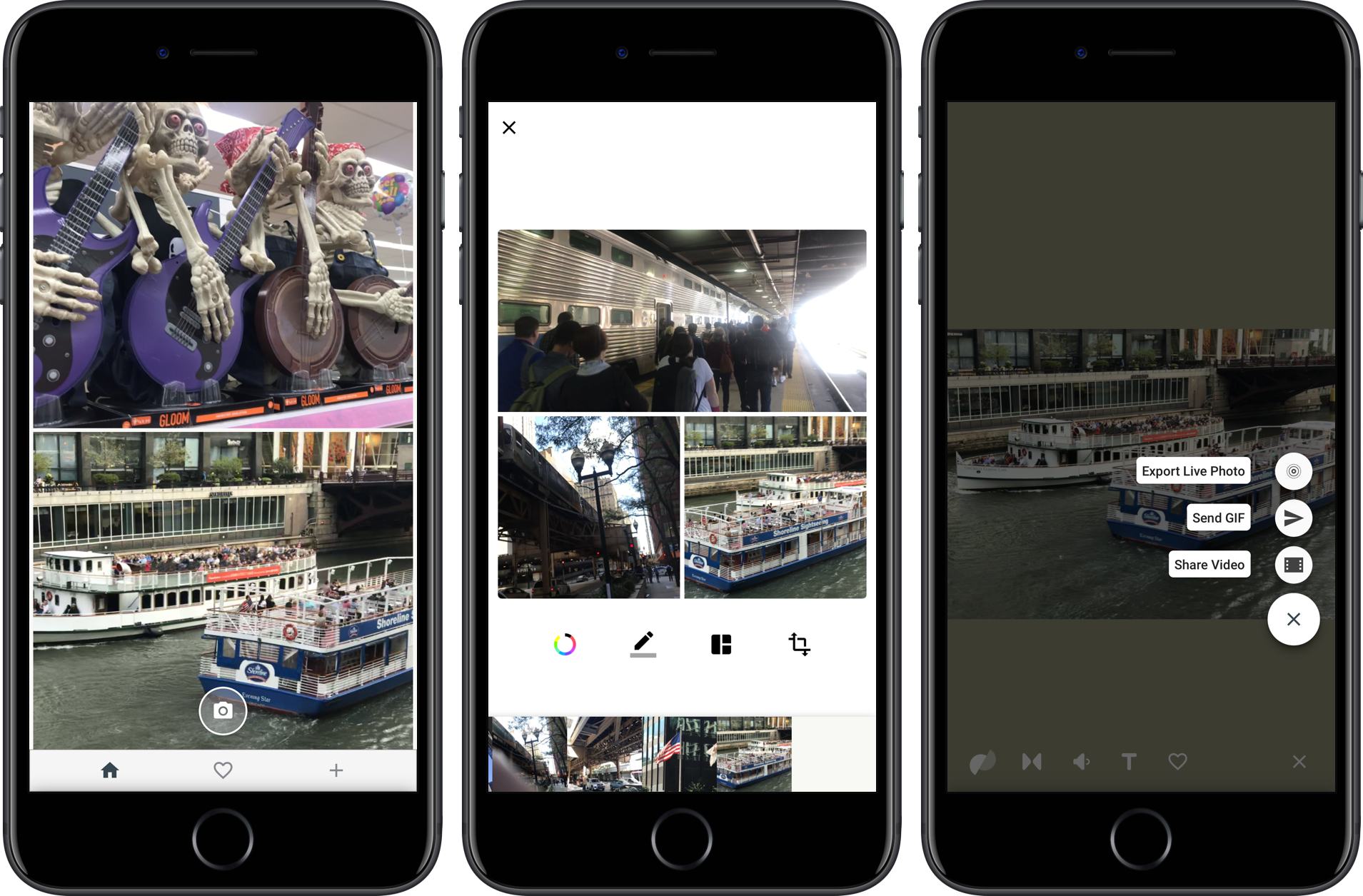
Google introduced Motion Stills on iOS in 2016. The app enables users to convert Live Photos into movies or GIFs applying stabilization to the video in the process. Live Photos can also be combined into moving collages.

Google has released version 2.0, which dispenses with the need to access your photo library to add Live Photos to a Motion Still. Instead, the app can now capture Live Photos and Motions Stills from within the app itself. The option to import from your photo library is still there, but having the option to shoot from within the Motion Stills app is a convenient addition. The new version also lets you delete Live Photos from your photo library with a swipe gesture and export collages you create as GIFs.

Motion Stills is available on the App Store.


Google Drive Now Supports iOS 11’s Files App

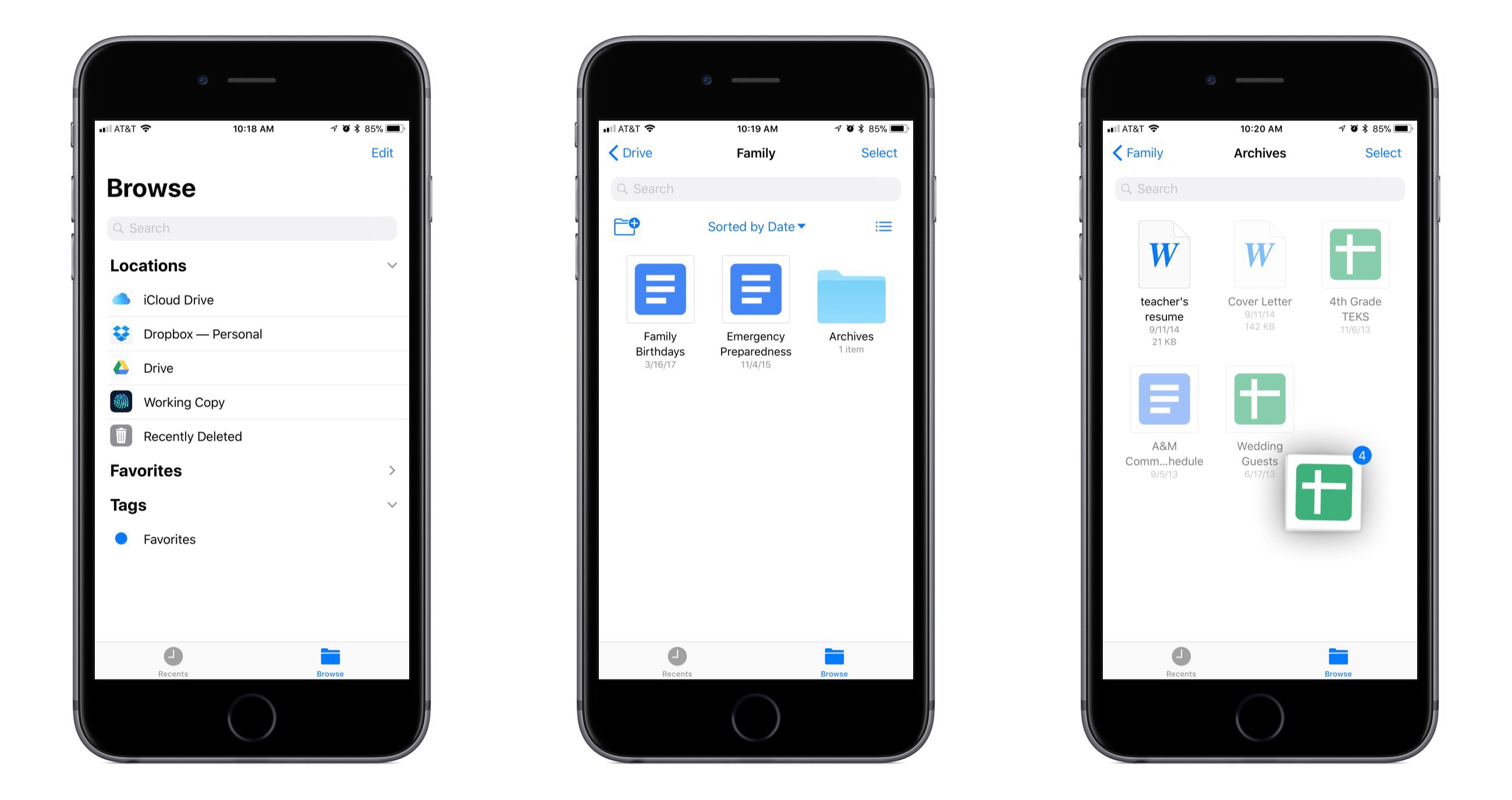
Following the lead of Dropbox last week, Google Drive’s iOS app has now been updated with full support for the new Files app in iOS 11. This means all Google Drive files can be accessed and managed alongside files from other cloud providers like iCloud Drive and Dropbox.

By replacing its legacy file extension with the new Files integration, Google Drive gains access to the full benefits of the Files app. You can now easily copy Google Drive files to or from other cloud services, organize files in a folder saved to the Favorites sidebar, add tags, use drag and drop to move files within the Files app or even into other apps, and much more.

Unfortunately, previews for Google Docs and Google Sheets files are not available within the Files app, so viewing them requires tapping the documents to load them in their respective separate apps. And oddly, every time you open one, the Google Drive app is opened first before you’re taken to the proper Docs or Sheets app – a seemingly unnecessary first step. Another drawback is that unlike the Files integration of Dropbox, Google Drive offers no ability whatsoever to manage file sharing from within Files – that will still require going through the full Google Drive app.

Shortcomings aside, the greatest benefits of Files support are still available with Google Drive: all your files are in one place, and drag and drop transforms the way you get files in and out of Google Drive.


Replacing Bing, Google Will Now Power Siri and Spotlight Web Search Results

Matthew Panzarino, reporting for TechCrunch:

Apple is switching the default provider of its web searches from Siri, Search inside iOS (formerly called Spotlight) and Spotlight on the Mac. So, for instance, if Siri falls back to a web search on iOS when you ask it a question, you’re now going to get Google results instead of Bing.

“Switching to Google as the web search provider for Siri, Search within iOS and Spotlight on Mac will allow these services to have a consistent web search experience with the default in Safari,” reads an Apple statement sent this morning.

As pointed out by Zac Hall of 9to5Mac, the timing of this change coincides well with Apple’s upcoming HomePod. Though the details of Google search’s implementation for HomePod are unclear, it’s possible that this switch will enable HomePod to provide the same answers to common web queries that its competing home speaker, Google Home, offers. Even if support doesn’t extend that far, with this change Siri should at least be able to supply the type of reliable search results Google users expect.

Permalink

Google Earth Gets a Big iOS Update

Google Earth got a big update on the web and Android earlier this year. Today, Google released the same features for the iOS version of the app.

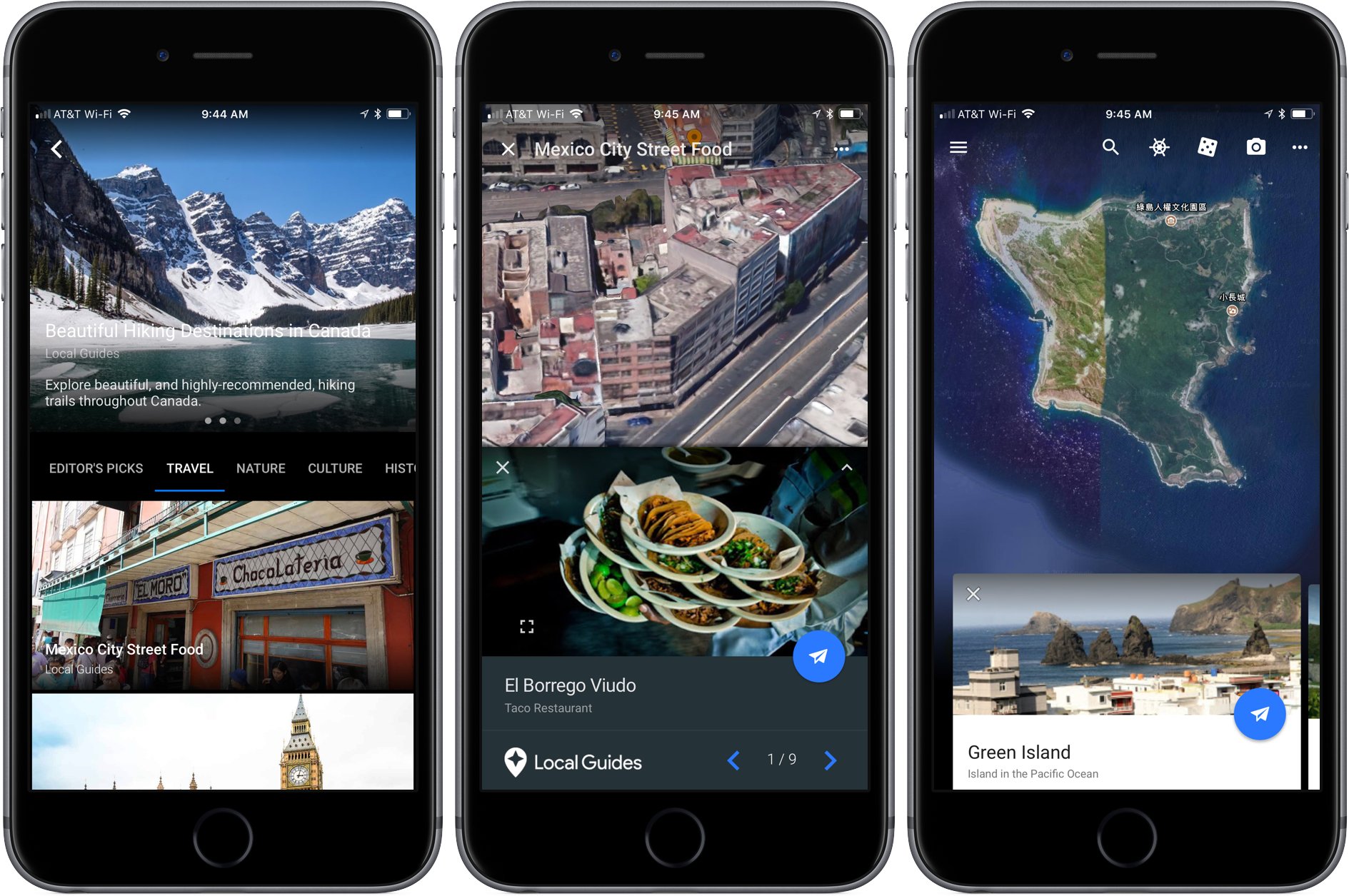
The update features four major additions to Google Earth. ‘Voyager’ is designed to help you plan your next trip with over 140 stories organized by topic like ‘Museums Around the World,’ ‘Mexico City Street Food,’ and ‘Beautiful Hiking Destinations in Canada.’ When you pick a location, Google Earth offers ‘Knowledge Cards’ that you can pull up from the bottom of the map. Cards include galleries of photos for your chosen locale as well as basic facts and links to Knowledge Cards for points of interest and related searches. If you’re at a loss of where to go, tap the ‘I’m Feeling Lucky’ icon in the toolbar and Google Earth will whisk you off to a random destination to explore.

Finally, ‘Postcards’ is a basic screenshot utility built into Google Earth. If you find a map angle you like, tap the camera icon to create a link and screenshot and share it with the iOS share sheet. Oddly though, you cannot share Postcards via Messages.

Google Earth is available on the App Store.

Permalink

Gboard Update Brings YouTube and Maps Integrations

One of the best third-party keyboard options on iOS just got better. The latest update for Gboard adds special integrations with two Google services: YouTube and Google Maps.

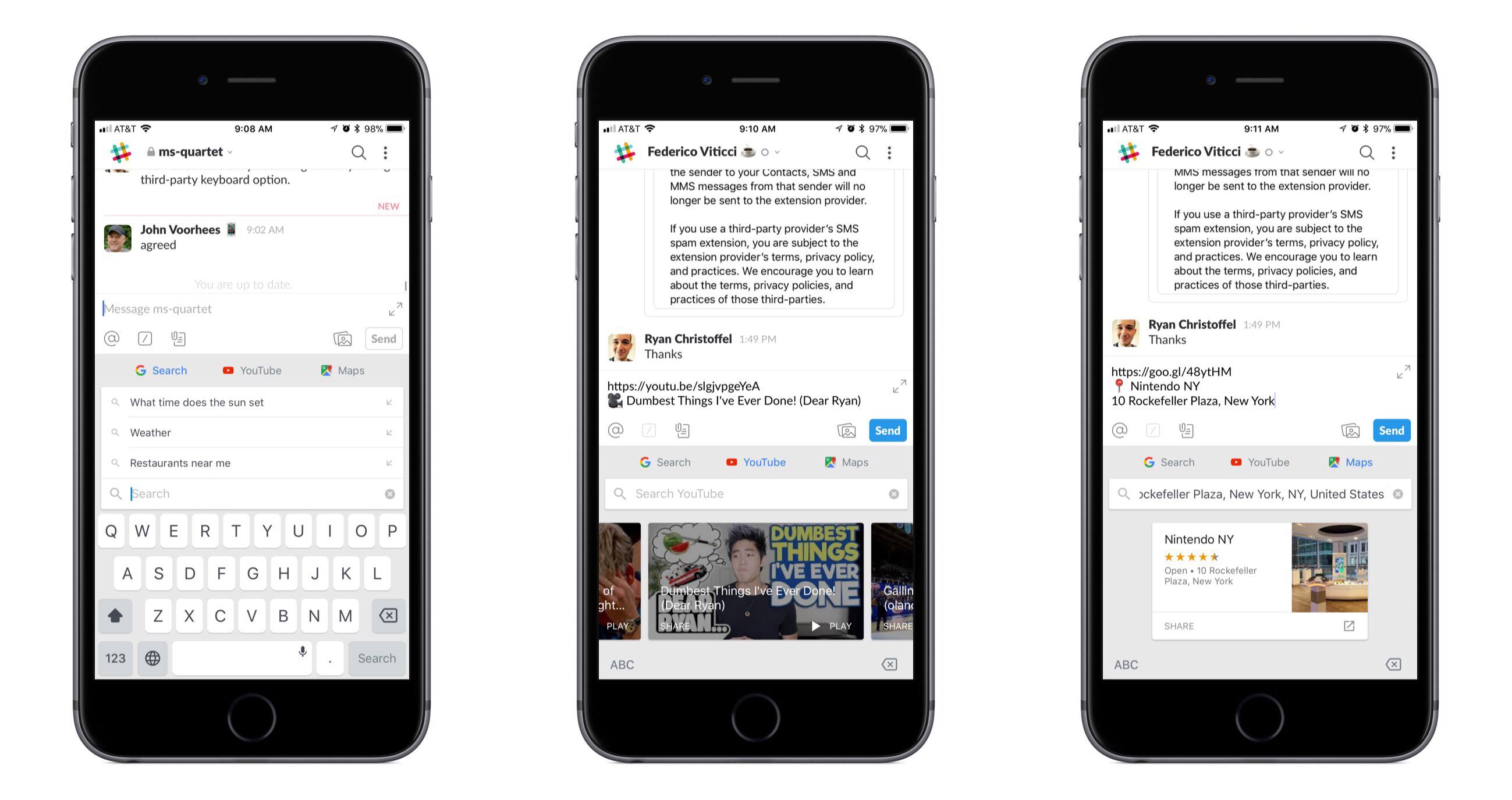
When using Gboard, tapping the G button will now present YouTube and Maps tabs alongside the standard Search option. Both new options present an assortment of suggestions when you first open them, along with the expected search function. YouTube’s suggestions appear to be a selection of top trending videos; in my testing Gboard wouldn’t show any videos personalized to me or my watch history, but that may change over time with more use. Maps shows an assortment of nearby locations, as well as your current location if you grant that permission. Making a selection copies a link to the content inside the text box, alongside a brief description of what you’re linking to.

The market for third-party keyboards on iOS has largely grown stagnant, but Google continues to show its commitment to Gboard. While adding new features to a keyboard could clutter its interface before long, YouTube and Maps are natural fits for Gboard, integrating well both from a functionality standpoint and in their placement in the interface.


Google iOS App Adds Personalized Feed with News, Interests, and More

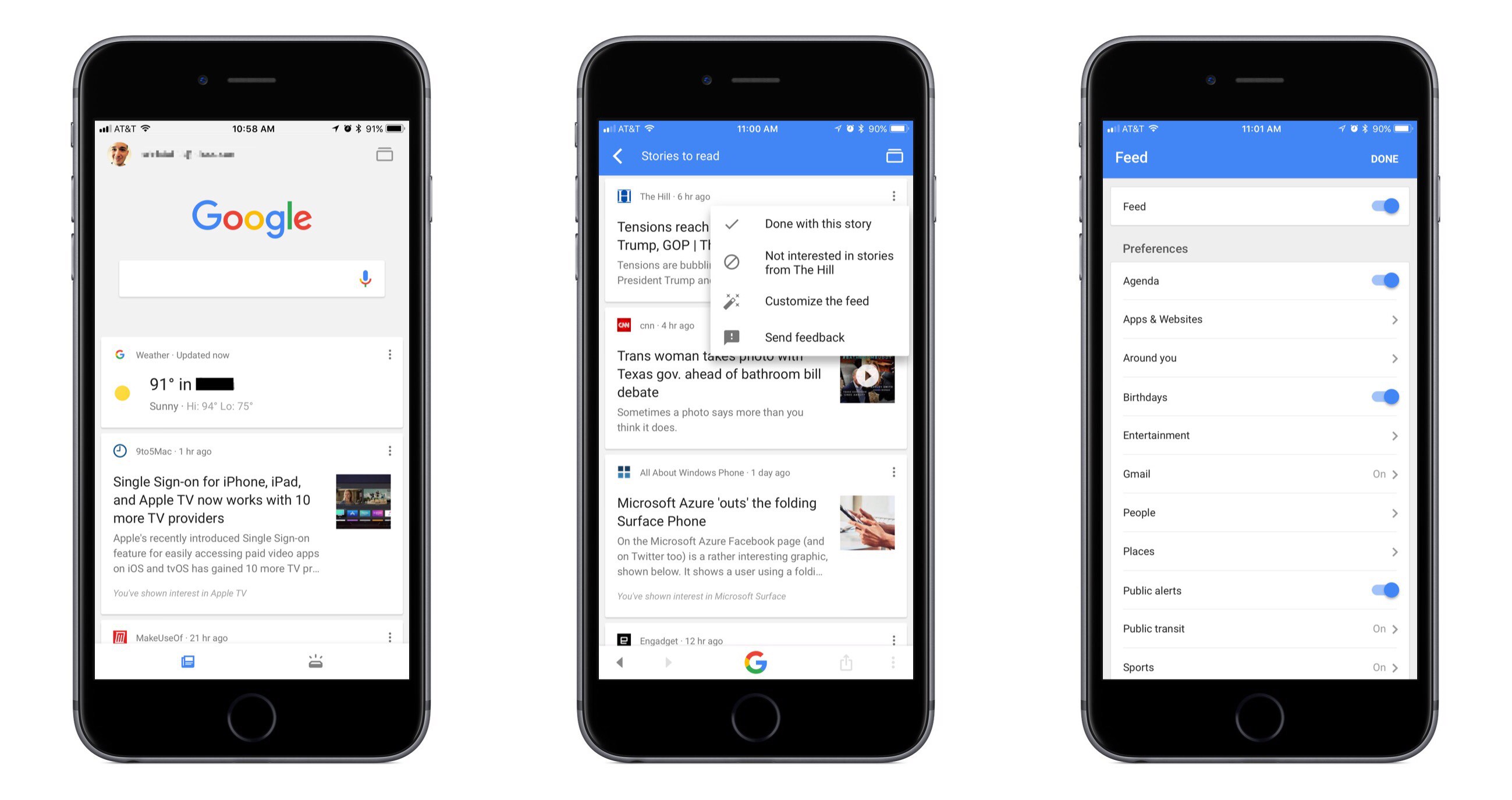
Google has long been the first place most of us go when searching for something specific, and now it wants to be our primary destination for personalized, proactive content as well. Launching today in the US, and internationally in the coming weeks, the Google app for iOS now includes a personalized feed filled with things like news stories, live sports highlights, and suggested videos, all of which are merged in the feed with other data we’ve come to expect from the Google app such as local weather, relevant travel info, and more.

While Google’s iOS app formerly served as a place to mainly perform searches and see a bit of personalized data, today’s update transforms the app experience entirely. The search option is still at the top of the screen, and that data you’re used to seeing is still around, but the additions included here change the app’s primary purpose. It becomes a place to go not only when you need to find something, but also just when you have a little time to kill and want to catch up on what’s going on in the outside world. If the feed becomes good enough at knowing what’s important to me, I can see myself regularly checking and scrolling through it the way I do with social apps like Twitter or Facebook.

Google promises that the feed will get better over time as its machine learning algorithms gain a more accurate understanding of a user’s interests. One way that users can help that process is through using the new ‘Follow’ button that will soon begin appearing next to Google search results. This button will allow you to selectively follow certain movies or TV shows, sports teams, musical artists, celebrities, and more. Another layer of customization is found in the ‘Customize the Feed’ menu accessible by tapping the three dots in the upper right corner of any content card. Here you can turn the feed off entirely if you’d like, but you can also customize exactly which categories of content will populate your feed.

If you’d like more in-depth information about today’s update, Google has a blog post walking through the changes.


Google Photos Launches Advanced Sharing Features

First announced last month at Google I/O, Google Photos for iOS has now been updated to include several new sharing features, including suggested sharing and shared libraries.

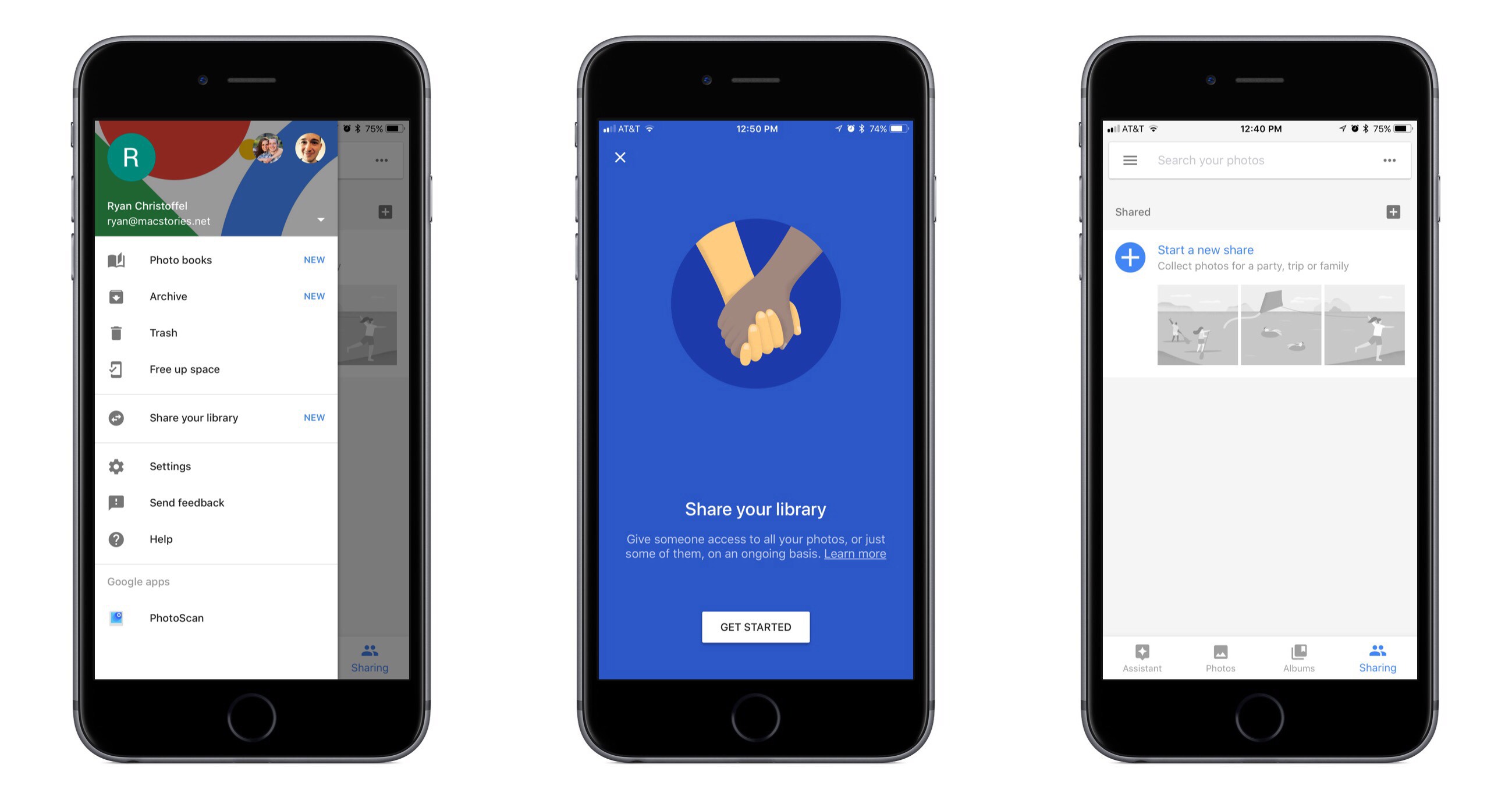
The suggested sharing feature brings with it a new dedicated navigation tab labeled ‘Sharing.’ Here you’ll find a listing of all prior sharing activity, as well as suggestions of photos you haven’t shared yet but may want to. These suggestions are made for one of two reasons: either the photos in question appear similar to images you’ve shared in the past with certain people, so Google thinks you may want to share them, or the photos contain people that Google knows are in your contacts, and thus you may want to share them.

If a Google Photos user shares images with another Google Photos user, and the sharing recipient appears to have photos from the same time and place, Google will suggest adding those images to the shared album. This can be used most effectively when sharing photos around a certain event, like a wedding or vacation. One person may initiate the sharing, but Google Photos makes it easy for the other people who attended the event to improve the shared album by seamlessly adding their own captured memories to it.

The new library sharing features are accessed from the sidebar menu’s ‘Share your library’ option, not the ‘Sharing’ tab. After you’ve selected one or more people to share with, there are a couple settings you can adjust. You can choose to share your entire library, or only photos of specific people. You can also set a time period from which the library sharing should begin – for example, you can set sharing to only happen with all photos from this day on, or from six months ago on, etc.

Google Photos was already an excellent service, but today’s updates make it even better. The automatic library sharing in particular has been on my wish list for Apple Photos for a long time. At the time these features were announced, details about iOS 11 were still unknown, but now that the WWDC unveiling has come and gone without any announced improvements to sharing in Apple Photos, Google Photos is more tempting than ever.