Posts tagged with "google"

Google Launches Catalogs App for iPad

In an effort to make shopping “more engaging, social and creative” and, at the same time, connected and interactive in the digital era, Google is launching Google Catalogs for iPad today, a brand new (and free) app to browse and interact with shopping catalogs from popular brand directly on the iPad’s screen. Said to be coming to Android tablets as well, Google Catalogs is now exclusive to the iPad and it offers access to hundreds of different catalogs slightly reworked to take advantage of the iPad with tags, photo albums and videos, as well as the possibility of zooming on product shots, and a button to see whether an item is available in a nearby shop.

Users can organize items they find interesting in Favorites, or create a “collage” with custom themes and resizable photographs to share with fellow Google Catalogs users. Google is touting this feature as a way to shop digitally using the iPad’s intuitive gesture-based system, and be creative.

For the launch of the Catalogs app, Google has partnered with the following brands:

  • Anthropologie
  • Bare Escentuals
  • Bergdorf Goodman
  • Crate and Barrel
  • L.L. Bean
  • Lands’ End
  • Macy’s
  • Neiman Marcus
  • Nordstrom
  • Pottery Barn
  • Saks Fifth Avenue
  • Sephora
  • Sundance
  • Tea Collection
  • Urban Outfitters
  • Williams-Sonoma

Google says more brands will be added soon, and merchants with a shopping catalog can contact the Google Catalogs team right away to apply for inclusion in the app. From the promo video embedded below, you can see how Google Catalogs seems to heavily rely on sliding animations, pop-ups and links placed directly on a product’s photo or description – rather than forcing users to navigate to a specific page like printed catalogs often do, the app enables them to have more information quickly available in a new window.

Google Catalogs for iPad is available for free on the App Store.
Read more


FlashtoHTML5 Turns YouTube In To A Flash-Free Zone On Safari

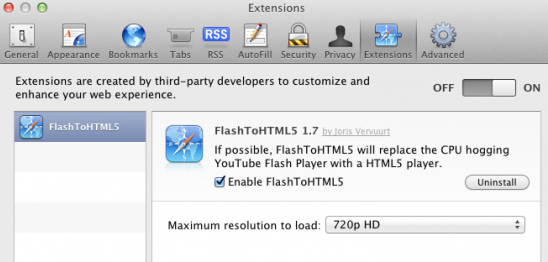
No-one really likes when their Mac’s fan decides to emulate a jet engine after you’ve been watching YouTube for a while because Flash has been running. It is particularly frustrating when you know that YouTube has been rolling out an experimental HTML5 video player that could work perfectly in Safari. Thankfully a new Safari plug-in, FlashtoHTML5, forces Safari to use that HTML5 YouTube whenever available (which is most of the time).

The plug-in from Juris Vervuurt will automatically choose the maximum video resolution available, up to 4K, although this can be manually changed. There are three minor caveats with FlashtoHTML5: this plug-in only works for Safari,  not all YouTube videos yet support the HTML5 version and subtitles and captions do not work in the HTML5 version. You can download FlashtoHTML5 for free.

[Via 9to5 Mac]


Google+ for iOS: Now Available For iPad and iPod touch

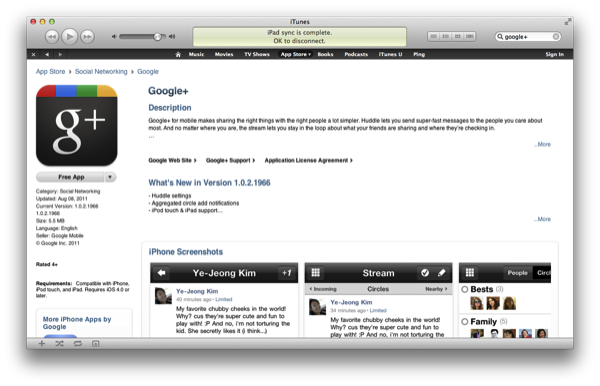
Looking to use the official Google+ app on your iPad or iPod touch? There’s a Google+ update in the App Store waiting for your geeky fingers to download the app on your tablet or smart-mp3 player. While Google+ doesn’t have an iPad specific version (you’re looking forward to 2x mode), you can now use it on devices outside of the iPhone (or your Android smartphone).

Google is also giving you additional control for their huddle feature via the app, as well as aggregated circle add notifications, stability improvements, and bug fixes.

You can download the latest Google+ update here.

[via The Next Web]


Gmail: Now Pull to Refresh and Retina Display Ready

Use Gmail on your iPhone? There’s an update waiting for you when you log in, including sharper graphics that shine on the iPhone 4’s Retina display. The  new graphics were a highly requested feature by Gmail users, and now Google’s gone and made everything prettier so their web interface doesn’t look as fuzzy or pixelated on our high resolution phones. And hey - now it feels like it belongs!

Want to refresh your inbox or a conversation? Simply pull down to refresh. Gmail now lets you refresh your inbox naturally, and you keep the conversation going if you’re rapid replying to a friend’s or coworkers email.

Finally, there’s some new transitions you can check out. As you navigate across Gmail, sliding transitions help create flow while generally looking pretty — it’s that final polish that iOS users come to expect on all apps (native or web).

There you go kids. A better Gmail for iOS.

[via The Official Gmail Blog]


Google Testing Clean New Google Search Design For Tablets

Multiple users are today reporting that Google is trialing a new tablet-optimized Google Search page that merges the recent design changes from the desktop version with a more touch-friendly design for tablets. Digital Inspiration managed to take a few screenshots of the new design running on their iPad which we’ve included above and below the break.

The new look uses just a single column layout, keeping the old sidebar options minimized below the search box instead. The new orange, dark gray and blue color theme is also present in this new design, which certainly feels cleaner with large amounts of white space. The one final design change that is of note is that the rather famous ‘Goooooooooogle’ at the bottom of the page that links to following search pages is gone – instead all that exists is the numbers one to ten.

This new design is currently being tested, and as is normal with Google product changes, is being randomly presented to a certain percentage of users. It may yet be a few weeks or possibly even months before this rolls out to everyone. Jump the break for some more screenshots.

[Digital Inspiration via The Next Web]

Read more


Apple to Bid on Hulu Online Television Service?

After being put up for sale by owners Walt Disney, News Corp, and NBC Universal, Apple may be considering to bid on the online television service according to ‘people familiar with the matter’. It’s your typical response to rumors small and large, but let’s look at what’s on the table. Apple has stockpiled storage in the past (presumably for storing and serving video), and today’s speculation also coincides with previous rumors that Apple is working on their own online streaming video service.

Hulu has already been in talks with AT&T, Yahoo, and Apple competitor Google. Apple has $76 billion in cash, a data center to spare, and a competitor I’m sure they’d love to prevent from acquiring Hulu’s properties. Hulu has 33,000 episodes available for Hulu Plus subscribers, mobile applications, and ties with gaming consoles and other devices in the consumer market.

Update: In an updated version of the story, Yahoo is purported to be willing to pay up to $2 billion for four/five years of content. Microsoft dropped out of the bidding for the deal.

[Bloomberg[1][2] via @emilychangtv]


Official Google+ App for iPhone Now Available

Google has just released the official Google+ app for iPhone on the App Store. The app is free and available here, and at the moment of writing this Google hasn’t updated its Mobile webpage to showcase the new app yet.

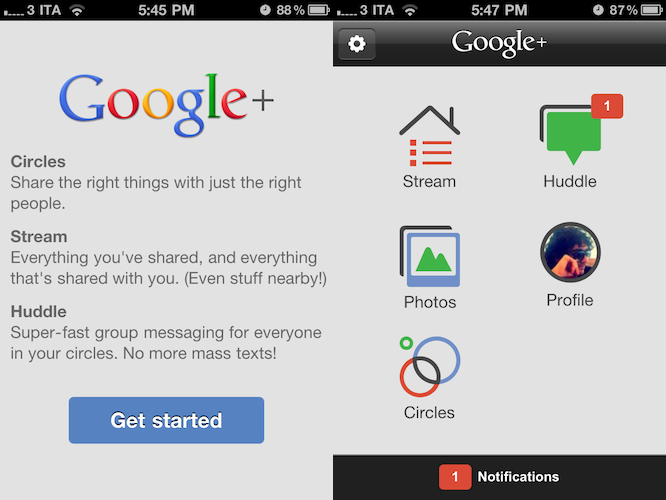
The Google+ iOS app provides a native interface to access much of the functionalities of the website, such as the Huddle group messaging feature – which was exclusive to Android devices prior to the app’s approval. The dashboard of the Google+ app presents a grid of icons to access the Stream, Huddle, Photos, your Profile and Circles, as well as a Notifications tab at the bottom that will open a vertical list of all your incoming notifications. Whilst much of the navigation seems to rely on web views optimized for the iPhone and fetched by the device, the animations when switching between sections are quite snappy and fast on iOS 4. Just like on the desktop, the Stream provides recent updates from the people you follow and your Circles, allowing you to check for new posts with the popular “pull to refresh gesture” and comment or +1 others’s posts. You can’t +1 from the home page – you have to open a single post and hit the + button in the upper right corner, while a text field at the bottom will let you leave a comment. You can also “mute” or “report” a post. The app is capable of sending push notifications for new comments, shares, and so forth. Read more


Invite-only Photovine Now Available On The App Store

Photovine, an image sharing service with a strong social component that is trademarked and registered by Google, has released its first official iPhone app in the App Store, which is available now for free. Described as a “fun way to learn more about your friends, meet new people, and share your world”, Photovine is backed by a beautiful user interface design to share your moments and photos with your friends, and watch other photo replies coming into your social stream. Photovine is developed by Google’s subsidiary Slide, which has also created other apps for Google like Disco and Pool Party. Photovine revolves around the concept of adding a tag (or caption) to a photo, and explore other photos with that specific tag in the “photovine”.

Details are scarce for now, but the iTunes description reports:

It all starts with what we call a photovine: a group of photos around a single, shared caption. Start a new vine with a photo and caption of your own or add your photo/take on someone else’s vine.

Photovine is invite-only for now, and upon first launch the app will ask you to enter an email address to use the service – this has to be the same email address you received an invite to. You can request an invite at Photovine.com, and we’ll update this story with more details once we get the chance to try the app. In the meantime, you can check out the teaser video after the break. [via iClarified]
Read more


Inside Google+ Mobile Web App

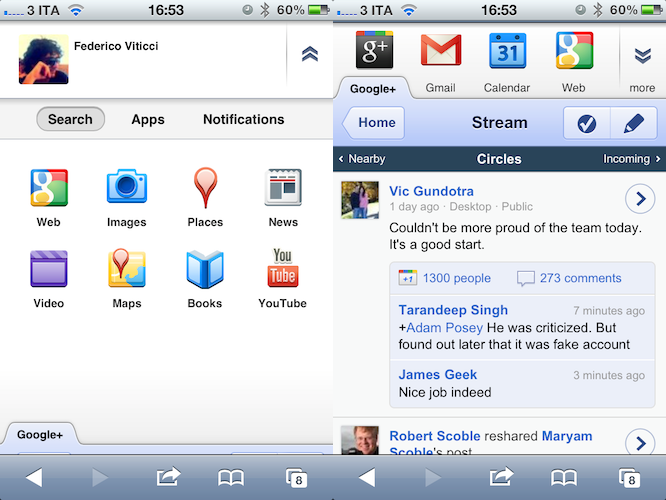
Two days ago Google launched Google+, the company’s latest effort to get into the social networking space and build a platform to share content and connect people. For those who missed the coverage (you can find some detailed reports here and here), here’s the gist of Plus: it’s a social network connected to your Google account that looks a lot like Facebook but it’s got a cleaner design and a set of different “apps” tied together by the Plus brand. What does it mean for consumers? It means that whilst Circles, Huddle, Hangouts and Sparks could be seen as separate services and concepts, they’re in fact sections of the entire Google+ website. Yesterday, Google started allowing people to send invites to other users, which resulted in a massive explosion of invite requests on Twitter and thousands of new sign-ups. After a few hours, Google was forced to close invites due to “insane demand” and promise more coming in the next few weeks as the service scales to accomodate new users and more content.

Google+ has a strong mobile counterpart, too. As the service aims at empowering Google users to share and connect at any time from anywhere, Google built native apps for Android and iOS devices to let users enjoy the Google+ experience on the go, and upload media such as photos and videos shot with their phones. Furthermore, the mobile apps get access to Huddle, a group messaging feature built into Google+ that some are already eyeing as Google’s response to iMessage, only it works on both iOS and Android. However, the official iPhone app is not available yet, and Google says it’s “coming soon”. In the meantime though, users can try a mobile optimized web app, which relies on Google’s recent mobile UI changes to lay out a unified interface to access Google+ and switch between various Google services.

Last night, I signed up for Google+ and played around with the website. Today, I decided to take a look at the mobile web app which, surprisingly enough, might just be the nicest thing Google has ever done on iOS’ Mobile Safari. Read more