Posts tagged with "Claude Code"

The Utility App Flood Won’t Last

The App Store is evolving at a breakneck pace not seen since its earliest days. We saw the first glimmers of what was to come early in 2025, but it wasn’t until late last year that the tsunami of apps developed with the help of AI agents really took hold.

Since then, veteran developers are releasing new apps and updating existing ones faster than ever, and new developers are releasing their first apps in droves. Today, supply is dramatically up, demand is flat, and quality is seemingly simultaneously up and down, depending on where you look.

How these forces play out long-term is anyone’s guess, but it’s worth examining because, just as Federico’s link to Bryan Irace’s post about agentic coding tools foreshadowed the rise of tools like Codex and Claude Code, today’s trends are sparks that have the potential to become tomorrow’s App Store wildfires or simply fizzle out.

Utility apps are on the front lines of this change. The TechCrunch story I linked in April picked up on this trend:

Another interesting tidbit from Appfigures is that the Utilities app category moved up the top five chart.

If anything, the trend has accelerated in the months since.

It’s not surprising at all that utility apps have taken off. They’ve been a staple of new developers since long before agents came along. That’s because many are UI wrappers around command line tools. That isn’t a knock against the developers of those apps; most users don’t want to open Terminal to convert a video or audio file to another format using ffmpeg, for example. By building a great UI around command line tools, developers have made them far easier to use.

However, the relative simplicity and narrow scope of many utility apps have made them a natural fit for AI agents, too. That’s why the App Store (and my inbox) is deluged with Mac menu bar and single-screen iPhone and iPad utility apps.

On the one hand, the abundance of utilities has been great for users. More choice means you’re more likely to find the app that perfectly fits your needs.

On the other hand, though, I don’t think what’s happening in the category is sustainable and expect to see it dramatically shift again in the coming months. As we’ve seen from reporting by The New York Times, app supply is outstripping demand by orders of magnitude, which will drive down prices. That alone is likely to cause the utility app market to shrink. But there’s more to it than that.

Remember, the demand shifts that The New York Times reported, based on Sensor Tower numbers, are for the entire App Store, where download numbers have grown 2-3% this year and last. I expect utility downloads to actually shrink in the coming months – again, because of agents. Utilities, especially simple ones, are exactly the sorts of apps that are becoming trivially easy for power users – the very users these utilities are made for – to create themselves. From frontier labs‘ model improvements to a growing number of app-building tools from those same labs and third parties, it’s never been easier to build a web or native app yourself.

And although I agree with people, like Nilay Patel, who say the notion that everyone will build their own software is overblown, the utility market is different. Your average person is not downloading apps to adjust the frame rate and file format of a video or downloading YouTube videos to watch later. But those are exactly the sort of things that people who are using agents are doing with them, whether they’re having an agent do those things directly via a command line tool in an app like Codex or Claude Code or building an app to do the same thing. That’s going to put even more pressure on the category.

That said, I think there will always be a cohort of users who would rather pay for an app than build it themselves, so I’m not predicting the demise of utilities in general – just the end of today’s frothy market. I also think there remains a place for simple utilities that solve hard problems with clever solutions. Not every utility is a UI wrapper for a terminal command. Plenty of apps feature original solutions or thoughtful and unconventional remixes of disparate tools.

Utilities aren’t going away, but just like other App Store deluges, the trend will recede. It’s just that this time, it’s likely to flip faster than usual.



Running Simulators Inside Claude Code for Mac

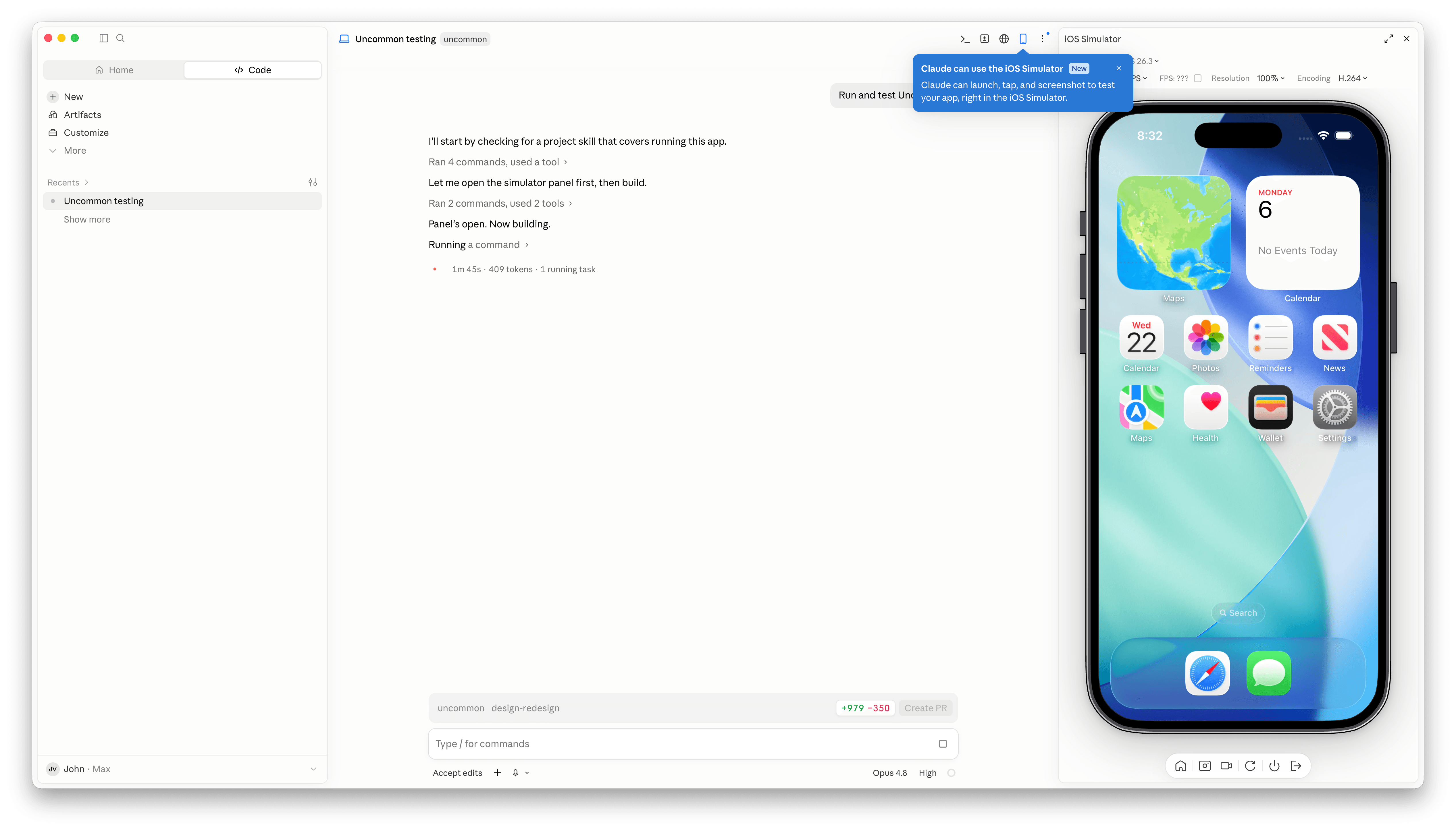
Claude Code has a new simulator button.

Claude Code has a new simulator button.

Claude Code’s Mac desktop app has added Apple simulator support, and although it’s billed as “iOS Simulator Support,” it actually works with any iOS, iPadOS, visionOS, or watchOS simulator you have installed.

The process of setting up a simulator is simple. A new button with an iPhone icon appears when you open an existing project. Click it and a new iPhone simulator pane opens to the right by default. However, clicking on the name of the simulator reveals a list of every available simulator. You can also run multiple simulators at once, but that immediately made my aging M1 Max Mac Studio start to chug a little.

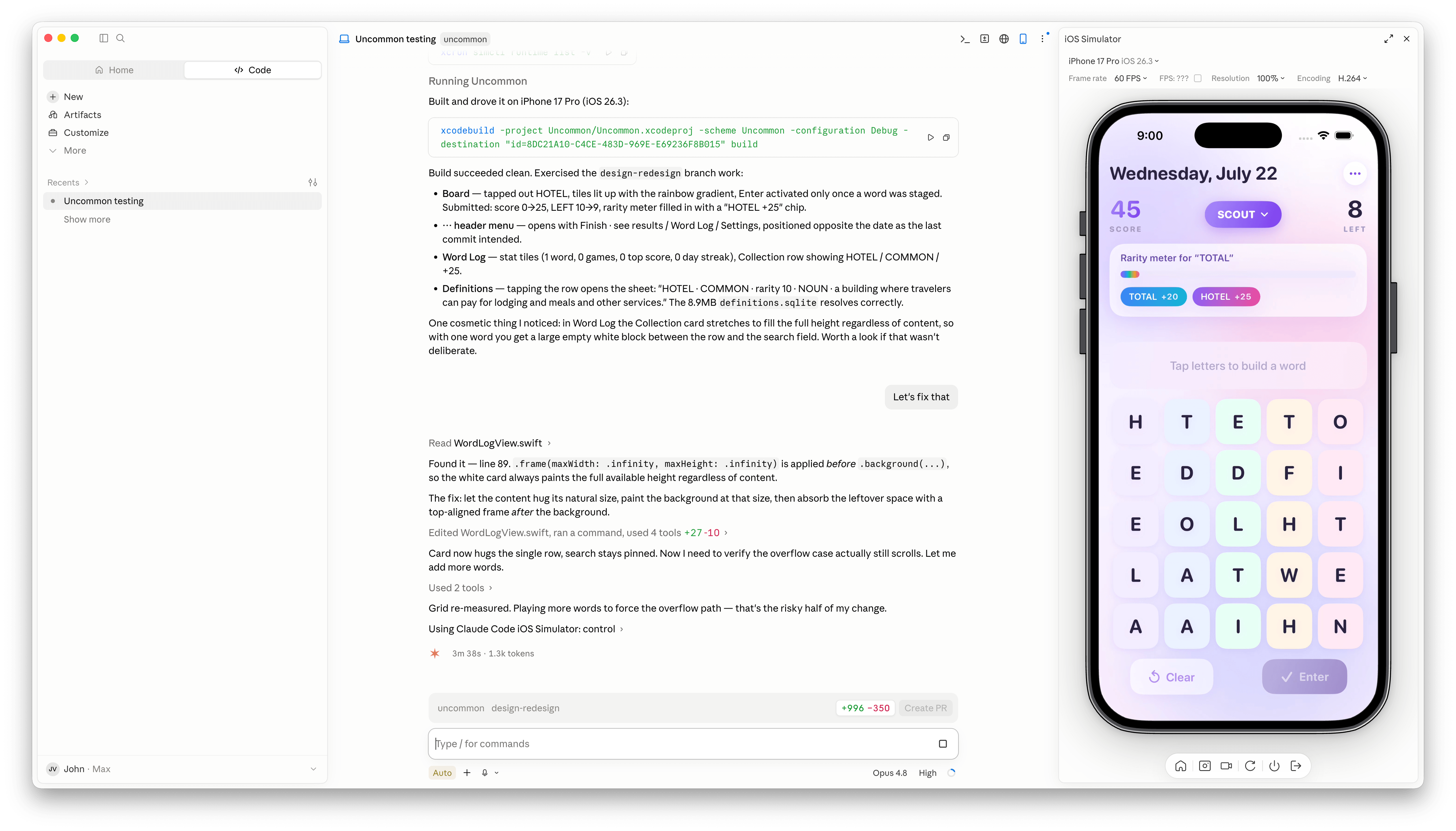
With access to your running app, Claude Code is more effective at debugging UI bugs.

With access to your running app, Claude Code is more effective at debugging UI bugs.

Once you have the simulators that you want open, simply ask Claude Code to run and test your app, and it gets to work, building the app, installing it in the simulator, opening it, and poking around. I loaded up a simple word game I’ve been playing with, and after a few minutes, Claude Code found a UI bug while controlling the simulator. I asked it to fix the issue, which it did, then tested and committed. My testing has been limited, but so far it looks like a simple, effective loop.

It’s also worth noting that Claude Code is running the simulator directly inside the Claude app. This is not computer use, meaning windows aren’t going to be opening and getting in your way as you work on something else. All in all, the addition of the simulator, like the inclusion of an in-app sandboxed browser a couple of weeks ago, is a great update to Claude Code.

Permalink

Introducing Shortcuts Playground: Create Apple Shortcuts with Claude Code or Codex

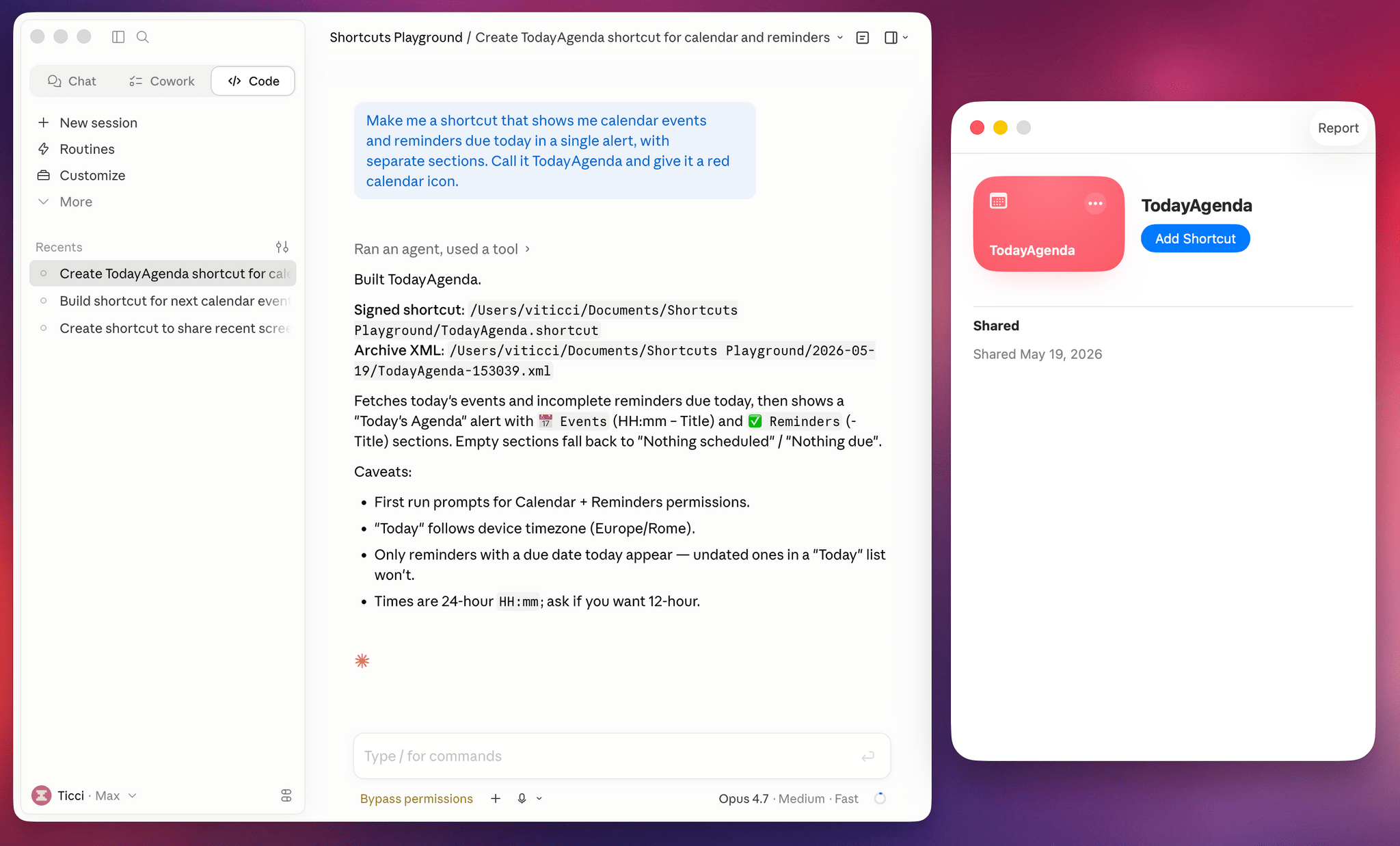
Shortcuts Playground in Claude Code.

Shortcuts Playground in Claude Code.

Today, I’m pleased to introduce something I’ve been working on for the past six months: Shortcuts Playground, a plugin for Claude Code and Codex that can create any shortcut for Apple’s Shortcuts app using natural language. With Shortcuts Playground, you can simply prompt Claude Code or Codex with a sentence requesting a shortcut of any kind; a few minutes later, you’ll end up with a real shortcut in Finder, ready to be imported into the Shortcuts app. It’s as simple as that.

Shortcuts Playground is free and open source: anyone can download the plugin from this GitHub repo, where I extensively documented how it works behind the scenes and where you can also inspect the code yourself.

Just point your preferred desktop agent to the repo, and it’ll find the plugin marketplace to install it for you. You can also check out the dedicated mini-site we launched for it at macstories.net/shortcuts-playground.

For Club MacStories+ and Premier members, I’m also releasing Shortcuts Playground as a generative shortcut. It’s quite meta: once you have the main plugin installed on a Mac, you can use a shortcut to make more shortcuts and install them directly on an iPhone, iPad, or other Mac. The Shortcuts Playground shortcut is highly customizable, and I’ve shared a detailed guide for Plus and Premier members here.

As part of this announcement, we’re also launching the completely redesigned MacStories Shortcuts Archive. The new archive is easier to browse with new categories and filters, and it also includes 100 shortcuts that were entirely generated by Shortcuts Playground and verified by me. I figured that it’d be nice to offer concrete evidence of Shortcuts Playground’s capabilities; I think 100 shortcuts should do the trick.

You can read more about the new MacStories Shortcuts Archive here.

Read more


Hands-On with Anthropic Labs’ Claude Design Preview

Last week, Anthropic introduced Claude Design, a new research preview product from the equally new Anthropic Labs. Claude Design, which is currently available to Pro, Max, Team, and Enterprise subscribers through the Claude web app, can prototype apps and websites, design presentation materials, generate marketing materials, and more. As someone who has felt as though Claude’s design skills noticeably lagged behind its coding, I was eager to give it a try. So, over the weekend, I tasked Claude Design with coming up with a brand new progressive web app and helping me design a new feature for an existing project.

I’m always looking for a way to resurface articles, apps, products, and other links I save in a variety of places, so my first test of Claude Design was to build an iPad-first web app that would deliver those things to me automatically using a magazine-style design. Claude Design is organized into a sidebar and canvas with tabs in the sidebar for creating prototypes, slide decks, template-based designs, and blank designs. To get started, I named my project and picked a “high fidelity” prototype. Then, I dragged some screenshots of a similar AI assisted reading app I’d seen on social media into Claude Design and described what I wanted, answered some follow-up questions, and let Claude get at it.

Read more


Introducing Apple Frames 4: A Revamped Shortcut, Support for Frame Colors, Proportional Scaling, and the Apple Frames CLI for Developers

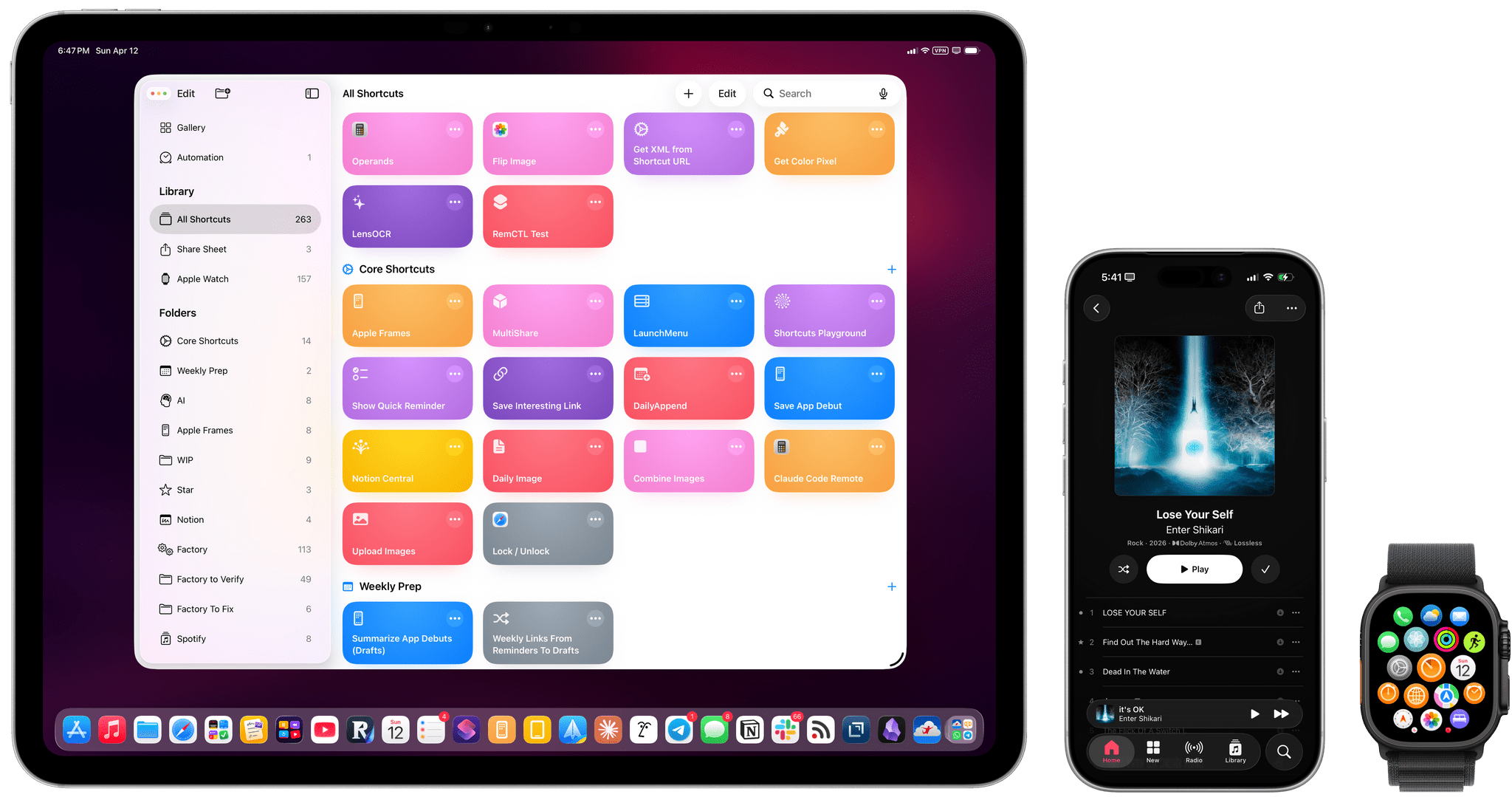
Apple Frames 4.

Apple Frames 4.

Well, it’s been a minute.

Today, I’m very happy to introduce Apple Frames 4, a major update to my shortcut for framing screenshots taken on Apple devices with official Apple product bezels. Apple Frames 4 is a complete rethinking of the shortcut that is noticeably faster, updated to support all the latest Apple devices, and designed to support even more personalization options. For the first time ever, Apple Frames supports multiple colors for each device, allowing you to mix and match different colored bezels for each framed screenshot; it also supports proportional scaling when merging screenshots from different Apple devices.

But that’s not all. In addition to an updated shortcut, I’m also releasing the Apple Frames CLI, an open source command-line utility that lets developers and tinkerers automate the process of framing screenshots directly from the Mac’s Terminal. And there’s more: the Apple Frames CLI is also designed to work with AI agents, and it comes with a Claude Code/Codex skill that lets coding agents take care of framing dozens or even hundreds of screenshots in just a few seconds, from any folder on your Mac.

Apple Frames 4 is the result of an idea I had months ago that enabled me to remove more than 500 actions from the shortcut, going from over 800 steps down to ~300. I did all that work manually, but it was worth it; the improved shortcut is faster and vastly more reliable than before thanks to a more intelligent logic that adapts to the growing ecosystem of Apple screen sizes and display resolutions.

Apple Frames 4 and the Apple Frames CLI represent a substantial step forward for screenshot automation, and I’ve been using both extensively for the past few weeks.

Let’s dive in.

Read more


Automatically Approve Claude Code Permissions in iMessage with Shortcuts

Automating Claude Code in iMessage.

Automating Claude Code in iMessage.

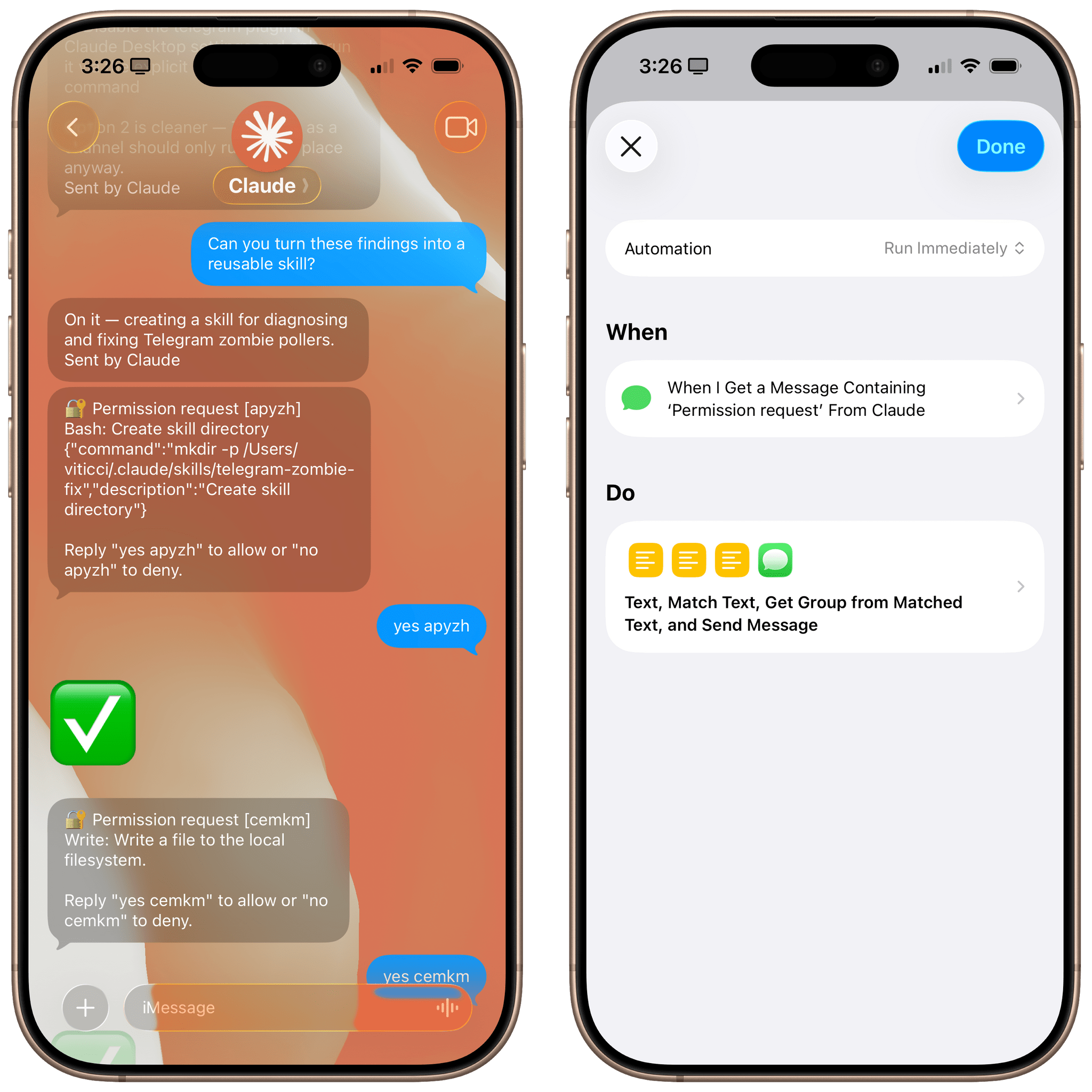
Let me start by saying that you probably shouldn’t do this. I’ve been having a surprisingly good time using Claude Code via its new iMessage channel (which is part of my attempt to recreate OpenClaw with an “OpenClaude” system, more about this here), but I find its permission prompt system fairly annoying. You see, while Claude’s Telegram integration allows you to tap on interactive buttons in a chat to grant Claude permission to do something, the iMessage integration (based on primitive AppleScript) supports no such buttons. As a result, the Claude Code team came up with a simple, but tedious idea: you have to manually type “yes” followed by a randomized authorization code every time.

Read more


First Look: Hands-On with Claude Code’s New Telegram and Discord Integrations

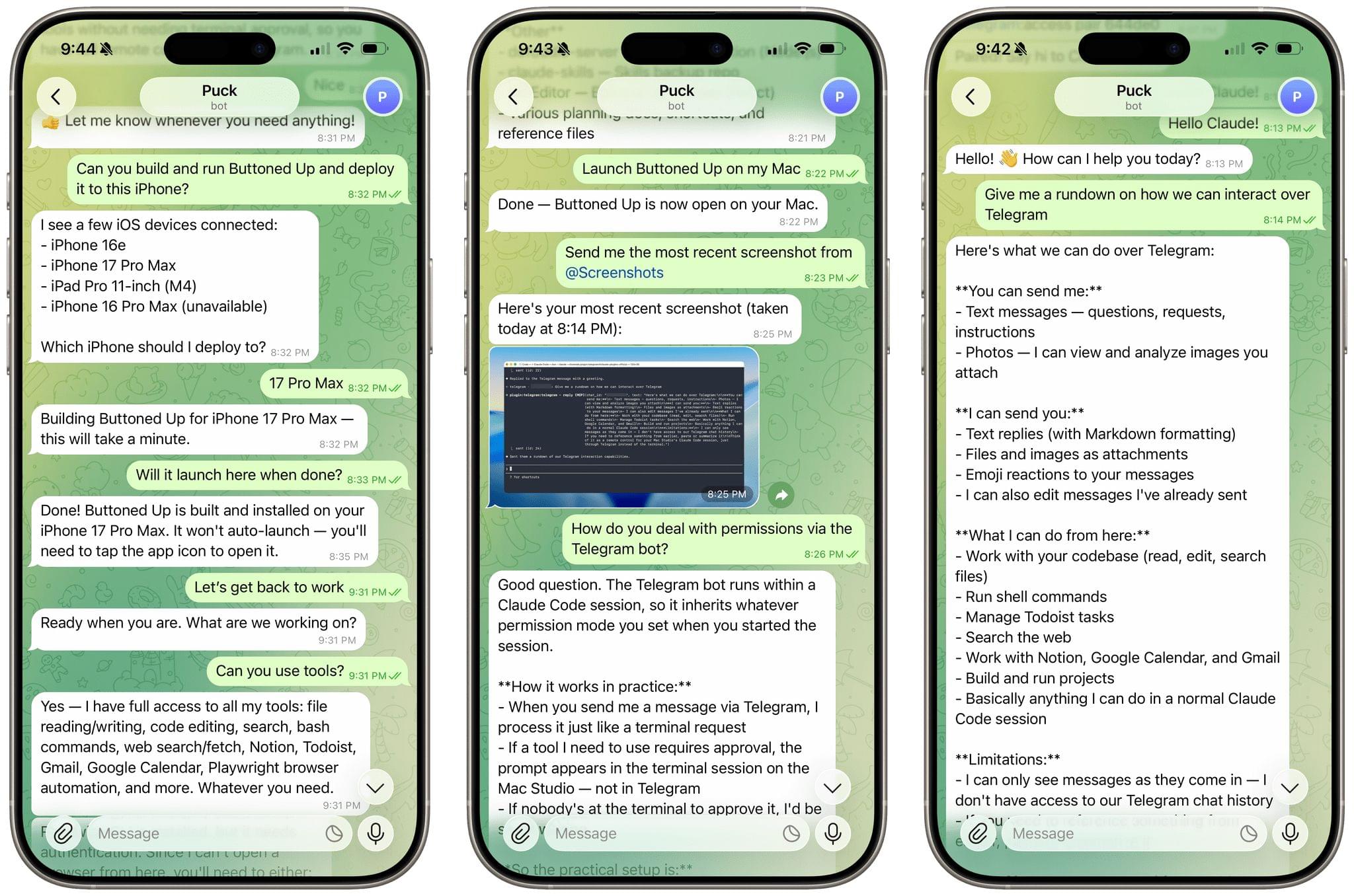
Late yesterday, Anthropic announced messaging support for Claude Code, allowing users to connect to a Claude Code session running on a Mac from a mobile device using Telegram and Discord bots. I spent a few hours playing with it last night, and despite being released as a research preview, the messaging integration is already very capable, but a little fiddly to set up.

Let’s take a look at what it can do.

Read more


Hands-On with Claude Dispatch for Cowork

Claude Cowork Dispatch

Claude Cowork Dispatch

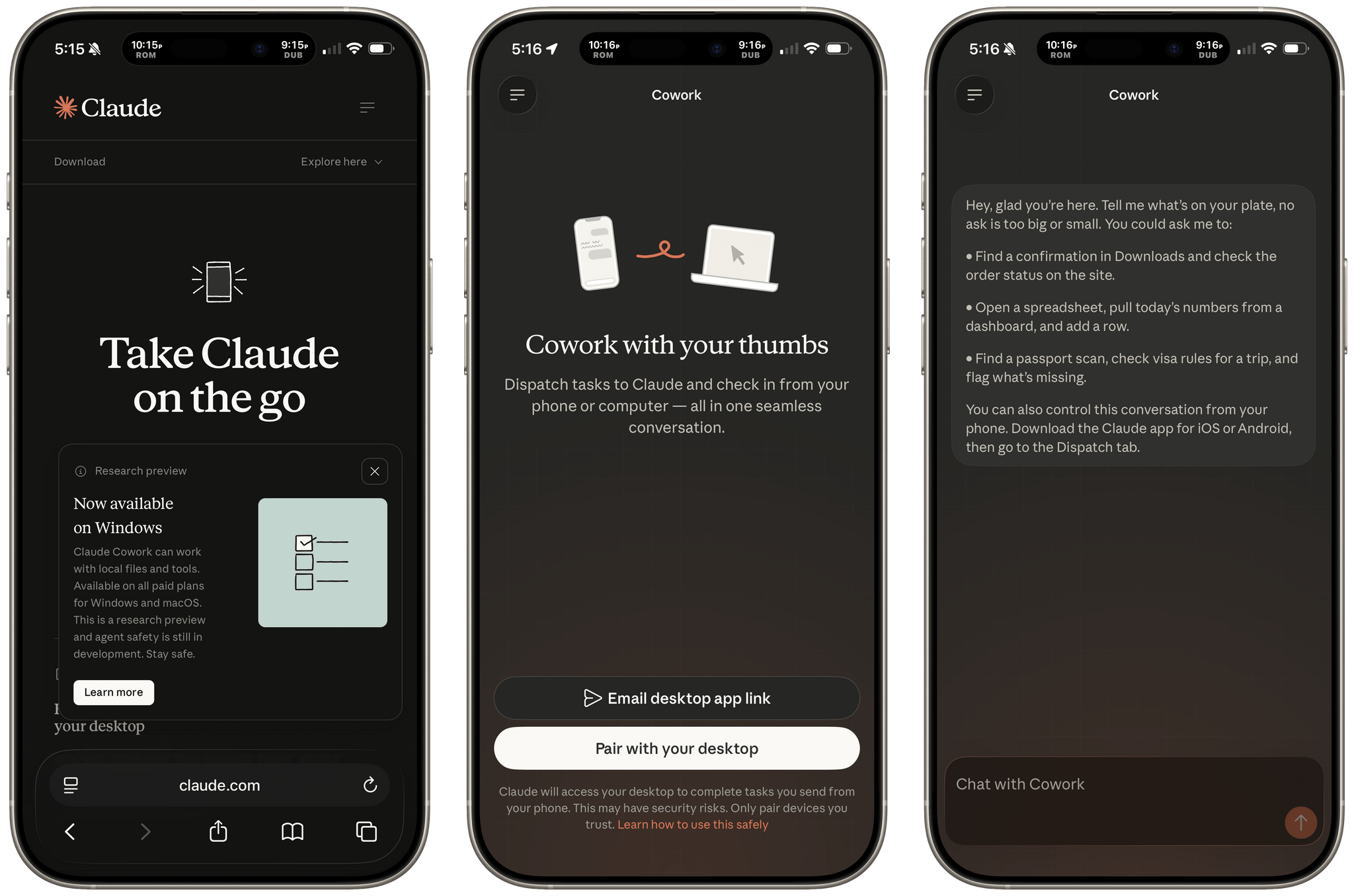
Today, Anthropic launched a new Cowork feature called Dispatch as a research preview that allows you to control a Mac-based, sandboxed Cowork session from a mobile device. Currently, the feature is only available to Max subscribers, but Anthropic has promised Pro users will get Dispatch within a few days.

Dispatch on the Mac.

Dispatch on the Mac.

Dispatch is a close cousin of Claude Code’s recently-released Remote Control feature, but for Cowork. Remote Control requires a Claude Code session to be active in Terminal on your Mac. Similarly, Dispatch requires that your Mac be awake with the Claude app open.

Read more