
Record-Breaking Holiday Season for the App Store

Apple Press Release:

In the two weeks ending January 3, customers spent over $1.1 billion on apps and in-app purchases, setting back-to-back weekly records for traffic and purchases. January 1, 2016 marked the biggest day in App Store history with customers spending over $144 million. It broke the previous single-day record set just a week earlier on Christmas Day.

“The App Store had a holiday season for the record books. We are excited that our customers downloaded and enjoyed so many incredible apps for iPhone, iPad, Mac, Apple Watch and Apple TV, spending over $20 billion on the App Store last year alone,” said Philip Schiller, Apple’s senior vice president of Worldwide Marketing. “We’re grateful to all the developers who have created the most innovative and exciting apps in the world for our customers. We can’t wait for what’s to come in 2016.”

These are some incredible numbers and unsurprisingly Apple dedicates a significant portion of the press release to spruiking how Apple creates and supports 1.9 million jobs in the U.S., 1.2 million jobs in Europe, and 1.4 million jobs in China.

Apple also details some of the most popular apps in the App Store:

Gaming, Social Networking and Entertainment were among the year’s most popular App Store categories across Apple products, with customers challenging themselves to Minecraft: Pocket Edition, Trivia Crack and Heads Up!, and staying in touch with friends and family using Facebook Messenger, WeChat and Snapchat. Games and subscription apps dominated this year’s top grossing titles including Clash of Clans, Monster Strike, Game of War - Fire Age and Fantasy Westward Journey, as well as Netflix, Hulu and Match.

The launch of the all-new Apple TV® and Apple Watch® have paved the way for entirely new app experiences, changing how people consume content through their television and providing useful information at a glance on Apple’s most personal device yet. Since its launch in October, the new Apple TV’s most popular apps include Rayman Adventures, Beat Sports and HBO NOW. Chart-topping apps for Apple Watch owners include fitness apps Nike+ Running and Lifesum, and iTranslate and Citymapper in the Travel category.

Curiously (or perhaps not), there was nothing in the press release specifically about the Mac App Store – which today celebrates its fifth anniversary (more on that shortly).
Permalink

On Twitter Going Beyond 140 Characters

Earlier today, a report by Re/code’s Kurt Wagner indicated that Twitter is building a feature to let users share text updates longer than 140 characters:

Twitter is building a new feature that will allow users to tweet things longer than the traditional 140-character limit, and the company is targeting a launch date toward the end of Q1, according to multiple sources familiar with the company’s plans. Twitter is currently considering a 10,000 character limit, according to these sources.

Re/code first reported about the feature in September, noting how it would enable users to share long-form content on the service.

After much speculation on Twitter and tech blogs this afternoon, Twitter’s own Jack Dorsey weighed in, funnily enough, with a textshot – a screenshot of text apparently taken from the Notes app on iOS (as Jason Snell points out, a popular way to share text beyond 140 characters).

Read more


Connected: What’s a Heart, Really?

This week, the boys talk about how Apple could differentiate the next big iPhone and check back in on iOS 9 after several months of daily usage.

On this week’s Connected, we’ve begun talking about possible changes in the next iPhones and our experience with iOS 9 so far and features we haven’t been completely satisfied with. You can listen here.

See also: a very special b-side.

Sponsored by:

  • Casper: Because everyone deserves a great night sleep. Get $50 off with the code ‘CONNECTED’
  • Squarespace: Build it beautiful. Use code ‘WORLD’ for 10% off.
  • Braintree: Code for easy online payments.
Permalink

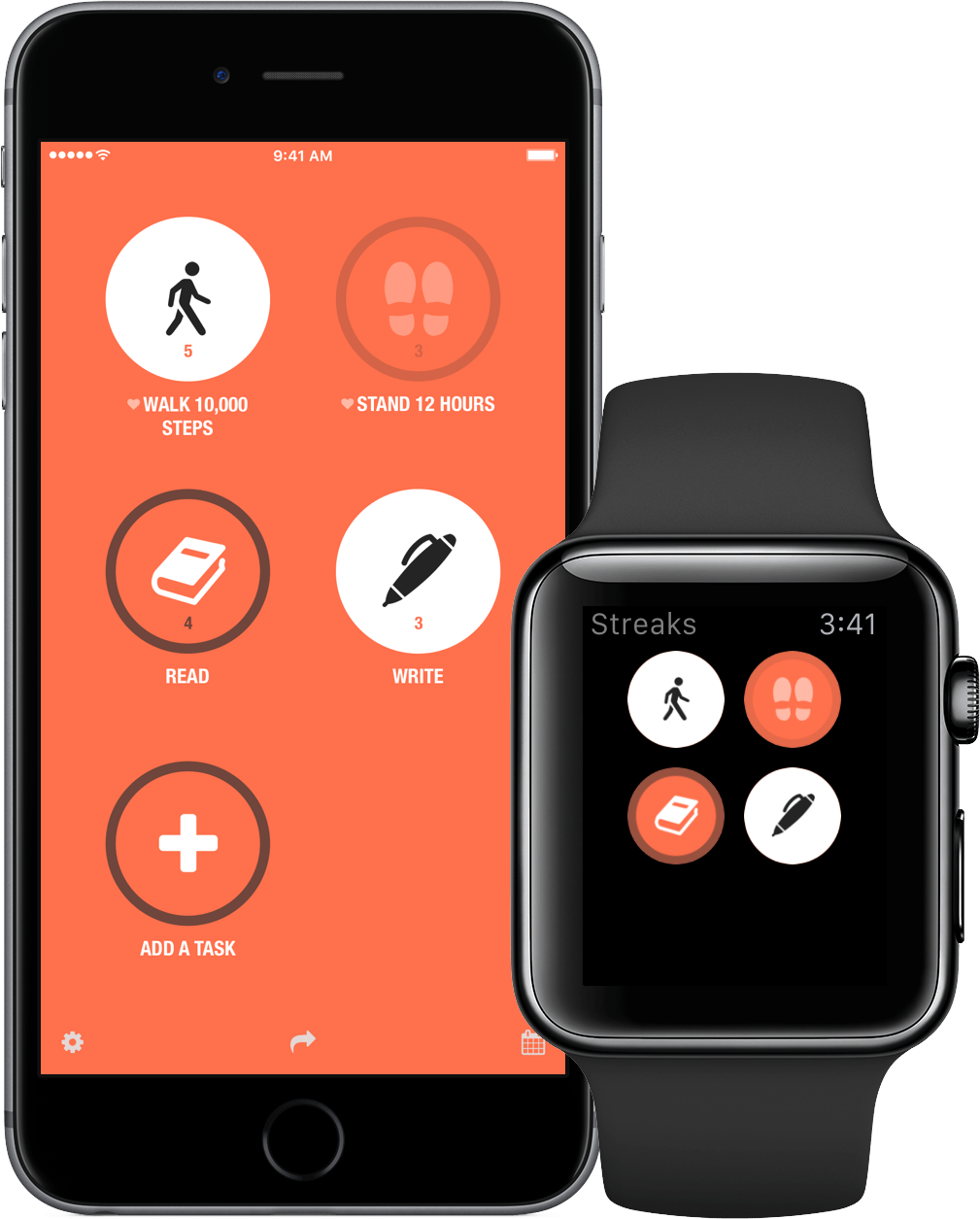
Achieving Personal Goals with Streaks

Good habits are hard to form. Before something becomes a habit that you don’t have to think about, it’s just a task that must be repeated over and over. The trouble is, good intentions only get you so far, which at least for me, is not very far at all.

So how do you get from aspiration to execution? An app isn’t going to magically make you eat better or wake up early to work on your next big project, but through a system of reminders and tracking, Streaks creates a sense of personal accountability that I find helps a lot.

It is easy to see why Apple named Streaks one of the best apps of 2015. Streaks looks great, with a design language that is right at home with today’s iOS, and is a great example of an app with a narrow focus, but deep, singular attention to detail.

Read more


Apple’s App Charts: 2015 Data and Trends

For the past two years, Gilad Lotan (Chief Data Scientist at Betaworks) has been collecting data from Apple’s App Store RSS feeds. Last week Lotan published nine interesting findings in a post on Medium – complete with over a dozen fascinating charts.

Here we can clearly see both weekly cycles in app usage, but also longer term trends throughout the year. Facebook Messenger, which relaunches as ‘Messenger’ in June, stays very close to the top position throughout the whole year, while both Viber and Tango start strong and slowly drifts down the chart. Find My Friends, on the other hand, displays high volatility — drastic changes in ranking, hence app engagement — especially throughout the summer months, and Twitter has clearly weekly cycles.

The best part of Lotan’s story is definitely the accompanying charts, which really help tell the story alongside his commentary. But here’s one more snippet to encourage you to read his whole article:

Here we look at new applications that not only reach a notable spot in the top chart, but also sustain it to some degree. As you can see below, a handful of these apps are music related: SongFlip (free music streaming), Musicloud (stream music from your Dropbox mp3’s), and Free Music HQ (what it sounds). Moments is the Facebook app that helps you find yourself in friends’ photos, and Triller helps users make music videos on their phones. There are also two applications that help upload content into Snapchat. See a trend here? Media, media, and more rich media!

Permalink

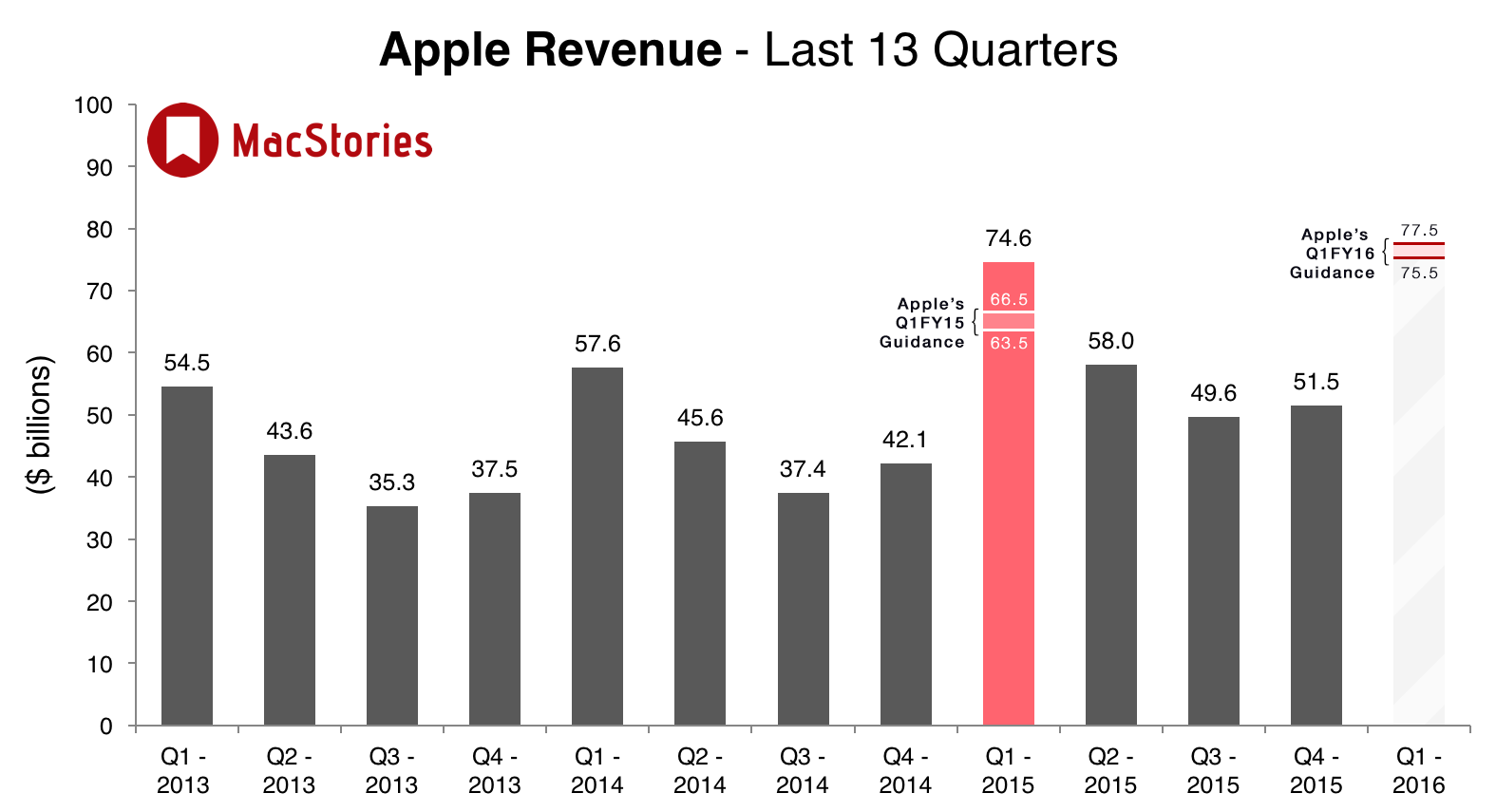
Apple Announces Q1 2016 Earnings Call for January 26

Apple’s Investor Relations website was yesterday updated to note that Apple’s earnings call for the first quarter of fiscal year 2016 (October, November and December 2015) will be held on Tuesday, January 26, 2016. As is usual, Apple will provide a live webcast of the conference call on the day.

Apple’s guidance for the first fiscal quarter of 2016 is revenue between $75.5 billion and $77.5 billion, gross margin between 39 percent and 40 percent and a tax rate of 26.2 percent. But as is illustrated above, Apple’s guidance in the past has often underestimated the actual numbers by quite a significant degree.

As we have for previous earnings calls, MacStories will cover the conference call on our site’s homepage on January 26 starting at 2 PM PT, posting charts of the results, collecting key quotes from Apple executives and highlighting interesting Tweets from others.


The Medium.com Hosted Press Kit

Robleh Jama has been using Medium to share press kits for apps:

When you put everything a blogger needs for their article in one spot, they’re going to like that. They’re going to appreciate you because you didn’t just do what’s most convenient for you. You actually thought about them. And even if they don’t write about you now, it starts the relationships on the right foot.

We kept it as unlisted because we figured that it’d be best for bloggers and journalists to get the details first, before passing it along to their audiences. Unlisted posts on Medium are visible to only those who have the link. It won’t be listed on Medium’s public pages or your profile. You can choose to keep it as a draft, or publish the post as an Unlisted post, like we did, or a public post.

I agree with this. I’ve been sent a few Medium-hosted press releases over the past few months – most recently, one for Pigment – and the experience was better than having to download a bunch of PDFs and folders full of screenshots. Perhaps Dropbox could leverage the convenience of easily editable/linkable documents with Paper (imagine if you could combine text and media stored somewhere else in your Dropbox within a single shared document).

Side note: if you’re looking for something a bit more customizable and advanced, I can’t recommend presskit() enough.

Permalink

Daylite: The Productivity App for Individuals and Teams, Exclusively for Mac and iOS [Sponsor]

Marketcircle helps individuals, teams, and small businesses on the Mac, iPhone and iPad be more productive with their two apps, Daylite and Billings Pro.

For those of you who don’t know about Daylite, it has been around for almost 15 years. Daylite helps you manage clients, schedules, tasks, projects, emails and new business opportunities, all in one app where they’re interconnected. From a single client you can see who referred them, emails to and from, booked or upcoming appointments, pending business deals and even future followups. Or from a single Project you can see each person and their role, the tasks and who’s responsible, meetings about the project, and notes, all in chronological order. Daylite helps you remember everything so you don’t have to worry about anything falling through the cracks. And when you invite team members, you can share this information, assign tasks or check each others calendars before scheduling meetings.

And with the recent release of Daylite 6, Marketcircle has made it even easier to get started. Create an account and login from your Mac, iPhone or iPad, then works with or without an Internet connection. Daylite will sync changes between devices and teammates when a connection is available. Marketcircle includes a 30 day trial for Daylite, with monthly and yearly plans.

You can even read about other companies using Daylite here.

Our thanks to Marketcircle for sponsoring MacStories this week.


iPad Pro and OS X with Screens

Eddie Vassallo, writing on the Entropy blog on using the iPad Pro in combination with a Mac mini via VNC:

The beauty of a single machine fully dedicated to the iPad Pro is that we always have a full OS X instance at the ready for anything that arises - from exporting and compiling app builds to transcoding video, to downloading and uploading large files. Heck, we’ve even found it useful for firing up a desktop instance of Chrome when pesky sites misbehave on mobile Safari. It has truly filled the gap for any desktop-class workflows we require (that have not already been fulfilled with an iOS App or Web-based method).

Before switching to the iPad as my only computer and before iOS 9 multitasking (I would say between 2011 and 2014), this is also what I did. I set up a personal mini at Macminicolo (a fine company which also hosts this very website) and relied on Edovia’s excellent Screens app to access desktop apps like iTunes and Chrome. I also used to keep the mini always running for Hazel rules (here’s an archive of posts about it) and other desktop automation. I do most of this stuff directly on iOS now, but if you need a Mac for some key tasks, Screens with iOS multitasking sounds better than ever.

Permalink