This Week's Sponsor:

Copilot Money

Copilot Money, The Best Money Tracker, Launches on the Web – Limited-Time: Get 26% Off + 2 Months Free


Track Your Water Consumption with WaterMinder

Drinking water consistently has never been a habit I’ve been able to master. The benefits are obvious, of course, but I’ve always fallen back on picking up a soda as my drink of choice.

After spending time with WaterMinder, I’m beginning to feel a conflict – as much as I love soda, I now have a motivation to drink water more frequently. By providing me with a visible goal to reach, WaterMinder has already challenged my habits.

The Goal

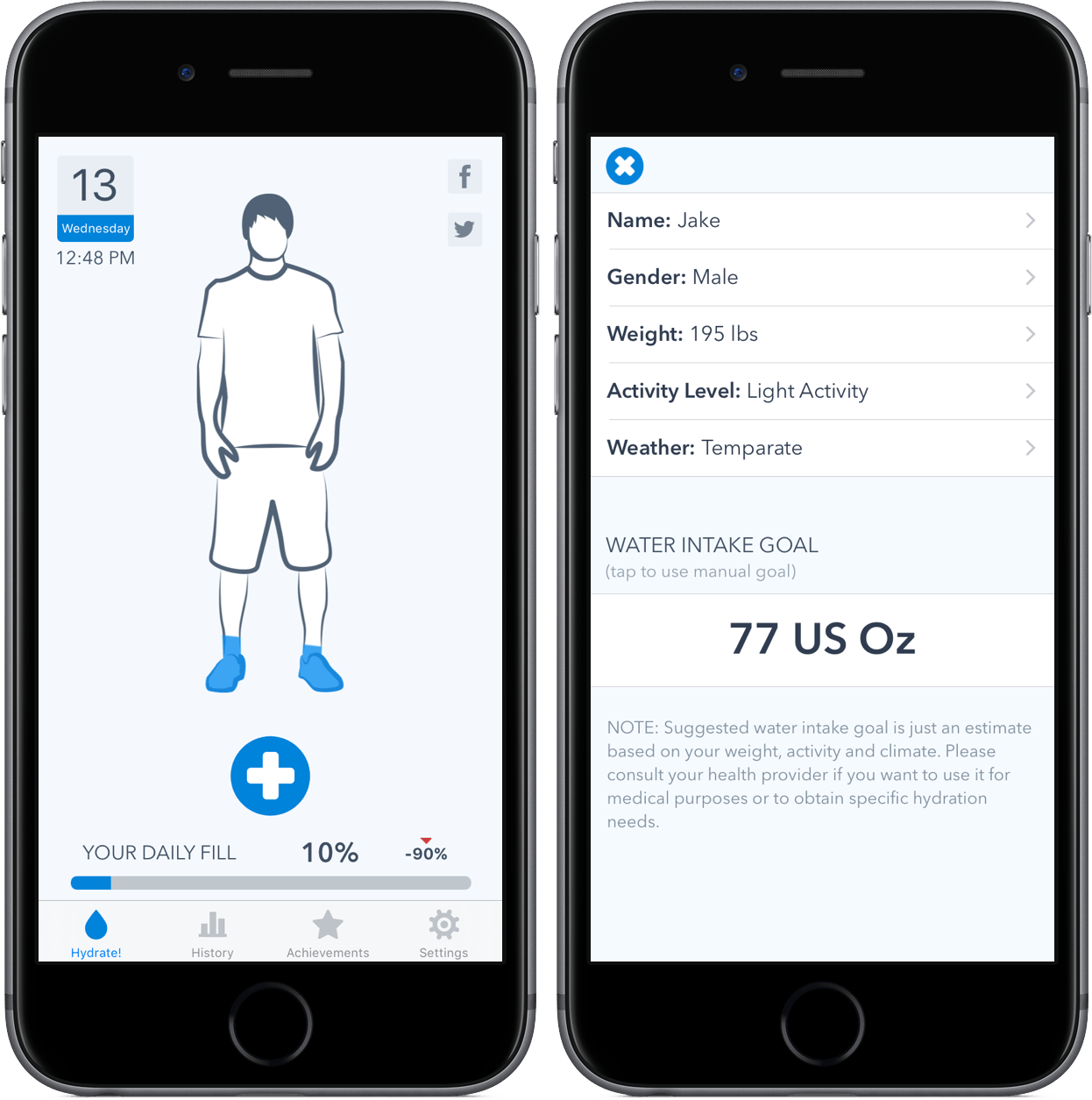
WaterMinder’s goal is to, quite simply, help you drink water. Similarly to how the Activity app aims to provide movement goals based on height, weight, and general activity lifestyle, WaterMinder calculates and presents you with a specific ounce count for the amount of water you should drink every day. By reminding you at certain intervals (I’ll get to that a little more in a bit), the ultimate goal is to fill up a meter, a completion of the goal.

iPhone/iPad App

Although the app runs on iPhone, iPad, and Apple Watch, the iPhone version of WaterMinder is the hub where you’ll customize the experience. After a simple setup and explanation process, you’ll need to give WaterMinder access to some health information stored on the phone. By doing this, your water intake will be logged in both Health and WaterMinder; additionally, the app will copy over your general information in order to calculate your daily desired water intake.
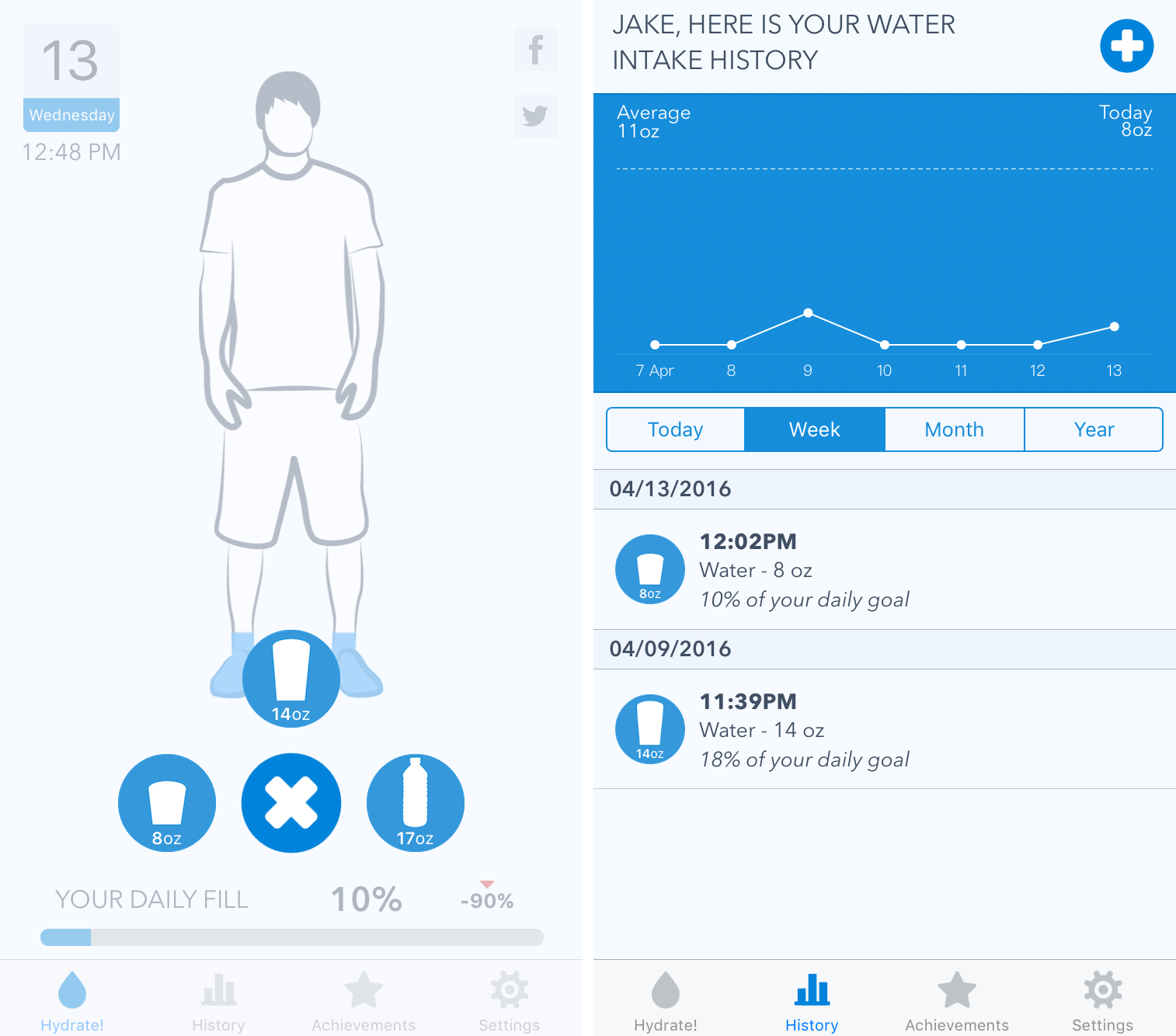
Logging water and the history tab.

Logging water and the history tab.

Once formed, your journey with WaterMinder is fairly straightforward – when you’ve consumed water, you’ll log it. By default, the app comes with three sizes of cups (WaterMinder specifically says “cup sizes,” but I’m not too sure about this phrasing…): 8 oz., 14 oz., and 17 oz. As you drink more water, your number percentage will fill up, covering the graphic blue.

In addition, a history tab includes your water intake history, such as times you’ve logged and what sizes you’ve consumed. The time frame for this can be changed between today, week, month, and year, so you’re able to get a big picture idea of how your water consumption habits have fared.
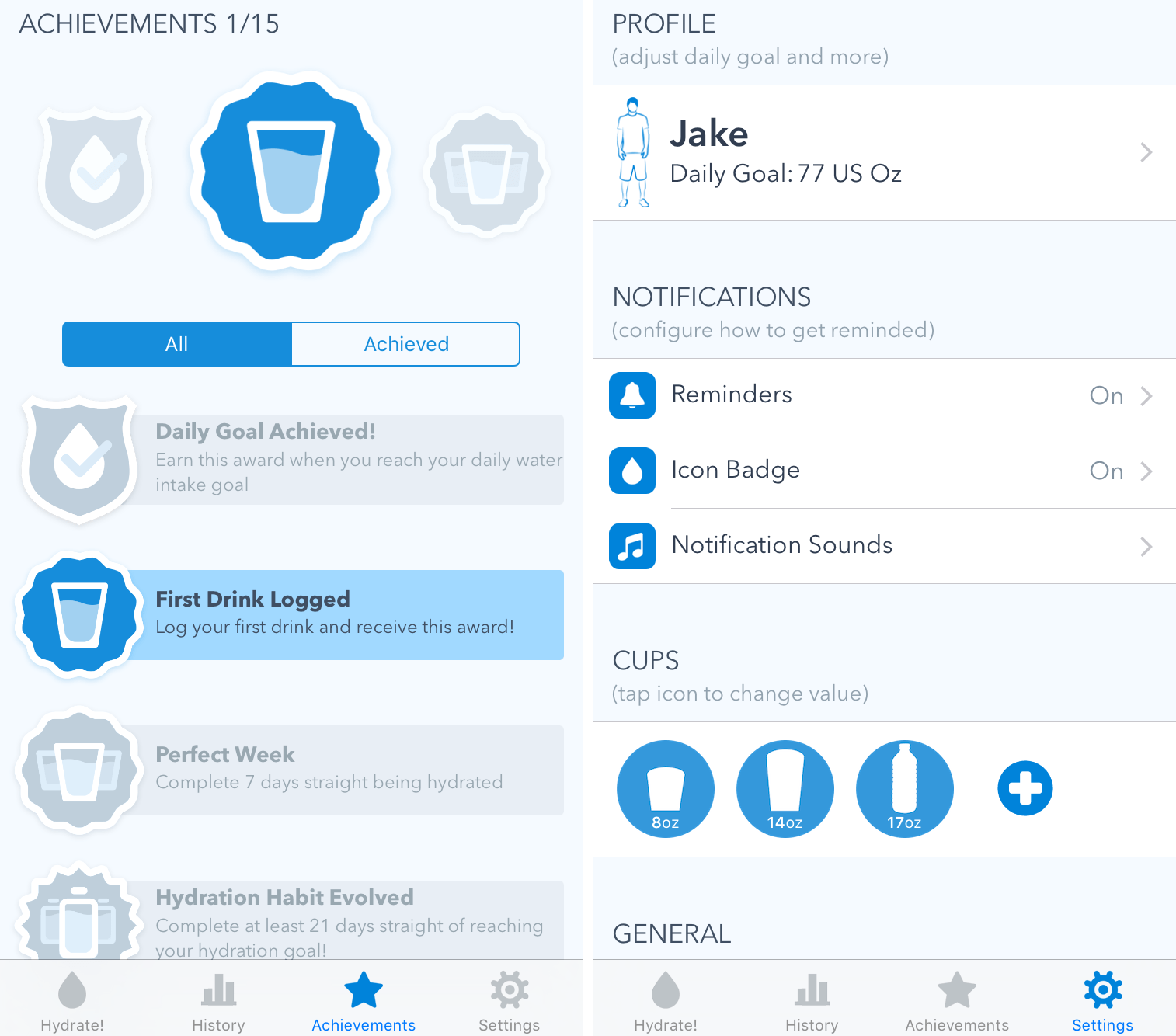
Achievements and settings.

Achievements and settings.

The “Achievements” section contains fifteen badges that can be awarded by completing various tasks. For example, after you log your first drink, you’ll receive an achievement. Completionists may find this appealing, but it didn’t do much for me.
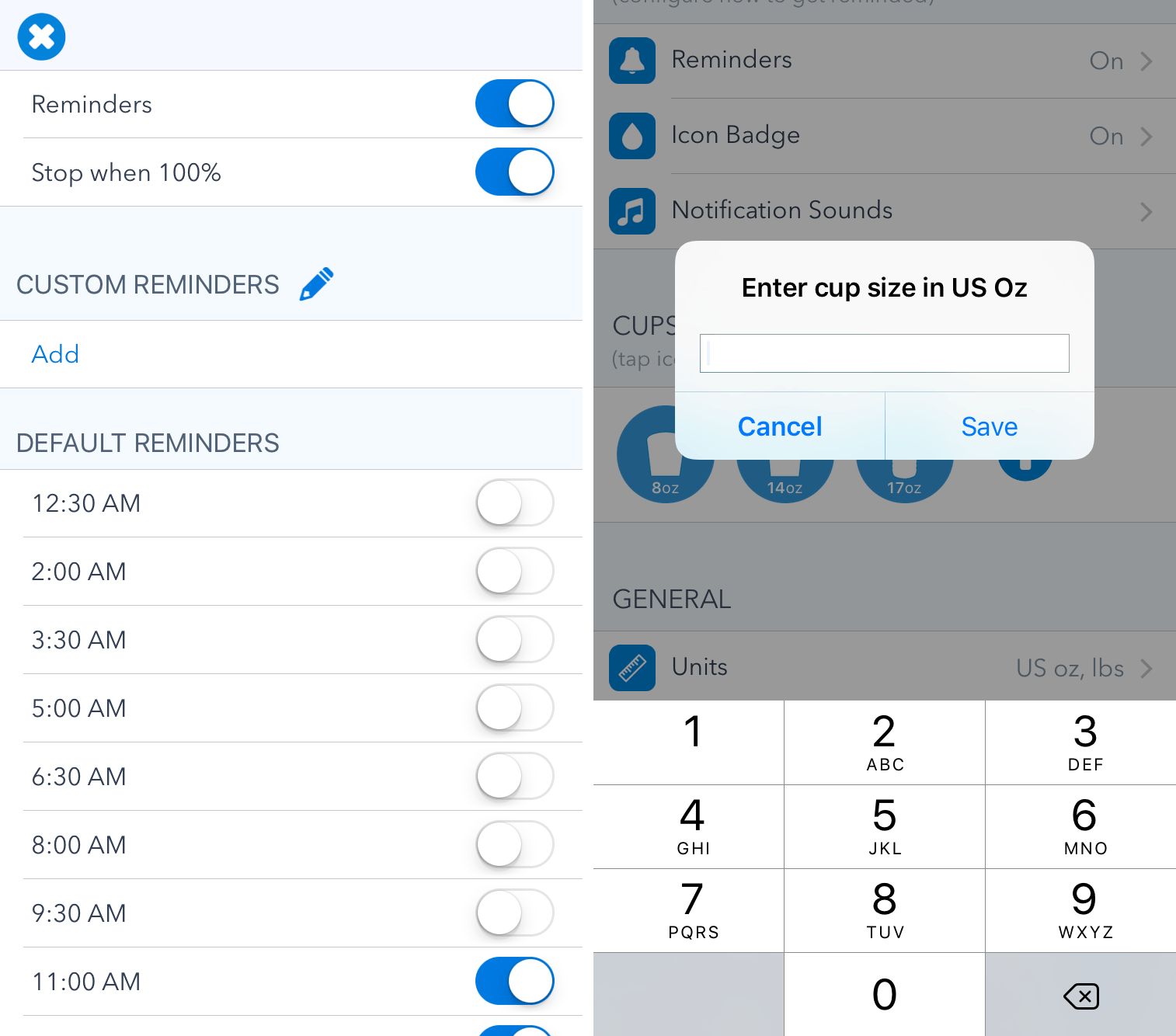
Reminders and custom containers.

Reminders and custom containers.

Finally, a wide variety of settings can be customized to create the optimal user experience. While I’ll include a screenshot above, I want to point out two that are vital to the usage of WaterMinder: Reminders and Cups.

In the Reminders settings (which is within the notifications section), you’re able to tell WaterMinder when you’d like to be nudged to log your water intake. By flipping switches for reminders ranging from 12:30 AM to 11 PM, you can set a schedule for when you’d like WaterMinder to ping you. There is also the option to add custom reminders at the times of your choosing.

With cups, it’s easy to add a custom container by entering in its ounce count. By doing this, you can tailor the values to meet various water bottles you may use. This is a great inclusion and one that prevents people from having to calculate every time they want to add an amount that is not included by default.

By default, WaterMinder will display a badge on the app icon that shows how many ounces of water you’ve drank so far during the day. On supported devices, pressing on the icon allows you to log preset amounts without entering the app.

Apple Watch App
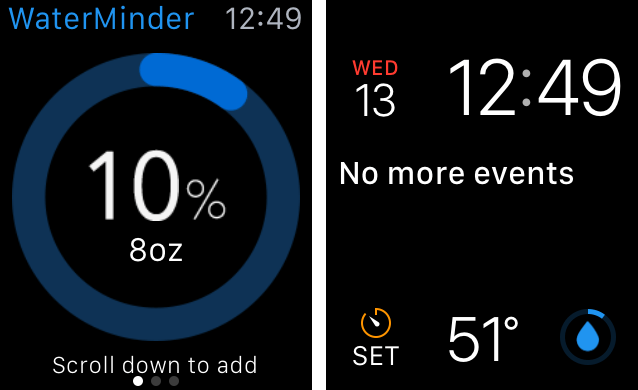
WaterMinder on the Apple Watch does not try to be a full-fledged app; rather, it is a, ahem, watered-down version of the iPhone app. Included is your water consumption information, the logging history for the past two weeks, and the achievements mentioned above. You’re also able to add water to the day’s amount from the Apple Watch, which is often times quicker than entering it from your iPhone.

WaterMinder’s glance is, unfortunately, fairly useless – it shows how much time is left in the day and how many more ounces of water until the goal is reached. By the time you swipe up and find the glance, it’s just as quick as opening the app.

However, a much better inclusion is that of a complication, which is manifested through WaterMinder’s ring on the watch face. Although it’s simple, it’s an easy way to see how close to the goal you are.

Wrap-Up

Owners of multiple iOS devices will be pleased to know that WaterMinder will sync its data and keep it updated. While I was slightly concerned that this was not the case when I had to enter my information on the iPad, the data caught up quickly.

My one complaint with WaterMinder is that it is always portrait on the iPad. I’d like to see the app redesigned so that it could run in landscape; removing my keyboard, flipping the device, and entering in data is not an optimal experience.

WaterMinder is a mature app that knows exactly what its purpose is. By recognizing this, it doesn’t provide an unnecessary amount of features that cause confusion. WaterMinder is a one-trick pony, but it does its trick so well that I can’t imagine ever tracking my water with anything else.

WaterMinder can be purchased in the App Store as a Universal app for $1.99.

Connected: A Tangerine in My Trunk

This week, Myke speaks about his two-iPad setup, Federico discusses his Telegram usage and Stephen interviews Kristen Gallerneaux from The Henry Ford Museum about their working Apple I.

This was a fun one: Stephen had a great interview with Kristen Gallerneaux of The Henry Ford Museum and we talked about Myke’s dual iPad setup. I also offered a bit of background on why we’re trying a Telegram channel for MacStories.

You can listen here.

Sponsored by:

  • Memories: Relive your Photos from the Past
  • Arq: Automatically back up all your Macs and PCs. Your files are stored securely, readable only by you.
Permalink

Smile Adjusts Pricing For Existing Customers of TextExpander

Smile Software found itself at the center of a firestorm of controversy last week when it moved to a subscription pricing model for TextExpander that made a lot of sense to business users, but less so for individuals. To its credit, Smile has listened to customer feedback and is instituting two changes to what was announced last week.

  • First, existing customers of TextExpander will receive a lifetime 50% discount on its new subscription service, instead of a discount on the first year only. With this change, existing customers can continue to enjoy TextExpander and future updates for $20/year.
  • Second, TextExpander 5 for Mac and TextExpander touch 3 for iOS will continue to be sold and maintained. So, if you prefer, or need, Dropbox or iCloud syncing of your text snippets, you can continue to use these products.

Software pricing is hard, and it’s never been more difficult to build and maintain sustainable Mac and iOS apps. Smile’s initial decision struck many as an abandonment of consumer software for an enterprise model. As Smile Founder Greg Scown explained on Smile’s blog, that is not the case:

To some of you it may seem we don’t care about our individual customers any more and only care about business use. We care about both, and in the changing software world a single focus is not a viable long term strategy for TextExpander. We did not make these changes easily or lightly, but for the long term life of the product so we can all enjoy it and engage with it for many years to come.

I’m glad to see Smile make these changes. It’s not easy to balance the needs of business and individual customers, but I think the changes announced today strike a fair balance that addresses the legitimate complaints that many individual users of TextExpander had with its new business model. I for one am signing up.


Arq 5 Brings Significant New Features and a Major Licensing Improvement

Arq Screenshot

Arq Screenshot

For years, Arq Backup has been often overlooked when talking about backup solutions for the Mac, despite the fact that it is one of the easiest and most flexible options, as well as the most configurable. If you are really concerned about the privacy and security of your backups, you should take a close look at Arq.

Today marks the release of version 5 of Arq, a little over 6 years since its first official release, and it contains many awesome new features, but one significant change that I want to highlight right up front is this: Arq v5 moves from a per computer license to a per user license. That means that instead of having to buy a new license for each Mac you own, one license covers them all. This makes Arq a much more affordable option for people who use multiple Macs. It also means this is the time to take a closer look at what Arq offers.

Read more


With Version 1.1 and an iPad App, I’m Switching to Airmail

When I first covered Airmail for iPhone, I noted how the vision of an email client for power users on iOS was only halfway there due to the lack of an iPad app and a variety of glitches and technical issues. Airmail showed that it was possible to build an email app for power users on mobile devices – asking for a fair price in the process – but I couldn’t switch to it as my full-time client yet.

That’s changing with today’s update to Airmail for iOS, which I’ve been using as my only email client on the iPhone and iPad for the past several weeks. In addition to an iPad app – which mostly follows in the footsteps of its iPhone counterpart in terms of UI and navigation choices – Airmail 1.1 brings powerful new features such as saved searches, customizable keyboard shortcuts, support for send later and read receipts, and more.

While the majority of “modern” email clients are focused on reinventing email with new display options for the inbox and novel interfaces, Airmail wants to redefine how much control you’re given over your email on iOS. Which is to say – Airmail is the most powerful email app for iOS out there right now, treating iPhone and iPad users with the same respect and attention other developers would only show for their Mac apps.

Read more


Apple Pulls Third-Party Reddit Clients for NSFW Content

Update (4am PDT 12 April 2016): Some of the third-party Reddit clients have now returned to the App Store. Both Narwhal and Antenna are now available in the App Store, but both have been updated to remove the NSFW toggle that used to be in their apps. It is our understanding that Apple’s objection is with the implementation of those NSFW toggles. Apple wants them removed from all Reddit apps so that if a user does want to view NSFW content, that toggle must be manually changed from the Reddit website.

Today, numerous third-party Reddit clients were removed from the App Store by Apple for breaching clause 18.2 of the App Review Guidelines. This clause states that apps will be rejected if they contain “user generated content that is frequently pornographic”.

The official Reddit app, which launched last week and was featured by Apple on the App Store, currently remains in the App Store, but other Reddit clients including Narwhal, Antenna, Eggplant and BaconReader have all been removed for sale. These third-party Reddit clients were removed from Apple without any advance notice to developers, despite some of the apps being available on the App Store for well over a year. It should also be noted that many of these third-party apps, such as Narwhal, did have a filter to enable or disable NSFW content.

It is our understanding that Reddit did not ask Apple to remove the third-party Reddit apps. This aligns with Reddit’s statement from last week (after the launch of the official Reddit app) in which Reddit’s VP of Consumer Product stated “if you already have an app you like, you’re free to continue enjoying it”.

Rick Harrison, co-author of the Narwhal Reddit client provided this quote to MacStories:

It also seems that a few other popular third-party Reddit apps were removed from the store, but not the official Reddit app. I reached out to Reddit asking them if they knew anything, and they informed me that they did not request Apple to pull these apps, and they were also receiving issues from Apple about 18.2. I think that Apple did not pull their app because they are a big company and were recently featured. As shown time and time again, Apple does not really care whatsoever about indie developers. From taking 30% of barely any revenue to rejecting apps based on features that have been available for 18+ months.

It is too soon to say, but Apple’s actions today may well be the latest example of policy and procedural failure on App Review. We covered this topic in detail in a story last month which chronicled the depth of developer frustration at App Review.

We will continue to monitor this story and provide further updates and details as we come across them.


Sean Malto Skateboard Documentary Shot on iPhone

Ghost Digital Cinema released a documentary about professional skateboarder Sean Malto that was shot entirely on an iPhone using an app called FiLMiC Pro, which is just $9.99 on the App Store. The filmmakers supplemented the iPhone with equipment like professional lenses, a gimbal and a drone, but the heart of the operation was an iPhone and a $10 app.

In addition to the documentary, Ghost Digital Cinema posted a behind the scenes video explaining how they made the Malto documentary. The amazing things that people make on their iPhones never never ceases to amaze me.


That Emoji Does Not Mean What You Think It Means

Alissa Walker, writing for Gizmodo on a fascinating study about emoji implementations across different platforms:

A study by the GroupLens Research team at the University of Minnesota examines the variations between some popular emoji presentations and how they are perceived. The most widely misinterpreted is the “grinning face with smiling eyes” emoji, which—depending on the platform—can range from the rosy-cheeked cherubic face of glee to the anguished clenched-teeth look of constipation.

Just seeing the difference in emoji presentations is revelatory in itself. But then it gets even more interesting. GroupLens researchers asked subjects to rate 22 anthropomorphic emoji from five platforms by sentiment, using a scale that ranged from strongly negative (-5) to strongly positive (5). And here’s where you start to see where “grinning face with smiling eyes” goes so very wrong. Apple’s average sentiment ranking was almost -1, while Microsoft, Samsung, LG, and Google all were 3 or above.

It’s curious to see what happens when you only have a loosely defined standard.

Permalink

Daylite: The Productivity App for Individuals and Teams, Exclusively for Mac and iOS [Sponsor]

This week is sponsored by Marketcircle, the developers of Daylite.

Daylite is a business productivity app that organizes your contacts, calendars, tasks, emails, notes, projects, and new business opportunities – all in one app. It helps you stay on top of calls and meetings, prioritize your tasks, and track projects and new business opportunities on your Mac, iPhone, and iPad.

You can use Daylite on your own to manage your solo business, or use it within a team to schedule meetings, delegate tasks, and track projects together. Daylite is a native app so you don’t need an Internet connection to use it. Your information is stored right on your Apple device so it’s always with you. When you get an Internet connection, it syncs your Mac, iPhone, and iPad so you and your team are up-to-date.

Daylite is loved by consultants, real estate agents, lawyers, photographers, designers, and more. For many small businesses, Daylite is the lifeline of their business and “makes order out of what would otherwise be chaos”. Learn how small businesses use Daylite to stay organized and increase productivity on Marketcircle’s website.

Our thanks to Marketcircle for sponsoring MacStories this week.