Introducing Shortcuts Playground: Create Apple Shortcuts with Claude Code or Codex

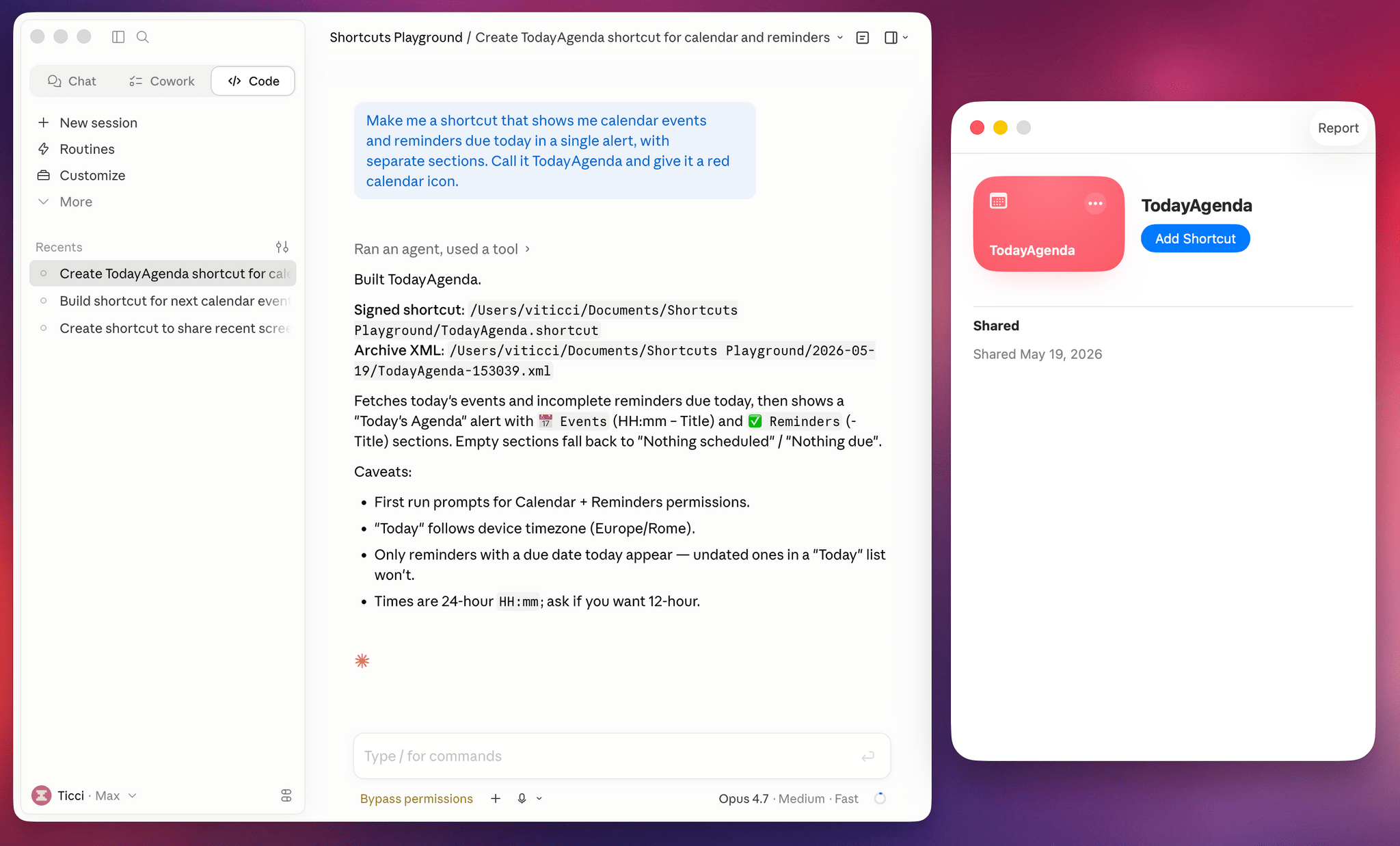
Shortcuts Playground in Claude Code.

Shortcuts Playground in Claude Code.

Today, I’m pleased to introduce something I’ve been working on for the past six months: Shortcuts Playground, a plugin for Claude Code and Codex that can create any shortcut for Apple’s Shortcuts app using natural language. With Shortcuts Playground, you can simply prompt Claude Code or Codex with a sentence requesting a shortcut of any kind; a few minutes later, you’ll end up with a real shortcut in Finder, ready to be imported into the Shortcuts app. It’s as simple as that.

Shortcuts Playground is free and open source: anyone can download the plugin from this GitHub repo, where I extensively documented how it works behind the scenes and where you can also inspect the code yourself.

Just point your preferred desktop agent to the repo, and it’ll find the plugin marketplace to install it for you. You can also check out the dedicated mini-site we launched for it at macstories.net/shortcuts-playground.

For Club MacStories+ and Premier members, I’m also releasing Shortcuts Playground as a generative shortcut. It’s quite meta: once you have the main plugin installed on a Mac, you can use a shortcut to make more shortcuts and install them directly on an iPhone, iPad, or other Mac. The Shortcuts Playground shortcut is highly customizable, and I’ve shared a detailed guide for Plus and Premier members here.

As part of this announcement, we’re also launching the completely redesigned MacStories Shortcuts Archive. The new archive is easier to browse with new categories and filters, and it also includes 100 shortcuts that were entirely generated by Shortcuts Playground and verified by me. I figured that it’d be nice to offer concrete evidence of Shortcuts Playground’s capabilities; I think 100 shortcuts should do the trick.

You can read more about the new MacStories Shortcuts Archive here.

Read more


Book Beats: Reading to the Rhythm

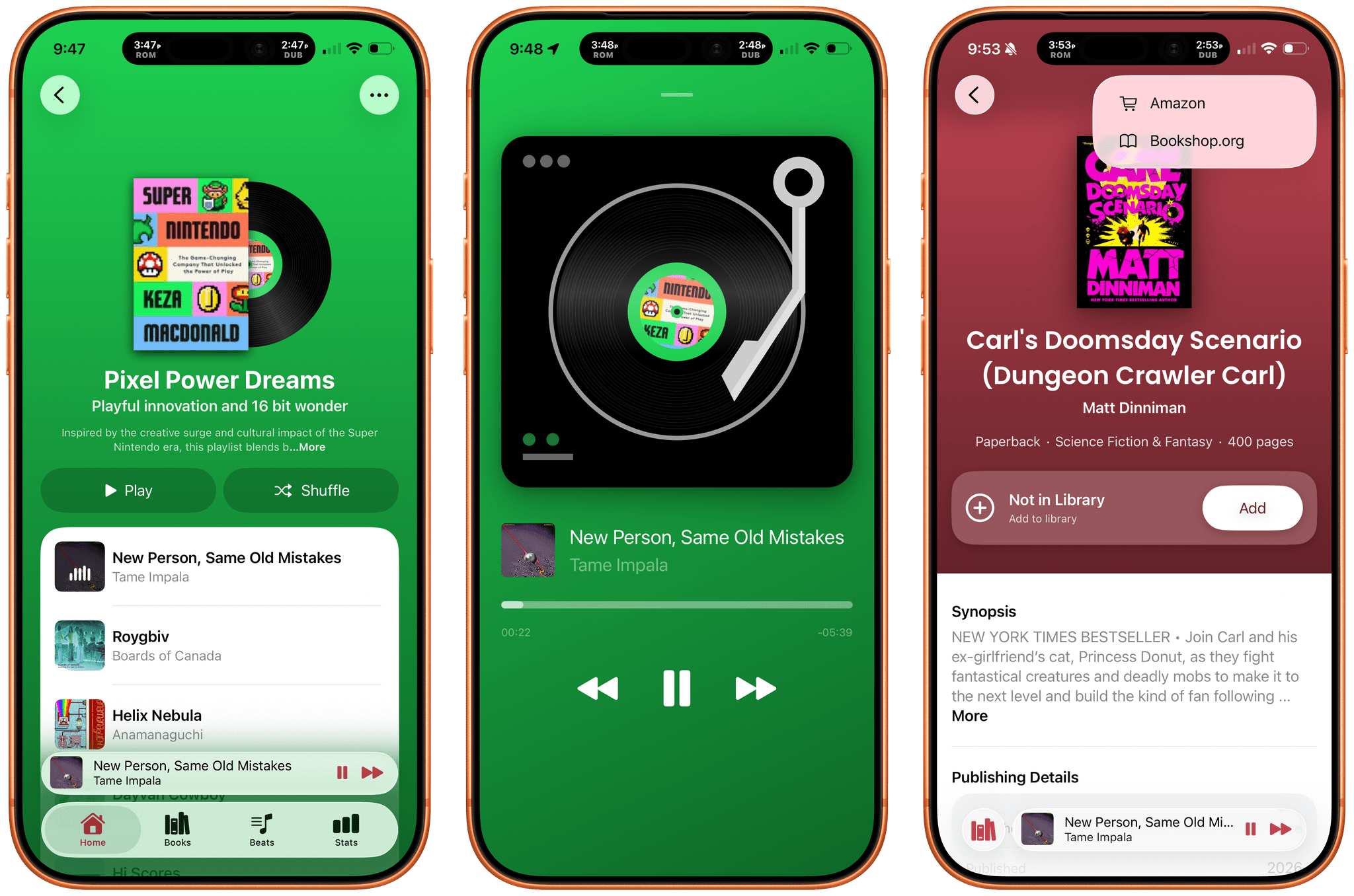
Tracking the books you read is well-trodden App Store ground. So is making music playlists. But what if you combined the two? The result is Book Beats, a new iPhone and iPad app from Olea Studios’ Casey and Lisa Doyle, that does just that, managing to elevate books and music in a new and unique way by bringing reading and listening together. It’s a terrific example of an app made by people who deeply understand its subject matter and bring AI to bear in a focused, tasteful way that elevates the app’s experience without being gimmicky.

Read more


Real Madrid Immersive Documentary Releases This Friday on Apple Vision Pro

Source: Apple.

Source: Apple.

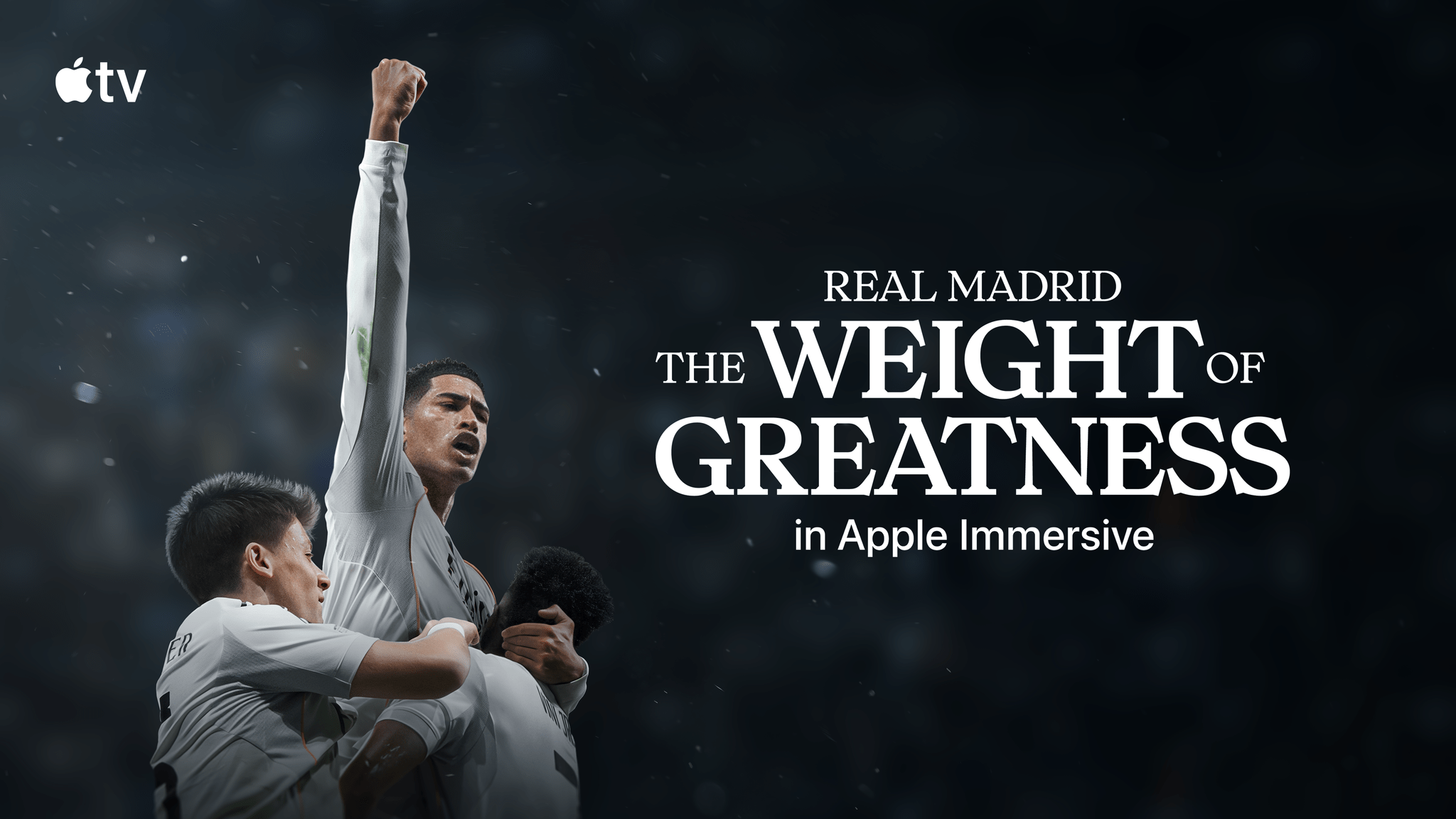
Apple’s push into immersive sports continues this Friday with the release of Real Madrid: The Weight of Greatness, an immersive documentary centering on the world’s most decorated football club. With a running time of 20 minutes, the short film records the action surrounding the team’s match against Juventus in the 2025 Champions League tournament through a combination of game footage, behind-the-scenes looks, newly spatialized historical photos, and interview with fans and players alike.

The documentary was announced last November by Eddy Cue, Apple’s senior vice president of services and health, and Real Madrid president Florentino Pérez. Real Madrid has shown a longstanding interest in using emerging technologies to engage fans, with Pérez referencing the idea of an “Infinite Bernabéu,” an immersive digital version of the team’s stadium where fans can experience matches close up in VR. For this project, directors James Marsh and Hector Dockrill and director of photography Xialong Liu outfit the real stadium with over 30 Blackmagic URSA Cine Immersive cameras to give viewers a taste of what football fandom could look like in the age of spatial computing.

As someone with very little familiarity with Real Madrid – or, let’s face it, sports in general – I came into this film with very few expectations. What surprised me, though, was how quickly I was swept up in the thrill of it all and found myself on the edge of my seat waiting to find out how this football match (which, again, was played many months ago) would end. Between the storytelling, the music, and the all-encompassing immersion of it all, I got drawn in.

Read more


Apple Intelligence-Infused Accessibility Features Promise Greater Flexibility and Power

Source: Apple.

Source: Apple.

In what I expect will be an overarching theme at WWDC 2026, Apple’s Accessibility group took the wraps off an impressive collection of features coming later this year. The announcement, which is timed to lead into Global Accessibility Awareness Day on Thursday, emphasizes existing features and technologies that the company says will gain deeper capabilities thanks to Apple Intelligence.

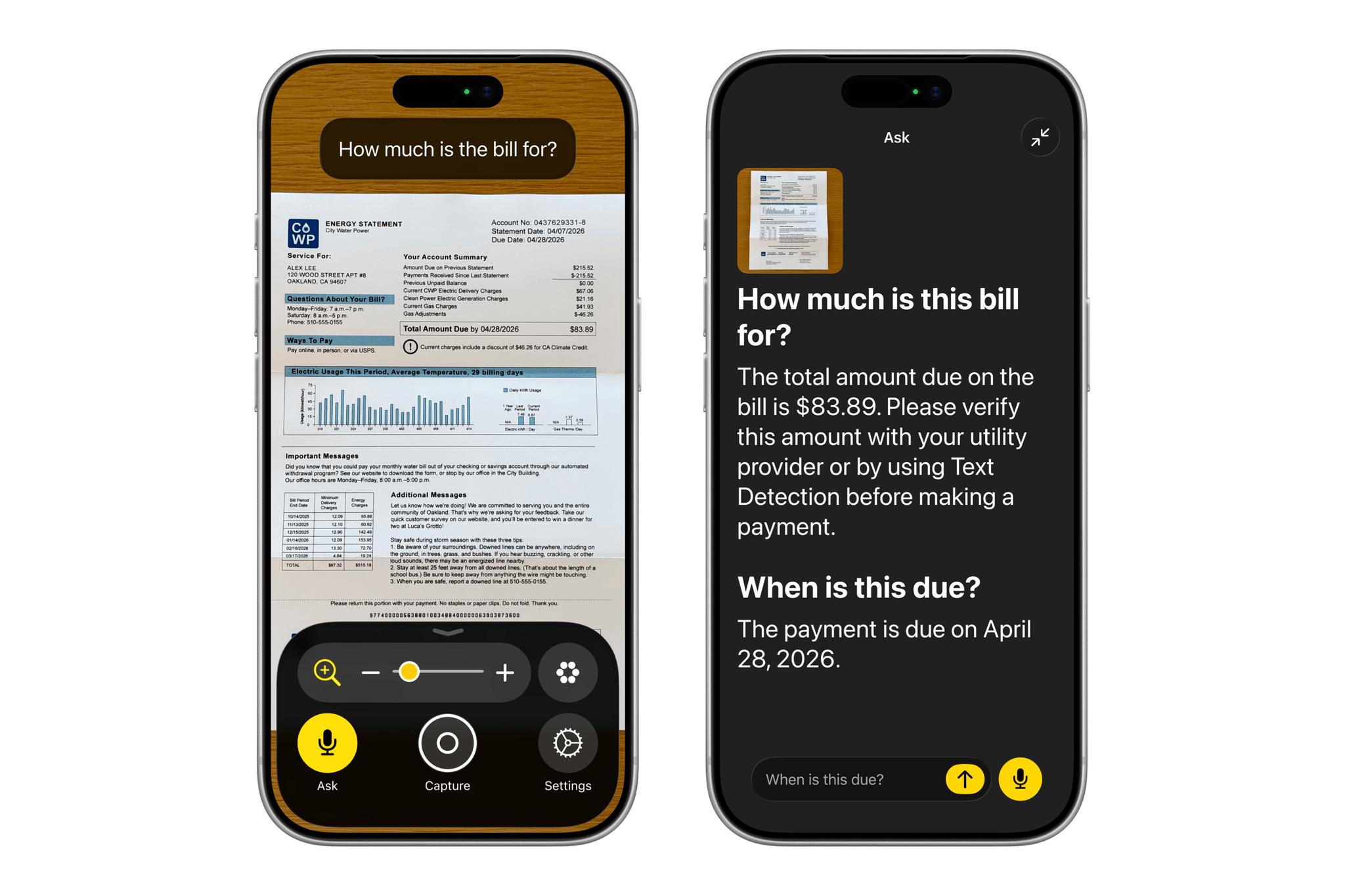
For starters, VoiceOver will become more descriptive, allowing a device’s camera to be used to describe the user’s surroundings or a scanned document in greater detail. The feature will also make use of the Action button to trigger the camera and allow users to ask questions and make follow-up inquiries about what’s in the viewfinder. The Magnifier will gain voice controls, too, so users can simply ask it to zoom in, for example.

Source: Apple.

Source: Apple.

Voice Control will get similar enhancements. Rather than requiring a defined set of commands that need to be memorized to control a device, the feature will allow users to invoke actions with natural language, such as, “Tap the orange folder.”

Accessibility Reader will be able to handle more complex written layouts that include tables, columns, and other traditionally challenging formatting. If there’s one thing that LLMs have become extremely good at, it’s scraping the web and learning how to parse the meaningful parts of a webpage. While I’d have preferred that the web not have been pillaged as fuel for models in the first place, I’m glad at least part of that is going towards making the web and other text more readable for people who need it.

One of my favorite demos that Apple showed off during my briefing was a short video shot on an iPhone that had subtitles added to it on the fly using an on-device model. We’ve grown so accustomed to subtitles being available with the TV shows, movies, and YouTube videos we watch that they feel like they’re missing from the home movies we shoot and share with friends and family. Later this year, though, subtitles will be available for all types of video, generated privately on device.

Vision Pro wheelchair control. Source: Apple.

Vision Pro wheelchair control. Source: Apple.

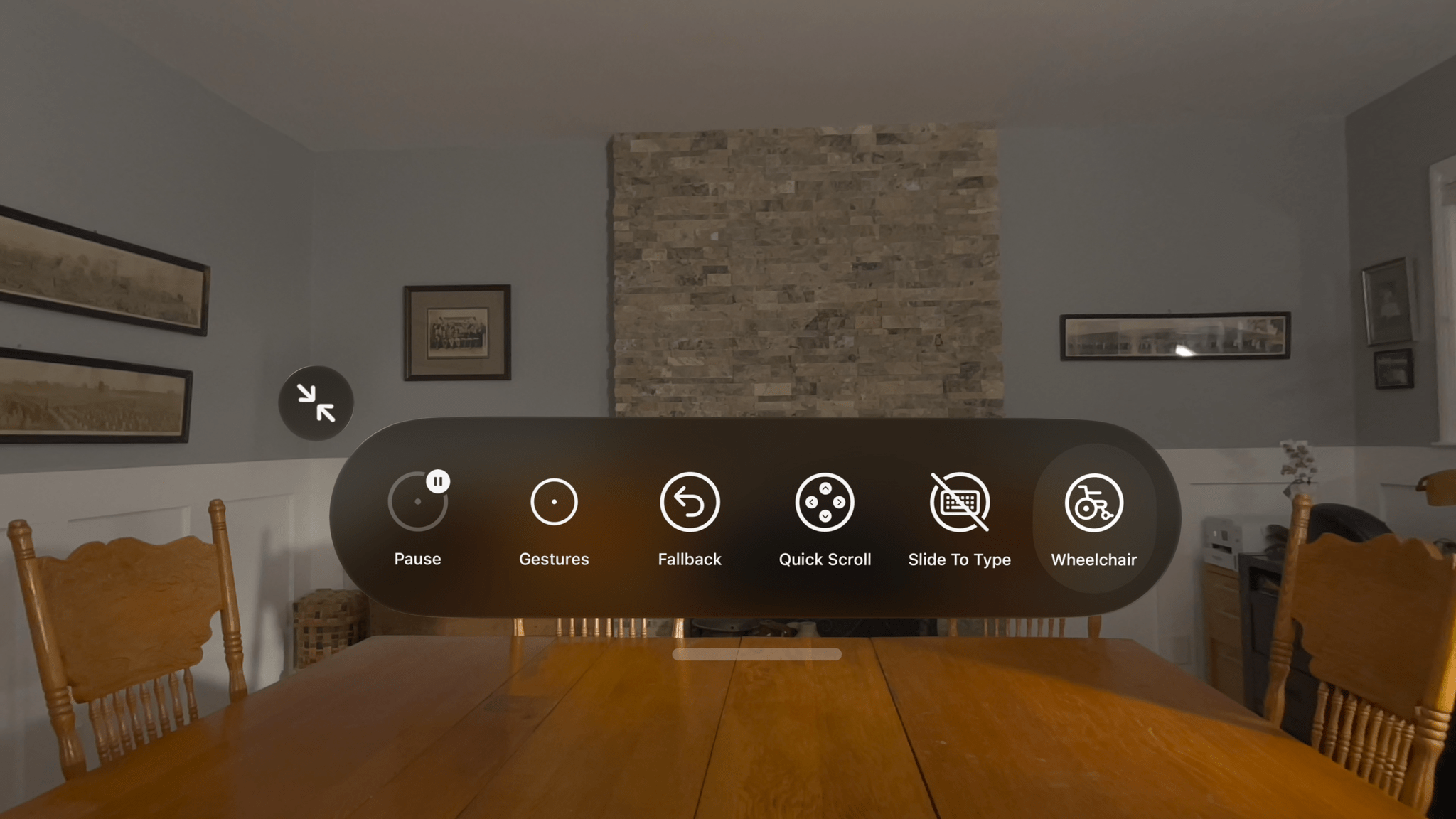
The Vision Pro uses state-of-the-art eye tracking for interacting with your environment. Apple announced that it is extending that technology to motorized wheelchairs by working with partners TOLT Technologies and LUCI. The system allows a motorized wheelchair to be maneuvered by the user simply looking at controls inside the Vision Pro. The video showing off the feature was impressive and makes perfect sense if you’ve ever used the Vision Pro.

Apple also announced a new accessory with an accessibility angle. You may have seen the Hikawa Grip and Stand collection, a series of colorful accessories designed to make it easier for people to hold an iPhone more securely. Designed late last year by artist Bailey Hikawa, the Hikawa Grip and Stand is being mass-produced by PopSockets and sold in Apple retail stores in 20 markets starting today.

Finally, a bunch of other accessibility features are coming to Apple platforms later this year, including:

  • Vehicle Motion Cues, face gestures for taps, and eye-select in Dwell Control for visionOS,
  • Touch Accommodations setup customization,
  • Improvements to MFi hearing aid pairing and handoff across devices,
  • Larger Text support in tvOS,
  • Name Recognition in over 50 languages,
  • An API for adding human sign language interpreters to FaceTime, and
  • Support for Sony’s Access game controllers on iOS, iPadOS, and macOS.

With all the overblown hype surrounding artificial intelligence, it’s refreshing to see Apple putting it to practical use in ways that are meaningful to its users. One thing I’ve learned from following the work of Apple’s Accessibility team over the years is that there’s no one-size-fits-all approach to accessibility. The solutions are as unique as the people they serve. Apple has always offered a wide range of APIs and user features to make their hardware and apps available to as many people as possible, but Apple Intelligence promises to take the company’s longstanding commitment and make it more flexible and powerful for more people than ever before.


Apple Announces Its 2026 Apple Design Award Finalists

Today, Apple announced the finalists for the Apple Design Awards in six categories:

  • Delight and Fun
  • Inclusivity
  • Innovation
  • Interaction
  • Social Impact
  • Visuals and Graphics

Each category includes three finalists for a total of 18 apps and games from across Apple’s platforms:

Delight and Fun

Finalists in this category provide memorable, engaging, and satisfying experiences enhanced by Apple technologies.

Apps

Games

Read more


Indigo: A Clever Mashup of Bluesky and Mastodon in One Timeline

Last week, Soapbox Software (Ben McCarthy and Aaron Vegh) released Indigo, an iPhone, iPad, and Mac app that offers a unique take on social media, allowing you to log into both Bluesky and Mastodon in a single app. In the increasingly fractured social media landscape we live in, it’s a fantastic idea. Instead of bouncing back and forth between two services that have a lot of overlap for some users, why not use just one?

This isn’t Soapbox’s first collaboration. You may recall Croissant, the cross-posting utility that I covered when it released in 2024. We were so taken by the app that we gave it the Best New App award in the 2024 MacStories Selects Awards. That pedigree shows in what is a much deeper and more complex app.

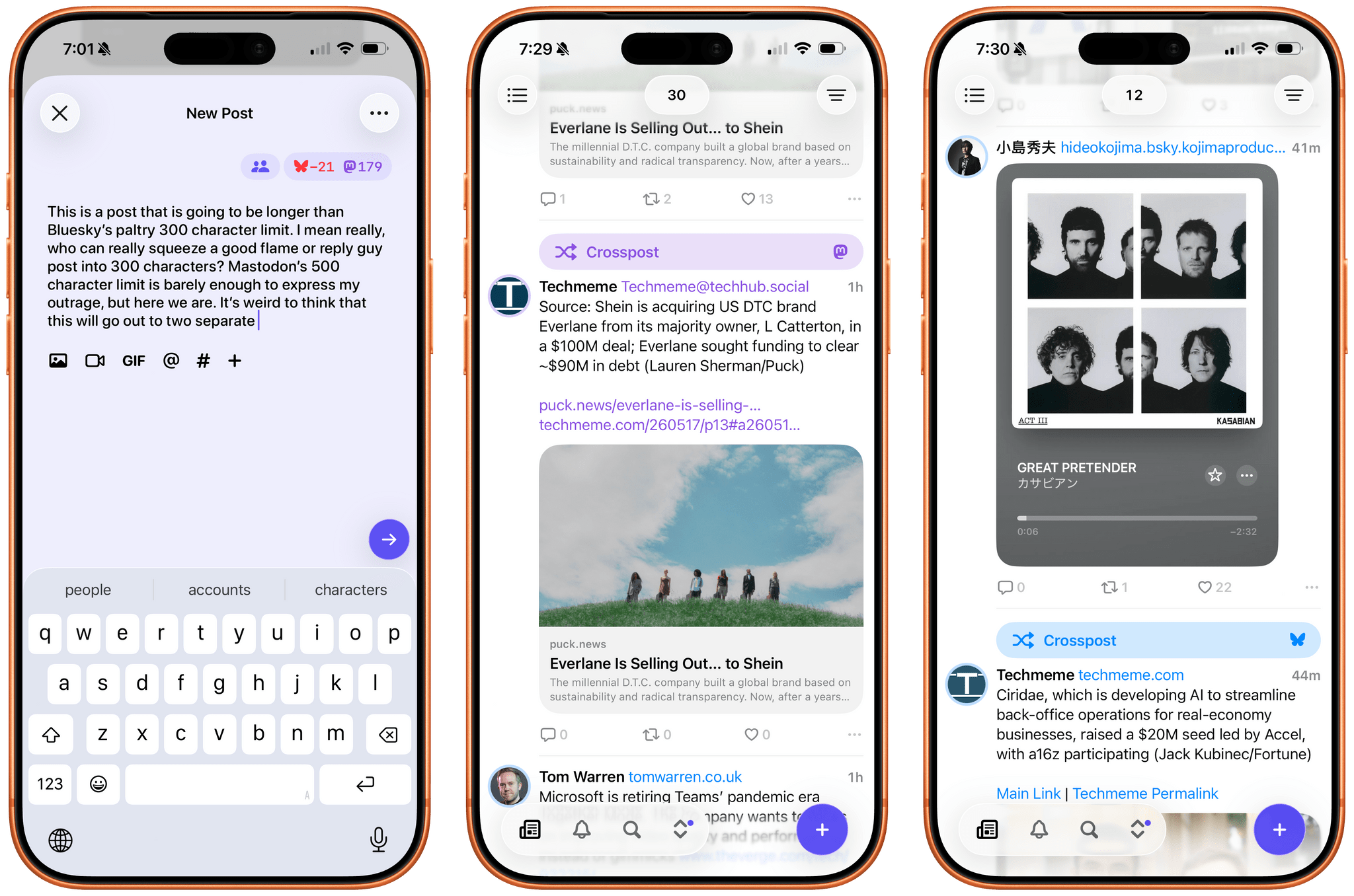
Like Croissant, Indigo lets you cross-post to Bluesky and Mastodon and is beautifully designed. But unlike Croissant, Indigo is a full-blown timeline app for simultaneously catching up on your Bluesky and Mastodon feeds at the same time.

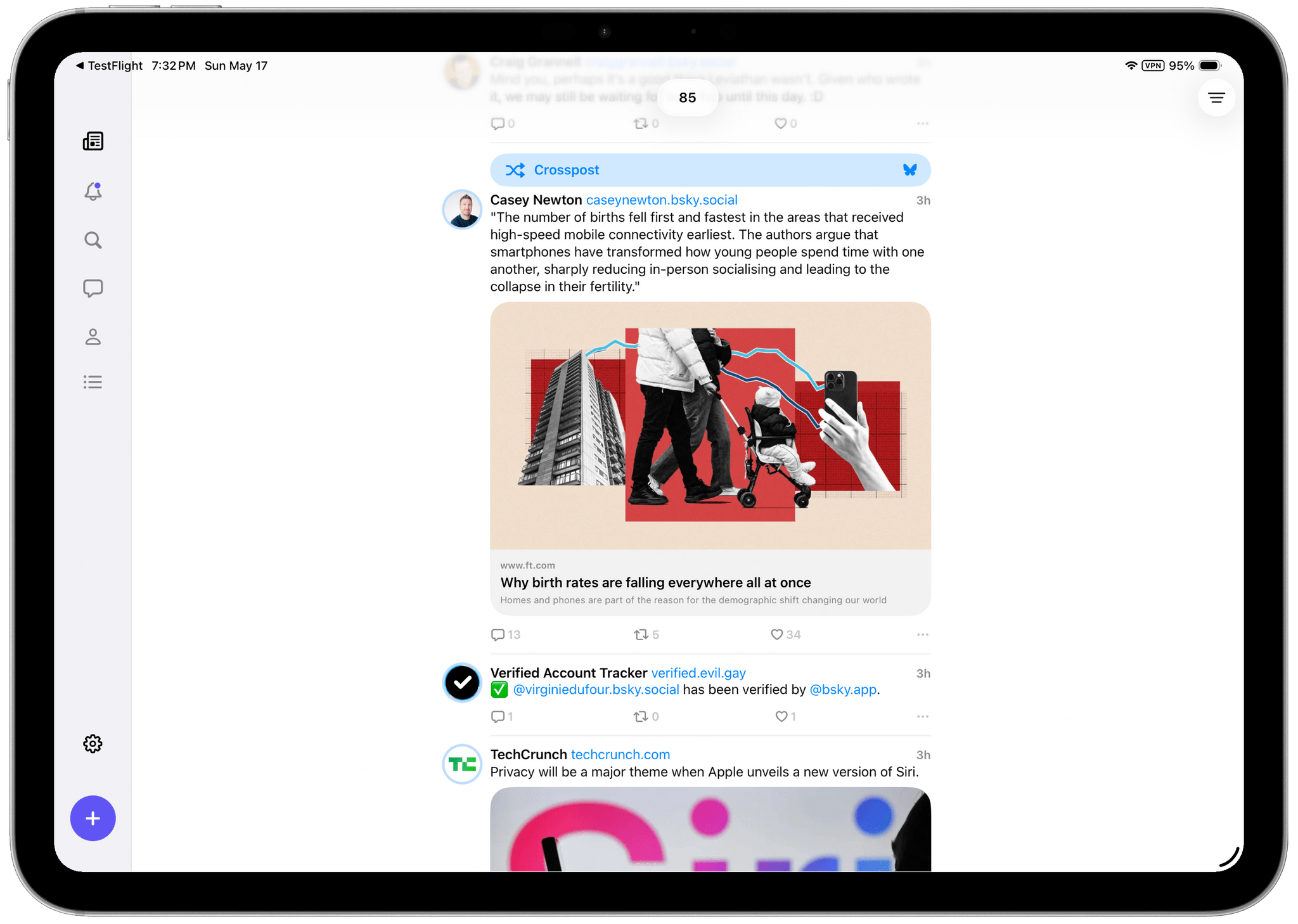
Depending on who you follow on each service, a mashup of the two has the potential to generate a timeline full of duplicates, but Soapbox took that into account with Indigo. There’s no need to change who you follow or make any other sort of adjustment yourself; instead, the app automatically detects duplicate posts and removes them from sight. However, if for some reason you want to see both, the duplicate post is always available behind the tap of a Crosspost button. It’s a great feature that alerts you to the fact that one of your timelines has been altered while also giving you the chance to check out the other post.

Indigo running on an iPad Pro.

Indigo running on an iPad Pro.

Other touches, such as the color of links, provide subtle clues to convey a post’s provenance, but the shades of blue and purple used are close enough that you might not notice the difference until you run across a Crosspost button. I also appreciate the separate character limit countdowns for each service on the New Post screen, which let you know when you’re going to have to forgo Bluesky for a chattier Mastodon post. Fortunately, the app lets you just post to one or the other service if you’d like by tapping on the character countdown.

All of the other core features you’d expect are available, too. Photos, videos, and GIFs are supported, as are @mentions and hashtags. You can filter who can see your post and who can reply to it, with some inherent differences in the underlying services’ support for those features. The app also includes search, notifications, direct messages, profile viewing, and a bunch of settings you can tweak. That said, power users of apps like Ivory may feel a little constrained in Indigo. It’s an excellent 1.0, but it doesn’t yet match the full functionality of Ivory.

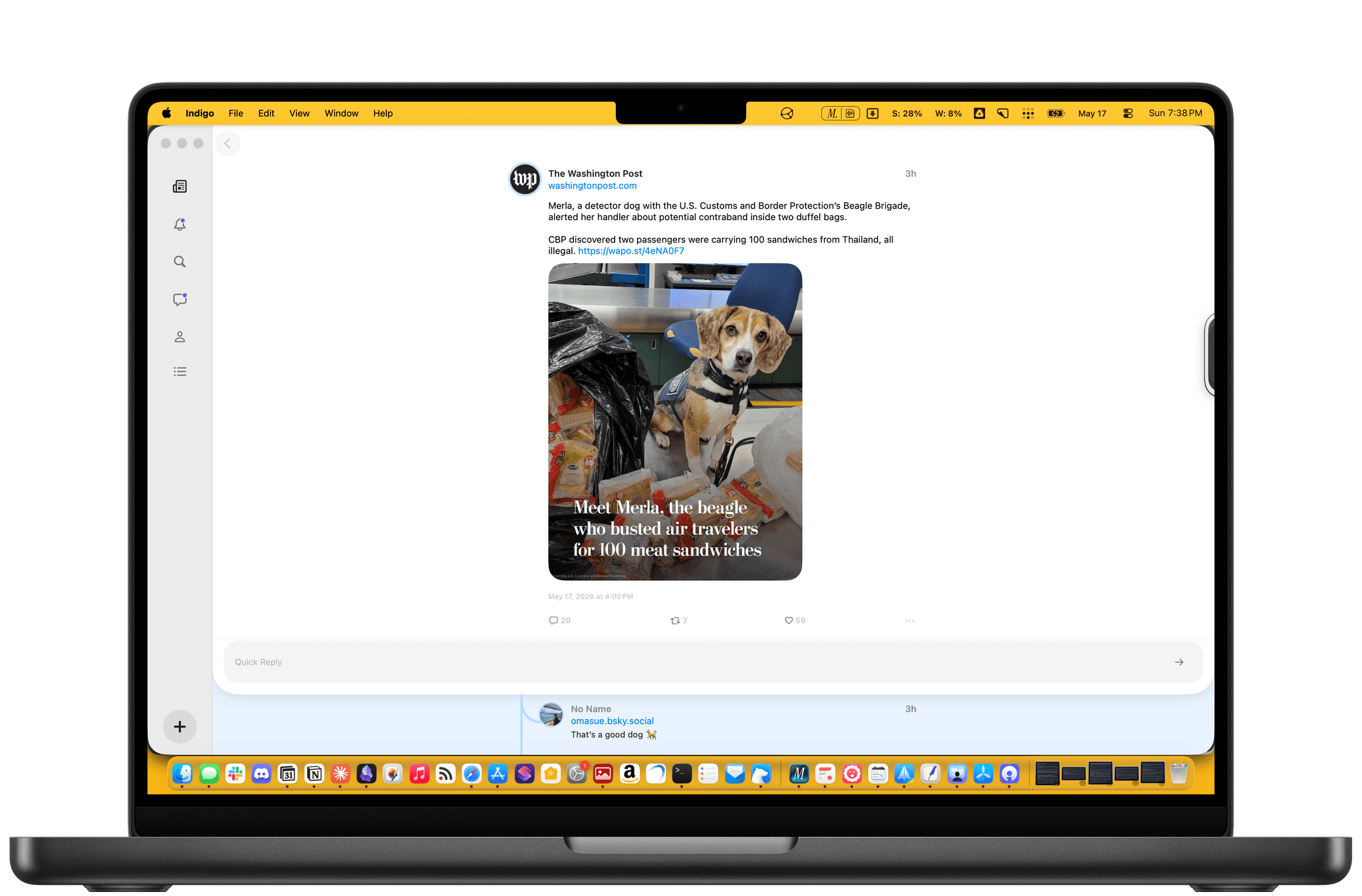
Scrolling dog stories on the Mac.

Scrolling dog stories on the Mac.

Indigo strikes me as a good solution for a couple of different types of users. If you want a simple, beautifully designed way to read your Bluesky or Mastodon timeline, this is a great one. While the cross-posting and deduplication features are what will set Indigo apart for many, it works well as a standalone option for either service.

However, I expect the core audience will be people who use both Bluesky and Mastodon and follow many of the same people in both places. Especially if the people you follow cross-post a lot, Indigo greatly improves the experience.

I’ve enjoyed playing around with Indigo for the past few weeks and noticed a couple of things. Despite following roughly the same number of people on both services, the Bluesky accounts I follow are a lot chattier than those on Mastodon. I also have far fewer Crosspost buttons in my timeline than I expected. I guess I just follow very different accounts on each.

If you’ve ever felt the fatigue of jumping back and forth between a Bluesky and Mastodon timeline and found it hard to keep up with both, be sure to give Indigo a try. It makes the entire experience much nicer. You can download Indigo from the App Store on iPhone, iPad, and Mac and unlock its full feature set by purchasing the Ultraviolet tier, which costs $4.99/month, $34.99/year, or a one-time payment of $119.99.


BetterTouchTool: Now with a Powerful Launcher for Your Mac [Sponsor]

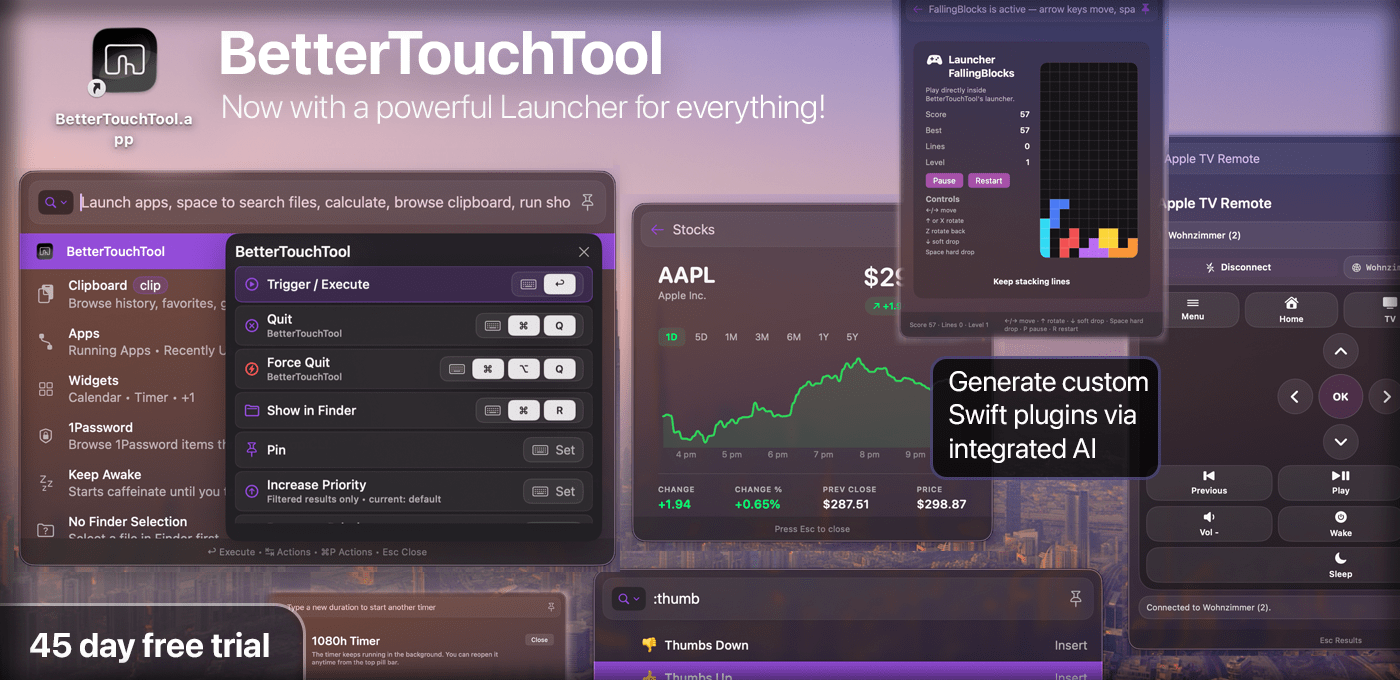
BetterTouchTool has long been one of the Mac’s most versatile customization tools, offering deep control over trackpad and mouse gestures, keyboard shortcuts, Stream Deck buttons, Floating Menus, window actions, Apple Shortcuts, and more.

The latest version adds a powerful new Spotlight-like Launcher that brings many parts of your Mac and BTT together in one fast interface. Open it with e.g. a hotkey, gesture, mouse button, or Stream Deck button, then launch apps, run Shortcuts, search and browse files, switch windows, use clipboard history, create reminders or calendar events, control Apple TV, and run BTT actions. The Launcher also handles complex calculations and unit conversions directly in the search field, powered by the excellent Soulver.app.

Your own BTT triggers can appear there too, so personal automations sit alongside apps, files, Shortcuts, and system actions.

One of the Launcher’s most powerful features is native Swift plugin support. Plugins can add rows, commands, nested results, and rich custom interfaces inside the Launcher window, making it possible to build mini apps for BTT: dashboards, device controllers, API clients, automation panels, and more. BetterTouchTool’s built-in [email protected] assistants can even create custom Launcher plugins from a prompt, making advanced customization more approachable for Mac power users.

Since BetterTouchTool’s last sponsored MacStories post, input-device support has expanded too. Native Logitech mouse and keyboard support makes many Logitech devices directly configurable in BTT without extra software, including special keys and remappable buttons. Normal mouse support has gained scroll modifiers, e.g. for smooth scrolling, drag gestures, and trackpad-like interactions such as fluid space switching and zooming, while Magic Trackpad and Magic Mouse users continue to get new options for deep gesture customization.

Try BetterTouchTool free for 45 days at folivora.ai. MacStories readers can use MACSTORIESBTT2026 for 20% off a license.


Podcast Rewind: Swapping Apps, Multiple Steam Controllers, Matt’s New Cult, and John’s High-Tech Shoes

Enjoy the latest episodes from MacStories’ family of podcasts:

AppStories

This week, John and Federico kick off the app swap challenge, with each of them giving the other three apps to use. We’ll be checking in on how it’s going each week with a final roundup of the results of the experiment after WWDC.

On AppStories+, we each pick aspirational apps and OS features that we wish we used more but don’t.

NPC: Next Portable Console

This week, mysterious Valve shipments are heading to the U.S., GameHub hits 6.0, one of us got multiple Steam Controllers, and plastic versus aluminum.

On NPC XL, Brendon, John, and Federico share apps and tips for Android gaming.

Comfort Zone

It’s just the boys today, as Chris has a slew of updates, while Matt has joined a new cult. They also try their darnedest to understand the appeal of mouse gestures in browsers.

On Cozy Zone, the gang roasts your (yes, your!) old Home Screens.

MacStories Unwind

This week, an Italian movie dubbing controversy, the role of tech in the first-ever sub-two hour marathon, John’s high-tech running shoes, and a jangle-pop EP for your listening pleasure.


AppStories, Episode 484, ‘An App Swap Challenge’ Show Notes

This episode is sponsored by:

  • Steamclock: We make great apps. Design and development, from demos to details.

An App Swap Challenge: Pick Three Apps for Each Other to Try for a Month and Report Back

AppStories+ Post-Show: Aspirational Apps and Features We’d Like to Use More

  • John
  • Federico
    • Apple Journal
    • Home Screen widgets
    • iPhone’s StandBy mode

Subscribe to AppStories+

Visit AppStories.net to learn more about the extended, high bitrate audio version of AppStories that is delivered early each week and subscribe.


NPC, Episode 80, ‘Is the Steam Machine Just Around the Corner?’ Show Notes

Steam Controller Pre-Orders

Valve Hardware Speculation

Anbernic RG Rotate

Lenovo Legion Tab

Game Native and Android PC Emulation

Subscribe to NPC XL

NPC XL is a weekly members-only version of NPC with extra content, available exclusively through our new Patreon for $5/month. Each week on NPC XL, Federico, Brendon, and John record a special segment or deep dive about a particular topic that is released alongside the “regular” NPC episodes. You can subscribe here.


Comfort Zone, Episode 100, ‘Don’t Let Tech Companies Electrocute You’ Show Notes

Things Discussed

Cozy Zone

For even more from the Comfort Zone crew, you can subscribe to Cozy Zone. Cozy Zone is a weekly bonus episode of Comfort Zone where Matt, Niléane, and Chris invite listeners to join them in the Cozy Zone where they’ll cover extra topics, invent wilder challenges and games, and share all their great (and not so great) takes on tech. You can subscribe to Cozy Zone for $5 per month here or $50 per year here.


MacStories Unwind, ‘Is It the Shoes?’ Show Notes

Picks

Unwind Deal

MacStories Unwind+

We deliver MacStories Unwind+ to Club MacStories subscribers ad-free with high bitrate audio every week. To learn more about the benefits of a Club MacStories subscription, visit our Plans page.


MacStories launched its first podcast in 2017 with AppStories. Since then, the lineup has expanded to include a family of weekly shows that also includes MacStories UnwindMagic Rays of LightComfort ZoneNPC: Next Portable Console, and First, Last, Everything that collectively, cover a broad range of the modern media world from Apple’s streaming service and videogame hardware to apps for a growing audience that appreciates our thoughtful, in-depth approach to media.

If you’re interested in advertising on our shows, you can learn more here or by contacting our Managing Editor, John Voorhees.