Connected, Episode 172: Shazamalo

Myke was surprised by Apple’s Shazam acquisition, Ticci is living that 4K life and Stephen is thinking about an iMac Pro.

A fun episode of Connected this week with a good variety of topics. You can listen here.

Sponsored by:

  • Balance Open: Find out more about Balance Open and get $2 in Ethereum.
  • Squarespace: Make your next move. Enter offer code WORLD at checkout to get 10% off your first purchase.
  • Incapsula: Secure and accelerate your website. Connected listeners get one month free.
Permalink

AppStories, Episode 35 – An Interview with Christian Selig, Creator of Reddit Client Apollo

On this week’s episode of AppStories, we interview Christian Selig, the creator of the popular iOS Reddit client Apollo about the development and design of the app, incorporating Redditors’ feedback, the complexities inherent in building a Reddit app, and working in Swift.

Sponsored by:

  • Jamf Now – Manage and protect your Apple devices in minutes. Create your free account today.
  • Dejal Time Out — You deserve a break. Try Time Out for Mac for free.
AppStories+ Deeper into the world of apps

AppStories Episode 35 - An Interview with Christian Selig, Creator of Reddit Client Apollo

0:00
28:36

AppStories+ Deeper into the world of apps

Permalink

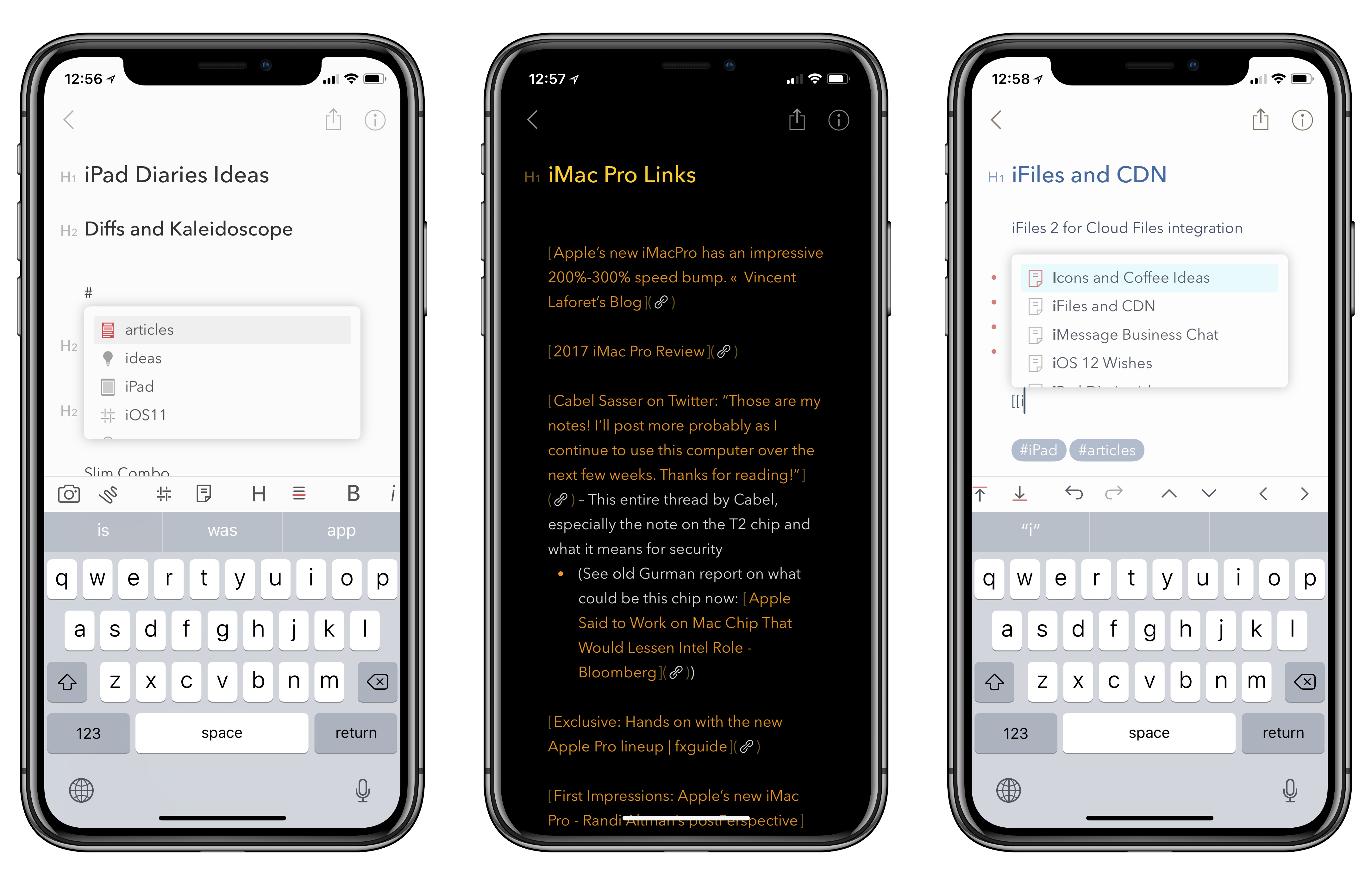
Bear 1.4 Brings Tag and Note Autocomplete, True Black Theme for iPhone X, and More

As I noted last month in my iPad Diaries column, I’ve started using Bear in addition to Apple Notes to research articles in Markdown and later convert them to drafts in Ulysses. I was impressed with Shiny Frog’s work on iOS 11 and how they brought advanced drag and drop to Bear, but I’m even more positively surprised by the improvements to tagging they released today as part of Bear’s 1.4 update.

Read more


iMac Pro First Impressions Around the Web

The iMac Pro was debuted on Apple’s online store today, but won’t be available to purchase until December 14th. Over the past week, the company provided test hardware to a handful of photographers, videographers, an aerospace engineer, and programmers. Each seems to have been given an iMac Pro with a 10-core 3GHz processor, 128GB memory, 2TB SSD, and the Radeon Pro Vega 64 graphics with 16GB memory. Although no one had time to put the machine through a thorough review, they each put the new iMac through a unique series of tests and real-world tasks to see how it performed.

Read more


Workouts++ Adds Podcast Playback, Mapping, New Workout Types, Siri and More

Almost a year ago, David Smith released Workouts++, an alternative to watchOS’ built-in Workout app that adds an iOS component to leverage the data collected during workouts. Today, Smith released version 2.0 of Workouts++ with a host of new features enabled by advances in the Apple Watch and Apple’s health and fitness APIs, including podcast playback, location tracking and mapping, support for new workout types, Siri integration, and more. On top of that, Workouts++ is now free with no In-App Purchases, advertising, or subscription.

Read more


How to Design for iPhone X (Without an iPhone X)

Great analysis by Sebastiaan de With on how they redesigned Halide for the iPhone X (the app indeed turned out to be one of the best iPhone X app updates we’ve seen so far):

Design for ergonomics. On regular iPhones, you have to do much less as a designer to optimize ergonomics. The iPhone X requires you to think about comfortable button placement and usability. Ergonomics is more than just tapping, but also swiping and other gestures. Lay out your UI so all actions are accessible and as comfortably usable as possible.

It’s a whole new device: Design for it. Everyone can stretch an app out to a larger screen, but just like the iPad, a fresh approach is not only welcomed but helps you stand out in the App Store. This is a great time to validate your current design. Are your approaches still valid? Is there a better solution possible? You might come to some valuable insights that you can apply to all your designs, not just the ones for the shiny new device.

If you’re a developer working on iPhone X UI updates, don’t miss Sebastiaan’s map visualization of the device’s display.

Permalink

Twitter Rolling Out Official Support for Threads

Twitter’s latest feature – which is rolling out “in the coming weeks” – is another that’s been inspired by something users have been doing for a few years now: threads.

From the Twitter blog:

At Twitter, we have a history of studying how people use our service and then creating features to make what they’re doing easier. The Retweet, ‘@reply’, and hashtag are examples of this. A few years ago we noticed people creatively stitching Tweets together to share more information or tell a longer story – like this. We saw this approach (which we call “threading”) as an innovative way to present a train of thought, made up of connected but individual elements.

Now, hundreds of thousands of threads are Tweeted every day! But this method of Tweeting, while effective and popular, can be tricky for some to create and it’s often tough to read or discover all the Tweets in a thread. That’s why we’re thrilled to share that we’re making it simpler to thread Tweets together, and to find threads, so it’s easier to express yourself on Twitter and stay informed.

We’ve made it easy to create a thread by adding a plus button in the composer, so you can connect your thoughts and publish your threaded Tweets all at the same time. You can continue adding more Tweets to your published thread at any time with the new “Add another Tweet” button. Additionally, it’s now simpler to spot a thread – we’ve added an obvious “Show this thread” label.

As far as I can tell, this is a prettier interface for the original method of creating a thread by replying to yourself. Twitter has integrated a multi-post feature into the app’s compose box, and there doesn’t seem to be a new API endpoint for threading. It seems like a nice workflow with a ‘Tweet All’ button at the end. In theory, popular third-party clients could replicate the same behavior (and design) in their own compose UIs – just like various tweetstorm utilities create “threads” by posting multiple replies in a row.

Permalink

Automating Your Holiday Lights Inside and Out

It’s easy to get carried away with elaborate and expensive home automation projects when you’re just starting out. A better place to begin though, is with a simple, temporary setup that doesn’t cost a lot but will still give you a glimpse of some of the conveniences of home automation without making a big commitment. When I heard that iHome had introduced a reasonably-priced outdoor smart plug, I knew immediately that it and some holiday lights would make an excellent home automation starter project.

This is by no means a Clark Griswold-level undertaking. My family’s holiday decorations are fairly simple. In the front yard, we put up lights in the bushes and on the columns on either side of our front door. Inside, we have a Christmas tree in our living room with lights. The first step was to put up the outdoor lights the weekend after Thanksgiving on what turned out to be a mercifully warm day.

After the lights were up and working, I plugged them into the iHome’s iSP100 Outdoor SmartPlug, which I connected to an outdoor outlet near my front door. The iSP100 is about as simple as you can imagine. It has a short cord attached to a plastic box that holds its electronics. One end plugs into a standard US outdoor electrical outlet, and the other end takes two or three-pronged electrical devices.

Read more


Punish Website Is a Blacklist-Only iOS Content Blocker

Several weeks ago we got a question from a Club MacStories member wanting to know if any of us had come across a blacklist-only content blocker. We hadn’t. We did some research and still came up empty, which we reported back to MacStories Weekly readers. That prompted developer Salavat Khanov to step in and fill the gap with a new app called Punish Website.

Khanov is the developer behind 1Blocker, a popular iOS content blocker that we’ve covered in the past. However 1Blocker, like its competitors, blocks ads, comments, and other content based on an elaborate system of rules. You can whitelist sites, but the default behavior is to block content unless instructed otherwise. Our reader wanted to come at the problem from the other direction with a content blocker that only blocks elements on blacklisted sites.

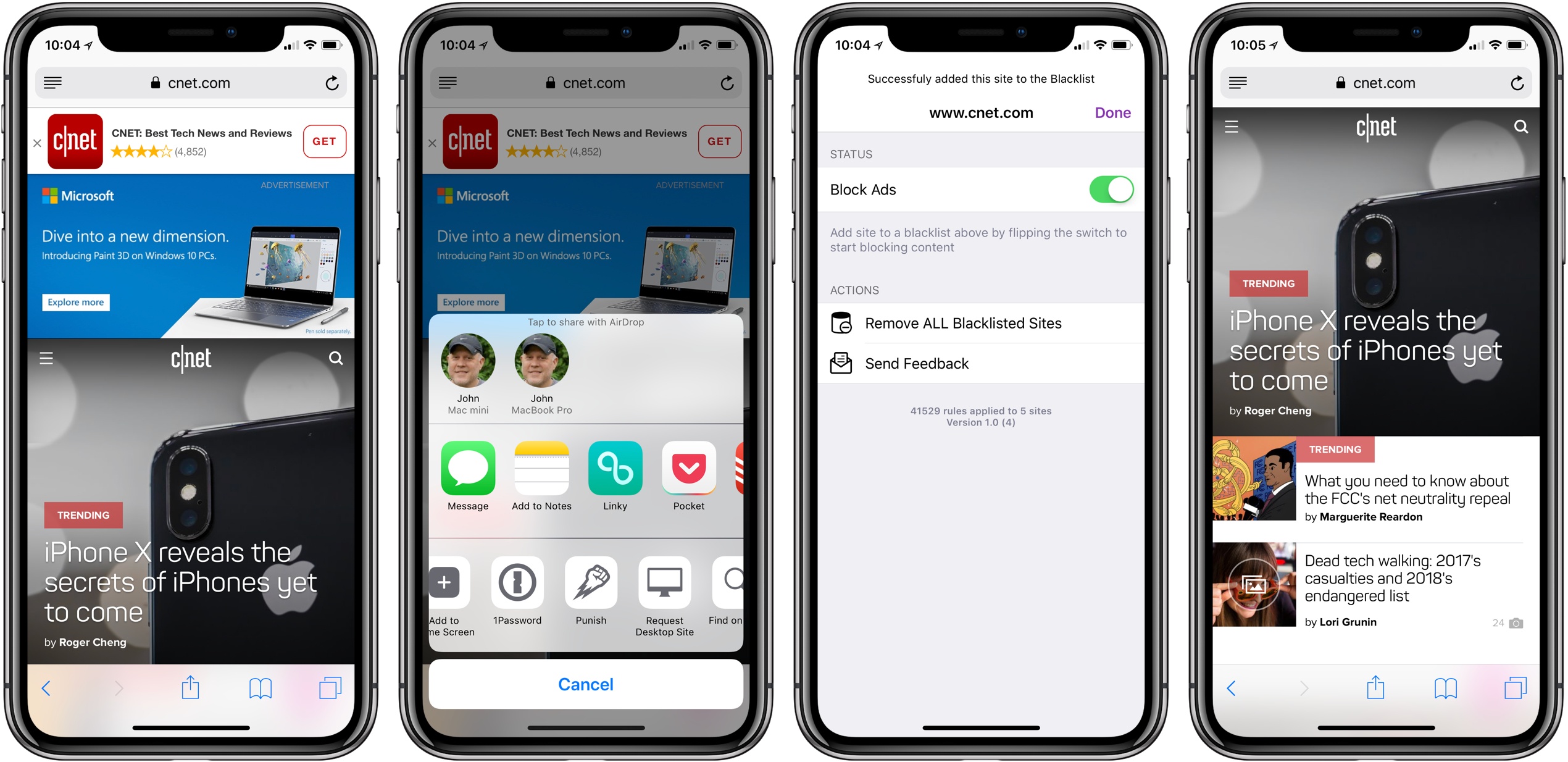
That’s exactly what Punish does. It’s primarily an action extension that’s invoked from the system share sheet. When you come across a site that crosses your tolerance line for website clutter, all you need to do is tap the share icon in Safari and pick Punish. The extension UI will appear to confirm you want to add the site to your blacklist. After you tap the Done button, the site reloads free of distractions.

To take a site off your blacklist, simply open the app and swipe left to reveal a delete button or use the Edit button. Managing your list is simple, but I’d also like to see a Cancel button added to the extension for those circumstances where you have second thoughts about invoking the blocker.

I’m glad to see that Khanov developed Punish. It’s easy to paint all websites with the same anti-advertising brush, but the reality is that advertising is still a big part of how sites earn money and there’s a strong case for a more considered and deliberate approach, which Punish enables.

Punish Website is available on the App Store for $2.99.