iOS 11 X and iOS 11 Classic

In his review of the iPhone X, John Gruber astutely points out that the device effectively runs a fork of iOS 11:

There were always two things and only two things on the front face of an iOS device — the touchscreen display and the home button. In fact, the iPhone X changes iOS in more fundamental ways than even the iPad did. In terms of the role between the display and the home button, the iPad really was — and remains today — “just a big iPhone”.

The iPhone X, however, creates a schism, akin to a reboot of the franchise.

Apple hasn’t called attention to this, but effectively there are two versions of iOS 11 — I’ll call them “iOS 11 X”, which runs only on iPhone X, and “iOS 11 Classic”, which runs on everything else.

The fundamental premise of iOS Classic is that a running app gets the entire display, and the home button is how you interact with the system to get out of the current app and into another. Before Touch ID, the home button was even labeled with a generic empty “app” icon, an iconographic touch of brilliance.

This is a great way to think about the evolution of iOS going forward. As I noted last month, the iPhone X will reshape the entire iOS ecosystem over the next few years. Consequently, it’ll also make it more challenging to review a new version of iOS, as we’ll have to account for deeply different variations of the same features.

Permalink

My Favorite iOS Games of 2017

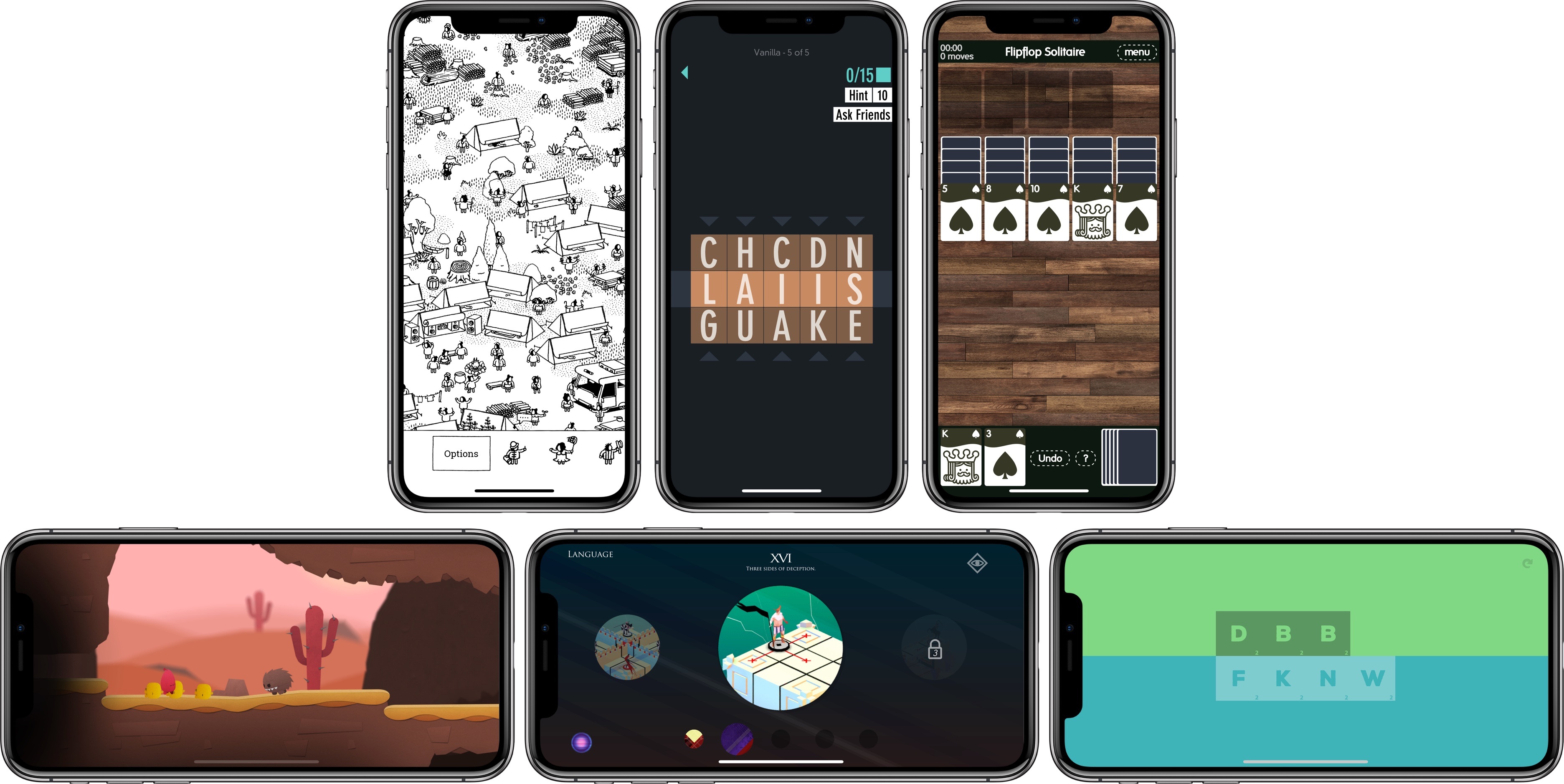
As 2017 draws to a close, we’ve seen what may prove to be a shift in iOS gaming. With the recent introduction of app pre-orders, iOS may attract more paid-up-front indie games and ports of console and PC titles than in the past. Pre-orders aren’t limited to games, but it’s no coincidence that the first batch of pre-orders released on the App Store were all successful indie titles.

It’s too early to tell if recent developments are the beginning of a trend towards a more diverse and interesting iOS game market or a one-off anomaly that will fizzle, but I hope it takes hold. The prospect of the App Store attracting new sorts of games could broaden the appeal of iOS as a gaming platform, which in turn, could change the dynamic of iOS gaming in 2018.

We’ll have to wait to see what 2018 has in store, but in the meantime, the end of the year is a good time to look back. It’s always hard to pick favorites. So many excellent games were released this year, and I didn’t have time to try them all, but here are my six favorites of the 37 that I covered in 2017 along with links to each of the reviews of them.

Read more


PortraitCam: Portrait Mode for Everyone [Sponsor]

PortraitCam by BrainFeverMedia takes iPhone portrait photography to the next level. The app, which was featured by Apple in the App Store’s ‘New Apps We Love,’ uses the latest Depth APIs and Face Detection to bring an incredible level of control over portraits.

The app automatically detects faces and captures depth data for compatible devices using Apple’s latest camera technologies. For two-lens devices like the iPhone X, PortraitCam uses the depth information captured by your iPhone. For other devices though, PortraitCam uses Face Detection to generate a depth map.

But what’s most impressive is what PortraitCam does with depth information. The app takes that data and uses it to let you dial in exactly the portrait you want, regardless of whether you’re shooting live or editing an existing photo. You can control the amount of background blur and shape of the bokeh. You can add simulated lenses too. It’s a simple, sensible workflow that works perfectly for portraiture.

BrainFeverMedia has a deep catalog of photography apps. That experience shows in PortraitCam, which draws on its past work with filters and effects to help you create beautiful portraits.

When you get together with friends and family this holiday season, download PortraitCam from the App Store and wow them with a special year-end portrait.

Thanks to PortraitCam for supporting MacStories this week.


Apple Updates and Expands App Store Review Guidelines to Address Pre-Orders, Loot Boxes, VPNs, and More

Just before the annual holiday shutdown of the App Store, Apple has revised its App Store Review Guidelines to address new App Store functionality like Pre-Orders and clarify or expand a handful of existing guidelines, including the creation of apps from templates and how ’loot boxes’ and VPNs should be handled. Below is a summary of the major changes to the Guidelines. To see all the changes, check out Rich Hong’s App Store Review Guidelines gist on GitHub.

Read more


My Must-Have Mac Apps, 2017 Edition

Feature of the Year

Pixelmator Pro’s Automatic Layer Naming

Machine learning was a common buzzword thrown about more often in 2017 than it was put to good use. Pixelmator Pro bucked that trend by using machine learning to automatically name images added in as new layers to the app. Drag in photos of a dog, a landscape, and a building and your layers will be named things like puppy, trees, and skyscraper. The feature is surprisingly accurate and a great time saver for organizing complex image projects.

Runner-Up

Todoist’s Task Syntax

There’s a learning curve with Todoist’s task syntax, but once you speak its language, you can become a master of sending tasks to the right projects with labels and proper due dates. As I think of something I need to do, it’s become second nature to summon Todoist’s input field and quickly type a task, complete with syntax, and receive the satisfaction of knowing it will be where I want it when I go back and look, instead of piling up unprocessed in an inbox.

Redesign of the Year

Pixelmator Pro

Pixelmator was my go-to image editor before the Pro version was released earlier this year and would have made my must-have list without the new Pro version. However, Pixelmator Pro is a full redesign of the app that does two things I absolutely love. First, it stashes tools in side panels where it’s easier to find them, eliminating the jumble of palettes used by the standard version. Second, its dark gray color scheme puts the focus on the image you’re working on, which makes it a delight to use.

Update of the Year

MindNode 5

I wasn’t a fan of mind maps, but something about MindNode 5 clicked with me. With an update this fall, the app got a new look, improved outline view, and many other features that together have made mind mapping feel as natural as typing a nested outline. The ability to quickly organize thoughts with only the keyboard in a way that looks good, without fiddling with settings, has made the app one of my favorite releases of the year.

Runner-Up

Bartender 3

Bartender is an essential tool for taming a wild menu bar full of apps. Even with Bartender though, it can be hard to find the app you’re looking for, which is why I was so happy to see that Bartender 3 added search support. In addition, the app has been built from the ground up with macOS High Sierra in mind, with a look that is right at home on a modern Mac.

Debut of the Year

Forecast

I wouldn’t normally pick a beta app as a Debut of the Year, but Forecast by Marco Arment is far more stable than the typical beta and was used in production by Arment and other podcasters for months before its public release. The app is lightning fast at encoding podcast episodes as MP3s and supports chapter markers, show art, and other little time savers that anyone who has produced a podcast will appreciate.

App of the Year

Ulysses

There’s no single app I use more than Ulysses. Despite a few eccentricities, the app handles the entire writing process with a simple, elegant design that belies the sophistication that underlies it. I especially like how Ulysses handles Markdown, its ability to hide distracting UI chrome from view, and the WordPress integration.

Runner-Up

iZotope RX Standard

There’s no doubt that you can produce a good-sounding podcast with free or inexpensive tools. iZotope RX, however, is one of my favorite apps of 2017 because it helped shorten the production time of AppStories while simultaneously making it sound better, which made it a good investment despite its hefty price tag.


Looking Ahead

As 2017 comes to a close, I’m on my Mac more than ever. A lot of that has to do with changes in how I work and what I do, which in turn is reflected in the tools I use. That seems incredibly obvious as I write it, but too often the discussion of apps and productivity winds up divorced from the work itself. After all, it’s the changes in my work and life that should affect the apps I use, not the other way around.

Although 2017 has seen a shift towards Mac apps, my overall approach remains a hybrid one. Nowhere is this more evident than on Friday mornings when I sit at my desk assembling MacStories Weekly – juggling Safari, PopClip, Ulysses, Byword, GitHub Desktop, Slack, and Airmail on my Mac, while switching periodically to Tweetbot, Photos, Workflow, Working Copy, Blink, and Pythonista on my iPhone. I enjoy working in both OSes and don’t see that changing anytime soon.

Perhaps it’s just a reflection of the exciting direction that iOS 11 has taken the iPad Pro, but the one thing that makes me slightly uncomfortable with my hybrid approach is that the Mac app ecosystem has stagnated in recent years. At the same time, even though the Mac app landscape is littered with a broken store and developer resources that lag behind their iOS counterparts, the iMac Pro, upcoming Mac Pro, and updated pro apps serve as a beacon of hope that the best days of macOS are not behind it.

I don’t have a crystal ball into the future of Mac apps, but I do know I can count on change. And with the introduction of new Mac hardware, I know I can also count on developers to push that hardware’s limits with apps I can’t wait to try in 2018 and beyond.


How Far Ahead of Apple Maps Is Google Maps?

Another fantastic essay by Justin O’Beirne, this time focused on explaining one of Google Maps’ strongest advantages over Apple Maps: the ability to use data to create more data.

With “Areas of Interest”, Google has a feature that Apple doesn’t have. But it’s unclear if Apple could add this feature to its map in the near future.

The challenge for Apple is that AOIs aren’t collected—they’re created_. And Apple appears to be missing the ingredients to create AOIs at the same quality, coverage, and scale as Google.

This is a perfect example of Google’s institutional approach to data collection paying off in the long term, giving them a substantial lead over the competition. O’Beirne’s visual comparisons between Google Maps and Apple Maps are just brutal.

Yes, Apple Maps may be “prettier”, but when you’re going somewhere, or need to find a specific point of interest, I bet you don’t care about “pretty”. You just want your map to tell you where to go, or show you accurately where you’re meant to be. Google is objectively ahead here, and Apple Maps’ slow evolution is concerning. There’s an interesting parallel here between Apple Music and Apple Maps: both nicer iOS apps than Spotify and Google Maps, and both far behind in terms of intelligence of the service itself.

As I wrote earlier this year:

Speaking from personal experience, Google Maps has considerably improved in my area in the past year, while Apple Maps has remained essentially the same. Which isn’t to say that Apple Maps is bad – Google simply has an edge over local business information and they’re evolving at a faster pace than Apple. To me, Apple Maps looks and feels nicer; Google Maps seems smarter and it has modern features I’d like Apple to add.

Permalink

Twitter Now Supports Third-Party Apps for Two-Factor Authentication

https://twitter.com/TwitterSafety/status/943542421698125824

Earlier today Twitter announced that you’ll now be able to use a third-party app (such as Google Authenticator, Authy, or 1Password) for two-factor authentication instead of SMS. The company has updated their support document with instructions on how to set it up here.

This is great news as Twitter was the last service with 2FA that only supported sending codes via SMS. Switching from text messages to 1Password (which I use for one-time codes) was easy: in Twitter for iPad, I went to Settings ⇾ Account ⇾ Security, and enabled the ‘Security app’ toggle. I then selected to use another app to generate my codes and opened 1Password on my iPhone, where I hit Edit on my Twitter login item and scrolled to the OTP section. Here, I tapped the QR button, scanned the QR code Twitter was displaying on my iPad with the iPhone’s camera, and that was it.

Unless you specifically want to receive 2FA codes from Twitter via SMS, you should consider switching to a dedicated authentication app: these codes work independently from carriers and location, and they can be generated offline.

Permalink

Connected, Episode 173: The Final Robin

Round out 2017 with fake apps and an anti-wishlist.

In the final episode of Connected for 2017, we revisit the classic wish list with a twist: what are the things we’d like Apple to stop doing? You can listen here.

Sponsored by:

  • Balance Open: Find out more about Balance Open and get $2 in Ethereum.
  • TextExpander, from Smile: Communicate smarter with TextExpander. Get 20% off your first year when you tell them you came from this show.
  • Incapsula: Secure and accelerate your website. Connected listeners get one month free.
Permalink