
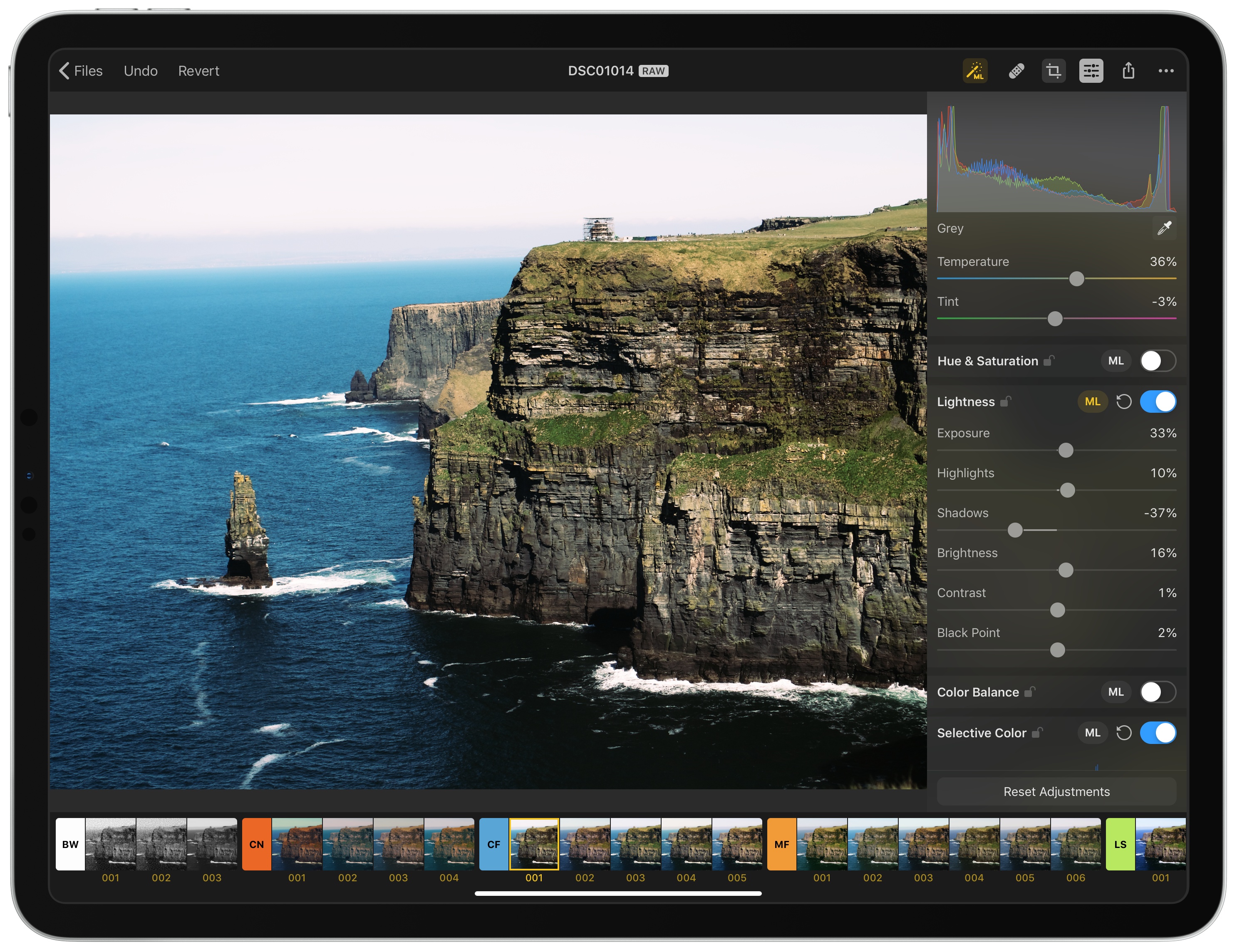
The Pixelmator team has released Pixelmator Photo, a pro-level photo editing tool that couples the core functionality of Pixelmator Pro for the Mac with the strengths of the iPad. The result, though not without a few caveats, is a sophisticated set of image editing tools wrapped in a straightforward UI that, with its support for RAW and other image formats, makes Pixelmator Photo my new favorite photo editor.
Pixelmator Photo: The MacStories Review
HoudahSpot 5 Review: Advanced File Search and Filtering on the Mac
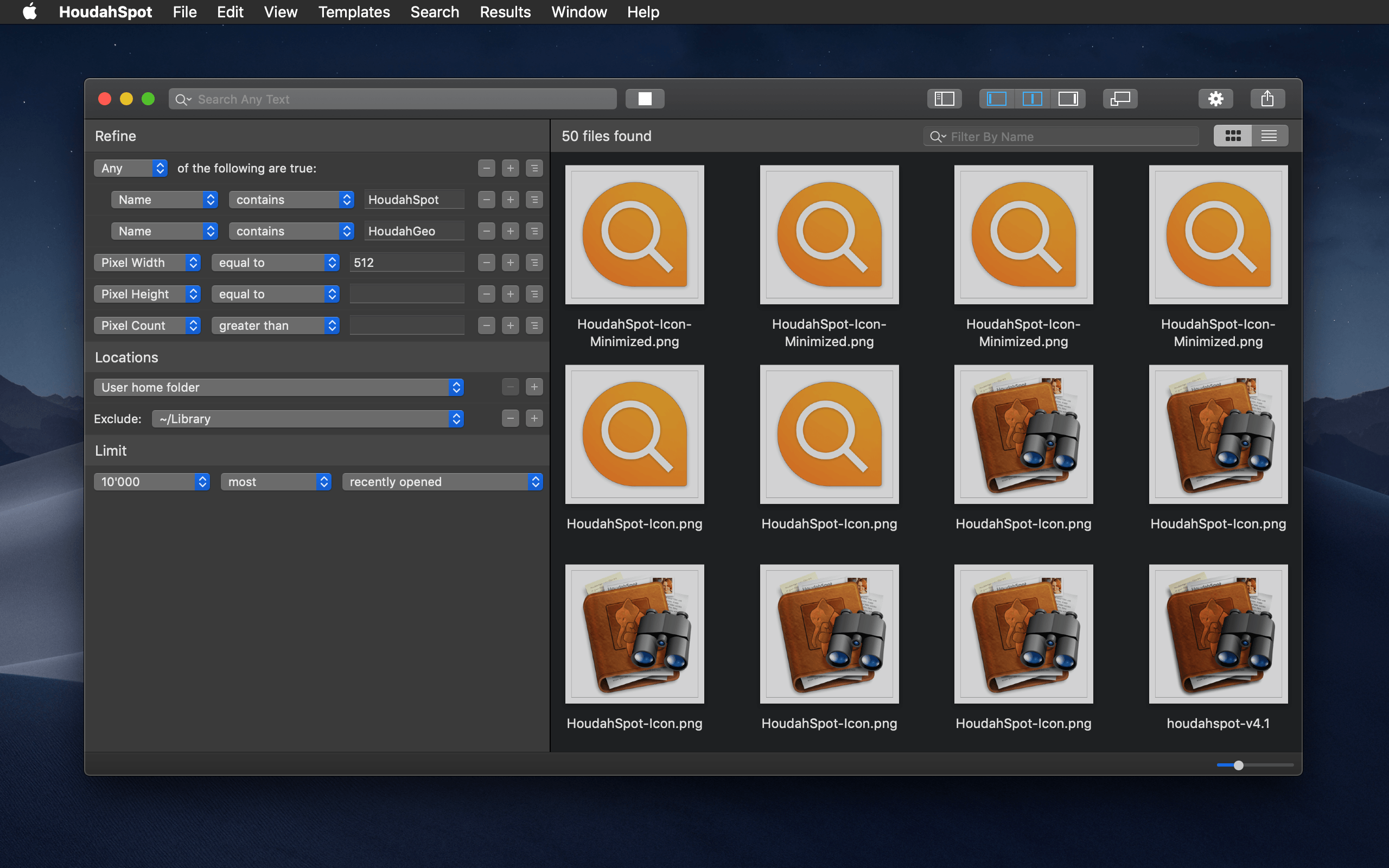
There’s a lot of power lurking under the hood of the Mac’s Spotlight search index, but that’s also the trouble. To make Spotlight accessible to more users, many of the feature’s most useful tools are hidden behind menus and special search syntax.
HoudahSpot takes a different approach that makes it easier to access the power of Spotlight. The app surfaces Spotlight’s advanced file search functionality and couples it with its own layer of tools to extend what Spotlight can do. With version 5, the app has been reexamined from top to bottom adding new features and refining the entire experience. The result is a terrific update that maintains HoudahSpot’s position as one of the premier pro utilities on the Mac.
Arq: Trustworthy Backup [Sponsor]

Backups of your computer’s files have to be trustworthy. If you can’t trust your backups, they’re not really backups.
The reason Stefan created Arq Backup for the Mac back in 2009 was because he couldn’t find an online solution that felt like real backup. Most online backup providers were and continue to be vague about where the data are stored, how durable the storage is, and how sustainable the business model is.
Arq does everything it can to provide a completely trustworthy backup solution.
Why should you trust Arq?
- Arq is open. It stores versioned, de-duplicated backup records in a format that’s documented.
- Arq is private. Backup records are encrypted with a password that only you know. The password never leaves your computer, and your data is encrypted before ever leaving your computer.
- Arq gives you control. Your backup data is stored in your own cloud account, SFTP server, or NAS.
- Arq verifies. Arq periodically makes sure the contents of the objects at the destination match the contents of your files on disk.
- Arq notifies. You’ll get a notification when there’s an error.
Do you like having total control over your data? Do you want to maintain your privacy? Then Arq is for you!
Download a free 30-day trial of Arq today and rest easy knowing that your files are backed up and secure.
Our thanks to Arq for sponsoring MacStories this week.
 MacStories Weekly: Issue 170
Castro Launches Top Picks Feature for Intelligent Episode Recommendations

In an update arriving today, Castro is introducing a new Top Picks feature designed to make managing a large number of podcast subscriptions easier than ever.
One of Castro’s most defining traits is its triage system: the app by default stores new episodes of shows you’re subscribed to in a New section, not in your playback queue, and inside New you can send the episodes you care about to your queue, while archiving anything that doesn’t interest you. If you subscribe to a wide array of shows, Castro’s New section is great; however, one drawback is that it previously lacked any sort of priority or hierarchy. Though Castro offers the option of having certain shows go straight to your queue, that requires manual configuration, and it’s really only ideal for shows that you want to listen to every single episode of. In most cases, the majority of shows will land in New, and Castro previously had no way of knowing which of those episodes you were more likely to care about. That’s why Top Picks was created.
Top Picks is an addition to the New tab which highlights episodes from your subscriptions that Castro thinks you’ll want to listen to. You can still access your full subscription roster at any time, but Top Picks will serve as a curated subset of episodes that’s easier to sort through.
Shows are surfaced in Top Picks based on your listening history, which the app analyzes on-device using only local data, so it remains private. If you’re new to Castro, this means it may take a little time to get the best Top Picks suggestions, but the good news is that training the system merely requires listening to the shows you care about. As you make decisions about what to listen to, Castro learns from those choices and uses that data to inform what does and doesn’t get sent to Top Picks.
If you only listen to a handful of podcasts, Top Picks likely isn’t for you because it addresses a problem you don’t have. But for users whose subscriptions can be a lot to keep up with, the feature simplifies the act of triage and, in the process, makes Castro an even better tool for enjoying the ever-growing world of podcasts.
BBEdit Returns to the Mac App Store After 4+ Year Absence
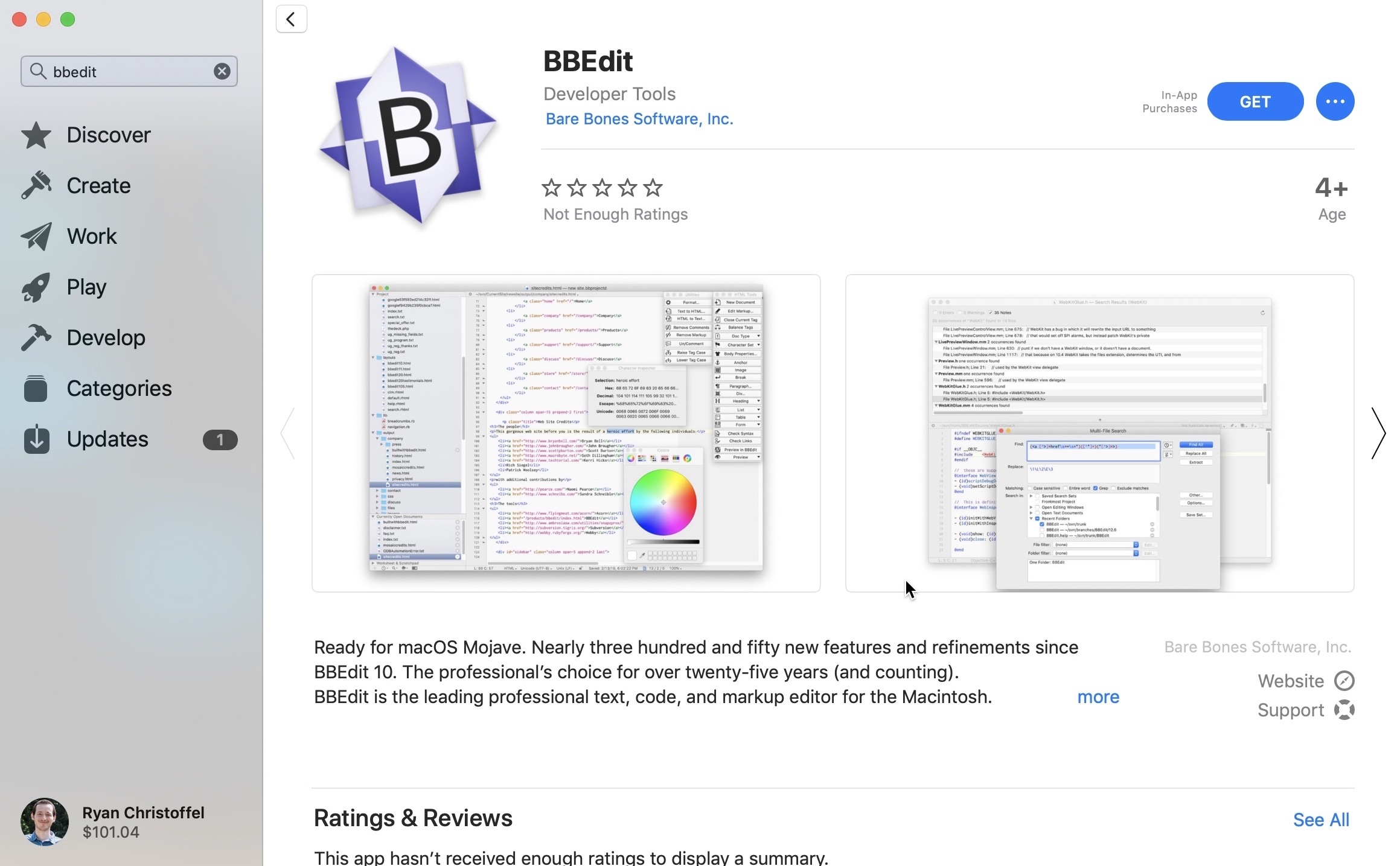
Beginning today, BBEdit 12 is available for download through the Mac App Store. BBEdit was previously listed for purchase through the Mac App Store, but famously left the store in October 2014. Last year, however, Apple announced on-stage at WWDC that BBEdit would be returning to the new Mac App Store in the near future, and that day has finally arrived. From the developers’ press release:
“We are delighted to be offering BBEdit in the Mac App Store again,” said Rich Siegel, founder and CEO of Bare Bones Software, Inc. “Since the release of macOS Mojave, the Mac App Store provides a beautiful new look; unique editorial content; and an emphasis on human curation, while offering a trusted and secure source for macOS software. In addition, the new Mac App Store makes it possible for us to offer our customers the option of a subscription-based pricing model.”
BBEdit 12, the latest version of the popular writing app for macOS, features more than three hundred new features and refinements since the app was last available on the Mac App Store. It also introduces a new pricing model: unlike direct purchases from Bare Bones Software, where an app license can (still) be purchased for a one-time $49.99 cost, on the Mac App Store BBEdit is available only as a subscription.
For those who wish to get BBEdit from the Mac App Store, the app is a free download, and you can use it in full up to 30 days at no cost, after which a subscription will be required to unlock its web authoring tools and a variety of other pro features; basic editing functionality will continue to work without a subscription, however.
Subscriptions are available at $3.99/month or $39.99/year. One advantage of the subscription option is that it will always provide access to the latest version of the app, whereas purchasing the app directly from Bare Bones will earn you the current version of the app only – if you want major new versions as they’re released, you’ll need to purchase upgrade licenses.
When Apple unveiled the new Mac App Store last year, it promised that not only would the app itself be modernized, but the store would be ripe with major app additions as well. Following Microsoft Office and Panic’s Transmit, BBEdit’s arrival today helps make good on that promise. This time last year some of the Mac’s best, most popular software wasn’t available in the Mac App Store; it’s good to see that begin to change.
PageTurn Uses Facial Recognition for Hands-Free Navigation of PDFs, Perfect for Musicians
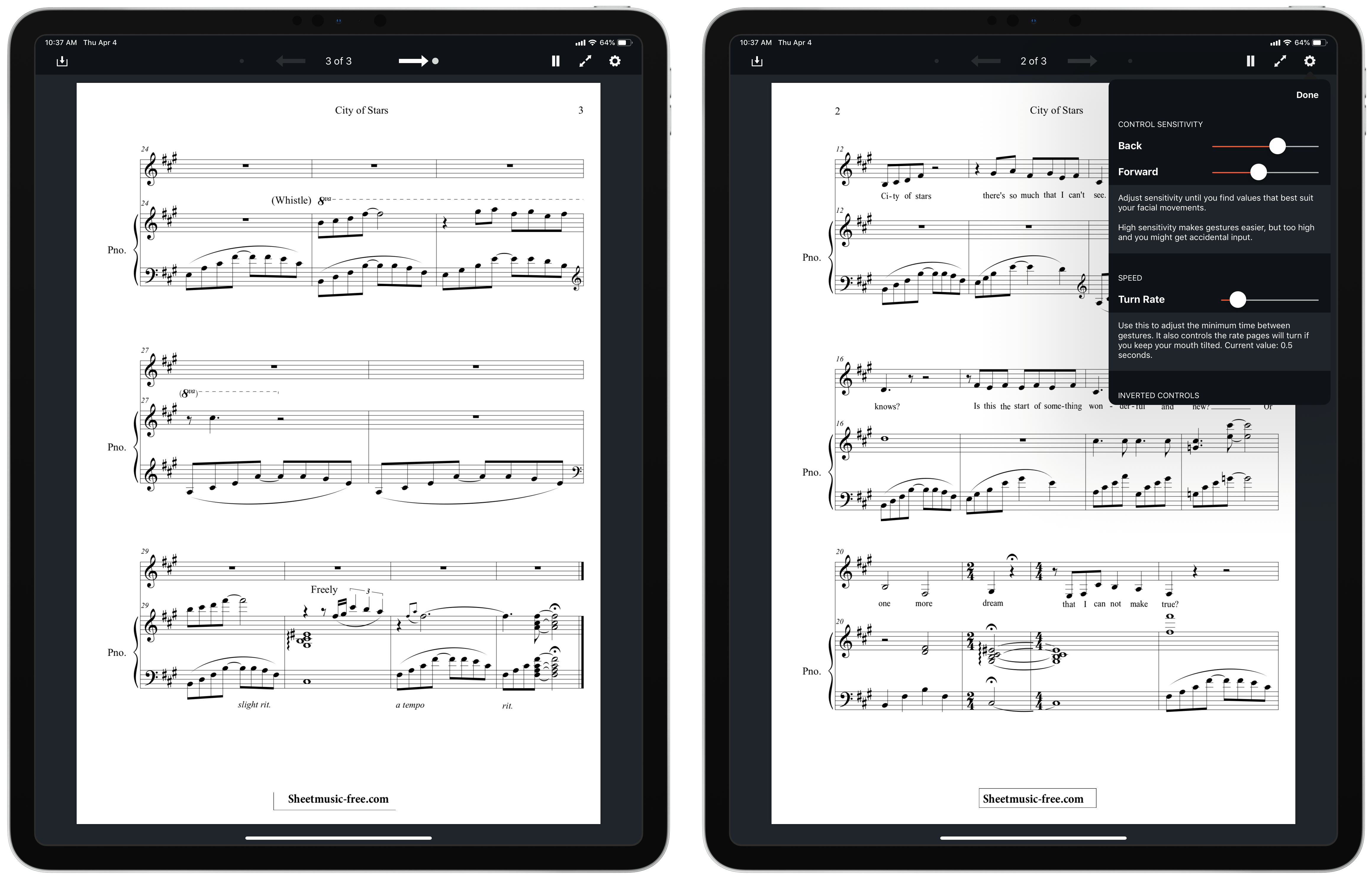
Developer and musician Stephen Coyle just released a new app that enables hands-free page turning of PDFs via facial expressions. The aptly-named PageTurn utilizes the power of the TrueDepth camera system found in all iOS devices that support Face ID – the iPhone X, XR, XS, and XS Max, plus the 2018 iPad Pros – to enable turning pages of a PDF using only your face.
There are two options of facial gestures available to control page turning: mouth control, which is the default, or wink control. Mouth control works by tracking the movement of your mouth: if you move it right, you’ll advance forward a page, while moving it left goes back a page. Wink control advances forward with a right wink, and goes back with a left wink. With both of these options, PageTurn provides the ability to set sensitivity so you can customize each gesture to whatever’s most comfortable for you. It feels odd at first making these gestures to turn pages, but in my experience it quickly became comfortable.
PageTurn was designed primarily for musicians, who often bear the unenviable task of turning pages of sheet music while both their hands are occupied playing an instrument. It works with any PDF though, so readers can have hands-free page navigation as well. You can get PDFs into the app via the import button in the upper-left corner, which opens a Files picker, or if you have a PDF open in another app, you can copy it to PageTurn using the share sheet.
PageTurn is a simple utility, but for those who could benefit from it – musicians in particular, and also users with accessibility needs – it’s a potentially revolutionary tool that enables new ways of doing a common task that weren’t previously possible. The app is a shining example of the creativity of indie developers.
Connected, Episode 237: All the Different Flavors of iCloud→
AirPower is dead, Powerbeats Pro are here, Federico is having a good week on Twitter and iCloud Drive deserves some attention from Apple.
A good episode of Connected this week – we talk about wireless chargers, new Beats headphones, and a whole list of suggestions on how to improve iCloud Drive. You can listen here.
Sponsored by:
- Hullo: A simple, natural pillow designed for comfort. Try it for 60 days.
- Hover: Extensions for anything you’re passionate about. Grab a .ME domain for $9.99.
- ExpressVPN: High-Speed, Secure & Anonymous VPN Service. Get 3 months free with a 1-year package.
Beats Announces Powerbeats Pro Wireless Workout Headphones

Apple subsidiary Beats has announced the Powerbeats Pro, $250 H1-powered workout-oriented headphones that dispense with all wires. Apple purchased Beats in 2014 and has incorporated some of its technologies like the W1 chip into its Powerbeats and Beats Solo3 headphones, but until now, Beats didn’t offer headphones that competed directly with AirPods.
The Powerbeats Pros aren’t entirely a surprise. As Guilherme Rambo reported for 9to5Mac last week, iOS 12.2 includes hidden images of the Powerbeats Pro headphones. However, the new headphones’ official announcement provides additional details.
The Powerbeats Pros will be available starting in May in the US and 20 other countries and come in four different colors: black, ivory, navy, and moss. The water and sweat resistant Pros are a significant step up from the existing Powerbeats because they are truly wireless in the same way AirPods are wireless. Unlike the original Powerbeats, which will continue to be available and have a wire that connects one ear to the other and wraps around your head, the Pros are independent wireless headphones that benefit from the quick connectivity afforded by the H1 chip. The Powerbeats Pro also include physical controls and charge via a Lightning connector using an AirPods-like charging case instead of the micro USB connector used in the Powerbeats model. However, unlike the latest iteration of AirPods, Powerbeats Pro do not support wireless Qi charging.
Also, the H1 chip means that the Powerbeats Pro headphones can be controlled with ‘Hey Siri’ commands. There are four sizes of headphone tips to fit a range of ear sizes, and the earhook that wraps around your ear is adjustable. Beats says that the new headphones have up to 4 hours more battery life than AirPods for a total of 9 hours of playback time, which exceeds 24 hours when charged using the case.
The Verge got early access to the Powerbeats Pro and has a hands-on review of the headphones. The assessment by Chris Welch is generally positive, and although I haven’t had the opportunity to try the Powerbeats Pros yet myself, they look like a good option for anyone for whom AirPods don’t fit well and who works out regularly. That said, at $250, the Powerbeats Pros are pricey compared to competing third-party products, so it’s worth considering other available options before purchasing the Pros.