Cursors on the iPad

Fantastic column by Jason Snell, writing for Macworld, on the rumor that Apple may bring a trackpad to the Smart Keyboard and update the iPadOS UI to support external pointing devices this year:

What makes the iPad great is its ultimate flexibility. When I write about iPad keyboards, people inevitably say: Why don’t you just use a MacBook, already?

But the iPad lets me tear off the keyboard when I’m not using it, and a MacBook doesn’t. I can use my same iPad Pro, and all the same apps, when my iPad Pro is completely naked, when it’s attached to a keyboard, when I have an Apple Pencil in my hand, and yes, even when I’ve got a Bluetooth mouse attached.

This is why I love the iPad so much. It’s everything I want it to be, when I want it to be that—and not when I don’t. Yes, there are definitely tasks my Mac is much better at performing, and in those cases using an iPad can be a compromise. But using a MacBook that can’t be transformed into a light touchscreen tablet is also a compromise. And unlike the current Windows experience, I don’t have to retreat into a weird faux-Mac interface to get real work done.

As I’ve argued many times before, the iPad’s greatest strength is its ability to transform into different types of computer depending on what you need. Here’s how I concluded my Beyond the Tablet story last year:

At a fundamental level, after seven years of daily iPad usage, I believe in the idea of a computer that can transform into different form factors. The iPad is such a device: it gives me the freedom to use it as a tablet with 4G while getting some lightweight work done at the beach, but it becomes a laptop when paired with a keyboard, and it turns into a workstation when hooked up to an external display, a USB keyboard, and a good pair of headphones. For me, the iPad is the ultimate expression of the modern portable computer: a one-of-a-kind device that morphs and scales along with my habits, needs, and lifestyle choices.

A few years ago, I described the iPad as a “liberating” experience that married power to portability and allowed me to work from anywhere. I stand by that concept, but I’ll revise it for 2019: the iPad is a liberating device that transcends its form factor. Its range of configurations, combined with a new generation of powerful iOS apps, delivers a flexible experience that eludes classification.

Adding a trackpad and native support for external pointing devices to UIKit wouldn’t turn the iPad into a laptop: it would just add to the list of potential, optional configurations for the device. That’s been true for a while with other accessories; I don’t see why mice and trackpads shouldn’t be next.


Permalink


Things Debuts Modernized Apple Watch App

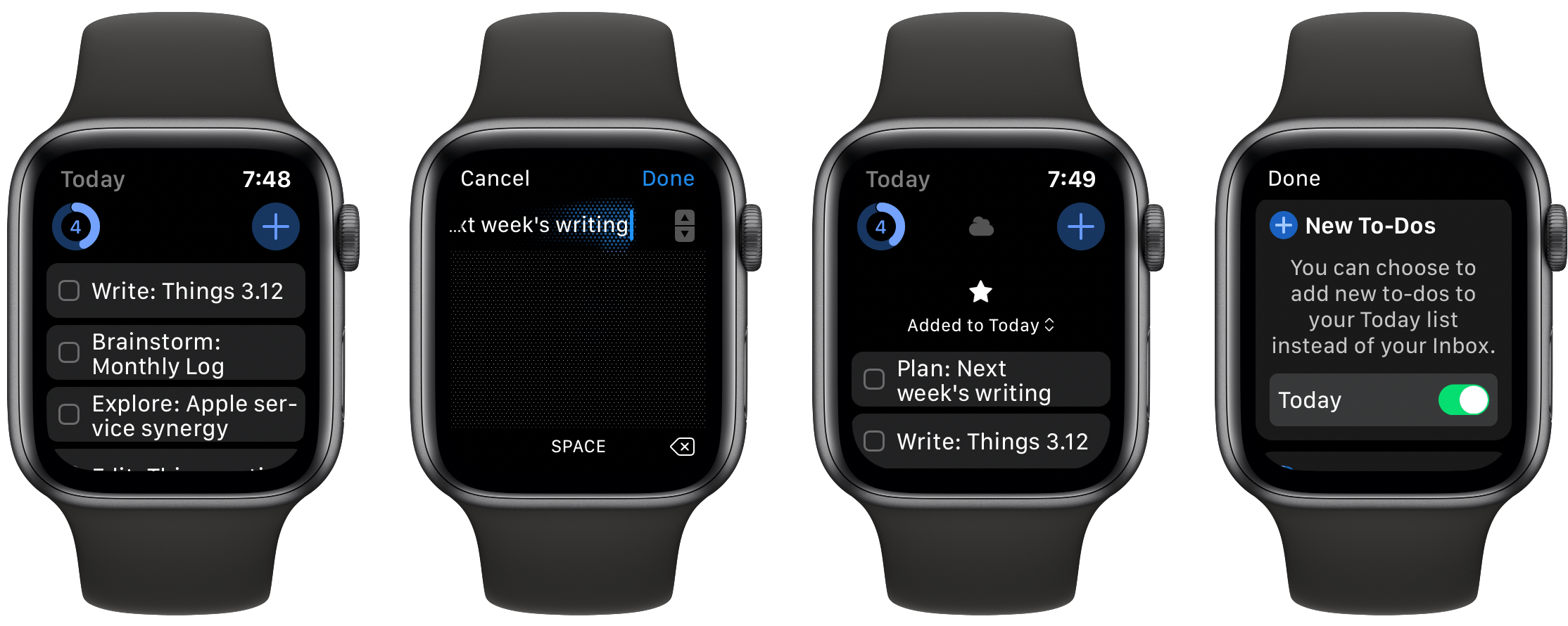
The Apple Watch has come a long way in five years, and apps are only starting to catch up. Many Watch apps received the majority of their development attention with the first or second versions of watchOS, before the days of LTE service, independence, and SwiftUI. Those early Watch apps were hamstrung by OS limitations, but in the last few years as the platform has evolved, most apps never adapted to what’s possible now.

Things 3.12, releasing today, exists for just that purpose: it addresses the task manager’s former Watch client shortcomings, making it a truly capable companion for Things on iPhone, iPad, and Mac.

Read more


NetNewsWire for iOS and iPadOS Review: The Perfect Complement to the App’s macOS Counterpart

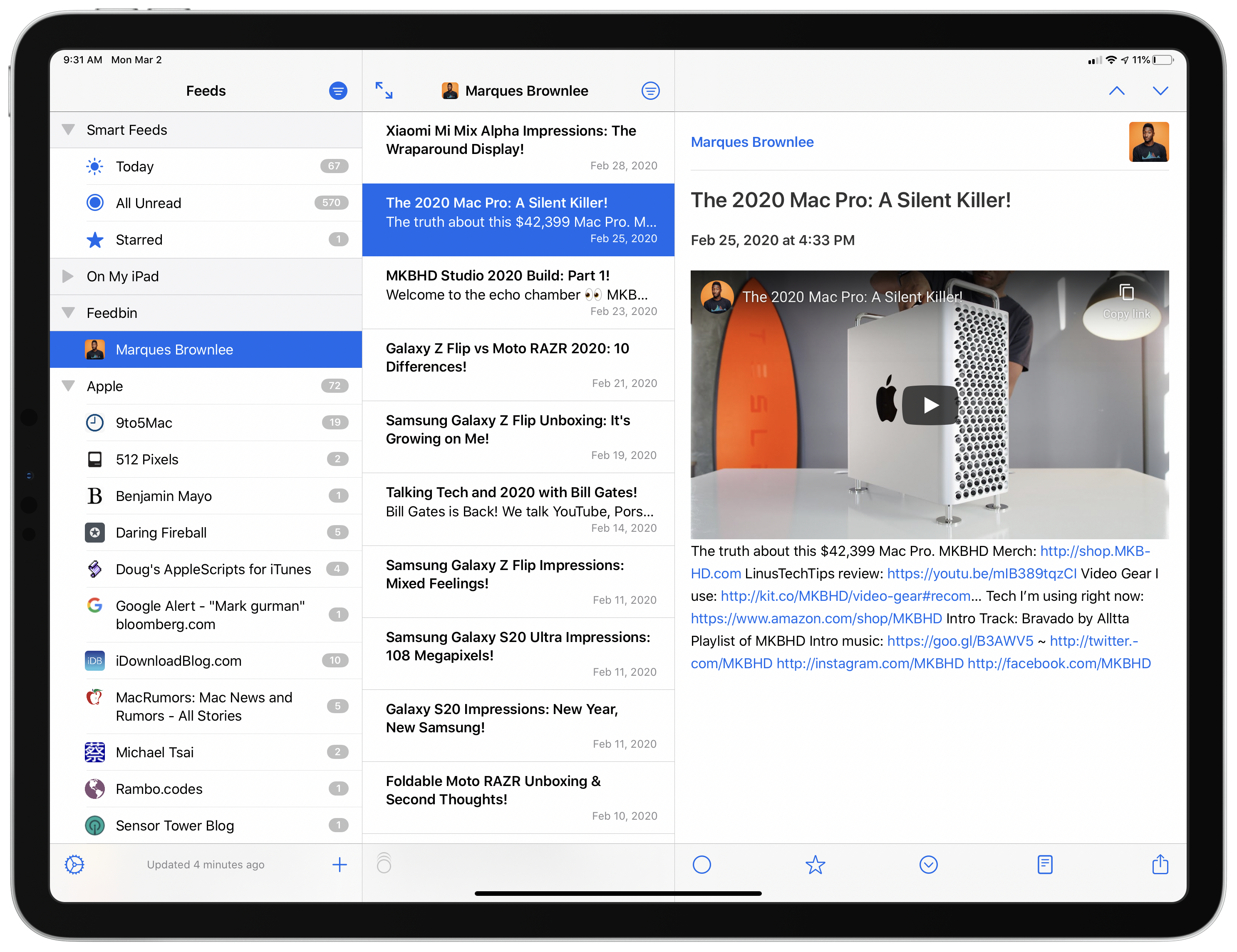
NetNewsWire, which was relaunched on the Mac last August, is now available on iOS and iPadOS. Like its Mac counterpart, the iOS and iPadOS version is built on a foundation of fast syncing and sensible, bug-free design. As with any 1.0 app, there are additional features and refinements I hope to see in future releases. Unlike most 1.0 releases, though, you won’t find lots of rough edges and bugs. NetNewsWire is ready to be your primary RSS client today.

Read more


iMazing: Manage and Transfer iPhone Photos Like a Pro! [Sponsor]

iMazing is the must-have backup and file acces tool for the Mac that provides unparalleled access to everything on your iOS devices. The app works over both WiFi and USB, allowing you to take control of your iOS data. With it, you can make Time Machine-style backups, easily transfer documents, media, and content, and dig into system files, access device and battery diagnostics, and a whole lot more.

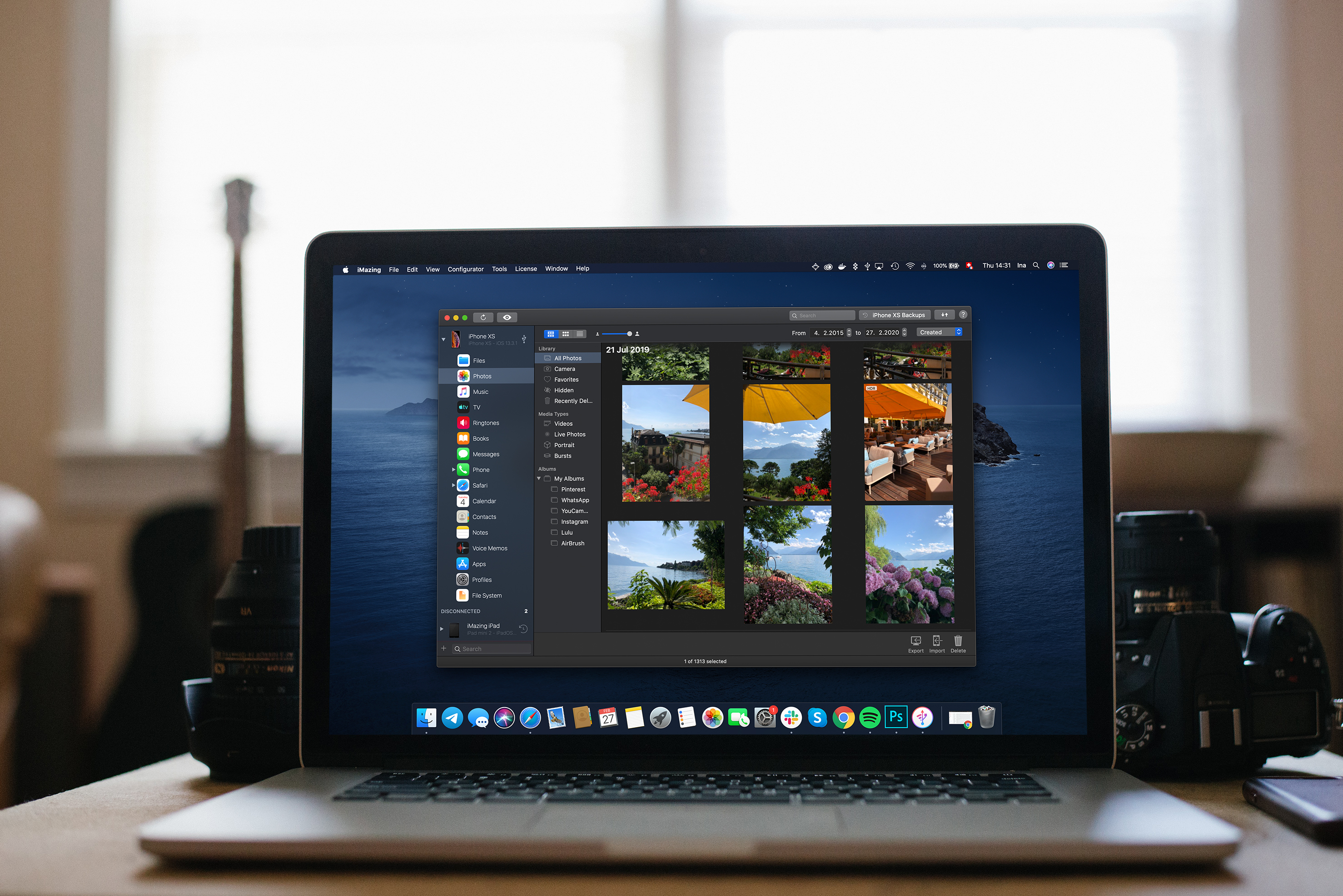
With the recent release of version 2.11, iMazing has greatly expanded its photo support. Now, you can manage and transfer even the largest iPhone and iPad photo libraries quickly and seamlessly using your Mac.

Your photos and videos are all available in high-resolution and can even be viewed full-screen before importing them to your Mac. You can also browse extensive metadata about each image like its file name, size, and format, number of views, location, shutter speed, focal length, ISO, and more.

When you decide to export photos, you have a wide range of options and control over exactly what gets exported too. Combined with iMazing’s excellent backup features, the new photos features allow you to easily browse and recover items that have been removed from devices and iCloud.

Version 2.11 is a fantastic update to iMazing that provides the power and flexibility that pro users demand with the ease of use and flexible export features that casual users will love. The update is free to all iMazing 2 license holders, and if you aren’t already an iMazing user, you can download and try it for free.

From March 9-16, 2020 only, MacStories readers can purchase iMazing for 30% off. This is a terrific deal, so don’t wait. Download iMazing today, and take advantage of this deal and start managing and transferring your iPhone photos like a pro.

Our thanks to iMazing for sponsoring MacStories this week.


Shortcuts Rewind: Dates, Calendars, and Beyond

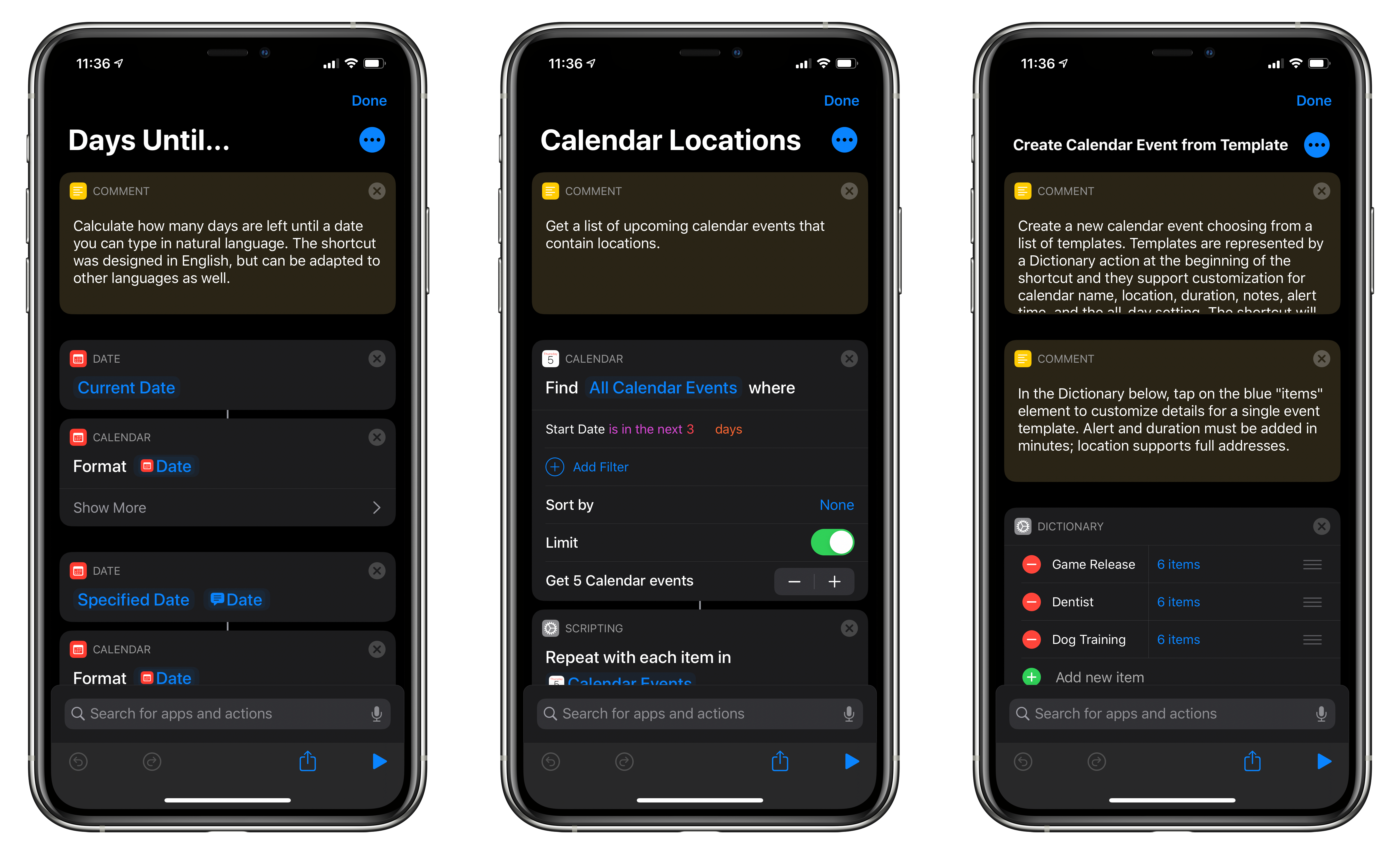
For this installment of Shortcuts Rewind, I’m going to focus on date and calendar actions. I’ll also touch on some of the Shortcuts actions that Apple Maps offers and explain dictionaries.

I wanted to cover date and calendar actions early in the Shortcuts Rewind series because they’re the sort of actions that come in handy over and over in a wide variety of shortcuts. Plus, date-based shortcuts are useful to lots of people. After all, everyone deals with schedules and meetings to some degree.

With Shortcuts, dates become modifiable building blocks that go hand-in-hand with events that the app allows you to decouple from your calendar app and recombine in new ways. It’s a powerful pairing that, along with an understanding of dictionaries, can be extended to other contexts over and over.

You can download each of the three shortcuts I cover at the end of each section of this story or by visiting the MacStories Shortcuts Archive, where you’ll find these and over 200 other shortcuts. Once you download one of the shortcuts, opening it on an iPad side-by-side with this walkthrough is a terrific way to learn how each works. Another technique that is effective is to rebuild each shortcut from scratch yourself, as you follow along below.

Read more


Connected, Episode 284: stevensmerch.com

On this week’s episode of Connected:

This week, Federico makes a change, Stephen buys a domain and Myke cancels a future live show, pending Apple’s decision on WWDC.

You can listen below (and find the show notes here).

AppStories+ Deeper into the world of apps
0:00
01:26:06

Connected, Episode 284

AppStories+ Deeper into the world of apps

Sponsored by:

  • Squarespace: Make your next move. Enter offer code CONNECTED at checkout to get 10% off your first purchase.
  • Boll & Branch: The Softest Organic Sheets & Luxury Bedding. Save $50. Try them for 30 days in a risk free trial.
  • Sanebox: Clean up your inbox in minutes. Sign up for a two-week free trial and a $25 credit.
Permalink

Adapt, Episode 20: Trackpads for iPads

On this week’s episode of Adapt:

Inspired by a report that the iPad Pro’s Smart Keyboard will gain a trackpad this year, Federico and Ryan imagine what that would mean for the future of the iPad.

You can listen below (and find the show notes here), and don’t forget to send us questions using #AskAdapt and by tagging our Twitter account.

AppStories+ Deeper into the world of apps
0:00
01:04:30

Adapt, Episode 20

AppStories+ Deeper into the world of apps

Sponsored by:

  • TextExpander, from Smile: Unlock your productivity with TextExpander. Get 20% off with your first year.
  • Sanebox: Clean up your inbox in minutes. Sign up for a two-week free trial and a $25 credit.
Permalink