Should Apple Own Factories Again?

Should Apple Own Factories Again?

Horace Dediu:

I’m not an expert in this area, but as a student of disruption I see signs of opportunity to re-engineer the manufacturing business model. The patterns from history are plain to see: Centralized systems get broken down and re-aligned with new bases of competition. Value chains disintegrate and re-integrate as profit algorithms change.

The new algorithm says you need to ramp production quickly (up and down) and to increase “product turns” from one to two each year. Each ramp needs to be even bigger than they are now. Maybe by a factor of two. Products should be built closer to where they are consumed to drive costs and delays out of transportation and tariffs. Carbon footprints need to be reduced.

Sounds daunting. But the rewards could be enormous.

Give Ive his own factory ? Just think about it.

Permalink

Doodle Jump “Christmas Special” Now Available

The trend in the App Store these days is to release “Christmas Editions” of apps. While I wouldn’t know about  ”Twitterrific: Santa’s Tweets” and “Instapaper: Christmas Reading” special versions, it seems like the strategy is quite working for games. Otherwise, why would Rovio bother releasing a “Season” version of Angry Birds?

Lima Sky is the latest development team to follow the trend and release Doodle Jump Christmas Special at $0.99 in the App Store. The game is simply a remix of the original Doodle Jump with just a new background and a few Christmas-themed enemies, but boy it looks cute. It’s got Retina Display-ready graphics and all the Game Center features seen in the standard edition.

Doodle Jump Christmas Special is available now at $0.99 in the App Store.


Apple Releases LED Cinema Display Firmware Update To Address Audio Issues

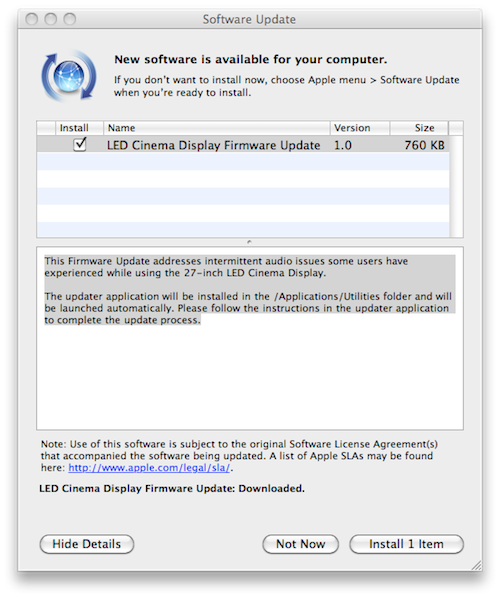
A few minutes ago Apple released a minor firmware update for the LED Cinema Display to address audio issues experienced by users on the 27-inch model.

This Firmware Update addresses intermittent audio issues some users have experienced while using the 27-inch LED Cinema Display.

The updater application will be installed in the /Applications/Utilities folder and will be launched automatically. Please follow the instructions in the updater application to complete the update process.

The update is available now in Software Update or on Apple’s website. A support article detailing the intermittent audio issues is available here. The issue has also been widely documented on Apple’s discussion boards.

[Thanks, Greek iPhone]


Daisy Disk 2 Public Beta Available

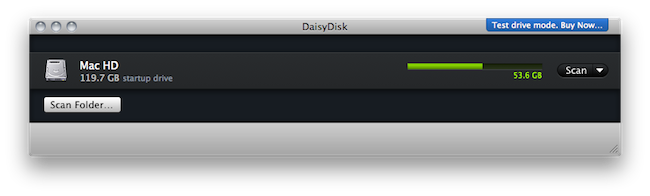
We previewed the new version of Daisy Disk for Mac back in November and I’ve been running the app on my computer since then. At regular weekly intervals, I’ve found myself using Daisy Disk 2 to take a peek into my Mac’s hidden and mysterious locations and see what was eating up all that space. Sometimes it was an iTunes backup. Sometimes it was a folder full of new apps to try. Most of the times it was just junk. Daisy Disk 2, with its gorgeous “sunburst” interface and file deletion functionality, provides a great way to “visually” know what has to be trashed on your machine. Read more


Disk Drill Is An Amazingly Simple Recovery App For HDDs

When we lose deleted files on our hard drives we tend to think of this information as unrecoverable. On a Wednesday afternoon it’s easy to forget that those nightly cleanup scripts aren’t going to do you any favors when you’re looking to reuse some stock images for an updated web template. And those deleted music files? It turns out that you liked that dirty ol’ garage band after all. In times of panic we resort to Google and often extreme utilities to scrounge our Macs for every last bit of recoverable data possible before sifting through the garbage of unreadable file names and Quick Look previews. We not only advise that you read John Gruber’s advice on the matter and keep consistent backups, but we’ve reviewed a brand new Mac utility that’s not only free during beta, it’s really (really) slick.

Read more


Apple iDevices Dominate Encoded Web Video

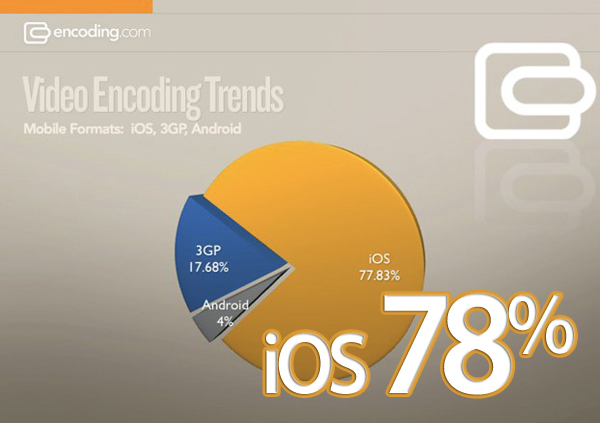
More than ever people are watching videos on mobile devices these days. So, when a website encodes their videos, they must decide which devices to support and encode their video to play on different smart phones and tablets. According to Encoding.com is reporting that, nearly 78 percent of its customers (MTV to PBS) encode mobile video to play on Apple’s iDevices, and only 4 percent specifically for Android devices. 18 percent encode for 3GP format, which is used by feature phones.

This data is based on which preset options Encoding’s customers choose. It doesn’t mean that only 4 percent of videos will play on Android devices (which after all support Flash, MPEG-4, and 3GP), but that only 4 percent of Encoding’s customers bother to select the Android preset, which provides the optimal viewing experience on those devices. Whereas choosing the Apple presets is pretty much the default right now, and as noted earlier, iOS was embraced rather quickly. Encoding’s 1,400 customers are fairly representative of video producers across the Web, spanning media, advertising, retailers, and developers.

Read more


The Onion Chooses The iPad As One Of The Most Influential People Of 2010

The Onion Chooses The iPad As One Of The Most Influential People Of 2010

We easily could have written about Steve Jobs, the iconic CEO of Apple, and adequately described the iPad in that predictable context. But instead, we made the radically unorthodox decision to grant this product—a one-and-a-half-pound wafer of aluminum and glass, mind you—the same status accorded to members of the human race. You’ve already read through a number of stories constructed around people, but just when you expected to encounter another, we pulled the rug right out from under you.

This year, we are choosing a computer as one of the most influential people of 2010.

Also:

Anyway, not to brag, but we’re pretty fucking proud of ourselves.

Yes, you should be. At least you didn’t realize Mark Zuckerberg was worth a price in 2010.

Permalink

Prizmo for iPhone Now Lets You Scan To Evernote and MobileMe

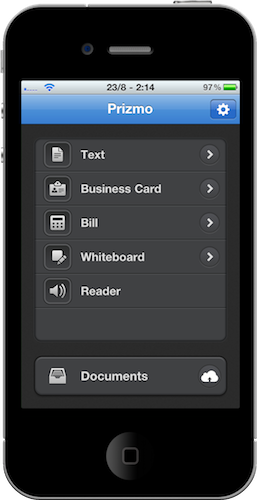
Prizmo for iPhone is an excellent port of the popular Mac app by Creaceed  which lets you scan just about any kind of document and apply smart OCR to it. The iPhone app – we reviewed it here – also lets you upload your scans to Dropbox and CloudApp. At least it used to.

The latest 1.1 update, released today, adds support for two much requested online services: Evernote and MobileMe. Evernote just happens to have a brand new 2.0 version available for Mac users today. Together with bug fixes, better in-app documentation and additional languages, Prizmo now lets you easily upload any document to these two new services.

Prizmo for iPhone is available at $9.99 in the App Store.


Genius Mixes Are Back With iTunes 10.1.1

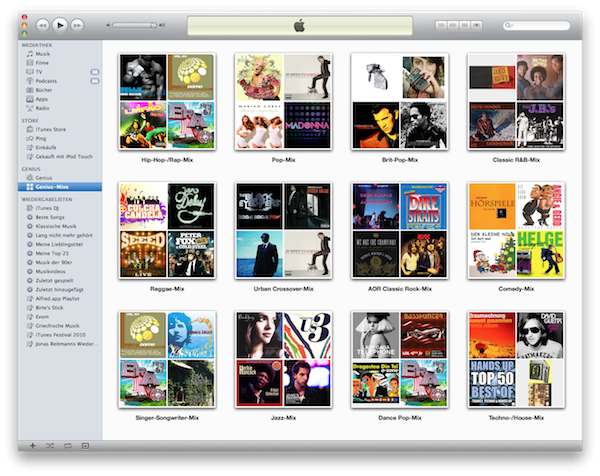
Just a quick update to let you know that together with the release of iTunes 10.1.1 earlier today, Apple seems to have fixed the “missing Genius Mixes” reported by many users last week.

Either built in 10.1.1 or a server-side fix on Apple’s end that has been deployed today, go update your iTunes now, activate and / or update Genius (Store -> Turn On Genius, Store -> Update Genius) and enjoy your Genius Mixes again.

[Thanks, Jonas]