


Here’s today’s deals on iOS, Mac, and Mac App Store apps that are on sale for a limited time, so get ‘em while they’re hot! Read more
#MacStoriesDeals - Monday
Hockey: An Open Source Platform For Distributing Ad-Hoc iOS Betas

Buzzworks has announced version one of a new open source platform for distributing ad-hoc betas to iOS testers called Hockey. As an alternative to TestFlight, Hockey faces stiff competition from developers seeking a “happy meal” solution for rapidly exchanging the latest iterations of applications with minimal setup. The immediate difference between TestFlight and Hockey comes down to the developer’s willingness or want to host their own their own apps: Hockey requires initial (though minimal) setup in combination with a PHP5 server. Arguably every developer has their own hosted nameapp.com website which they can utilize for this purpose, but what benefit does this provide to the developer? Satisfying the testers.
Hipstamatic Photos Come To Life In UK Exhibition

Hipstamatic is one of the most popular and successful camera apps ever released for the iPhone: Apple included the app in the iTunes Rewind top selection of 2010 and even The New York Times ran a story on the front page featuring a photo by Damon Winter, shot using Hipstamatic for the iPhone 4. The application mimics the appearance of the original Hipstamatic 100 toy camera, created by the Dorbowski brothers and released in 157 limited edition models between 1982 and 1984.
At the Orange Dot Gallery in London, the “Exhibition for Hipstamatics” features 157 prints of photos realized with Hipstamatic for iPhone and selected from the fan-made website Hipstamatics, where users can submit images uploaded from their iOS devices. The iPhone photo gallery will be held until February 13th, and it’s surely a big improvement over the (hilarious) world’s smallest Instagram gallery we covered a few weeks ago.
We think it’s great that photos coming from a smartphone camera are being showcased in real-life exhibition, inside an actual photo gallery. In case you had any doubts, this once again proves that software is the best addition to Apple’s hardware. [via The Apple Lounge]
Motorola Prepares Another Jab at Apple with Super Bowl Commercial

It looks like Motorola is back to its usual business of launching commercials with clear and direct pokes at Apple’s products. After the “giant iPhone” argument for the iPad, here comes a teaser of the ad Motorola will run during Super Bowl for its upcoming Honeycomb tablet, the Xoom.
The ad / teaser, called “Goodbye 1984”, says:
2011 looks a lot like 1984. One authority. One design. One way to work.
It’s time for more choices. It’s time to explore. It’s time to live a free life.
In the video, you can see planet Earth wearing Apple-white earbuds slowly fading from colors to black & white. The “one design” and “one authority” Motorola mentions is an obvious reference to the popular Super Bowl commercial Apple ran in 1984, quite possibility the most famous tech commercial of all time. Tech specs of the Xoom are presented in the ad, like Android Honeycomb support, 5 MP camera and 3G connectivity upgradable to 4G.
MacBook Air Finds Its Natural Habitat: Floating In The Air

Sometimes Apple can take its product line a little too literally. That’s the only reason we can think of behind Apple’s latest storefront setup in various Apple Stores, where a MacBook Air is gently floating in the air, attached to a balloon. Sure, a metal wire is attached to the balloon – but the trick works. The whole setup looks pretty cool.
Most of all, Apple put an end to all those MacBook “air” jokes. Check out the video below. [Obama Pacman via 9to5mac] Read more
From Russia With Love: Old Films Become Illegal Apps

For as much as Apple wants to curate the content of its App Store, it’s becoming increasingly difficult for the app review team at Cupertino to filter apps based on illegal content with no copyrights from the genuine ones. A new report on the BBC points to several apps being sold in the App Store with no consent from the Russian company that has rights on the content of these apps. The apps, in fact, are based on old Russian films like Gentlemen of Fortune, Assa, The Diamond Arm, Kin-dza-dza and Cheburashka.
The films and cartoons, as noted by the BBC, are still protected by copyright. Russian film studio Mosfilm and the Joint State Film Collection confirmed that they didn’t approve the release of those apps in Apple’s App Store:
It is illegal to present our films as applications either in iTunes or on any other internet site. It is permitted only on our own Mosfilm site”, Svetlana Pyleva, Mosfilm’s deputy director-general, said in an interview with bbcrussian.com.
“The only official internet site where you can watch legal Mosfilm content is the Mosfilm site.,” she said. “There are no third parties which we have permitted to use our content.
An Apple spokesperson told the Russian BBC that the company “understands the importance of protecting intellectual property”, so it won’t be a surprise to see the apps pulled soon. After all, this is not an isolated case of apps sold without consent of the original copyright owners: just open the App Store and look for clones of Nintendo’s Super Mario, Angry Birds or other 1980’s hits. The truth is most companies don’t care about the rip-offs, and some file complaints to get the apps removed. Overall, the App Store is a crowded place with more than 350,000 apps and it’s incredibly difficult, if not impossible, for Apple to check on every copyright agreement ahead of the app’s approval. At least it’s fairly easy to contact the iTunes team and claim copyright infringement.
Spotify’s Head Of Business On iTunes and Music Labels→
Spotify’s Head Of Business On iTunes and Music Labels

Spotify, the European-based music streaming service, is having a hard time trying to launch its product in the United States. Once expected to become available in a self-imposed December 2010 deadline, the service failed to launch due to the lack of deals with major music labels that, as you can guess, have to guarantee Spotify access to their music libraries. Two weeks ago, All Things Digital reported Spotify managed to close a deal with Sony, as a first step to bring the service to the United States. In the past months, rumors surfaced detailing how Apple was subtly playing against Spotify to convince labels that the service wouldn’t be a good source of revenue like iTunes.
Spotify’s head of business Faisal Galaria told Strategy Eye:
Q: But aren’t the labels eager to break iTunes’ monopoly?
A: If you’re the digital team [at a label] and 80% of your revenue was coming from one place, how much are you going to p*ss them off until someone else can guarantee all that revenue from a new source?
Put yourself into their shoes for a moment – you’re a nice, fat big executive at label X, Y, Z. You’re getting half a million dollars a year as long as you hit your bonus. Your bonus means that 80% of your revenues comes from iTunes. Are you going to tell iTunes where to go? Because your half a million dollar bonus has now gone.
According to various reports, Apple may be blocking Spotify from launching in the States because of a similar music streaming service they are building on top of iTunes, based on the data center in North Carolina. [via Cult of Mac]
This Front Row Mockup Is Totally Gorgeous
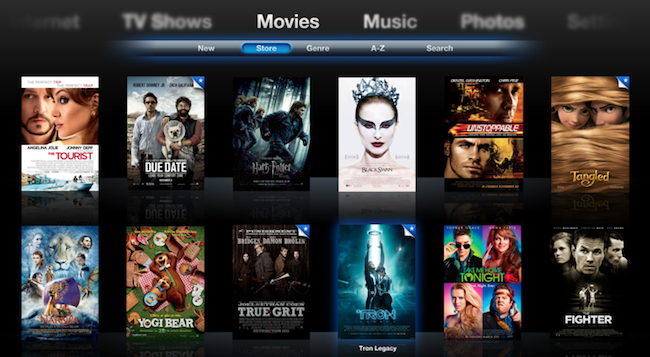
Designer Zach Forrester tried to imagine what would Front Row look like if Apple updated its interface with new shiny pixels, animations and a visualizer. The result, a series of mockups available here, is impressive: Zach took the basic concept underlying Front Row’s UI and the Apple TV’s browsing experience and re-imagined them with a bit of artistic sense and pixel perfection in mind.
I’m not sure about the keyboard as-you-type he designed, but everything else looks great: from the Movies view with larger poster art and slide-in animation for a single item, to the music player that includes a subtle visualizer on top of the Cover Flow navigation and next to the Now Playing album art.
More screenshots are available here, and there’s a limited web demo for you to play around as well. [via Beautiful Pixels] Read more
The Great Disparity in Global iTunes Prices
Over the weekend I curiously started investigating whether Australians had been getting a progressively worse deal for their iTunes purchases as the Australian dollar rose from USD$0.60 to parity whilst iTunes prices stayed constant. The answer is most definitely a yes but it doesn’t just apply to Australians, and the extent of the price disparity is larger than I had thought.
Whilst Apple is entitled to have different prices for different regions, it doesn’t really need to. Furthermore the extent to which there is price disparity is very extensive for the music section of the store and this article aims to bring the inequity to light. Apple has previously been under similar pressure but the exchange rates reverted back, I would hope Apple again reconsiders their iTunes pricing system now when exchange rates have pushed the disparity to a very high level.
This turned into a bigger article than I had expected so here are the key things I cover and keep reading after the break for a full run down with tables, graphs and more.
- iTunes uses fixed prices (i.e. $0.99, $1.29 etc.) and for stores outside the US these price levels were converted using a very conservative prediction of the future value of a particular currency
- The price levels in non-US stores seem not to have been updated in a long time, yet the value of the non-US currencies have mostly appreciated since then. As a result people purchasing from most of the non-US iTunes Stores are now paying more than US customers and Apple is earning more from those customers
- The conversion rate is different for the App Store and Music store (and likely the other stores too), the App store conversion rates are much more appropriate and the price disparity is less extreme.
Updated on April 27 2011 - see end of article for revised figures and comment.