Twitter for Mac 2.1 Released: Updated UI, Lots Of Fixes

Ever since I reviewed Twitter for Mac back in January, the long anticipated sequel to popular Twitter client Tweetie by Loren Brichter, I couldn’t switch to any other app. I tried other Twitter clients for the desktop and I even thought that the web app would be the best fit for me (to keep everything in the browser), but in the end I always kept coming back to Twitter for Mac. For me, the app is just so good, for a number of reasons: live stream allows me to stay on top with the latest tweets and news; direct messages have their own section and they don’t appear in my main timeline; gestures let me quickly switch between sections without lifting my fingers off the trackpad, and most of all they’re fast. Twitter for Mac already had a great feature set, but some people criticized the app when it came out for some design choices implemented by Twitter and Brichter that didn’t make the app behave as “normally” as other apps on the Mac. With Twitter for Mac 2.1, released a few hours ago, the application gets a facelift to finally feature a more native Mac look (just when we were getting used to the old one, but I guess it’s better this way), as well as several interface changes, bug fixes and performance improvements.

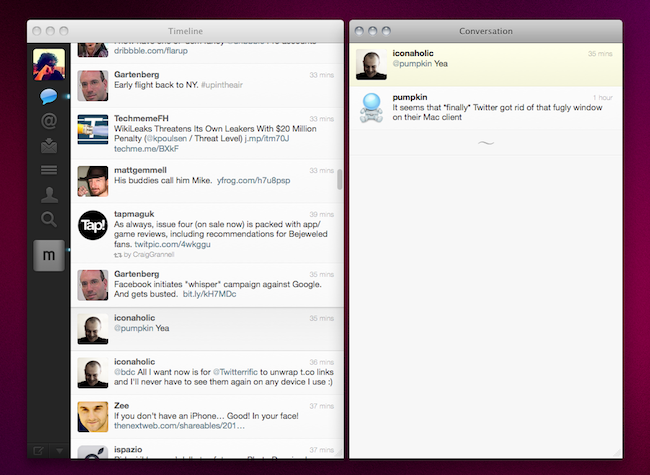
In Twitter for Mac, the main window has been redesigned to sport a native top toolbar with breadcrumb navigation for every time you dig into a conversation view, a profile, or a search. Just like in Tweetie 1 for Mac, you can click on the native toolbar to go back to where you were previously. Embracing a more native look apparently brought some welcome fixes as well, such as the fact that Twitter for Mac doesn’t follow you from space to space anymore. In the 2.1 changelog, the developers mention “bug fixes, enhancements and performance improvements” together with the addition of a console in the preferences for registered Twitter devs.

The biggest change in 2.1 is the possibility to “clone” any view in a separate window. By hitting the triangle icon in the bottom left or the Shift + Cmd + T keyboard shortcut, you’ll be able to open a conversation in a separate view, or your direct messages, a profile view, a search - anything can be cloned in multiple windows that will sit alongside your main timeline. This allows you to have multiple timelines on screen at the same time, multiple searches - I’m pretty sure Twitter power users who need to keep an eye on lots of things at the same time will appreciate this. Speaking of updated views, Twitter 2.1 also gets an updated profile window (with new tabs on top) and a refreshed DM view featuring the popular “chat bubbles” also seen on many iPhone apps.

Other changes have found their way in Twitter for Mac 2.1, too. AppleScript support has been implemented, as well as font size preferences; username and hashtag autocomplete enables you to tweet or mention someone faster from the compose window; t.co links now work much like the iPhone and iPad apps, being displayed as the domain they belong to (example: mcstr.net) without http:// before them. These links are still clickable, but when you copy them you’ll notice they won’t automatically append http:// to the link. I hope Twitter will change this, as it’s something that’s always bothered me on the iPhone and iPad too. For those who know how to unlock secret features in Twitter for Mac (it was possible in the first version with a MacHeist trick), we’re hearing the app features some neat things like pull to refresh and Classic mode.

From what I’ve seen so far, Twitter for Mac 2.1 is definitely an improvement over the last version, and the interface changes will be much easier to get used to this time. Bugs have been fixed, the app feels more responsive overall, the clone functionality to open multiple windows is just great. You can download Twitter for Mac for free in the App Store. Check out more screenshots below. Read more

Component Supply Chain To Face Shortages In Coming Months After Japan Crisis

Two reports out of DigiTimes today reveal that there will likely be component shortages in the next two months as a result of the Japanese earthquake and tsunami from earlier this year. Since the devastating crisis, many PC and mobile device makers have been downplaying the impact the crisis would have on component supply and prices, but DigiTimes reports that this was largely to try and quell any increase in component prices by the suppliers. In reality, many key players from Asus, HTC, Motorola and Apple have been aggressively acting to secure various components such as PCBs and glass touch panels.

Japan’s earthquake as well as the power brownout policy have already created strong pressure on the global IT supply chain, especially for PC players and in addition to component shortages, the labor shortage issue in China has also grown to become another menace to the IT industry.

The strong pressures on the component supply chain will likely result in shortages beginning next month with supply still hampered from the impact of the Japanese crisis. Prices too will inevitably rise for many of the key components such as touch panels in the face of inadequate supply. It may also bring the unfortunate consequence of more defective components being used as manufacturers become desperate to maintain production to keep up with demand.

DigiTimes also reported today that Foxconn, which is a key manufacturer for Apple products, is facing not only a shortage of components but also labor. The double knock on supply may be enough to impact on shipments of iPad 2 and iPhone 4 orders in the second quarter. Foxconn, in responding to the suggestion, said that the company has extensive experience in dealing with “arranging manpower to assist clients in reaching their goals” and that it will do all it can to keep up with client demands.

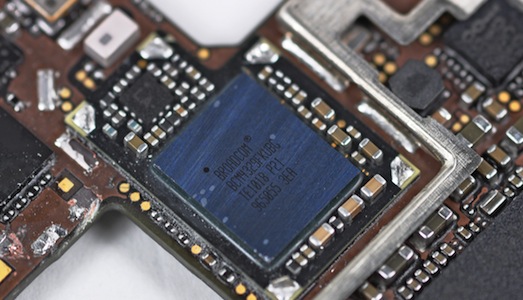
[Via DigiTimes (1) (2), Image via iFixIt]


Apple’s Eddy Cue Confirms Half of iPad Subscriber Base Shares Personal Info

Publishers whom haven’t yet submitted their magazine or news publication to the App Store fear that consumers will simply opt-out of sharing personal information if given the choice. While only names, email addresses, and zip codes can be gathered by publishers, the possible road block via a simple pop-up notification was enough to scare off the likes of Time, Inc. The New York TimesConde Nast, and others have given the App Store a shot despite the limitation to easily retrieve customer data, and Forbes’ Jeff Bercovici has confirmed that people aren’t that uncomfortable giving that information away.

Read more


Apple Fixes Events Bug with iPhoto 9.1.3 Update

A bug that caused iPhoto events to be split into multiple ones on iOS devices has been fixed by Apple with a software update to iPhoto, which reaches version 9.1.3. The issue, reported by several users on Apple Support Communities, caused an iPhoto events to be split into multiple instances on an iPhone, iPod touch or iPad after an iTunes sync.

The update is recommended for all iPhoto ‘11 users and is available now in Software Update or for direct download here. iPhoto 9.1.2 was released in late April, fixing several bugs and bringing other performance and stability improvements.


Apple Reaches 100th iAd Campaign

The Loop reports Apple has successfully launched its 100th iAd campaign in late March with real estate company Coldwell Banker:

Apple on Wednesday said it had launched the 100th iAd campaign with real estate company Coldwell Banker.

The iAd allows iPhone and iPod touch users to search for their dream home, scrolling through visually driven search features to find specific homes matching their criteria. You can search by price, zip code, and include images of the homes.

So far, the campaign is bringing “glowing results” with 11 pages on average viewed per visit, engagement time above one minute and conversion rates four times higher than standard search ads. Apple’s iAd is currently live in 7 countries across America and Europe, with a minimum buy of $500,000, lowered from $1 million to allow smaller companies to launch campaigns to display on iOS devices. iPhones, iPod touches and iPads are supported, but a recent email from a member of the iAd team suggested Apple, following a request from advertisers, has shifted its targeting focus to hide advertisements from some kids-oriented apps.


Twitter Rolls Out Redesigned & Improved Mobile Web App

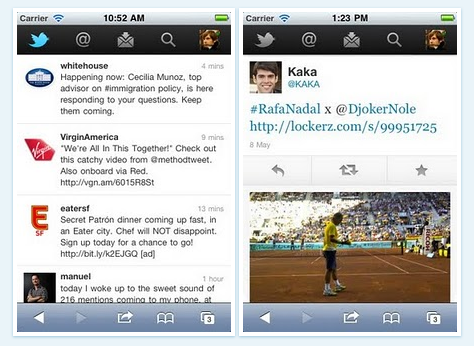
With an official blog post that went live a few minutes ago, Twitter has announced they’re slowly rolling out an updated version of their web app for mobile devices – this time redesigned to resemble the Twitter app for iPhone, but with a tab bar on top, and to feature more HTML5 integration. The web app allows you to quickly scroll the timeline, switch between tabs, check out your profile and even direct messages without leaving Mobile Safari.

We want you to be able to access Twitter no matter where you are; regardless of what device you use; or, whether you prefer to access Twitter through a mobile application or the browser. Today, we’re starting to roll out a new version of twitter.com for mobile devices. This web app allows us to provide a high-quality and consistent Twitter experience on high-end touchscreen devices – whether or not an official Twitter application is available. It was built from the ground up for smartphones and tablets, which have more advanced browsers that support the latest web technologies, including HTML5.

The new web app works on the iPhone, iPod touch and Android handsets, but it’s being rolled out to a small percentage of users today, with more following in the next weeks. Whilst the redesign looks good from the screenshots, there are still some obvious perks in using the native iPhone app, such as inline browsing for media and links or image and video uploading functionalities. Still, this looks like a major improvement over the old version, and we hope Twitter will be faster in rolling it out to all users than they did with #NewTwitter.


Apple Releases iOS 4.2.2 for Apple TV 2G

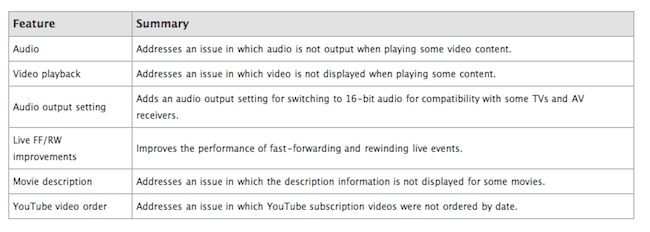
A few minutes ago Apple pushed a minor software update for the Apple TV 2nd generation. The firmware file, available for download here, is labelled 4.2.2 (build 8F305), but we’re pretty sure it’ll follow another nomenclature in the internal Apple TV settings or Apple’s website, as with previous releases. iOS 4.2.1 for the second generation Apple TV was released on March 22 with various fixes including TV compatibility and audio improvements.

Apple’s official Downloads webpage hasn’t been updated with a changelog yet, so we’ll update this post as more information about the update becomes available. [via]

Update: Here’s the full changelog for 4.2.2. As expected it contains various bug fixes and stability improvements.


Angry Birds’ Theme Song Recreated with Real Instruments [Video]

Sure, you can play Angry Birds on multiple devices, install all the possible versions and spin-offs from the App Store – heck, I’ll even go on to say it’s fine if you bought some of those shady guides to get the most out of the game. But can you play the official theme song like those indie Pomplamoose folks did? As noted by TUAW, the duo seems to enjoy the world of Angry Birds quite a lot, and even if there’s some Samsung advertising weirdness going on in the video, the overall result for your viewing pleasure is undoubtedly nice.

Video is embedded below. As for anyone else willing to recreate his own version of the Birds’ song, I’m pretty sure GarageBand for iPad has a share button somewhere. [via YouTube]
Read more


My Artists Levels Up and Becomes A Real iPod.app Replacement

My Artists, a nifty iPod-integrated app for the iPhone I first reviewed last year, just received a major update to version 1.2 which, among several improvements to the interface and speed optimizations, turns the app into the ultimate iPod replacement the developer was aiming for since the first release. My Artist, in fact, used to provide a beautiful alternative view for the standard iPod.app installed on every iPhone, but that was nothing more than a custom extra layer that still relied on iPod.app for music playback and controls. Like most “iPod.app controllers” in the App Store, My Artists added a lot of functionalities but was unable to directly control and play music already synced on your device. This changes today, as My Artists 1.2 finally ditches iPod.app dependence, being able to directly play your music. This means you’ll see a My Artists icon in the multitasking tray when using the app, not the iPod app’s one, and yet you won’t have to give up on standard iOS features like AirPlay – which works just fine even without using the native iPod software. I don’t know how Top Drawer Apps did it, but it works – music is now both recognized and played by my Artists.

Version 1.2 also brings Last.fm integration for those willing to scrobble music to the service, but that will cost you $1.99 as in-app purchase. A little last.fm icon in the playing screen will allow you to activate or disable the feature at any time. Speaking of which, the Now Playing view got some interesting updates as well, namely an icon in the upper right to quickly jump to more albums or tracks from the artist you’re already listening to. Alternatively, you can open the (improved) Bio section, which uses Wikipedia to display artist and album info.

My Artists was a great app before this update, now it’s just a must have for heavy mobile music listeners and general music lovers who would like an app focused on artists, albums, and information coming from the web. My Artists can be downloaded at $1.99 from the App Store.