Panic Updates Transmit, Candybar, Coda and Unison for Lion

Panic, makers of popular software for the Mac like website creation tool and code editor Coda or UI & icon customization manager Candybar, have released four updates to their flagship applications for OS X tonight, adding Lion compatibility ahead of the upcoming Mac App Store release for the new OS. As tweeted a few minutes ago by the company’s Twitter account, Transmit, Candybar, Coda and Unison have all been updated with a series of bug fixes and 10.7-related improvements.

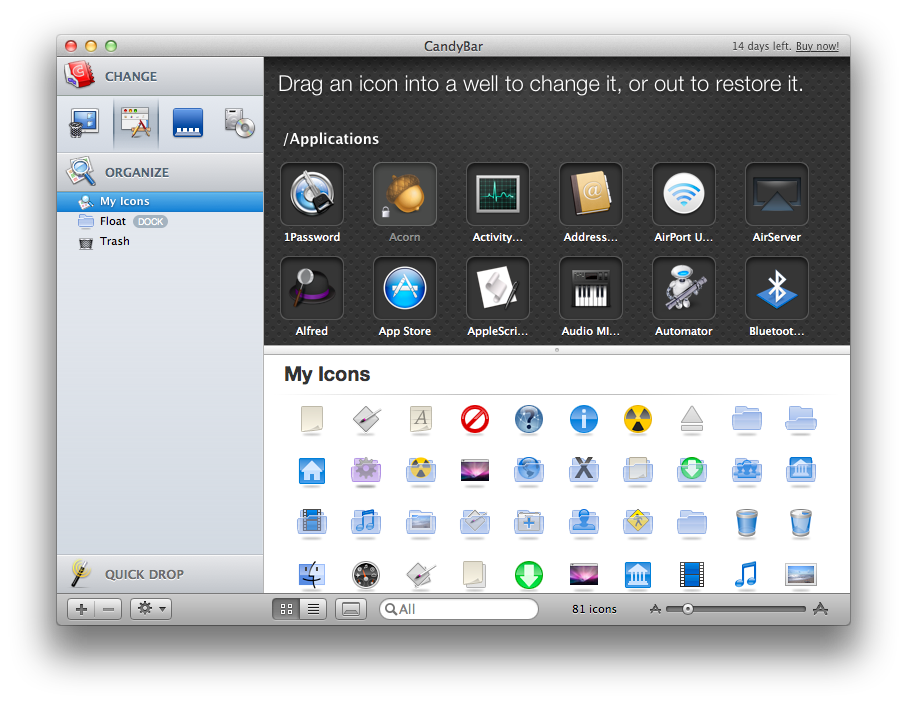
Candybar, the desktop app to change system icons and other graphical files, has received a substantial update to version 3.3 that prevents the application from doing “harmful customization” to Mac App Store icons (this has been an issue since January when the Mac App Store came out and users found out changing applications’ resources could be a problem for the Store’s update mechanism) and also introduces other interface changes. Candybar was last updated on October of last year, and today’s new version brings a smarter slider that presents common export sizes as you interact with it, and copy of icons onto Collections in the Info window.

Other changelogs for the updates Panic released today:

Transmit 4.1.6

  • Improved compatibility with Mac OS X 10.7 (Lion)
  • Added support for AWS Tokyo region
  • Added bookmark importing from Cyberduck 4
  • Dates are now read properly on SabreDAV servers
  • Improved Unicode filename support with download Syncing

Coda 1.7.1

  • Improves compatibility with Mac OS X 10.7 (Lion)

Unison 2.1.5

  • Fixed an issue that could cause preferences to be reset
  • Fixed a possible crash when playing an audio file
  • Improved decoding of Chinese messages
  • Sped up the performance of header loading with lots of “Ignore Sender” rules
  • Images without filenames in HTML messages are now shown properly

Currently, the new updated versions can be only downloaded from Panic’s website. The Mac App Store counterparts will likely receive the updates as soon as Apple processes them, so make sure to keep an eye on the developers’ Mac App Store page.


Take Five for Mac Updated to Give You More Control

Back in March we covered Take Five for Mac from the Iconfactory crew. The app is simple and efficient and does one thing and does it very well – stopping and restarting your music so you don’t have to remember.

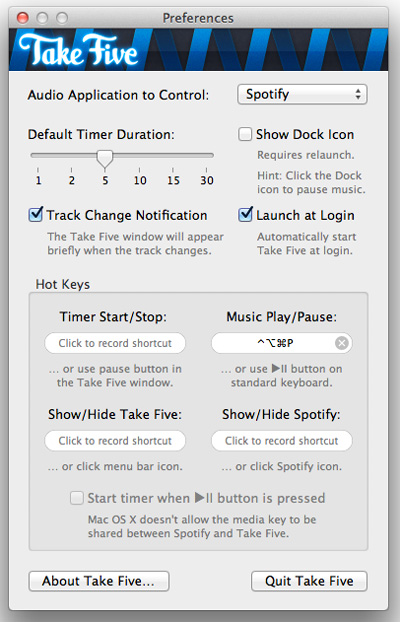
Today, Take Five has been updated to version 1.1 which may sound like a minor update but in actuality is very significant. Version 1.1 brings two new and requested features; one is the ability to pause music in the following apps/services: iTunes, Ecoute, Pulsar, Radium, Rdio and Spotify. The other is that Take Five can also now pause your music without a timer by holding down the option key while clicking the pause button. The update also addresses a bug where Take Five would stop responding when used with CoverSutra.

I am a heavy Ecoute user (and future Spotify user if it ever gets service in the US) and the additional control within the new Take Five is welcome. Spotify and Rdio users will also love the 1.1 update as well as users of the other services listed. Take Five is only $3.99 in the Mac App Store, or if you’re already a Take Five user, check for updates.


Bing for iPad Gets New “Lasso” Search Feature

Originally released in April and quickly acclaimed by the press as one of Microsoft’s best examples of innovation in user experience in the past months, the official Bing app for the iPad has managed to capture the attention of both regular Bing users and the blogosphere thanks to its compelling set of features that turned a rather simple activity like searching the web into a visually rich experience that combined local information, images, weather data and search trends to lay out beautiful search results based upon an intuitive interface and fast animations.

Today, Microsoft is announcing the release of Bing for iPad 1.1 which, among some interface optimizations and various bug fixes, brings a new search functionality called Lasso that, according to the company, should allow users to search for any keyword on the web by simply drawing a circle around it. Lasso sounds like a very innovative project and it looks good from Microsoft’s own promo video that you can check out here, but on my two iPads running the stable iOS 4.3.3 and the iOS 5 beta, I could only get it to work a couple of times in all my tests. When it did work, Lasso indeed matched the keyword I marked with a circle with a search result on Bing. As usual, the Bing app for iPad comes with an elegant design that makes it easy to swipe between searches and webpages, or jump to smart results like weather info and movie theater showtimes which, in this version, can be viewed with multiple days and theaters at once.

Microsoft writes on its blog:

In this release we made some improvements that you asked for and are excited to introduce a new feature called Lasso. Designed for touch-friendly devices, Lasso is a new way to search with the touch of a finger.

From our research, we know that many searches are inspired by things people see on the web. Today, it can be somewhat painful to search on a tablet when you’re engaged in reading something; just copying and pasting pieces of text from a webpage to a search box can take up to nine steps on the iPad. With Lasso you can circle and search in just two steps.

Microsoft keeps innovating with its Bing apps for iOS and I’m sure the issues I’ve stumbled into when testing the new Lasso capture tool can be easily fixed with an update. You can find the Bing app for iPad on the App Store. Check out more screenshots of the app after the break. Read more


Skype 5.2 Released, Brings Group Video Calls, Screen And Document Sharing

Just a little while ago, Skype 5.2 for Mac was made available and makes further improvements upon version 5.1, which had tried to appease complaints from the version 5 Skype relaunch that saw significant backlash from users. With this new version, group video calls are now out of beta and available for the general public and users can share their screens or documents in a group call. Unfortunately, group video calling, screen sharing as well as document sharing all require a Skype Premium subscription, which costs between $4.49 and $8.99 per month.

While screen sharing is already available for free on a one-to-one Skype call, group screen sharing makes communication and collaboration on group calls even richer by enabling people to view presentations, photos and documents on a participant’s screen, perfect for presenting a document to colleagues knowing they can’t skip slides in advance or for sharing holiday photos with friends and family.

There are also some UI modifications, for example in the sidebar there is now a ‘Recents’ region, which displays a list of the most active conversations, a history section also shows less active users. The call control bar now also features a video feed so that when you are multi-tasking during a video call you can still see the person as well as mute or hang up directly from that bar.

Meanwhile, there hasn’t been any movement on the release of the Skype iPad app, which had been expected to launch last week. However, Skype will apparently be making its way into some kind of Facebook video chat service which is rumoured to launch this week.

You can download Skype 5.2 for Mac OS X here.

[Via TechCrunch]


Reports: Pegatron Receives 15 Million iPhone 5 Orders, 5 Million iPad 2 Shipments In July

According to a report in DigiTimes today, Pegatron Technology has landed an order from Apple for 15 million iPhone 5s, for a September launch. According to the upstream sources that revealed the information to DigiTimes, the iPhone 5 “does not seem to [be a] major update from [the] iPhone 4”. Component supplies are currently making their way to the Pegatron plant in Shaghai, with more hiring also underway.

Pegatron’s supposed involvement in the production of the iPhone 5 comes after they worked with Apple to satisfy an order of 10 million CDMA (Verizon) iPhone 4s. Because sales have been significantly less, roughly 4 million, Pegatron has been under some financial strain. As a result, Pegatron has apparently been aggressive in getting iPad and MacBook orders from Apple – although so far they haven’t had any luck.

In another report out today, DigiTimes notes that five million touch sensors of the iPad 2 will be shipped this month. TPK Holding and Wintek will supply the majority (roughly 1.5 million each) with the remaining produced by Cando, Sintek Photronic and Chimei Innolux.

[Via DigiTimes]


Review: Saver For iPhone, Expense Tracking Made Less Painful And More Beautiful

Just like flashlight apps, GTD apps and games, there are a slew of personal finance and budgeting apps within the App Store — navigating the ocean of similar apps to find a good one can be difficult. Today I am here to shine the spotlight on one such app that has just launched, which I suspect will be perfect for many of you. The app in question is Saver and it is available for the iPhone and iPod Touch — developed by Alex Solonsky and ‘Redmadrobot’. Jump the break for a full review Saver.

Read more


Swapp For Mac is One Impressive App When Working With Multiple Monitors

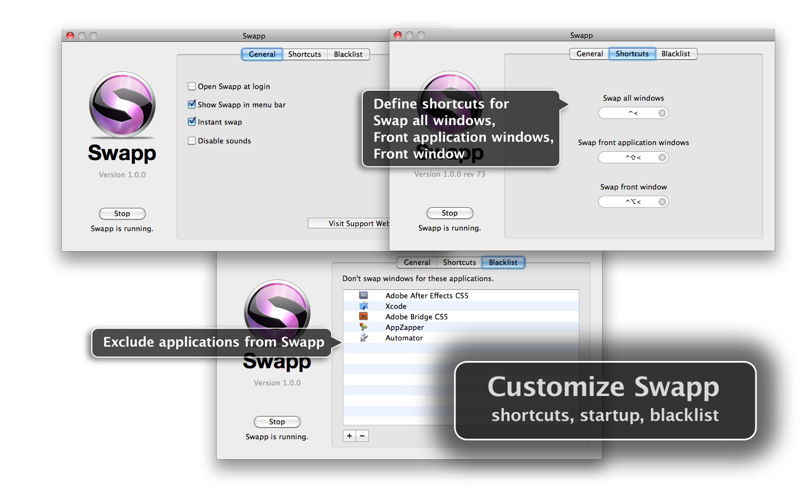
Okay you MacBook Pro plus Cinema Display users, I’ve got an app for you that impresses me more than the balls Tyler Glenn had to wish the USA a happy fourth of july with his pair of patriot boxers at this year’s iTunes Festival. (Can you tell I’m watching the Neon Trees today)? If you’ve ever wanted to swap windows between your MBP and Cinema Display monitors, move the front most window over, or move all of an app’s windows (say all of your open Safari windows) to the next monitor, Swapp for the Mac is impressive.

Read more


The New Brain Behind Your Photos

One of the new features of iCloud that was announced at WWDC but was slightly overlooked by bloggers and iOS users is Photo Stream. Built into the native Photos app for iOS devices, iPhoto for Mac and the Pictures folder on Windows PCs, Photo Stream will allow you to automatically find on any device the photos you’ve taken on an iPhone, iPod touch or iPad. With the addition of the Apple TV 2nd gen, Photo Stream will let you watch these photos on the bigger screen with your friends and family. How does it work? For those that missed the announcement, here’s a quick recap: because iCloud automatically stores, updates and pushes your content on all your registered devices (be them iPhones, iPads, or Macs and PCs running the iCloud control panel), Photo Stream acts as an extension of the mobile Camera Roll that, rather than just storing pictures locally, also pushes them to the cloud as soon as they’re taken, provided you’re on a WiFi connection. If you’re not on WiFi, Photo Stream will upload the photos from the Camera Roll to iCloud as soon a a new connection is established.

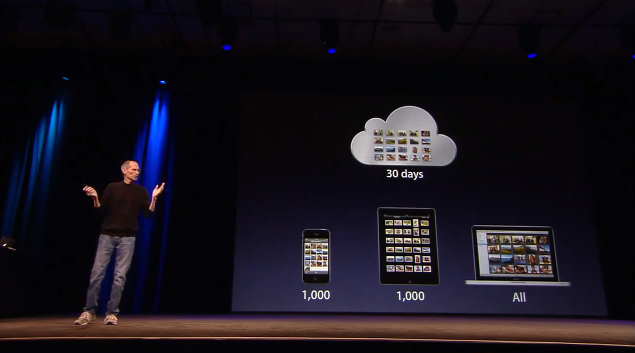
As explained by Steve Jobs on stage, and later demoed by Eddy Cue, the main purpose of Photo Stream is that of easing the process of importing photos shot on, say, an iPhone to an iPad or Mac for better viewing. With previous versions of iOS, users were forced to email pictures themselves and open the message on OS X to save the photos (facing at the same time a risk of quality loss due to email limitations); create an account on social services like Flickr or Facebook to upload photos from their mobile devices to avoid a desktop transfer process; even worse, users had to go home, find a USB cable, connect their iPhone to a computer, launch iPhoto or Image Capture and manually import the most recent photos. That’s a long and tedious process Apple wants to eliminate with a smart, automatic system that always puts the most recent photos on all your devices. In fact, Photo Stream can display the 1,000 most recent photos on iOS devices, whilst files are stored on iCloud for 30 days due to storage limitations on both ends (iOS and Apple’s server farms). On desktop computers, which come with more storage, Photo Stream stores all photos. Again, this new functionality works out of the box with any iOS 5 device configured with an iCloud account, and Photo Stream can be enabled in the Settings app. On the desktop’s side, right now Apple is requiring developers to download a special beta version of iPhoto and the iCloud control panel to test Photo Stream, but once iCloud publicly launches this fall everything will be baked in with no further configuration needed.
Read more