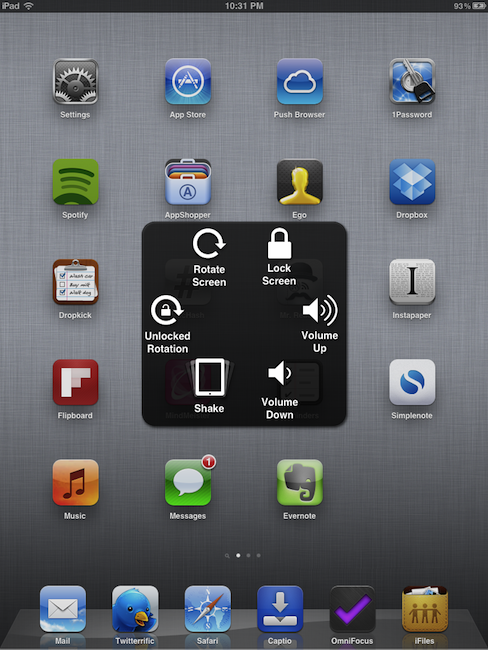
iOS 5 Beta 3 Features New Accessibility Panel with Gesture Controls

A new option in the Accessibility settings of iOS 5 beta 3 allows users to set up a floating panel to access a variety of hardware controls and gesture-based commands without using an iPad or iPhone’s physical buttons. Once enabled in Settings->General->Accessibility->AssistiveTouch, the new menu will let you interact with four different sections: Home, Device, Gestures and Favorites. Whilst the usage of Favorites and Gestures is still unclear, users can set up custom gestures in the Settings and play with built-in gesture such as swipe and pinch. The Home tab in the floating panel (which can be repositioned on screen via drag & drop) will perform the same function of the Home button, and Device will open a sub-menu with other controls to increase / decrease volume, lock or rotate the screen, unlock rotation and virtually shake the device (to enable features such as “shake to undo” without actually shaking a device).

The new accessibility options aren’t of course meant for everyday usage (they need to be manually enabled deep down in the Settings, and they’re aimed at people having trouble using iOS’ traditional gestures and hardware buttons), but they’re rather interesting in the way they could replace hardware controls and switches on damaged devices, or provide shortcuts to areas and commands of iOS that would require a physical movement otherwise (such as the aforementioned shake gesture).

9to5mac has a video of this new panel in action, and you can check out more screenshots after the break. Read more



Opera Shows Commitment to iOS with 6.0.1 Update

Well look at that! Unlike the previous version of Opera Mini (which remained stagnant for a year), it looks like Opera is serious about keeping their latest iteration of Opera Mini up-to-date, which quite frankly inspires some hope for the mobile nerd in me. Opera is a fine browser to use (especially on 3G) since you can tweak website performance to your heart’s content, and while the final product may be compressed through Opera’s servers, getting that web page at all is certainly better than nothing.

Opera’s initial offering was pretty strong aside from my general issues with Opera’s engine of choice, and today’s 6.0.1 update offers some general improvements.

Changelog

  • Improved YouTube video integration
  • Added single column view
  • Added Opera Mobile Store icon to Speed Dial list
  • Fixed various font-related issues
  • Fixed various stability issues
  • General bug fixes and improvements

Opera is committed, announcing that they have a major 6.1 update on the way that’ll mirror features already released on Blackberry and Android phones, such as a universal search and address bar, intelligent domain suggestions, smarter text selection, and Google AutoComplete.

If you’re an Opera user, you have lots of great things to look forward to on iOS. You can download the latest update from the App Store.

[via Opera Mini Blog]


Updated MacBook Airs and Mac Pros to Launch Alongside Lion

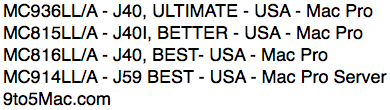
If your little hearts just can’t handle the anticipation in waiting for this week’s presume launch of OS X Lion, just wait until you hear this next bit of news. If you’re a college student or professional video editor / graphic designer, you’ll have some additional goodies to look forward to. 9 to 5 Mac have a scoop with model numbers for the upcoming MacBook Airs featuring ultra-quick Sandy Bridge processors and Thunderbolt.

What wasn’t expected is rumored announcement for all new Mac Pros. It isn’t sure whether we’ll be seeing new guts or all new redesign, but the Mac Pros are rumored to include Thunderbolt as Apple updates their line, and there’s even a server model specifically designed for use in business environments.

The new Macs will ship with Lion (and Lion Server) preinstalled, and are expected to launch with the release of 10.7. 9 to 5 Mac says that the 14th is a possible launch date for all three of these items, so keep an eye on Thursday for an Apple launch-stravaganza.

[via 9 to 5 Mac]


iOS 5 Concept UI Shows Off WiFi Notifications and a Smart Multitasking Tray

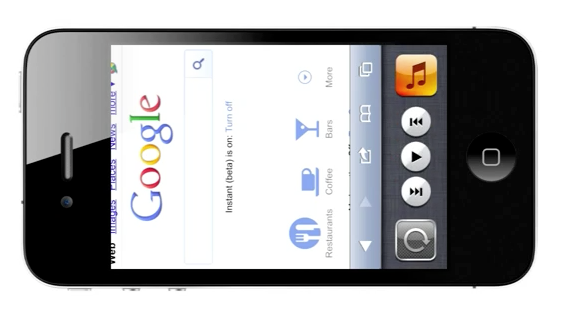
I think it’s clear that Apple is keeping a keen eye on the community when it comes to UI concepts and other imaginative implementations from the jailbreak community, and it’s possible they could at least snatch one good idea from this latest mockup. A concept video created by a charming Jan-Michael Cart shows off some pretty rad improvements, including being able to select a WiFi network in the Notification Center, improved popovers, and a multitasking bar whose icons rotate with the iPhone’s orientation (my favorite).

Check past the break to see the concepts in action — I think the WiFi notifications are really nice.

[via Jan-Michael Cart]

Read more


Apple Posts Xcode 4.1 GM Seed for OS X Lion

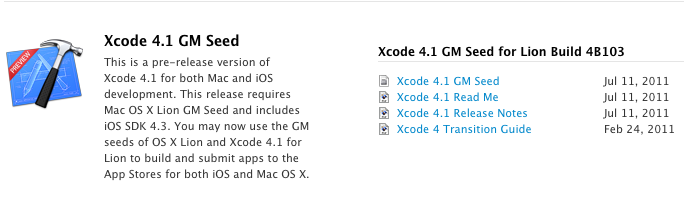
Apple has published a GM for Xcode 4.1 in the Mac Dev Center this afternoon in preparation for the launch of Lion (presumably later this week). You’ll find an updated Xcode 4.1 GM, Read Me, and Release Notes that are recommended for consumption as developers beginning building Lion compatible apps.

Xcode 4.1’s Interface Builder includes support for new Aqua controls such as NSPopover, Full screen support in the Xcode workspace (for full screen apps), and project modernization that can automatically fix errors caused by improper build settings.


Apple Releases iOS 5 Beta 3

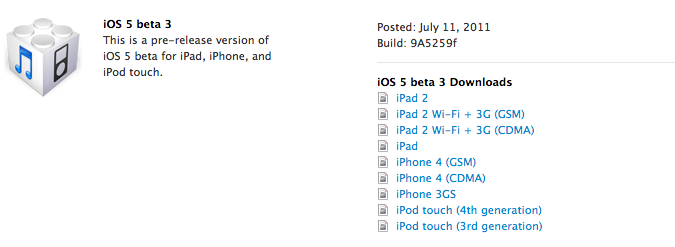
Apple just posted the third beta of iOS 5 on the Dev Center. Build number is 9A5259f. As with previous iOS 5 betas, the build targets the iPad 2, iPad, iPhone 4, iPhone 3GS, iPod touch 3rd and 4th gen. iOS 5 beta 3 for the Apple TV has also been released. The second beta of iOS 5 was posted three weeks ago, on June 24. iOS 5 is expected to be released publicly this fall, with many suggesting the usual September media event will be the stage this year for a formal iOS 5 announcement, as well as the unveiling of the next-generation iPhone.

Alongside the new iOS 5 beta, Apple also uploaded a new iCloud for Lion beta (reaching version 4), iTunes 10.5 beta 3 and Xcode 4.2 Developer Preview 3. On the Mac Dev Center, Xcode 4.1 GM for Lion has been seeded to developers. Read more


TV Forecast HD Is A Beautifully Refined iPad App That Keeps Track Of Your Favourite TV Shows

If you are anything like me, you probably don’t watch much live TV anymore; instead just watching a few shows a week on TV and the rest via an online catch-up service. If that sounds like you as well, you may be interested in a new iPad app that makes it easier to track when your favorite shows are airing on TV. The app, TV Forecast HD, is developed by Big Bucket Software (also the developer behind The Incident) and is an entirely redesigned version of TV Forecast, which is currently available for the iPhone. Jump the break for the full review of TV Forecast HD, which has just been made available today.

Read more


Incoming! iPhoto, iMovie, and GarageBand Updates for July 11th

If you’re smart, talented, and own copies of iPhoto ‘11, iMovie ‘11, and GarageBand ‘11 from the Mac App Store, it’s time to check for an update! Today we’re seeing general improvements all around for the trio of creative applications, including support for opening iMovie projects from iMovie for iOS.

iPhoto: What’s New In Version 9.1.5
This update supports general compatibility issues, and also addresses overall stability and performance. Minor issues addressed include:

• The date range of each event now updates correctly to reflect changes made to photos using the Adjust Time and Date command
• Addresses an issue that could cause the Photos view to scroll incorrectly when Event Titles are displayed
• Fixes a problem that could prevent Ken Burns animations from being applied correctly on photos in a saved Classic slideshow
• Deleting photos from a web album using the contextual menu now removes them from the album without deleting them from the library
• Addresses an issue that could prevent a crop adjustment from being removed from a photo when using the Revert to Original command

iMovie: What’s New In Version 9.0.4
This update improves overall stability and addresses a number of minor issues, including the following:

• Support for opening projects imported from iMovie for iOS.
• Fixes an issue where some audio adjustments were not preserved.
• Addresses a performance issue when using large quantities of video clips with keywords.
• Resolves issue with slow application launch when working with large iPhoto libraries.

GarageBand: What’s New In Version 6.0.4
This update supports general compatibility issues, and addresses overall stability and performance issues including the following:

• Fixes an issue with the GarageBand Lesson Store not completing single or multiple lesson downloads.
• Corrects issues with some tempo-based effects falling out of sync with main song tempo.
• Resolves problems with Magic GarageBand project files not opening up correctly in the GarageBand tracks view.

iPhoto, iMovie, and GarageBand are $14.99 on the Mac App Store. If you’ve purchased iLife outside the Mac App Store, keep your eyeballs on Software Update for the latest improvements.