Ahead Of Next Week’s Earnings Call, Analysts Predict High Mac, iPhone And iPad Sales

Ahead of next week’s earning call, there are two reports out today by analysts that paint a rosy picture of Mac, iPhone and iPad sales. The first report by Barclays Capital anaylst Ben Reitzes, claims that Apple is likely to exceed 22% growth in Mac computer shipments during the June quarter. This is despite US market data that has been less optimistic, but Reitzes suggests that overseas sales may compensate for the “somewhat muted” US sales due to the fact that many consumers are waiting for new MacBook Air models.

The second report from Brian White of Ticonderoga Securities included some revised figures and claims that Apple is likely to have sold a record of 8.5 million iPads and an impressive 17.53 million iPhones in the June quarter.

After our recent trip to Asia, we indicated that we felt our iPhone estimates for the June quarter were overly conservative, while our iPad projections were achievable and well above the Street.

Apple’s previous record for iPad sales was last years holiday quarter where they sold 7.3 million units. The iPhone sales according to White would be less than last-quarter’s record 18.65 units but still more than double the 8.4 million units Apple sold in the same quarter last year.

While many larger tech companies rely on more cyclical trends to grow sales, we believe Apple enjoys the tailwind of strong secular industry trends, hot new products and market share gain opportunities

[Via Barrons, AppleInsider]


PDF Converter for iPad Creates New PDFs Off Webpages, Contacts, Docs, More

iOS comes with a fast and elegant built-in PDF viewer (in fact, the latest JailbreakMe 3.0 is largely based upon a security hole in the PDF display engine), but unlike Mac OS X the options to convert documents into new PDF files are limited. PDF Converter, a new app by Readdle (the makers of PDF Expert and Terra web browser, among others), aims at providing an easy to use yet powerful solution to turn almost anything on your iPad (webpages, documents, clipboard contents, even photos) into new PDF documents to save locally or send to an external physical or virtual printer.

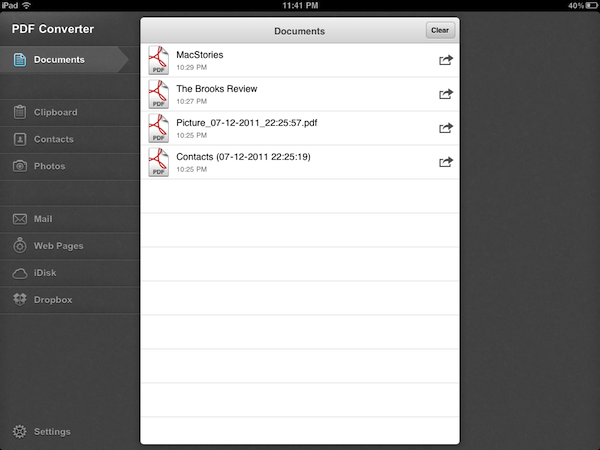
Released earlier today at $6.99 on the App Store, PDF Converter runs as an iPad-only application for now. The interface resembles Readdle’s previous works for the iPhone and iPad – namely ReaddleDocs and PDF Expert – with a narrow sidebar on the left side of the screen allowing to switch between the different types of content you can convert to PDF. The app supports PDF creation off clipboard contents, Address Book contacts, photos, webpages and just about any document that can be sent to third-party apps using iOS’ native “Open In” menu. By opening a document into PDF Converter, in fact, the app will take care of turning it into a properly formatted PDF document that keeps pagination and line breaks (as well as layout and graphics) intact, while making the doc’s text entirely selectable as you would expect from a PDF. Unlike ReaddleDocs and PDF Expert the app doesn’t come with direct iDisk and Dropbox access, but the developers recommend you use the “Open In” menu in those apps if you wish to get documents into PDF Converter.

In my tests, I’ve found PDF Converter to perform reliably with a variety of content and clipboard contents sent from iOS apps to Readdle’s utility. The built-in Address Book integration will allow you to print out contacts in a simple plain-text layout with all available fields (email, phone, address), but more importantly full clipboard integration means you’ll be able to, say, copy a web address from Safari into your system’s clipboard, launch PDF Converter and have the webpage you just visited available as a PDF you can print, email, or open into another app (you can’t rename PDF files in the current version of the app, but Readdle says that’s coming with an update soon). Furthermore, the developers have enabled a unique URI shortcut system for PDF Converter that will let you send a webpage from Safari to the app by simply adding “pdf” (without quotes) before the http:// string of a webpage, in the address bar. Change a URL to “pdfhttp://”, wait a few seconds, and the webpage will become a new document in PDF Converter. I tried this by saving MacStories’ and Brooks Review’s homepages as new docs in PDF Converter, and then I sent them off to a virtual printer on my Mac using the amazing Printopia desktop printing tool. Not only did the PDF transfer just fine, unlike other solutions to generate PDFs off webpages, PDF Converter’s engine kept the layout of both sites exactly the way I’m used to see it in Safari. For offline reading and webpage archiving (perhaps paired with Evernote on the Mac, or other apps like Yojimbo and DEVONthink), this is very useful.

At $6.99, with PDF Converter you get a powerful tool to create new PDFs on your iPad, and share them with other apps that support document interaction with iOS’ built-in features. The price may be a little steep and the app definitely isn’t for everyone – it’s a rather niche software that, however, addresses a common complaint with elegance, and good interoperability with Readdle’s other PDF app, PDF Expert. Read more


Mophie Pulse for iPod Touch Will Add Stereo Sound and Haptic Vibration

Mophie, who makes great accessories for iOS devices such as the Juice Pack Air, has a new product in the pipeline for the iPod Touch 4G - the Mophie Pulse. The Pulse is a video game/app enhancer that turns your iPod Touch into the “ultimate gaming device with pulse-pounding stereo sound and bone-shaking game feedback.” It’s all built into a textured gaming grip. The Pulse gets its magical powers from ViviTouch Technology that converts game audio into a variety of different effects. ViviTouch doesn’t require an API to generate vibrations but the games will be better optimized if the developers use it.

There currently is not a release date but a “coming soon” sign-up form on the product page if you want informed when the product launches. The Pulse looks like a great addition to Apple’s favorite gaming device and as long as the price point is good, Mophie will have another hit on their hands. If the iPod Touch version is a success, could an iPhone version be next?

Video after the break.

Read more


Grazing 2.0: Once Again, My Favorite iOS Browser

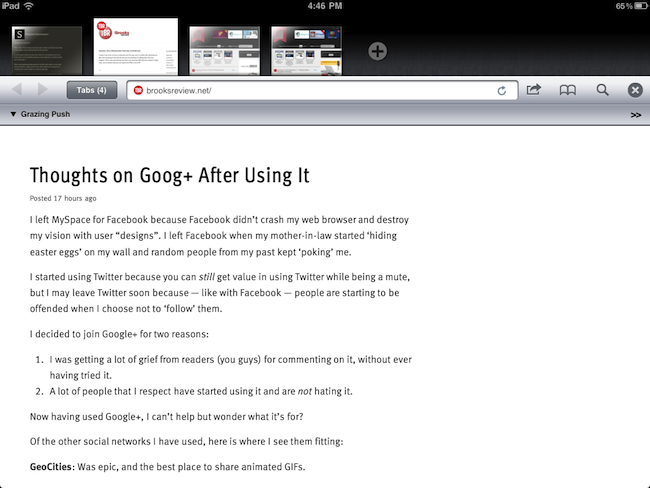
Back in September I first reviewed Grazing, an alternative web browser for the iPad that came out a few weeks after I complained about the average alternative browser for the iPad lacking the ideas, feature set or implementation to properly compete with Safari. Lots of things have changed since then, both with iOS Safari and the third-party development scene. Safari for iPhone and iPad got faster with the Nitro engine, received AirPlay support for any video found on the web and, with iOS 5, is also getting a major facelift with tabs on the iPad and other welcome additions such as tab undo and history right from the toolbar. On the other hand, the past few months have seen an explosion of alternative browsers that, in spite of the lack of Nitro JavaScript engine, are playing around with the craziest ideas when it comes to re-inventing web browsing on the tablet. I was impressed by the feature set of iCab Mobile (perhaps the most popular 3rd party browser for iOS), the UI of Sleipnir and the underlying concept of Portal, without a doubt the most innovative iPhone browser to date. There are dozens (if not hundreds) of alternative browsers for iOS now, and unlike last year many of them are really, really good. Apple still doesn’t allow iOS users to set a different default browser other than Safari, but third-party support has increased in the past months, so we’re starting to see integration with alternative browsers (usually iCab) in apps like Handoff and Mr. Reader.

Developers realized there could be so much more besides copying Safari and putting a sharing menu and tabs in an “alternative” browser. We have seen experiments with visual tabs, gestures, tab re-organization, and more. Is there still room for innovation? With iOS 5 bringing a slew of enhancements to Safari (including direct Twitter integration) and titles like iCab, Portal, Sleipnir, Skyfire and iChromy already available on the App Store, what’s next for third-party iOS browsers?

Grazing 2.0, a major update to the app I reviewed in September, provides an answer to this question by offering an interesting mix of features aimed at turning the app into a multitouch-enabled, platform-connected browsing experience for iOS. Read more


Former Pixar Animator And Moonbot Studios Create Surreal iPad Storybook

The Fantastic Flying Books of Mr. Morris Lessmore is a fascinating new ‘iPad Storybook’ that recently hit the App Store. Developed by Moonbot Studios and lead by an ex-Pixar animator, William Joyce, the book is an intriguing mix of book, animation and game.

Put yourself in Morris’ shoes as you dive into the story of Mr. Lessmore and his flying friends through Moonbot Studios’ first Interactive Storybook. In this reinvention of digital storytelling you can repair books, tumble through a storm, learn the piano and even get “lost in a book,” flying through a magical world of words, giving you a dynamic journey through the story.

Available on the iPad App Store for $4.99, the book contains sequences where you have to interact with the iPad app in order to progress through the story. It includes such activities such as drawing, playing a piano, playing with food and a number of mini-games. It looks like a tonne of fun, jump the break for a beautiful trailer of the interactive Storybook.

[Via The Next Web]

Read more


New MacBook Airs To Feature Backlit Keyboard

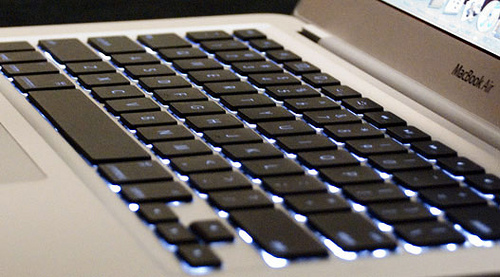
The new MacBook Airs expected to launch this week alongside OS X Lion may feature a return of the backlit keyboard that was omitted from the October 2010 redesign of the popular line. According to AppleInsider, people familiar with the matter have indicated that this month’s refresh will see the return of the backlit keyboard, together with new hardware improvements such as Sandy Bridge processors, Thunderbolt technology, and faster flash memory.

With the release of new models later this month, Apple is set to reinstate a feature to its MacBook Airs that went missing when the company overhauled the ultra-thin notebooks into more cost-affordable products late last year, AppleInsider has learned.

According to people familiar with the matter, backlit keyboards will join the string of hardware enhancements planned for the new 11.6- and 13.3-inch notebooks, which are also expected to adopt high-speed Thunderbolt ports, an upgrade to Intel’s Sandy Bridge architecture, and possibly high-speed 400MBps flash memory.

The lack of a backlit keyboard in the 2010 redesign of the MacBook Air family generated quite a backlash online, especially considering the previous iterations of the MacBook Air came with a backlit option by default. Many speculated Apple had to remove the backlit keyboard due to design issues and battery life constraints; the upcoming refresh is said to feature the same design of the 2010 MacBook Air, thus suggesting Apple has either figured out a way to implement the backlit system in the ultra-thin chassis of the machine, or listened to customers’ feedback and decided the feature had to return. A backlit keyboard helps in low-light conditions, and it’s currently implemented in all versions of Apple’s MacBook Pro line.

The new MacBook Airs’ part numbers have already leaked online, suggesting an upcoming refresh for the entry/upgraded 11-inch and 13-inch models. No details on whether Apple will tweak pricing of the line have surfaced yet, however, based on recent speculation, it seems fairly certain that the new machines will come with Lion pre-installed on a possible July 14th launch.

[Old-gen MacBook Air keyboard image via]


Screens for iOS Now Lets You Log Into Lion Computers

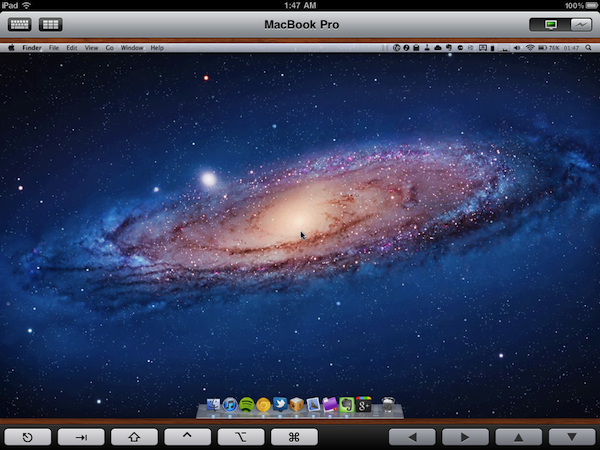
Screens, Edovia’s VNC client for the iPhone and iPad we’ve reviewed a couple of times on MacStories in the past, has been just updated to version 1.6 which, alongside a series of speed and performance improvements, brings full compatibility for machines running OS X Lion. With Mac OS X 10.7, Apple has changed a few things with VNC and remote user authentication, enabling features like Apple ID support and possibility of logging into a separate account while a machine is active on a different one.

The new Screens 1.6 allows you to log into a computer running Lion avoiding the additional login prompt you’d get when logging in with a VNC password (if you’ve tried VNC apps that haven’t been updated for Lion, you should be familiar with the login prompt). Screens, in fact, has a new OS authentication method that, by logging into a machine with your OS account name and password, skips the VNC prompt altogether and directly takes you to your desktop, with whatever is on screen, just like with previous versions of the app on Snow Leopard. Current Screens users willing to connect to a Lion computer should switch to the new setting for an optimal experience (that is, unless you want an additional login dialog). Bug fixes aside, Screens 1.6 brings keyboard support for more languages, and Windows VNC servers.

You can download Screens at $19.99 on the App Store. Read more


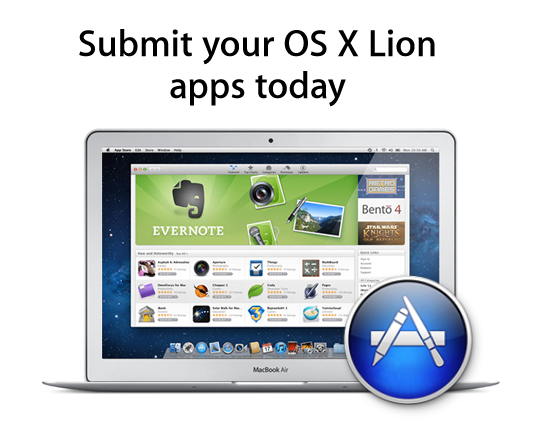
Apple To Developers: You Can Now Submit Lion Apps

Following the release of the Xcode 4.1 Golden Master seed and with OS X Lion rumored to be nearing its public release, Apple has just informed registered Mac developers that they can now submit apps built for Lion to the Mac App Store.

OS X Lion, the eighth major release of the world’s most advanced operating system, will soon be available to millions of Mac users around the world. Submit your Lion apps for review now so they can be on the Mac App Store when Lion ships this month.

In the past weeks, in spite of various developer previews of Xcode 4.1 for Lion available on the Dev Center, developers were unable to submit apps built specifically for the new OS. In OS X Lion, developers can take advantage of hundreds of new APIs to enable features like full-screen mode, push notifications for apps, new Aqua controls including iPad-inspired popovers, auto-save and versions, as well as sandboxing and multi-touch gestures.

Lion is rumored to hit this week, alongside new MacBook Airs with Sandy Bridge processors and Thunderbolt, and new Mac Pros. The GM build of Lion was seeded on July 1, leading to speculation that, after two weeks and with no major bugs found, the final version is ready to become available on the Mac App Store at $29 any day now. Several developers we polled in the past week told us they were ready to submit their new apps, but Apple (and Xcode) wouldn’t let them. With the release of Xcode 4.1 GM today, Apple flipped the switch on Lion submissions, but it’s unclear how many apps the Review Team could manage to approve before the rumored Lion launch. Clearly Apple wants some Lion-ready apps to be ready for Lion’s debut, so it’ll be interesting to see how this will play out in the next 48 hours.

Apple announced Lion would come out sometime in July as Mac App Store exclusive. In the past, Apple began accepting iOS 4 submissions on June 11 (roughly 10 days ahead of iOS 4’s release) and Mac App Store submissions in November, whilst the Mac App Store went public on January 6.