

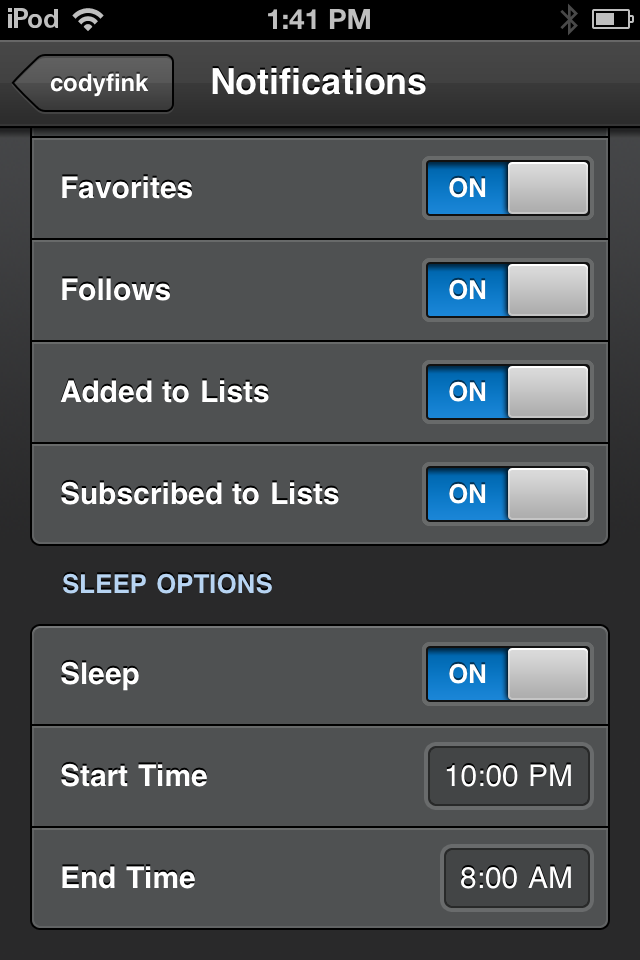
Tweetbot 1.4.3 has been approved and is now waiting for your loving fingers to tap Update in the App Store. With push notifications now open to everyone who uses Tweetbot (in case you haven’t heard), you’ll now have access to realtime updates for when a tweet is favorited, retweeted, replied to, when you’re mentioned, or when you receive a direct message. With so many notification types available (and our forgetfulness to put our devices on mute before going to sleep), Tweetbot also adds features to help curate what kinds of notifications you receive, and when you receive them.
Tweetbot 1.4.3: Sleep Time for Notifications, Hiding Spam, and Mentions from only People You Follow
#MacStoriesDeals - Wednesday

Here are today’s @MacStoriesDeals on iOS, Mac, and Mac App Store apps that are on sale for a limited time, so get them before they end!
Griffin IntelliCase for iPad 2 Intelligently Covers the Front and Back
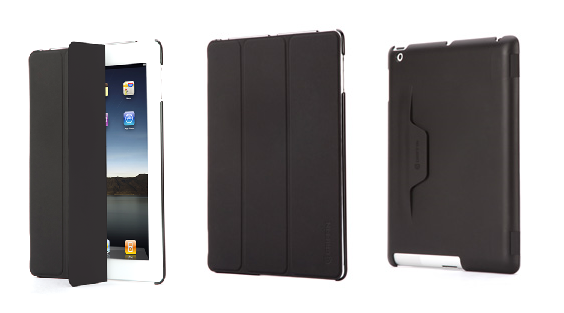
We all love our Smart Covers for the iPad, but it only covers the front and not the exposed aluminum backing. What if we could have the best of both worlds: a smart cover that puts the iPad to sleep when we close it, and protective backing keeps the aluminum frame from getting scratched and dinged up? Griffin’s IntelliCase for the iPad 2 is an all-in-one case and cover wrap for the iPad 2 that provides the functionality of Apple’s Smart Cover via a three paneled cover, while covering the the back of the iPad 2 in a grippy finish that wraps around your iPad for full protection.
Instead of just having a cover that folds into a triangle, Griffin has implemented a tuck and fold solution that allows you to prop up the iPad for typing and watching video via a small pocket integrated onto the back of the polycarbonate case. If you want the functionality of the smart cover plus additional protection, I’d recommend giving Griffin’s IntelliCase for the iPad 2 a shot. It’s $59.99 through Griffin’s storefront, and available in black.
Banca: Convert Currencies Swiftly With this Beautiful iPhone App
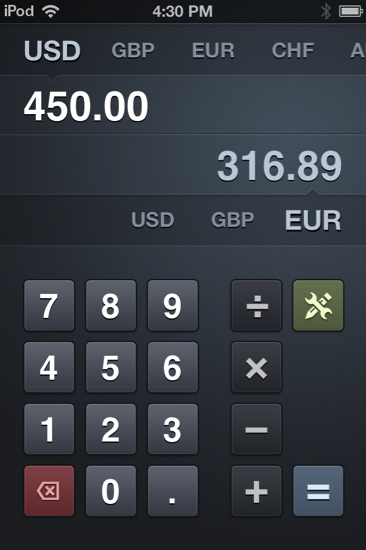
With the US economy in flux, it’s a good idea to keep a close eye on your dollar. As world travelers we find ourselves spending a good dime overseas, and international friendships online can lead to an occasional penny dropped in each other’s PayPal bucket. As foreign currency plays a big role in today’s lifestyles and businesses — boundaries are practically absent — knowing how the USD compares to the Euro or the Australian dollar at the press of the button becomes very useful. Radiant Tap’s Banca for the iPhone isn’t just a calculator, but a currency converter (it supports all of the world’s currencies) that’s both beautiful and incredibly elegant in design.
Twitter begins rolling out new HTML5 interface for iPads
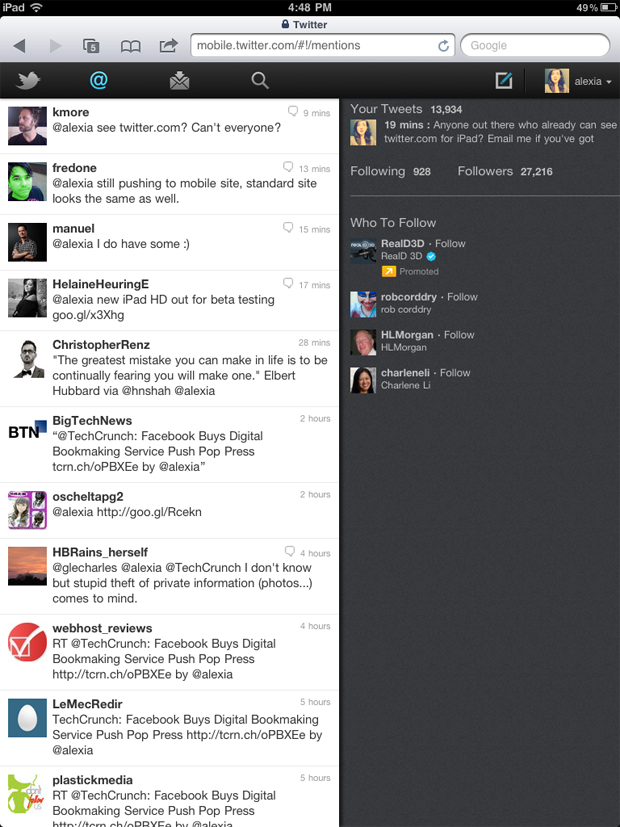
It doesn’t matter if you’re using a native app or a web app if you want to use Twitter right? Right. So as long as you have options, an overhauled iPad interface can’t hurt. Twitter has already rolled out an updated HTML5 interface for phones (with a nifty tab bar on the top), and the new iPad interface follows suit. Heck, it even includes the dual panes you’re so used to on the desktop version of the app, showing your timeline on the left as single tweet views and miscellaneous information displayed on the right. The feature is rolling out as we speak (I don’t have the new goodies yet), but hopefully we can get some more screenshots soon for those waiting. The redesigned interface may take a week to reach your account, but don’t worry, you still have Twitter’s speedy native iPad app to hold you over.
[Twitter via Techcrunch]
Image via Techcrunch
Keep Your Lion Computer Protected with Witness
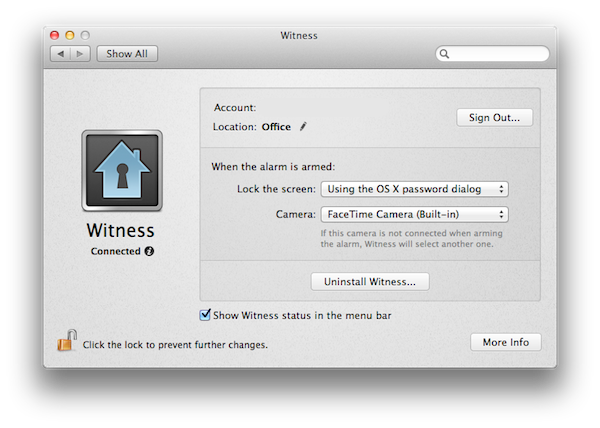
A few months ago I reviewed Witness for Mac, an OS X utility from the creators of Undercover – a tracking app for stolen computers – aimed at letting you remotely lock/unlock a machine, and see who’s using it thanks to webcam integration. The Witness app, available on the Mac as a System Preferences panel, iOS and the web, leverages the Mac’s built-in FaceTime camera (nèe iSight) to send you “mugshots” of whoever is using a locked computer – Witness can also detect motion in front of your screen and send you a push notification as soon as something happens.
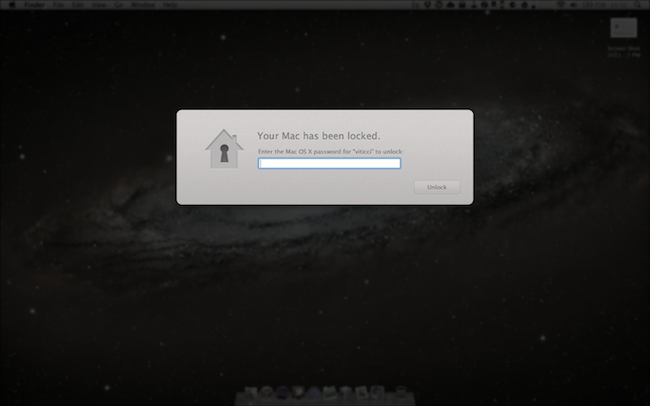
When I upgraded to Lion GM on my two Macs, I was disappointed to see the new OS broke Witness, which simply stopped working with Lion’s new Screen Saver and login screen. I could send the lock command from my iPhone or iPad, but the app would only freeze to a lockscreen. With a series of updates, the Orbicule developers have updated Witness to fully integrate with OS X Lion and its new authentication window, which in version 1.2 is used instead of the old screensaver method. Now, you can choose to lock your Mac either using Witness’ own lock system, or through the default login screen in Lion.
The screensaver/login screen triggered by Witness on Lion
For what it’s worth, Witness’ notifications already play nice with iOS 5 beta, which will list alerts of “detected motion” in its new Notification Center. Witness is a great addition to the Mac, with minimal footprint on memory and an optional menubar icon to trigger the alarm system and open the Settings.
You can create a Witness account here ($39 with student licenses available) and download the free Witness Remote app from the App Store.
Measures for iPad Is A Powerful Unit & Currency Converter
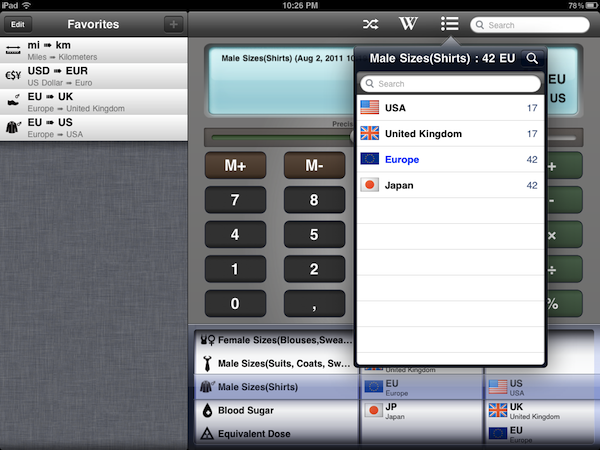
Back in 2009, I installed a simple currency and unit conversion utility on my iPhone called Measures. Developed by Michael Neuwert, I remember Measures as one of the first “popular” converter apps for the iPhone, one that actually managed to move thousands of sales back when the App Store was still relatively small. Two years and hundreds of thousands of app later (let alone the iPad and two new App Stores), Measures is coming back with an HD version built specifically to take advantage of the iPad’s screen. Retaining the same icon and UI color scheme of its iPhone counterpart, Measures HD packs 170 currency exchange rates (constantly updated over the air) and 1000 different units, organized in 40 categories.
I like Measures HD not because of its design, but because it’s functional. Measures may lack the amount of polish seen in any Tapbots or Iconfactory app, but as far as the actual unit and currency conversion goes, Measures works better than anything else I’ve tried on the iPad to date. There are two aspects of the app that truly stand out to me: the Favorites sidebar, and the fact that Measures doesn’t stop at normal units like those pertaining to length, area, speed, or temperature. Measures adds dozens of categories ranging from Male Shoe Sizes and Data Storage to Radioactivity, Male Sizes for suits/coats/shirts, and Typography. With all these types of “units” available at your fingertips, Measures lets you convert, say, a European shoe size to a UK or US one, or your milligram/deciliter blood sugar level to millimol/liter. And again: you can easily convert megabytes to yottabytes, short tons to pounds, and obviously US Dollars to Euros and other currencies as well.
Measures’ unit database is huge, and if it’s not the biggest one on the App Store yet, then it definitely get very close to it. Whilst most converter apps focus on providing a fresh interface for the usual units and currencies, Measures sacrifices some attention to the overall design (I don’t like the slider to adjust decimals and the looks of the keypad – but this is just personal taste) to focus on “real life usage” with options like the aforementioned shirt sizes, or fuel consumption and data storage. This is the kind of stuff I always need to check (especially when buying some cool t-shirt from a website that doesn’t list EU sizes), but that very few apps provide. In fact, most of the times I’m forced to look it up on Wikipedia. Speaking of which, Measures HD comes with a Wikipedia search function to look up the selected unit on the website’s database. Multiple Wikipedia articles (when found, otherwise it’s just a single one) are listed inside a popover, and you can decide to open the webpage within Measures, in Safari, or in Sophiestication’s Articles. Next to the Wikipedia button in the top toolbar, there’s also a “list” icon to see all converted results without being restricted to a single conversion.
Another nice feature is the Favorites sidebar, which enables you to save any conversion for quick access at a later time. If you find yourself converting Euros to Dollars pretty often, you might want to consider saving that conversion as a shortcut in the Favorites so you won’t have to use the (gimmicky) unit picker at the botton; Apple itself suggests in its Interface guidelines to use a “date and time picker” for iPad inside a popover rather the main screen – I agree, as the result is not really pleasant in Measures and it feels unresponsive if your finger runs down to the iPad’s bezel.
Overall, I enjoy having Measures on my iPad because it’s useful. The app could use some UI refinements and re-thinking, but as it stands now it is the converter app for iPad with the largest array of options I’ve seen so far. You can download Measures HD at $1.99 on the App Store. Check out more screenshots of the app after the break. Read more
iPad 2 Getting Retro iPWN Gameboy Case

This is not for the Apple purists, the ones that leave their devices raw and uncovered or only clothe them in Cupertino-issued skins. But for the rest of the world, most people want their Apple products to be as original as the people that buy them. We’ve seen cases/covers in the past that look like classic Nintendo gaming systems but this one supersizes the original Gameboy for the iPad 2.
Lootiful already carries a series of iPWN cases that snap on the back side of your iPhone to make it look like a Gameboy. The iPad 2 version looks just like the iPhone version, only larger. The case not only provides protection from bumps and scratches, but retains full access to your touchscreen and all the buttons.
There has been no word on availability for the iPad 2 case, but according to the Lootiful site, pre-orders will be open soon. Pricing has not been announced yet either, but the iPhone versions retail for only $18. I agree with the header graphic, “It’s friggin’ sweet.”
I can only imagine someone carrying their iPad 2 on the bus and sitting down while a curious onlooker snaps some blurry photos and posts them as “Apple + Nintendo Collaborating on New Project - iPadBoy!”
[via TUAW]
#MacStoriesDeals - Tuesday

Here are today’s @MacStoriesDeals on iOS, Mac, and Mac App Store apps that are on sale for a limited time, so get them before they end!