Path: Doing the Right Thing

Yesterday, personal social network/smart journal Path was hit by a wave of controversy as a user found out the iPhone app uploaded a device’s entire Address Book (your contacts’ names, emails, phone numbers, and addresses) to the company’s servers without any kind of user consent or notice. Whilst some people claimed this is actually common practice for several iOS apps as Apple doesn’t provide native Address Book access dialogs as they do for location, the fact that Path did it was unequivocally wrong, and in spite of the Path’s CEO quickly responding to comments, the company was still called out to make the right thing, apologize, and remove all user data.

And unlike many web companies nowadays, that’s exactly what Path did. With a blog post published earlier today, Path explains that what they did was simply functional to the service’s contact matching feature, but wrong nonetheless. Path is apologizing for the mistake, and has released a new version of the app that makes the functionality opt-in for all users; they have also removed all data from their servers as many asked today.

We believe you should have control when it comes to sharing your personal information. We also believe that actions speak louder than words. So, as a clear signal of our commitment to your privacy, we’ve deleted the entire collection of user uploaded contact information from our servers. Your trust matters to us and we want you to feel completely in control of your information on Path.

You may like Path or think it’s useless (I, for one, use it and enjoy it quite a bit), but you have to admit we don’t see companies be that honest and transparent to their users that often. In a world where we’re used to see companies hiding particular aspects of their services to their users (sometimes even paying users), it’s refreshing to see Path be an example of clarity and simplicity in communication.

What Path did was wrong, and they have paid (and will continue paying) the consequences for their mistake in bad PR. On the other hand though, Path has shown that there’s nothing wrong about admitting your errors, saying you’re sorry, and trying to turn a bad decision into a precious lesson for future endeavors.

Bravo, Path.


Tweetbot for iPad Review

Since its release two years ago, the iPad has always needed a better Twitter client. Tweetbot for iPad is the better Twitter app I have been waiting for, and it sets a new standard that future Twitter clients will have to be compared with.

From a Twitter power user’s perspective, the iPad came at an interesting point in the history of the platform. Twitter clients for iPhone and Mac had reached a kind of maturity and complexity that enabled users like me to demand a certain grade of efficiency from new Twitter apps for the tablet; Twitter itself was beefing up its first-party app portfolio with acquisitions and a fresh strategy based on making the official clients the go-to apps for the average Twitter user. Some notable Twitter clients came out on the iPad throughout 2010, including the excellent Twitterrific, which we have reviewed several times on MacStories.

In 2010, Twitter also released its very own application for the iPad; developed by Loren Brichter, the man behind Tweetie, Twitter for iPad launched to a (still ongoing) controversy as to whether iPad interfaces should adopt more courageous designs in displaying information and sections to the user. Taking the best features of Twitter for iPhone (fluidity, clean design, pull to refresh) and mixing them up with new interaction schemes such as panels and pinch gestures, Twitter for iPad collected rave reviews and considerable disapprovals because of its interesting use of classic Twitter elements (vertical timeline, separate section for Mentions) alongside a new model for driving users’ taps around the app in the form of sliding panels, modal menus, and popovers. You can read more about it in my original review from 2010.

The problem with Twitter for iPad, I believe, is that it failed to appeal power users in the long term, stalling on the same feature set it had at launch without adding substantial improvement over what could have been a fantastic application. I, for one, used the official Twitter iPad app for months, but then I came at a point where I couldn’t stand seeing decent third-party apps staying on top of new Twitter functionalities and “unofficial” services, and Twitter’s own app left behind with Brichter gone and seemingly no interest from Twitter’s mobile team in keeping it up to date – fixing the bugs and annoyances that were reported on day one. Some improvements and new features eventually found their way to the app, and word is that we are waiting for a major 4.0 redesign of the client which, I believe, will put the app on par with the disastrous iPhone version. Tweetbot for iPad thus arrives in a landscape with no clear leader, but with some very good apps that have caught the attention of both power and average users in the past two years.

I wrote about this before. I wish third-party developers would accept Tweetbot as the de-facto app for power users and move on to innovate on other areas of the service. I’m biased: I love Tweetbot, I use it every day on the iPhone, and I couldn’t wait for an iPad version to be released. Today is kind of a dream come true for a Twitter nerd, but the question is – was it worth the wait? Not just good – is Tweetbot the great app the iPad was waiting for? Let’s dive in. Read more


Tweetbot 2.0 Review

How do you improve something that’s already great? You keep working on it, trying to look at your product from as many perspectives as possible. If you believe in it, you can make something great an even greater product. Last year, I reviewed Tweetbot 1.0 for iPhone, the Twitter client many of us had been impatiently waiting for:

Tweetbot is the app I’ve been waiting for: an excellent innovator of the Twitter platform. My new favorite Twitter client.

Tweetbot is everything I’ve ever wanted from a Twitter app: it looks great, it’s fast on WiFi and 3G, it innovates in several aspects that have been regarded as “standards” from both users and developers for too long. Could Tweetbot be any better? Maybe. The developers could work on improving the speed of animations and refresh times as much as possible, or implement support for Readability and other URL shortening services. But as far as the Twitter experience goes, Tweetbot has got everything I’m looking for.

I have tried many Twitter apps in the past years, as you may know, and I’ve never seen a third-party developer as committed to making their client great as Tapbots did with Tweetbot for iPhone. Iteration. Tapbots listened to feedback, and managed to pull the old trick of implementing features without turning your original vision into a piece a software it wasn’t meant to be. With version 2.0 of Tweetbot for iPhone, Tapbots has improved almost every aspect of the original experience, adding features, bug fixes, and refinements that still make Tweetbot the finest Twitter client available on the iPhone. Now faster, smoother, and more intuitive. Read more


Sprint Q4 2011 Results: 1.8 Million iPhones Sold, 45% Of New Customers Bought iPhone

Sprint has just announced their Q4 2011 financial results, revealing that they sold 1.8 million iPhones. 40% of those iPhones sold were to new Sprint customers, a high percentage and one that was needed for Sprint. After continued losses, Sprint needed to add more customers to its network and in Q4 it achieved 1.6 million new users - meaning 45% of those new subscribers signed up with an iPhone.

“Our strong fourth quarter performance illustrates the power of matching iconic devices like the iPhone with our simple, unlimited plans and industry-leading customer experience,” said Dan Hesse, Sprint CEO

It follows the financial results from Verizon and AT&T a few weeks ago where it was revealed that Verizon sold 2.2 million iPhones and AT&T sold 7.6 million iPhones.

View the full Sprint press release after the break.

Read more


Evernote For iOS Gets Some Nice Improvements In 4.1.8 Update

The Evernote iOS app today got a little bit better with 4.1.8 update, bringing some nice additions and improvements. We’re big fans of Evernote here at MacStories, but their iOS app isn’t as good as it could or should be. Thankfully today’s update (although minor) directly addresses some of my complaints which makes me optimistic that the team is hard at work on making Evernote for iOS a truly great app.

Perhaps the best improvement for me is the “better editing, copying, pasting and more”, which translates to faster editing and improved preservation of styles. I’ve been plagued with some weird lag issues when editing large notes, particularly when copying and pasting, so this is much appreciated on my part.

Also new is “predictive note titles” which means Evernote now uses contextual information to create a more appropriate title if you leave the field blank - so no more “Untitled Notes”. Instead it will look at calendar events, location, note contents and other info to create a contextual title that is far more useful and informative. Similarly handy is the new, easier method of sharing a notebook on the iOS app. Now you just need to go to the notebook list, tap on the desired notebook and you’ll see a share icon in the top right corner of the screen.

Notebook Stacks, which work well on the desktop are now better represented on the iPhone. They have existed but were hard to enable, now, viewing notebooks will use the Notebook Stacks view as default. Finally this update also includes the standard bunch of bug fixes and also improved stability - including faster and more reliable synchronisation. Now, if only we could get a new design for the iPad app…

For more information the Evernote Blog covers all these new features and improvements to the app in a little more detail.


MacBook Air, iMac, MacBook Pro EFI Firmware Updated With Internet Recovery Support for 2010 Models

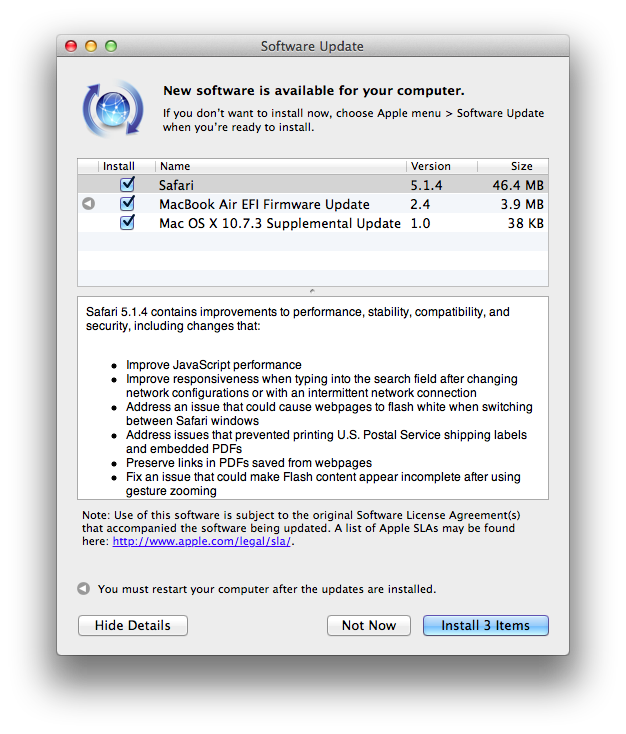
Earlier today Apple published two EFI Firmware updates for its iMac, MacBook Air, and MacBook Pro lines. The updates, available through Software Update or Apple’s website, bring Lion Internet Recovery to more Mac models from 2010 – the mid 2010 iMac, late 2010 MacBook Air, and early 2010 MacBook Pro.

This update enables Lion Recovery from an Internet connection on iMac (Mid 2010) models.

MacBook Air EFI Firmware Update 2.3

This update enables Lion Recovery from an Internet connection on MacBook Air (Late 2010) models and addresses an issue where the system could restart if the power button is pressed immediately after waking from deep sleep.

MacBook Pro EFI Firmware Update 2.6

This update enables Lion Recovery from an Internet connection on MacBook Pro (Early 2010) models.

Lion Internet Recovery was first released last summer alongside OS X 10.7, allowing users to re-download the OS directly from Apple’s servers without the Mac App Store. The feature was initially only available on Mac models refreshed during the summer, but eventually found its way to older models through software updates.


iOS Monitors (And Cursors)

Gabe Weatherhead has an interesting take on my iOS-ification of Apple’s Ecosystem piece:

But there is one feature missing from iOS that will prevent it from ever being effective with an external display: a cursor. I know this seems blasphemous but if you have ever tried to us an iPad with mirroring, you know that you must still look at the iPad to get anything done.

To use the iPad as a desktop replacement, mirroring is not enough. I need a cursor displayed where my finger touches the iPad (or iPhone) so that I have context on the external display. Every time I see iOS app demo videos they are accompanied by cursor representations for the touch interactions, and I think “that would be a great feature on the AppleTV.

I have used AirPlay Mirroring with my iPad 2, and I agree that it’s weird to be forced to look down at your iPad’s display if you want to get anything done that’s not sliding presentations and photos. Even games, in spite of their less complex on-screen controls and interfaces than, say, an app like OmniFocus, can be hard to be played without looking down sometimes.

What I’d like to see – and something that likely won’t happen anytime soon – is a series of “desktop accessories” to better take advantage of the iPad when mirrored or connected to an external display. For instance, imagine some sort of Magic Trackpad for iOS that would allow you to retain gestures and multitouch, but have a cursor when the iPad is mirrored to an Apple TV. Something I often hear (and find myself into as well) is that some apps are just better with a cursor in the current state of software offerings – for example, image editing and highlighting text. Imagine if Apple built an official accessory that, through APIs (much like iCade does), allowed developers to enhance their apps with direct support for “cursor mode” when the iPad’s screen is mirrored or even when the device is held by a stand (magnetic latches could inform the system of the current orientation of the device). If I had to put my two cents in it, I’d say this could be a way to market the iPad as a device capable of switching to a more precision control-oriented environment if needed. Video professionals woud sure welcome such a move.

I’m not saying Apple should produce a convertible tablet that switches between iOS and OS X (albeit Apple’s direction seems to be making switching between the two a seamless experience) – I’m arguing that some specific software and functions are better with a cursor in the current state of things. So unless we’ll see revolutionary new touch controls that will obviate the need for such idea, I think cursor controls on an app-by-app basis is something worth considering for the future of iOS’ mirroring and external display connections.

Perhaps Apple is fully committed to multi-touch and we’ll never see new cursor-based interfaces/hardware coming out of Cupertino again. But I think cursor-based controls are still superior for some kind of apps, especially for professional software such as video and image editing.


The Case for an iOS Aperture


I’m not usually one for making baseless predictions about what Apple’s going to do next. There are plenty of people who already do that, and I’m generally more interested in their current affairs than in unconfirmed rumors. But there are exceptions to every “usually”, and today I want to try my hand at speculating.

Though we tend to forget about them after the fact, iPads have always debuted with iPad versions of some of Apple’s biggest apps. The original was released alongside iWork, to show that the iPad could do real work from day one (never mind how many people derided it as a consumption device for months). The iPad 2 brought an iPad-optimized version of iMovie and GarageBand, which expanded the boundaries of what everyone thought could be created with a touch screen.

Now Apple is on a photography kick in a big way. Not only have they been relentlessly improving the iPhone’s camera since the 3GS, they have also added important and useful features in iOS 5 in the form of basic photo edits, built-in HDR and composition grids, the ability to organize albums, and Photo Stream, which near everyone agrees is their favorite feature of iCloud.

Given all that, I think that the next big Apple app to make its iOS debut will be Aperture, alongside the iPad 3’s inevitable announcement. Our own Cody Fink has written about the possibility of Aperture for iOS before, but there are a number of reasons why the timing for it makes sense now.

Retina Display
The one thing everyone expects about the iPad 3 is that it will finally get its long-awaited Retina display. It’s also the feature that everyone is most looking forward to (and for good reason, seeing what a huge difference it made when we first saw it on the iPhone 4). Of course this display will be great for reading and writing text, but what better way to really show it off than with photography, where the crispness and clarity of the display will be readily apparent?

A6
Another all-but-certain feature everyone agrees the iPad 3 will have is a quad-core A6, the next evolution of Apple’s A-series mobile processors. Like the A5, this chip will surely include vastly improved CPU and graphics performance over its predecessor, and in addition to games a great way to demonstrate it would be an iOS version of Aperture that shows how fast and fluidly the iPad 3 can manage tons of photos and perform complex image edits.

Photo Stream
Given Apple’s current photography kick the iPad 3 is likely to have better cameras than the iPad 2, but even if they’re not as good as the ones on the 4S —which, given how poor the ones on the 2 are compared to even the iPhone 4, seems likely— the brilliant thing with Photo Stream is that they don’t have to be. With Photo Stream, every photo you take on your 4S, your iPad 3, or even on a DSLR (once it’s been imported into iPhoto or OS X Aperture) would be available on your iOS Aperture library without you having to lift a finger.

iCloud Metadata Sync
We know iCloud is a big part of Apple’s strategy, and is only going to get bigger as time goes on. I can see iCloud playing a big part in Aperture on both iOS and the Mac. Any photo tagged, edited, or organized in one version of Aperture could be automatically mirrored with those same changes on another. Naturally this won’t make sense for current large Aperture libraries, but perhaps there will be a special iCloud section on the Mac version (like how there’s already a section for Photo Stream) specifically for photos that have been edited in this way.

Another Desktop Need Eliminated
iOS 5 may have given us “true” post-PC devices that could finally be used independently of our old-fashioned mice and window-based systems, but many people still need traditional PCs to store and manage digital photo collections. Aperture for iOS (along with iCloud and higher-capacity iPads) could be the next natural step in the iPad’s evolution towards being the only computer that 90% of people need.

Like I said, I don’t usually care to make baseless predictions, and everything here is certainly that. I have no idea if Apple will do any of this or not; for all we know they could be readying iOS versions of Logic and Final Cut Pro instead. But when you consider what the combination of Aperture for iOS with a retina-enabled iPad 3 could do, I think we may very well be seeing this alongside its announcement.


One More Thing: Open photos in any iOS image editor
This is more of a wish than a guess, but just like Aperture on the Mac I would love to see Aperture on iOS have the ability to open any image in any of the great image editing apps that already exist for iOS (with the ability to roundtrip them back into Aperture, of course). I have even less of an idea as to whether Apple will do this than I do my above speculations. Perhaps we will have to wait for a future version of iOS that better lets us share data between apps. But when and whether it happens or not, I think it would be a great way to let Aperture for iOS coexist happily among the many photo apps that iOS users already know and enjoy.