


Here are today’s @MacStoriesDeals on hardware, iOS, and Mac apps that are on sale for a limited time, so get them before they end!
Read more
#MacStoriesDeals - Friday
Retina Mac Numbers→
Retina Mac Numbers
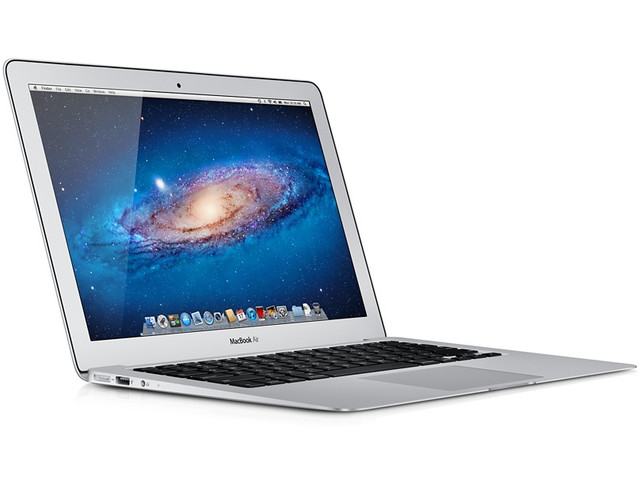
Ryan Block did some math over at gdgt, and came up with a great analysis of the future of Retina displays on the Mac, and estimated resolutions and PPI counts for various upgrades. He notes how, assuming Apple will bring the Retina display to other Mac models and the external Thunderbolt display, the low-end 11-inch MacBook Air could actually be the most peculiar change due to its high pixel density.
Now, one area where things get a little wonky for Apple is in the MacBook Air line of devices (as you’ll see below). The current, non-Retina display on the 13-inch Air actually has the same resolution as the 15-inch MacBook Pro (1440 x 900), thus giving it a much higher pixel density (127 PPI) than, say, the 13-inch Pro (113.48 PPI).
And as it happens, the humble 11-inch Air actually has the highest pixel density of all the non-Retina computers Apple currently makes, with a PPI of 131. That’s pretty damn high for Apple’s lowest-end laptop.
According to recent speculation, the 13-inch MacBook Pro could be the next model to receive a Retina upgrade in October. At WWDC, like the “regular” 15-inch version, the 13-inch MacBook Pro received a speed-bump upgrade with new processor and faster graphics. Apple said they view thinner and Retina-ready devices as the future of laptops, so it only makes sense for the entire MacBook family to get a high-resolution display eventually.
Read Ryan’s analysis here for a full comparison of every Mac model (including iMacs) against proposed Retina resolutions.
WeatherSnitch 2.1 Brings Full-Screen Weather, New Artworks
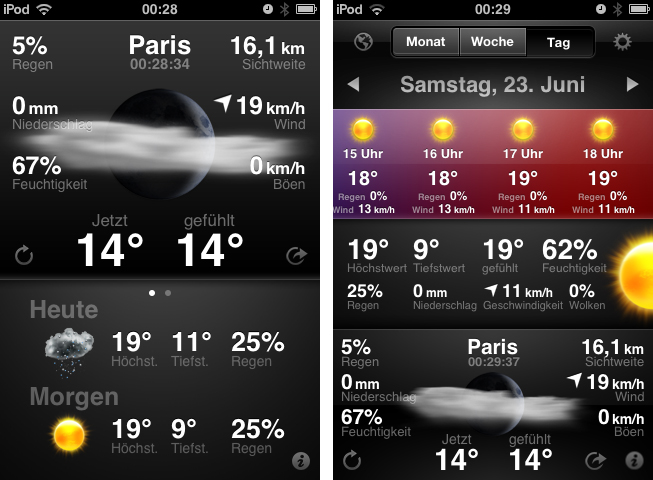
Today is the second time I don’t obey my “never cover stocks and weather apps” principle. I think I’ll have to abandon it completely, as there are way too many cool UIs in this app category. After I reviewed StockTouch some weeks ago, I recently discovered WeatherSnitch 2, a weather app by developer Snitchware (with a website certainly inspired by apple.com). The original WeatherSnitch v1 and this new update are designed as ”one view is all it takes” apps — just fire them up, get to the main screen displaying all relevant information, and continue with your workflow right away. Read more
Transit Beautifully Displays Public Transport Routes Around You
Google GTFS is an acronym some developers and bloggers might already be familiar with. The Google General Transit Feed Specification is a developer tool that public transport services can use to track their bus or train lines on Google Maps via GPS. Using GTFS, created using a bunch of zipped text files (you can get more information on the Google dev pages), public transport companies can voluntarily publish their routes for Google Maps users to incorporate them into route planning. Front-end developers can also benefit from this specification. One of the newest products for the iPhone which incorporates GTFS is Transit by Sam Vermette and Guillaume Campagna, which has been published today.
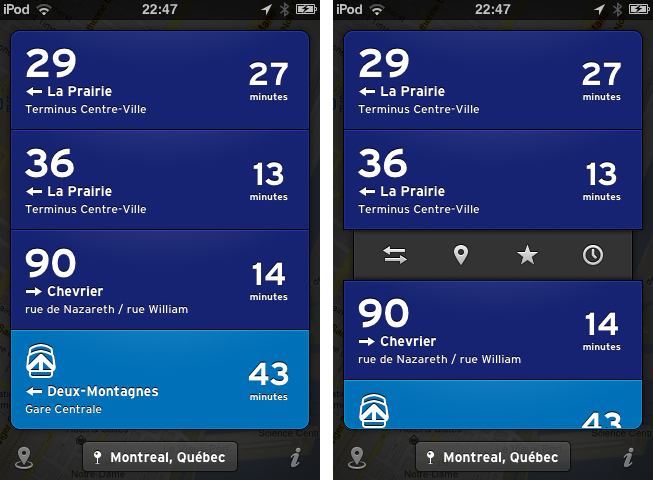
Transit locates you via GPS or Wi-Fi hotspots, and then displays the nearest public transport routes sorted chronologically after their departure. This way, you’re always up to date what traveling possibilities you have around you. If it’s in your home town, you only get what you need and what you’re familiar with, because the app displays only the nearest lines with the “real lines” colors and numbers. Your current location is then displayed in a small panel at the bottom of the screen with the route information in a custom list above it — tap it to change the saved location. Transit also works offline, so you can download foreign cities’ routes before traveling there to save 3G costs and still always be up to date. The bundle downloads can be reached via the location button in the bottom left corner of the screen (along with the amount of public transport agencies displayed).
When looking at the list of your closest routes, route information elements inform you with big, readable typography about the next departures with location, time of departure, line information, bus/train stop location, and the route direction. Tap and hold one of them to get the direction and distance to the next stop, or to get the next departure times displayed in a cute popup panel above your finger. When you tap on one of the elements, there are four other actions to perform with it. You can switch the direction if the displayed destination is not the one you’re looking for, then check the route with the Google Maps view to see other stations and their route distances. Furthermore, you can star routes to mark them as favorites so you can always pin them to the top of your list. You can also browse the whole line schedule for the day in a separate list if you need the information for a departure at a later time. This way you get the information you need quickly and efficiently.
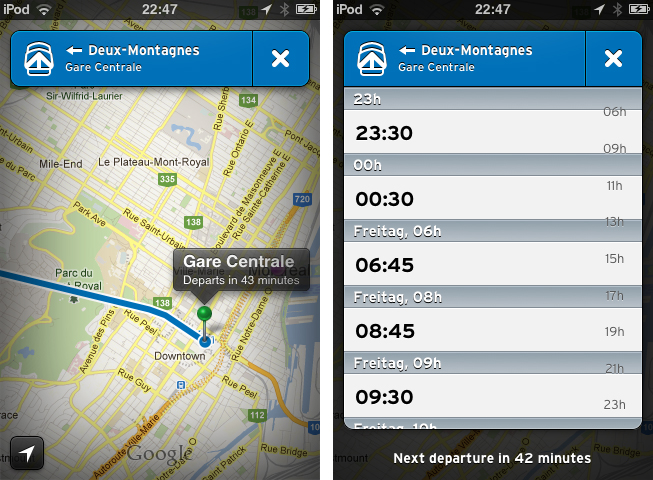
Currently, Transit is only supported in three Canadian cities: Montreal, Toronto and Quebec. But the two developers promised to work hard and want to finish covering Canada by the end of July, with European and U.S. cities following in August. To keep the app clutter-free, Transit will always display the nearest routes and change displayed transport companies when the user is in a new location.
Transit can be freely downloaded on the App Store, however, certain features are restricted until they’re unlocked with a subscription. Using the free version, you cannot view routes offline and the app only displays the three closest routes. By paying $0.99 for one month, $2.99 for six months, or $4.99 for a year, you add the ability to view maps offline and see all routes within a 1.5km radius. This is a very good pricing plan: you can get free transit data in a pinch, or pay to receive the most comprehensive mapping data (which will probably be worth the subscription fee for constant travelers once more cities are added).
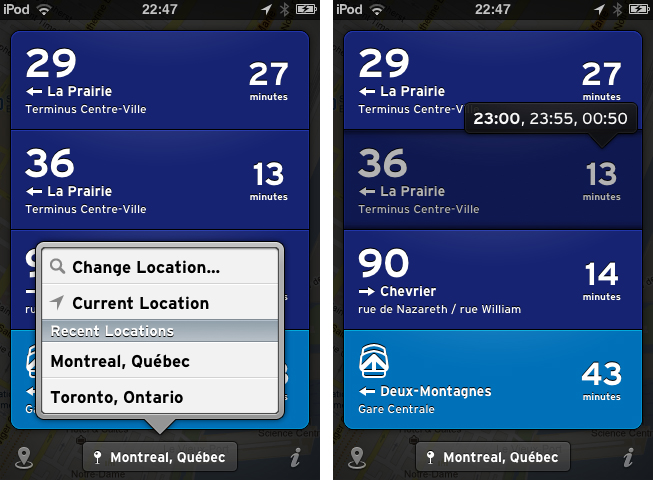
But what makes Transit really worth a try is its user interface. The trend of applying outer shadows and light textures to UI elements and buttons has been a common way to style an app in the last years, but not many designers manage to make it unique while still using this method. Sam Vermette did: Transit features a stunning amount of cool interface elements. Some of my favorites are the Tweetbot-like action menus when tapping a list element, the already mentioned small information popups, the black vignette design around the menus and the Google Maps view, and especially the popup list when changing the location. The latter shows a deep care for consistent design: within the list, the developers changed the text display font to the sans-serif font which is used throughout the app. Using Transit’s UI is pretty smooth — the performance only lacked a couple times when online data got fetched.
Another thing I really like about Transit is the icon. It’s unique, simple, and makes my fingers want to touch it.
So, as you could possibly tell from the review, I like Transit very much. I’m thrilled to see it coming to Europe over the next months (although not every public transport agency supports GTFS), because it’s plain, easy to use, but still has a great feature set which really solves the problem of combining multiple public transport agencies in one single, and still awesome user interface. Even if you’re not a resident of Toronto, Quebec or Montreal, I still urge you to download Transit for free on the App Store, take some time looking over its stunning UI, and wait for your city to be supported.
Be sure to keep an eye on Transit’s Twitter account to stay up to date on when new cities are added.
App Store “Game Collections” Gathers All Previous Game Bundles
In our story about the first four years of App Store, we noted how Apple had been collecting apps and games in custom “sections” that, unfortunately, are often rarely updated and hard to find in the App Store once they are removed from the homepage.
For years now, Apple has been refreshing the App Store on a weekly basis to include custom “sections” showcasing hand-picked apps and games. These sections typically come with rotating banners and smaller “mini-banners” on the App Store’s homepage, and are later grouped into an “App Store Essentials” macro-section that includes several of past sections and recommendations.
Custom sections provide a decent solution to browse titles Apple has previously “curated”; however, these sections aren’t usually updated as often as they are created — N.O.V.A. 3, a new shooter game by Gameloft, still isn’t listed under Benchmark Games: Stunning Graphics, whilst the majority of reviewers and publications have outlined the game’s remarkable graphic capabilities.
With today’s weekly refresh of the App Store’s homepage, it appears Apple has started taking some first steps into a new direction – grouping all previous game bundles into a bigger “collection”. Aptly named Game Collections and linked from the App Store’s homepage, the section offers a roundup of every selection Apple offered to date.
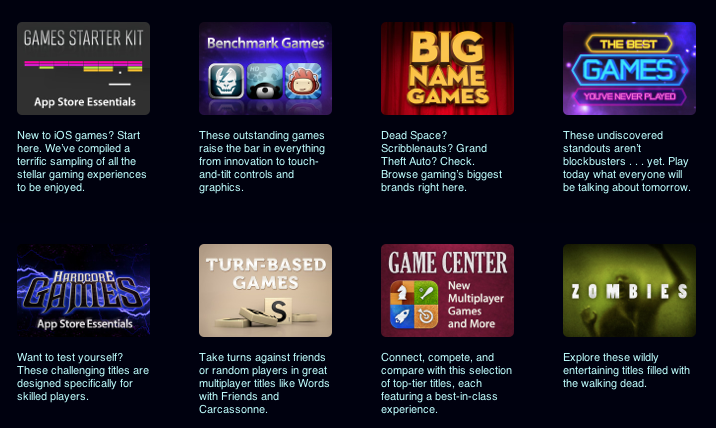
Game Collections includes:
- Games Starter Kit (App Store Essentials)
- Benchmark Games
- Big Name Games
- The Best Games You’ve Never Played
- Quick-Fix Games
- Hardcore Games (App Store Essentials)
- Turn-Based Games
- Game Center
- Zombies
- Racing Games
- Great Platformers
- Sports Games (App Store Essentials)
- Music Rhythm Games
- Retro Games
- Great Role-Playing Games
- Hollywood Hits
- Flight Games
- Galactic Games
- Games for Kids
- Dinosaurs
Previously only available through the App Store’s homepage or partially through the dedicated Games category page, the new Game Collections feature brings some much needed organization to the custom sections Apple has been “curating” over the years. They are now accessible from a single place, and Apple notes how they will be “updated on a regular basis”.
As of today, “regular” apps still aren’t being organized into a unified collection. Right now, the App Store Essentials page is the best way to browse previously featured selections, but it also still mixes games and apps, and doesn’t provide the same elegant and simple layout of Game Collections. Hopefully Apple will provide an “App Collections” page as well, bringing past handpicked app selections and features in a single page.
Apple has been making a series of improvements to the App Store’s navigation lately. Aside from the complete App Store revamp coming in iOS 6, Apple redesigned the App of the Week section and renamed it to Editor’s Choice, leaving the former “App of the Week” to free app promotions.
App Store navigation and curation has long been an issue for third-party developers, with Apple’s Phil Schiller recently weighing in, too, noting how ”you can still get discovered and get a hit overnight”.
Why Apple Is Making The Mac Harder To Use→
Why Apple Is Making The Mac Harder To Use
Michael Schechter weighs in on today’s news that TextExpander 4 couldn’t be released through the Mac App Store due to Sandboxing restrictions:
I know I’m not the average Mac user, but I’m far from the geekiest. While there will always be things that need to exist outside of the Mac App Store for the geeky amongst us, the exclusion of something as useful and harmless as TextExpander shows the flaws in the current execution of App Sandboxing. The idea of protecting users from harm makes sense; the execution of protecting users from conveniently installing and maintaining useful software makes none.
This morning, Macdrifter brought a reasonable explanation as to why Apple’s Sandboxing is, ultimately, benefitting the average Mac user who doesn’t use apps like TextExpander, but wants a Mac to be secure and “safe”:
New Mac owners lose the fear that Windows has instilled. I’ve seen it happen over and over. Ever so slowly, they begin to realize that installing software doesn’t have to be scary. Everything on the App Store is “safe” because Apple is moderating the content.
We actually saw this coming. Back in October 2011, when Sandboxing was still on track to become effective in November, I commented on two pieces by Andy Ihnatko and Jason Snell, noting how the concept of “app” – software that “does one thing well” – coupled with enhanced security for Mac users allowed Apple to position Sandboxing as a powerful technology for the new App Store market.
As a security measure, Sandboxing is a good thing for the user. It forces apps to access only the system resources they need, and, generally, it reinforces the belief that Apple-vetted apps are safer than software downloaded from the Internet. But like I said, the real problem – and I guess the reason why people like Michael and I don’t appreciate the consequences of this change – is that developers of existing apps sold on the Store are being forced out of the door. I also wrote:
The problem with Sandboxing, I believe, is that it introduced a change that is forcing developers of existing apps to reconsider functionalities that are not compatible with the Mac App Store anymore. If this will lead to serious fragmentation of Mac software with a proliferation of deeply different Mac App Store and “website versions” of the same apps, we’ll see.
And we did see the first result with TextExpander 4. It’s still too early to judge, but if these first signs are of any indication, then we should be thanking whoever thought of Gatekeeper at Apple, as it will bring some security to software downloaded outside of the Mac App Store. Similarly, we should appreciate the efforts of developers like ManyTricks and Smile, who are thinking of clever ways to offer upgrades without “officially” using the Mac App Store.
There is an argument to be made about Apple not particularly “liking” apps that change system behavior, like TextExpander. If that’s the case, why approving them for Store sale in the first place? I understand that plans evolve and things can take unexpected turns; however, today’s TextExpander update unarguably shows that this isn’t the top notch user experience Apple typically shoots for.
Geeks will always know how to get around the Mac App Store’s limitations; Sandboxing is showing its first trade-offs, including “harder” upgrades and fragmented applications, but we’ll have to wait more to understand its long-term impact.
GoodReader 3.15.0→
GoodReader 3.15.0
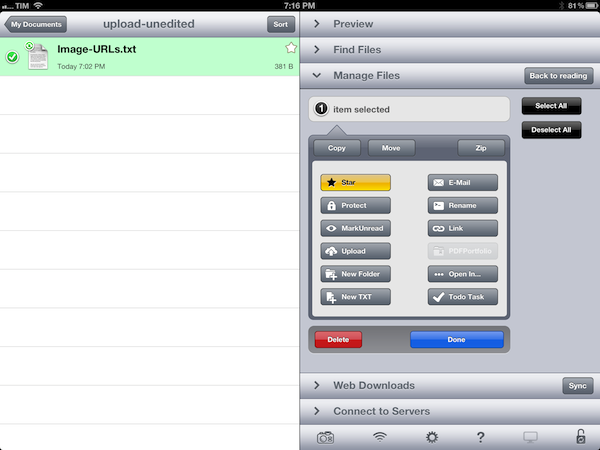
GoodReader is a powerful PDF reader and file manager. It is not the prettiest app available on iOS, but in terms of functionality, I’ve yet to find a single solution that integrates good PDF annotation features and support for file management and remote servers as well as GoodReader does.
Especially on the iPad, the app has become a part of my daily workflow as it allows me to connect to AFP servers (such as my Mac mini), Dropbox, and iCloud. GoodReader is one of the few apps with real folder-based iCloud storage for documents (as I have previously detailed), and, on top of solid integration with web services, it comes with powerful file management options and support for several file types including .webarchives, Office documents, audio, and video.
The latest version of GoodReader for iPad, released yesterday, adds a number of useful options for PDFs, such as an eraser tool for freehand drawings (available as annotations), and possibility to email a PDF annotation summary. While I don’t use GoodReader as my main PDF reader (I like PDF Expert better for that), the fact that it can sync entire folders with Dropbox means I can still get my fully-annotated documents coming from other iOS apps that sync with Dropbox, like the aforementioned PDF Expert, or the recently released PDFPen 1.2.
On the file management side, version 3.15.0 is also a notable update. If you have configured the app with Dropbox, you can now generate a public link for any file or folder (GoodReader can browse the entire contents of your Dropbox) to share with your friends. Another new button, “Upload” puts a convenient shortcut into GoodReader’s file management popover so you’ll be able to instantly beam new files to remote servers (I use this to upload images to Dropbox). Last, with a new bookmarklet, GoodReader is capable of saving HTML5 video directly from Safari – and this works with YouTube as well (it’ll save .mp4 files into GoodReader).
GoodReader for iPad is only $4.99 on the App Store.
#MacStoriesDeals - Thursday

Here are today’s @MacStoriesDeals on hardware, iOS, and Mac apps that are on sale for a limited time, so get them before they end!
Read more
Launch Center Pro Review

Launch Center Pro has become my second SpringBoard. I have been testing the app for the past month, and it’s a fantastic upgrade over Launch Center, which we have covered on multiple occasions on MacStories. If you were a Launch Center user before, you’ll most definitely want to check out the new, separate Pro version.
For many, it’s difficult to see the appeal of software like Launch Center. Originally conceived as a Notification Center-based launcher for common actions such as toggling Bluetooth settings and custom URLs supported by third-party apps, Launch Center turned into a powerful hub to collect shortcuts for system actions and app-specific URLs. The discontinuation of Settings shortcuts in iOS 5.1 didn’t diminish Launch Center’s functionality, which gained support for several third-party applications and a nicer interface with support for icons and even more actions.
What started as an interesting hack to put shortcuts in Notification Center eventually became a utility that, in its niche, is redefining the concept of “launching actions”, rather than apps. This goes back to a fundamental issue behind the nature of the iOS Home screen – as I have previously written – and Launch Center Pro, while retaining the basic functionality of Launch Center, doubles down on this very distinction between finding apps and launching actions.