


Here are today’s @MacStoriesDeals on hardware, iOS, and Mac apps that are on sale for a limited time, so get them before they end!
Read more
#MacStoriesDeals - Tuesday
Apple Launches Podcasts App for iOS 5.1 and Later
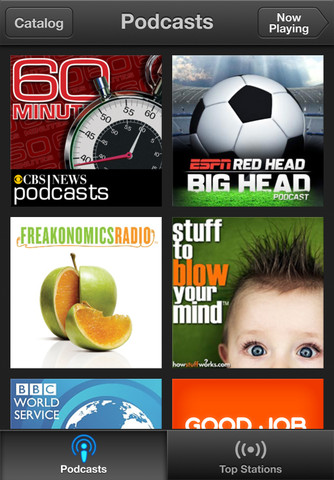
When Peter Kafka at AllThingsD hinted at an upcoming Podcasts app for iOS, we didn’t expect to see it until this Fall. Some early tells clued us in that Apple was working on something, and today our best guesses and inside sources held up: Apple has launched their forecasted Podcasts app, and you can download it right now from the App Store.

Wearing Apple’s iconic purple colors in its icon, Apple podcasts app centralizes the podcast player and podcast section of the iTunes Store in a standalone application. Able to playback audio and video podcasts, Podcasts continues the retro-styled playback controls first seen in the updated Music app on the iPad, and shares the the catalogue views from the updated App Store and iTunes Store on iOS 6. At first glance, Apple’s Podcasts podcatcher appears to be a rather basic player, leaving room for power-listeners to continue using their favorite apps like Downcast and Instacast.
With Apple’s standalone podcast player breaking away from the Music player, you’ll want to check out all of the new features below:
• Enjoy all of your audio and video podcasts in a single app
• Explore hundreds of thousands of podcasts including shows in over 40 languages
• Try the innovative new Top Stations feature to find new podcast series in a variety of topics, including arts, business, comedy, music, news, sports, and more.
• Browse by Audio or Video podcasts, or see what’s most popular in Top Charts
• Tap subscribe for your favorites and automatically receive new episodes for free as they become available
• Stream episodes or download to listen while offline
• Skip forward and back using simple playback controls
• Turn on Sleep Timer to automatically stop playing a podcast while listening in bed
• Share your favorite episodes with friends using Twitter, Messages and Mail
• Optionally sync your favorite episodes from iTunes on your Mac or PC
• Sync your episode playback for seamless transition between devices
Podcasts required iOS 5.1 and iTunes 10.6.3 for optionally syncing episodes. Download Podcasts (a universal app) from the App Store.
Brightcove Gives Developers A Tool To Create Dual Screen Apps With AirPlay
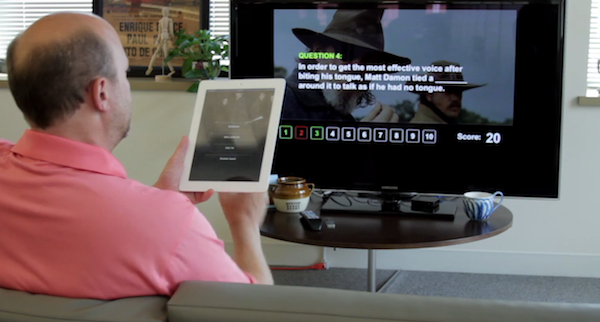
Brightcove today unveiled their ‘App Cloud Dual-Screen Solution for Apple TV’ which is effectively a development kit that allows developers and media publishers to easily create “dual-screen” apps that utilise AirPlay. It enables an Apple TV to effectively become a second screen in which different content can be showed, but synchronised to what is shown on the iPad or iPhone. As highlighted in the demonstration video below, this tool could be used to create interactive quiz games or perhaps an app that plays a video on a TV and display additional information on the iPad or iPhone.
Read more
Review of WTHR - A Simpler, More Beautiful Weather App
I admit it, I have a bit of a fetish for weather apps. My taste in them is a bit different than all the other categories because I am a data geek when it comes to what’s happening outside. Apps like WeatherSnitch do a great job showing you a lot of info on a small screen but many don’t present them to the user very effectively. Until Dark Sky for iPhone came out, I didn’t think I could use a weather app that focused on the important details instead of all of them. Since then I have changed the way I use weather apps and rely on Dark Sky for short forecasts / radar and iOS’ built-in Weather app for extended forecasts until today.
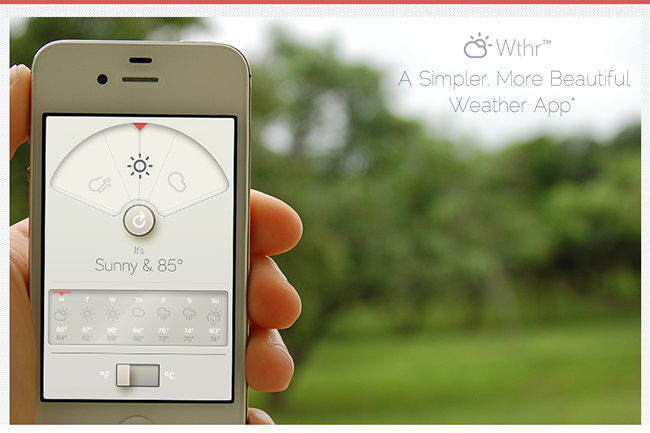
WTHR is a brand new weather app from David Elgena. He wanted to build a weather app based on Dieter Rams’ 10 principles of design so the user could stop wasting time staring at weather radars and atmospheric pressure readings and spend more time enjoying what’s happening outside. WTHR started as a mockup on Dribbble about a month ago and received a lot of attention there. More mockups and a programmer later, WTHR was submitted to Apple and is available today.
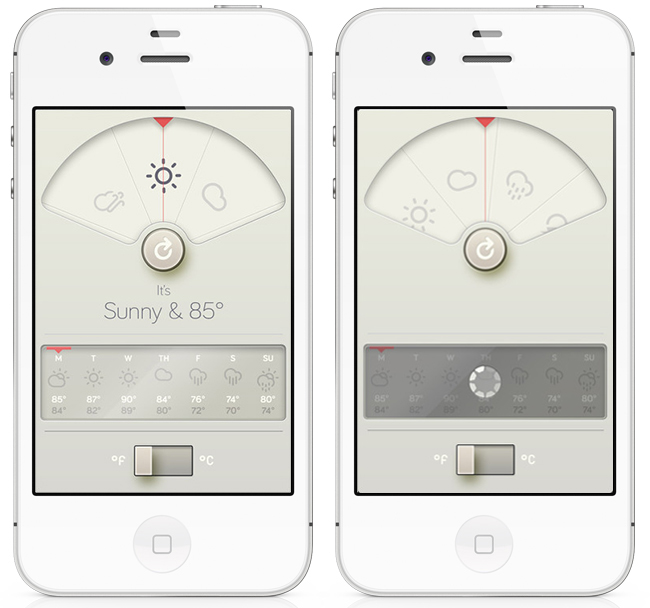
WTHR is one of the best looking weather apps available — I love the style and simplicity of it. I appreciate that it hides the status bar to give your entire iPhone the look of being a handheld weather device with zero distraction. Launch the app, watch the animations, get your forecast and go. Some people may not like the color scheme but if you know Dieter Rams’ designs you understand where the colors come from. When you launch the app, it asks for your location then the UI presents the weather data in a retro-futuristic style. There’s only 2 buttons to interact with, one to refresh the forecast and the other to flip from Celcius to Fahrenheit. The refresh animation is great and the spinning notification in the 7-day forecast almost looks like a Rams dial. Underneath the current forecast is a 7 day extended forecast. All the weather icons are Adam Whitcroft’s wonderful Climacons which look perfect to the stylings of WTHR.
David Elgena told me that they are already working on future updates to include, but not complicate, more features and data like multiple locations and a dark mode. “My intentions with WTHR was really to create something as beautiful as the device that hosts them… and I do believe that even UI designers and app developers could gain inspiration from Dieter Ram’s product designs. Too often we load digital products with features and hidden or hard to use interfaces because we are suddenly given this almost infinitely layered product, the real discipline is control. There is no difference from when Dieter Rams was designing his first clock face…to an app on the iPhone. I look forward to creating more apps in the future…and continually improving upon WTHR.”
The lack of contrast in the 7-day forecast can make you squint a bit — an option to switch to a 5-day forecast could help. I’m glad the app icon wasn’t designed with the same skeuomorphism in mind, as I am not a fan of doing this in iOS because it clashes too much with most other icons. International iOS users – don’t worry, WTHR uses a global geo-location weather API so no one is exempt from using this great app. The weather data is a little different than what iOS uses but only a few degrees at times as Federico noticed in Italy. WTHR has gained a spot on my home screen with its beautiful, focused purpose. WTHR is available for 99¢ via the App Store.
Instagram 2.5 is All About the Users
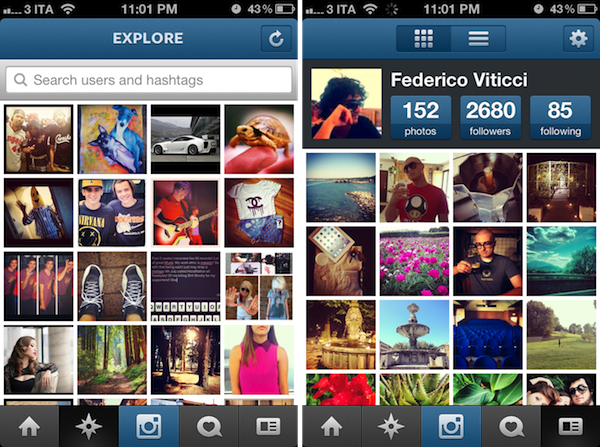
Previous versions of Instagram improved performance, added filters, and made taking pictures and sharing photos with your phone’s camera faster than ever. Instagram is still the cool place to hang out if you want to snap pictures quickly and add a little flair, and today’s update shows it’s not always about just the things you take photos of.
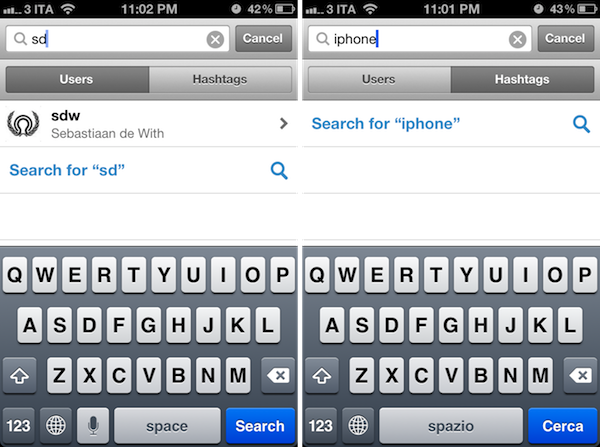
Using Instagram and interacting with people is just as important as being able to take and edit a photograph. Instagram’s 2.5 update isn’t about adding filters to your images — it’s about the people you want to interact and share moments with. Thanks in part to a revamped profile tab, improved search, improved commenting, auto complete, and integration with Facebook. Instagram’s latest update brings to the forefront some aesthetic, usability, and performance changes that should make the overall experience smoother.
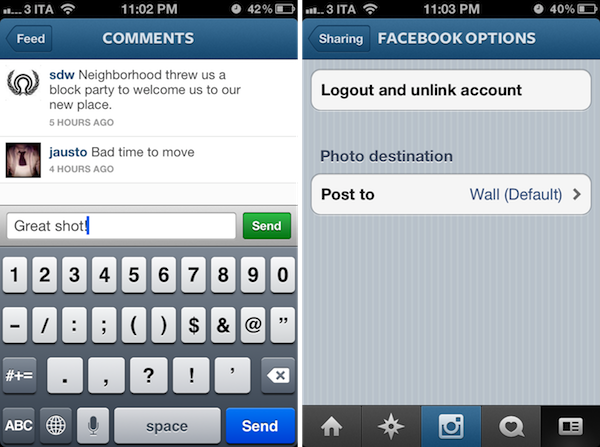
The update makes Instagram feel much more interactive, and brings about features I enjoy using in my Twitter apps (a la autocomplete). Instagram is a free download from the App Store.
Image Compression Case Study: ImageOptim vs. Xcode→
Image Compression Case Study: ImageOptim vs. Xcode
When iOS developers package their apps, images can be compressed to a “CgBi” format through Xcode that helps reduce the total application size and improve performance. Compression, however, could be taken a lot further. In ImageOptim’s case study, they took a look at TweetBot for the iPad, a graphically rich application that contains over 26 MB of compressed images. When ImageOptim optimized the uncompressed versions of those images through their application, and twice over in combination with ImageAlpha, they saw a dramatic reduction in file size and loading times.
Disabling Xcode conversion and simply using ImageOptim instead was enough to reduce the application size by almost 30% (33.4MB down to 23.8MB) and halve initial display time in the benchmark.
Manually optimizing images with ImageAlpha reduced entire application size by more than a half (33.4MB down to 16.3MB). Images alone were 65% smaller and were displayed 2.5 times quicker than Xcode-optimized ones.
ImageOptim claims that developers can submit applications that don’t use Xcode’s compression method, point to resources showing how this can be done, and also link to an excellent success story. Developers should definitely check out the examples and data provided on their blog post to see how they can better optimize their apps. [ImageOptim via @cbowns]
Gmail for iOS Update Adds Notification Support
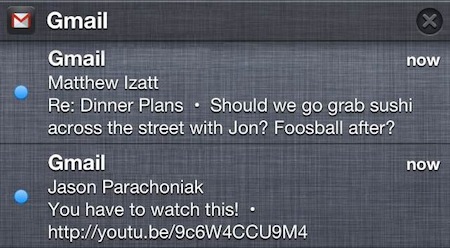
When Gmail first launched on iOS, we lamented at two things: the lack of support for multiple addresses and notifications. While Gmail on the iPhone is still a web app at heart, it has gotten better as the app gained support for signatures, a vacation responder, and nested labels. If you’ve thought Gmail has been forgotten and left behind, today’s update brings some much desired requests into the application.
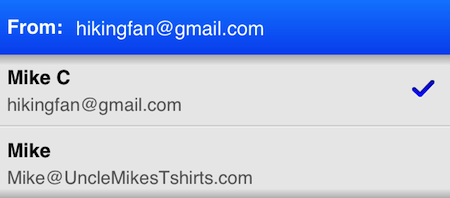
First up, Gmail for iOS now brings support for proper notifications on iOS. Instead of hearing just the chime, you’ll get banner notifications and will be able to see a history of recent emails in the Notification Center. Secondly, you’ll now be able to send a message from an alternate email address. This can be configured in the app’s settings. If you have other email accounts that forward their messages to your Gmail inbox, you can reply to those messages as the other address. Lastly, you don’t have to worry about signing back into Gmail every time you leave. Gmail will save your login information and keep you logged in unless you sign-out yourself.
If you need Gmail on your iPhone with proper notifications, today’s update might just win you over. It’s a free download from the App Store.
[via the Official Gmail Blog, Gizmodo | Images via the Official Gmail Blog]
#MacStoriesDeals - Monday

Here are today’s @MacStoriesDeals on hardware, iOS, and Mac apps that are on sale for a limited time, so get them before they end!
Read more
Kickstarter: TAKTIK - A Premium Protection System for the iPhone
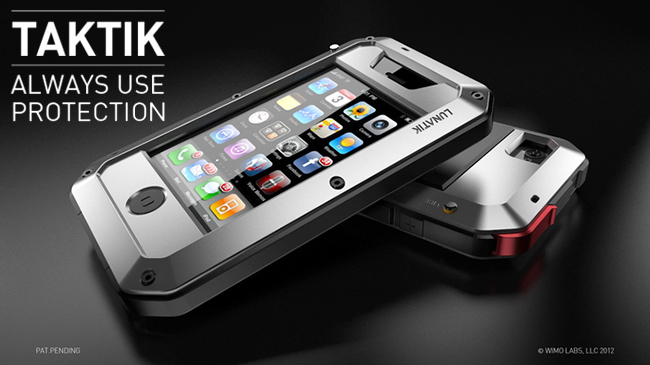
Many people take their iPhone protection very seriously. With cases like OtterBox and Griffin’s Armored case, there are some nice options available. LUNATIK, the makers of the TikTok+LunaTik watch, have started a new Kickstarter campaign to target these users with a new case called TAKTIK.
The design of the TAKTIK was injected from the TikTok+LunaTik and the LUNATIK Touch Pen with its hard lines and tactical feel. To take the rigidness of the case to the extreme, they have also included a Gorilla Glass lens (for an extra $25) for ultimate screen protection. The case itself has a shockproof suspension system with great iconic aesthetics. The TAKTIK also has GORE acoustic port covers to protect your iPhone from liquids, sand, dirt, etc. It has a nifty little patent-pending Silence Switch that only requires one fingertip to activate; there’s even a lanyard loop to fasten your iPhone safely to you. Videos after the break. Read more