


We have many great deals for #MacStoriesDeals today. You can find us as @MacStoriesDeals on Twitter.
#MacStoriesDeals - Wednesday
Twitter For iOS Update Brings Wider Timelines, New Tweet Composer
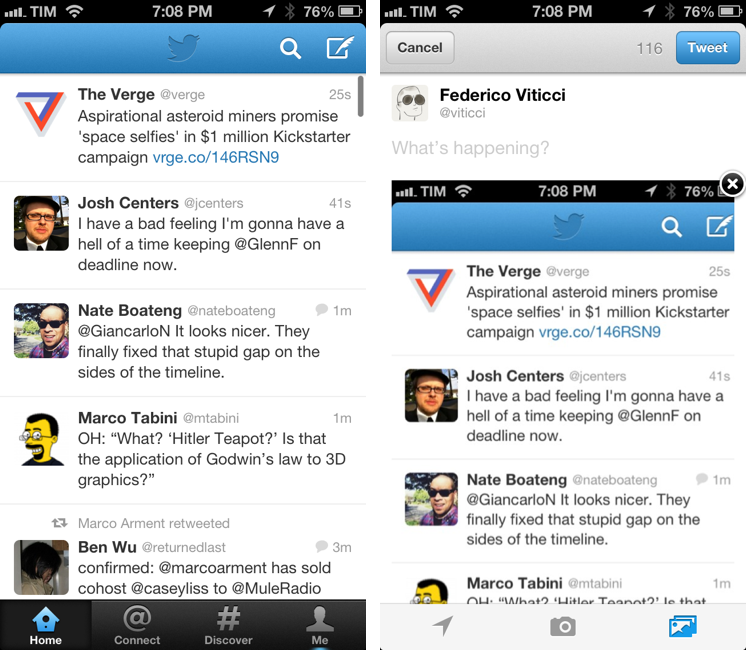
A few minutes ago, Twitter updated its official iOS app to include a number of improvements for the app’s visual appearance.
On the iPhone, Twitter got rid of the margins at the sides of timelines: the app now uses a wider timeline design that feels more natural and less constrained. Comparing the screenshot above with an older version of the app, you can see how today’s new design makes more sense and is in line with timelines we’re used to seeing in other iOS apps.
The tweet composer for iPhone has also received attention, getting an updated look that lets you see how a tweet containing images will look like when it’s posted. The tweet composer, besides revealing photos in your Library in the same area occupied by the keyboard, embeds a preview of a photo you’re attaching below the status update, with an “x” button to immediately remove it and revert to a text-only tweet.
Twitter 5.7 is available on the App Store.
Gmail Introduces Categories With a Tabbed Interface, Gradually Rolling Out Over the Coming Weeks→
Today, Google announced new features for Gmail that sorts your inbox into various categories for social network notifications, receipts and shipping updates, and promotions from your favorite shopping sites. While Priority Inbox made an attempt to surface only the stuff that really mattered, categories breaks the inbox down to a series of tabs that should help cut down on some of the clutter. Categories and tabs are basically pre-defined filters and labels with training wheels.
On the desktop, the new inbox groups your mail into categories which appear as different tabs. You simply choose which categories you want and voilà! Your inbox is organized in a way that lets you see what’s new at a glance and decide which emails you want to read when.
Categories for Android, iOS, and the desktop will be gradually rolling out to Gmail users and their respective app stores over the coming weeks. In the meantime, be sure to check out The Verge, who have an initials hands-on with the latest features.
Capturing the Moon With an iPhone→
One of the best methods of taking photos of stars, planets and satellites is with a webcam, like the old Toucam Pro, and processing with Registax. That’s not the easiest method though, and when you want photos of the moon, an iPhone does the job very well.
Jared Earle captures spectacular photographs of the moon by attaching an iPhone to a spotting scope with an interesting set of accessories and offers up some tips on how to get the perfect shot. So cool.
Analog Camera Review

Through a simple card, Analog Camera introduces itself with a short tutorial and animated image, explaining how to set exposure and autofocus. Personally, I wanted to fool around with the app before I read the manual, seeing if I could discover which gestures did what and whether I could navigate the app without having getting frustrated or lost. I took the same approach with Clear, Realmac Software’s earlier collaborative effort on iOS, and ultimately determined that there was enough feedback and freedom to figure it out on your own. So I dismissed the card, and would have to do so a few more times as I got around to viewing different parts of the app.
Tim Cook at D11: The Full Video→
In last night’s interview, Tim Cook didn’t reveal new Apple products or hint at new software features specifically (not a surprise), but he did share his thoughts on the “grand vision” for TV, opening up iOS APIs to third-parties, and letting Jony Ive contribute to the next version of iOS. I am watching this today.
Rdio for Mac Gets New Player
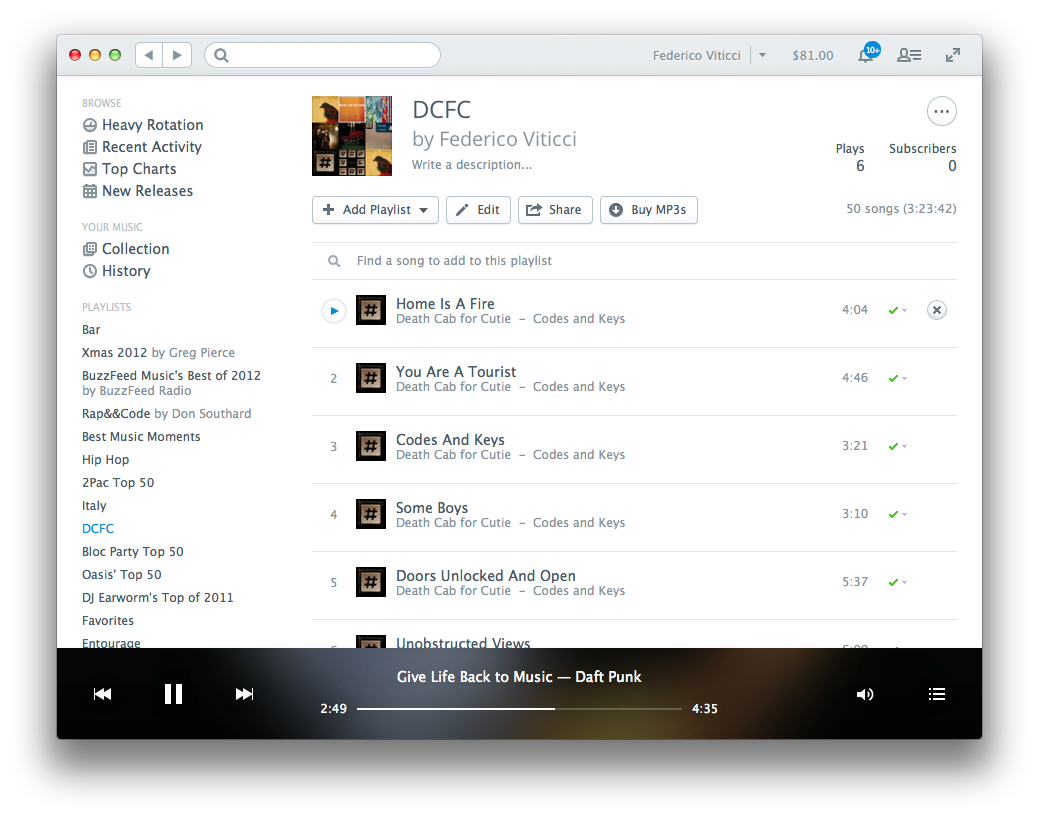
A few minutes ago, music streaming service Rdio updated its website and Mac app (which is largely web-based) with a new “bigger, bolder” player. Inspired by the iOS app’s recent redesigns, the player sits at the bottom of the window, styled with a blurred preview of the currently playing song’s artwork. As you click the list icon in the bottom right, you’ll get a larger album art view (screenshot) with a summary of upcoming songs (and a larger, blurred artwork in the background).
The new player is a big change in terms of visual appearance – it certainly is in contrast with Rdio’s otherwise clean and minimal design focused on whitespace, text, and smaller thumbnails. Last week, Rdio updated its iOS app to include a similar redesign for the sidebar.
Rdio for Mac can be downloaded here.
Tim Cook at D11

Apple CEO Tim Cook will be joining Walt Mossberg and Kara Swisher tonight for D11’s opening session at the Terranea Resort in Rancho Palos Verdes, California. The Wall Street Journal’s D: All Things Digital conference begins today on May 28th and ends on May 30th, inviting on stage several industry tech titans such as Dick Costolo of Twitter and Elon Musk of Tesla to discuss the impact of today’s technology and what’s in store for the future.
Tim Cook, having spoken at D10, has stayed the course at Apple by introducing a brand new iPhone, a more powerful iPad, and the incredibly successful iPad mini. New, industry changing Macs were also introduced in the form of the MacBook Pro with Retina display and nearly razor thin iMacs. But he’s also been hard at work pushing Apple in new directions, switching up assumed product release dates and hinting at new opportunities, suggesting new product lines during fiscal conference calls. Although Apple had an incredible 2nd fiscal quarter for 2013, publications like the Wall Street Journal have tried to rewrite the narrative, suggesting that demand for Apple products is falling in the face of strong competition and that innovation is stale due to the lack of new products. Rumor has it, however, that the company is remaining steadfast and focused on bringing to light a new look and feel for their flagship operating system, iOS, re-imaging the appearance of a core interface that’s been a mainstay on the iPhone since 2007.
Much of the interest around new product lines and iOS’ expected rethinking has been driven by Tim Cook’s management switch up that occurred last October, where Senior Vice President of iOS Software Scott Forstall and Senior Vice President of Retail were let go as Jonathan Ive stepped in to oversee Human Interface design across the company. Bob Mansfield, instead of retiring, was promoted to Senior Vice President of Technologies while Craig Federighi would take the helm of Senior Vice President of Software Engineering. It was an unexpected simplifying of Apple’s core management structure, the conclusion of which likely awaits at WWDC’s opening Keynote on June 10th.
Then there’s Apple’s doubling of the capital return program, as well recent Senate hearings, where Tim Cook has defended Apple’s tax policies concerning the large amounts of cash Apple keeps in safe havens overseas.
With these events in mind, tonight’s D11 should bring forward Tim Cook’s perspective on the current condition of Apple and where it’s headed. At D10, Tim Cook was asked about his relationship with Steve Jobs, what that meant to him, and figuring out who he was as a person. This time, we should expect a lot of talk focusing on his vision, how he’s reigning in the company as his own, and how he views the competition as it currently stands.
All Things D will not have a live stream of the event, so we’ll be following along with others in attendance. Be sure to check out: Engadget, The Verge, and MacRumors for extensive coverage.
Sponsor: Creaceed
Our thanks to Creaceed for sponsoring MacStories this week with Prizmo.
Prizmo makes scanning easy, requiring nothing more than an iPhone, iPad, or your favorite digital camera. Prizmo works like magic — it takes a snapshot of your document and transforms it into a digital format which can be used and worked on just like any ordinary file. Text recognized in more than 40 languages is pulled right from the pages and transferred to Prizmo thanks to an amazing Optical Character Recognition engine that can read every word. And that text is immediately editable, so you can lay out your scanned documents, add, and delete as you see fit. Plus, you’re not even tethered to your phone. Prizmo has apps on all of your apple devices, so you can keep your documents in sync with iCloud, or via other storage apps like Dropbox, Evernote, and Google Drive. Who needs a big, bulky scanner when you have Prizmo?
Prizmo for iOS devices is only $9.99, with the Mac version starting at $49.99. You can learn more about the Prizmo suite of software here, and try a demo of the Mac version with your portable camera from the Mac page.