This Week's Sponsor:

Clic for Sonos

The native app Sonos should’ve made. No lag, no hassle, just music. Save up to 50%.


Posts in reviews

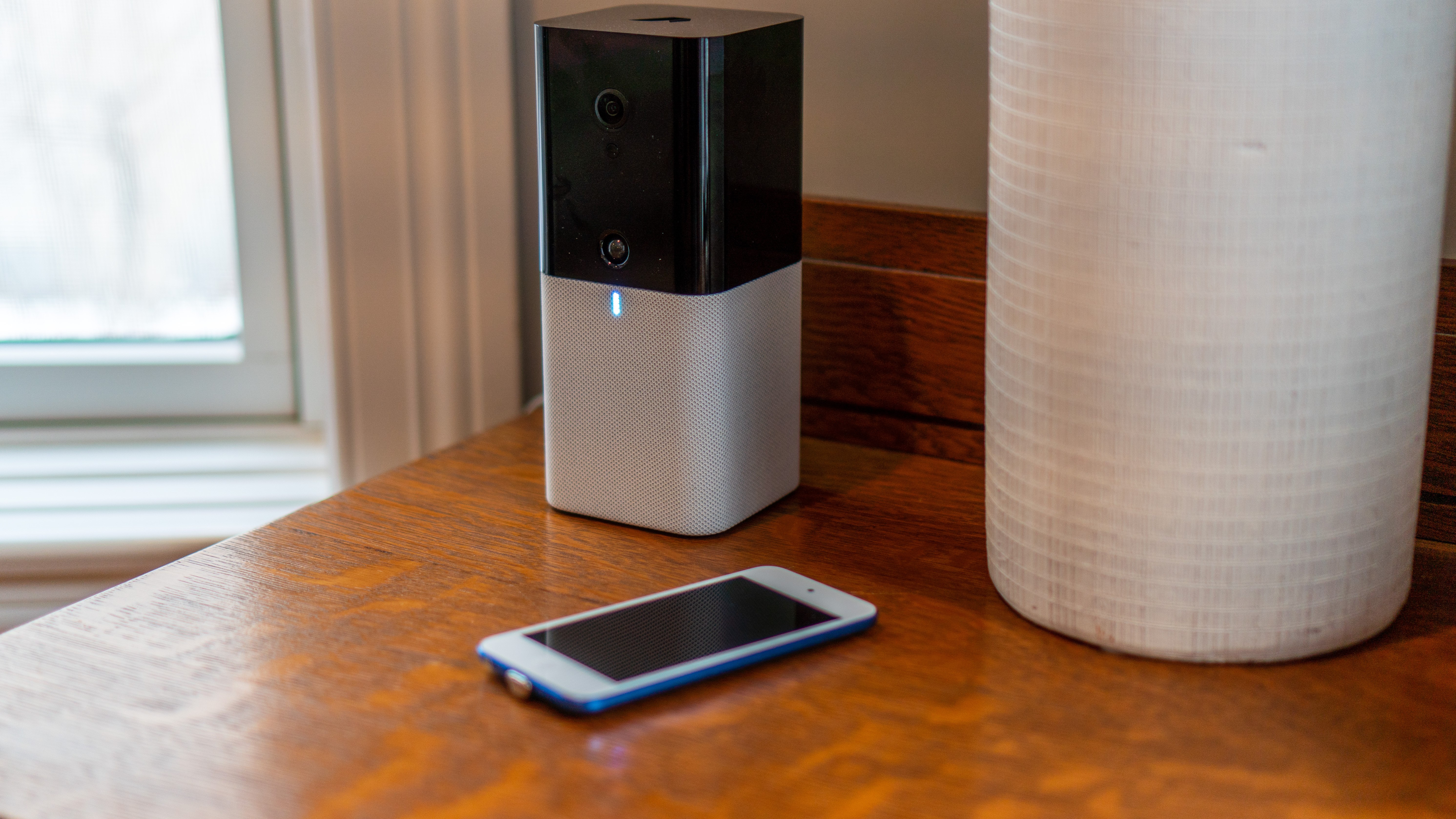
HomeCam 2 Brings Auto Cycling of Camera Feeds, Improved Data Layers, and More

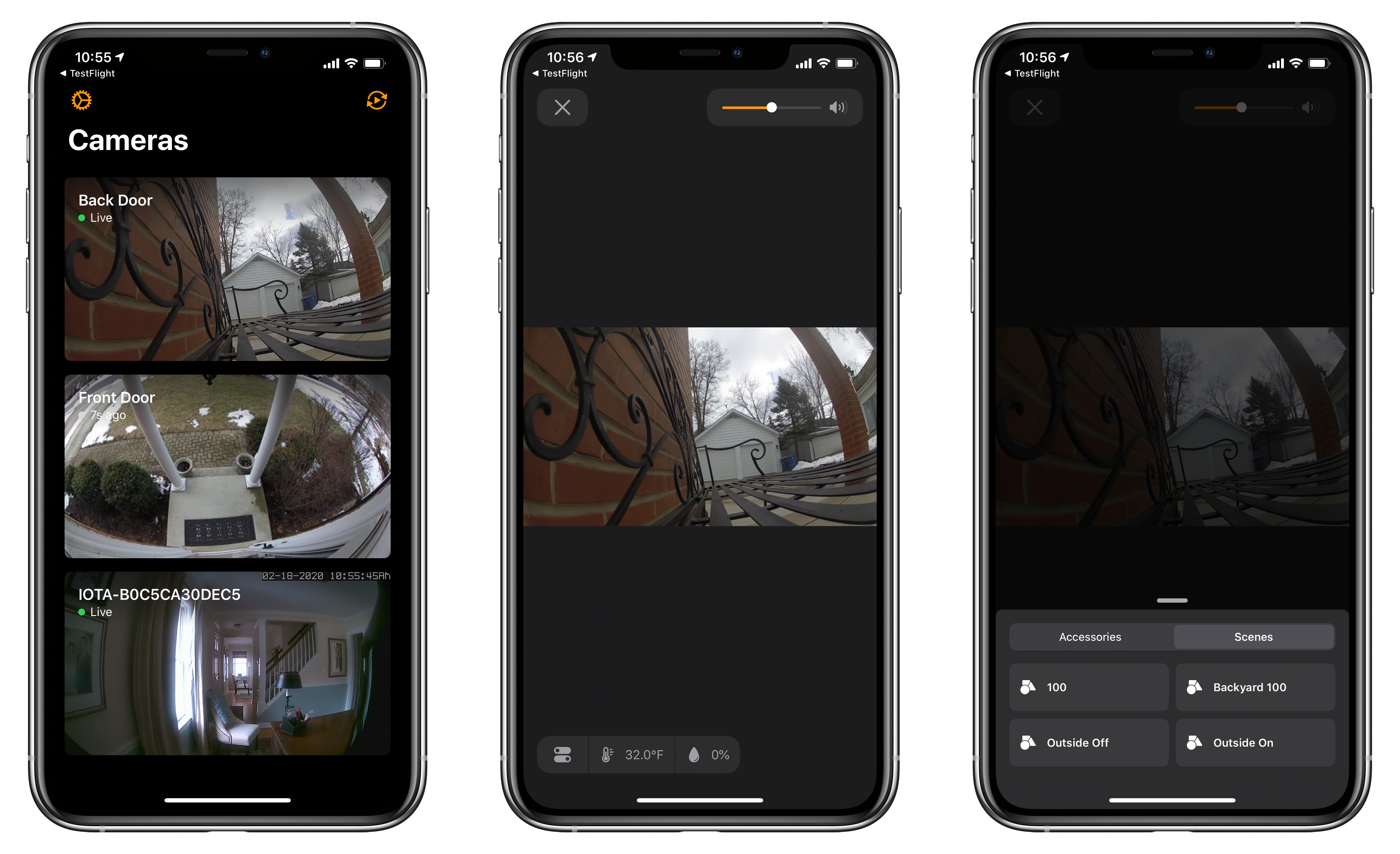
HomeCam by Aaron Pearce, which consolidates all of your HomeKit-compatible cameras into a simple, streamlined UI, has been updated to version 2.0 across the many platforms it supports. I’ve been a fan of the app since it debuted, and this update is an excellent refinement of the app’s original concept.

The value of HomeCam lies in its elegant UI that focuses first and foremost on your HomeKit video cameras. Apple’s Home app displays feeds from HomeKit cameras in one of two places. You can add them as favorite devices, so they show up at the bottom of the Home tab. Otherwise, though, your cameras only show up in the rooms to which they are assigned where they compete for space and attention with other accessories and scenes and aren’t live until tapped. I’ve been testing HomeCam with two Logitech Circle 2 cameras and an abode iota security kit camera, and the app’s design and availability on a wide variety of devices adds a level of flexibility to monitoring multiple cameras that isn’t possible with Apple’s system app.

Read more


Developer Crunchy Bagel Releases a Mac Catalyst Version of Streaks

I’ve used Streaks on and off since its introduction. The app is a fantastic way to track and establish new habits. When it was launched, Streaks was iPhone-only. Since then, however, the app has added iPad support, an Apple Watch companion, Health app and Shortcuts integrations, new customizations, and other features, all while maintaining its distinctive, brightly-colored UI and fantastic iconography.

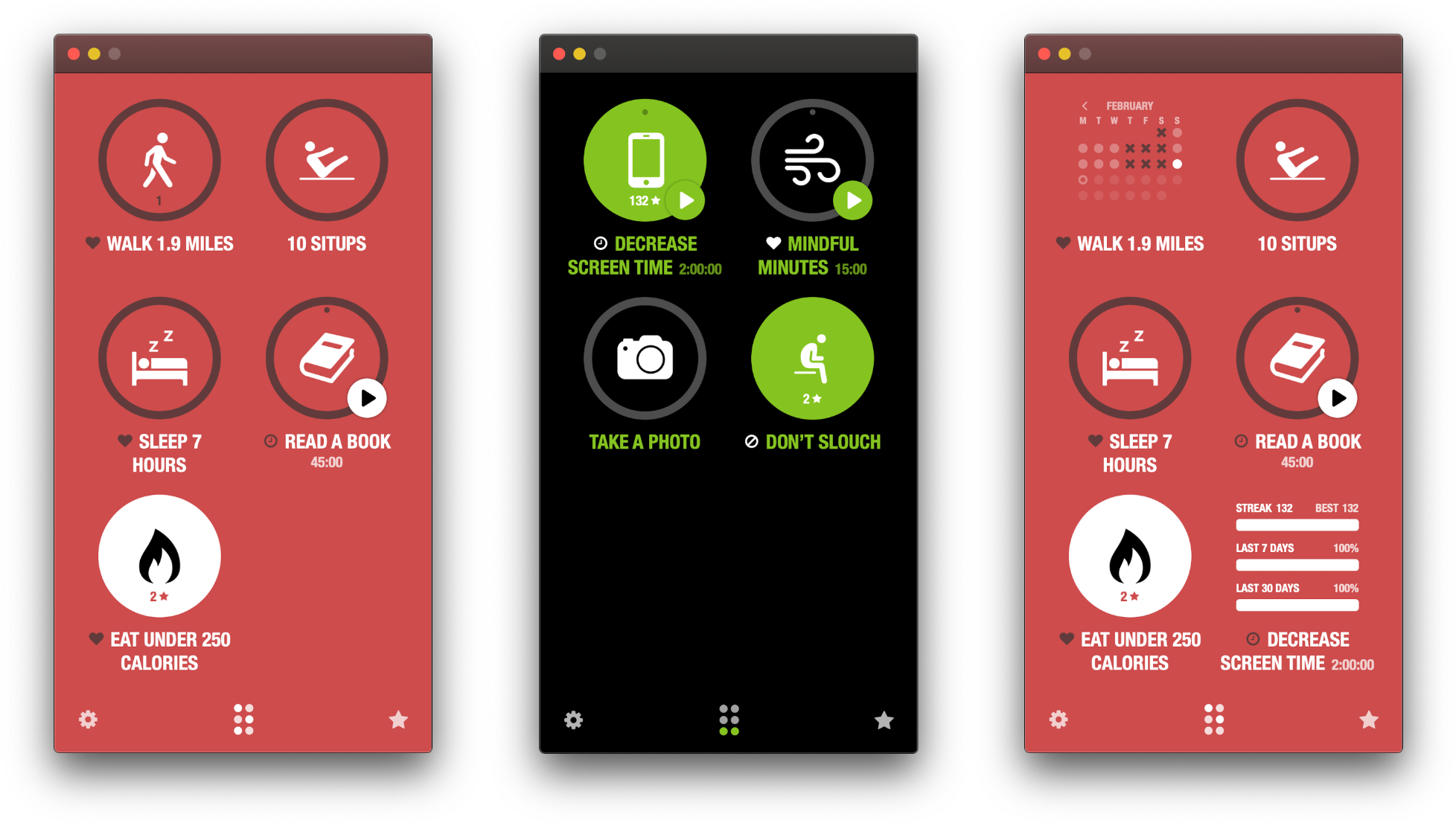
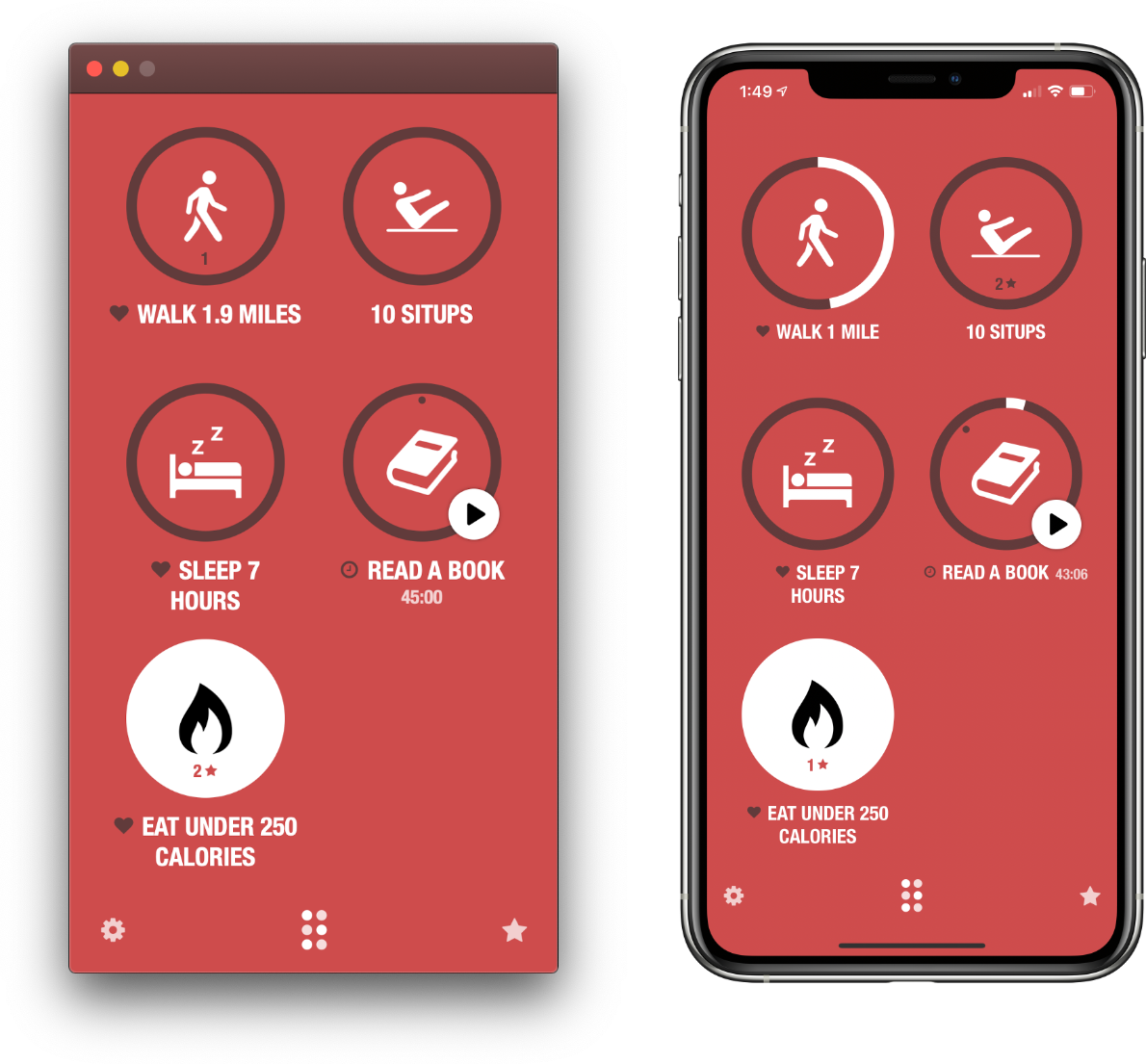
Today’s update adds Mac support to the mix via a brand new Catalyst app. There are a few differences between the Mac app and its iOS and iPadOS counterparts, but if you already use Streaks on an existing platform, the nearly-identical Mac version will feel familiar immediately.

iPhone screenshot scaled down for easier comparison with the Mac app.

iPhone screenshot scaled down for easier comparison with the Mac app.

By the same token, newcomers who discover Streaks on the Mac may have a hard time adapting to the app’s approach. Modal views that slide into place from the bottom of the screen like an iOS app, ‘Done’ buttons and custom controls to close views, and fixed window dimensions aren’t design elements typically found on the Mac.

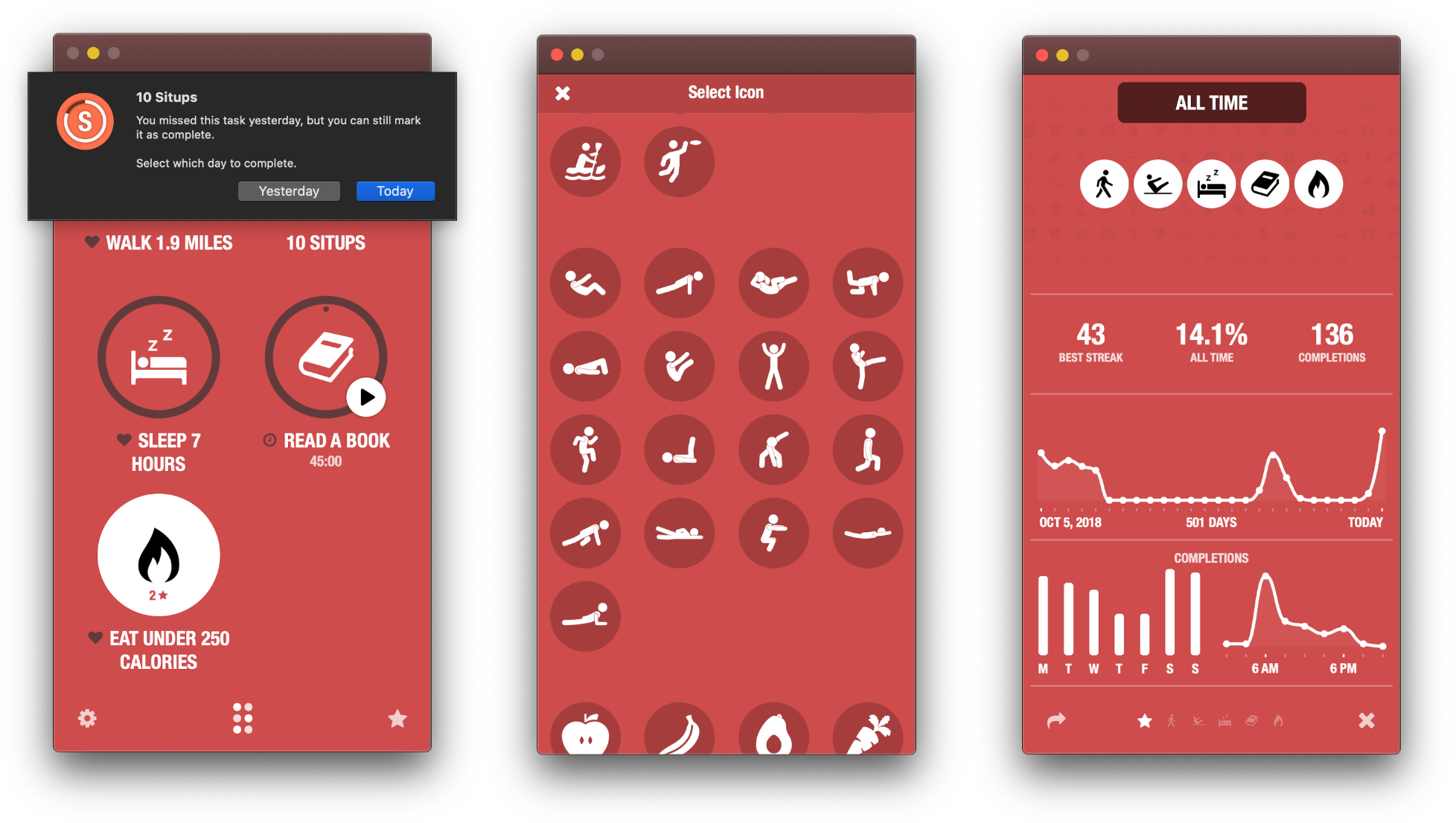
Coming from using the iOS app, though, the only place I found things hard to get used to was the ‘long click’ that replaces a long press on iOS and iPadOS for completing a task or entering editing mode, for example. On balance, though, I think Streaks’ long history and large audience on iOS largely negate the downsides of its atypical interactions.

All the core features of Streaks on iOS and iPadOS are available on the Mac too.

All the core features of Streaks on iOS and iPadOS are available on the Mac too.

By and large, the functionality of the Mac version of Streaks is the same as the iOS and iPadOS versions. However, as you would expect, platform-specific settings that don’t make sense on a Mac, like Face ID and management of the Apple Watch app, are missing.

iCloud sync works well overall, too, syncing habit data, but not settings, running timers, and themes, which is also the case on the iPhone and iPad. However, I’ve noticed in my testing that the Mac version of Streaks is occasionally slow to update with changes from iOS. Even so, the two versions didn’t stay out of sync long since the apps coordinate their data every time the Catalyst app is reopened.

Streaks is a fantastic addition to the Mac by virtue of its nature as an activity tracker. It’s an app that fills a gap. If I don’t have my iPhone nearby, there’s a very good chance I’m working on my Mac or iPad. The inclusion of a Mac version of Streaks, like the iPad support that came before it, reduces the friction of tracking a new habit I’m trying to form, giving me even fewer excuses not to keep on top of my goals. As a result, even though I don’t expect to use the Mac app as often as Streaks on my iPhone, I’m glad I have that option now.

For more on Streaks, check out my reviews of the original app, as well as versions 3 and 4. Streaks for the Mac is available on the Mac App Store for $4.99.

FlickType Keyboard Review: Real Typing on an Apple Watch Display

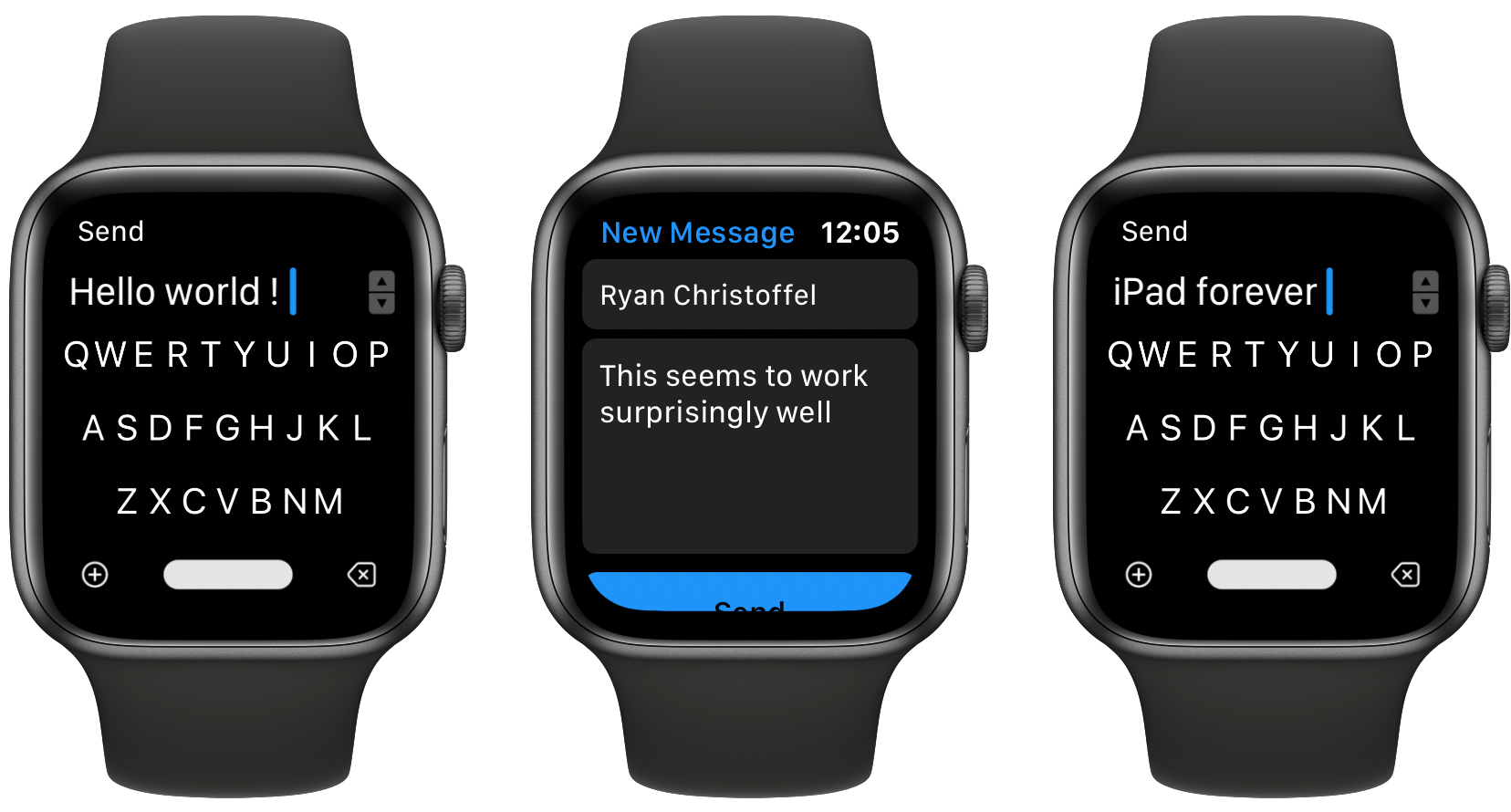
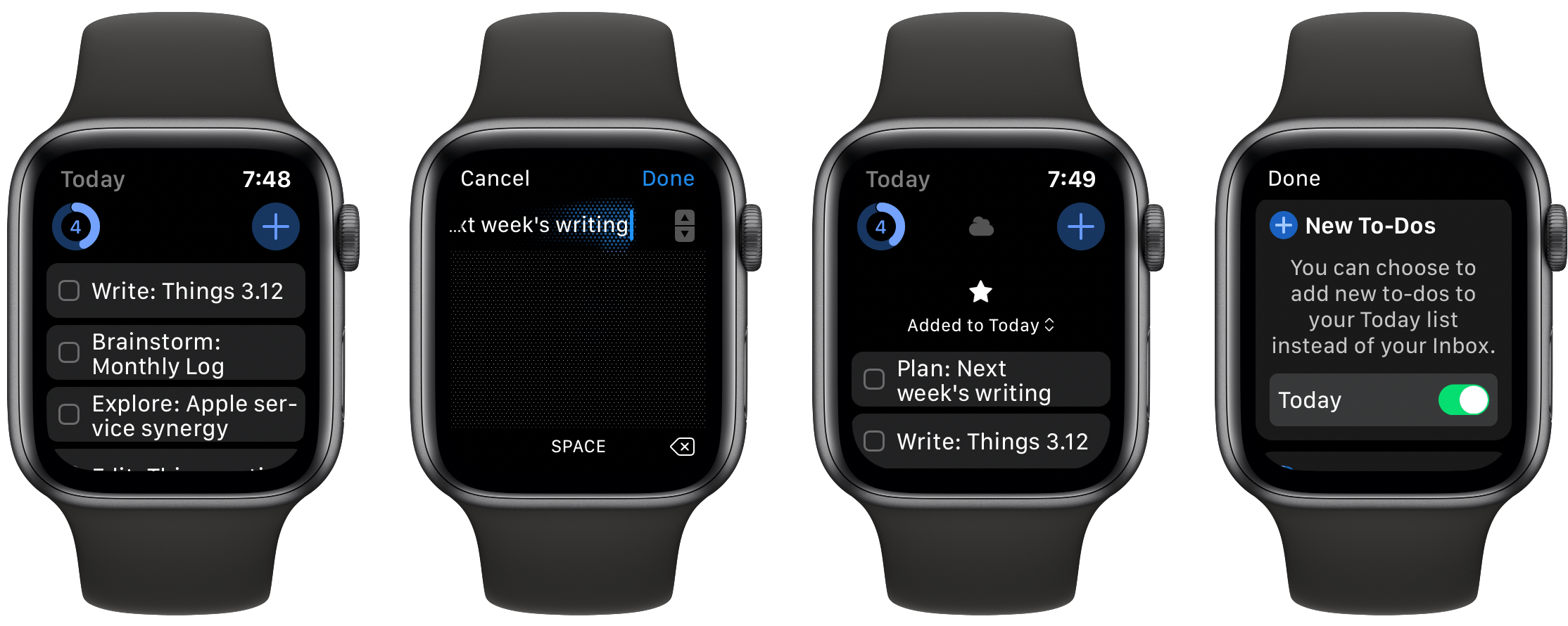
The Apple Watch is steadily moving toward full independence from the iPhone. Making cellular an option, adding new apps at a healthy pace, and enabling apps to be downloaded and run independent of an iPhone are all crucial steps toward the device becoming entirely untethered. I have a cellular Apple Watch and go running with it each week without bringing my iPhone along, and it works great. I’ve even gone to a couple of doctor’s appointments with only my Watch, and the list of things I miss my phone for in those cases is now minimal.

One time the device still falls flat, however, is when I need to send a message. Scribble is too slow for more than a word or two, dictation is hit-or-miss, and canned responses aren’t good enough for most situations. FlickType Keyboard sets out to solve this problem, and entirely succeeds.

Read more


Book Track Review: A Modern, iOS-Friendly Library Manager

The App Store contains millions of apps, yet for some app categories there can be a real scarcity of quality options. Book tracking, for example, features a few solid choices that are still actively developed, but largely this category receives less developer attention than I’d hope. One new option that debuted recently is Book Track, an app designed to provide key library management features in a clean and simple interface. When it comes to utilities like book trackers, I prefer that apps keep complication to a minimum while still providing the key functionality I need. Book Track, with a few exceptions, largely succeeds at that.

Read more


Overcast Refines Podcast Listening with AirPlay 2 Support and a New Version of Voice Boost

Overcast, Marco Arment’s iOS podcast player, received its first update of 2020 today, which enhances the listening experience with improvements focused on playback and audio quality.

Today’s update adds support for AirPlay 2, which means much faster switching between devices like an iPhone or iPad and a HomePod or another AirPlay 2 speaker or device. AirPlay 2 also buffers more audio than Apple’s original AirPlay technology. As a result, Overcast can continue playing a podcast episode even if you are temporarily out of range of the AirPlay 2 receiver.

I’m delighted that Overcast supports AirPlay 2 now. I often listen to podcasts as I’m doing things around my house. When I move to a room with one of my HomePods, the process of switching to the HomePod from my iPhone’s built-in speaker is much faster and smoother now, whether I use Control Center or tap my phone on the top of the HomePod. The delay with the original version of AirPlay wasn’t a deal-breaker, but it was a constant small annoyance that kept me from using AirPlay with Overcast most of the time. With AirPlay 2 baked into the app, I’m using my HomePods to listen to podcasts far more than ever before.

There's a lot going on under the hood with Voice Boost 2, but you don't need to understand the details to enjoy it.

There’s a lot going on under the hood with Voice Boost 2, but you don’t need to understand the details to enjoy it.

The latest version of Overcast also adds Voice Boost 2. The feature has been rebuilt from the ground up, and the results are subtle but noticeable. The first time I played a podcast using Voice Boost 2 over my iPhone’s speaker in a noisy environment, I immediately sensed the difference. Where in the past, I would have to turn the volume up all the way to hear a podcast over constant, loud background noise like running water, now I can turn the volume down and still listen to what was said and with less distortion.

Over the weeks I’ve been testing the update to Overcast, Voice Boost 2’s volume and clarity improvements have become the ‘new normal,’ making the difference feel less pronounced than they were at first. However, that’s also why the update to the feature is so good. The change is so natural that you don’t notice it except side-by-side with the old version of the feature or another podcast player.

Under the hood, Voice Boost 2 has been entirely re-written and draws on Arment’s experience editing hundreds of podcast episodes. As he describes it in a post on Marco.org:

Voice Boost 2 is a mastering-quality audio-processing pipeline that applies broadcast-standard loudness normalization, light compression and EQ, and a true-peak lookahead limiter to your podcasts, in real time, without sacrificing quality or battery life.

You don’t need to understand what that means to appreciate Voice Boost 2, but Overcast is applying sophisticated, professional-grade audio processing techniques on the fly to generate audio that sounds more natural and is less jarring in contrast to system audio like Siri. Moreover, Overcast accomplishes this while using hardly any CPU resources (1% on an iPhone SE according to Arment), which means you get the benefits of Voice Boost 2 without paying a high price in battery drain. Voice Boost 2 is a remarkable technical accomplishment with practical, real-world benefits that make listening to podcasts more enjoyable.

According to Arment, Smart Speed has been updated to handle background noise better, too. The feature works the same way as it always has, but now it relies on dynamically changing based on Voice Boost’s loudness analysis. I haven’t noticed a difference here, but shows I listen to regularly don’t have a lot of background noise.

Overcast has added the ability to skip a show's intro and outro from its settings.

Overcast has added the ability to skip a show’s intro and outro from its settings.

Overcast also includes a couple of other smaller features in this release too. First, you can set a number of seconds to skip at the beginning and end of an episode on a per-podcast basis, which allows you to skip a show’s intro and outro. The period can be set in five-second increments and is a nice addition for shows with long intros and outros that you’ve heard over and over and would prefer to skip, though it’s not a feature I expect to use personally.

Second, clip sharing and starring episodes are now available for private podcast feeds. I haven’t tried this feature because I don’t subscribe to any private feeds, but it’s good to see those features added to private feeds too.

The most significant changes to Overcast in this update are completely invisible to the user but have a considerable impact on how podcasts are enjoyed. With Voice Boost 2 and AirPlay 2 support, Overcast makes your favorite shows sound better, and they are easier to enjoy on more devices, which is a significant improvement for anyone who listens to podcasts in a lot of different environments and contexts.

Overcast 2020.1 is available on the App Store as a free update.


Spelltower+ Review: New Modes and More Resurrect the Classic Word Game

Word game addicts, say goodbye to your family, friends, and productivity: Spelltower is back and better than ever. The newly launched Spelltower+ from Zach Gage and Jack Schlesinger takes the original game, modernizes it for the latest iPhone and iPad screen sizes, adds lots of new game modes, and packs several other key feature enhancements. Whether you’re a longtime Spelltower fan, or the game missed your radar entirely in its glory days, Spelltower+ deserves your attention.

Read more


The New Fantastical Review

The new Fantastical.

The new Fantastical.

Over six years after the debut of the second major iteration of Fantastical – version 2.0 for iPhone, which I reviewed in October 2013 – Flexibits is introducing a new version of their popular hybrid calendar client/task manager today. The new Fantastical1, available today on the App Store, is a single app that runs on iPhone, iPad, Mac, and Apple Watch.

In many ways, the new Fantastical is a distillation of themes typically found in the modern productivity app scene: the app is free, and the developers have switched to a subscription model to unlock a variety of premium features. Fantastical Premium – the name of the new service – costs $4.99/month or $39.99/year and brings a collection of brand new functionalities, integrations, as well as enhancements to existing features. Users of Fantastical 2, regardless of the platform they were using, get to carry all existing features into the new app for free, and can try the Premium service at no cost for 14 days.

I’ll cut right to the chase: I’ve been using the new Fantastical for the past few months (hence the inclusion in my Must-Have Apps story), and it’s become the only calendar app I need, offering more power and flexibility than any alternative from Apple or the App Store. The free version of the new Fantastical – effectively, Fantastical 2 with a fresh coat of paint and some smaller bonuses – is a capable alternative to Apple’s Calendar app, but the Premium version is where Flexibits’ latest creation truly shines. At $40/year, Fantastical Premium may be a big ask for some users, but as a busy individual who deals with teammates all over the globe and likes Fantastical’s new features, I plan to subscribe.

In addition to the unification of the app across all platforms, design changes, and new premium features, which I will detail below, Flexibits has devised one of the most reasonable, generous upgrade flows from the old, paid-upfront app to the new, subscription-based one I’ve seen to date. There will be backlash from folks who are against subscriptions on principle – a discussion that is beyond the scope of this review – but I believe Flexibits has done a commendable job granting existing users access to all features they’ve already paid for, while replacing Fantastical 2 (the new app is an update over the old version) with something that is faster, visually more attractive, and potentially more useful.

With the new Fantastical, I’ve replaced a series of apps I was using for calendars, calendar sets, and time zones, and integrated everything into a single dashboard, kicking Apple’s Calendar app off my Home screen in the process. Even with a few shortcomings and system limitations, the new Fantastical is, at least for me, the non plus ultra of calendar apps at the moment.

Let’s dig in.

Read more


Portal Review: Immersive Ambient Noise with Philips Hue Integration

Ambient noise apps exist to help you focus or sleep, primarily. They provide a calming effect and complement mode-switching, whether that’s switching to a specific work project, switching from awake to asleep, or some other purpose. Portal, the ambient noise app that bears no relation to Facebook, works well for these purposes – in fact, focus and sleep are two of the three pillars Portal highlights in its name. However, the third pillar – escape – is what speaks most to the app’s distinct strength.

Portal doesn’t just offer a pleasant soundtrack to work or sleep by. As its name implies, its purpose is more specific and holistic than that, providing an escape portal into another environment entirely. Portal employs 3D soundscapes, Philips Hue integration, and imagination-inspiring visuals to make you truly feel, as much as possible, like you’ve escaped to a new place.

Read more


NapBot 1.3 Adds Independent Watch App, Today Widget, Notifications, and New Awake Minutes Trend

NapBot debuted last fall as a Swift UI-powered app that makes sleep tracking easy thanks to CoreML and a clean, simple design. The app recently received a variety of improvements via a 1.3 update that enhances both the watchOS and iOS components of NapBot.

On the watchOS side, NapBot now features a fully independent Watch app, meaning it can be downloaded from the Watch’s App Store and run without needing the iOS app installed. The current Watch app only shows sleep data for the previous day, rather than the full history that’s available on the iPhone, so I hope this release is just the first step toward offering full feature parity between watchOS and iOS apps.

Timed with its upgrade to independence, NapBot’s Watch app also now has complications available for every type of watch face and every complication size, so no matter which face is your go-to, you can find a fit for your sleep data.

The iPhone app now tracks a new trend, accessed from inside the Trends tab: Awake minutes. This enables keeping a pulse on how much time you spend awake during a normal night, and if the number doesn’t look good, NapBot will recommend you try reducing caffeine consumption during the latter parts of your day. If your Awake minutes trend shows just limited awake time, you’ll receive reassurance that brief waking periods can be perfectly normal.

Finally, NapBot has added a Today widget that documents your sleep data from the previous evening, and a notification in the morning to let you know sleep has been tracked. Using one or both of these options can reduce the need to open the full NapBot app as often and enable passive use instead, which I find ideal for a sleep tracking app.

The appeal of NapBot is in combining an easy-to-understand interface and effortless sleep tracking with data analysis powered by CoreML. Version 1.3 doesn’t change anything fundamental about the app, but it brings system feature integrations that make a meaningful difference in everyday use.