This Week's Sponsor:

Copilot Money

Copilot Money, The Best Money Tracker, Launches on the Web – Limited-Time: Get 26% Off + 2 Months Free


Posts in reviews

Record Your Internet Radio With Snowtape

Snowtape is an internet radio player for the Mac, a one-of-a-kind app that looks good as it blasts your tunes. Sporting a slick, dark, interface, Snowtape is like an iTunes for your iRadio, helping you browse through thousands of stations and even import your own.

Currently available for OS X 10.5 with an iPhone companion (not reviewed here) on the App Store, Snowtape is the place for internet radio.

Read more


Cinch Brings 7’s Windows Management to Mac OS X. Is It Really That Bad?

There’s this great feature of Windows 7 everyone was talking about 2 months ago, which enables you to easily resize your windows by simply dragging them into specific “zones” of your screen: drag it to the left / right and the window is automatically resized to fill half the screen, drag it to the top to make it full screen. Sounds pretty cool, actually. Now, what if some less known developers make an app that emulates this resize thing..on Mac OS?

Here comes Cinch.

Read more


Spark App Released

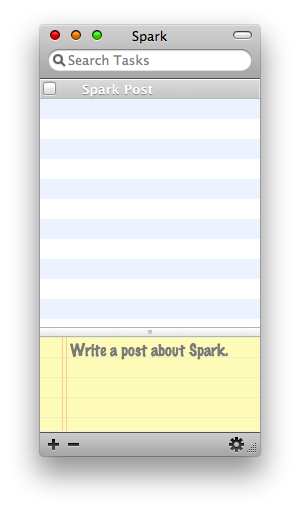
Spark, a new application for Mac OS X I had the chance to beta test, was finally released tonight. Here is the official (and cute!) website.

Spark Mac

Spark Mac

Spark is a very lightweight notes taking / to-do list app, which you could decide to either run in the dock or in the menubar. The interface is very nice and straightforward: you can add tasks, attach notes to them and organize tasks in bigger projects. Another great features is the iCal syncing: everytime a Spark task changes, so it does in iCal. Cool.

Spark is a freeware, it has a clean and well-designed UI and it could become the ultimate solution for those who are looking for a simple, uncluttered to-do manager app for Mac.

Go download!


It’s Time to Close That Mail.app. Welcome Notify 2.

I never used a mail client other than Mail.app on Mac OS for my IMAP account. Thunderbird is slow and buggy and Postbox feels too much like a Windows app, though it could be nice if just the devs would refine the UI. On the other hand, Mail.app is powerful. From mailboxes to rules and plugins (just to name a few, Letterbox, Mail Act-on and MailTags) Mail gets its job done with a huge set of awesome features, speed and stability. But there’s another market on Mac OS X, that of mail notifiers: they usually sit up in the menubar and provide an easy and minimal to way to instantly check for new mails. Now, what if we merge these two kinds of applications, creating both a minimal, lightweight mail notifier and client?That’s exactly what Notify 2 is.

Read more


Espresso, the All-In-One Caffeinated Web Editor. Reviewed.

[This article was written by Raj Ramamurthy. You can check out his personal website here.]

For a long time, Panic’s Coda has been the best, in both functionality and fashion, application for all in one website editing on the Mac.

MacRabbit, a software development company well known for it’s ADA winning CSSEdit, released their competitor to Coda that is putting some heat on the number one: Espresso.

Appropriately named the “Coda killer”, Espresso packs a real punch.

Read more


Choosy: Choosing the Right Browser for You Since 2008

Though a few months ago I wrote a huge roundup about the ultimate list of browsers for Mac which featured more than 40 of them, there are actually 4 main browers: Safari, Firefox, Opera and Chrome. The rest is either made of variations / beta versions or just shit. That said, if you’re a designer or a developer it’s very likely that you need to test the websites you’re creating under different rendering engines. But what a pain can be to manually open overtime a different link in a different browser? A huge pain.

Here’s where Choosy comes in.

Read more


Caffeinated: The Next Big Thing in RSS Readers for Mac?

I wrote many times how much I’m into Ember app: it’s a great place to find inspirational stuff and work in progress screenshots of Mac and iPhone applications. So, the other day I was browsing the Images section and stumbled upon this screenie of a RSS app for Mac  I never saw before: damn, it was sexy.

I tried to gather some additional info and I found out it was a screenshot of a working build of Caffeinated, an application that’s being developed by Curtis Hard. He was so kind to give me a quick preview of Caffeinated and guys - this one’s gonna be amazing.

Find out why.

Read more


Pastebot: Command Your Clipboard, Manage Your Data Library.

That of taking notes on the iPhone it’s a trend that won’t expire soon. There are hundreds of applications available for download which let you store / clip / organize / backup those small snippets of text you take on the go. Simplenote, Evernote, Shovebox, AwesomeNote, Idea Organizer..I’ve tried many of them, I love many of these apps.Today I’ll take a different approach and talk about an application that doesn’t simply store a group of notes. Well , it can do that too actually, but it can also store pictures, folders and 99 items from your clipboard history. It can even sync with your Mac. And it’s sexy.

Tapbots did it again. Here comes Pastebot.

Read more


Droplr Finally Goes Public. Reviewed.

Back in October I wrote a post about 9 Beta applications for Mac OS X you should check out and, guess what, Droplr was in. Droplr has been an invite-only app / service for a long time, one of those apps people never stopped searching for an invite as rumor was “Droplr is freakin’ awesome”. I was in the private / beta testing group of the application and it surely was a great, easy to use app, seamlessly integrated with Mac OS X. Yesterday Droplr 1.0 finally landed and here’s why you should go download it now.

Read more